
Solved Recovery partition is removed

prateek133

New member
Local time
7:26 PM
Messages
46
Location
India
i m having hp pavilion g7-1219wm notebook with windows 7 Home premium sp 1 OEM.
by accidentally Recovery partition from the hard disk is removed so that i m not able to use some function in HP Recovery Manager like System Recovery and Recovery Media creation..
please help me how can i restore/recover this deleted Recovery Partition..
 

My Computer My Computer

Computer Manufacturer/Model Number
HP Pavilion g7-1219wm
OS
Windows 7 Home Premium (x64) Service Pack 1 (build 7601)
CPU
1.65 gigahertz AMD E-450 APU with Radeon HD Graphics
Motherboard
Hewlett-Packard 3562 07.27
Memory
4 GB DDR3 RAM
Graphics Card(s)
AMD Radeon HD 6320 Graphics
Sound Card
AMD High Definition Audio Device & IDT HD
Monitor(s) Displays
Generic PnP Monitor (17.1"vis)
Hard Drives
Hitachi HTS547550A9E384 [Hard drive] (500.11 GB) -- drive 0
Unless you have created a set of recovery discs or can order a set from HP, the recovery partition is lost and can only be reinstalled by a factory restore when you use the recovery discs.

Best to contact HP Support: http://www8.hp.com/uk/en/home.html

Just choose your region first.
 

My Computer My Computer

Computer Manufacturer/Model Number
HP Pavilion Elite 495UK
OS
Windows 7 Ultimate SP1 64-Bit
CPU
Intel Core i7 870 @ 2.93GHz
Motherboard
MSI 2A9C (CPU1)
Memory
8Gb Dual-Channel DDR3 @ 664MHz
Graphics Card(s)
nVidia GeForce GTX 460 1024MB dedicated RAM
Sound Card
Realtek HD Audio
Monitor(s) Displays
HP2310i
Screen Resolution
1920 x 1080
Hard Drives
1x1954GB Hitachi HDS22020ALA 330 (RAID), 1x1954GB Hitachi External for backup and storage
PSU
460W
Case
HP Elite
Cooling
Air cooled
Keyboard
Logitech K750 solar-powered keyboard
Mouse
Logitech Wireless M180 mouse
Internet Speed
2Mb
Other Info
Pure Avanti Flow Internet Radio with iPod Dock, 64Gb iPod, HP USB Speakers, Sony MDR-V500 Headphones, Sony Vaio F-Series Laptop
neither i have created recovery discs nor i am having.. also i have not created system image ...
is there any option to restore the deleted recovery partition , using third party application..????
 

My Computer My Computer

Computer Manufacturer/Model Number
HP Pavilion g7-1219wm
OS
Windows 7 Home Premium (x64) Service Pack 1 (build 7601)
CPU
1.65 gigahertz AMD E-450 APU with Radeon HD Graphics
Motherboard
Hewlett-Packard 3562 07.27
Memory
4 GB DDR3 RAM
Graphics Card(s)
AMD Radeon HD 6320 Graphics
Sound Card
AMD High Definition Audio Device & IDT HD
Monitor(s) Displays
Generic PnP Monitor (17.1"vis)
Hard Drives
Hitachi HTS547550A9E384 [Hard drive] (500.11 GB) -- drive 0
There is partition recovery software - most partition managers have an undelete function.

That is only any use if you have not subsequently done anything else to the unallocated space - e,g, formatting.
 

My Computers My Computers

System One System Two

  • Computer type
    PC/Desktop
    OS
    7 X64
    CPU
    i5 8400
    Motherboard
    gigabyte b365m ds3h
    Memory
    2x8gb 3200mhz
    Hard Drives
    various
    PSU
    pure power 11 400w cm
    Case
    Coolermaster
    Cooling
    cryorig m9i
  • Computer type
    PC/Desktop
    OS
    7x64
    CPU
    g5400
    Motherboard
    ga b365m ds3h
    Memory
    8gb ddr4 2400
    PSU
    xfx pro 450w
here is the screen shot:
 

Attachments

  • disk management basic.JPG
    disk management basic.JPG
    105.9 KB · Views: 181

My Computer My Computer

Computer Manufacturer/Model Number
HP Pavilion g7-1219wm
OS
Windows 7 Home Premium (x64) Service Pack 1 (build 7601)
CPU
1.65 gigahertz AMD E-450 APU with Radeon HD Graphics
Motherboard
Hewlett-Packard 3562 07.27
Memory
4 GB DDR3 RAM
Graphics Card(s)
AMD Radeon HD 6320 Graphics
Sound Card
AMD High Definition Audio Device & IDT HD
Monitor(s) Displays
Generic PnP Monitor (17.1"vis)
Hard Drives
Hitachi HTS547550A9E384 [Hard drive] (500.11 GB) -- drive 0
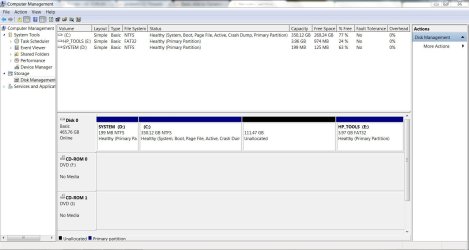
Didn't we see another screenshot of your Disk Management elsewhere which showed a partition H in the empty space where you say your Recovery was? If so then it may have been overwritten already.

However you can run the PW Recovery Wizard anyway to see if it finds anything to restore there then see what it is. See my earlier post for a video tutorial.
 
Didn't we see another screenshot of your Disk Management elsewhere which showed a partition H in the empty space where you say your Recovery was? If so then it may have been overwritten already.

However you can run the PW Recovery Wizard anyway to see if it finds anything to restore there then see what it is. See my earlier post for a video tutorial.

i restored another partition G that i have deleted, but could not find Recovery partition H that deleted accidently ..
 

Attachments

  • recovered.JPG
    recovered.JPG
    113.8 KB · Views: 60

My Computer My Computer

Computer Manufacturer/Model Number
HP Pavilion g7-1219wm
OS
Windows 7 Home Premium (x64) Service Pack 1 (build 7601)
CPU
1.65 gigahertz AMD E-450 APU with Radeon HD Graphics
Motherboard
Hewlett-Packard 3562 07.27
Memory
4 GB DDR3 RAM
Graphics Card(s)
AMD Radeon HD 6320 Graphics
Sound Card
AMD High Definition Audio Device & IDT HD
Monitor(s) Displays
Generic PnP Monitor (17.1"vis)
Hard Drives
Hitachi HTS547550A9E384 [Hard drive] (500.11 GB) -- drive 0
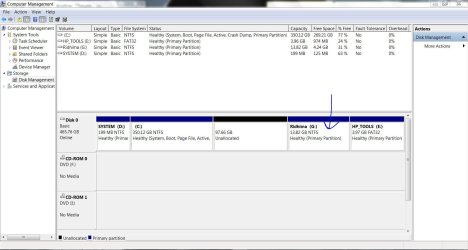
when i managing the unallocated space with the help of easeus home edition .. it asking for shut down , and if pressing yes it is asking to reboot.. what should i do????
 

Attachments

  • easeus1.JPG
    easeus1.JPG
    103.4 KB · Views: 56
  • easeus2.JPG
    easeus2.JPG
    102.3 KB · Views: 37

My Computer My Computer

Computer Manufacturer/Model Number
HP Pavilion g7-1219wm
OS
Windows 7 Home Premium (x64) Service Pack 1 (build 7601)
CPU
1.65 gigahertz AMD E-450 APU with Radeon HD Graphics
Motherboard
Hewlett-Packard 3562 07.27
Memory
4 GB DDR3 RAM
Graphics Card(s)
AMD Radeon HD 6320 Graphics
Sound Card
AMD High Definition Audio Device & IDT HD
Monitor(s) Displays
Generic PnP Monitor (17.1"vis)
Hard Drives
Hitachi HTS547550A9E384 [Hard drive] (500.11 GB) -- drive 0
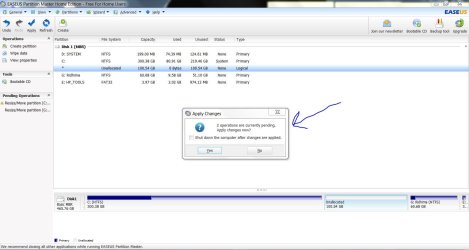
Just let the computer reboot.

Easeus needs the reboot to configure and action the changes you've made in the same way that many programs or updates need a reboot to complete the process.
 

My Computer My Computer

Computer Manufacturer/Model Number
HP Pavilion Elite 495UK
OS
Windows 7 Ultimate SP1 64-Bit
CPU
Intel Core i7 870 @ 2.93GHz
Motherboard
MSI 2A9C (CPU1)
Memory
8Gb Dual-Channel DDR3 @ 664MHz
Graphics Card(s)
nVidia GeForce GTX 460 1024MB dedicated RAM
Sound Card
Realtek HD Audio
Monitor(s) Displays
HP2310i
Screen Resolution
1920 x 1080
Hard Drives
1x1954GB Hitachi HDS22020ALA 330 (RAID), 1x1954GB Hitachi External for backup and storage
PSU
460W
Case
HP Elite
Cooling
Air cooled
Keyboard
Logitech K750 solar-powered keyboard
Mouse
Logitech Wireless M180 mouse
Internet Speed
2Mb
Other Info
Pure Avanti Flow Internet Radio with iPod Dock, 64Gb iPod, HP USB Speakers, Sony MDR-V500 Headphones, Sony Vaio F-Series Laptop
Did you run the Partition Wizard recovery wizard to see if it could find the Recovery partition which was deleted?

You were told that if nothing had overwritten the space it was in that it might still be recoverable using that Wizard.
 
thanks .. i have managed space wid easeus and made 3 partitions primary and 2 logical .. see the shot below::
also
1.is there any problem in making logical drives and storing data on them?????
2.can i install other operating sys.(windows 8 or linux) on prateek H logical drive?????
 

Attachments

  • disk5.JPG
    disk5.JPG
    124.9 KB · Views: 23

My Computer My Computer

Computer Manufacturer/Model Number
HP Pavilion g7-1219wm
OS
Windows 7 Home Premium (x64) Service Pack 1 (build 7601)
CPU
1.65 gigahertz AMD E-450 APU with Radeon HD Graphics
Motherboard
Hewlett-Packard 3562 07.27
Memory
4 GB DDR3 RAM
Graphics Card(s)
AMD Radeon HD 6320 Graphics
Sound Card
AMD High Definition Audio Device & IDT HD
Monitor(s) Displays
Generic PnP Monitor (17.1"vis)
Hard Drives
Hitachi HTS547550A9E384 [Hard drive] (500.11 GB) -- drive 0
Did you run the Partition Wizard recovery wizard to see if it could find the Recovery partition which was deleted?

You were told that if nothing had overwritten the space it was in that it might still be recoverable using that Wizard.

yepp.. i ran partition wizard but it did not locate the Recovery partition.. is there any chances left for the recovery partition!!!?????
 

My Computer My Computer

Computer Manufacturer/Model Number
HP Pavilion g7-1219wm
OS
Windows 7 Home Premium (x64) Service Pack 1 (build 7601)
CPU
1.65 gigahertz AMD E-450 APU with Radeon HD Graphics
Motherboard
Hewlett-Packard 3562 07.27
Memory
4 GB DDR3 RAM
Graphics Card(s)
AMD Radeon HD 6320 Graphics
Sound Card
AMD High Definition Audio Device & IDT HD
Monitor(s) Displays
Generic PnP Monitor (17.1"vis)
Hard Drives
Hitachi HTS547550A9E384 [Hard drive] (500.11 GB) -- drive 0
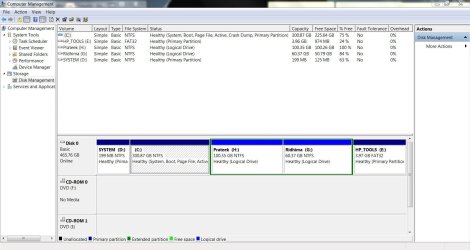
No unfortunately it isn't recoverable once you overwrite it.

The System D partition was once your System Reserved partition to boot Win7, but it has been cut out by Repairs which have moved the System boot files into C now - which is fine, but I wanted you to know D is no longer needed if you ever want to delete it and recover the space into C. However you may need to run Repairs afterwards whenever you resize on the boot sector of the HD.

You can try installing another OS on a Logical partition as Windows will normally place it's boot files on the first-installed OS to configure a Multi-boot. In this case since Win7 is on a Primary it can accept the boot files.

If the OS you try to install will not install then we can help you convert the Logical to Primary, which is why I brought up that eventually you may want to reclaim D so you can use your third Primary elsewhere.
 
No unfortunately it isn't recoverable once you overwrite it.

The System D partition was once your System Reserved partition to boot Win7, but it has been cut out by Repairs which have moved the System boot files into C now - which is fine, but I wanted you to know D is no longer needed if you ever want to delete it and recover the space into C. However you may need to run Repairs afterwards whenever you resize on the boot sector of the HD.

You can try installing another OS on a Logical partition as Windows will normally place it's boot files on the first-installed OS to configure a Multi-boot. In this case since Win7 is on a Primary it can accept the boot files.

If the OS you try to install will not install then we can help you convert the Logical to Primary, which is why I brought up that eventually you may want to reclaim D so you can use your third Primary elsewhere.

thank u ,, so i can delete the system D drive,,but many people told that it contains the boot files.. please see the screen shot.. in this system D has something which occupying some Mbs , but there are no files on opening this drive... please explain me ..
 

Attachments

  • system.JPG
    system.JPG
    78.6 KB · Views: 22

My Computer My Computer

Computer Manufacturer/Model Number
HP Pavilion g7-1219wm
OS
Windows 7 Home Premium (x64) Service Pack 1 (build 7601)
CPU
1.65 gigahertz AMD E-450 APU with Radeon HD Graphics
Motherboard
Hewlett-Packard 3562 07.27
Memory
4 GB DDR3 RAM
Graphics Card(s)
AMD Radeon HD 6320 Graphics
Sound Card
AMD High Definition Audio Device & IDT HD
Monitor(s) Displays
Generic PnP Monitor (17.1"vis)
Hard Drives
Hitachi HTS547550A9E384 [Hard drive] (500.11 GB) -- drive 0
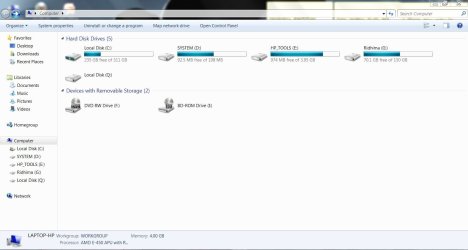
The files are hidden and can only be seen by unhiding System Files in Control Panel>File Options>View. But we know they are not being used because the System flag is now on C which means the System files which are booting Win7 are without doubt there - likely written there during a Startup Repair when C was somehow marked Active. (The installer or Startup Repair write the System boot files to the first marked-Active partition).

You don't need to delete it until you find out if you can install a second OS to the Logical partition, which is highly likely since a second Windows OS will write its boot files to the first-installed OS which is Primary. Only the boot files must be on a Primary partition.

The near-death experience you had with Win7 by allowing Disk Mgmt to convert to Dynamic will hopefully teach you to not jump until you are guided in the future. We have more experience with these issues here than the other help sites so be sure to ask back first for the exact steps.
 
The files are hidden and can only be seen by unhiding System Files in Control Panel>File Options>View. But we know they are not being used because the System flag is now on C which means the System files which are booting Win7 are without doubt there - likely written there during a Startup Repair when C was somehow marked Active. (The installer or Startup Repair write the System boot files to the first marked-Active partition).

You don't need to delete it until you find out if you can install a second OS to the Logical partition, which is highly likely since a second Windows OS will write its boot files to the first-installed OS which is Primary. Only the boot files must be on a Primary partition.

The near-death experience you had with Win7 by allowing Disk Mgmt to convert to Dynamic will hopefully teach you to not jump until you are guided in the future. We have more experience with these issues here than the other help sites so be sure to ask back first for the exact steps.

yes you are right ,, just i was little curious.. thank u very much again sir..
 

My Computer My Computer

Computer Manufacturer/Model Number
HP Pavilion g7-1219wm
OS
Windows 7 Home Premium (x64) Service Pack 1 (build 7601)
CPU
1.65 gigahertz AMD E-450 APU with Radeon HD Graphics
Motherboard
Hewlett-Packard 3562 07.27
Memory
4 GB DDR3 RAM
Graphics Card(s)
AMD Radeon HD 6320 Graphics
Sound Card
AMD High Definition Audio Device & IDT HD
Monitor(s) Displays
Generic PnP Monitor (17.1"vis)
Hard Drives
Hitachi HTS547550A9E384 [Hard drive] (500.11 GB) -- drive 0
You're most welcome, and my compliments on your abilities in handling the steps given which are highly complicated and some of the most advanced operations done here. :geek:
 
You're most welcome, and my compliments on your abilities in handling the steps given which are highly complicated and some of the most advanced operations done here. :geek:

i made a system image of drive C and system D on drive G , a folder named WindowsImageBackup is created.. and also i have changed the attribute of this folder to hidden.. on critical conditions or if windows corrupted or if there is any problem with hard disk Will i be able to restore the system with this hidden folder of WindowsImageBackup with the help of System Repair Disc when booting with it...
 

Attachments

  • imagebackup.JPG
    imagebackup.JPG
    48.9 KB · Views: 5

My Computer My Computer

Computer Manufacturer/Model Number
HP Pavilion g7-1219wm
OS
Windows 7 Home Premium (x64) Service Pack 1 (build 7601)
CPU
1.65 gigahertz AMD E-450 APU with Radeon HD Graphics
Motherboard
Hewlett-Packard 3562 07.27
Memory
4 GB DDR3 RAM
Graphics Card(s)
AMD Radeon HD 6320 Graphics
Sound Card
AMD High Definition Audio Device & IDT HD
Monitor(s) Displays
Generic PnP Monitor (17.1"vis)
Hard Drives
Hitachi HTS547550A9E384 [Hard drive] (500.11 GB) -- drive 0
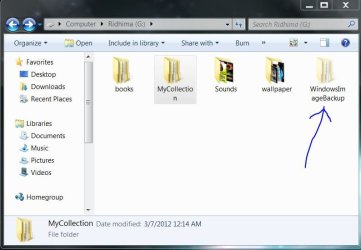
I would work on getting an external HD to store the backup image in case of HD failure.

I would also not change anything about the image except if necessary to move it into a folder for storage if another WindowsImageBackup folder is needed to be placed on the external. You must then move it back into the root of the external for it to be detected by the booted Repair CD or Win7 DVD Recovery.

Anything else you change may make it undetectable when needed.

You'll gain more flexibility using free Macrium - Image your system
 
Back
Top