
Solved Cannot boot after deleting old windows7 partition.. White cursor

mgeocaris

New member
Local time
3:29 AM
Messages
23
Hello, new here

I see other people have the same problem as me but I think I have a different cause than any of the others I've seen.

I have my current system drive (C) on a 60GB SSD. I also have a 2TB HDD that has partitions for my Recovery (F), Data (E), and Old Windows (D). I have had it setup this way for over a month working just fine.

Today I formatted the (D) partition on the HDD to add more space to the Data partition. I used MiniTool Partition Wizard to do this. Upon reboot, I got the black screen with a blinking white cursor. I rebooted from my Windows7 disk and tried to recover my system (since I back up my C&E drives along with a system image of C every morning). I also have an external that I backed up C&D and a system image of C on 3 days ago. When I tried to enter system recovery I got this message:

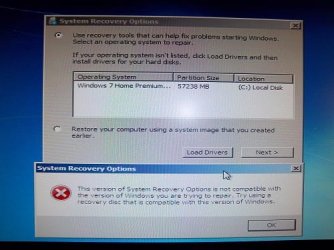
“This version of System Recovery Options is not compatible with the version of Windows you are trying to repair. Try using a recovery disc that is compatible with this version of Windows”

I then went into the BIOS and disabled my HDD and tried to boot override on the SSD but I got the same black screen. When I tried to enter system recovery again my operating system is no longer listed as an option even after enabling the HDD again. After that I tried to load the only system image that was listed (from my Recovery partition) but it gave me the error:

"The selected system image cannot be restored in this recovery environment. To restore this system image: 1: Insert a system repair disc or a Windows installation disc (x64) 2. Boot the computer from the disc 3. Choose 'Restore your computer using a system image that you created earlier', and then select this system image"

My external does not show up as an option for either the system recovery or system image even though it is enabled in the BIOS. I know I have the right boot disk and that I am on 64-bit Windows so needless to say I'm perplexed.

Thanks in advance
 

My Computer My Computer

At a glance

Windows 7 Home Premium 64bitIntel Core i5-2500K 3.3 GHz16GB (4GBx4) DDR3/1600MHz (Corsair Vengeance)AMD Radeon HD 6970 2GB
OS
Windows 7 Home Premium 64bit
CPU
Intel Core i5-2500K 3.3 GHz
Motherboard
Asus P8Z68-V LX
Memory
16GB (4GBx4) DDR3/1600MHz (Corsair Vengeance)
Graphics Card(s)
AMD Radeon HD 6970 2GB
Sound Card
HD On Board Audio
Monitor(s) Displays
1920x1080 Asus VS247H-P LCD
Hard Drives
60GB OCZ Agility 3 SATA III 6.0Gb/s SSD
2TB SATA-III 6.0Gb/s 64MB Cache 7200rpm HDD
PSU
800 Watts - XtremeGear
Case
CoolerMaster Elite 430 Mid-Tower
Cooling
Asetek 510LC Liquid Cooling System
Boot into Partition Wizard CD to post back a camera snap of the maximized drive map and listings: Screenshots and Files - Upload and Post in Seven Forums - Windows 7 Forums

Normally you'd rightclick in PW CD on Win7 partition to Modify>Set to Active, click OK. If partition won't mark Active you may need to convert from Logical to Primary first: Video help on how to set partition as Primary or Logical. Keep in mind you can only have 4 Primary or 3 Primary and unlimited Logical partitions.

Then click on the HD # to highlight it, from Disk tab choose Rebuild MBR, Apply all steps, reboot.

If Win7 doesn't start boot into System Recovery Options to run Startup Repair - Run 3 Separate Times. You may need to download the Win7 installer with SP1 if the other two methods to access Options fail: See Step 5 in Troubleshooting Windows 7 Failure to Boot.

If these steps above don't work unplug all other HD's which may be interfering - another reason we should see the screenshot first, and you should have asked first if this is something you don't do regularly.
 
Thank you very much for the help Gregrocker,

I completed the steps given and ran the startup repair 3 times. Now I get "BOOTMGR is missing Press Ctrl Alt Del to Restart"

I attached a picture of my drive map on PW CD.

Thanks again for the help
 

Attachments

  • 019a.jpg
    019a.jpg
    114.9 KB · Views: 64

My Computer My Computer

At a glance

Windows 7 Home Premium 64bitIntel Core i5-2500K 3.3 GHz16GB (4GBx4) DDR3/1600MHz (Corsair Vengeance)AMD Radeon HD 6970 2GB
OS
Windows 7 Home Premium 64bit
CPU
Intel Core i5-2500K 3.3 GHz
Motherboard
Asus P8Z68-V LX
Memory
16GB (4GBx4) DDR3/1600MHz (Corsair Vengeance)
Graphics Card(s)
AMD Radeon HD 6970 2GB
Sound Card
HD On Board Audio
Monitor(s) Displays
1920x1080 Asus VS247H-P LCD
Hard Drives
60GB OCZ Agility 3 SATA III 6.0Gb/s SSD
2TB SATA-III 6.0Gb/s 64MB Cache 7200rpm HDD
PSU
800 Watts - XtremeGear
Case
CoolerMaster Elite 430 Mid-Tower
Cooling
Asetek 510LC Liquid Cooling System
Have you set Win7 HD first to boot in BIOS setup? The error normally means the wrong disk is set to boot.

If Win 7 will not start after running up to 3 Startup Repairs with reboots, di you then remove the other HD to run the Repairs again? Try that now, with Win7 HD set first to boot.

It's doubtful the Recovery partition on Disk2 will run any longer without an OS although you can test it to see if it will boot using the hotkey at boot. If not or you don't want it anyway then in Disk Mgmt you can delete it and Old Win7 partition then create a new partition there, or resize your Data partition into that space using Partition Wizard bootable CD: Partition Wizard Resize Partition Video Help.
 
Thanks for the quick reply. I set the SSD with Windows7 on it to first boot priority with 3 startup repairs and no luck so I physically disconnected the HDD and did 3 more repairs and reboots. I got the "BOOTMGR is missing" again, this is weird because I installed Windows7 on the SSD with the HDD disconnected.

Here is the message I get when I do the startup repairs
 

Attachments

  • 018a.jpg
    018a.jpg
    99.8 KB · Views: 14

My Computer My Computer

At a glance

Windows 7 Home Premium 64bitIntel Core i5-2500K 3.3 GHz16GB (4GBx4) DDR3/1600MHz (Corsair Vengeance)AMD Radeon HD 6970 2GB
OS
Windows 7 Home Premium 64bit
CPU
Intel Core i5-2500K 3.3 GHz
Motherboard
Asus P8Z68-V LX
Memory
16GB (4GBx4) DDR3/1600MHz (Corsair Vengeance)
Graphics Card(s)
AMD Radeon HD 6970 2GB
Sound Card
HD On Board Audio
Monitor(s) Displays
1920x1080 Asus VS247H-P LCD
Hard Drives
60GB OCZ Agility 3 SATA III 6.0Gb/s SSD
2TB SATA-III 6.0Gb/s 64MB Cache 7200rpm HDD
PSU
800 Watts - XtremeGear
Case
CoolerMaster Elite 430 Mid-Tower
Cooling
Asetek 510LC Liquid Cooling System
Double check the Win7 SSD is set first to boot in BIOS. Are you sure?

Next boot PW CD to check Win7 partition is marked Active, then click on HD # to highlight it, from Disk tab select Rebuild MBR, Apply steps. Reboot. If Win7 doesn't start try repairs again.

Are you using Win7 DVD or Repair CD to run Repairs. What changed to stop getting the error you first reported about wrong version?
 
OK I confirmed the OCZ Agility SSD is priority #1 in the BIOS boot list and did rest of the steps but no luck still.

for my original question, I get this error I still get when I try to select my operating system. The other picture is the cd I'm using for system recovery and repair (behind the flash is says SP1)
 

Attachments

  • recover warning.JPG
    recover warning.JPG
    62.3 KB · Views: 30
  • windows cd.JPG
    windows cd.JPG
    55.4 KB · Views: 16

My Computer My Computer

At a glance

Windows 7 Home Premium 64bitIntel Core i5-2500K 3.3 GHz16GB (4GBx4) DDR3/1600MHz (Corsair Vengeance)AMD Radeon HD 6970 2GB
OS
Windows 7 Home Premium 64bit
CPU
Intel Core i5-2500K 3.3 GHz
Motherboard
Asus P8Z68-V LX
Memory
16GB (4GBx4) DDR3/1600MHz (Corsair Vengeance)
Graphics Card(s)
AMD Radeon HD 6970 2GB
Sound Card
HD On Board Audio
Monitor(s) Displays
1920x1080 Asus VS247H-P LCD
Hard Drives
60GB OCZ Agility 3 SATA III 6.0Gb/s SSD
2TB SATA-III 6.0Gb/s 64MB Cache 7200rpm HDD
PSU
800 Watts - XtremeGear
Case
CoolerMaster Elite 430 Mid-Tower
Cooling
Asetek 510LC Liquid Cooling System

My Computer My Computer

At a glance

Windows 7 Ultimate SP1 64-BitIntel Core i7 870 @ 2.93GHz8Gb Dual-Channel DDR3 @ 664MHznVidia GeForce GTX 460 1024MB dedicated RAM
Computer Manufacturer/Model Number
HP Pavilion Elite 495UK
OS
Windows 7 Ultimate SP1 64-Bit
CPU
Intel Core i7 870 @ 2.93GHz
Motherboard
MSI 2A9C (CPU1)
Memory
8Gb Dual-Channel DDR3 @ 664MHz
Graphics Card(s)
nVidia GeForce GTX 460 1024MB dedicated RAM
Sound Card
Realtek HD Audio
Monitor(s) Displays
HP2310i
Screen Resolution
1920 x 1080
Hard Drives
1x1954GB Hitachi HDS22020ALA 330 (RAID), 1x1954GB Hitachi External for backup and storage
PSU
460W
Case
HP Elite
Cooling
Air cooled
Keyboard
Logitech K750 solar-powered keyboard
Mouse
Logitech Wireless M180 mouse
Internet Speed
2Mb
Other Info
Pure Avanti Flow Internet Radio with iPod Dock, 64Gb iPod, HP USB Speakers, Sony MDR-V500 Headphones, Sony Vaio F-Series Laptop
OK, Wow thank you for the advice. I didn't know the disc couldn't be used for both things. It says on your link that only a 64bit Windows7 can make a 64bit repair disc and the laptop I'm currently using is 32bit. Is there any way around this or do I have to just find a friend with 64bit Windows? (could be tough).

I see there are websites where you can buy these ISO files and burn to CD for about $10. Is this a viable option?
 

My Computer My Computer

At a glance

Windows 7 Home Premium 64bitIntel Core i5-2500K 3.3 GHz16GB (4GBx4) DDR3/1600MHz (Corsair Vengeance)AMD Radeon HD 6970 2GB
OS
Windows 7 Home Premium 64bit
CPU
Intel Core i5-2500K 3.3 GHz
Motherboard
Asus P8Z68-V LX
Memory
16GB (4GBx4) DDR3/1600MHz (Corsair Vengeance)
Graphics Card(s)
AMD Radeon HD 6970 2GB
Sound Card
HD On Board Audio
Monitor(s) Displays
1920x1080 Asus VS247H-P LCD
Hard Drives
60GB OCZ Agility 3 SATA III 6.0Gb/s SSD
2TB SATA-III 6.0Gb/s 64MB Cache 7200rpm HDD
PSU
800 Watts - XtremeGear
Case
CoolerMaster Elite 430 Mid-Tower
Cooling
Asetek 510LC Liquid Cooling System

My Computer My Computer

At a glance

Windows 7 Ultimate SP1 64-BitIntel Core i7 870 @ 2.93GHz8Gb Dual-Channel DDR3 @ 664MHznVidia GeForce GTX 460 1024MB dedicated RAM
Computer Manufacturer/Model Number
HP Pavilion Elite 495UK
OS
Windows 7 Ultimate SP1 64-Bit
CPU
Intel Core i7 870 @ 2.93GHz
Motherboard
MSI 2A9C (CPU1)
Memory
8Gb Dual-Channel DDR3 @ 664MHz
Graphics Card(s)
nVidia GeForce GTX 460 1024MB dedicated RAM
Sound Card
Realtek HD Audio
Monitor(s) Displays
HP2310i
Screen Resolution
1920 x 1080
Hard Drives
1x1954GB Hitachi HDS22020ALA 330 (RAID), 1x1954GB Hitachi External for backup and storage
PSU
460W
Case
HP Elite
Cooling
Air cooled
Keyboard
Logitech K750 solar-powered keyboard
Mouse
Logitech Wireless M180 mouse
Internet Speed
2Mb
Other Info
Pure Avanti Flow Internet Radio with iPod Dock, 64Gb iPod, HP USB Speakers, Sony MDR-V500 Headphones, Sony Vaio F-Series Laptop
I'd prefer to just do a system restore from my external. Is this possible anymore or did I mess things up so bad only a clean install could fix it?
 

My Computer My Computer

At a glance

Windows 7 Home Premium 64bitIntel Core i5-2500K 3.3 GHz16GB (4GBx4) DDR3/1600MHz (Corsair Vengeance)AMD Radeon HD 6970 2GB
OS
Windows 7 Home Premium 64bit
CPU
Intel Core i5-2500K 3.3 GHz
Motherboard
Asus P8Z68-V LX
Memory
16GB (4GBx4) DDR3/1600MHz (Corsair Vengeance)
Graphics Card(s)
AMD Radeon HD 6970 2GB
Sound Card
HD On Board Audio
Monitor(s) Displays
1920x1080 Asus VS247H-P LCD
Hard Drives
60GB OCZ Agility 3 SATA III 6.0Gb/s SSD
2TB SATA-III 6.0Gb/s 64MB Cache 7200rpm HDD
PSU
800 Watts - XtremeGear
Case
CoolerMaster Elite 430 Mid-Tower
Cooling
Asetek 510LC Liquid Cooling System
I thought you said you'd tried that and failed.

I still think a clean install is your best bet.
 

My Computer My Computer

At a glance

Windows 7 Ultimate SP1 64-BitIntel Core i7 870 @ 2.93GHz8Gb Dual-Channel DDR3 @ 664MHznVidia GeForce GTX 460 1024MB dedicated RAM
Computer Manufacturer/Model Number
HP Pavilion Elite 495UK
OS
Windows 7 Ultimate SP1 64-Bit
CPU
Intel Core i7 870 @ 2.93GHz
Motherboard
MSI 2A9C (CPU1)
Memory
8Gb Dual-Channel DDR3 @ 664MHz
Graphics Card(s)
nVidia GeForce GTX 460 1024MB dedicated RAM
Sound Card
Realtek HD Audio
Monitor(s) Displays
HP2310i
Screen Resolution
1920 x 1080
Hard Drives
1x1954GB Hitachi HDS22020ALA 330 (RAID), 1x1954GB Hitachi External for backup and storage
PSU
460W
Case
HP Elite
Cooling
Air cooled
Keyboard
Logitech K750 solar-powered keyboard
Mouse
Logitech Wireless M180 mouse
Internet Speed
2Mb
Other Info
Pure Avanti Flow Internet Radio with iPod Dock, 64Gb iPod, HP USB Speakers, Sony MDR-V500 Headphones, Sony Vaio F-Series Laptop
OK, I'll clean install then, it does seem like I've tried all other methods given :(

As long as I have your advice here, what do you think about Intel Rapid Storage Technology (installing Windows on my HDD and using the 60gb SSD as cache). I had this originally set up by CyberPowerPC but I experienced issues and re-installed windows onto the SSD. Maybe if I use the official windows7 installer you provided, I will not experience the same issues I did the first time?

Thanks again for all your help guys
 

My Computer My Computer

At a glance

Windows 7 Home Premium 64bitIntel Core i5-2500K 3.3 GHz16GB (4GBx4) DDR3/1600MHz (Corsair Vengeance)AMD Radeon HD 6970 2GB
OS
Windows 7 Home Premium 64bit
CPU
Intel Core i5-2500K 3.3 GHz
Motherboard
Asus P8Z68-V LX
Memory
16GB (4GBx4) DDR3/1600MHz (Corsair Vengeance)
Graphics Card(s)
AMD Radeon HD 6970 2GB
Sound Card
HD On Board Audio
Monitor(s) Displays
1920x1080 Asus VS247H-P LCD
Hard Drives
60GB OCZ Agility 3 SATA III 6.0Gb/s SSD
2TB SATA-III 6.0Gb/s 64MB Cache 7200rpm HDD
PSU
800 Watts - XtremeGear
Case
CoolerMaster Elite 430 Mid-Tower
Cooling
Asetek 510LC Liquid Cooling System
SSD has 1 partition right? And that's windows 7.
  • Disconnect harddisk
  • boot from installation dvd or system repair disk. Anyway .. boot to "recovery environment"
  • Is win7 listed? if do select it, otherwise press next anyway
  • then enter "command prompt":
Code:
bootsect/nt60 C: /force
bootsect/nt60 C: /force /mbr

Both succeed succesfully?
Code:
attrib c:\bootmgr

Is bootmgr there?
Code:
dir C:\

Is C realy win7 disk?
 

My Computer My Computer

At a glance

Microsoft Windows 7 Home Premium 64-bits 7601...Intel(R) Core(TM) i3 CPU M 370 @ 2.40GHz4,00 GBATI Mobility Radeon HD 5400 Series
Computer type
Laptop
Computer Manufacturer/Model Number
ACER ASPIRE 5742G
OS
Microsoft Windows 7 Home Premium 64-bits 7601 Multiprocessor Free Service Pack 1
CPU
Intel(R) Core(TM) i3 CPU M 370 @ 2.40GHz
Motherboard
Acer Aspire 5742G
Memory
4,00 GB
Graphics Card(s)
ATI Mobility Radeon HD 5400 Series
Sound Card
(1) AMD High Definition Audio Device (2) Realtek High Defi
Screen Resolution
1366 x 768 x 32 bits (4294967296 colors) @ 60 Hz
Hard Drives
WDC WD5000BEVT-22ZAT0
Using the installation cd to "repair your computer", "Windows7 Home Premium (recovered)" is listed in the location "C: Local Disk"

but when I try to press next I get this error message. It seems to indicate that I have the wrong disc for my operating system but this is definitely the disc I used to install onto the SSD
 

Attachments

  • recover warning.JPG
    recover warning.JPG
    62.3 KB · Views: 4

My Computer My Computer

At a glance

Windows 7 Home Premium 64bitIntel Core i5-2500K 3.3 GHz16GB (4GBx4) DDR3/1600MHz (Corsair Vengeance)AMD Radeon HD 6970 2GB
OS
Windows 7 Home Premium 64bit
CPU
Intel Core i5-2500K 3.3 GHz
Motherboard
Asus P8Z68-V LX
Memory
16GB (4GBx4) DDR3/1600MHz (Corsair Vengeance)
Graphics Card(s)
AMD Radeon HD 6970 2GB
Sound Card
HD On Board Audio
Monitor(s) Displays
1920x1080 Asus VS247H-P LCD
Hard Drives
60GB OCZ Agility 3 SATA III 6.0Gb/s SSD
2TB SATA-III 6.0Gb/s 64MB Cache 7200rpm HDD
PSU
800 Watts - XtremeGear
Case
CoolerMaster Elite 430 Mid-Tower
Cooling
Asetek 510LC Liquid Cooling System
I think your ssd has errors. Just boot into recovery environment->command prompt

Code:
chkdsk/f/r  C:
try to boot from SSD or perform startup repair again. Same problem?
 

My Computer My Computer

At a glance

Microsoft Windows 7 Home Premium 64-bits 7601...Intel(R) Core(TM) i3 CPU M 370 @ 2.40GHz4,00 GBATI Mobility Radeon HD 5400 Series
Computer type
Laptop
Computer Manufacturer/Model Number
ACER ASPIRE 5742G
OS
Microsoft Windows 7 Home Premium 64-bits 7601 Multiprocessor Free Service Pack 1
CPU
Intel(R) Core(TM) i3 CPU M 370 @ 2.40GHz
Motherboard
Acer Aspire 5742G
Memory
4,00 GB
Graphics Card(s)
ATI Mobility Radeon HD 5400 Series
Sound Card
(1) AMD High Definition Audio Device (2) Realtek High Defi
Screen Resolution
1366 x 768 x 32 bits (4294967296 colors) @ 60 Hz
Hard Drives
WDC WD5000BEVT-22ZAT0
Using the installation cd to "repair your computer", "Windows7 Home Premium (recovered)" is listed in the location "C: Local Disk"

but when I try to press next I get this error message. It seems to indicate that I have the wrong disc for my operating system but this is definitely the disc I used to install onto the SSD
Very strange but windows is still there!

You did a startup repair earlier http://www.sevenforums.com/backup-r...dows7-partition-white-cursor.html#post1933773

How did you do that?
 

My Computer My Computer

At a glance

Microsoft Windows 7 Home Premium 64-bits 7601...Intel(R) Core(TM) i3 CPU M 370 @ 2.40GHz4,00 GBATI Mobility Radeon HD 5400 Series
Computer type
Laptop
Computer Manufacturer/Model Number
ACER ASPIRE 5742G
OS
Microsoft Windows 7 Home Premium 64-bits 7601 Multiprocessor Free Service Pack 1
CPU
Intel(R) Core(TM) i3 CPU M 370 @ 2.40GHz
Motherboard
Acer Aspire 5742G
Memory
4,00 GB
Graphics Card(s)
ATI Mobility Radeon HD 5400 Series
Sound Card
(1) AMD High Definition Audio Device (2) Realtek High Defi
Screen Resolution
1366 x 768 x 32 bits (4294967296 colors) @ 60 Hz
Hard Drives
WDC WD5000BEVT-22ZAT0
You told before:
I completed the steps given and ran the startup repair 3 times. Now I get "BOOTMGR is missing Press Ctrl Alt Del to Restart"
So MBR is most likely good. Same for bootsector. But it you can refresh them with the 2 bootsect commands I gave you earlier.

It finds "Windows Home Premiun (recovered)" so it's in bootmenu. Bootmenu is fine I think.

Only problem so far: C:\BOOTMGR is not found

Code:
attrib c:\bootmgr

To show if it's really there. But then you have to boot into recovery environment :cry:
 

My Computer My Computer

At a glance

Microsoft Windows 7 Home Premium 64-bits 7601...Intel(R) Core(TM) i3 CPU M 370 @ 2.40GHz4,00 GBATI Mobility Radeon HD 5400 Series
Computer type
Laptop
Computer Manufacturer/Model Number
ACER ASPIRE 5742G
OS
Microsoft Windows 7 Home Premium 64-bits 7601 Multiprocessor Free Service Pack 1
CPU
Intel(R) Core(TM) i3 CPU M 370 @ 2.40GHz
Motherboard
Acer Aspire 5742G
Memory
4,00 GB
Graphics Card(s)
ATI Mobility Radeon HD 5400 Series
Sound Card
(1) AMD High Definition Audio Device (2) Realtek High Defi
Screen Resolution
1366 x 768 x 32 bits (4294967296 colors) @ 60 Hz
Hard Drives
WDC WD5000BEVT-22ZAT0
OK, using the command prompt in the recovery environment I ran the disk check on C: with no errors. (it did say "Failed to transfer logged messages to the event log with status 50" at the very end of the check)

After it found no errors, I ran the startup repair 3x with 3 reboots but got the same "BOOTMGR is missing" right after the BIOS screen
 

My Computer My Computer

At a glance

Windows 7 Home Premium 64bitIntel Core i5-2500K 3.3 GHz16GB (4GBx4) DDR3/1600MHz (Corsair Vengeance)AMD Radeon HD 6970 2GB
OS
Windows 7 Home Premium 64bit
CPU
Intel Core i5-2500K 3.3 GHz
Motherboard
Asus P8Z68-V LX
Memory
16GB (4GBx4) DDR3/1600MHz (Corsair Vengeance)
Graphics Card(s)
AMD Radeon HD 6970 2GB
Sound Card
HD On Board Audio
Monitor(s) Displays
1920x1080 Asus VS247H-P LCD
Hard Drives
60GB OCZ Agility 3 SATA III 6.0Gb/s SSD
2TB SATA-III 6.0Gb/s 64MB Cache 7200rpm HDD
PSU
800 Watts - XtremeGear
Case
CoolerMaster Elite 430 Mid-Tower
Cooling
Asetek 510LC Liquid Cooling System
is bootmgr realy not there?

Code:
attrib c:\bootmgr

Please do
Code:
bootsect  /nt60   C:   /force
bootsect  /nt60   C:   /force /mbr

as well. errors?
 

My Computer My Computer

At a glance

Microsoft Windows 7 Home Premium 64-bits 7601...Intel(R) Core(TM) i3 CPU M 370 @ 2.40GHz4,00 GBATI Mobility Radeon HD 5400 Series
Computer type
Laptop
Computer Manufacturer/Model Number
ACER ASPIRE 5742G
OS
Microsoft Windows 7 Home Premium 64-bits 7601 Multiprocessor Free Service Pack 1
CPU
Intel(R) Core(TM) i3 CPU M 370 @ 2.40GHz
Motherboard
Acer Aspire 5742G
Memory
4,00 GB
Graphics Card(s)
ATI Mobility Radeon HD 5400 Series
Sound Card
(1) AMD High Definition Audio Device (2) Realtek High Defi
Screen Resolution
1366 x 768 x 32 bits (4294967296 colors) @ 60 Hz
Hard Drives
WDC WD5000BEVT-22ZAT0
Back
Top