Solved Assigning static IP address on Linksys E3000 router?

sygnus21

New member
Guru
Gold Member
VIP
Local time
12:39 PM
Messages
7,684
Location
Hampton VA
OK, I’m a little weak on networks so here’s my issue….

I have a Linksys router E3000 which works well for my small network which currently consists of two desktops, mine (wired), and the family desktop (wireless).

Anyway it seems the router dynamically assigns an IP address to the family desktop every so often which is a pain when using remote desktop. In short Remote Desktop can’t find the family desktop because the IP address keeps changing.

Incidentally I never had this particular issue with my older Linksys router - WRT54GS V1.1

So how do I set it so that the family desktop’s IP address stays static? I’m sure there’s a simple fix but I seem to be missing the boat.

Thanks.
 

My Computer My Computer

Computer type
PC/Desktop
Computer Manufacturer/Model Number
Custom built by me.
OS
Windows 10 Pro
CPU
Intel Core i7-4770K (3.5Ghz)
Motherboard
Gigabyte G1 Sniper 5 (F10 Bios)
Memory
32 gig Corsair Dominator Platinum (4x8Gig)
Graphics Card(s)
Sapphire Tri-X R9 Fury
Sound Card
Soundblaster ZXR
Monitor(s) Displays
NEC PA242W 24" LCD Monitor
Screen Resolution
1920 x 1200
Hard Drives
Primary - Samsung 850 Pro (512gig), Samsung 840 Pro (256gig), 2TB WD Caviar Black.
PSU
EVGA Supernova 1000 G2
Case
Cooler Master HAF X
Cooling
Corsair H100i with Corsair Air Series SP120 Quiet Fans
Keyboard
Logitech Wireless Wave
Mouse
Logitech Performance MX
Internet Speed
High Speed Cable
Antivirus
Norton Security
Browser
IE11
Other Info
Memory Timings - 1866MHz @ 9-9-9-27-1T @ 1.5 volts
Check your router firmware for any updates...and personally I don't use MS remote desktop. I like teamviewer, much much easier to use.
 

My Computer My Computer

Computer Manufacturer/Model Number
Custom built
OS
Windows 7 Ultimate 64 bit
CPU
AMD Phenom II X4 965 Black Edition
Motherboard
Gigabyte GA-MA790X-DS4
Memory
GSkill 4 X 2 GB PC 8500
Graphics Card(s)
XFX Radeon HD 6790 D
Sound Card
On board RealTek HD
Monitor(s) Displays
Dual monitors:Samsung SyncMaster S20B300
Screen Resolution
1600 X 900
Hard Drives
Seagate Barracuda 1TB (primary)
Seagate Barracuda 2 X 320 GB
PSU
Ultra X4 750 watt fully modular
Case
Thermaltake Overseer RX 1 full tower
Cooling
Core-Contact 92 mm CPU Cooler
Keyboard
Logitech G510
Mouse
Razor DeathAdder
Internet Speed
50/5 Mbps UL/DL
Other Info
Optical: Super Muliti DVD burner w/lightscribe, Hauppauge WinTV HVR-1800
I'll do that but I don't see what this has to do with the router changing an IP address. I'm thinking it's doing what its supposed to do.... unless I tell it not to. What am I looking for to tell it not to???

And for my purposes, remote desktop does what I need. I only use it at home when I'm too lazy to walk to the other room to work on the computer :)

Anyway I'll check for an update but I'm pretty sure that isn't the issue. I've done router updates before so.... :confused:
 

My Computer My Computer

Computer type
PC/Desktop
Computer Manufacturer/Model Number
Custom built by me.
OS
Windows 10 Pro
CPU
Intel Core i7-4770K (3.5Ghz)
Motherboard
Gigabyte G1 Sniper 5 (F10 Bios)
Memory
32 gig Corsair Dominator Platinum (4x8Gig)
Graphics Card(s)
Sapphire Tri-X R9 Fury
Sound Card
Soundblaster ZXR
Monitor(s) Displays
NEC PA242W 24" LCD Monitor
Screen Resolution
1920 x 1200
Hard Drives
Primary - Samsung 850 Pro (512gig), Samsung 840 Pro (256gig), 2TB WD Caviar Black.
PSU
EVGA Supernova 1000 G2
Case
Cooler Master HAF X
Cooling
Corsair H100i with Corsair Air Series SP120 Quiet Fans
Keyboard
Logitech Wireless Wave
Mouse
Logitech Performance MX
Internet Speed
High Speed Cable
Antivirus
Norton Security
Browser
IE11
Other Info
Memory Timings - 1866MHz @ 9-9-9-27-1T @ 1.5 volts
OK, I’m a little weak on networks so here’s my issue….

I have a Linksys router E3000 which works well for my small network which currently consists of two desktops, mine (wired), and the family desktop (wireless).

Anyway it seems the router dynamically assigns an IP address to the family desktop every so often which is a pain when using remote desktop. In short Remote Desktop can’t find the family desktop because the IP address keeps changing.

Incidentally I never had this particular issue with my older Linksys router - WRT54GS V1.1

So how do I set it so that the family desktop’s IP address stays static? I’m sure there’s a simple fix but I seem to be missing the boat.

Thanks.

My router has a setting called DHCP reservation so you can assign an IP to a specific machine but still have DHCP turned on so all the other network machines can still obtain an IP though DHCP rather than having to static assign IP's to everyone on the network. The E3000 should have a similar feature, you should be able to find it by looking around on the routers set up page.

My router seems to give the same machines the same IP's and they don't seem to change for some reason.

You can also just go into the IPv4 properties for the family's desktop connection and change over to Static IP's then fill in the blanks, Default Gateway, Desired IP address, subnet mask and the DNS servers you want to use. The picture below shows where this is.

I don't know what your default gateway is, or the range of IP's your router is using, or which DNS servers you might want to use, or the subnet mask but all that info can be obtained by looking at your routers set up page or the ipconfig all.
 

Attachments

  • Static IP's.PNG
    Static IP's.PNG
    22 KB · Views: 216
Last edited:

My Computer My Computer

Computer type
PC/Desktop
Computer Manufacturer/Model Number
Home built
OS
Windows 7 Ult, Windows 8.1 Pro,
CPU
Q9650-4.275GHz, E8600 4.5GHz, E6750-3.8GHz
Motherboard
Evga 780i FTW
Memory
G.Skill PC2 9600 1200Mhz 5 5 5 15 2T
Graphics Card(s)
GTX480
Sound Card
Asus Xonar D2
Monitor(s) Displays
HannsG
Screen Resolution
1680X1050
Hard Drives
GSkill Phoenix Pro 120GB SSD
PSU
ThermalTake Toughpower 1000Watt modular
Case
ThermalTake XaserV
Cooling
Xigmatek S1283
Keyboard
Logitech G15
Mouse
Logitech G9
Internet Speed
T1
So why don't you just use static IP? Disable DHCP on the router and then manually assign every computer in your network an IP. Usually in the 192.168.x.x range.
This is what I do on my home network. I can remote in to the family computers either with RD or teamviewer by IP. Simple.
 

My Computer My Computer

Computer type
PC/Desktop
Computer Manufacturer/Model Number
Custom Build
OS
Windows 7 Pro 64bit build 7601 SP1
CPU
Intel Core I5 3570K 3.4Ghz w/ Zalman CNPS9900NT RT
Motherboard
MSI Z77A-G45 Gaming
Memory
G.Skill F3-12800CL9D-8GbXL ; 4Gx2
Graphics Card(s)
EVGA Geforce GTX 770 Superclocked
Sound Card
Creative Sound Blaster Z
Monitor(s) Displays
Dual ViewSonic VX2770Smh-LED Black 27"IPS-Panel
Screen Resolution
1920x1080
Hard Drives
Kingston Hyper X 240GB SSD Win8 Pro 64bit 6GB/s Sata III
Intel 335 Series SSD 240GB Win8 Storage 6GB/s Sata III
Intel 320 Series SSD 600GB Storage 3GB/s Sata II
Western Digital Scorpio Black 1TB - Docked via Esata
PSU
Coolermaster GX 750W
Case
Corsair Vengence C70
Cooling
Coolermaster 120mm and Enermax 140mm
Keyboard
Corsair Vengence K70
Mouse
Logitech G500
Internet Speed
22mbps+
Browser
Firefox, Chrome, IE
Other Info
Swan M50W 2.1 speakers
APC UPS
Thermaltake BlacX HDD Dock
Samsung BD Optical Drive
Netgear WNDR4500
Thanks chev I'll give look around the router again. Problem is I'm not sure what I'm looking for????

And yeah....
My router seems to give the same machines the same IP's and they don't seem to change for some reason.

My old router worked that way too, but this newer Linksys seems to behave differently (by default?).

My router has a setting called DHCP reservation so you can assign an IP to a specific machine but still have DHCP turned on so all the other network machines can still obtain an IP though DHCP rather than having to static assign IP's to everyone on the network. The E3000 should have a similar feature, you should be able to find it by looking around on the routers set up page.

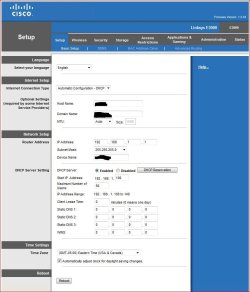
Anyway I'll look around some more. Hmmm.... found this but not sure what to do next :o

router settings.JPG

So why don't you just use static IP? Disable DHCP on the router and then manually assign every computer in your network an IP. Usually in the 192.168.x.x range.
This is what I do on my home network. I can remote in to the family computers either with RD or teamviewer by IP. Simple.

1 - Never had to do this with my other Linksys routers so why should I have to do it now?

2 - I'd rather not do that; not even sure I could if I wanted to as some ISP's don't allow static addresses (main address).
 

My Computer My Computer

Computer type
PC/Desktop
Computer Manufacturer/Model Number
Custom built by me.
OS
Windows 10 Pro
CPU
Intel Core i7-4770K (3.5Ghz)
Motherboard
Gigabyte G1 Sniper 5 (F10 Bios)
Memory
32 gig Corsair Dominator Platinum (4x8Gig)
Graphics Card(s)
Sapphire Tri-X R9 Fury
Sound Card
Soundblaster ZXR
Monitor(s) Displays
NEC PA242W 24" LCD Monitor
Screen Resolution
1920 x 1200
Hard Drives
Primary - Samsung 850 Pro (512gig), Samsung 840 Pro (256gig), 2TB WD Caviar Black.
PSU
EVGA Supernova 1000 G2
Case
Cooler Master HAF X
Cooling
Corsair H100i with Corsair Air Series SP120 Quiet Fans
Keyboard
Logitech Wireless Wave
Mouse
Logitech Performance MX
Internet Speed
High Speed Cable
Antivirus
Norton Security
Browser
IE11
Other Info
Memory Timings - 1866MHz @ 9-9-9-27-1T @ 1.5 volts
Set a static ip on the desktop computer. ISP has nothing to do with your internal network.
You don't have to change anything in your router either.
 

My Computer My Computer

Computer Manufacturer/Model Number
HAL-9000
OS
Windows 7 Ultimate 64bit
CPU
Intel i7 3770K
Motherboard
Asus Sabertooth Z77
Memory
16GB DDR3 1333 Corsair XMS3
Graphics Card(s)
XFX HD6950 2GB EyeFinity
Sound Card
Logitech G35 & Sennheiser PC135 & VIA HD
Monitor(s) Displays
23" HP 2310e, 23" Samsung B2230, 21.5" Viewsonic
Screen Resolution
5760x1080
Hard Drives
16TB of Storage
128GB & 256GB Crucial M4 SSD's, 2X 1TB WD Black, 3x 2TB WD, 3x 2TB Samsung F4, 1.5TB Seagate, WD 500GB,
PSU
Antec True Power New 650watt
Case
Cooler Master HAF-932
Cooling
Corsair H60 Hydro Cooler, 3x 230mm Fans, 2x120mm Fan
Keyboard
Logitech G15 and G13
Mouse
Logitech G700 Gaming Mouse
Internet Speed
50/10 Mbit
Other Info
Speakers : Alesis M1 Active Mk2 Studio Monitors , APC RS 1200 UPS, HP 4500DN Color Laser, HP P1006 mono Laser, Kodak 8500 Dye-Sub, Epson 1280 inkjet, Epson Worforce 610 MFC
Thanks Zepher

ISP has nothing to do with your internal network.

Yeah I figured that much. Doesn't seem that they would.

Set a static ip on the desktop computer.

Hate to be the dumb @ss but remember I said I know nothing of networks? (yet). So what, and where, am I looking to change???

BTW I'm currently working on my Computer Information Sytem degree and somewhere in there I'll be coming across networking, but that class hasn't gotten here yet :D

Anyway thanks for the help.
 

My Computer My Computer

Computer type
PC/Desktop
Computer Manufacturer/Model Number
Custom built by me.
OS
Windows 10 Pro
CPU
Intel Core i7-4770K (3.5Ghz)
Motherboard
Gigabyte G1 Sniper 5 (F10 Bios)
Memory
32 gig Corsair Dominator Platinum (4x8Gig)
Graphics Card(s)
Sapphire Tri-X R9 Fury
Sound Card
Soundblaster ZXR
Monitor(s) Displays
NEC PA242W 24" LCD Monitor
Screen Resolution
1920 x 1200
Hard Drives
Primary - Samsung 850 Pro (512gig), Samsung 840 Pro (256gig), 2TB WD Caviar Black.
PSU
EVGA Supernova 1000 G2
Case
Cooler Master HAF X
Cooling
Corsair H100i with Corsair Air Series SP120 Quiet Fans
Keyboard
Logitech Wireless Wave
Mouse
Logitech Performance MX
Internet Speed
High Speed Cable
Antivirus
Norton Security
Browser
IE11
Other Info
Memory Timings - 1866MHz @ 9-9-9-27-1T @ 1.5 volts
See if the video below helps you to set a static IP address for that desktop.
(you might want to watch in the full screen mode and 720p)


In the video, I changed the IP address from a dynamically assigned one of 192.168.0.5 to a statically assigned one of 192.168.0.22, but you can assign the same one that the computer had via DHCP. However, you will run the slight risk that the computer will be turned off long enough for that IP address to be assigned to another computer... so you might want to assign a static IP address that is outside of the range of IP addresses that the DHCP server is assigning to other computers.

For example, if the router is acting as the network's DHCP server and it is assigning IP addresses in the range of 192.168.0.100 thru 192.168.0.150 - then you might want to assign a static IP to the desktop computer of 192.168.0.200. That way, 192.168.0.200 should never be assigned to another computer on your network via the DHCP server (router) and you will not have an IP address conflict.

Most routers will tolerate having a computer connect that has an IP address outside of the DHCP range of addresses... some will not. In those rare cases, the router usually has settings to reserve an IP address for a certain MAC address - even if the IP address is in the range of IP addresses to be doled out via DHCP.

Edit: As Zepher points out below - you can record & keep your DNS IPs
Or hunt for faster ones: http://www.dslreports.com/faq/15890
In my case, OpenDNS works well and filters out some stuff that I don't want coming in.
 

My Computer My Computer

Computer type
Laptop
Computer Manufacturer/Model Number
Employer provided Dell Latitude
OS
W7 Pro SP1 64bit
CPU
i7
Memory
8GB
Graphics Card(s)
Intel HD Graphics
Hard Drives
crappy SSD
Antivirus
Employer mandated Symantec Endpoint Protection
Browser
Pale Moon 64bit, IE11 64bit & Chrome 64bit
I'll post some screenshots when I get on my machine.
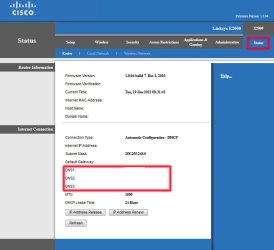
The only thing you'll need to do is write down the DNS numbers before you set your ip to static since you will have to input those numbers manually.
Those numbers should also be available in your routers status page.

I used to use static ips a long time ago but haven't really had the need again till recently when I got a streaming app for my iPad 3 so that I could access my media from anywhere.
 

My Computer My Computer

Computer Manufacturer/Model Number
HAL-9000
OS
Windows 7 Ultimate 64bit
CPU
Intel i7 3770K
Motherboard
Asus Sabertooth Z77
Memory
16GB DDR3 1333 Corsair XMS3
Graphics Card(s)
XFX HD6950 2GB EyeFinity
Sound Card
Logitech G35 & Sennheiser PC135 & VIA HD
Monitor(s) Displays
23" HP 2310e, 23" Samsung B2230, 21.5" Viewsonic
Screen Resolution
5760x1080
Hard Drives
16TB of Storage
128GB & 256GB Crucial M4 SSD's, 2X 1TB WD Black, 3x 2TB WD, 3x 2TB Samsung F4, 1.5TB Seagate, WD 500GB,
PSU
Antec True Power New 650watt
Case
Cooler Master HAF-932
Cooling
Corsair H60 Hydro Cooler, 3x 230mm Fans, 2x120mm Fan
Keyboard
Logitech G15 and G13
Mouse
Logitech G700 Gaming Mouse
Internet Speed
50/10 Mbit
Other Info
Speakers : Alesis M1 Active Mk2 Studio Monitors , APC RS 1200 UPS, HP 4500DN Color Laser, HP P1006 mono Laser, Kodak 8500 Dye-Sub, Epson 1280 inkjet, Epson Worforce 610 MFC
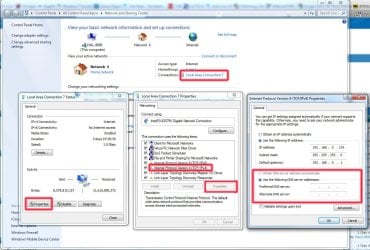
Here are the pics showing where to make your changes.

Navigate to Control Panel>Network and Sharing

click on the Local Area Connection
Then Click on Properties
Then Click on Internet Protocol Version 4
Then Click on Properties.
You will see an IP Address as well as the Preferred DNS Servers.
Write down the DNS Numbers since they will disappear once you click on "Use the Following IP Address"

Type in your IP Address and Subnet Mask, and the Default Gateway is the address of the router, which is normally 192.168.1.1 or 192.168.0.1.

If you forget to write down the DNS numbers, you can grab them from your router or another PC.
I included an image of the Router page where the numbers are, I erased the numbers on my image for privacy reasons.
 

Attachments

  • network settings.jpg
    network settings.jpg
    164.1 KB · Views: 57
  • network settings2.jpg
    network settings2.jpg
    56.6 KB · Views: 104

My Computer My Computer

Computer Manufacturer/Model Number
HAL-9000
OS
Windows 7 Ultimate 64bit
CPU
Intel i7 3770K
Motherboard
Asus Sabertooth Z77
Memory
16GB DDR3 1333 Corsair XMS3
Graphics Card(s)
XFX HD6950 2GB EyeFinity
Sound Card
Logitech G35 & Sennheiser PC135 & VIA HD
Monitor(s) Displays
23" HP 2310e, 23" Samsung B2230, 21.5" Viewsonic
Screen Resolution
5760x1080
Hard Drives
16TB of Storage
128GB & 256GB Crucial M4 SSD's, 2X 1TB WD Black, 3x 2TB WD, 3x 2TB Samsung F4, 1.5TB Seagate, WD 500GB,
PSU
Antec True Power New 650watt
Case
Cooler Master HAF-932
Cooling
Corsair H60 Hydro Cooler, 3x 230mm Fans, 2x120mm Fan
Keyboard
Logitech G15 and G13
Mouse
Logitech G700 Gaming Mouse
Internet Speed
50/10 Mbit
Other Info
Speakers : Alesis M1 Active Mk2 Studio Monitors , APC RS 1200 UPS, HP 4500DN Color Laser, HP P1006 mono Laser, Kodak 8500 Dye-Sub, Epson 1280 inkjet, Epson Worforce 610 MFC
Thanks Zepher, I give it a try later and post back.

Later.
 

My Computer My Computer

Computer type
PC/Desktop
Computer Manufacturer/Model Number
Custom built by me.
OS
Windows 10 Pro
CPU
Intel Core i7-4770K (3.5Ghz)
Motherboard
Gigabyte G1 Sniper 5 (F10 Bios)
Memory
32 gig Corsair Dominator Platinum (4x8Gig)
Graphics Card(s)
Sapphire Tri-X R9 Fury
Sound Card
Soundblaster ZXR
Monitor(s) Displays
NEC PA242W 24" LCD Monitor
Screen Resolution
1920 x 1200
Hard Drives
Primary - Samsung 850 Pro (512gig), Samsung 840 Pro (256gig), 2TB WD Caviar Black.
PSU
EVGA Supernova 1000 G2
Case
Cooler Master HAF X
Cooling
Corsair H100i with Corsair Air Series SP120 Quiet Fans
Keyboard
Logitech Wireless Wave
Mouse
Logitech Performance MX
Internet Speed
High Speed Cable
Antivirus
Norton Security
Browser
IE11
Other Info
Memory Timings - 1866MHz @ 9-9-9-27-1T @ 1.5 volts
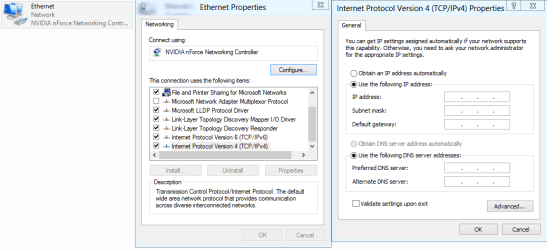
Why does everyone keep posting the same picture of the IPv4 properties? This isn't a complicated deal at all.

It seems very obvious to me how to proceed after my last post, you can either use IPv4 properties for static IP's or DHCP reservation, I just thought I would point out both ways to do this.

Hmmm must be an echo in here lol.
 

My Computer My Computer

Computer type
PC/Desktop
Computer Manufacturer/Model Number
Home built
OS
Windows 7 Ult, Windows 8.1 Pro,
CPU
Q9650-4.275GHz, E8600 4.5GHz, E6750-3.8GHz
Motherboard
Evga 780i FTW
Memory
G.Skill PC2 9600 1200Mhz 5 5 5 15 2T
Graphics Card(s)
GTX480
Sound Card
Asus Xonar D2
Monitor(s) Displays
HannsG
Screen Resolution
1680X1050
Hard Drives
GSkill Phoenix Pro 120GB SSD
PSU
ThermalTake Toughpower 1000Watt modular
Case
ThermalTake XaserV
Cooling
Xigmatek S1283
Keyboard
Logitech G15
Mouse
Logitech G9
Internet Speed
T1
....It seems very obvious to me how to proceed after my last post,....
Your "last post" was #4. In post #6, the OP asked for more instructions; hence the partial echoing of your advice.
 

My Computer My Computer

Computer type
Laptop
Computer Manufacturer/Model Number
Employer provided Dell Latitude
OS
W7 Pro SP1 64bit
CPU
i7
Memory
8GB
Graphics Card(s)
Intel HD Graphics
Hard Drives
crappy SSD
Antivirus
Employer mandated Symantec Endpoint Protection
Browser
Pale Moon 64bit, IE11 64bit & Chrome 64bit
....It seems very obvious to me how to proceed after my last post,....
Your "last post" was #4. In post #6, the OP asked for more instructions; hence the partial echoing of your advice.

Well I would have filled out the IP's for him but at the time I had no idea what router or default gateway he was using. Echoing LOL I like that.

I did mention this though:
I don't know what your default gateway is, or the range of IP's your router is using, or which DNS servers you might want to use, or the subnet mask but all that info can be obtained by looking at your routers set up page or the ipconfig all.

Though I still don't see any info from the Op's router posted here and Zepher still ended up guessing at this information. If the Op wants precise information then we need to have all the stuff I already asked for.

I guess this stuff is so obvious to me but maybe not so obvious to others. :confused:
 

My Computer My Computer

Computer type
PC/Desktop
Computer Manufacturer/Model Number
Home built
OS
Windows 7 Ult, Windows 8.1 Pro,
CPU
Q9650-4.275GHz, E8600 4.5GHz, E6750-3.8GHz
Motherboard
Evga 780i FTW
Memory
G.Skill PC2 9600 1200Mhz 5 5 5 15 2T
Graphics Card(s)
GTX480
Sound Card
Asus Xonar D2
Monitor(s) Displays
HannsG
Screen Resolution
1680X1050
Hard Drives
GSkill Phoenix Pro 120GB SSD
PSU
ThermalTake Toughpower 1000Watt modular
Case
ThermalTake XaserV
Cooling
Xigmatek S1283
Keyboard
Logitech G15
Mouse
Logitech G9
Internet Speed
T1
Why does everyone keep posting the same picture of the IPv4 properties? This isn't a complicated deal at all.

It seems very obvious to me how to proceed after my last post, you can either use IPv4 properties for static IP's or DHCP reservation, I just thought I would point out both ways to do this.

Let me say this again.... I'm NOT very adept at networks!!! It may be obvious to YOU, but it isn't to me. That's why I asked for help!


Though I still don't see any info from the Op's router posted here and Zepher still ended up guessing at this information. If the Op wants precise information then we need to have all the stuff I already asked for.

You obviously missed this post - http://www.sevenforums.com/network-...address-linksys-e3000-router.html#post1969250 as I DID post a screenhot of my router settings!

Further more it's not like I'm some newb here, if someone asks for info, I'll provide it.

And unlike a lot of people I have no problem admitting I don't know everything.

Later
 

My Computer My Computer

Computer type
PC/Desktop
Computer Manufacturer/Model Number
Custom built by me.
OS
Windows 10 Pro
CPU
Intel Core i7-4770K (3.5Ghz)
Motherboard
Gigabyte G1 Sniper 5 (F10 Bios)
Memory
32 gig Corsair Dominator Platinum (4x8Gig)
Graphics Card(s)
Sapphire Tri-X R9 Fury
Sound Card
Soundblaster ZXR
Monitor(s) Displays
NEC PA242W 24" LCD Monitor
Screen Resolution
1920 x 1200
Hard Drives
Primary - Samsung 850 Pro (512gig), Samsung 840 Pro (256gig), 2TB WD Caviar Black.
PSU
EVGA Supernova 1000 G2
Case
Cooler Master HAF X
Cooling
Corsair H100i with Corsair Air Series SP120 Quiet Fans
Keyboard
Logitech Wireless Wave
Mouse
Logitech Performance MX
Internet Speed
High Speed Cable
Antivirus
Norton Security
Browser
IE11
Other Info
Memory Timings - 1866MHz @ 9-9-9-27-1T @ 1.5 volts
Zepher, UsernameIssues,

I've not ignored your suggestions, I just haven't looked into them yet. Will do that tonight after I get out of school.

Thanks.
 

My Computer My Computer

Computer type
PC/Desktop
Computer Manufacturer/Model Number
Custom built by me.
OS
Windows 10 Pro
CPU
Intel Core i7-4770K (3.5Ghz)
Motherboard
Gigabyte G1 Sniper 5 (F10 Bios)
Memory
32 gig Corsair Dominator Platinum (4x8Gig)
Graphics Card(s)
Sapphire Tri-X R9 Fury
Sound Card
Soundblaster ZXR
Monitor(s) Displays
NEC PA242W 24" LCD Monitor
Screen Resolution
1920 x 1200
Hard Drives
Primary - Samsung 850 Pro (512gig), Samsung 840 Pro (256gig), 2TB WD Caviar Black.
PSU
EVGA Supernova 1000 G2
Case
Cooler Master HAF X
Cooling
Corsair H100i with Corsair Air Series SP120 Quiet Fans
Keyboard
Logitech Wireless Wave
Mouse
Logitech Performance MX
Internet Speed
High Speed Cable
Antivirus
Norton Security
Browser
IE11
Other Info
Memory Timings - 1866MHz @ 9-9-9-27-1T @ 1.5 volts
Why does everyone keep posting the same picture of the IPv4 properties? This isn't a complicated deal at all.

It seems very obvious to me how to proceed after my last post, you can either use IPv4 properties for static IP's or DHCP reservation, I just thought I would point out both ways to do this.

Let me say this again.... I'm NOT very adept at networks!!! It may be obvious to YOU, but it isn't to me. That's why I asked for help!


Though I still don't see any info from the Op's router posted here and Zepher still ended up guessing at this information. If the Op wants precise information then we need to have all the stuff I already asked for.

You obviously missed this post - http://www.sevenforums.com/network-...address-linksys-e3000-router.html#post1969250 as I DID post a screenhot of my router settings!

Further more it's not like I'm some newb here, if someone asks for info, I'll provide it.

And unlike a lot of people I have no problem admitting I don't know everything.

Later

I think I just missed the picture the first time I posted, that does make it easier. ;)

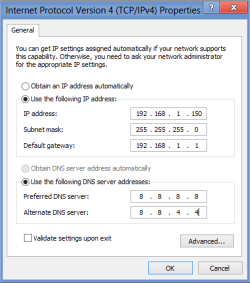
It's important to point out that if you use static IP's you have to use IP addresses that are out of the range of your DHCP server, otherwise the IP's could be re-assigned to another machine on your network.

In your case DHCP uses the range 192.168.1.100-149 so you can leave DHCP turned on if you use static IP's starting before 100 or after 149.

I guess Zepher didn't see the router set up page either because the addresses he used aren't correct.

The IPv4 static IP for your machine should look like the picture below. This will allow you to keep DHCP enabled while having a static IP for just this one machine. Notice how the last number "150" is just outside the range of DHCP addresses that your router uses.

I just used Google's DNS as an example. :)
 

Attachments

  • static ip for sygnus.PNG
    static ip for sygnus.PNG
    8.7 KB · Views: 58

My Computer My Computer

Computer type
PC/Desktop
Computer Manufacturer/Model Number
Home built
OS
Windows 7 Ult, Windows 8.1 Pro,
CPU
Q9650-4.275GHz, E8600 4.5GHz, E6750-3.8GHz
Motherboard
Evga 780i FTW
Memory
G.Skill PC2 9600 1200Mhz 5 5 5 15 2T
Graphics Card(s)
GTX480
Sound Card
Asus Xonar D2
Monitor(s) Displays
HannsG
Screen Resolution
1680X1050
Hard Drives
GSkill Phoenix Pro 120GB SSD
PSU
ThermalTake Toughpower 1000Watt modular
Case
ThermalTake XaserV
Cooling
Xigmatek S1283
Keyboard
Logitech G15
Mouse
Logitech G9
Internet Speed
T1
The address in my post is my machine. I went ahead and moved it outside the DHCP range.
 

My Computer My Computer

Computer Manufacturer/Model Number
HAL-9000
OS
Windows 7 Ultimate 64bit
CPU
Intel i7 3770K
Motherboard
Asus Sabertooth Z77
Memory
16GB DDR3 1333 Corsair XMS3
Graphics Card(s)
XFX HD6950 2GB EyeFinity
Sound Card
Logitech G35 & Sennheiser PC135 & VIA HD
Monitor(s) Displays
23" HP 2310e, 23" Samsung B2230, 21.5" Viewsonic
Screen Resolution
5760x1080
Hard Drives
16TB of Storage
128GB & 256GB Crucial M4 SSD's, 2X 1TB WD Black, 3x 2TB WD, 3x 2TB Samsung F4, 1.5TB Seagate, WD 500GB,
PSU
Antec True Power New 650watt
Case
Cooler Master HAF-932
Cooling
Corsair H60 Hydro Cooler, 3x 230mm Fans, 2x120mm Fan
Keyboard
Logitech G15 and G13
Mouse
Logitech G700 Gaming Mouse
Internet Speed
50/10 Mbit
Other Info
Speakers : Alesis M1 Active Mk2 Studio Monitors , APC RS 1200 UPS, HP 4500DN Color Laser, HP P1006 mono Laser, Kodak 8500 Dye-Sub, Epson 1280 inkjet, Epson Worforce 610 MFC
Hi guys,

Sorry for getting back to you so late but school and finals has kept me busy. I'm good now.

Anyway I used the suggestion Zepher gave.....


Though it's way to early to tell if they'll be future problems I do have internet connection and was even able to connect remotely. Just need to see if they're stick, they should but....

Anyways thanks for the inputs. All is good for now :)

Peace :cool:
 

My Computer My Computer

Computer type
PC/Desktop
Computer Manufacturer/Model Number
Custom built by me.
OS
Windows 10 Pro
CPU
Intel Core i7-4770K (3.5Ghz)
Motherboard
Gigabyte G1 Sniper 5 (F10 Bios)
Memory
32 gig Corsair Dominator Platinum (4x8Gig)
Graphics Card(s)
Sapphire Tri-X R9 Fury
Sound Card
Soundblaster ZXR
Monitor(s) Displays
NEC PA242W 24" LCD Monitor
Screen Resolution
1920 x 1200
Hard Drives
Primary - Samsung 850 Pro (512gig), Samsung 840 Pro (256gig), 2TB WD Caviar Black.
PSU
EVGA Supernova 1000 G2
Case
Cooler Master HAF X
Cooling
Corsair H100i with Corsair Air Series SP120 Quiet Fans
Keyboard
Logitech Wireless Wave
Mouse
Logitech Performance MX
Internet Speed
High Speed Cable
Antivirus
Norton Security
Browser
IE11
Other Info
Memory Timings - 1866MHz @ 9-9-9-27-1T @ 1.5 volts
Back
Top