
Solved Cooler Master 212 Plus Fan Issue

Regarding PWM connected fans stopping for periods, this has been reported when the CPU temps are low and no air flow is needed as in start up and or low ambient room temps. For me I want my fans spinning all the time moving air though the case and out.....but that's just me.
 

My Computer My Computer

Computer type
PC/Desktop
Computer Manufacturer/Model Number
A blend of brains, brawn and dumb luck.
OS
Windows 7 Ultimate 64
CPU
i7 3770k OC'd 4.6 @ 1.17v, also FX 8120 & i5 miniITX
Motherboard
MSI P67A-GD80 b3
Memory
32 gb G.Skill Sniper DDR3 10-12-12-31 @ 2133
Graphics Card(s)
XFX Radeon 7870 2GB DDR5
Sound Card
Sound Blaster Z Series Card
Monitor(s) Displays
(2) LG LED 23" 1920 x 1080 2ms Monitors via mini d-port
Screen Resolution
1680 X 1050 p
Hard Drives
Samsung 256 gb 830 SSD sata III
(1) 1 tb WD Black
(2) 1 tb Hitachi deskmates/sata II
(2) 1 tb WD green/sata II
(2) 3 tb Seagate Barracuda
(1) 120 gb OCZ Vertex SS
(1) Drobo 5N w/5 Seagate 3tb
PSU
EVGA modular 1000G2 80% gold rating & APC 1200 RS
Case
CoolerMaster Storm Styker
Cooling
7 case fans 140mm & 120mm, NZXT Kraken X60
Keyboard
(2) Logitech Illuminated Keyboards (1) usb (1) wireless
Mouse
Logitech G700 & T-BC21 - nano nx for the laptop
Internet Speed
Basic 120mbps down
Antivirus
Trend Micro Titanium Max Security & Malwarebytes Premium
Browser
Chrome and IE 10
Other Info
5 Noctua case fans + 3 Noctua in p/p on NZXT cooler
Integrated hot swap drive bays for 2.5" Drives
(2) Lite-on dvd/cd/Blu Ray optical 22X
Integrated fan controller and led on/off
HP Officejet Pro 8630 all-n-one
Hot-swappable 3.5" hard drive bay
Netgear Nighthawk router
Asus USB 3 & sata 6 PCIe card
Vantec IDE to sata adptr./Ultra sata adptr
Lenovo L420 i5 lappy with m sata
Drobo 5N advanced NAS
They're talking about replacing the fan on your cpu cooler. If it's working so far, then just keep a close eye on it. I've never heard of a problem with the bios not running the fan, but you can't rule it out. Do you have the airflow of the cpu cooler blowing towards the rear exhaust and out of the case?

Yea, the fan is now on the proper side of the heat sink. All air is being pushed towards the rear of my case and being exhausted.
 

My Computer My Computer

Computer type
PC/Desktop
Computer Manufacturer/Model Number
Custom Build
OS
Windows 7 Ultimate x64
CPU
Intel i7-3770K Ivy Bridge 3.5GHz (3.9GHz Turbo) LGA 1155 77W
Motherboard
Gigabyte Z77-D3H (rev. 1.0)
Memory
CORSAIR Vengeance 16GB (4x4GB) 240-Pin DDR3 1600 (PC3 12800)
Graphics Card(s)
Radeon HD 6970 2GB 256-bit GDDR5
Sound Card
Integrated Audio VIA VT2021 codec
Monitor(s) Displays
Dual (19'' Samsung 1440 x 900 (2ms) SyncMaster Widescreen)
Screen Resolution
Dual (1440x900)
Hard Drives
Windows: Crucial M4 CT128M4SSD2CCA - 128 GB, SATA III MLC Internal Solid State Drive (SSD)

WD Caviar Blue - 500 GB, SATA 3.0 Gb/s, 16 MB Cache, 7200 RPM (WD5000AAKS)
WD Caviar Black - 1 TB, SATA 6.0 Gb/s, 64MB Cache, 7200 RPM (WD1002FAEX)
PSU
CORSAIR HX850 - 80 PLUS GOLD Certified
Case
COOLER MASTER HAF 922
Cooling
COOLER MASTER Hyper 212 Plus
Keyboard
Razer Deathstalker
Mouse
Razer DeathAdder
Antivirus
Microsoft Security Essentials
Browser
Google Chrome
Other Info
Microsoft LifeCam Cinema, A40 Audio System - MLG Edition, M-Audio Bx8 D2's
Regarding PWM connected fans stopping for periods, this has been reported when the CPU temps are low and no air flow is needed as in start up and or low ambient room temps. For me I want my fans spinning all the time moving air though the case and out.....but that's just me.

So what my fan was doing was normal? I'm asking this cause it is brand new and i'm curious whether I should RMA it or not.

Also, is there any way to make it spin 100% of the time while plugged into the CPU Header?
 

My Computer My Computer

Computer type
PC/Desktop
Computer Manufacturer/Model Number
Custom Build
OS
Windows 7 Ultimate x64
CPU
Intel i7-3770K Ivy Bridge 3.5GHz (3.9GHz Turbo) LGA 1155 77W
Motherboard
Gigabyte Z77-D3H (rev. 1.0)
Memory
CORSAIR Vengeance 16GB (4x4GB) 240-Pin DDR3 1600 (PC3 12800)
Graphics Card(s)
Radeon HD 6970 2GB 256-bit GDDR5
Sound Card
Integrated Audio VIA VT2021 codec
Monitor(s) Displays
Dual (19'' Samsung 1440 x 900 (2ms) SyncMaster Widescreen)
Screen Resolution
Dual (1440x900)
Hard Drives
Windows: Crucial M4 CT128M4SSD2CCA - 128 GB, SATA III MLC Internal Solid State Drive (SSD)

WD Caviar Blue - 500 GB, SATA 3.0 Gb/s, 16 MB Cache, 7200 RPM (WD5000AAKS)
WD Caviar Black - 1 TB, SATA 6.0 Gb/s, 64MB Cache, 7200 RPM (WD1002FAEX)
PSU
CORSAIR HX850 - 80 PLUS GOLD Certified
Case
COOLER MASTER HAF 922
Cooling
COOLER MASTER Hyper 212 Plus
Keyboard
Razer Deathstalker
Mouse
Razer DeathAdder
Antivirus
Microsoft Security Essentials
Browser
Google Chrome
Other Info
Microsoft LifeCam Cinema, A40 Audio System - MLG Edition, M-Audio Bx8 D2's
Yes the fan can stop for brief periods if the cooling fins are keeping the CPU stable and within temps. If as you say the fan is new then I'm sure you're fine. Good catch getting the fan pointed in the correct direction. I would either turn of the PWM feature in the bios or better yet just move the fan plug from the PWM header to a std. fan header which there should be one handy on the mobo. Lastly if you can find the std. fan header then do as I do and run the fan directly off a free 12v molex connection off the PSU, this will require on of these.
Cables To Go - 6-Inch 3-Pin Fan to 4-Pin Pass-Thru Power Adapter Cable 27078 at TigerDirect
 

My Computer My Computer

Computer type
PC/Desktop
Computer Manufacturer/Model Number
A blend of brains, brawn and dumb luck.
OS
Windows 7 Ultimate 64
CPU
i7 3770k OC'd 4.6 @ 1.17v, also FX 8120 & i5 miniITX
Motherboard
MSI P67A-GD80 b3
Memory
32 gb G.Skill Sniper DDR3 10-12-12-31 @ 2133
Graphics Card(s)
XFX Radeon 7870 2GB DDR5
Sound Card
Sound Blaster Z Series Card
Monitor(s) Displays
(2) LG LED 23" 1920 x 1080 2ms Monitors via mini d-port
Screen Resolution
1680 X 1050 p
Hard Drives
Samsung 256 gb 830 SSD sata III
(1) 1 tb WD Black
(2) 1 tb Hitachi deskmates/sata II
(2) 1 tb WD green/sata II
(2) 3 tb Seagate Barracuda
(1) 120 gb OCZ Vertex SS
(1) Drobo 5N w/5 Seagate 3tb
PSU
EVGA modular 1000G2 80% gold rating & APC 1200 RS
Case
CoolerMaster Storm Styker
Cooling
7 case fans 140mm & 120mm, NZXT Kraken X60
Keyboard
(2) Logitech Illuminated Keyboards (1) usb (1) wireless
Mouse
Logitech G700 & T-BC21 - nano nx for the laptop
Internet Speed
Basic 120mbps down
Antivirus
Trend Micro Titanium Max Security & Malwarebytes Premium
Browser
Chrome and IE 10
Other Info
5 Noctua case fans + 3 Noctua in p/p on NZXT cooler
Integrated hot swap drive bays for 2.5" Drives
(2) Lite-on dvd/cd/Blu Ray optical 22X
Integrated fan controller and led on/off
HP Officejet Pro 8630 all-n-one
Hot-swappable 3.5" hard drive bay
Netgear Nighthawk router
Asus USB 3 & sata 6 PCIe card
Vantec IDE to sata adptr./Ultra sata adptr
Lenovo L420 i5 lappy with m sata
Drobo 5N advanced NAS
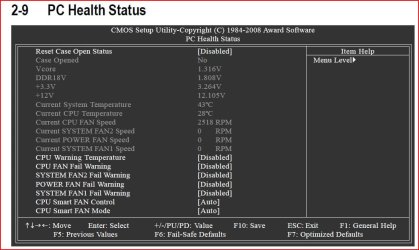
You may have a perfectly good CPU fan, but even if you're confident with it, you may want to set a safeguard, just in case.
Enabling the "CPU Fan Fail Warning" in the BIOS is a good idea.

Capture.JPG
 

My Computer My Computer

Computer type
PC/Desktop
Computer Manufacturer/Model Number
Custom Build
OS
Windows 7 Home Premium 64 bit
CPU
Intel Core i7-4790
Motherboard
GA-Z87X-D3H
Memory
G.SKILL 8GB (2 x 4GB) DDR3 F3-10666CL9D-8GBNT
Graphics Card(s)
AMD Radeon R7 250
Sound Card
Realtek ALC892
Monitor(s) Displays
Samsung UN32EH5000, Dell 1703FPT
Screen Resolution
1920 x 1080, 1280 x 1024
Hard Drives
WD5003AZEX
WD10EZEX
Samsung HD103SJ
Samsung 128 GB 840 PRO
PSU
SeaSonic M12II SS-500GM
Case
Fractal Design Define R4
Cooling
Zalman CNPS9900ALED
Keyboard
Logitech K800
Mouse
Logitech M705
Internet Speed
16 Mbps
Antivirus
Avast
Browser
Firefox
Other Info
Bose Companion 2 Multimedia Speakers
Yes the fan can stop for brief periods if the cooling fins are keeping the CPU stable and within temps. If as you say the fan is new then I'm sure you're fine. Good catch getting the fan pointed in the correct direction. I would either turn of the PWM feature in the bios or better yet just move the fan plug from the PWM header to a std. fan header which there should be one handy on the mobo. Lastly if you can find the std. fan header then do as I do and run the fan directly off a free 12v molex connection off the PSU, this will require on of these.
Cables To Go - 6-Inch 3-Pin Fan to 4-Pin Pass-Thru Power Adapter Cable 27078 at TigerDirect

I will just connect it to a standard header. My question is though why do you recommend this 12v connection over the motherboard?
 

My Computer My Computer

Computer type
PC/Desktop
Computer Manufacturer/Model Number
Custom Build
OS
Windows 7 Ultimate x64
CPU
Intel i7-3770K Ivy Bridge 3.5GHz (3.9GHz Turbo) LGA 1155 77W
Motherboard
Gigabyte Z77-D3H (rev. 1.0)
Memory
CORSAIR Vengeance 16GB (4x4GB) 240-Pin DDR3 1600 (PC3 12800)
Graphics Card(s)
Radeon HD 6970 2GB 256-bit GDDR5
Sound Card
Integrated Audio VIA VT2021 codec
Monitor(s) Displays
Dual (19'' Samsung 1440 x 900 (2ms) SyncMaster Widescreen)
Screen Resolution
Dual (1440x900)
Hard Drives
Windows: Crucial M4 CT128M4SSD2CCA - 128 GB, SATA III MLC Internal Solid State Drive (SSD)

WD Caviar Blue - 500 GB, SATA 3.0 Gb/s, 16 MB Cache, 7200 RPM (WD5000AAKS)
WD Caviar Black - 1 TB, SATA 6.0 Gb/s, 64MB Cache, 7200 RPM (WD1002FAEX)
PSU
CORSAIR HX850 - 80 PLUS GOLD Certified
Case
COOLER MASTER HAF 922
Cooling
COOLER MASTER Hyper 212 Plus
Keyboard
Razer Deathstalker
Mouse
Razer DeathAdder
Antivirus
Microsoft Security Essentials
Browser
Google Chrome
Other Info
Microsoft LifeCam Cinema, A40 Audio System - MLG Edition, M-Audio Bx8 D2's
You may have a perfectly good CPU fan, but even if you're confident with it, you may want to set a safeguard, just in case.
Enabling the "CPU Fan Fail Warning" in the BIOS is a good idea.

View attachment 219414

I actually saw this option last night while looking through BIOS and was going to ask about it, read my mind! Thanks :D
 

My Computer My Computer

Computer type
PC/Desktop
Computer Manufacturer/Model Number
Custom Build
OS
Windows 7 Ultimate x64
CPU
Intel i7-3770K Ivy Bridge 3.5GHz (3.9GHz Turbo) LGA 1155 77W
Motherboard
Gigabyte Z77-D3H (rev. 1.0)
Memory
CORSAIR Vengeance 16GB (4x4GB) 240-Pin DDR3 1600 (PC3 12800)
Graphics Card(s)
Radeon HD 6970 2GB 256-bit GDDR5
Sound Card
Integrated Audio VIA VT2021 codec
Monitor(s) Displays
Dual (19'' Samsung 1440 x 900 (2ms) SyncMaster Widescreen)
Screen Resolution
Dual (1440x900)
Hard Drives
Windows: Crucial M4 CT128M4SSD2CCA - 128 GB, SATA III MLC Internal Solid State Drive (SSD)

WD Caviar Blue - 500 GB, SATA 3.0 Gb/s, 16 MB Cache, 7200 RPM (WD5000AAKS)
WD Caviar Black - 1 TB, SATA 6.0 Gb/s, 64MB Cache, 7200 RPM (WD1002FAEX)
PSU
CORSAIR HX850 - 80 PLUS GOLD Certified
Case
COOLER MASTER HAF 922
Cooling
COOLER MASTER Hyper 212 Plus
Keyboard
Razer Deathstalker
Mouse
Razer DeathAdder
Antivirus
Microsoft Security Essentials
Browser
Google Chrome
Other Info
Microsoft LifeCam Cinema, A40 Audio System - MLG Edition, M-Audio Bx8 D2's
Deception,
I like to keep all unnecessarily voltage off the mobo, that's just me. I run a lot of fans and a lot off stuff, plus I also have a fair OC so to me it just makes sense. It also adds to a cleaner mobo but when you are talking just a CPU cooler it's a fairly mute point.
 

My Computer My Computer

Computer type
PC/Desktop
Computer Manufacturer/Model Number
A blend of brains, brawn and dumb luck.
OS
Windows 7 Ultimate 64
CPU
i7 3770k OC'd 4.6 @ 1.17v, also FX 8120 & i5 miniITX
Motherboard
MSI P67A-GD80 b3
Memory
32 gb G.Skill Sniper DDR3 10-12-12-31 @ 2133
Graphics Card(s)
XFX Radeon 7870 2GB DDR5
Sound Card
Sound Blaster Z Series Card
Monitor(s) Displays
(2) LG LED 23" 1920 x 1080 2ms Monitors via mini d-port
Screen Resolution
1680 X 1050 p
Hard Drives
Samsung 256 gb 830 SSD sata III
(1) 1 tb WD Black
(2) 1 tb Hitachi deskmates/sata II
(2) 1 tb WD green/sata II
(2) 3 tb Seagate Barracuda
(1) 120 gb OCZ Vertex SS
(1) Drobo 5N w/5 Seagate 3tb
PSU
EVGA modular 1000G2 80% gold rating & APC 1200 RS
Case
CoolerMaster Storm Styker
Cooling
7 case fans 140mm & 120mm, NZXT Kraken X60
Keyboard
(2) Logitech Illuminated Keyboards (1) usb (1) wireless
Mouse
Logitech G700 & T-BC21 - nano nx for the laptop
Internet Speed
Basic 120mbps down
Antivirus
Trend Micro Titanium Max Security & Malwarebytes Premium
Browser
Chrome and IE 10
Other Info
5 Noctua case fans + 3 Noctua in p/p on NZXT cooler
Integrated hot swap drive bays for 2.5" Drives
(2) Lite-on dvd/cd/Blu Ray optical 22X
Integrated fan controller and led on/off
HP Officejet Pro 8630 all-n-one
Hot-swappable 3.5" hard drive bay
Netgear Nighthawk router
Asus USB 3 & sata 6 PCIe card
Vantec IDE to sata adptr./Ultra sata adptr
Lenovo L420 i5 lappy with m sata
Drobo 5N advanced NAS
I thought someone said it is supposed to start and stop?
I have two. It can stop and start.
A cpu fan is never supposed to stop.
Be careful with blanket statements. Some that do an excellent job of cooling with heat pipes don't always run. My server is running an i3-2100 with a 212+ on it, and between the cool processor, excellent cooling in m case, and the heat pipes, my fan doesn't run all the time, either. It runs more on my i7 system, but still not constantly.
 

My Computer My Computer

OS
Windows 7 Ultimate x64 SP1
CPU
Intel Core i7-2600
Motherboard
Gigabyte GA-P67A-UD3P-B3
Memory
12 GB Patriot Extreme DDR3-1333
Graphics Card(s)
Nvidia GTX 470
Monitor(s) Displays
Dell UltraSharp 2209WA
Hard Drives
OCZ Agility3 240 GB, WD5001AALS, WD7501AALS
PSU
OCZ ModStream 700W
Case
CoolerMaster HAF 912 Advanced
Cooling
CoolerMaster Hyper 212 Plus
I've never seen a cpu cooler fan stop.
 

My Computer My Computer

Computer type
PC/Desktop
Computer Manufacturer/Model Number
Custom Built
OS
MS Windows 7 Professional 64-bit SP1
CPU
Intel(R) Core(TM) i5-2400 CPU @ 3.10GHz
Motherboard
Asus P8Z77-V LK
Memory
G.SKILL Ares 8GB (2x4GB)
Graphics Card(s)
EVGA nVidia GeForce GTX 760 Superclocked
Sound Card
Realtek High Definition Audio
Monitor(s) Displays
ASUS VN247 24" 1ms
Screen Resolution
1920x1080
Hard Drives
Mushkin Chronos 120GB SSD (OS), 1TB Seagate HDD (Data)
PSU
XFX Pro Series 850w P1-850B-BEFX
Case
Corsair Obsidian 750D
Cooling
Corsair H100i (cpu) and case fans
Keyboard
Corsair Vengeance K70
Mouse
Corsair Vengeance M60
Internet Speed
1.14 MB/s (9.6 mbps)
Browser
Google Chrome
Is my fan supposed to spin constantly all the time or no?
The reason I am asking is because it isn't. Watch the short 1 minute video I made, explains it all in detail.

Cooler Master 212 Plus Fan Issue - YouTube

Thanks for your help!
Sean
Your post you stipulated you fan does not run all the time and gave us a video. That was and is the reason for my post # 14. If the fan would of worked from another connection on the M/B the fan would be concerned okay.
 

My Computer My Computer

Computer type
PC/Desktop
Computer Manufacturer/Model Number
Home made Desktop
OS
Windows 10 Pro. 64/ version 1709 Windows 7 Pro/64
CPU
Intel i7-6800K @ 4.3
Motherboard
ASUS X-99 Deluxe II
Memory
Corsair Platinum 16 gig @2400
Graphics Card(s)
EVGA GTX 1070 OC
Monitor(s) Displays
Asus 27" LED LCD/VE278Q
Screen Resolution
1920-1080 or 1280-720 HDMI
Hard Drives
INTEL SSD 730-240 Gb Sata 3.0/
PSU
EVGA Platium 1200W
Case
Phanteks Luxe Tempered Glass 8 fans/ one radiator
Cooling
XSPC/ Water Cooled CPU
Keyboard
Das 4 Professional
Mouse
Logitech M705/MX Anywhere 2-S
Internet Speed
100 mbits
Antivirus
Microsoft Security Essentials/ Malwarebytes Premium 3.0/ SAS
Browser
I.E. 11 default/Firefox/ ISP Time Warner Cable/Spectrum
Other Info
LG BluRay Burner/
Sound system-KLipsch-THX/
Icy Dock ssd Hot Swap bays.
I have my cpu fans plugged into a case fan header so they will spin 100% all the time. So I don't get warning every time I boot I plug a case fan into the cpu fan connection. Some cpu fans will be a little noisy at 100% all the time, mine are not.
 

My Computer My Computer

Computer type
PC/Desktop
Computer Manufacturer/Model Number
Home made Desktop
OS
Windows 10 Pro. 64/ version 1709 Windows 7 Pro/64
CPU
Intel i7-6800K @ 4.3
Motherboard
ASUS X-99 Deluxe II
Memory
Corsair Platinum 16 gig @2400
Graphics Card(s)
EVGA GTX 1070 OC
Monitor(s) Displays
Asus 27" LED LCD/VE278Q
Screen Resolution
1920-1080 or 1280-720 HDMI
Hard Drives
INTEL SSD 730-240 Gb Sata 3.0/
PSU
EVGA Platium 1200W
Case
Phanteks Luxe Tempered Glass 8 fans/ one radiator
Cooling
XSPC/ Water Cooled CPU
Keyboard
Das 4 Professional
Mouse
Logitech M705/MX Anywhere 2-S
Internet Speed
100 mbits
Antivirus
Microsoft Security Essentials/ Malwarebytes Premium 3.0/ SAS
Browser
I.E. 11 default/Firefox/ ISP Time Warner Cable/Spectrum
Other Info
LG BluRay Burner/
Sound system-KLipsch-THX/
Icy Dock ssd Hot Swap bays.
Is my fan supposed to spin constantly all the time or no?
The reason I am asking is because it isn't. Watch the short 1 minute video I made, explains it all in detail.

Cooler Master 212 Plus Fan Issue - YouTube

Thanks for your help!
Sean
Your post you stipulated you fan does not run all the time and gave us a video. That was and is the reason for my post # 14. If the fan would of worked from another connection on the M/B the fan would be concerned okay.

I meant it starts and stops, I see how my post can be misconstrued as otherwise... BUT that's why I made the video, explains it clearly.


I have my cpu fans plugged into a case fan header so they will spin 100% all the time. So I don't get warning every time I boot I plug a case fan into the cpu fan connection. Some cpu fans will be a little noisy at 100% all the time, mine are not.

Alright well i'll give it a go and see if this one is noisy! Thanks for the help.

This thread I feel like could be pretty dang useful to others!
 

My Computer My Computer

Computer type
PC/Desktop
Computer Manufacturer/Model Number
Custom Build
OS
Windows 7 Ultimate x64
CPU
Intel i7-3770K Ivy Bridge 3.5GHz (3.9GHz Turbo) LGA 1155 77W
Motherboard
Gigabyte Z77-D3H (rev. 1.0)
Memory
CORSAIR Vengeance 16GB (4x4GB) 240-Pin DDR3 1600 (PC3 12800)
Graphics Card(s)
Radeon HD 6970 2GB 256-bit GDDR5
Sound Card
Integrated Audio VIA VT2021 codec
Monitor(s) Displays
Dual (19'' Samsung 1440 x 900 (2ms) SyncMaster Widescreen)
Screen Resolution
Dual (1440x900)
Hard Drives
Windows: Crucial M4 CT128M4SSD2CCA - 128 GB, SATA III MLC Internal Solid State Drive (SSD)

WD Caviar Blue - 500 GB, SATA 3.0 Gb/s, 16 MB Cache, 7200 RPM (WD5000AAKS)
WD Caviar Black - 1 TB, SATA 6.0 Gb/s, 64MB Cache, 7200 RPM (WD1002FAEX)
PSU
CORSAIR HX850 - 80 PLUS GOLD Certified
Case
COOLER MASTER HAF 922
Cooling
COOLER MASTER Hyper 212 Plus
Keyboard
Razer Deathstalker
Mouse
Razer DeathAdder
Antivirus
Microsoft Security Essentials
Browser
Google Chrome
Other Info
Microsoft LifeCam Cinema, A40 Audio System - MLG Edition, M-Audio Bx8 D2's
I've never seen a cpu cooler fan stop.
Just because you've never seen one doesn't mean they don't exist. Newer processors run cooler than ever, so with proper cooling, they may not always need a fan spinning constantly....especially if that cooling is paired with a properly cooled case.

I'll assume you've never seen an HTPC that doesn't even have a fan, and uses passive cooling?
 

My Computer My Computer

OS
Windows 7 Ultimate x64 SP1
CPU
Intel Core i7-2600
Motherboard
Gigabyte GA-P67A-UD3P-B3
Memory
12 GB Patriot Extreme DDR3-1333
Graphics Card(s)
Nvidia GTX 470
Monitor(s) Displays
Dell UltraSharp 2209WA
Hard Drives
OCZ Agility3 240 GB, WD5001AALS, WD7501AALS
PSU
OCZ ModStream 700W
Case
CoolerMaster HAF 912 Advanced
Cooling
CoolerMaster Hyper 212 Plus
I've never seen a cpu cooler fan stop.
Just because you've never seen one doesn't mean they don't exist. Newer processors run cooler than ever, so with proper cooling, they may not always need a fan spinning constantly....especially if that cooling is paired with a properly cooled case.

I'll assume you've never seen an HTPC that doesn't even have a fan, and uses passive cooling?

I've seen one of those, but that obviously doesn't have a fan to begin with. I've had quite a few computers and I have yet to see a fan stop. Even my i5 needs the fan constantly spinning.
 

My Computer My Computer

Computer type
PC/Desktop
Computer Manufacturer/Model Number
Custom Built
OS
MS Windows 7 Professional 64-bit SP1
CPU
Intel(R) Core(TM) i5-2400 CPU @ 3.10GHz
Motherboard
Asus P8Z77-V LK
Memory
G.SKILL Ares 8GB (2x4GB)
Graphics Card(s)
EVGA nVidia GeForce GTX 760 Superclocked
Sound Card
Realtek High Definition Audio
Monitor(s) Displays
ASUS VN247 24" 1ms
Screen Resolution
1920x1080
Hard Drives
Mushkin Chronos 120GB SSD (OS), 1TB Seagate HDD (Data)
PSU
XFX Pro Series 850w P1-850B-BEFX
Case
Corsair Obsidian 750D
Cooling
Corsair H100i (cpu) and case fans
Keyboard
Corsair Vengeance K70
Mouse
Corsair Vengeance M60
Internet Speed
1.14 MB/s (9.6 mbps)
Browser
Google Chrome
As I explained before, it all depends on other factors. Have you ever installed or used a Hyper 212+? It comes with a huge heatsink with thermal pipes. On some systems, it can be used alone, without a fan, assuming the case itself is cooling and moving air properly. It's thermal monitoring controls the fan to run when needed, and that's how it can keep the noise way down.

I have one of my two running on a server cooling an i3-2100. I can watch the fan stop spinning at random times, and then spin up when needed. If your i5 is running a stock HSF, then it needs to have the fan running all the time to stay cool. Sit a stock cooler on a table next to the Hyper 212+, and it will be very obvious why the two differ in cooling abilities.
 

My Computer My Computer

OS
Windows 7 Ultimate x64 SP1
CPU
Intel Core i7-2600
Motherboard
Gigabyte GA-P67A-UD3P-B3
Memory
12 GB Patriot Extreme DDR3-1333
Graphics Card(s)
Nvidia GTX 470
Monitor(s) Displays
Dell UltraSharp 2209WA
Hard Drives
OCZ Agility3 240 GB, WD5001AALS, WD7501AALS
PSU
OCZ ModStream 700W
Case
CoolerMaster HAF 912 Advanced
Cooling
CoolerMaster Hyper 212 Plus
As I explained before, it all depends on other factors. Have you ever installed or used a Hyper 212+? It comes with a huge heatsink with thermal pipes. On some systems, it can be used alone, without a fan, assuming the case itself is cooling and moving air properly. It's thermal monitoring controls the fan to run when needed, and that's how it can keep the noise way down.

I have one of my two running on a server cooling an i3-2100. I can watch the fan stop spinning at random times, and then spin up when needed. If your i5 is running a stock HSF, then it needs to have the fan running all the time to stay cool. Sit a stock cooler on a table next to the Hyper 212+, and it will be very obvious why the two differ in cooling abilities.

It's definitely not a stock cooler. I have a ZALMAN CNPS9900MAX-B. I've never used a stock cooler. I also have 6 other case fans in the computer as well and it still constantly spins. The other setup I had a huge heatsink/fan as well and 4 case fans.
 

My Computer My Computer

Computer type
PC/Desktop
Computer Manufacturer/Model Number
Custom Built
OS
MS Windows 7 Professional 64-bit SP1
CPU
Intel(R) Core(TM) i5-2400 CPU @ 3.10GHz
Motherboard
Asus P8Z77-V LK
Memory
G.SKILL Ares 8GB (2x4GB)
Graphics Card(s)
EVGA nVidia GeForce GTX 760 Superclocked
Sound Card
Realtek High Definition Audio
Monitor(s) Displays
ASUS VN247 24" 1ms
Screen Resolution
1920x1080
Hard Drives
Mushkin Chronos 120GB SSD (OS), 1TB Seagate HDD (Data)
PSU
XFX Pro Series 850w P1-850B-BEFX
Case
Corsair Obsidian 750D
Cooling
Corsair H100i (cpu) and case fans
Keyboard
Corsair Vengeance K70
Mouse
Corsair Vengeance M60
Internet Speed
1.14 MB/s (9.6 mbps)
Browser
Google Chrome
Maybe your Zalman isn't designed to ever spin down completely. Who knows. All I'm telling you is how the Hyper 212+ works, from experience of owning two. You made a blanket statement that I corrected...nothing more nothing less.

The number of case fans also has no real bearing on how well the case is cooled. I've been building systems for 15 years now, and I can tell you one of the biggest lessons learned is that simply adding fans doesn't always increase the cooling ability. I don't know your case or your layout of fans, so I'm not making assumptions that your cooling isn't good. I'm just saying that just adding a lot of fans doesn't always do the trick.
 

My Computer My Computer

OS
Windows 7 Ultimate x64 SP1
CPU
Intel Core i7-2600
Motherboard
Gigabyte GA-P67A-UD3P-B3
Memory
12 GB Patriot Extreme DDR3-1333
Graphics Card(s)
Nvidia GTX 470
Monitor(s) Displays
Dell UltraSharp 2209WA
Hard Drives
OCZ Agility3 240 GB, WD5001AALS, WD7501AALS
PSU
OCZ ModStream 700W
Case
CoolerMaster HAF 912 Advanced
Cooling
CoolerMaster Hyper 212 Plus
Maybe your Zalman isn't designed to ever spin down completely. Who knows. All I'm telling you is how the Hyper 212+ works, from experience of owning two. You made a blanket statement that I corrected...nothing more nothing less.

The number of case fans also has no real bearing on how well the case is cooled. I've been building systems for 15 years now, and I can tell you one of the biggest lessons learned is that simply adding fans doesn't always increase the cooling ability. I don't know your case or your layout of fans, so I'm not making assumptions that your cooling isn't good. I'm just saying that just adding a lot of fans doesn't always do the trick.

Well my case is NZXT Tempest 410 Elite. It has 2 top fans, 2 front fans, one bottom, and one back. I've just never known one to spin down, but you're right. I've never used the Hyper 212+.
 

My Computer My Computer

Computer type
PC/Desktop
Computer Manufacturer/Model Number
Custom Built
OS
MS Windows 7 Professional 64-bit SP1
CPU
Intel(R) Core(TM) i5-2400 CPU @ 3.10GHz
Motherboard
Asus P8Z77-V LK
Memory
G.SKILL Ares 8GB (2x4GB)
Graphics Card(s)
EVGA nVidia GeForce GTX 760 Superclocked
Sound Card
Realtek High Definition Audio
Monitor(s) Displays
ASUS VN247 24" 1ms
Screen Resolution
1920x1080
Hard Drives
Mushkin Chronos 120GB SSD (OS), 1TB Seagate HDD (Data)
PSU
XFX Pro Series 850w P1-850B-BEFX
Case
Corsair Obsidian 750D
Cooling
Corsair H100i (cpu) and case fans
Keyboard
Corsair Vengeance K70
Mouse
Corsair Vengeance M60
Internet Speed
1.14 MB/s (9.6 mbps)
Browser
Google Chrome
Back
Top