Solved bcd/bcdedit problems and others after Acronis DD11

okay I had to reboot to clear the assign
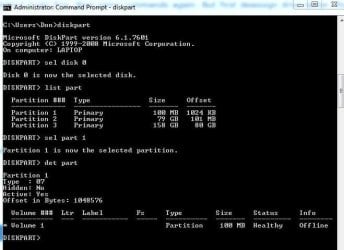
DiskPart.JPG

Without reboot the output was the same as the assigned and it keeps "system reserved" label in disk management. After reboot, hidden partition label is blank and diskpart output shown above
 

My Computer My Computer

At a glance

Windows 7 SP1 Home Premium x64Intel Core i7 720QMKingston 8 GBATI Mobility Radeon HD 5870
Computer Manufacturer/Model Number
Aus G73JH-RBBX05
OS
Windows 7 SP1 Home Premium x64
CPU
Intel Core i7 720QM
Motherboard
Asus (Intel HM55 Chipset)
Memory
Kingston 8 GB
Graphics Card(s)
ATI Mobility Radeon HD 5870
Sound Card
Realtek
Monitor(s) Displays
LG
Screen Resolution
1600X900
Hard Drives
Crucial M4 256GB
(Seagate Momentus ST9500420AS)Currently Disabled
Mouse
Razer Naga
Internet Speed
Cable

My Computer My Computer

At a glance

Microsoft Windows 7 Home Premium 64-bits 7601...Intel(R) Core(TM) i3 CPU M 370 @ 2.40GHz4,00 GBATI Mobility Radeon HD 5400 Series
Computer type
Laptop
Computer Manufacturer/Model Number
ACER ASPIRE 5742G
OS
Microsoft Windows 7 Home Premium 64-bits 7601 Multiprocessor Free Service Pack 1
CPU
Intel(R) Core(TM) i3 CPU M 370 @ 2.40GHz
Motherboard
Acer Aspire 5742G
Memory
4,00 GB
Graphics Card(s)
ATI Mobility Radeon HD 5400 Series
Sound Card
(1) AMD High Definition Audio Device (2) Realtek High Defi
Screen Resolution
1366 x 768 x 32 bits (4294967296 colors) @ 60 Hz
Hard Drives
WDC WD5000BEVT-22ZAT0
Without reboot the output was the same as the assigned and it keeps "system reserved" label in disk management. After reboot, hidden partition label is blank and diskpart output shown above

Not shown as offline after i remove drive letter, until i reboot
 

My Computer My Computer

At a glance

Windows 7 SP1 Home Premium x64Intel Core i7 720QMKingston 8 GBATI Mobility Radeon HD 5870
Computer Manufacturer/Model Number
Aus G73JH-RBBX05
OS
Windows 7 SP1 Home Premium x64
CPU
Intel Core i7 720QM
Motherboard
Asus (Intel HM55 Chipset)
Memory
Kingston 8 GB
Graphics Card(s)
ATI Mobility Radeon HD 5870
Sound Card
Realtek
Monitor(s) Displays
LG
Screen Resolution
1600X900
Hard Drives
Crucial M4 256GB
(Seagate Momentus ST9500420AS)Currently Disabled
Mouse
Razer Naga
Internet Speed
Cable
Without reboot the output was the same as the assigned and it keeps "system reserved" label in disk management. After reboot, hidden partition label is blank and diskpart output shown above
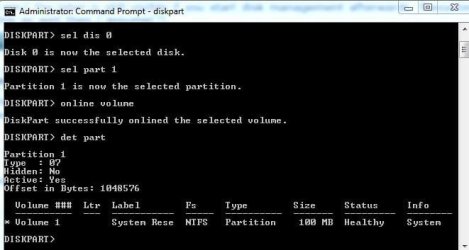
But now you still have the strange output? if so:

Code:
diskpart
sel dis 0
sel part 1
online volume
det part


post output
 

My Computer My Computer

At a glance

Microsoft Windows 7 Home Premium 64-bits 7601...Intel(R) Core(TM) i3 CPU M 370 @ 2.40GHz4,00 GBATI Mobility Radeon HD 5400 Series
Computer type
Laptop
Computer Manufacturer/Model Number
ACER ASPIRE 5742G
OS
Microsoft Windows 7 Home Premium 64-bits 7601 Multiprocessor Free Service Pack 1
CPU
Intel(R) Core(TM) i3 CPU M 370 @ 2.40GHz
Motherboard
Acer Aspire 5742G
Memory
4,00 GB
Graphics Card(s)
ATI Mobility Radeon HD 5400 Series
Sound Card
(1) AMD High Definition Audio Device (2) Realtek High Defi
Screen Resolution
1366 x 768 x 32 bits (4294967296 colors) @ 60 Hz
Hard Drives
WDC WD5000BEVT-22ZAT0
So if you deassign the drive letter in win7 the label is still visible if you start disk management afterwards. filesystem is also ntfs I assume(?). bcdedit runs fine as well then I assume(?)
 

My Computer My Computer

At a glance

Microsoft Windows 7 Home Premium 64-bits 7601...Intel(R) Core(TM) i3 CPU M 370 @ 2.40GHz4,00 GBATI Mobility Radeon HD 5400 Series
Computer type
Laptop
Computer Manufacturer/Model Number
ACER ASPIRE 5742G
OS
Microsoft Windows 7 Home Premium 64-bits 7601 Multiprocessor Free Service Pack 1
CPU
Intel(R) Core(TM) i3 CPU M 370 @ 2.40GHz
Motherboard
Acer Aspire 5742G
Memory
4,00 GB
Graphics Card(s)
ATI Mobility Radeon HD 5400 Series
Sound Card
(1) AMD High Definition Audio Device (2) Realtek High Defi
Screen Resolution
1366 x 768 x 32 bits (4294967296 colors) @ 60 Hz
Hard Drives
WDC WD5000BEVT-22ZAT0
What did Startup Repair report each time it was run? Or did you give up after it reported nothing to repair?

All of these repairs are automated in Win7 Startup Repair. Does it find an installation to repair when booting into WinRE?

I think if that failed I'd run a Repair Install or Clean Reinstall with all other drives unplugged. Running bcd edit commands can compound the problems and never get anywhere - it's best to rely on automation since it tests many dependent variables before proceeding.
 
So if you deassign the drive letter in win7 the label is still visible if you start disk management afterwards. filesystem is also ntfs I assume(?). bcdedit runs fine as well then I assume(?)
Yes, correct.

DiskPartOnline.JPG

I also just notice when I press F8 at boot there is no longer an option to "Repair Your Computer"
 

My Computer My Computer

At a glance

Windows 7 SP1 Home Premium x64Intel Core i7 720QMKingston 8 GBATI Mobility Radeon HD 5870
Computer Manufacturer/Model Number
Aus G73JH-RBBX05
OS
Windows 7 SP1 Home Premium x64
CPU
Intel Core i7 720QM
Motherboard
Asus (Intel HM55 Chipset)
Memory
Kingston 8 GB
Graphics Card(s)
ATI Mobility Radeon HD 5870
Sound Card
Realtek
Monitor(s) Displays
LG
Screen Resolution
1600X900
Hard Drives
Crucial M4 256GB
(Seagate Momentus ST9500420AS)Currently Disabled
Mouse
Razer Naga
Internet Speed
Cable
What did Startup Repair report each time it was run? Or did you give up after it reported nothing to repair?

All of these repairs are automated in Win7 Startup Repair. Does it find an installation to repair when booting into WinRE?

I think if that failed I'd run a Repair Install or Clean Reinstall with all other drives unplugged. Running commands can compound the problems - it's best to rely on automation since it tests many variables before proceeding.
Yes Startup Repair does find my Windows 7 installation

The only error it found was from SFC. I ran sfc /scannow and only saw this error, twice:
CSI 000002dc [SR] Cannot verify component files for Microsoft-Windows-IE-JScriptDebugUI, Version = 9.4.8112.16446, pA = PROCESSOR_ARCHITECTURE_INTEL (0), Culture neutral, VersionScope = 1 nonSxS, PublicKeyToken = {l:8 b:31bf3856ad364e35}, Type neutral, TypeName neutral, PublicKey neutral, manifest is damaged (FALSE)
 

My Computer My Computer

At a glance

Windows 7 SP1 Home Premium x64Intel Core i7 720QMKingston 8 GBATI Mobility Radeon HD 5870
Computer Manufacturer/Model Number
Aus G73JH-RBBX05
OS
Windows 7 SP1 Home Premium x64
CPU
Intel Core i7 720QM
Motherboard
Asus (Intel HM55 Chipset)
Memory
Kingston 8 GB
Graphics Card(s)
ATI Mobility Radeon HD 5870
Sound Card
Realtek
Monitor(s) Displays
LG
Screen Resolution
1600X900
Hard Drives
Crucial M4 256GB
(Seagate Momentus ST9500420AS)Currently Disabled
Mouse
Razer Naga
Internet Speed
Cable
No drive letter anymore. It is NTFS and label visible... all fine. Even bcdedit works. So also msconfig.
Correct?

Does it still work after reboot?
 

My Computer My Computer

At a glance

Microsoft Windows 7 Home Premium 64-bits 7601...Intel(R) Core(TM) i3 CPU M 370 @ 2.40GHz4,00 GBATI Mobility Radeon HD 5400 Series
Computer type
Laptop
Computer Manufacturer/Model Number
ACER ASPIRE 5742G
OS
Microsoft Windows 7 Home Premium 64-bits 7601 Multiprocessor Free Service Pack 1
CPU
Intel(R) Core(TM) i3 CPU M 370 @ 2.40GHz
Motherboard
Acer Aspire 5742G
Memory
4,00 GB
Graphics Card(s)
ATI Mobility Radeon HD 5400 Series
Sound Card
(1) AMD High Definition Audio Device (2) Realtek High Defi
Screen Resolution
1366 x 768 x 32 bits (4294967296 colors) @ 60 Hz
Hard Drives
WDC WD5000BEVT-22ZAT0
Then run it three times with reboots in between each to see if it resolves the problem. It should see the problem and repair or rewrite the System boot files. If it doesn't then a Repair Install or Reinstall will, but I would wipe the HD with Diskpart Clean Command before reinstalling as there is always the looming possibility you have corruption from prior boot code interfering.
 
Then run it three times with reboots in between each to see if it resolves the problem. It should see the problem and repair or rewrite the System boot files. If it doesn't then a Repair Install or Reinstall will, but I would wipe the HD with Diskpart Clean Command before reinstalling as there is always the looming possibility you have corruption for prior boot code interfering.
For such a small problem? I think he can live with that problem. Or delete "system reserved" partition and do a startup repair
 

My Computer My Computer

At a glance

Microsoft Windows 7 Home Premium 64-bits 7601...Intel(R) Core(TM) i3 CPU M 370 @ 2.40GHz4,00 GBATI Mobility Radeon HD 5400 Series
Computer type
Laptop
Computer Manufacturer/Model Number
ACER ASPIRE 5742G
OS
Microsoft Windows 7 Home Premium 64-bits 7601 Multiprocessor Free Service Pack 1
CPU
Intel(R) Core(TM) i3 CPU M 370 @ 2.40GHz
Motherboard
Acer Aspire 5742G
Memory
4,00 GB
Graphics Card(s)
ATI Mobility Radeon HD 5400 Series
Sound Card
(1) AMD High Definition Audio Device (2) Realtek High Defi
Screen Resolution
1366 x 768 x 32 bits (4294967296 colors) @ 60 Hz
Hard Drives
WDC WD5000BEVT-22ZAT0
No drive letter anymore. It is NTFS and label visible... all fine. Even bcdedit works. So also msconfig.
Correct?

Does it still work after reboot?
I'll check After reboot now...
 

My Computer My Computer

At a glance

Windows 7 SP1 Home Premium x64Intel Core i7 720QMKingston 8 GBATI Mobility Radeon HD 5870
Computer Manufacturer/Model Number
Aus G73JH-RBBX05
OS
Windows 7 SP1 Home Premium x64
CPU
Intel Core i7 720QM
Motherboard
Asus (Intel HM55 Chipset)
Memory
Kingston 8 GB
Graphics Card(s)
ATI Mobility Radeon HD 5870
Sound Card
Realtek
Monitor(s) Displays
LG
Screen Resolution
1600X900
Hard Drives
Crucial M4 256GB
(Seagate Momentus ST9500420AS)Currently Disabled
Mouse
Razer Naga
Internet Speed
Cable
No drive letter anymore. It is NTFS and label visible... all fine. Even bcdedit works. So also msconfig.
Correct?

Does it still work after reboot?
After reboot NTFS and label are missing and it's offline. And bcdedit doesn't work
Something puts it offline. If you assign it a drive letter everything works fine. Even after reboot?
 

My Computer My Computer

At a glance

Microsoft Windows 7 Home Premium 64-bits 7601...Intel(R) Core(TM) i3 CPU M 370 @ 2.40GHz4,00 GBATI Mobility Radeon HD 5400 Series
Computer type
Laptop
Computer Manufacturer/Model Number
ACER ASPIRE 5742G
OS
Microsoft Windows 7 Home Premium 64-bits 7601 Multiprocessor Free Service Pack 1
CPU
Intel(R) Core(TM) i3 CPU M 370 @ 2.40GHz
Motherboard
Acer Aspire 5742G
Memory
4,00 GB
Graphics Card(s)
ATI Mobility Radeon HD 5400 Series
Sound Card
(1) AMD High Definition Audio Device (2) Realtek High Defi
Screen Resolution
1366 x 768 x 32 bits (4294967296 colors) @ 60 Hz
Hard Drives
WDC WD5000BEVT-22ZAT0
Then run it three times with reboots in between each to see if it resolves the problem. It should see the problem and repair or rewrite the System boot files. If it doesn't then a Repair Install or Reinstall will, but I would wipe the HD with Diskpart Clean Command before reinstalling as there is always the looming possibility you have corruption for prior boot code interfering.
For such a small problem? I think he can live with that problem. Or delete "system reserved" partition and do a startup repair

Having no installation appear in msconfig>boot or Startup and Recovery is not insignificant or something I'd ignore.

What will it do exactly if you "delete System Reserved and run a Startup Repair? "
 
diskpart
automount (is it enabled)?
automount enable
exit

now reboot. Problem solved?


Issue: 3:


“The boot configuration data store could not be opened. The system cannot find the file specified.”


Symptoms

When you run Bcdedit /enum all you get the following error

“The boot configuration data store could not be opened. The system cannot find the file specified.”

Look for the following registry key HKEY_LOCAL_MACHINE\BCD00000000
If we check under HKLM you will not find the key BCD00000000


Cause

If some 3rd party storage Disk or Storage Management software is installed it may bring all the volume without drive letter offline

Generally 100 MB partition is system partition which contains Boot configuration Database and does not have a drive letter assigned.


Resolution

From command prompt

C:\>Diskpart

C:\Diskpart> List volume

C:\Diskpart> Select volume 1 (Considering this is 100 MB system partition)

c:\Diskpart> Online volume

C:\Diskpart> exit

OR

From the Disk Management console assign the drive letter to the 100MB partition it should bring the disk online.

To access Disk Management, open command prompt

C:\>Diskmgmt.msc

Select the 100 MB volume; Right click on the volume Change drive letter & Path; Assign a drive letter.

Assigning the drive letter will ensure the volume is not offline again after a reboot.


The volumes may go offline if AUTOMOUNT is disabled either while using a 3rd party storage software or if the user manually disabled the AUTOMOUNT for the volume. To check this type the following command after running diskpart in the administrator command prompt

DISKPART> automount

Automatic mounting of new volumes is disabled.

To enable AUTOMOUNT run the following command

DISKPART> automount enable

Reboot the server and the volume will not go offline.
 

My Computer My Computer

At a glance

Microsoft Windows 7 Home Premium 64-bits 7601...Intel(R) Core(TM) i3 CPU M 370 @ 2.40GHz4,00 GBATI Mobility Radeon HD 5400 Series
Computer type
Laptop
Computer Manufacturer/Model Number
ACER ASPIRE 5742G
OS
Microsoft Windows 7 Home Premium 64-bits 7601 Multiprocessor Free Service Pack 1
CPU
Intel(R) Core(TM) i3 CPU M 370 @ 2.40GHz
Motherboard
Acer Aspire 5742G
Memory
4,00 GB
Graphics Card(s)
ATI Mobility Radeon HD 5400 Series
Sound Card
(1) AMD High Definition Audio Device (2) Realtek High Defi
Screen Resolution
1366 x 768 x 32 bits (4294967296 colors) @ 60 Hz
Hard Drives
WDC WD5000BEVT-22ZAT0
Then run it three times with reboots in between each to see if it resolves the problem. It should see the problem and repair or rewrite the System boot files. If it doesn't then a Repair Install or Reinstall will, but I would wipe the HD with Diskpart Clean Command before reinstalling as there is always the looming possibility you have corruption for prior boot code interfering.
For such a small problem? I think he can live with that problem. Or delete "system reserved" partition and do a startup repair

Having no installation appear in msconfig>boot or Startup and Recovery is not insignificant or something I'd ignore.

What will it do exactly if you "delete System Reserved and run a Startup Repair? "
Greg: Only problem so far is: "system reserved" is offline if no drive letter assigned. That causes the problems.
 

My Computer My Computer

At a glance

Microsoft Windows 7 Home Premium 64-bits 7601...Intel(R) Core(TM) i3 CPU M 370 @ 2.40GHz4,00 GBATI Mobility Radeon HD 5400 Series
Computer type
Laptop
Computer Manufacturer/Model Number
ACER ASPIRE 5742G
OS
Microsoft Windows 7 Home Premium 64-bits 7601 Multiprocessor Free Service Pack 1
CPU
Intel(R) Core(TM) i3 CPU M 370 @ 2.40GHz
Motherboard
Acer Aspire 5742G
Memory
4,00 GB
Graphics Card(s)
ATI Mobility Radeon HD 5400 Series
Sound Card
(1) AMD High Definition Audio Device (2) Realtek High Defi
Screen Resolution
1366 x 768 x 32 bits (4294967296 colors) @ 60 Hz
Hard Drives
WDC WD5000BEVT-22ZAT0
After Online Volume command, after reboot, label and ntfs is missing again and bcdedit doen't work.

If I assign "System Reserved" a letter and reboot, then it works fine but I know it never had an assinged letter, lol
 

My Computer My Computer

At a glance

Windows 7 SP1 Home Premium x64Intel Core i7 720QMKingston 8 GBATI Mobility Radeon HD 5870
Computer Manufacturer/Model Number
Aus G73JH-RBBX05
OS
Windows 7 SP1 Home Premium x64
CPU
Intel Core i7 720QM
Motherboard
Asus (Intel HM55 Chipset)
Memory
Kingston 8 GB
Graphics Card(s)
ATI Mobility Radeon HD 5870
Sound Card
Realtek
Monitor(s) Displays
LG
Screen Resolution
1600X900
Hard Drives
Crucial M4 256GB
(Seagate Momentus ST9500420AS)Currently Disabled
Mouse
Razer Naga
Internet Speed
Cable
Automount is disabled, should I enable and reboot?
 

My Computer My Computer

At a glance

Windows 7 SP1 Home Premium x64Intel Core i7 720QMKingston 8 GBATI Mobility Radeon HD 5870
Computer Manufacturer/Model Number
Aus G73JH-RBBX05
OS
Windows 7 SP1 Home Premium x64
CPU
Intel Core i7 720QM
Motherboard
Asus (Intel HM55 Chipset)
Memory
Kingston 8 GB
Graphics Card(s)
ATI Mobility Radeon HD 5870
Sound Card
Realtek
Monitor(s) Displays
LG
Screen Resolution
1600X900
Hard Drives
Crucial M4 256GB
(Seagate Momentus ST9500420AS)Currently Disabled
Mouse
Razer Naga
Internet Speed
Cable
System Reserved should never have a letter. It is not issued one during install. I've never heard of it going offline for any reason unless you're referring to manually editing the BCD.

Will this be another thread that goes on for three pages with bcd trivia but no resolution? Should I check back in a few days? Are these quicker solutions than the automated Repairs which we've used since release?

Please answer the question: What does deleting System Reserved and running a Startup Repair do?
 
diskpart
sel dis 0
sel part 1
online volume
det part
automount enable
automount
exit

bcdedit works? now reboot
 

My Computer My Computer

At a glance

Microsoft Windows 7 Home Premium 64-bits 7601...Intel(R) Core(TM) i3 CPU M 370 @ 2.40GHz4,00 GBATI Mobility Radeon HD 5400 Series
Computer type
Laptop
Computer Manufacturer/Model Number
ACER ASPIRE 5742G
OS
Microsoft Windows 7 Home Premium 64-bits 7601 Multiprocessor Free Service Pack 1
CPU
Intel(R) Core(TM) i3 CPU M 370 @ 2.40GHz
Motherboard
Acer Aspire 5742G
Memory
4,00 GB
Graphics Card(s)
ATI Mobility Radeon HD 5400 Series
Sound Card
(1) AMD High Definition Audio Device (2) Realtek High Defi
Screen Resolution
1366 x 768 x 32 bits (4294967296 colors) @ 60 Hz
Hard Drives
WDC WD5000BEVT-22ZAT0
Back
Top