Build 7601 Windows not genuine

haha No please keep talking =))) I wasn't saying it was a bad thing ;)

If you would rather, we will say nothing.

We are agreeable (hard to believe, eh?).
 

My Computer My Computer

At a glance

Windows 7 64 bit4 GB
Computer Manufacturer/Model Number
HP G71
OS
Windows 7 64 bit
Memory
4 GB
So if I ordered a recovery disk from HP? Would that help anything?
 

My Computer My Computer

At a glance

Windows 7 64 bit4 GB
Computer Manufacturer/Model Number
HP G71
OS
Windows 7 64 bit
Memory
4 GB
I tried the BIOS update and it didn't change anything. I looked at the bios thing again and it still had all zeros. Why would this even happen???

The way yall talk back and forth makes me feel dumb.. I am just sitting here like I have no clue what yall are talking about. I like it :geek::hot:
That is all right Holly. When them two get to gabbing and thinking they are over my brain waves and many others here. I just read and learn.
 

My Computer My Computer

At a glance

Windows 10 Pro. 64/ version 1709 Windows 7 Pr...Intel i7-6800K @ 4.3Corsair Platinum 16 gig @2400EVGA GTX 1070 OC
Computer type
PC/Desktop
Computer Manufacturer/Model Number
Home made Desktop
OS
Windows 10 Pro. 64/ version 1709 Windows 7 Pro/64
CPU
Intel i7-6800K @ 4.3
Motherboard
ASUS X-99 Deluxe II
Memory
Corsair Platinum 16 gig @2400
Graphics Card(s)
EVGA GTX 1070 OC
Monitor(s) Displays
Asus 27" LED LCD/VE278Q
Screen Resolution
1920-1080 or 1280-720 HDMI
Hard Drives
INTEL SSD 730-240 Gb Sata 3.0/
PSU
EVGA Platium 1200W
Case
Phanteks Luxe Tempered Glass 8 fans/ one radiator
Cooling
XSPC/ Water Cooled CPU
Keyboard
Das 4 Professional
Mouse
Logitech M705/MX Anywhere 2-S
Internet Speed
100 mbits
Antivirus
Microsoft Security Essentials/ Malwarebytes Premium 3.0/ SAS
Browser
I.E. 11 default/Firefox/ ISP Time Warner Cable/Spectrum
Other Info
LG BluRay Burner/
Sound system-KLipsch-THX/
Icy Dock ssd Hot Swap bays.
I tried the BIOS update and it didn't change anything. I looked at the bios thing again and it still had all zeros. Why would this even happen???

The way yall talk back and forth makes me feel dumb.. I am just sitting here like I have no clue what yall are talking about. I like it :geek::hot:
That is all right Holly. When them two get to gabbing and thinking they are over my brain waves and many others here. I just read and learn.


haha really? It blows my mind the capacity of some peoples brains! I can hardly remember anything.. I love smart people :p
 

My Computer My Computer

At a glance

Windows 7 64 bit4 GB
Computer Manufacturer/Model Number
HP G71
OS
Windows 7 64 bit
Memory
4 GB
The HP lady was talking BS!
Neither Retail nor OEM System Builder licenses take ANY notice of the BIOS tables at all.

Yep, the Key on the Microsoft sticker on the bottom of the case (on some machines it can be in the battery compartment - but that's a recent innovation for most companies.)

Actually, activation is still required. It just doesn't ask for a key, that's all. We have many HP computers on our stand-alone, non-internet network at work, and I have to call the 800 number in order to activate them.
 

My Computer My Computer

At a glance

Windows 7 Ultimate x64 SP1Core i7-2670QM8GB DDR3 PC3-10600Intel HD Graphics 3000 + GeForce GT 540M
Computer Manufacturer/Model Number
Dell XPS 15 L502x
OS
Windows 7 Ultimate x64 SP1
CPU
Core i7-2670QM
Memory
8GB DDR3 PC3-10600
Graphics Card(s)
Intel HD Graphics 3000 + GeForce GT 540M
Screen Resolution
1920x1080
Hard Drives
1TB 5400RPM Seagate
Holly,
When you boot into the bios menu,
does the time and the date also show zeroes?
 

My Computer My Computer

At a glance

MS Windows 7 Ultimate SP1 64-bitAMD A10-4600M6.00 GB Dual-Channel DDR3 @ 798MHz (11-11-12-28)AMD Radeon HD 7660G
Computer Manufacturer/Model Number
Toshiba Satellite S875D-S7239 laptop
OS
MS Windows 7 Ultimate SP1 64-bit
CPU
AMD A10-4600M
Motherboard
AMD Pumori (Socket FT1)
Memory
6.00 GB Dual-Channel DDR3 @ 798MHz (11-11-12-28)
Graphics Card(s)
AMD Radeon HD 7660G
Sound Card
High Definition Audio Device
Monitor(s) Displays
Generic PnP Monitor (1600x900@60Hz)
Screen Resolution
1600x900@60Hz
Hard Drives
SSD 119GB Corsair CSSD-V128GB2 ATA Device
Keyboard
Standard PS/2 Keyboard
Mouse
HP Wireless Optical Mobile Mouse Model FHA-3410
Internet Speed
What the local pub, local coffee shop offers.
Other Info
Optical Drive:MATSHITA BD-CMB UJ160B ATA Device


Also have an Asus ha1002xp netbook with Win 7 Ultimate installed.
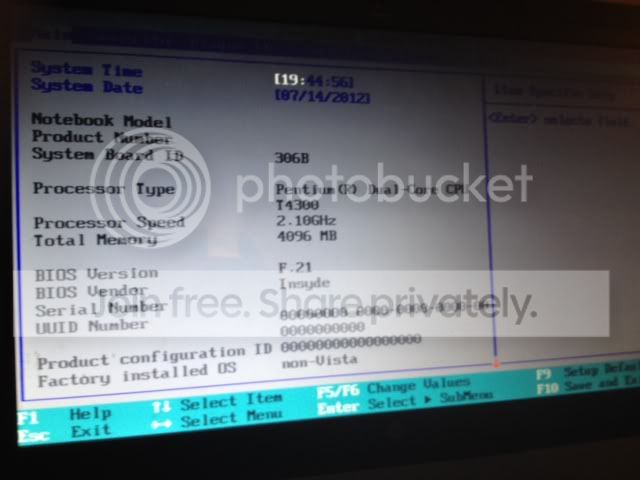
photo-1.jpg


bad picture but everything looks normal except all of those zeros..
 

My Computer My Computer

At a glance

Windows 7 64 bit4 GB
Computer Manufacturer/Model Number
HP G71
OS
Windows 7 64 bit
Memory
4 GB
Did HP have you go through the steps to reset the BIOS hardware/software connections? I doubt it will resolve the problem, but it is worth a shot:
  1. Shut down and turn off the computer.
  2. Unplug the computer from the wall or surge protector (then remove the battery if it is a laptop).
  3. "Remove the computer from any port replicator or docking station, disconnect
    cables to printers or devices such as external monitors, USB memory sticks or SD cards, headset or external speakers, mouse or auxiliary keyboard, turn off WIFI and Bluetooth wireless devices." (Use Hard Reset to Resolve Hardware and Software Issues HP Pavilion dv5000 Notebook PC series - HP Customer Care (United States - English))
  4. Hold down the power button for 30 seconds. This closes the circuit and ensures all
    power from components is drained to clear the software connections between the BIOS
    and hardware and clear any corruption in the temporary memory.
  5. (If it is a laptop, plug the battery back into the laptop and then) Plug the computer back into the wall. Do not reconnect any unnecessary peripherals; monitor, keyboard,
    and mouse should suffice and be the only peripherals reconnected.
  6. Turn it on to reinitialize the software connections between the BIOS and hardware
 

My Computer My Computer

At a glance

Windows 7 Home Premium 64 BitIntel(R) Core(TM)2 Quad CPU Q9550 @ 2.83GHz6.00 GB Hundai HMT125U6BFR8C-H9ATI Radeon HD 4850
Computer Manufacturer/Model Number
HP Pavilion e9110t
OS
Windows 7 Home Premium 64 Bit
CPU
Intel(R) Core(TM)2 Quad CPU Q9550 @ 2.83GHz
Motherboard
Pegatron IPIEL-LA3
Memory
6.00 GB Hundai HMT125U6BFR8C-H9
Graphics Card(s)
ATI Radeon HD 4850
Sound Card
Realtek High Definition Audio/ATI High Definition Audio
Monitor(s) Displays
Acer AL2216W
Screen Resolution
1680x1050
Hard Drives
Hitachi HDP725050GLA360 ATA Device 500 GB
PSU
Unknown/installed by HP
Case
HP generic case
Cooling
Intel Stock Cooling
Keyboard
HP Keyboard
Mouse
HP Mouse
Internet Speed
Download: 19.15 Mbps Upload: 1.67 Mbps
Other Info
Network Adapter Realtek RTL8168D/8111D Family PCI-E Gigabit Ethernet NIC (NDIS 6.20)
Network Adapter 802.11n Wireless PCI Express Card LAN Adapter
I don't believe that time is correct if that means anything now. Time shown is 19-44-56 = 7:44 Virginia pm est and the post was just 17 minutes ago. Time now is 10:59 est.
 

My Computer My Computer

At a glance

Windows 10 Pro. 64/ version 1709 Windows 7 Pr...Intel i7-6800K @ 4.3Corsair Platinum 16 gig @2400EVGA GTX 1070 OC
Computer type
PC/Desktop
Computer Manufacturer/Model Number
Home made Desktop
OS
Windows 10 Pro. 64/ version 1709 Windows 7 Pro/64
CPU
Intel i7-6800K @ 4.3
Motherboard
ASUS X-99 Deluxe II
Memory
Corsair Platinum 16 gig @2400
Graphics Card(s)
EVGA GTX 1070 OC
Monitor(s) Displays
Asus 27" LED LCD/VE278Q
Screen Resolution
1920-1080 or 1280-720 HDMI
Hard Drives
INTEL SSD 730-240 Gb Sata 3.0/
PSU
EVGA Platium 1200W
Case
Phanteks Luxe Tempered Glass 8 fans/ one radiator
Cooling
XSPC/ Water Cooled CPU
Keyboard
Das 4 Professional
Mouse
Logitech M705/MX Anywhere 2-S
Internet Speed
100 mbits
Antivirus
Microsoft Security Essentials/ Malwarebytes Premium 3.0/ SAS
Browser
I.E. 11 default/Firefox/ ISP Time Warner Cable/Spectrum
Other Info
LG BluRay Burner/
Sound system-KLipsch-THX/
Icy Dock ssd Hot Swap bays.
I don't believe that time is correct if that means anything now. Time shown is 19-44-56 = 7:44 Virginia pm est and the post was just 17 minutes ago. Time now is 10:59 est.


Sorry I took that picture at that time.
 

My Computer My Computer

At a glance

Windows 7 64 bit4 GB
Computer Manufacturer/Model Number
HP G71
OS
Windows 7 64 bit
Memory
4 GB
Did HP have you go through the steps to reset the BIOS hardware/software connections? I doubt it will resolve the problem, but it is worth a shot:

  1. Shut down and turn off the computer.
  2. Unplug the computer from the wall or surge protector (then remove the battery if it is a laptop).
  3. "Remove the computer from any port replicator or docking station, disconnect
    cables to printers or devices such as external monitors, USB memory sticks or SD cards, headset or external speakers, mouse or auxiliary keyboard, turn off WIFI and Bluetooth wireless devices." (Use Hard Reset to Resolve Hardware and Software Issues HP Pavilion dv5000 Notebook PC series - HP Customer Care (United States - English))
  4. Hold down the power button for 30 seconds. This closes the circuit and ensures all
    power from components is drained to clear the software connections between the BIOS
    and hardware and clear any corruption in the temporary memory.
  5. (If it is a laptop, plug the battery back into the laptop and then) Plug the computer back into the wall. Do not reconnect any unnecessary peripherals; monitor, keyboard,
    and mouse should suffice and be the only peripherals reconnected.
  6. Turn it on to reinitialize the software connections between the BIOS and hardware

OK I did all of that. Should I do something now that the computer is back on??
 

My Computer My Computer

At a glance

Windows 7 64 bit4 GB
Computer Manufacturer/Model Number
HP G71
OS
Windows 7 64 bit
Memory
4 GB
Just check whether the 0's are still there. I am nearly 100% sure that process will not resolve the problem. It was just a thought that occurred to me that can sometimes help with BIOS related issues.
 

My Computer My Computer

At a glance

Windows 7 Home Premium 64 BitIntel(R) Core(TM)2 Quad CPU Q9550 @ 2.83GHz6.00 GB Hundai HMT125U6BFR8C-H9ATI Radeon HD 4850
Computer Manufacturer/Model Number
HP Pavilion e9110t
OS
Windows 7 Home Premium 64 Bit
CPU
Intel(R) Core(TM)2 Quad CPU Q9550 @ 2.83GHz
Motherboard
Pegatron IPIEL-LA3
Memory
6.00 GB Hundai HMT125U6BFR8C-H9
Graphics Card(s)
ATI Radeon HD 4850
Sound Card
Realtek High Definition Audio/ATI High Definition Audio
Monitor(s) Displays
Acer AL2216W
Screen Resolution
1680x1050
Hard Drives
Hitachi HDP725050GLA360 ATA Device 500 GB
PSU
Unknown/installed by HP
Case
HP generic case
Cooling
Intel Stock Cooling
Keyboard
HP Keyboard
Mouse
HP Mouse
Internet Speed
Download: 19.15 Mbps Upload: 1.67 Mbps
Other Info
Network Adapter Realtek RTL8168D/8111D Family PCI-E Gigabit Ethernet NIC (NDIS 6.20)
Network Adapter 802.11n Wireless PCI Express Card LAN Adapter
Just check whether the 0's are still there. I am nearly 100% sure that process will not resolve the problem. It was just a thought that occurred to me that can sometimes help with BIOS related issues.

Oh poo. They are! :cry:
 

My Computer My Computer

At a glance

Windows 7 64 bit4 GB
Computer Manufacturer/Model Number
HP G71
OS
Windows 7 64 bit
Memory
4 GB
The HP lady was talking BS!
Neither Retail nor OEM System Builder licenses take ANY notice of the BIOS tables at all.

Yep, the Key on the Microsoft sticker on the bottom of the case (on some machines it can be in the battery compartment - but that's a recent innovation for most companies.)

Actually, activation is still required. It just doesn't ask for a key, that's all. We have many HP computers on our stand-alone, non-internet network at work, and I have to call the 800 number in order to activate them.

Keg
At no time have I ever said that activation wasn't required - it is required *without exception* in all installations of Windows (and Office) since XP was launched (technically, since the launch of Office 2000, which was the first product to require activation)

The Key on the COA sticker will always ask for activation when first installed (often that first activation will have to be by telephone).

A pre-installed OEM_SLP Key in contrast should never ask for activation, as the system is designed to activate it on every boot. If it does ask for activation, then there is something amiss - either the BIOS SLIC table is broken, the certificates in teh OS are missing, there is a software problem of some kind, or the Key is on the wrong machine.
 

My Computer My Computer

At a glance

Win 7 x64 Home Premium (and x86 VirtualBox VM...i3 370M/i7 6500U8GB - finally :)/8GBit's an i3, dude!/dual Intel&nVidia
Computer type
Laptop
Computer Manufacturer/Model Number
Asus K52F or Lenovo B51-80
OS
Win 7 x64 Home Premium (and x86 VirtualBox VM)/Win10
CPU
i3 370M/i7 6500U
Motherboard
Asus/Lenovo
Memory
8GB - finally :)/8GB
Graphics Card(s)
it's an i3, dude!/dual Intel&nVidia
Sound Card
onboard
Monitor(s) Displays
15.6" built-in
Screen Resolution
1366x768/1920x1080
Hard Drives
750GB Seagate internal
Sundry external drives attached to other computers on the local network
1TB SSD on the Lenovo
PSU
n/a
Internet Speed
as much as I can get - usually on a dongle/phone, so <1MB/s
Antivirus
MSE/Defender
Browser
IE11/12/Edge/Chrome/FF(if I must)
The time is irrelevant it this point - the important line is the one at the bottom.
'Factory Installed OS - non-Vista' which means that the SLIC table is removed
(It's the first time I've ever seen that screen!)

{edit} Sorry - I missed the back page of the thread for my earlier comment (not enough caffeine again!{/edit}
 

My Computer My Computer

At a glance

Win 7 x64 Home Premium (and x86 VirtualBox VM...i3 370M/i7 6500U8GB - finally :)/8GBit's an i3, dude!/dual Intel&nVidia
Computer type
Laptop
Computer Manufacturer/Model Number
Asus K52F or Lenovo B51-80
OS
Win 7 x64 Home Premium (and x86 VirtualBox VM)/Win10
CPU
i3 370M/i7 6500U
Motherboard
Asus/Lenovo
Memory
8GB - finally :)/8GB
Graphics Card(s)
it's an i3, dude!/dual Intel&nVidia
Sound Card
onboard
Monitor(s) Displays
15.6" built-in
Screen Resolution
1366x768/1920x1080
Hard Drives
750GB Seagate internal
Sundry external drives attached to other computers on the local network
1TB SSD on the Lenovo
PSU
n/a
Internet Speed
as much as I can get - usually on a dongle/phone, so <1MB/s
Antivirus
MSE/Defender
Browser
IE11/12/Edge/Chrome/FF(if I must)
First time you've ever seen that screen means that's a bad thing.. How would this happen? Should i just restore the entire thing?
 

My Computer My Computer

At a glance

Windows 7 64 bit4 GB
Computer Manufacturer/Model Number
HP G71
OS
Windows 7 64 bit
Memory
4 GB
The time is irrelevant it this point - the important line is the one at the bottom.
'Factory Installed OS - non-Vista' which means that the SLIC table is removed
(It's the first time I've ever seen that screen!)

{edit} Sorry - I missed the back page of the thread for my earlier comment (not enough caffeine again!{/edit}

Not enough caffeine what were you in the pub all night last night :))) do you have an accent??
 

My Computer My Computer

At a glance

Windows 7 64 bit4 GB
Computer Manufacturer/Model Number
HP G71
OS
Windows 7 64 bit
Memory
4 GB
First time you've ever seen that screen means that's a bad thing.. How would this happen? Should i just restore the entire thing?

The most common 'sensible' explanation is installing a custom BIOS for some reason - other than that, we're left with the elementts of chance and malware.
 

My Computer My Computer

At a glance

Win 7 x64 Home Premium (and x86 VirtualBox VM...i3 370M/i7 6500U8GB - finally :)/8GBit's an i3, dude!/dual Intel&nVidia
Computer type
Laptop
Computer Manufacturer/Model Number
Asus K52F or Lenovo B51-80
OS
Win 7 x64 Home Premium (and x86 VirtualBox VM)/Win10
CPU
i3 370M/i7 6500U
Motherboard
Asus/Lenovo
Memory
8GB - finally :)/8GB
Graphics Card(s)
it's an i3, dude!/dual Intel&nVidia
Sound Card
onboard
Monitor(s) Displays
15.6" built-in
Screen Resolution
1366x768/1920x1080
Hard Drives
750GB Seagate internal
Sundry external drives attached to other computers on the local network
1TB SSD on the Lenovo
PSU
n/a
Internet Speed
as much as I can get - usually on a dongle/phone, so <1MB/s
Antivirus
MSE/Defender
Browser
IE11/12/Edge/Chrome/FF(if I must)
Not enough caffeine what were you in the pub all night last night :))) do you have an accent??

Nah- it was 2a.m. when I went to bed, though.

Accent? - it's you foreigners that have accents! :)
 

My Computer My Computer

At a glance

Win 7 x64 Home Premium (and x86 VirtualBox VM...i3 370M/i7 6500U8GB - finally :)/8GBit's an i3, dude!/dual Intel&nVidia
Computer type
Laptop
Computer Manufacturer/Model Number
Asus K52F or Lenovo B51-80
OS
Win 7 x64 Home Premium (and x86 VirtualBox VM)/Win10
CPU
i3 370M/i7 6500U
Motherboard
Asus/Lenovo
Memory
8GB - finally :)/8GB
Graphics Card(s)
it's an i3, dude!/dual Intel&nVidia
Sound Card
onboard
Monitor(s) Displays
15.6" built-in
Screen Resolution
1366x768/1920x1080
Hard Drives
750GB Seagate internal
Sundry external drives attached to other computers on the local network
1TB SSD on the Lenovo
PSU
n/a
Internet Speed
as much as I can get - usually on a dongle/phone, so <1MB/s
Antivirus
MSE/Defender
Browser
IE11/12/Edge/Chrome/FF(if I must)
Back
Top