Solved The Dependency service or group failed to start.

cspears10

New member
Local time
5:07 AM
Messages
1
I am having this problem and it started one day when I booted up my PC. I tried resetting the router, modem, a new cable, using netsh winsock reset catalog (reset winsock entries), netsh int ip reset reset.log hit (reset TCP/IP stack)
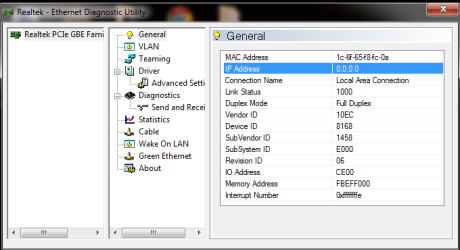
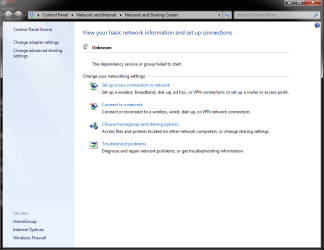
and none of it has helped. I have updated all the drivers for my motherboard, which is a gigabyte GA-Z68XP-UD3P. On the lan connections I am getting a solid orange light,1000ms connection, and a flashing yellow light which means data is being received and sending (This is in the manual). I have used the program, Realtek-Ethernet Diagnostic Utility which gives me some information that I put as attachments, I'm not sure how to post SS's when the insert picture button ask for a URL. I also posted the Ipconfig which brought back some weird results. I am not sure where to go from here and any help would be great.
 

Attachments

  • ipconfig.png
    ipconfig.png
    9.6 KB · Views: 128
  • Realtek Ethernet.png
    Realtek Ethernet.png
    15.7 KB · Views: 112
  • Realtek Ethernet2.png
    Realtek Ethernet2.png
    19.3 KB · Views: 99
  • Unknown.png
    Unknown.png
    32 KB · Views: 109

My Computer My Computer

OS
Windows 7 Home Premium 64bit
Have you tried restoring to a previous point before you started having these problems? :D
 

My Computer My Computer

OS
Win 7 64bit HP
I am having this problem and it started one day when I booted up my PC. I tried resetting the router, modem, a new cable, using netsh winsock reset catalog (reset winsock entries), netsh int ip reset reset.log hit (reset TCP/IP stack)
and none of it has helped. I have updated all the drivers for my motherboard, which is a gigabyte GA-Z68XP-UD3P. On the lan connections I am getting a solid orange light,1000ms connection, and a flashing yellow light which means data is being received and sending (This is in the manual). I have used the program, Realtek-Ethernet Diagnostic Utility which gives me some information that I put as attachments, I'm not sure how to post SS's when the insert picture button ask for a URL. I also posted the Ipconfig which brought back some weird results. I am not sure where to go from here and any help would be great.

According to the ipconfig you aren't getting anything from the router at all so resetting the router would be the first thing to try. :)
 

My Computer My Computer

Computer type
PC/Desktop
Computer Manufacturer/Model Number
Home built
OS
Windows 7 Ult, Windows 8.1 Pro,
CPU
Q9650-4.275GHz, E8600 4.5GHz, E6750-3.8GHz
Motherboard
Evga 780i FTW
Memory
G.Skill PC2 9600 1200Mhz 5 5 5 15 2T
Graphics Card(s)
GTX480
Sound Card
Asus Xonar D2
Monitor(s) Displays
HannsG
Screen Resolution
1680X1050
Hard Drives
GSkill Phoenix Pro 120GB SSD
PSU
ThermalTake Toughpower 1000Watt modular
Case
ThermalTake XaserV
Cooling
Xigmatek S1283
Keyboard
Logitech G15
Mouse
Logitech G9
Internet Speed
T1
According to the ipconfig you aren't getting anything from the router at all so resetting the router would be the first thing to try. :)

He'd tried resetting the router many times, as well as plugging another computer into the same port with the same cable and it worked correctly. He did a good job of trying all the basics. Never did find out why all the services crashed but restoring to a previous point solved the problem for now. The funny thing is that the only thing he did before this problem appeared was to install a card reader. And used the windows driver, didn't install any software or make any other changes. Very strange.
 
Last edited:

My Computer My Computer

OS
Win 7 64bit HP
He'd tried resetting the router many times, as well as plugging another computer into the same port with the same cable and it worked correctly. He did a good job of trying all the basics. Never did find out why all the services crashed but restoring to a previous point solved the problem for now. The funny thing is that the only thing he did before this problem appeared was to install a card reader. And used the windows driver, didn't install any software or make any other changes. Very strange.

That is strange yes, it seems that the card reader drivers were not compatible with his system or something. Anyway glad it's fixed with the restore.
 

My Computer My Computer

Computer type
PC/Desktop
Computer Manufacturer/Model Number
Home built
OS
Windows 7 Ult, Windows 8.1 Pro,
CPU
Q9650-4.275GHz, E8600 4.5GHz, E6750-3.8GHz
Motherboard
Evga 780i FTW
Memory
G.Skill PC2 9600 1200Mhz 5 5 5 15 2T
Graphics Card(s)
GTX480
Sound Card
Asus Xonar D2
Monitor(s) Displays
HannsG
Screen Resolution
1680X1050
Hard Drives
GSkill Phoenix Pro 120GB SSD
PSU
ThermalTake Toughpower 1000Watt modular
Case
ThermalTake XaserV
Cooling
Xigmatek S1283
Keyboard
Logitech G15
Mouse
Logitech G9
Internet Speed
T1
That is strange yes, it seems that the card reader drivers were not compatible with his system or something. Anyway glad it's fixed with the restore.


Thanks for the help. It is strange and like I said, it pulled the standard windows drivers, we didn't load anything!!!

Very annoying to go through all this trouble for no good reason.
 

My Computer My Computer

OS
Win 7 64bit HP
Back
Top