ACER laptop not connecting via wifi

hemenduroy

New member
Local time
9:57 PM
Messages
13
hi, i have an ACER Aspire 4741Z and i am not able to connect via wifi :confused:
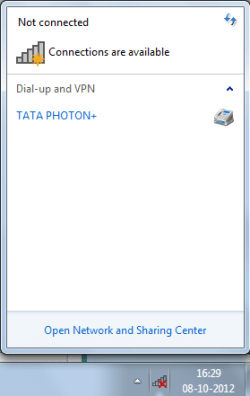
I can connect fine with ethernet but wifi is not working...the tray icon always shows a red cross :(

Wifi used to work fine about 2 months ago but now its not working :( ...please help me :)

heres the results from ipconfig/all (something like that which i found on other forums )

Microsoft Windows [Version 6.1.7601]
Copyright (c) 2009 Microsoft Corporation. All rights reserved.

C:\Users\TANMOY ROY>ipconfig /all

Windows IP Configuration

Host Name . . . . . . . . . . . . : TANMOYROY-PC
Primary Dns Suffix . . . . . . . :
Node Type . . . . . . . . . . . . : Hybrid
IP Routing Enabled. . . . . . . . : No
WINS Proxy Enabled. . . . . . . . : No

PPP adapter TATA PHOTON+:

Connection-specific DNS Suffix . :
Description . . . . . . . . . . . : TATA PHOTON+
Physical Address. . . . . . . . . :
DHCP Enabled. . . . . . . . . . . : No
Autoconfiguration Enabled . . . . : Yes
IPv4 Address. . . . . . . . . . . : 14.99.188.22(Preferred)
Subnet Mask . . . . . . . . . . . : 255.255.255.255
Default Gateway . . . . . . . . . : 0.0.0.0
DNS Servers . . . . . . . . . . . : 121.242.190.181
121.242.190.210
NetBIOS over Tcpip. . . . . . . . : Disabled

Wireless LAN adapter Wireless Network Connection:

Media State . . . . . . . . . . . : Media disconnected
Connection-specific DNS Suffix . :
Description . . . . . . . . . . . : Broadcom 802.11n Network Adapter
Physical Address. . . . . . . . . : 90-4C-E5-5D-E1-F9
DHCP Enabled. . . . . . . . . . . : Yes
Autoconfiguration Enabled . . . . : Yes

Ethernet adapter Local Area Connection:

Media State . . . . . . . . . . . : Media disconnected
Connection-specific DNS Suffix . :
Description . . . . . . . . . . . : Broadcom NetLink (TM) Gigabit Ethernet
Physical Address. . . . . . . . . : 00-26-2D-AF-84-78
DHCP Enabled. . . . . . . . . . . : Yes
Autoconfiguration Enabled . . . . : Yes

Tunnel adapter isatap.{BE842C4B-3BC0-4EFC-AF20-2891B570F90D}:

Media State . . . . . . . . . . . : Media disconnected
Connection-specific DNS Suffix . :
Description . . . . . . . . . . . : Microsoft ISATAP Adapter #2
Physical Address. . . . . . . . . : 00-00-00-00-00-00-00-E0
DHCP Enabled. . . . . . . . . . . : No
Autoconfiguration Enabled . . . . : Yes

Tunnel adapter Local Area Connection* 11:

Connection-specific DNS Suffix . :
Description . . . . . . . . . . . : Teredo Tunneling Pseudo-Interface
Physical Address. . . . . . . . . : 00-00-00-00-00-00-00-E0
DHCP Enabled. . . . . . . . . . . : No
Autoconfiguration Enabled . . . . : Yes
IPv6 Address. . . . . . . . . . . : 2001:0:9d38:953c:1c88:33a3:f19c:43e9(Pref
erred)
Link-local IPv6 Address . . . . . : fe80::1c88:33a3:f19c:43e9%29(Preferred)
Default Gateway . . . . . . . . . :
NetBIOS over Tcpip. . . . . . . . : Disabled

Tunnel adapter isatap.{06EADD92-FB92-472F-9406-D93019C8A538}:

Media State . . . . . . . . . . . : Media disconnected
Connection-specific DNS Suffix . :
Description . . . . . . . . . . . : Microsoft ISATAP Adapter #3
Physical Address. . . . . . . . . : 00-00-00-00-00-00-00-E0
DHCP Enabled. . . . . . . . . . . : No
Autoconfiguration Enabled . . . . : Yes

Tunnel adapter isatap.{78463C52-821F-41D8-92E4-E92AFCD70A05}:

Media State . . . . . . . . . . . : Media disconnected
Connection-specific DNS Suffix . :
Description . . . . . . . . . . . : Microsoft ISATAP Adapter #7
Physical Address. . . . . . . . . : 00-00-00-00-00-00-00-E0
DHCP Enabled. . . . . . . . . . . : No
Autoconfiguration Enabled . . . . : Yes

Tunnel adapter 6TO4 Adapter:

Connection-specific DNS Suffix . :
Description . . . . . . . . . . . : Microsoft 6to4 Adapter
Physical Address. . . . . . . . . : 00-00-00-00-00-00-00-E0
DHCP Enabled. . . . . . . . . . . : No
Autoconfiguration Enabled . . . . : Yes
IPv6 Address. . . . . . . . . . . : 2002:e63:bc16::e63:bc16(Preferred)
Default Gateway . . . . . . . . . : 2002:c058:6301::c058:6301
DNS Servers . . . . . . . . . . . : 121.242.190.181
121.242.190.210
NetBIOS over Tcpip. . . . . . . . : Disabled

C:\Users\TANMOY ROY>
 

My Computer My Computer

At a glance

Windows 7 Home Basic 64bitIntel Pentium processor P60003 GB DDR3Intel HD Graphics
Computer Manufacturer/Model Number
ACER
OS
Windows 7 Home Basic 64bit
CPU
Intel Pentium processor P6000
Memory
3 GB DDR3
Graphics Card(s)
Intel HD Graphics
Sound Card
Realtek HD Audio
Monitor(s) Displays
14.0" HD LED LCD
Screen Resolution
1366x768
Hard Drives
320 GB
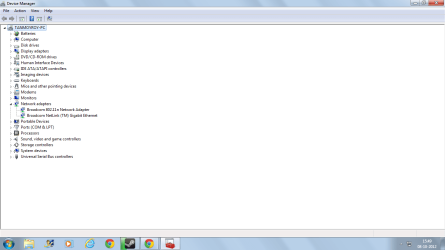
please post output of "device manager" with network adapters branche expanded.
 

My Computer My Computer

At a glance

Microsoft Windows 7 Home Premium 64-bits 7601...Intel(R) Core(TM) i3 CPU M 370 @ 2.40GHz4,00 GBATI Mobility Radeon HD 5400 Series
Computer type
Laptop
Computer Manufacturer/Model Number
ACER ASPIRE 5742G
OS
Microsoft Windows 7 Home Premium 64-bits 7601 Multiprocessor Free Service Pack 1
CPU
Intel(R) Core(TM) i3 CPU M 370 @ 2.40GHz
Motherboard
Acer Aspire 5742G
Memory
4,00 GB
Graphics Card(s)
ATI Mobility Radeon HD 5400 Series
Sound Card
(1) AMD High Definition Audio Device (2) Realtek High Defi
Screen Resolution
1366 x 768 x 32 bits (4294967296 colors) @ 60 Hz
Hard Drives
WDC WD5000BEVT-22ZAT0
thanks for the speedy reply :D here is the output of the device manager :
DEV MAN.png
 

My Computer My Computer

At a glance

Windows 7 Home Basic 64bitIntel Pentium processor P60003 GB DDR3Intel HD Graphics
Computer Manufacturer/Model Number
ACER
OS
Windows 7 Home Basic 64bit
CPU
Intel Pentium processor P6000
Memory
3 GB DDR3
Graphics Card(s)
Intel HD Graphics
Sound Card
Realtek HD Audio
Monitor(s) Displays
14.0" HD LED LCD
Screen Resolution
1366x768
Hard Drives
320 GB
press FN+F3
what happens?
 

My Computer My Computer

At a glance

Microsoft Windows 7 Home Premium 64-bits 7601...Intel(R) Core(TM) i3 CPU M 370 @ 2.40GHz4,00 GBATI Mobility Radeon HD 5400 Series
Computer type
Laptop
Computer Manufacturer/Model Number
ACER ASPIRE 5742G
OS
Microsoft Windows 7 Home Premium 64-bits 7601 Multiprocessor Free Service Pack 1
CPU
Intel(R) Core(TM) i3 CPU M 370 @ 2.40GHz
Motherboard
Acer Aspire 5742G
Memory
4,00 GB
Graphics Card(s)
ATI Mobility Radeon HD 5400 Series
Sound Card
(1) AMD High Definition Audio Device (2) Realtek High Defi
Screen Resolution
1366 x 768 x 32 bits (4294967296 colors) @ 60 Hz
Hard Drives
WDC WD5000BEVT-22ZAT0
when i press fn + f3 i get a small window to enable/disable wifi/bluetooth. i have set wifi at "on" and bluetooth at "off".
 

My Computer My Computer

At a glance

Windows 7 Home Basic 64bitIntel Pentium processor P60003 GB DDR3Intel HD Graphics
Computer Manufacturer/Model Number
ACER
OS
Windows 7 Home Basic 64bit
CPU
Intel Pentium processor P6000
Memory
3 GB DDR3
Graphics Card(s)
Intel HD Graphics
Sound Card
Realtek HD Audio
Monitor(s) Displays
14.0" HD LED LCD
Screen Resolution
1366x768
Hard Drives
320 GB
when i go in the control panel, there is no 'manage wireless networks' option...(i saw this in other forums)

ntwrk.png

so i typed 'wireless' in the start menu n got a link...it says 'wireless is not currently enabled'

man.png
 

My Computer My Computer

At a glance

Windows 7 Home Basic 64bitIntel Pentium processor P60003 GB DDR3Intel HD Graphics
Computer Manufacturer/Model Number
ACER
OS
Windows 7 Home Basic 64bit
CPU
Intel Pentium processor P6000
Memory
3 GB DDR3
Graphics Card(s)
Intel HD Graphics
Sound Card
Realtek HD Audio
Monitor(s) Displays
14.0" HD LED LCD
Screen Resolution
1366x768
Hard Drives
320 GB
when i press fn + f3 i get a small window to enable/disable wifi/bluetooth. i have set wifi at "on" and bluetooth at "off".
So wifi is on now? On my acer 5742G I see above upper left of keyboard:
power on button (blue light), right side of it: harddisk light (flashing blue if accesing disk), right side of it: wireless icon (color orange).

You see the wirless icon there or somewhere else? It changes color if enableing/disabling it using fn+f3?
 

My Computer My Computer

At a glance

Microsoft Windows 7 Home Premium 64-bits 7601...Intel(R) Core(TM) i3 CPU M 370 @ 2.40GHz4,00 GBATI Mobility Radeon HD 5400 Series
Computer type
Laptop
Computer Manufacturer/Model Number
ACER ASPIRE 5742G
OS
Microsoft Windows 7 Home Premium 64-bits 7601 Multiprocessor Free Service Pack 1
CPU
Intel(R) Core(TM) i3 CPU M 370 @ 2.40GHz
Motherboard
Acer Aspire 5742G
Memory
4,00 GB
Graphics Card(s)
ATI Mobility Radeon HD 5400 Series
Sound Card
(1) AMD High Definition Audio Device (2) Realtek High Defi
Screen Resolution
1366 x 768 x 32 bits (4294967296 colors) @ 60 Hz
Hard Drives
WDC WD5000BEVT-22ZAT0
hardisk icon : flashing blue
wifi icon : orange when i press fn + f3 n set it to 'on'. when i set it to 'off' , there is no light. But when i set it to on i still cant detect my home's wifi
 

My Computer My Computer

At a glance

Windows 7 Home Basic 64bitIntel Pentium processor P60003 GB DDR3Intel HD Graphics
Computer Manufacturer/Model Number
ACER
OS
Windows 7 Home Basic 64bit
CPU
Intel Pentium processor P6000
Memory
3 GB DDR3
Graphics Card(s)
Intel HD Graphics
Sound Card
Realtek HD Audio
Monitor(s) Displays
14.0" HD LED LCD
Screen Resolution
1366x768
Hard Drives
320 GB
network centre->change adapter settings. Richt click on wireless adapter->enable
This should fix it. Right?
 

My Computer My Computer

At a glance

Microsoft Windows 7 Home Premium 64-bits 7601...Intel(R) Core(TM) i3 CPU M 370 @ 2.40GHz4,00 GBATI Mobility Radeon HD 5400 Series
Computer type
Laptop
Computer Manufacturer/Model Number
ACER ASPIRE 5742G
OS
Microsoft Windows 7 Home Premium 64-bits 7601 Multiprocessor Free Service Pack 1
CPU
Intel(R) Core(TM) i3 CPU M 370 @ 2.40GHz
Motherboard
Acer Aspire 5742G
Memory
4,00 GB
Graphics Card(s)
ATI Mobility Radeon HD 5400 Series
Sound Card
(1) AMD High Definition Audio Device (2) Realtek High Defi
Screen Resolution
1366 x 768 x 32 bits (4294967296 colors) @ 60 Hz
Hard Drives
WDC WD5000BEVT-22ZAT0
hardisk icon : flashing blue
wifi icon : orange when i press fn + f3 n set it to 'on'. when i set it to 'off' , there is no light. But when i set it to on i still cant detect my home's wifi
ipconfig looks fine
device manager looks fine
if wireless icon is orange above keyboard it's fine.
just enable wireless adapter in network centre (change adapter settings) and it should be fine
 

My Computer My Computer

At a glance

Microsoft Windows 7 Home Premium 64-bits 7601...Intel(R) Core(TM) i3 CPU M 370 @ 2.40GHz4,00 GBATI Mobility Radeon HD 5400 Series
Computer type
Laptop
Computer Manufacturer/Model Number
ACER ASPIRE 5742G
OS
Microsoft Windows 7 Home Premium 64-bits 7601 Multiprocessor Free Service Pack 1
CPU
Intel(R) Core(TM) i3 CPU M 370 @ 2.40GHz
Motherboard
Acer Aspire 5742G
Memory
4,00 GB
Graphics Card(s)
ATI Mobility Radeon HD 5400 Series
Sound Card
(1) AMD High Definition Audio Device (2) Realtek High Defi
Screen Resolution
1366 x 768 x 32 bits (4294967296 colors) @ 60 Hz
Hard Drives
WDC WD5000BEVT-22ZAT0
it is already enabled as you can see there is a disable option (which means that its enabled right? )

Untitled2.png
 

My Computer My Computer

At a glance

Windows 7 Home Basic 64bitIntel Pentium processor P60003 GB DDR3Intel HD Graphics
Computer Manufacturer/Model Number
ACER
OS
Windows 7 Home Basic 64bit
CPU
Intel Pentium processor P6000
Memory
3 GB DDR3
Graphics Card(s)
Intel HD Graphics
Sound Card
Realtek HD Audio
Monitor(s) Displays
14.0" HD LED LCD
Screen Resolution
1366x768
Hard Drives
320 GB
it is already enabled as you can see there is an option to disable it (which means that it is enabled right? )

Untitled2.png
 

My Computer My Computer

At a glance

Windows 7 Home Basic 64bitIntel Pentium processor P60003 GB DDR3Intel HD Graphics
Computer Manufacturer/Model Number
ACER
OS
Windows 7 Home Basic 64bit
CPU
Intel Pentium processor P6000
Memory
3 GB DDR3
Graphics Card(s)
Intel HD Graphics
Sound Card
Realtek HD Audio
Monitor(s) Displays
14.0" HD LED LCD
Screen Resolution
1366x768
Hard Drives
320 GB
sorry for the double post... i thought it hadnt got posted...it was actually in page 2 lol :P
 

My Computer My Computer

At a glance

Windows 7 Home Basic 64bitIntel Pentium processor P60003 GB DDR3Intel HD Graphics
Computer Manufacturer/Model Number
ACER
OS
Windows 7 Home Basic 64bit
CPU
Intel Pentium processor P6000
Memory
3 GB DDR3
Graphics Card(s)
Intel HD Graphics
Sound Card
Realtek HD Audio
Monitor(s) Displays
14.0" HD LED LCD
Screen Resolution
1366x768
Hard Drives
320 GB
it is already enabled as you can see there is an option to disable it (which means that it is enabled right? )

View attachment 235598
it's enabled. You can try connect there. But it's actually the same form taskbar. And there's a red cross you said.

Try to disconnect from your current 3G internet connection (temporary). Or disable it there (just as a test). Then try to connect using wifi.
 

My Computer My Computer

At a glance

Microsoft Windows 7 Home Premium 64-bits 7601...Intel(R) Core(TM) i3 CPU M 370 @ 2.40GHz4,00 GBATI Mobility Radeon HD 5400 Series
Computer type
Laptop
Computer Manufacturer/Model Number
ACER ASPIRE 5742G
OS
Microsoft Windows 7 Home Premium 64-bits 7601 Multiprocessor Free Service Pack 1
CPU
Intel(R) Core(TM) i3 CPU M 370 @ 2.40GHz
Motherboard
Acer Aspire 5742G
Memory
4,00 GB
Graphics Card(s)
ATI Mobility Radeon HD 5400 Series
Sound Card
(1) AMD High Definition Audio Device (2) Realtek High Defi
Screen Resolution
1366 x 768 x 32 bits (4294967296 colors) @ 60 Hz
Hard Drives
WDC WD5000BEVT-22ZAT0
nope no luck :( i disconnected my 3g connection n it is still not detecting any wifi

Untitled2.png

(before i used to detect 5-6 connections i.e mine n my neighbour's.. but now..nothing :(
 

My Computer My Computer

At a glance

Windows 7 Home Basic 64bitIntel Pentium processor P60003 GB DDR3Intel HD Graphics
Computer Manufacturer/Model Number
ACER
OS
Windows 7 Home Basic 64bit
CPU
Intel Pentium processor P6000
Memory
3 GB DDR3
Graphics Card(s)
Intel HD Graphics
Sound Card
Realtek HD Audio
Monitor(s) Displays
14.0" HD LED LCD
Screen Resolution
1366x768
Hard Drives
320 GB
nope no luck :( i disconnected my 3g connection n it is still not detecting any wifi

View attachment 235600

(before i used to detect 5-6 connections i.e mine n my neighbour's.. but now..nothing :(
not only disconnect but also disable it temporary. Put it back as it was if still not working
 

My Computer My Computer

At a glance

Microsoft Windows 7 Home Premium 64-bits 7601...Intel(R) Core(TM) i3 CPU M 370 @ 2.40GHz4,00 GBATI Mobility Radeon HD 5400 Series
Computer type
Laptop
Computer Manufacturer/Model Number
ACER ASPIRE 5742G
OS
Microsoft Windows 7 Home Premium 64-bits 7601 Multiprocessor Free Service Pack 1
CPU
Intel(R) Core(TM) i3 CPU M 370 @ 2.40GHz
Motherboard
Acer Aspire 5742G
Memory
4,00 GB
Graphics Card(s)
ATI Mobility Radeon HD 5400 Series
Sound Card
(1) AMD High Definition Audio Device (2) Realtek High Defi
Screen Resolution
1366 x 768 x 32 bits (4294967296 colors) @ 60 Hz
Hard Drives
WDC WD5000BEVT-22ZAT0
i didnt understand you please give me instructions
 

My Computer My Computer

At a glance

Windows 7 Home Basic 64bitIntel Pentium processor P60003 GB DDR3Intel HD Graphics
Computer Manufacturer/Model Number
ACER
OS
Windows 7 Home Basic 64bit
CPU
Intel Pentium processor P6000
Memory
3 GB DDR3
Graphics Card(s)
Intel HD Graphics
Sound Card
Realtek HD Audio
Monitor(s) Displays
14.0" HD LED LCD
Screen Resolution
1366x768
Hard Drives
320 GB
right click you 3G network adapter in network center->change adapter settings.
You see connect/disconnect. But also something like enable/disable? I don't if I'm right(?)
 

My Computer My Computer

At a glance

Microsoft Windows 7 Home Premium 64-bits 7601...Intel(R) Core(TM) i3 CPU M 370 @ 2.40GHz4,00 GBATI Mobility Radeon HD 5400 Series
Computer type
Laptop
Computer Manufacturer/Model Number
ACER ASPIRE 5742G
OS
Microsoft Windows 7 Home Premium 64-bits 7601 Multiprocessor Free Service Pack 1
CPU
Intel(R) Core(TM) i3 CPU M 370 @ 2.40GHz
Motherboard
Acer Aspire 5742G
Memory
4,00 GB
Graphics Card(s)
ATI Mobility Radeon HD 5400 Series
Sound Card
(1) AMD High Definition Audio Device (2) Realtek High Defi
Screen Resolution
1366 x 768 x 32 bits (4294967296 colors) @ 60 Hz
Hard Drives
WDC WD5000BEVT-22ZAT0
all looks fine anaway. To prove it's a hardware failure:

Download Thank you | Ubuntu
It's linux, so maybe it looks strange. Burn that image to CD/DVD and boot from it. Select an option something like "try ubuntu. This changes nothing to your disk"
Then search for the network settings. I'll post where to find that later
 

My Computer My Computer

At a glance

Microsoft Windows 7 Home Premium 64-bits 7601...Intel(R) Core(TM) i3 CPU M 370 @ 2.40GHz4,00 GBATI Mobility Radeon HD 5400 Series
Computer type
Laptop
Computer Manufacturer/Model Number
ACER ASPIRE 5742G
OS
Microsoft Windows 7 Home Premium 64-bits 7601 Multiprocessor Free Service Pack 1
CPU
Intel(R) Core(TM) i3 CPU M 370 @ 2.40GHz
Motherboard
Acer Aspire 5742G
Memory
4,00 GB
Graphics Card(s)
ATI Mobility Radeon HD 5400 Series
Sound Card
(1) AMD High Definition Audio Device (2) Realtek High Defi
Screen Resolution
1366 x 768 x 32 bits (4294967296 colors) @ 60 Hz
Hard Drives
WDC WD5000BEVT-22ZAT0
there is no enable/disable option

Untitled2.png
 

My Computer My Computer

At a glance

Windows 7 Home Basic 64bitIntel Pentium processor P60003 GB DDR3Intel HD Graphics
Computer Manufacturer/Model Number
ACER
OS
Windows 7 Home Basic 64bit
CPU
Intel Pentium processor P6000
Memory
3 GB DDR3
Graphics Card(s)
Intel HD Graphics
Sound Card
Realtek HD Audio
Monitor(s) Displays
14.0" HD LED LCD
Screen Resolution
1366x768
Hard Drives
320 GB
Back
Top