To anyone who might know a solution to this quandary:
As a fresh user of Windows 7 Home Premium 64-bit that came installed with my new desktop computer, I am now and then confronted with issues I never encountered before. I have been relatively proficient in using XP for years on my older machines, but can not always solve problems I run across now.
Here goes:
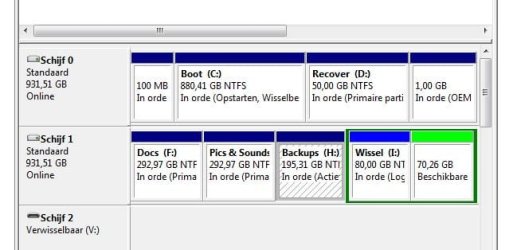
When I added an external 1TB HD to the new computer, I partitioned it into four partitions making use of the partition capability that comes with Win7. This in contrast to my XP computers, on which I used a separate, commercial disk management utility (it is unfortunately not compatible with a 64-bit OS).
Two of the partitions were reserved for document, picture and video files, one was reserved for backups, one for an extra Windows swap file.
[Note: the other swap file is naturally on drive C - for the time being. Once I get up and running with the new computer after transferring all my files and programs to it, I shall open and use a lot of programs simultaneously to evaluate the amount of space the swap file(s) need(s). After which I may probably use only the allocated space on the external HD and extend/shrink the partition following my findings.]
After partitioning, I took the precaution, as I did in the past, to leave sufficient GBs so as to be able to shrink/extend any of the 4 partitions whenever necessary; this resulted in an 'unused' partition.
Now nothing in this constitutes a problem because everything in that part went without a hitch. I also used the backup utility that comes as well with Windows 7. Indeed,it seemed quite adequate, if not extremely sophisticated compared to other commercial or even free backup utilities (more about this below).
My problem started when, after some automated backups, I noticed that the Windows utility takes up quite some space, while not all my programs and files have been transferred yet! Moreover, it appears that the utility cannot be programmed for different kinds of backups: incremental, full, differential, etc. It seems to do a full job every time - lest I have been missing something somewhere.
I thought I could momentarily lessen the problem by extending the partition I had dedicated for backups - making use of the 'unused' part of the HD. And it is there that I hit a wall - or rather got entangled in a typical MS catch-22 situation.
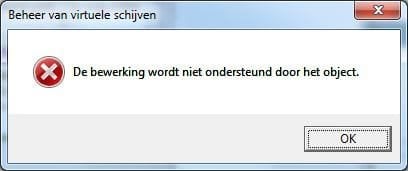
When I right-clicked on the symbol of the drive in question in Administrative Tools/Disk Management, 'extending' the drive was indeed accessible. I followed the menus and filled in the amount of MB to increase the partition size. But when I went to the next stage, there was a warning, saying that if I proceeded the partitions would be changed to dynamic ones and so on. Even if that was rather strange, since no partitions had been added, I have no problem with the change because I do not intend to install an OS on that external drive. But when I clicked "yes" - and here come the Catch-22 part - another warning: "The operation is not supported by the object". The extraordinary aspect is that this dialog comes under the heading "Management of virtual disks"! I am not making this up.
After this, I even tried to make that partition active. No difference in behaviour (and no way to go back to a simple primary partition either!)
What is the solution to this quandary? Use a third party disk + partition manager and another backup utility - since both Windows defaults seem to have restrictions and mannerisms? Is perhaps the backup dedication of the partition in the way? Indeed, all other partitions on the HD can be shrunk and extended at will.
And what about that dynamic configuration bit? No partitions were added, after all. To repeat myself: I just wanted to make use of the 'unused' space I set aside on the HD to extend the partition.
I've looked up similar situations in your forum. Most recommend to use third party software. But, golly, is there no way then to use what comes as default utilities with Windows?
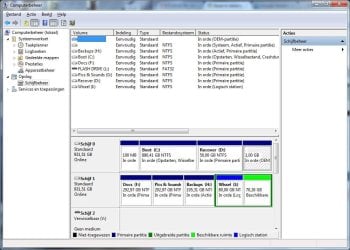
Attached, a screenshot of the relevant Disk Management part as well as that warning dialog with the Virtual disk heading. It's all in Dutch, but it is just there as proof of a very unpalatable pudding...
Looking forward to hear from one of you 'gurus'.
Best regards,
haku7
As a fresh user of Windows 7 Home Premium 64-bit that came installed with my new desktop computer, I am now and then confronted with issues I never encountered before. I have been relatively proficient in using XP for years on my older machines, but can not always solve problems I run across now.
Here goes:
When I added an external 1TB HD to the new computer, I partitioned it into four partitions making use of the partition capability that comes with Win7. This in contrast to my XP computers, on which I used a separate, commercial disk management utility (it is unfortunately not compatible with a 64-bit OS).
Two of the partitions were reserved for document, picture and video files, one was reserved for backups, one for an extra Windows swap file.
[Note: the other swap file is naturally on drive C - for the time being. Once I get up and running with the new computer after transferring all my files and programs to it, I shall open and use a lot of programs simultaneously to evaluate the amount of space the swap file(s) need(s). After which I may probably use only the allocated space on the external HD and extend/shrink the partition following my findings.]
After partitioning, I took the precaution, as I did in the past, to leave sufficient GBs so as to be able to shrink/extend any of the 4 partitions whenever necessary; this resulted in an 'unused' partition.
Now nothing in this constitutes a problem because everything in that part went without a hitch. I also used the backup utility that comes as well with Windows 7. Indeed,it seemed quite adequate, if not extremely sophisticated compared to other commercial or even free backup utilities (more about this below).
My problem started when, after some automated backups, I noticed that the Windows utility takes up quite some space, while not all my programs and files have been transferred yet! Moreover, it appears that the utility cannot be programmed for different kinds of backups: incremental, full, differential, etc. It seems to do a full job every time - lest I have been missing something somewhere.
I thought I could momentarily lessen the problem by extending the partition I had dedicated for backups - making use of the 'unused' part of the HD. And it is there that I hit a wall - or rather got entangled in a typical MS catch-22 situation.
When I right-clicked on the symbol of the drive in question in Administrative Tools/Disk Management, 'extending' the drive was indeed accessible. I followed the menus and filled in the amount of MB to increase the partition size. But when I went to the next stage, there was a warning, saying that if I proceeded the partitions would be changed to dynamic ones and so on. Even if that was rather strange, since no partitions had been added, I have no problem with the change because I do not intend to install an OS on that external drive. But when I clicked "yes" - and here come the Catch-22 part - another warning: "The operation is not supported by the object". The extraordinary aspect is that this dialog comes under the heading "Management of virtual disks"! I am not making this up.
After this, I even tried to make that partition active. No difference in behaviour (and no way to go back to a simple primary partition either!)
What is the solution to this quandary? Use a third party disk + partition manager and another backup utility - since both Windows defaults seem to have restrictions and mannerisms? Is perhaps the backup dedication of the partition in the way? Indeed, all other partitions on the HD can be shrunk and extended at will.
And what about that dynamic configuration bit? No partitions were added, after all. To repeat myself: I just wanted to make use of the 'unused' space I set aside on the HD to extend the partition.
I've looked up similar situations in your forum. Most recommend to use third party software. But, golly, is there no way then to use what comes as default utilities with Windows?
Attached, a screenshot of the relevant Disk Management part as well as that warning dialog with the Virtual disk heading. It's all in Dutch, but it is just there as proof of a very unpalatable pudding...
Looking forward to hear from one of you 'gurus'.
Best regards,
haku7
Attachments
My Computer
At a glance
Microsoft Windows 7 Home Premium 64-bits 7601...AMD A8-5500 APU with Radeon(tm) HD Graphics4,00 GB Usable 3,48 GB(1) AMD Radeon HD 7560D + 7670 Dual Graphics ...
- Computer type
- PC/Desktop
- Computer Manufacturer/Model Number
- Medion
- OS
- Microsoft Windows 7 Home Premium 64-bits 7601 Multiprocessor Free Service Pack 1
- CPU
- AMD A8-5500 APU with Radeon(tm) HD Graphics
- Motherboard
- MEDION MS-7800
- Memory
- 4,00 GB Usable 3,48 GB
- Graphics Card(s)
- (1) AMD Radeon HD 7560D + 7670 Dual Graphics (2) AMD Radeo
- Sound Card
- (1) AMD High Definition Audio Device (2) Realtek Hi Def Aud
- Screen Resolution
- 1680 x 1050 x 32 bits (4294967296 colors) @ 60 Hz
- Hard Drives
- (1) WDC WD10 EARX-00N0YB0 SATA Disk Device (2) Generic- Compact Flash USB Device (3) Generic- SD/MMC/MS PRO USB Device (4) Generic- SM/xD-Picture USB Device (5) Maxtor OneTouch USB Device (6) ST1000DM 003-9YN162 USB Device (7) TDKMedia Tr
- Browser
- Google Chrome