Solved Not responding - now can't open Outlook, check disk

Memtest went okay. No errors in seven passes. On to imaging.

That's good to know, there is no problem with your memory then, and the imaging of hard-drive will offer a complete backup of the data.
 

My Computer My Computer

Computer type
Laptop
Okay. I need help again. I downloaded Macrium to an external drive hooked up via USB. Then I downloaded the WAIK (Skydrive link) to the same drive. I clicked on reflect_setup_free.exe, and nothing seemed to happen. Then I clicked on the Rescue.iso. The menu that comes up does not look like what is shown in the video for "Imaging with free Macrium," but it does ask me for source and target discs.

Under source disc, I chose the C drive, which is about 69GB. Then it asks me to choose a target drive, but the only choice is a CD. Is this the only choice there is? And if so, how in the world does a complete copy of my stuff get copied onto it?

And can I keep my current backup on my external drive? Or do I need to have everything removed from it to create the image?

Please help. I'm totally stuck.
 
Last edited:

My Computer My Computer

At a glance

Windows 7 x64Intel Mobile Core 2 Duo T6600 @ 2.20GHz; Penr...4.00 GB Dual-Channel DDR2 @ 398MHz (6-6-6-18)Generic PnP Monitor (1366x768@60Hz)
Computer Manufacturer/Model Number
Toshiba
OS
Windows 7 x64
CPU
Intel Mobile Core 2 Duo T6600 @ 2.20GHz; Penryn 45nm Tech.
Motherboard
Toshiba Portable PC
Memory
4.00 GB Dual-Channel DDR2 @ 398MHz (6-6-6-18)
Graphics Card(s)
Generic PnP Monitor (1366x768@60Hz)
Sound Card
Realtek High Def; Intel High Def Audio HDMI
Hard Drives
466GB Toshiba MK5055GSX (SATA)
Keyboard
Microsoft Natural Ergonomic 4000
Mouse
Microsoft USB Trackball Optical (IntelliPoint)
Does anyone else have any idea how to use Macrium? The Macrium support group is just for paying customers.

Nothing seems to happen when I install reflect_setup_free.exe. After I click "Next," the bar advances very fast, and that's it. I can't pull up any menu; nothing opens. I've lost five days of work now. Please help.
 

My Computer My Computer

At a glance

Windows 7 x64Intel Mobile Core 2 Duo T6600 @ 2.20GHz; Penr...4.00 GB Dual-Channel DDR2 @ 398MHz (6-6-6-18)Generic PnP Monitor (1366x768@60Hz)
Computer Manufacturer/Model Number
Toshiba
OS
Windows 7 x64
CPU
Intel Mobile Core 2 Duo T6600 @ 2.20GHz; Penryn 45nm Tech.
Motherboard
Toshiba Portable PC
Memory
4.00 GB Dual-Channel DDR2 @ 398MHz (6-6-6-18)
Graphics Card(s)
Generic PnP Monitor (1366x768@60Hz)
Sound Card
Realtek High Def; Intel High Def Audio HDMI
Hard Drives
466GB Toshiba MK5055GSX (SATA)
Keyboard
Microsoft Natural Ergonomic 4000
Mouse
Microsoft USB Trackball Optical (IntelliPoint)
Okay, after I made sure Windows Installer was started, Macrium installed. I'm now at the window menu that is shown in the video.

I would still like to confirm I can keep my backup files on the disk I will be imaging to.
 

My Computer My Computer

At a glance

Windows 7 x64Intel Mobile Core 2 Duo T6600 @ 2.20GHz; Penr...4.00 GB Dual-Channel DDR2 @ 398MHz (6-6-6-18)Generic PnP Monitor (1366x768@60Hz)
Computer Manufacturer/Model Number
Toshiba
OS
Windows 7 x64
CPU
Intel Mobile Core 2 Duo T6600 @ 2.20GHz; Penryn 45nm Tech.
Motherboard
Toshiba Portable PC
Memory
4.00 GB Dual-Channel DDR2 @ 398MHz (6-6-6-18)
Graphics Card(s)
Generic PnP Monitor (1366x768@60Hz)
Sound Card
Realtek High Def; Intel High Def Audio HDMI
Hard Drives
466GB Toshiba MK5055GSX (SATA)
Keyboard
Microsoft Natural Ergonomic 4000
Mouse
Microsoft USB Trackball Optical (IntelliPoint)
I can't get sound on the video any more (I did check my audio services, and they seem to be okay), so I'm just going through the steps as I see them. I selected my C drive as the source. The size for total selected is correct.

For destination, I created a new folder in my external drive.

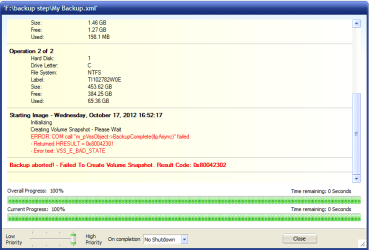
Now at the backup up window, it has it going to drive C. On the tutorial, only the name was changed -- not the location. I'm assuming it should go to the external drive, correct? That's what I did, and now I have an error (attached). I have to take a break now, but I hope someone is able to walk me through this.

 

Attachments

  • Macrium error.png
    Macrium error.png
    18.4 KB · Views: 1

My Computer My Computer

At a glance

Windows 7 x64Intel Mobile Core 2 Duo T6600 @ 2.20GHz; Penr...4.00 GB Dual-Channel DDR2 @ 398MHz (6-6-6-18)Generic PnP Monitor (1366x768@60Hz)
Computer Manufacturer/Model Number
Toshiba
OS
Windows 7 x64
CPU
Intel Mobile Core 2 Duo T6600 @ 2.20GHz; Penryn 45nm Tech.
Motherboard
Toshiba Portable PC
Memory
4.00 GB Dual-Channel DDR2 @ 398MHz (6-6-6-18)
Graphics Card(s)
Generic PnP Monitor (1366x768@60Hz)
Sound Card
Realtek High Def; Intel High Def Audio HDMI
Hard Drives
466GB Toshiba MK5055GSX (SATA)
Keyboard
Microsoft Natural Ergonomic 4000
Mouse
Microsoft USB Trackball Optical (IntelliPoint)
Okay, I found out I didn't have Volume Shadow something checked in services. It is now on, so I'm going to try this again.
 

My Computer My Computer

At a glance

Windows 7 x64Intel Mobile Core 2 Duo T6600 @ 2.20GHz; Penr...4.00 GB Dual-Channel DDR2 @ 398MHz (6-6-6-18)Generic PnP Monitor (1366x768@60Hz)
Computer Manufacturer/Model Number
Toshiba
OS
Windows 7 x64
CPU
Intel Mobile Core 2 Duo T6600 @ 2.20GHz; Penryn 45nm Tech.
Motherboard
Toshiba Portable PC
Memory
4.00 GB Dual-Channel DDR2 @ 398MHz (6-6-6-18)
Graphics Card(s)
Generic PnP Monitor (1366x768@60Hz)
Sound Card
Realtek High Def; Intel High Def Audio HDMI
Hard Drives
466GB Toshiba MK5055GSX (SATA)
Keyboard
Microsoft Natural Ergonomic 4000
Mouse
Microsoft USB Trackball Optical (IntelliPoint)
I'm stuck again. I'm trying to make the rescue disc using the Rescue.iso file that was linked here: http://www.sevenforums.com/tutorials/73828-imaging-free-macrium.html. The video skips over the instructions on the details. I selected the Windows PE 3.1 option. From there I chose the extracted WAIK iso file that I downloaded. I lef the rest of the buttons selected as they were. Now I come up with a Windows Installer error. I verified that Windows installer is running, and since I just installed Macrium, it should be working okay. Any suggestions?
 

Attachments

  • Windows Installer.png
    Windows Installer.png
    5.1 KB · Views: 2

My Computer My Computer

At a glance

Windows 7 x64Intel Mobile Core 2 Duo T6600 @ 2.20GHz; Penr...4.00 GB Dual-Channel DDR2 @ 398MHz (6-6-6-18)Generic PnP Monitor (1366x768@60Hz)
Computer Manufacturer/Model Number
Toshiba
OS
Windows 7 x64
CPU
Intel Mobile Core 2 Duo T6600 @ 2.20GHz; Penryn 45nm Tech.
Motherboard
Toshiba Portable PC
Memory
4.00 GB Dual-Channel DDR2 @ 398MHz (6-6-6-18)
Graphics Card(s)
Generic PnP Monitor (1366x768@60Hz)
Sound Card
Realtek High Def; Intel High Def Audio HDMI
Hard Drives
466GB Toshiba MK5055GSX (SATA)
Keyboard
Microsoft Natural Ergonomic 4000
Mouse
Microsoft USB Trackball Optical (IntelliPoint)
I'm sorry for all of the posts. I made an image of the iso file onto the CD, and it tested okay. The Linux CD also works. Now back to creating the image itself.
 

My Computer My Computer

At a glance

Windows 7 x64Intel Mobile Core 2 Duo T6600 @ 2.20GHz; Penr...4.00 GB Dual-Channel DDR2 @ 398MHz (6-6-6-18)Generic PnP Monitor (1366x768@60Hz)
Computer Manufacturer/Model Number
Toshiba
OS
Windows 7 x64
CPU
Intel Mobile Core 2 Duo T6600 @ 2.20GHz; Penryn 45nm Tech.
Motherboard
Toshiba Portable PC
Memory
4.00 GB Dual-Channel DDR2 @ 398MHz (6-6-6-18)
Graphics Card(s)
Generic PnP Monitor (1366x768@60Hz)
Sound Card
Realtek High Def; Intel High Def Audio HDMI
Hard Drives
466GB Toshiba MK5055GSX (SATA)
Keyboard
Microsoft Natural Ergonomic 4000
Mouse
Microsoft USB Trackball Optical (IntelliPoint)
Now I have another error. I read something about changing the VSS through run/cmd, but that came up with a message that I didn't have authorization or something like that. Any suggestions on how to get this one fixed?

According to Macrium.com, this error is due to disks that have nonstandard sector sizes. There are none listed on my laptop that fall into this category, so this error message seems to be wrong.
 

Attachments

  • Macrium VSS error.png
    Macrium VSS error.png
    17.1 KB · Views: 2
Last edited:

My Computer My Computer

At a glance

Windows 7 x64Intel Mobile Core 2 Duo T6600 @ 2.20GHz; Penr...4.00 GB Dual-Channel DDR2 @ 398MHz (6-6-6-18)Generic PnP Monitor (1366x768@60Hz)
Computer Manufacturer/Model Number
Toshiba
OS
Windows 7 x64
CPU
Intel Mobile Core 2 Duo T6600 @ 2.20GHz; Penryn 45nm Tech.
Motherboard
Toshiba Portable PC
Memory
4.00 GB Dual-Channel DDR2 @ 398MHz (6-6-6-18)
Graphics Card(s)
Generic PnP Monitor (1366x768@60Hz)
Sound Card
Realtek High Def; Intel High Def Audio HDMI
Hard Drives
466GB Toshiba MK5055GSX (SATA)
Keyboard
Microsoft Natural Ergonomic 4000
Mouse
Microsoft USB Trackball Optical (IntelliPoint)
Wow, you've been through a lot since I last visited!

I'm requesting more help from other members on the use of Macrium. To be honest, I use other imaging apps, but because of the high number of experienced forum members here who use and recommend it I thought it would be better to mention Macrium rather than any other imaging app. Figured if you ran into a problem with it you'd be more likely to get the needed help with the use of Macrium than you would if I recommended the ones I use or any others.

So hang tight! Someone will be around here soon. ;)
 

My Computer My Computer

At a glance

Windows 7 Ultimate x64
OS
Windows 7 Ultimate x64

My Computer My Computer

At a glance

Microsoft Windows 7 Home Premium 64-bit Servi...Intel(R) Core(TM) i3 CPU M 330 @ 2.13GHz8 GB DDR3Intel(R) HD Graphics
Computer type
Laptop
Computer Manufacturer/Model Number
Hewlett-Packard/G62-107SA Notebook
OS
Microsoft Windows 7 Home Premium 64-bit Service Pack 1
CPU
Intel(R) Core(TM) i3 CPU M 330 @ 2.13GHz
Motherboard
Hewlett-Packard 1425
Memory
8 GB DDR3
Graphics Card(s)
Intel(R) HD Graphics
Sound Card
Realtek High Definition Audio
Monitor(s) Displays
Builtin
Screen Resolution
1366 x 768 x 32 bits (4294967296 colors) @ 60 Hz
Hard Drives
250 GB SATA Hard Disk Drive 7200 rpm
2TB Seagate GoFlex USB 2 Drive
1TB Iomega Prestige USB 2 Drive
1.5TB Iomega Prestige USB 2 Drive (Samsung)
2TB WD MyBook Live NAS.
Mouse
Logitech Anywhere MX
Internet Speed
152 Mbs download 10 Mbs upload
Antivirus
Norton 360
Browser
Chrome
Thank you, F5ing and Kado. The problem I've been having is with VSS. Here's the log:

(Gathering writer metadata...)
(Waiting for the asynchronous operation to finish...)
Error during the last asynchronous operation.
- Returned HRESULT = 0x80042302
- Error text: <Unknown error code>
- Please re-run VSHADOW.EXE with the /tracing option to get more details
- Backup failed. Mark all writers as not succesfully backed up...
Completing the backup (BackupComplete) ...

ERROR: COM call "m_pVssObject->BackupComplete(&pAsync)" failed.
- Returned HRESULT = 0x80042301
- Error text: VSS_E_BAD_STATE

I've read several articles about it and so far determined the number of sectors is not the problem.

One article suggested I try command prompt ‘vssadmin list writers’, but that just flashed a window and nothing else. I may have some services turned off that should be on. Any suggestions?
 

My Computer My Computer

At a glance

Windows 7 x64Intel Mobile Core 2 Duo T6600 @ 2.20GHz; Penr...4.00 GB Dual-Channel DDR2 @ 398MHz (6-6-6-18)Generic PnP Monitor (1366x768@60Hz)
Computer Manufacturer/Model Number
Toshiba
OS
Windows 7 x64
CPU
Intel Mobile Core 2 Duo T6600 @ 2.20GHz; Penryn 45nm Tech.
Motherboard
Toshiba Portable PC
Memory
4.00 GB Dual-Channel DDR2 @ 398MHz (6-6-6-18)
Graphics Card(s)
Generic PnP Monitor (1366x768@60Hz)
Sound Card
Realtek High Def; Intel High Def Audio HDMI
Hard Drives
466GB Toshiba MK5055GSX (SATA)
Keyboard
Microsoft Natural Ergonomic 4000
Mouse
Microsoft USB Trackball Optical (IntelliPoint)
You would have to run that ‘vssadmin list writers’ command in a command prompt window. That way it stays open so you can see the results. Press the Windows Start icon, type cmd, right click on the result and select "Run as Administrator...".

I have to wonder if your Macrium problem is really the result of a hard drive problem.
 

My Computer My Computer

At a glance

Windows 7 Ultimate x64
OS
Windows 7 Ultimate x64
Hopefully the hard-drive can be imaged soon, so we can get your data backed up for you.
 

My Computer My Computer

Computer type
Laptop
Press the Windows Start icon, type cmd, right click on the result and select "Run as Administrator...".

I did do it from the cmd prompt. This time I tried it from the administrator command prompt, and all that came up was, "vssadmin 1.1 - Volume Shadow Copy Service administrative command-line tool" with copyright information.

That's not very helpful.

I have to wonder if your Macrium problem is really the result of a hard drive problem. I've been trying to create the image so that I can check the hard drive. I have all of my files backed up except the Outlook .pst file (and it bothers me that I get errors when I try to back that up). What if I just try to run that hard drive check that was suggested earlier without having the image?
 

My Computer My Computer

At a glance

Windows 7 x64Intel Mobile Core 2 Duo T6600 @ 2.20GHz; Penr...4.00 GB Dual-Channel DDR2 @ 398MHz (6-6-6-18)Generic PnP Monitor (1366x768@60Hz)
Computer Manufacturer/Model Number
Toshiba
OS
Windows 7 x64
CPU
Intel Mobile Core 2 Duo T6600 @ 2.20GHz; Penryn 45nm Tech.
Motherboard
Toshiba Portable PC
Memory
4.00 GB Dual-Channel DDR2 @ 398MHz (6-6-6-18)
Graphics Card(s)
Generic PnP Monitor (1366x768@60Hz)
Sound Card
Realtek High Def; Intel High Def Audio HDMI
Hard Drives
466GB Toshiba MK5055GSX (SATA)
Keyboard
Microsoft Natural Ergonomic 4000
Mouse
Microsoft USB Trackball Optical (IntelliPoint)
If you don't have a working Windows to do the backup from the Macrium WinPE boot disk can be used to make the image.
 

My Computer My Computer

At a glance

Microsoft Windows 7 Home Premium 64-bit Servi...Intel(R) Core(TM) i3 CPU M 330 @ 2.13GHz8 GB DDR3Intel(R) HD Graphics
Computer type
Laptop
Computer Manufacturer/Model Number
Hewlett-Packard/G62-107SA Notebook
OS
Microsoft Windows 7 Home Premium 64-bit Service Pack 1
CPU
Intel(R) Core(TM) i3 CPU M 330 @ 2.13GHz
Motherboard
Hewlett-Packard 1425
Memory
8 GB DDR3
Graphics Card(s)
Intel(R) HD Graphics
Sound Card
Realtek High Definition Audio
Monitor(s) Displays
Builtin
Screen Resolution
1366 x 768 x 32 bits (4294967296 colors) @ 60 Hz
Hard Drives
250 GB SATA Hard Disk Drive 7200 rpm
2TB Seagate GoFlex USB 2 Drive
1TB Iomega Prestige USB 2 Drive
1.5TB Iomega Prestige USB 2 Drive (Samsung)
2TB WD MyBook Live NAS.
Mouse
Logitech Anywhere MX
Internet Speed
152 Mbs download 10 Mbs upload
Antivirus
Norton 360
Browser
Chrome

My Computer My Computer

At a glance

Windows 10 Pro x64 ; Xubuntu x64Intel i7 860 @ 2.80 GHz O/C'ed to 4.0GHz16GB Corsair Vengance DDR3 @ 661 MHz Dual Cha...EVGA NVidia GTX 560 1024MB
Computer type
PC/Desktop
Computer Manufacturer/Model Number
Golden Mk. I.4
OS
Windows 10 Pro x64 ; Xubuntu x64
CPU
Intel i7 860 @ 2.80 GHz O/C'ed to 4.0GHz
Motherboard
Gigabyte P55A-UD3R Rev.1. Award BIOS F13
Memory
16GB Corsair Vengance DDR3 @ 661 MHz Dual Channel (9-9-9-24)
Graphics Card(s)
EVGA NVidia GTX 560 1024MB
Sound Card
Realtek Integrated
Monitor(s) Displays
Dual Samsung SyncMaster 2494HS
Screen Resolution
1920*1080 and 1920*1080
Hard Drives
1*Samsung 840 EVO 120GB SSD;
1*OCZ Vertex 2 60GB SSD;
2*Samsung F3 SpinPoint 1TB in RAID0;
1*Samsung F1 SpinPoint 1TB;
2*Western Digital 1TB External USB 3.0
1*Western Digital 500GB External USB 3.0
1*Seagate 500GB External USB 2.0
PSU
Thermaltake ToughPower QFan 750W
Case
Thermaltake Element S VK60001W2Z
Cooling
Corsair H60 Water Cooling, 2*230mm and 2*80mm case fans
Keyboard
Logitech G110
Mouse
Logitech MX518
I have to wonder if your Macrium problem is really the result of a hard drive problem. I've been trying to create the image so that I can check the hard drive. I have all of my files backed up except the Outlook .pst file (and it bothers me that I get errors when I try to back that up). What if I just try to run that hard drive check that was suggested earlier without having the image?

Yes, I realize you're at the step to create the image. One thing I was going to add to that post yesterday that listed those three steps (imaging was second) was that if you were unable to create an image you would have to go straight to the HDD testing. It will work the drive pretty hard so if it does fail you'll be looking at having to get a new drive, install it, reload the OS/apps, etc.

The one thing I'm trying to find out is if Macrium will do offline images, where you don't have to rely on the machine's OS running. That would be the best bet to get an image.

If you're not worried about having to reinstall the OS/apps, you could skip the imaging and go straight to the testing.

Do you have your license keys handy?
 

My Computer My Computer

At a glance

Windows 7 Ultimate x64
OS
Windows 7 Ultimate x64
The OP mentioned earlier in the thread, that they brought the laptop from someone else I believe.
 

My Computer My Computer

Computer type
Laptop
Back
Top