trojan rootkit and virus prevention

Since you already extracted the ISO from the 7z file using 7ZIP, you can now start at Step 5.


okay. thank you very much Golden.


have just successfully installed macrium iso onto flashdrive with yumi!!!!!!

read this note at the beginning of the Macrium tutorial:
"The production of the WinPE recovery CD (which is highly recommended) may take up to 3 hours because Macrium needs to download the 1.7GB WAIK (Windows Application Installation Kit). For your convenience I have uploaded a ready made .iso of the WinPE recovery disc. That can be downloaded in appr. 8 minutes which clearly beats the WAIK download. Once you downloaded and unzipped the folder, you can burn it directly to a CD with e.g. ImgBurn."

should I do this? and what about the linux recovery disc? should I burn one of them too?

I apologize if this was a stupid question. I thought I read that the purpose of something or other was to be able to avoid having to use the WAIK thing.
 
Last edited:

My Computer My Computer

Computer Manufacturer/Model Number
sony vaio vpcsc31fm
OS
Microsoft Windows 7 Home Premium 64-bit 7601 Multiprocessor Free Service Pack 1
CPU
Intel(R) Core(TM) i5-2430M CPU @ 2.40GHz
Motherboard
Sony Corporation VAIO
Memory
6.00 GB
Graphics Card(s)
Intel(R) HD Graphics Family
Sound Card
(1) High Definition Audio Device (2) Bluetooth Hands-free
Screen Resolution
1366 x 768 x 32 bits (4294967296 colors) @ 59 Hz
Hard Drives
ST95005620AS
read this note at the beginning of the Macrium tutorial:
"The production of the WinPE recovery CD (which is highly recommended) may take up to 3 hours because Macrium needs to download the 1.7GB WAIK (Windows Application Installation Kit). For your convenience I have uploaded a ready made .iso of the WinPE recovery disc. That can be downloaded in appr. 8 minutes which clearly beats the WAIK download. Once you downloaded and unzipped the folder, you can burn it directly to a CD with e.g. ImgBurn."

You don't have to worry about that step - you already have the WinPE ISO. The WAIK referred to allows you to create the WinPE...but you already have it, so ignore that.
 

My Computer My Computer

Computer type
PC/Desktop
Computer Manufacturer/Model Number
Golden Mk. I.4
OS
Windows 10 Pro x64 ; Xubuntu x64
CPU
Intel i7 860 @ 2.80 GHz O/C'ed to 4.0GHz
Motherboard
Gigabyte P55A-UD3R Rev.1. Award BIOS F13
Memory
16GB Corsair Vengance DDR3 @ 661 MHz Dual Channel (9-9-9-24)
Graphics Card(s)
EVGA NVidia GTX 560 1024MB
Sound Card
Realtek Integrated
Monitor(s) Displays
Dual Samsung SyncMaster 2494HS
Screen Resolution
1920*1080 and 1920*1080
Hard Drives
1*Samsung 840 EVO 120GB SSD;
1*OCZ Vertex 2 60GB SSD;
2*Samsung F3 SpinPoint 1TB in RAID0;
1*Samsung F1 SpinPoint 1TB;
2*Western Digital 1TB External USB 3.0
1*Western Digital 500GB External USB 3.0
1*Seagate 500GB External USB 2.0
PSU
Thermaltake ToughPower QFan 750W
Case
Thermaltake Element S VK60001W2Z
Cooling
Corsair H60 Water Cooling, 2*230mm and 2*80mm case fans
Keyboard
Logitech G110
Mouse
Logitech MX518
read this note at the beginning of the Macrium tutorial:
"The production of the WinPE recovery CD (which is highly recommended) may take up to 3 hours because Macrium needs to download the 1.7GB WAIK (Windows Application Installation Kit). For your convenience I have uploaded a ready made .iso of the WinPE recovery disc. That can be downloaded in appr. 8 minutes which clearly beats the WAIK download. Once you downloaded and unzipped the folder, you can burn it directly to a CD with e.g. ImgBurn."

You don't have to worry about that step - you already have the WinPE ISO. The WAIK referred to allows you to create the WinPE...but you already have it, so ignore that.


ok. thank you very much Golden.
 

My Computer My Computer

Computer Manufacturer/Model Number
sony vaio vpcsc31fm
OS
Microsoft Windows 7 Home Premium 64-bit 7601 Multiprocessor Free Service Pack 1
CPU
Intel(R) Core(TM) i5-2430M CPU @ 2.40GHz
Motherboard
Sony Corporation VAIO
Memory
6.00 GB
Graphics Card(s)
Intel(R) HD Graphics Family
Sound Card
(1) High Definition Audio Device (2) Bluetooth Hands-free
Screen Resolution
1366 x 768 x 32 bits (4294967296 colors) @ 59 Hz
Hard Drives
ST95005620AS
I am writing to ask for help as to how to boot from my usb flash drive on my desktop.

(first question. I apologize for how dumb this is going to sound. I did search first. in the System Setup, which comes up after pressing F2 on start up, on the Boot screen, does "Enable" mean that its already enabled, or does it mean that you can change it to "Enabled"? )
yes I do understand that you change it by pressing "enter" and you have the choice of Enable or Disable.


(on my laptop, it was very easy to boot from my USB flash drive.)

I have searched for how to change the settings. I do not know what to do.

I enabled "USB Boot" and "Boot USB devices first". my flash drive still did not appear in the "Boot Device Priority".

I do see that my Sandisk Cruzer flash drive is listed in the category "Hard Drive Order".
my Sandisk Cruzer is listed third.

should I just change the order there, and make my Sandisk Cruzer flash drive first, even though my computer is recognizing my Sandisk Cruzer flash drive as a Hard Drive?

starting from the top of the screen it says "Boot Type Menu" Normal (I don't think I can change that one).

I don't want to change the wrong settings.
 

My Computer My Computer

Computer Manufacturer/Model Number
sony vaio vpcsc31fm
OS
Microsoft Windows 7 Home Premium 64-bit 7601 Multiprocessor Free Service Pack 1
CPU
Intel(R) Core(TM) i5-2430M CPU @ 2.40GHz
Motherboard
Sony Corporation VAIO
Memory
6.00 GB
Graphics Card(s)
Intel(R) HD Graphics Family
Sound Card
(1) High Definition Audio Device (2) Bluetooth Hands-free
Screen Resolution
1366 x 768 x 32 bits (4294967296 colors) @ 59 Hz
Hard Drives
ST95005620AS
I do see that my Sandisk Cruzer flash drive is listed in the category "Hard Drive Order".
my Sandisk Cruzer is listed third.

should I just change the order there, and make my Sandisk Cruzer flash drive first, even though my computer is recognizing my Sandisk Cruzer flash drive as a Hard Drive?

Yes - change it to first. This is probably easier than trying to work out your BIOS settings, and talk you through it without this thread becoming 100's of pages long.
 

My Computer My Computer

Computer type
PC/Desktop
Computer Manufacturer/Model Number
Golden Mk. I.4
OS
Windows 10 Pro x64 ; Xubuntu x64
CPU
Intel i7 860 @ 2.80 GHz O/C'ed to 4.0GHz
Motherboard
Gigabyte P55A-UD3R Rev.1. Award BIOS F13
Memory
16GB Corsair Vengance DDR3 @ 661 MHz Dual Channel (9-9-9-24)
Graphics Card(s)
EVGA NVidia GTX 560 1024MB
Sound Card
Realtek Integrated
Monitor(s) Displays
Dual Samsung SyncMaster 2494HS
Screen Resolution
1920*1080 and 1920*1080
Hard Drives
1*Samsung 840 EVO 120GB SSD;
1*OCZ Vertex 2 60GB SSD;
2*Samsung F3 SpinPoint 1TB in RAID0;
1*Samsung F1 SpinPoint 1TB;
2*Western Digital 1TB External USB 3.0
1*Western Digital 500GB External USB 3.0
1*Seagate 500GB External USB 2.0
PSU
Thermaltake ToughPower QFan 750W
Case
Thermaltake Element S VK60001W2Z
Cooling
Corsair H60 Water Cooling, 2*230mm and 2*80mm case fans
Keyboard
Logitech G110
Mouse
Logitech MX518
I do see that my Sandisk Cruzer flash drive is listed in the category "Hard Drive Order".
my Sandisk Cruzer is listed third.

should I just change the order there, and make my Sandisk Cruzer flash drive first, even though my computer is recognizing my Sandisk Cruzer flash drive as a Hard Drive?

Yes - change it to first. This is probably easier than trying to work out your BIOS settings, and talk you through it without this thread becoming 100's of pages long.


roger that. thank you very much Golden.

ok. I start up and I see a YUMI screen. there are 2 choices:

continue to boot from First HD (default)
directly bootable ISO's or Windows XP


I try: continue to boot from First HD (default).

I then get what appears to be a regular old bootup.

when I look in "computer", I see the regular Hard Disk Drives (2 of them). and I see Devices with Removeable Storage (which includes my flash drive wich is named "Multiboot I: ".


note: in system setup (after pressing F2 at start up), I enabled both "USB Boot" and "Boot USB Devices first".

Golden (or anybody), any comments? how should I proceed??

(I had no trouble booting from the flash drive on my laptop. not quite sure what the big deal is here. this is really going nowhere now.)
 
Last edited:

My Computer My Computer

Computer Manufacturer/Model Number
sony vaio vpcsc31fm
OS
Microsoft Windows 7 Home Premium 64-bit 7601 Multiprocessor Free Service Pack 1
CPU
Intel(R) Core(TM) i5-2430M CPU @ 2.40GHz
Motherboard
Sony Corporation VAIO
Memory
6.00 GB
Graphics Card(s)
Intel(R) HD Graphics Family
Sound Card
(1) High Definition Audio Device (2) Bluetooth Hands-free
Screen Resolution
1366 x 768 x 32 bits (4294967296 colors) @ 59 Hz
Hard Drives
ST95005620AS
Now why would you think that booting from First HD would boot the Macrium WinPE ISO? :sarc:

Choose directly bootable ISO! The choose the WinPE ISO that appears..................
 

My Computer My Computer

Computer type
PC/Desktop
Computer Manufacturer/Model Number
Golden Mk. I.4
OS
Windows 10 Pro x64 ; Xubuntu x64
CPU
Intel i7 860 @ 2.80 GHz O/C'ed to 4.0GHz
Motherboard
Gigabyte P55A-UD3R Rev.1. Award BIOS F13
Memory
16GB Corsair Vengance DDR3 @ 661 MHz Dual Channel (9-9-9-24)
Graphics Card(s)
EVGA NVidia GTX 560 1024MB
Sound Card
Realtek Integrated
Monitor(s) Displays
Dual Samsung SyncMaster 2494HS
Screen Resolution
1920*1080 and 1920*1080
Hard Drives
1*Samsung 840 EVO 120GB SSD;
1*OCZ Vertex 2 60GB SSD;
2*Samsung F3 SpinPoint 1TB in RAID0;
1*Samsung F1 SpinPoint 1TB;
2*Western Digital 1TB External USB 3.0
1*Western Digital 500GB External USB 3.0
1*Seagate 500GB External USB 2.0
PSU
Thermaltake ToughPower QFan 750W
Case
Thermaltake Element S VK60001W2Z
Cooling
Corsair H60 Water Cooling, 2*230mm and 2*80mm case fans
Keyboard
Logitech G110
Mouse
Logitech MX518
Now why would you think that booting from First HD would boot the Macrium WinPE ISO? :sarc:

Choose directly bootable ISO! The choose the WinPE ISO that appears..................


roger that. thank you Golden.

ok. I did what you said. when I do that it takes me back to:

YUMI screen with 2 choices:

continue to boot from First HD (default)
directly bootable ISO's or Windows XP


I tried it twice. it then just does a regular boot up. is there something I'm still doing wrong?
 

My Computer My Computer

Computer Manufacturer/Model Number
sony vaio vpcsc31fm
OS
Microsoft Windows 7 Home Premium 64-bit 7601 Multiprocessor Free Service Pack 1
CPU
Intel(R) Core(TM) i5-2430M CPU @ 2.40GHz
Motherboard
Sony Corporation VAIO
Memory
6.00 GB
Graphics Card(s)
Intel(R) HD Graphics Family
Sound Card
(1) High Definition Audio Device (2) Bluetooth Hands-free
Screen Resolution
1366 x 768 x 32 bits (4294967296 colors) @ 59 Hz
Hard Drives
ST95005620AS
Are you sure you wrote the ISO to the USB correctly? Did you rename the ISO and add spaces to the name?
 

My Computer My Computer

Computer type
PC/Desktop
Computer Manufacturer/Model Number
Golden Mk. I.4
OS
Windows 10 Pro x64 ; Xubuntu x64
CPU
Intel i7 860 @ 2.80 GHz O/C'ed to 4.0GHz
Motherboard
Gigabyte P55A-UD3R Rev.1. Award BIOS F13
Memory
16GB Corsair Vengance DDR3 @ 661 MHz Dual Channel (9-9-9-24)
Graphics Card(s)
EVGA NVidia GTX 560 1024MB
Sound Card
Realtek Integrated
Monitor(s) Displays
Dual Samsung SyncMaster 2494HS
Screen Resolution
1920*1080 and 1920*1080
Hard Drives
1*Samsung 840 EVO 120GB SSD;
1*OCZ Vertex 2 60GB SSD;
2*Samsung F3 SpinPoint 1TB in RAID0;
1*Samsung F1 SpinPoint 1TB;
2*Western Digital 1TB External USB 3.0
1*Western Digital 500GB External USB 3.0
1*Seagate 500GB External USB 2.0
PSU
Thermaltake ToughPower QFan 750W
Case
Thermaltake Element S VK60001W2Z
Cooling
Corsair H60 Water Cooling, 2*230mm and 2*80mm case fans
Keyboard
Logitech G110
Mouse
Logitech MX518
Chas, do you have file extensions showing?

If not, type fol in start search box, when folder options pops up, click it, under the "view" tab, untick "Hide extensions for known file types" > Apply> OK.
 

My Computers My Computers

System One System Two

  • Computer type
    PC/Desktop
    OS
    7 X64
    CPU
    i5 8400
    Motherboard
    gigabyte b365m ds3h
    Memory
    2x8gb 3200mhz
    Hard Drives
    various
    PSU
    pure power 11 400w cm
    Case
    Coolermaster
    Cooling
    cryorig m9i
  • Computer type
    PC/Desktop
    OS
    7x64
    CPU
    g5400
    Motherboard
    ga b365m ds3h
    Memory
    8gb ddr4 2400
    PSU
    xfx pro 450w
Are you sure you wrote the ISO to the USB correctly? Did you rename the ISO and add spaces to the name?


I thought I wrote it correctly.

I did not rename the ISO or add spaces to it.
 

My Computer My Computer

Computer Manufacturer/Model Number
sony vaio vpcsc31fm
OS
Microsoft Windows 7 Home Premium 64-bit 7601 Multiprocessor Free Service Pack 1
CPU
Intel(R) Core(TM) i5-2430M CPU @ 2.40GHz
Motherboard
Sony Corporation VAIO
Memory
6.00 GB
Graphics Card(s)
Intel(R) HD Graphics Family
Sound Card
(1) High Definition Audio Device (2) Bluetooth Hands-free
Screen Resolution
1366 x 768 x 32 bits (4294967296 colors) @ 59 Hz
Hard Drives
ST95005620AS
Chas, do you have file extensions showing?

If not, type fol in start search box, when folder options pops up, click it, under the "view" tab, untick "Hide extensions for known file types" > Apply> OK.


ok. I did what you said. same problem.

so I deleted everything off my computer (Macrium and YUMI), and reformatted my flash drive.
then downloaded Macrium and YUMI again. followed all the steps. everything went well. no problems.

no good.

same exact thing. the YUMI screen on start, has me in a loop. it will not boot from the flash drive. no matter what. I have the flash drive selected for first in the Hard Drive Boot Order.

I can't get my computer to boot from my flash drive.

any thoughts?
 
Last edited:

My Computer My Computer

Computer Manufacturer/Model Number
sony vaio vpcsc31fm
OS
Microsoft Windows 7 Home Premium 64-bit 7601 Multiprocessor Free Service Pack 1
CPU
Intel(R) Core(TM) i5-2430M CPU @ 2.40GHz
Motherboard
Sony Corporation VAIO
Memory
6.00 GB
Graphics Card(s)
Intel(R) HD Graphics Family
Sound Card
(1) High Definition Audio Device (2) Bluetooth Hands-free
Screen Resolution
1366 x 768 x 32 bits (4294967296 colors) @ 59 Hz
Hard Drives
ST95005620AS
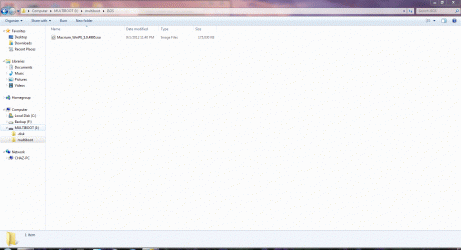
Open the contents off the flash drive in Windows Explorer. Maximise the \multiboot\ISOS folder, then post a screen capture image of the contents of this folder, here in your next reply.
 

My Computer My Computer

Computer type
PC/Desktop
Computer Manufacturer/Model Number
Golden Mk. I.4
OS
Windows 10 Pro x64 ; Xubuntu x64
CPU
Intel i7 860 @ 2.80 GHz O/C'ed to 4.0GHz
Motherboard
Gigabyte P55A-UD3R Rev.1. Award BIOS F13
Memory
16GB Corsair Vengance DDR3 @ 661 MHz Dual Channel (9-9-9-24)
Graphics Card(s)
EVGA NVidia GTX 560 1024MB
Sound Card
Realtek Integrated
Monitor(s) Displays
Dual Samsung SyncMaster 2494HS
Screen Resolution
1920*1080 and 1920*1080
Hard Drives
1*Samsung 840 EVO 120GB SSD;
1*OCZ Vertex 2 60GB SSD;
2*Samsung F3 SpinPoint 1TB in RAID0;
1*Samsung F1 SpinPoint 1TB;
2*Western Digital 1TB External USB 3.0
1*Western Digital 500GB External USB 3.0
1*Seagate 500GB External USB 2.0
PSU
Thermaltake ToughPower QFan 750W
Case
Thermaltake Element S VK60001W2Z
Cooling
Corsair H60 Water Cooling, 2*230mm and 2*80mm case fans
Keyboard
Logitech G110
Mouse
Logitech MX518
thanks Golden. this is fun in a way for me. I have learned so much stuff along the way.

I never did this before (capturing a screen image).

I saved the screenshot as a .gif.

please tell me if this is the wrong screenshot or the wrong format or whatever other info you want.


thank you again for helping me with this. I tried many times yesterday to make this work. all to no avail. I will be patient though. maybe the problem is something simple.
 

Attachments

  • sevenforumgolden.gif
    sevenforumgolden.gif
    309.7 KB · Views: 6

My Computer My Computer

Computer Manufacturer/Model Number
sony vaio vpcsc31fm
OS
Microsoft Windows 7 Home Premium 64-bit 7601 Multiprocessor Free Service Pack 1
CPU
Intel(R) Core(TM) i5-2430M CPU @ 2.40GHz
Motherboard
Sony Corporation VAIO
Memory
6.00 GB
Graphics Card(s)
Intel(R) HD Graphics Family
Sound Card
(1) High Definition Audio Device (2) Bluetooth Hands-free
Screen Resolution
1366 x 768 x 32 bits (4294967296 colors) @ 59 Hz
Hard Drives
ST95005620AS
maybe this is a better screenshot.
 

Attachments

  • Golden.gif
    Golden.gif
    282.8 KB · Views: 4

My Computer My Computer

Computer Manufacturer/Model Number
sony vaio vpcsc31fm
OS
Microsoft Windows 7 Home Premium 64-bit 7601 Multiprocessor Free Service Pack 1
CPU
Intel(R) Core(TM) i5-2430M CPU @ 2.40GHz
Motherboard
Sony Corporation VAIO
Memory
6.00 GB
Graphics Card(s)
Intel(R) HD Graphics Family
Sound Card
(1) High Definition Audio Device (2) Bluetooth Hands-free
Screen Resolution
1366 x 768 x 32 bits (4294967296 colors) @ 59 Hz
Hard Drives
ST95005620AS
Thats fine, there should be no problem. Why can't you boot from the USB?
 

My Computer My Computer

Computer type
PC/Desktop
Computer Manufacturer/Model Number
Golden Mk. I.4
OS
Windows 10 Pro x64 ; Xubuntu x64
CPU
Intel i7 860 @ 2.80 GHz O/C'ed to 4.0GHz
Motherboard
Gigabyte P55A-UD3R Rev.1. Award BIOS F13
Memory
16GB Corsair Vengance DDR3 @ 661 MHz Dual Channel (9-9-9-24)
Graphics Card(s)
EVGA NVidia GTX 560 1024MB
Sound Card
Realtek Integrated
Monitor(s) Displays
Dual Samsung SyncMaster 2494HS
Screen Resolution
1920*1080 and 1920*1080
Hard Drives
1*Samsung 840 EVO 120GB SSD;
1*OCZ Vertex 2 60GB SSD;
2*Samsung F3 SpinPoint 1TB in RAID0;
1*Samsung F1 SpinPoint 1TB;
2*Western Digital 1TB External USB 3.0
1*Western Digital 500GB External USB 3.0
1*Seagate 500GB External USB 2.0
PSU
Thermaltake ToughPower QFan 750W
Case
Thermaltake Element S VK60001W2Z
Cooling
Corsair H60 Water Cooling, 2*230mm and 2*80mm case fans
Keyboard
Logitech G110
Mouse
Logitech MX518
the YUMI screen on start, has me in a loop.

I just read this again. Are you using the arrow keys to move the highlighted box onto the Macrium ISO, and then hitting enter on the keyboard?
 

My Computer My Computer

Computer type
PC/Desktop
Computer Manufacturer/Model Number
Golden Mk. I.4
OS
Windows 10 Pro x64 ; Xubuntu x64
CPU
Intel i7 860 @ 2.80 GHz O/C'ed to 4.0GHz
Motherboard
Gigabyte P55A-UD3R Rev.1. Award BIOS F13
Memory
16GB Corsair Vengance DDR3 @ 661 MHz Dual Channel (9-9-9-24)
Graphics Card(s)
EVGA NVidia GTX 560 1024MB
Sound Card
Realtek Integrated
Monitor(s) Displays
Dual Samsung SyncMaster 2494HS
Screen Resolution
1920*1080 and 1920*1080
Hard Drives
1*Samsung 840 EVO 120GB SSD;
1*OCZ Vertex 2 60GB SSD;
2*Samsung F3 SpinPoint 1TB in RAID0;
1*Samsung F1 SpinPoint 1TB;
2*Western Digital 1TB External USB 3.0
1*Western Digital 500GB External USB 3.0
1*Seagate 500GB External USB 2.0
PSU
Thermaltake ToughPower QFan 750W
Case
Thermaltake Element S VK60001W2Z
Cooling
Corsair H60 Water Cooling, 2*230mm and 2*80mm case fans
Keyboard
Logitech G110
Mouse
Logitech MX518
Thats fine, there should be no problem. Why can't you boot from the USB?

I don't know. I am hoping that you will be able to help me figure it out.

the YUMI screen on start, has me in a loop.

I just read this again. Are you using the arrow keys to move the highlighted box onto the Macrium ISO, and then hitting enter on the keyboard?


yes. I have tried probably more than 15 times now.

it brings me back to the YUMI screen. and to the Boot from First Hard Drive selection.
and then its a regular boot. it does not (will not) go to the macrium screen.

no clue what the problem is. what is going on?
 

My Computer My Computer

Computer Manufacturer/Model Number
sony vaio vpcsc31fm
OS
Microsoft Windows 7 Home Premium 64-bit 7601 Multiprocessor Free Service Pack 1
CPU
Intel(R) Core(TM) i5-2430M CPU @ 2.40GHz
Motherboard
Sony Corporation VAIO
Memory
6.00 GB
Graphics Card(s)
Intel(R) HD Graphics Family
Sound Card
(1) High Definition Audio Device (2) Bluetooth Hands-free
Screen Resolution
1366 x 768 x 32 bits (4294967296 colors) @ 59 Hz
Hard Drives
ST95005620AS
hey Golden (or anyone),

I have a new problem.

(I had this a year ro 2 ago. but its been fie until now.)

when I open a new tab its a blank pag. instead of my home page (google).

I am using IE9 and windows 7 professional 64 bit.

any help greatly appreciated.

I have searched and not come up with a fix yet.
 

My Computer My Computer

Computer Manufacturer/Model Number
sony vaio vpcsc31fm
OS
Microsoft Windows 7 Home Premium 64-bit 7601 Multiprocessor Free Service Pack 1
CPU
Intel(R) Core(TM) i5-2430M CPU @ 2.40GHz
Motherboard
Sony Corporation VAIO
Memory
6.00 GB
Graphics Card(s)
Intel(R) HD Graphics Family
Sound Card
(1) High Definition Audio Device (2) Bluetooth Hands-free
Screen Resolution
1366 x 768 x 32 bits (4294967296 colors) @ 59 Hz
Hard Drives
ST95005620AS
@ chas53, you need to keep all your programs, especially 'vulnerable' ones, such as Java and Adobe up to date! Keep Windows updates (critical and important) up to date.
Also, download and update/protect often SpywareBlaster (free), to protect you before, not after reaching a malicious web page!

Instructions and tutorial found here: Using SpywareBlaster to protect your computer from Spyware, Hijackers, and Malware
 

My Computer My Computer

Computer type
PC/Desktop
Computer Manufacturer/Model Number
Bruce ... somewhere in his 40's
OS
Windows 7 Ultimate 32bit SP1
CPU
Intel(R) Core(TM)2 Quad CPU @ 2.40GHz, 2400 MHz
Motherboard
INTEL/D975XBX2
Memory
4 GB
Graphics Card(s)
ATI Radeon HD 2600 Pro
Monitor(s) Displays
Samsung SyncMaster 914v
Screen Resolution
1280 x 1024
Hard Drives
2/500GB each ... ST3500630AS ATA Device.
One is not connected
PSU
Rocketfish 700 W
Case
G.Skill Gigabyte Chassis
Keyboard
Standard PS/2 Keyboard
Mouse
Microsoft PS/2 Mouse
Internet Speed
DSL
Antivirus
Avira Internet Security
Browser
IE 11
Other Info
ATI HDMI Audio
Back
Top