8gbs and it makes this lastop scream it only shows 7.86 usable
Totally normal, what does it say as installed in computer properties ?
8.00 GB ( 7.86 usable ) ? Totally normal.[/QUOTE]
8gbs 2.87 usable
My Computer
- OS
- 32 bit 7 home premium

8gbs and it makes this lastop scream it only shows 7.86 usable
What is your graphics card? Can you please post a screenshot of Resource Monitor:
http://www.sevenforums.com/tutorials/9733-screenshots-files-upload-post-seven-forums.html
Startrb: > Type: Resource Monitor > Memory tab
Take a screenshot of the Memory tab please.
i attached itView attachment 239223
I said to do this on the 4th post.

i dont understand is waht i gave you not it?
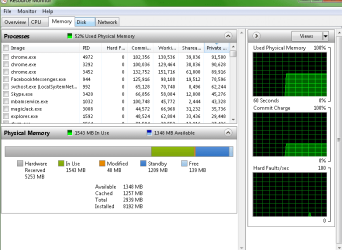
you posted a screenshot of the overview tab not the memory tab.
View attachment 239232you posted a screenshot of the overview tab not the memory tab.
View attachment 239232you posted a screenshot of the overview tab not the memory tab.
View attachment 239232you posted a screenshot of the overview tab not the memory tab.
Thanks, it's strange that so much of your memory is hardware reserved :huh:
Your onboard graphics card is using some your memory, which is normal, you could try:
The usable memory may be less than the installed memory on Windows 7-based computers
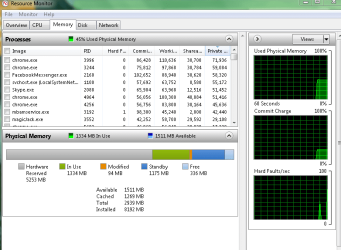
would you want to have controll remotely and see if you could git more to show?Your onboard graphics card is using some your memory, which is normal, you could try:
The usable memory may be less than the installed memory on Windows 7-based computers
now whatView attachment 239235
would you want to have controll remotely and see if you could git more to show?Your onboard graphics card is using some your memory, which is normal, you could try:
The usable memory may be less than the installed memory on Windows 7-based computers
now whatView attachment 239235
would you want to have controll remotely and see if you could git more to show?Your onboard graphics card is using some your memory, which is normal, you could try:
The usable memory may be less than the installed memory on Windows 7-based computers
now whatView attachment 239235
would you want to have controll remotely and see if you could git more to show?
Have you tried changing the slots in which the RAM is in? This has been the case, in similar situations like yours, the RAM arrangement may not be correct for your motherboard and therefore this may account for the large Hardware Reserved segment within Resource Monitor.
would you want to have controll remotely and see if you could git more to show?
Have you tried changing the slots in which the RAM is in? This has been the case, in similar situations like yours, the RAM arrangement may not be correct for your motherboard and therefore this may account for the large Hardware Reserved segment within Resource Monitor.
let me try that brb
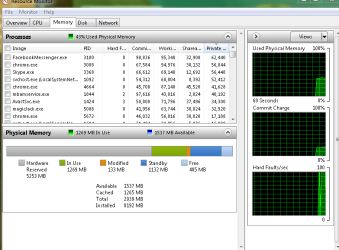
Have you tried changing the slots in which the RAM is in? This has been the case, in similar situations like yours, the RAM arrangement may not be correct for your motherboard and therefore this may account for the large Hardware Reserved segment within Resource Monitor.
let me try that brb
is that any better View attachment 239237

