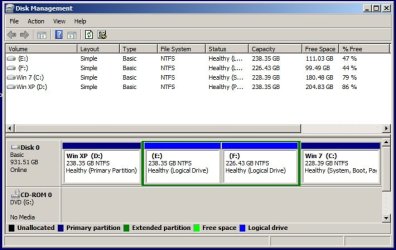
Solved Remove Win XP from dual boot with Win7. Win7 not at front of HDD.

greyhnd

New member
Member
Local time
11:43 PM
Messages
25
Hello folks and good day.

I've searched the forum and read so many different threads that now I'm confused about the proper way to accomplish the task at hand. To prepare, I've done the following: Downloaded and installed Reflect backup, EasyBCD version 1.7.2 and Partition Wizard. I've successfuly backed up the WinXP and Win7 partitions and have a Partition Wizard Boot disk burned to CD.

Here is a pic of my Disk Management screen:
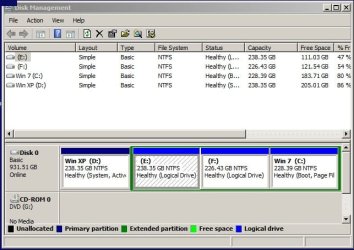
DM_1.jpg

I originally had WinXP then added Win7 in a dual boot setup. I haven't used WinXP for nearly a year so it needs to go. As you can see, XP is the primary partition and Win7 is a logical drive.

If I understand the steps correctly, I need to make C: active with EasyBCD, then I'm safe to format or delete the contents of the current XP partition? This is the point where I get confused. How do I get Win7 to the front of the HDD, or is it even critical to do that? I'm also confused about the proper steps to take with the Partition Wizard boot disk and/or the use of my Win7 DVD install disk.

I've tried to make myself ready to do this, but I think I've researched myself into a stupor. Please, someone straighten me out on the steps and order which I should do them.

Thanks in advance.
 

My Computer My Computer

At a glance

Windows 7 Ultimate x64AMD Phenom II 555BE4 GB CorsairATI Radeon HD 4830 512 MB
Computer Manufacturer/Model Number
self built
OS
Windows 7 Ultimate x64
CPU
AMD Phenom II 555BE
Motherboard
Biostar TA890GXB HD
Memory
4 GB Corsair
Graphics Card(s)
ATI Radeon HD 4830 512 MB
Sound Card
Diamond Xtreme Sound 7.1
Monitor(s) Displays
Acer 22" LED
Hard Drives
Western Digital 1 TB Black
First you'll need to convert C to Primary using Partition Wizard: How to set partition as Primary or Logical.

Then mark C Active: How to Set Active/Inactive partition -Partition Wizard Video Help.

Then click on HD to highlight and from Disk tab run Rebuild MBR: Rebuild MBR with Partition Wizard Rebuild MBR Video Help.

If Win7 doesn't start outright, boot into Installation DVD or System Repair Disk to run Startup Repair - Run up to 3 Separate Times until Win7 starts on its own and holds the System Active labels.

Now that you know Win7 will boot on its own you can then delete XP to recover its space or image Win7 over there.

I would personally want Win7 at the front of the drive, which would need to be achieved by imaging it. You are in luck since having a WD HD qualifies you to use their superior imaging/cloning app at WD Acronis free cloning app. The Manual is there on the downloads page and easy to understand.

If the old install interferes use PW CD to Mark it Inactive until certain the newly imaged OS will start so you can delete it. If it fails to start up run Startup Repair again until it does.
 
hello greg - Thanks so much for the info. After viewing the videos, I make the C: Win 7 partition primary. When I make that same partition active I need to make the D: XP partition inactive?

I'll run the PW Rebuild MBR and hopefully that will do the trick. If not I'll run Startup Repair until it's repaired good and proper. I'll delete XP and format that partition to make it ready for the cloned Win7 install. Is formatting sufficient for my needs or am I better to delete the XP partition completely? If I only reformat will the "old" XP partition remain drive letter D: or will the cloned Win7 carry the drive letter C: with it?

I think I'll be okay with this now. Will read through the Acronis manual to make sure I get the cloning done right.
 

My Computer My Computer

At a glance

Windows 7 Ultimate x64AMD Phenom II 555BE4 GB CorsairATI Radeon HD 4830 512 MB
Computer Manufacturer/Model Number
self built
OS
Windows 7 Ultimate x64
CPU
AMD Phenom II 555BE
Motherboard
Biostar TA890GXB HD
Memory
4 GB Corsair
Graphics Card(s)
ATI Radeon HD 4830 512 MB
Sound Card
Diamond Xtreme Sound 7.1
Monitor(s) Displays
Acer 22" LED
Hard Drives
Western Digital 1 TB Black
No need to mark XP Inactive.

Once you know Win7 will boot itself from its own Primary partition, the correct way to delete XP is to delete its partition. Leave it Unallocated so it's ready to receive the image.

During imaging look at all options offered to set the drive letter to Auto, keep a Primary Active partition and choose to copy the MBR and Track0 so it remains bootable. Just before attempting to boot the new imaged, boot in with PW CD to mark the old partition Inactive. Be prepared to run Repairs again.
 
hello again greg.
Followed your instructions and making the Win7 partition Primary and Active went fine. Then when I attempted to run the Rebuild MBR, that option was greyed out and unavailable. I went ahead and applied the make Primary and set Active and that was no problem. I thought I'd go ahead and reboot and see if I could come back and rebuild MBR, but still greyed out and unavailable. Kept getting the "NTLDR missing" error.

I then used my Win7 repair disc to get the computer back into a bootable state. Right now I'm back at square one and I've read your instructions about 6 times and I don't think I missed anything. Should I have done a reboot between each of the steps? I did the make primary and make active at the same time. PW didn't complain and completed the changes. Do you suppose I should make the changes to the XP partition, make it logical or leave Primary, but mark it as inactive?

Is it possible that I had some kind of error when I burned my PW Boot disk ISO? Just flustered by not being able to use the rebuild MBR option.
 

My Computer My Computer

At a glance

Windows 7 Ultimate x64AMD Phenom II 555BE4 GB CorsairATI Radeon HD 4830 512 MB
Computer Manufacturer/Model Number
self built
OS
Windows 7 Ultimate x64
CPU
AMD Phenom II 555BE
Motherboard
Biostar TA890GXB HD
Memory
4 GB Corsair
Graphics Card(s)
ATI Radeon HD 4830 512 MB
Sound Card
Diamond Xtreme Sound 7.1
Monitor(s) Displays
Acer 22" LED
Hard Drives
Western Digital 1 TB Black

My Computer My Computer

At a glance

Microsoft Windows 7 Home Premium 64-bits 7601...Intel(R) Core(TM) i3 CPU M 370 @ 2.40GHz4,00 GBATI Mobility Radeon HD 5400 Series
Computer type
Laptop
Computer Manufacturer/Model Number
ACER ASPIRE 5742G
OS
Microsoft Windows 7 Home Premium 64-bits 7601 Multiprocessor Free Service Pack 1
CPU
Intel(R) Core(TM) i3 CPU M 370 @ 2.40GHz
Motherboard
Acer Aspire 5742G
Memory
4,00 GB
Graphics Card(s)
ATI Mobility Radeon HD 5400 Series
Sound Card
(1) AMD High Definition Audio Device (2) Realtek High Defi
Screen Resolution
1366 x 768 x 32 bits (4294967296 colors) @ 60 Hz
Hard Drives
WDC WD5000BEVT-22ZAT0
Kaktussoft - I used PW to change everything back to its original state. When I left Win7 marked as Primary and Active, that's when I kept getting the NTDLR missing error. I finally used my Win7 recovery disk to get back where I could boot.

I think I'll try this again and after making the changes just go directly to the Win7 disk and run System Repair until it's corrected. I'll update here in a short time to let you know how it went.
 

My Computer My Computer

At a glance

Windows 7 Ultimate x64AMD Phenom II 555BE4 GB CorsairATI Radeon HD 4830 512 MB
Computer Manufacturer/Model Number
self built
OS
Windows 7 Ultimate x64
CPU
AMD Phenom II 555BE
Motherboard
Biostar TA890GXB HD
Memory
4 GB Corsair
Graphics Card(s)
ATI Radeon HD 4830 512 MB
Sound Card
Diamond Xtreme Sound 7.1
Monitor(s) Displays
Acer 22" LED
Hard Drives
Western Digital 1 TB Black
Ok, went back in witht the PW boot disk. Made the Win7 partition Primary and Active. Had to run the Win7 Repair Disk 3 times and the 3rd time it detected no problems.

Rebooted and Win7 booted fine. I'll leave things alone for a day or two and make sure it keeps booting like it should.
 

My Computer My Computer

At a glance

Windows 7 Ultimate x64AMD Phenom II 555BE4 GB CorsairATI Radeon HD 4830 512 MB
Computer Manufacturer/Model Number
self built
OS
Windows 7 Ultimate x64
CPU
AMD Phenom II 555BE
Motherboard
Biostar TA890GXB HD
Memory
4 GB Corsair
Graphics Card(s)
ATI Radeon HD 4830 512 MB
Sound Card
Diamond Xtreme Sound 7.1
Monitor(s) Displays
Acer 22" LED
Hard Drives
Western Digital 1 TB Black
Kaktussoft - I used PW to change everything back to its original state. When I left Win7 marked as Primary and Active, that's when I kept getting the NTDLR missing error. I finally used my Win7 recovery disk to get back where I could boot.

I think I'll try this again and after making the changes just go directly to the Win7 disk and run System Repair until it's corrected. I'll update here in a short time to let you know how it went.
If win7 partition is primary and active...it tries to boot from that partition. It looks like win7 partition was formatted from within winxp. You just forgot to do a startup repair 3 times I think
 

My Computer My Computer

At a glance

Microsoft Windows 7 Home Premium 64-bits 7601...Intel(R) Core(TM) i3 CPU M 370 @ 2.40GHz4,00 GBATI Mobility Radeon HD 5400 Series
Computer type
Laptop
Computer Manufacturer/Model Number
ACER ASPIRE 5742G
OS
Microsoft Windows 7 Home Premium 64-bits 7601 Multiprocessor Free Service Pack 1
CPU
Intel(R) Core(TM) i3 CPU M 370 @ 2.40GHz
Motherboard
Acer Aspire 5742G
Memory
4,00 GB
Graphics Card(s)
ATI Mobility Radeon HD 5400 Series
Sound Card
(1) AMD High Definition Audio Device (2) Realtek High Defi
Screen Resolution
1366 x 768 x 32 bits (4294967296 colors) @ 60 Hz
Hard Drives
WDC WD5000BEVT-22ZAT0
Ok, went back in witht the PW boot disk. Made the Win7 partition Primary and Active. Had to run the Win7 Repair Disk 3 times and the 3rd time it detected no problems.

Rebooted and Win7 booted fine. I'll leave things alone for a day or two and make sure it keeps booting like it should.
Afterward you can delete winxp partition
 

My Computer My Computer

At a glance

Microsoft Windows 7 Home Premium 64-bits 7601...Intel(R) Core(TM) i3 CPU M 370 @ 2.40GHz4,00 GBATI Mobility Radeon HD 5400 Series
Computer type
Laptop
Computer Manufacturer/Model Number
ACER ASPIRE 5742G
OS
Microsoft Windows 7 Home Premium 64-bits 7601 Multiprocessor Free Service Pack 1
CPU
Intel(R) Core(TM) i3 CPU M 370 @ 2.40GHz
Motherboard
Acer Aspire 5742G
Memory
4,00 GB
Graphics Card(s)
ATI Mobility Radeon HD 5400 Series
Sound Card
(1) AMD High Definition Audio Device (2) Realtek High Defi
Screen Resolution
1366 x 768 x 32 bits (4294967296 colors) @ 60 Hz
Hard Drives
WDC WD5000BEVT-22ZAT0
Kaktussoft - Yes, I plan to delete the WinXP partition and move the Win7 partition to the first of the drive. I read in another thread here that I can copy the Win7 partition with PW and once WinXP partition is deleted paste it into the unallocated space. Is it that simple? I understand I may have to run Startup Repair again to correct any possible problem that might come up in the MBR, so that is no problem.

If I understand correctly, the Win7 would need to be made inactive before I can copy and move it, then repeat the process of making it active again? Doing it that way seems entirely to easy...hahaha.
 

My Computer My Computer

At a glance

Windows 7 Ultimate x64AMD Phenom II 555BE4 GB CorsairATI Radeon HD 4830 512 MB
Computer Manufacturer/Model Number
self built
OS
Windows 7 Ultimate x64
CPU
AMD Phenom II 555BE
Motherboard
Biostar TA890GXB HD
Memory
4 GB Corsair
Graphics Card(s)
ATI Radeon HD 4830 512 MB
Sound Card
Diamond Xtreme Sound 7.1
Monitor(s) Displays
Acer 22" LED
Hard Drives
Western Digital 1 TB Black
Post a current shot of disk mgt.

Never heard of anyone pasting it :sarc:
 

My Computer My Computer

At a glance

Windows 10 Pro x64Intel Core i7 6700KGSkill TridentZ RGB 16GB 3600 16-16-16-36EVGA GTX 980 Ti SC x2
Computer type
PC/Desktop
Computer Manufacturer/Model Number
Skylake Special #666
OS
Windows 10 Pro x64
CPU
Intel Core i7 6700K
Motherboard
Asus Sabertooth Z170 Mark 1
Memory
GSkill TridentZ RGB 16GB 3600 16-16-16-36
Graphics Card(s)
EVGA GTX 980 Ti SC x2
Sound Card
Realtek High Definition
Monitor(s) Displays
AOC G2460PG
Screen Resolution
1920 x 1080 144Hz
Hard Drives
Samsung 860 Pro 256GB, Seagate Barracuda 4TB x2
PSU
EVGA 1000 P2, EVGA White Custom Braided Cables
Case
Corsair Vengeance C70 Gunmetal Black
Cooling
Corsair H100i v2, Corsair ML120 x2, Thermal Grizzly Kryonaut
Keyboard
Logitech G910 Orion Spectrum
Mouse
Logitech G700s
Internet Speed
Verizon Fios Quantum Gateway 75/75
Antivirus
Windows Defender, Malwarebytes Free 3.8.3
Browser
Chrome
Other Info
Corsair SP120 x4, LG Blu-ray Drive, Durabrand HT-395 100 Watt Dolby Digital Amp, Corsair H2100 Wireless 7.1 Headset
Hello guys, I will be attempting sort of the same process myself very soon. Only difference is that my system has Dos/WinXp on one HD and Win7 on a seperate HD. Which by the way I transfered Win7 to an SSD a few weeks ago. I wanted to be sure that Win7 would run ok for a little while before I attempted removing the dual boot and DOS/XP setup. Any pre-op suggestions would be greatly appreciated.
 

My Computer My Computer

At a glance

Windows 7 Professional 32 bitIntel Pentium D CPU 3.20GHz, 3200 Mhz, 2 Cores4 GBGeForce GT 520 (ASUS)
Computer Manufacturer/Model Number
Dell Optiplex GX620
OS
Windows 7 Professional 32 bit
CPU
Intel Pentium D CPU 3.20GHz, 3200 Mhz, 2 Cores
Memory
4 GB
Graphics Card(s)
GeForce GT 520 (ASUS)
Sound Card
ON-Board
Monitor(s) Displays
Samsung B2030
Screen Resolution
1600 x 900
Hard Drives
128GB SSD - Win7 PE System Drive
128GB SSD - DATA/Application Drive
Mouse
Logitech Wireless Laser
Internet Speed
DSL
Antivirus
MSSE (of course) and IOBit Malware Fighter
Browser
Chrome (primary), Firefox, and IE
Then all you should have to do is, unplug the xp drive, run startup repair until 7 boots on it`s own. Easy
 

My Computer My Computer

At a glance

Windows 10 Pro x64Intel Core i7 6700KGSkill TridentZ RGB 16GB 3600 16-16-16-36EVGA GTX 980 Ti SC x2
Computer type
PC/Desktop
Computer Manufacturer/Model Number
Skylake Special #666
OS
Windows 10 Pro x64
CPU
Intel Core i7 6700K
Motherboard
Asus Sabertooth Z170 Mark 1
Memory
GSkill TridentZ RGB 16GB 3600 16-16-16-36
Graphics Card(s)
EVGA GTX 980 Ti SC x2
Sound Card
Realtek High Definition
Monitor(s) Displays
AOC G2460PG
Screen Resolution
1920 x 1080 144Hz
Hard Drives
Samsung 860 Pro 256GB, Seagate Barracuda 4TB x2
PSU
EVGA 1000 P2, EVGA White Custom Braided Cables
Case
Corsair Vengeance C70 Gunmetal Black
Cooling
Corsair H100i v2, Corsair ML120 x2, Thermal Grizzly Kryonaut
Keyboard
Logitech G910 Orion Spectrum
Mouse
Logitech G700s
Internet Speed
Verizon Fios Quantum Gateway 75/75
Antivirus
Windows Defender, Malwarebytes Free 3.8.3
Browser
Chrome
Other Info
Corsair SP120 x4, LG Blu-ray Drive, Durabrand HT-395 100 Watt Dolby Digital Amp, Corsair H2100 Wireless 7.1 Headset
Oh would that be beautiful!!:D
 

My Computer My Computer

At a glance

Windows 7 Professional 32 bitIntel Pentium D CPU 3.20GHz, 3200 Mhz, 2 Cores4 GBGeForce GT 520 (ASUS)
Computer Manufacturer/Model Number
Dell Optiplex GX620
OS
Windows 7 Professional 32 bit
CPU
Intel Pentium D CPU 3.20GHz, 3200 Mhz, 2 Cores
Memory
4 GB
Graphics Card(s)
GeForce GT 520 (ASUS)
Sound Card
ON-Board
Monitor(s) Displays
Samsung B2030
Screen Resolution
1600 x 900
Hard Drives
128GB SSD - Win7 PE System Drive
128GB SSD - DATA/Application Drive
Mouse
Logitech Wireless Laser
Internet Speed
DSL
Antivirus
MSSE (of course) and IOBit Malware Fighter
Browser
Chrome (primary), Firefox, and IE
AddRAM- I may have misunderstood the post about copying the partition. I didn't think a partition could be copy/pasted like a normal file. I have a new backup of the Win7 partition and I think I'll just restore it to the unallocated space formerly used by WinXP.

Do you still want or need me to post a shot of the current Disk Management screen?
 

My Computer My Computer

At a glance

Windows 7 Ultimate x64AMD Phenom II 555BE4 GB CorsairATI Radeon HD 4830 512 MB
Computer Manufacturer/Model Number
self built
OS
Windows 7 Ultimate x64
CPU
AMD Phenom II 555BE
Motherboard
Biostar TA890GXB HD
Memory
4 GB Corsair
Graphics Card(s)
ATI Radeon HD 4830 512 MB
Sound Card
Diamond Xtreme Sound 7.1
Monitor(s) Displays
Acer 22" LED
Hard Drives
Western Digital 1 TB Black
Glad you finally saw the step to run Startup Repair - Run up to 3 Separate Times since it writes the System Boot files to the Active partition. It was in my original steps.

Is Win7 now labeled System Active Boot? Best to post back another screenshot.

We've had reports that after deleting the XP some users were able to Copy the Win7 partition into the space, then delete the old 7 partition and it would boot, sometimes after running Startup Repairs. However I would definitely save a Win7 backup image first as imaging is always the safest way to transfer an OS.
 
Okay guys, here is an updated shot of my Disk Management screen.
DM_2.jpg

Drive C: (Win7) is now Primary and Active, drive D: (WinXP) is only Primary. I've restarted from a cold boot as well as several restarts and the pc is booting directly into Win7 without a hitch. I need to go through my XP partition one last time and make sure I have everything out of there that I want to keep. Then I'm ready to delete the XP partition, which I've also made an image of, just in case.

I've used Macrium Reflect to image the Win7 drive and did another a few minutes ago to make sure it was up to date. Now I need to delete the XP partition with PW and I'll have unallocated space at the front of the drive, correct? Here is where I get a bit foggy about things. Once the XP partition is deleted, I can restore my backup into the unallocated space or try the copy if it's an available option. I'm not sure about the drive letters. If Win7 is currently C:, what happens when I restore the image where XP used to be? Will the imaged drive then become C: automatically and the current Win7 partition be assigned a different drive letter? Do I need to make my current Win7 install inactive before I start moving it around/restoring it?

And lastly, after restoring the image into the unallocated space, I can then extend the drive to include all of the unallocated space, correct?

You all have been extremely helpful and I appreciate your patience with me on this matter.
 

My Computer My Computer

At a glance

Windows 7 Ultimate x64AMD Phenom II 555BE4 GB CorsairATI Radeon HD 4830 512 MB
Computer Manufacturer/Model Number
self built
OS
Windows 7 Ultimate x64
CPU
AMD Phenom II 555BE
Motherboard
Biostar TA890GXB HD
Memory
4 GB Corsair
Graphics Card(s)
ATI Radeon HD 4830 512 MB
Sound Card
Diamond Xtreme Sound 7.1
Monitor(s) Displays
Acer 22" LED
Hard Drives
Western Digital 1 TB Black
Just delete the winxp and win7 partition using partition wizard bootable CD. Then boot from macrium bootable CD and restore the win7 image. Be sure it can see the external disk, so test that prior to deleting partitions. Attach external disk using usb2.0 instead of usb3.0! Restore the image to the unallocated space at beginning of disk (which was winxp) by using drag and drop. Partition will be primary and active automatically (it was at the time of backup).

Macrium sees the backup image has OS and bootmenu and knows old location. You gonna restore to different location... macrium adjusts all references automatically! (bootmenu and registry reference to new C).

I did it twice... no problem at all
http://kb.macrium.com/KnowledgebaseArticle50079.aspx
 

My Computer My Computer

At a glance

Microsoft Windows 7 Home Premium 64-bits 7601...Intel(R) Core(TM) i3 CPU M 370 @ 2.40GHz4,00 GBATI Mobility Radeon HD 5400 Series
Computer type
Laptop
Computer Manufacturer/Model Number
ACER ASPIRE 5742G
OS
Microsoft Windows 7 Home Premium 64-bits 7601 Multiprocessor Free Service Pack 1
CPU
Intel(R) Core(TM) i3 CPU M 370 @ 2.40GHz
Motherboard
Acer Aspire 5742G
Memory
4,00 GB
Graphics Card(s)
ATI Mobility Radeon HD 5400 Series
Sound Card
(1) AMD High Definition Audio Device (2) Realtek High Defi
Screen Resolution
1366 x 768 x 32 bits (4294967296 colors) @ 60 Hz
Hard Drives
WDC WD5000BEVT-22ZAT0
Kaktussoft - I have my backups stored on my F: drive since I don't have another external source at the moment. I'm assuming that will be okay and I won't have to worry about the USB things.

I think I'll only delete the XP partition initially and then try to restore the Win7 backup. After I've determined the restored partition is working, go back and delete the Win7 partition. Is it okay to do it that way? I'd hate like the devil to have the restore go foobar on me and be stuck. My only other question is this....If I keep the original Win7 install intact and restore my backup, will I need to change that partition from active to inactive first? Or, will, as you you've said, the restored partition take over and render the original Win7 inactive?
 

My Computer My Computer

At a glance

Windows 7 Ultimate x64AMD Phenom II 555BE4 GB CorsairATI Radeon HD 4830 512 MB
Computer Manufacturer/Model Number
self built
OS
Windows 7 Ultimate x64
CPU
AMD Phenom II 555BE
Motherboard
Biostar TA890GXB HD
Memory
4 GB Corsair
Graphics Card(s)
ATI Radeon HD 4830 512 MB
Sound Card
Diamond Xtreme Sound 7.1
Monitor(s) Displays
Acer 22" LED
Hard Drives
Western Digital 1 TB Black
Back
Top