Hello folks and good day.
I've searched the forum and read so many different threads that now I'm confused about the proper way to accomplish the task at hand. To prepare, I've done the following: Downloaded and installed Reflect backup, EasyBCD version 1.7.2 and Partition Wizard. I've successfuly backed up the WinXP and Win7 partitions and have a Partition Wizard Boot disk burned to CD.
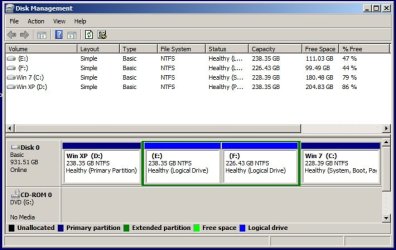
Here is a pic of my Disk Management screen:
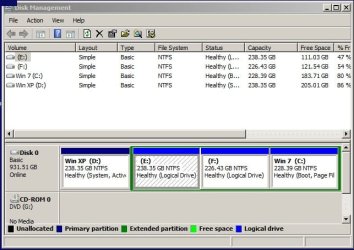
I originally had WinXP then added Win7 in a dual boot setup. I haven't used WinXP for nearly a year so it needs to go. As you can see, XP is the primary partition and Win7 is a logical drive.
If I understand the steps correctly, I need to make C: active with EasyBCD, then I'm safe to format or delete the contents of the current XP partition? This is the point where I get confused. How do I get Win7 to the front of the HDD, or is it even critical to do that? I'm also confused about the proper steps to take with the Partition Wizard boot disk and/or the use of my Win7 DVD install disk.
I've tried to make myself ready to do this, but I think I've researched myself into a stupor. Please, someone straighten me out on the steps and order which I should do them.
Thanks in advance.
I've searched the forum and read so many different threads that now I'm confused about the proper way to accomplish the task at hand. To prepare, I've done the following: Downloaded and installed Reflect backup, EasyBCD version 1.7.2 and Partition Wizard. I've successfuly backed up the WinXP and Win7 partitions and have a Partition Wizard Boot disk burned to CD.
Here is a pic of my Disk Management screen:
I originally had WinXP then added Win7 in a dual boot setup. I haven't used WinXP for nearly a year so it needs to go. As you can see, XP is the primary partition and Win7 is a logical drive.
If I understand the steps correctly, I need to make C: active with EasyBCD, then I'm safe to format or delete the contents of the current XP partition? This is the point where I get confused. How do I get Win7 to the front of the HDD, or is it even critical to do that? I'm also confused about the proper steps to take with the Partition Wizard boot disk and/or the use of my Win7 DVD install disk.
I've tried to make myself ready to do this, but I think I've researched myself into a stupor. Please, someone straighten me out on the steps and order which I should do them.
Thanks in advance.
My Computer
At a glance
Windows 7 Ultimate x64AMD Phenom II 555BE4 GB CorsairATI Radeon HD 4830 512 MB
- Computer Manufacturer/Model Number
- self built
- OS
- Windows 7 Ultimate x64
- CPU
- AMD Phenom II 555BE
- Motherboard
- Biostar TA890GXB HD
- Memory
- 4 GB Corsair
- Graphics Card(s)
- ATI Radeon HD 4830 512 MB
- Sound Card
- Diamond Xtreme Sound 7.1
- Monitor(s) Displays
- Acer 22" LED
- Hard Drives
- Western Digital 1 TB Black