How Do I Move My Documents To Desktop?

You can add the user folder to the desktop - easiest way is to right click on the user name on the start menu and click "show on Desktop" that creates a link on the desktop that is not a shortcut
 

My Computers My Computers

  • At a glance

    Windows 11 Pro x64 [Latest Release and Releas...Ryzen 9 5950X, 3.8 - 5.2 MHz64GB [2 x 32GB] DDR4 3200MHz4GB NVIDIA GEFORCE GTX 1650 Ti
    Computer type
    PC/Desktop
    Computer Manufacturer/Model Number
    ChillBlast - Custom to my design
    OS
    Windows 11 Pro x64 [Latest Release and Release Preview]
    CPU
    Ryzen 9 5950X, 3.8 - 5.2 MHz
    Motherboard
    Asus Prime X570-Pro
    Memory
    64GB [2 x 32GB] DDR4 3200MHz
    Graphics Card(s)
    4GB NVIDIA GEFORCE GTX 1650 Ti
    Sound Card
    On-board SPDIF to 5.1 System + HDMI [5.1 system]
    Monitor(s) Displays
    32" UHD 32 Bit HDR Monitor + 43" UHD 4K 32Bit HDR TV
    Screen Resolution
    2 x 3840 x 2160 @60Hz
    Hard Drives
    1TB M2 SSD OS, 500GB Fast Access SSD, 2 x 8TB Data + Various Externals from 1TB to 4TB, 10TB NAS
    PSU
    NZXT C750 80 PLUS Gold 750W Modular PSU
    Case
    Workstation Case [Matt Black]
    Cooling
    NZXT Kraken X63 280mm CPU Cooler +2x Quiet Case fans
    Keyboard
    Logitech Wireless MX Keys & K400 + others
    Mouse
    Logitech Wireless MX Master 3S
    Internet Speed
    920 MB Down 50 MB Up
    Antivirus
    BitDefender Total Security Pro
    Browser
    Chrome (always run latest Non-Beta)
    Other Info
    Also run ...
    Laptop - Quad 8GB - Windows 10 Pro x64
    Nexus 7 Android tablet x2
    Samsung 10.2" tablet
    Blackview TAB 8 4G Android Tablet c/w Keyboard
    Wacom Intuos Pro Medium Pen Pad
    Wacom Intuos Pro Small Pen Pad
    Wacom Expresskeys Remote
    Loopdeck+ Graphics Controller
    Shuttle Pro v2 Control
  • At a glance

    Windows 11 Pro x64 Latest RPIntel I7 10750H 5.0GHz32GB [2x16GB] DDR4 2933 MHznVidia GTX1650Ti 4 GB GDDR6
    Computer type
    Laptop
    System Manufacturer/Model Number
    Dell XPS 17 10750H
    OS
    Windows 11 Pro x64 Latest RP
    CPU
    Intel I7 10750H 5.0GHz
    Motherboard
    Dell XPS
    Memory
    32GB [2x16GB] DDR4 2933 MHz
    Graphics Card(s)
    nVidia GTX1650Ti 4 GB GDDR6
    Sound Card
    Stock [Realtek] 4 Speaker
    Monitor(s) Displays
    17" IPS UHD+ Infinity Edge Touchscreen
    Screen Resolution
    3840 x 2400
    Hard Drives
    2TB M2 NVMe, 4TB External + various 500GB & 1TB External NVMe (also have access to spinner HDD from
    PSU
    Stock
    Case
    Stock XPS Aluminium & Carbon Fibre
    Cooling
    Stock - Active Fan Control
    Keyboard
    Backlit + Various Logitech
    Mouse
    Stock Track Pad + Logitech MX Trackball
    Internet Speed
    72 MB Down 18MB Up
    Browser
    Chrome
    Other Info
    Also run ...
    Laptop - Quad 8GB - Windows 10 Pro x64
    Nexus 7 Android tablet x2
    10.2" tablet
    Sony Z3 Android Smartphone
    Wacom Intuos Pro Medium Pen Pad
    Wacom Intuos Pro Small Pen Pad
    Wacom Expresskeys Remote
    Loopdeck+ Graphics Controller
    Shuttle Pro v2 Control Pad
    10TB NAS
I'm back.
I definitely did NOT want a mere short cut on the desktop.
I wanted the actual "My Documents" folder where I could drag and drop files to. Windows XP had the "My Documents" folder on Desktop. It was not a mere shortcut.

Right now I'm on an XP computer but I will try the suggestion given when I get home to my Win 7 computer.
Thanks for all the input !!!
 

My Computer My Computer

At a glance

win 7
OS
win 7
I'm back.
I definitely did NOT want a mere short cut on the desktop.
I wanted the actual "My Documents" folder where I could drag and drop files to. Windows XP had the "My Documents" folder on Desktop. It was not a mere shortcut.
I am sorry to say but that is absolutely not true. Please check your facts before stating it as truth.

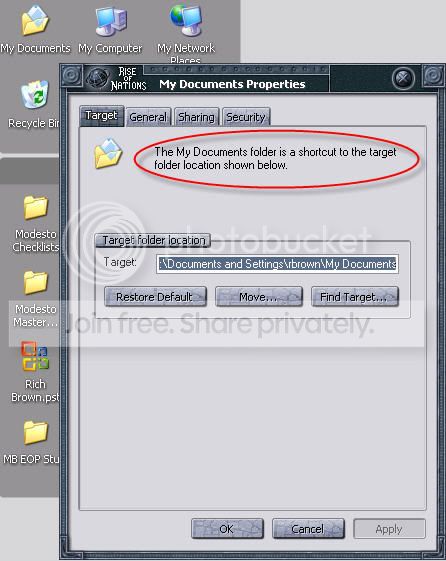
Right click My Documents on your XP desktop, choose properties. This is what you see:

mydocuments.PNG

It was and is a completely normal shortcut to folder C:\Documents and Settings\your_usename\My Documents, only difference with other shortcuts being that it had no shortcut arrow.

Kari
 

My Computer My Computer

At a glance

Windows 10 Pro x64 EN-GB1.6 GHz Intel Core i7-720QM Processor6 GBATI Mobility Radeon HD 5850 Graphics
Computer type
Laptop
Computer Manufacturer/Model Number
HP ENVY 17-1150eg
OS
Windows 10 Pro x64 EN-GB
CPU
1.6 GHz Intel Core i7-720QM Processor
Memory
6 GB
Graphics Card(s)
ATI Mobility Radeon HD 5850 Graphics
Sound Card
Beats sound system with integrated subwoofer
Monitor(s) Displays
17" laptop display, 22" LED and 32" Full HD TV through HDMI
Screen Resolution
1600*900 (1), 1920*1080 (2&3)
Hard Drives
Internal: 2 x 500 GB SATA Hard Disk Drive 7200 rpm
External: 2TB for backups, 3TB USB3 network drive for media
Cooling
As Envy runs a bit warm, I have it on a Cooler Master pad
Keyboard
Logitech diNovo Media Desktop Laser (bluetooth)
Mouse
Logitech Performance Mouse MX
Internet Speed
50/10 Mbps VDSL
Antivirus
Windows Defender 4.3.9431.0
Browser
Maxthon 3.5.2., IE11
I am sorry to say but that is absolutely not true. Please check your facts before stating it as true.

Right click My Documents on your XP desktop, choose properties. This is what you see:

View attachment 22990

It was and is a completely normal shortcut to folder C:\Documents and Settings\your_usename\My Documents, only difference with other shortcuts being that it had no shortcut arrow.

Kari
Yes, but he doesn't understand that My Documents folder (XP) is replaced with "Username" folder (Vista &7) witch can be showed on desktop...
 

My Computer My Computer

At a glance

OS
OS
OS
So here it comes, last time:

  • IF you want to have your user folder on desktop, do as Barman told (post 21)
  • IF you want to have your My Documents folder on desktop, do as I told (post 4)
Kari
 

My Computer My Computer

At a glance

Windows 10 Pro x64 EN-GB1.6 GHz Intel Core i7-720QM Processor6 GBATI Mobility Radeon HD 5850 Graphics
Computer type
Laptop
Computer Manufacturer/Model Number
HP ENVY 17-1150eg
OS
Windows 10 Pro x64 EN-GB
CPU
1.6 GHz Intel Core i7-720QM Processor
Memory
6 GB
Graphics Card(s)
ATI Mobility Radeon HD 5850 Graphics
Sound Card
Beats sound system with integrated subwoofer
Monitor(s) Displays
17" laptop display, 22" LED and 32" Full HD TV through HDMI
Screen Resolution
1600*900 (1), 1920*1080 (2&3)
Hard Drives
Internal: 2 x 500 GB SATA Hard Disk Drive 7200 rpm
External: 2TB for backups, 3TB USB3 network drive for media
Cooling
As Envy runs a bit warm, I have it on a Cooler Master pad
Keyboard
Logitech diNovo Media Desktop Laser (bluetooth)
Mouse
Logitech Performance Mouse MX
Internet Speed
50/10 Mbps VDSL
Antivirus
Windows Defender 4.3.9431.0
Browser
Maxthon 3.5.2., IE11
So here it comes, last time:

  • IF you want to have your user folder on desktop, do as Barman told (post 21)
  • IF you want to have your My Documents folder on desktop, do as I told (post 4)
Kari
Can I send you a PM?
 

My Computer My Computer

At a glance

OS
OS
OS

My Computer My Computer

At a glance

Windows 10 Pro x64 EN-GB1.6 GHz Intel Core i7-720QM Processor6 GBATI Mobility Radeon HD 5850 Graphics
Computer type
Laptop
Computer Manufacturer/Model Number
HP ENVY 17-1150eg
OS
Windows 10 Pro x64 EN-GB
CPU
1.6 GHz Intel Core i7-720QM Processor
Memory
6 GB
Graphics Card(s)
ATI Mobility Radeon HD 5850 Graphics
Sound Card
Beats sound system with integrated subwoofer
Monitor(s) Displays
17" laptop display, 22" LED and 32" Full HD TV through HDMI
Screen Resolution
1600*900 (1), 1920*1080 (2&3)
Hard Drives
Internal: 2 x 500 GB SATA Hard Disk Drive 7200 rpm
External: 2TB for backups, 3TB USB3 network drive for media
Cooling
As Envy runs a bit warm, I have it on a Cooler Master pad
Keyboard
Logitech diNovo Media Desktop Laser (bluetooth)
Mouse
Logitech Performance Mouse MX
Internet Speed
50/10 Mbps VDSL
Antivirus
Windows Defender 4.3.9431.0
Browser
Maxthon 3.5.2., IE11
Yes, I do see a path name in "My Documents" Desktop Icon in XP, but I can drag and drop files to and from it.
I cannot drag and drop files to a mere shortcut. What I was trying to do is replicate the XP structure allowing me to keep all of my files in that folder on the Desktop for immediate access.

I do appreciate all the comments and I don't pretend to know exactly how Windows is put together, as opposed to how it worked for me in the past.
 

My Computer My Computer

At a glance

win 7
OS
win 7
Yes, I do see a path name in "My Documents" Desktop Icon in XP, but I can drag and drop files to and from it.
I cannot drag and drop files to a mere shortcut. What I was trying to do is replicate the XP structure allowing me to keep all of my files in that folder on the Desktop for immediate access.

I do appreciate all the comments and I don't pretend to know exactly how Windows is put together, as opposed to how it worked for me in the past.
Whether you want to believe it or not, the "My Documents" on the desktop is a short cut. Here's proof from my own XP Pro desktop (Click image for higher resolution):
mydocs-1.jpg
 

My Computer My Computer

At a glance

Windows 7 RTM x64Q9300 - overclocked to 3.10ghzPNY 8GB DDR2 800Palit Sonic GTX 460 x2 SLI
OS
Windows 7 RTM x64
CPU
Q9300 - overclocked to 3.10ghz
Motherboard
XFX 750i SLI
Memory
PNY 8GB DDR2 800
Graphics Card(s)
Palit Sonic GTX 460 x2 SLI
Sound Card
mainboard
Monitor(s) Displays
Optoma GT720 projector
Screen Resolution
1280 x 720 (for 3D)
Hard Drives
WD Caviar Green 640 GB, 16 MB Cache, SATA 3 Gb/s
PSU
XFX Black Edition 750w
Case
NMedia 2000B
Cooling
EVERCOOL HPH-9525CU 95mm Ever Lubricate CPU Cooler
Keyboard
Microsoft wireless
Mouse
Microsoft wireless
Internet Speed
Comcast hi-speed
Yes, I do see a path name in "My Documents" Desktop Icon in XP, but I can drag and drop files to and from it.
I cannot drag and drop files to a mere shortcut.
Yes you can. I have to repeate this:
I am sorry to say but that is absolutely not true. Please check your facts before stating it as truth.

And then:
I do appreciate all the comments and I don't pretend to know exactly how Windows is put together, as opposed to how it worked for me in the past.
If you do what Barman told in post 21 or I told in post 4, it works just as it did for you in the past.

Kari
 

My Computer My Computer

At a glance

Windows 10 Pro x64 EN-GB1.6 GHz Intel Core i7-720QM Processor6 GBATI Mobility Radeon HD 5850 Graphics
Computer type
Laptop
Computer Manufacturer/Model Number
HP ENVY 17-1150eg
OS
Windows 10 Pro x64 EN-GB
CPU
1.6 GHz Intel Core i7-720QM Processor
Memory
6 GB
Graphics Card(s)
ATI Mobility Radeon HD 5850 Graphics
Sound Card
Beats sound system with integrated subwoofer
Monitor(s) Displays
17" laptop display, 22" LED and 32" Full HD TV through HDMI
Screen Resolution
1600*900 (1), 1920*1080 (2&3)
Hard Drives
Internal: 2 x 500 GB SATA Hard Disk Drive 7200 rpm
External: 2TB for backups, 3TB USB3 network drive for media
Cooling
As Envy runs a bit warm, I have it on a Cooler Master pad
Keyboard
Logitech diNovo Media Desktop Laser (bluetooth)
Mouse
Logitech Performance Mouse MX
Internet Speed
50/10 Mbps VDSL
Antivirus
Windows Defender 4.3.9431.0
Browser
Maxthon 3.5.2., IE11
Yes you can. I have to repeate this:


And then:

If you do what Barman told in post 21 or I told in post 4, it works just as it did for you in the past.

Kari
Here we go again... :doh:
:roflmao:
 

My Computer My Computer

At a glance

OS
OS
OS
I conceed it's a shortcut, it's a short cut. Just not one with a normal shortcut arrow on it.

When I get home I will try your recommendations.

Thanks for the education guys. I do appreciate it, even if I do get beat up a little in the process.
 

My Computer My Computer

At a glance

win 7
OS
win 7
Thanks for the education guys. I do appreciate it, even if I do get beat up a little in the process.
That's the spirit! Please understand nobody was offending you, we just tried to explain it so that you could understand it and solve your issue.

Kari
 

My Computer My Computer

At a glance

Windows 10 Pro x64 EN-GB1.6 GHz Intel Core i7-720QM Processor6 GBATI Mobility Radeon HD 5850 Graphics
Computer type
Laptop
Computer Manufacturer/Model Number
HP ENVY 17-1150eg
OS
Windows 10 Pro x64 EN-GB
CPU
1.6 GHz Intel Core i7-720QM Processor
Memory
6 GB
Graphics Card(s)
ATI Mobility Radeon HD 5850 Graphics
Sound Card
Beats sound system with integrated subwoofer
Monitor(s) Displays
17" laptop display, 22" LED and 32" Full HD TV through HDMI
Screen Resolution
1600*900 (1), 1920*1080 (2&3)
Hard Drives
Internal: 2 x 500 GB SATA Hard Disk Drive 7200 rpm
External: 2TB for backups, 3TB USB3 network drive for media
Cooling
As Envy runs a bit warm, I have it on a Cooler Master pad
Keyboard
Logitech diNovo Media Desktop Laser (bluetooth)
Mouse
Logitech Performance Mouse MX
Internet Speed
50/10 Mbps VDSL
Antivirus
Windows Defender 4.3.9431.0
Browser
Maxthon 3.5.2., IE11
Just want to add that the exact behaviour from XP should be possible by use of a junction point. am posting from my phone so will check later as to actual method and post a step by step. Will check this thread in am ;-)
 

My Computers My Computers

  • At a glance

    Windows 11 Pro x64 [Latest Release and Releas...Ryzen 9 5950X, 3.8 - 5.2 MHz64GB [2 x 32GB] DDR4 3200MHz4GB NVIDIA GEFORCE GTX 1650 Ti
    Computer type
    PC/Desktop
    Computer Manufacturer/Model Number
    ChillBlast - Custom to my design
    OS
    Windows 11 Pro x64 [Latest Release and Release Preview]
    CPU
    Ryzen 9 5950X, 3.8 - 5.2 MHz
    Motherboard
    Asus Prime X570-Pro
    Memory
    64GB [2 x 32GB] DDR4 3200MHz
    Graphics Card(s)
    4GB NVIDIA GEFORCE GTX 1650 Ti
    Sound Card
    On-board SPDIF to 5.1 System + HDMI [5.1 system]
    Monitor(s) Displays
    32" UHD 32 Bit HDR Monitor + 43" UHD 4K 32Bit HDR TV
    Screen Resolution
    2 x 3840 x 2160 @60Hz
    Hard Drives
    1TB M2 SSD OS, 500GB Fast Access SSD, 2 x 8TB Data + Various Externals from 1TB to 4TB, 10TB NAS
    PSU
    NZXT C750 80 PLUS Gold 750W Modular PSU
    Case
    Workstation Case [Matt Black]
    Cooling
    NZXT Kraken X63 280mm CPU Cooler +2x Quiet Case fans
    Keyboard
    Logitech Wireless MX Keys & K400 + others
    Mouse
    Logitech Wireless MX Master 3S
    Internet Speed
    920 MB Down 50 MB Up
    Antivirus
    BitDefender Total Security Pro
    Browser
    Chrome (always run latest Non-Beta)
    Other Info
    Also run ...
    Laptop - Quad 8GB - Windows 10 Pro x64
    Nexus 7 Android tablet x2
    Samsung 10.2" tablet
    Blackview TAB 8 4G Android Tablet c/w Keyboard
    Wacom Intuos Pro Medium Pen Pad
    Wacom Intuos Pro Small Pen Pad
    Wacom Expresskeys Remote
    Loopdeck+ Graphics Controller
    Shuttle Pro v2 Control
  • At a glance

    Windows 11 Pro x64 Latest RPIntel I7 10750H 5.0GHz32GB [2x16GB] DDR4 2933 MHznVidia GTX1650Ti 4 GB GDDR6
    Computer type
    Laptop
    System Manufacturer/Model Number
    Dell XPS 17 10750H
    OS
    Windows 11 Pro x64 Latest RP
    CPU
    Intel I7 10750H 5.0GHz
    Motherboard
    Dell XPS
    Memory
    32GB [2x16GB] DDR4 2933 MHz
    Graphics Card(s)
    nVidia GTX1650Ti 4 GB GDDR6
    Sound Card
    Stock [Realtek] 4 Speaker
    Monitor(s) Displays
    17" IPS UHD+ Infinity Edge Touchscreen
    Screen Resolution
    3840 x 2400
    Hard Drives
    2TB M2 NVMe, 4TB External + various 500GB & 1TB External NVMe (also have access to spinner HDD from
    PSU
    Stock
    Case
    Stock XPS Aluminium & Carbon Fibre
    Cooling
    Stock - Active Fan Control
    Keyboard
    Backlit + Various Logitech
    Mouse
    Stock Track Pad + Logitech MX Trackball
    Internet Speed
    72 MB Down 18MB Up
    Browser
    Chrome
    Other Info
    Also run ...
    Laptop - Quad 8GB - Windows 10 Pro x64
    Nexus 7 Android tablet x2
    10.2" tablet
    Sony Z3 Android Smartphone
    Wacom Intuos Pro Medium Pen Pad
    Wacom Intuos Pro Small Pen Pad
    Wacom Expresskeys Remote
    Loopdeck+ Graphics Controller
    Shuttle Pro v2 Control Pad
    10TB NAS
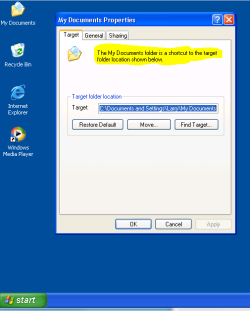
Ok I have checked the method I suggested in my last post and can confirm that it works for the OP's requirements.

To create the link


  • start an administrator command prompt
  • navigate to your desktop folder [normally c:\users\name\desktop]
  • enter the following command
    mklink /D "My Documents" "d:\path to my documents folder"
Note the "" are important
You will now have a My Documents folder icon on the desktop which is a link to the My Documents folder that you can drag and drop items too

To change the icon you have to use the customize option in properties

This method will also work for any other folder that you wish to have a shortcut to with the drag and drop functionality
 
Last edited:

My Computers My Computers

  • At a glance

    Windows 11 Pro x64 [Latest Release and Releas...Ryzen 9 5950X, 3.8 - 5.2 MHz64GB [2 x 32GB] DDR4 3200MHz4GB NVIDIA GEFORCE GTX 1650 Ti
    Computer type
    PC/Desktop
    Computer Manufacturer/Model Number
    ChillBlast - Custom to my design
    OS
    Windows 11 Pro x64 [Latest Release and Release Preview]
    CPU
    Ryzen 9 5950X, 3.8 - 5.2 MHz
    Motherboard
    Asus Prime X570-Pro
    Memory
    64GB [2 x 32GB] DDR4 3200MHz
    Graphics Card(s)
    4GB NVIDIA GEFORCE GTX 1650 Ti
    Sound Card
    On-board SPDIF to 5.1 System + HDMI [5.1 system]
    Monitor(s) Displays
    32" UHD 32 Bit HDR Monitor + 43" UHD 4K 32Bit HDR TV
    Screen Resolution
    2 x 3840 x 2160 @60Hz
    Hard Drives
    1TB M2 SSD OS, 500GB Fast Access SSD, 2 x 8TB Data + Various Externals from 1TB to 4TB, 10TB NAS
    PSU
    NZXT C750 80 PLUS Gold 750W Modular PSU
    Case
    Workstation Case [Matt Black]
    Cooling
    NZXT Kraken X63 280mm CPU Cooler +2x Quiet Case fans
    Keyboard
    Logitech Wireless MX Keys & K400 + others
    Mouse
    Logitech Wireless MX Master 3S
    Internet Speed
    920 MB Down 50 MB Up
    Antivirus
    BitDefender Total Security Pro
    Browser
    Chrome (always run latest Non-Beta)
    Other Info
    Also run ...
    Laptop - Quad 8GB - Windows 10 Pro x64
    Nexus 7 Android tablet x2
    Samsung 10.2" tablet
    Blackview TAB 8 4G Android Tablet c/w Keyboard
    Wacom Intuos Pro Medium Pen Pad
    Wacom Intuos Pro Small Pen Pad
    Wacom Expresskeys Remote
    Loopdeck+ Graphics Controller
    Shuttle Pro v2 Control
  • At a glance

    Windows 11 Pro x64 Latest RPIntel I7 10750H 5.0GHz32GB [2x16GB] DDR4 2933 MHznVidia GTX1650Ti 4 GB GDDR6
    Computer type
    Laptop
    System Manufacturer/Model Number
    Dell XPS 17 10750H
    OS
    Windows 11 Pro x64 Latest RP
    CPU
    Intel I7 10750H 5.0GHz
    Motherboard
    Dell XPS
    Memory
    32GB [2x16GB] DDR4 2933 MHz
    Graphics Card(s)
    nVidia GTX1650Ti 4 GB GDDR6
    Sound Card
    Stock [Realtek] 4 Speaker
    Monitor(s) Displays
    17" IPS UHD+ Infinity Edge Touchscreen
    Screen Resolution
    3840 x 2400
    Hard Drives
    2TB M2 NVMe, 4TB External + various 500GB & 1TB External NVMe (also have access to spinner HDD from
    PSU
    Stock
    Case
    Stock XPS Aluminium & Carbon Fibre
    Cooling
    Stock - Active Fan Control
    Keyboard
    Backlit + Various Logitech
    Mouse
    Stock Track Pad + Logitech MX Trackball
    Internet Speed
    72 MB Down 18MB Up
    Browser
    Chrome
    Other Info
    Also run ...
    Laptop - Quad 8GB - Windows 10 Pro x64
    Nexus 7 Android tablet x2
    10.2" tablet
    Sony Z3 Android Smartphone
    Wacom Intuos Pro Medium Pen Pad
    Wacom Intuos Pro Small Pen Pad
    Wacom Expresskeys Remote
    Loopdeck+ Graphics Controller
    Shuttle Pro v2 Control Pad
    10TB NAS
Interesting.

When I left clicked Start Button then right clicked on my User Profile and selected Show on Desktop, it did copy the whole profile folder. BUT, when I opened that new Desktop Folder, what was labeled as "Documents" in the Library is now labeled "My Documents" in the new Desktop Folder [note that 'My' was automatically added].

I also left clicked Start then right clicked the Documents line and then selected Send To Desktop as a Shortcut. The Shortcut was labeled just "Documents" [not "My Documents" as it was in the prior method.]

This Win 7 file tree structure is really confusing to me from the older windows/dos structure.
 

My Computer My Computer

At a glance

win 7
OS
win 7
You can make a folder on the desktop saying "My Documents"

Then go to Start--> Open the "Your user name" folder. The "My Documents" folder in there, right click on it and go to properties.

There should be something about "Target"

Click Browse and point it to the "My Documents" folder you created on your desktop. Click ok.

If this has helped you, please rep.

:)
I tried this...
If he do that he will move "My Documents " folder to desktop permanently...

If want move (all Sub Folders) User- Folder to another Drive?? example to Drive D: because my Drive C: protected by Deep Freeze.
 

My Computer My Computer

At a glance

Windows 7 Home Basic
Computer Manufacturer/Model Number
Aspire ACER
OS
Windows 7 Home Basic
I was searching Google for the same problem and found this topic and because last poster's link doesn't work, let me post a link to a possible solution Is it possible to have a classic my documents folder?


I understand post author, because user's files folder sometimes gets confusing. For example, if you want to save documents, to do it right, you need to open My Documents subfolder in Users Files folder, but wait... you may think, you already opened your "personal files or documents" folder? Yes but at the same time No. Also, in User's Files folder there are maps that are used mostly by system (IE favorites, links, search) and you do not want to mess with them in your pesonal files folder, do you? But you can't simply delete them or even hide them with hidden attribute, it just doesn't work. Yet another reason for wanting My Documents shortcut on desktop.


BTW, Shortcut to My Documents is little different than system desktop folder that topic author wanted. Shortcuts have arrows and context menu is different (try to create shortcut to Computer and then right click on both, see the difference, same goes for My Documents, although there is smaller difference, but still). Moving My Documents folder directly to Desktop is not a good option too for several reasons.

But for the most users simple shortcut to desktop will be good enough and they will be happy using it the same way they used it on WinXP, it's just that some users are little more picky on these things :)
 
Last edited:

My Computer My Computer

At a glance

windows 7 Premium x86
OS
windows 7 Premium x86
Back
Top