How to set session duration limit ? Via Parental Control ?

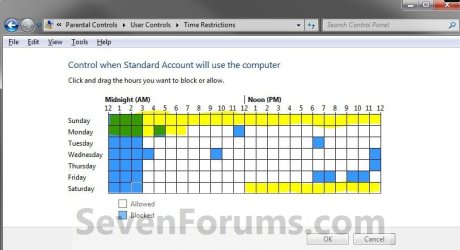
You should be able to block an entire 24 hour period or multiple 24 hour periods. For example, if you wanted to prevent computer usage from 12noon on Saturday until 7am on Monday (that's 43 consecutive hours of no access) you'd block off the boxes highlighted in yellow.

settimes.JPG
 

My Computer My Computer

At a glance

Win 7 Pro 64-bitIntel i5 2.4 Ghz8GB DDR3Intel HD 3000
Computer type
Laptop
Computer Manufacturer/Model Number
Sony Vaio VPCEB47GM Laptop
OS
Win 7 Pro 64-bit
CPU
Intel i5 2.4 Ghz
Memory
8GB DDR3
Graphics Card(s)
Intel HD 3000
Sound Card
IDT High Definition
Monitor(s) Displays
15.6 WGXA Anti-Glare LED
Screen Resolution
1280x800
Hard Drives
640Gb 7200rpm
Antivirus
MSE
Browser
Opera (primary) with IE9 backup
No you don't understand.

I want to allow for instance usage between 9h00 and 20h00; but within that period I don't want more than 2 hours of usage !
 

My Computer My Computer

At a glance

Win 7 64 bits French
OS
Win 7 64 bits French
You're right. I'm confused. Sorry. :(

For example, you want two hours of total usage between 9am and 8pm (9h00 and 20h00.) How do you want those two hours of usage set up? You can only do it in one hour blocks with Parental Control. If you're trying to do 30 minutes here, 15 minutes there, 1 hour and 15 minutes some place else, it won't work.

But there are other free programs that are more flexible. Such as:

Timeout | Romaco Canada

If I'm still not getting it my deepest apologies.
 

My Computer My Computer

At a glance

Win 7 Pro 64-bitIntel i5 2.4 Ghz8GB DDR3Intel HD 3000
Computer type
Laptop
Computer Manufacturer/Model Number
Sony Vaio VPCEB47GM Laptop
OS
Win 7 Pro 64-bit
CPU
Intel i5 2.4 Ghz
Memory
8GB DDR3
Graphics Card(s)
Intel HD 3000
Sound Card
IDT High Definition
Monitor(s) Displays
15.6 WGXA Anti-Glare LED
Screen Resolution
1280x800
Hard Drives
640Gb 7200rpm
Antivirus
MSE
Browser
Opera (primary) with IE9 backup
Thanks for answering !
Maybe I didn't express myself in a clear & unique way !

But there are other free programs that are more flexible. Such as:

Timeout | Romaco Canada
Many thanks !:)
From a functional point, seems totally what I'm looking, hope is not full of adware and won't slow my PC down.

P.S. Do you know in parental control how de-active other browsers than Chrome (esp. IE9); as my quick test about porn shows, that Chrome locks the search in "safe search mode" and is effective, while IE9 sometimes let porn thumbnail preview, which Chrome does NOT.
 

My Computer My Computer

At a glance

Win 7 64 bits French
OS
Win 7 64 bits French
P.S. Do you know in parental control how de-active other browsers than Chrome (esp. IE9); as my quick test about porn shows, that Chrome locks the search in "safe search mode" and is effective, while IE9 sometimes let porn thumbnail preview, which Chrome does NOT.

Try this:

1. Open Control Panel > Internet Options
2. Click "Content" tab
3. Click "Enable" under "Content Advisor"
4. You should now see different categories like "Nudity", "Sexual Content", etc
5. Drag the slider menu to "None" to specify what computer users are allowed to see
6. Click "Apply" and then "OK" to save your settings
 

My Computer My Computer

At a glance

Win 7 Pro 64-bitIntel i5 2.4 Ghz8GB DDR3Intel HD 3000
Computer type
Laptop
Computer Manufacturer/Model Number
Sony Vaio VPCEB47GM Laptop
OS
Win 7 Pro 64-bit
CPU
Intel i5 2.4 Ghz
Memory
8GB DDR3
Graphics Card(s)
Intel HD 3000
Sound Card
IDT High Definition
Monitor(s) Displays
15.6 WGXA Anti-Glare LED
Screen Resolution
1280x800
Hard Drives
640Gb 7200rpm
Antivirus
MSE
Browser
Opera (primary) with IE9 backup
3. Click "Enable" under "Content Advisor"

4. You should now see different categories like "Nudity", "Sexual Content", etc

I don't see that, I see Web Filtering(sliding from green list to authorise adult content), and although I already had selected "public websites(Blocking adult sites)", still with IE9 I do see porn thumbnails.

In IE9, just type "suce ma bite" then on results page(already text content is explicit), choose "images" or "videos" to display videos or images and you'll see explicit blowjobs; with Chrome you don't!
 

My Computer My Computer

At a glance

Win 7 64 bits French
OS
Win 7 64 bits French
Back
Top