
Solved Flash videos: audio OK, no video, instead only solid green background

Kari

An Angry Old Man
Guru
VIP
SF Team
Local time
3:45 PM
Messages
17,473
Location
A Finnish ex-pat in Leipzig, Germany
Dear fellow geeks, please help me to solve this mystery.

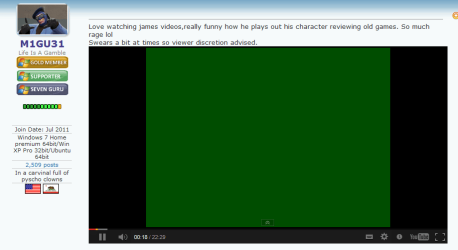
When I boot the laptop mentioned in my specs, flash videos do normally not work. Audio is OK but instead of video the only thing I can see is solid green color. See screenshot:
Flash_11.png

This is with all browsers, all sites with streaming flash (our Youtube thread, Youtube, my Finnish IPTV system and so on), also when trying to play locally saved flash video on VLC or other media players.

A reboot or two, sometimes four fixes this error. I am always using the latest Adobe Flash Player, also the GPU drivers are latest and 100% correct for this computer and GPU.

When after reboots flash video works, it can be so an hour or full day until suddenly when opening for instance a Youtube video it's back to green solid color, and I have to reboot again.

This is making me crazy, please any input and ideas welcome.

Kari
 

My Computer My Computer

Computer type
Laptop
Computer Manufacturer/Model Number
HP ENVY 17-1150eg
OS
Windows 10 Pro x64 EN-GB
CPU
1.6 GHz Intel Core i7-720QM Processor
Memory
6 GB
Graphics Card(s)
ATI Mobility Radeon HD 5850 Graphics
Sound Card
Beats sound system with integrated subwoofer
Monitor(s) Displays
17" laptop display, 22" LED and 32" Full HD TV through HDMI
Screen Resolution
1600*900 (1), 1920*1080 (2&3)
Hard Drives
Internal: 2 x 500 GB SATA Hard Disk Drive 7200 rpm
External: 2TB for backups, 3TB USB3 network drive for media
Cooling
As Envy runs a bit warm, I have it on a Cooler Master pad
Keyboard
Logitech diNovo Media Desktop Laser (bluetooth)
Mouse
Logitech Performance Mouse MX
Internet Speed
50/10 Mbps VDSL
Antivirus
Windows Defender 4.3.9431.0
Browser
Maxthon 3.5.2., IE11
Hi Kari,

Have you tried reinstalling Flash?
Have you tried reinstalling your graphics card drivers?
Do you use any codecs software?

I would recommend installing this whilst we troubleshoot:

Shark007.net - Windows 7 Codecs - WMP12 Codecs
Shark007.net - Windows 7 x64 Codecs - WMP12 Codecs

Install them both in that order.

Could you run a sfc /scannow command then upload your CBS log please?

C:\Windows\Logs\CBS\CBS.log

I would like the full log please, the export of lines with [SR] isn't enough to troubleshoot this.

Tom
 

My Computer My Computer

Computer type
PC/Desktop
Computer Manufacturer/Model Number
Build #1
OS
Windows 8.1 Pro x64
CPU
Intel i7 3770K @4.5GHz
Motherboard
ASUS P8Z77-V PRO
Memory
Corsair Vengeance 2x4GB DDR3 1600MHz Low Profile (White)
Graphics Card(s)
Gigabyte Radeon HD 7850 (2GB GDDR5)
Sound Card
Integrated on motherboard
Monitor(s) Displays
23" LG LCD/LED IPS
Screen Resolution
1920*1080
Hard Drives
Samsung EVO 128GB SSD
Seagate Barracuda 2GB 7200rpm
2x Seagate FreeAgent [500gb]
PSU
Corsair TX650W V2 (80+ Bronze)
Case
NZXT Phantom 410 White
Cooling
Corsair H100 Water Cooler
Keyboard
Microsoft Desktop 2000 Wireless Keyboard
Mouse
Microsoft Desktop 2000 Wireless Mouse
Internet Speed
95 Mb/s Download 70 Mb/s Upload
Antivirus
MSE + MBAM Pro
Browser
Firefox
  • SFC found no errors
  • Flash uninstalled and reinstalled several times
  • GPU drivers uninstalled and reinstalled several times, tried both ones Windows Update offers, those from HP Support and those directly from ATI
  • No codecs, have never used / installed any codecs on Seven and Eight, have not found a media file that WMP and VLC could not open and play natively. At this point I am not willing to install Shark's codecs; I have 6 other PCs in our household, three Seven Ultimates and three Eight Pros, none of them have any codecs, all of them working perfectly
  • Installed Eight on this laptop a day or two before Christmas (clean install) to see if this flash issue was specific to Seven. It was not, the same behavior continues on Eight
Kari
 

My Computer My Computer

Computer type
Laptop
Computer Manufacturer/Model Number
HP ENVY 17-1150eg
OS
Windows 10 Pro x64 EN-GB
CPU
1.6 GHz Intel Core i7-720QM Processor
Memory
6 GB
Graphics Card(s)
ATI Mobility Radeon HD 5850 Graphics
Sound Card
Beats sound system with integrated subwoofer
Monitor(s) Displays
17" laptop display, 22" LED and 32" Full HD TV through HDMI
Screen Resolution
1600*900 (1), 1920*1080 (2&3)
Hard Drives
Internal: 2 x 500 GB SATA Hard Disk Drive 7200 rpm
External: 2TB for backups, 3TB USB3 network drive for media
Cooling
As Envy runs a bit warm, I have it on a Cooler Master pad
Keyboard
Logitech diNovo Media Desktop Laser (bluetooth)
Mouse
Logitech Performance Mouse MX
Internet Speed
50/10 Mbps VDSL
Antivirus
Windows Defender 4.3.9431.0
Browser
Maxthon 3.5.2., IE11
Shot in the dark. Power off/unplug Modem, router and all PCs connected to a network if that applies. Wait a full minute. Power devices on in the order:
1.Modem, wait until it fully boots
2.Router, wait until it fully boots
3. First PC on the router, fully booted again
4.Other devices
 

My Computer My Computer

Computer type
PC/Desktop
Computer Manufacturer/Model Number
Home Built Desktop By DataTech
OS
Windows 7 Ultimate X64 SP1
CPU
Intel i5-2550K, Differing ~4.4-4.8GHz No built in GPU
Motherboard
ASUS P8Z68-V PRO/GEN3
Memory
16GB G.Skill Sniper 1866MHz @ 2133MHz 2x8GB
Graphics Card(s)
ASUS GTX650TIB-DC2OC-2GD5, (650TI Boost)
Sound Card
Onboard Realtek 5-1
Monitor(s) Displays
Samsung P2570HD
Screen Resolution
1920x1080
Hard Drives
Samsung 840 Pro 256GB SSD for OS, 500GB Seagate Constellation (Enterprise drive) for Data
PSU
Corsair HX650W
Case
Inwin Dragon Rider
Cooling
Hyper 212 EVO w/two Noctua fans, push-pull, @1300 RPM
Keyboard
E-Z Eyes, bright yellow keys with large characters
Mouse
steelseries SENSEI Laser Pro Gaming
Internet Speed
48-51Mbs Mbs down, 11 Mbs up Xfinity Cable
Antivirus
Norton Internet Security 2013
Browser
IE 10, Opera, Pale Moon if needed
Other Info
4 case fans, LG BluRay-RE, ASUS DVD-RW, Mr. Fusion power supply, 1.21 gigawatts.
  • SFC found no errors
  • Flash uninstalled and reinstalled several times
  • GPU drivers uninstalled and reinstalled several times, tried both ones Windows Update offers, those from HP Support and those directly from ATI
  • No codecs, have never used / installed any codecs on Seven and Eight, have not found a media file that WMP and VLC could not open and play natively. At this point I am not willing to install Shark's codecs; I have 6 other PCs in our household, three Seven Ultimates and three Eight Pros, none of them have any codecs, all of them working perfectly
  • Installed Eight on this laptop a day or two before Christmas (clean install) to see if this flash issue was specific to Seven. It was not, the same behavior continues on Eight
Kari

lol, well there goes most of my ideas!

Don't worry about the codecs if you use VLC then; it contains all of them. I use codecs so I can play the lot in WMP :)

One more thing to try: right click on a flash video and select Settings, go to the Display tab (the first one) then uncheck Enable Hardware Acceleration.

From Adobe:

Here's the background story on why we believe this occurred.
With Flash Player 11.2.202.228 we removed some internal code specific to Nvidia that was causing many issues with Stage3D and StageVideo. After this change, we ran our normal certification passes and we discovered this green screen/bar bug against older beta Nvidia drivers. We confirmed both internally and with Nvidia that it was not present with shipping versions of their driver and the bug was closed. Unfortunately, based on reports on the forum and other locations it appears that this is still a problem with a limited set of GPU's. We're going to continue to investigate this problem and I'll see how we can try to minimize issues like this in the future.


Source: Adobe Community: Flash Player 11.2.202.228 - still get this green screen on videos


Tom
 

My Computer My Computer

Computer type
PC/Desktop
Computer Manufacturer/Model Number
Build #1
OS
Windows 8.1 Pro x64
CPU
Intel i7 3770K @4.5GHz
Motherboard
ASUS P8Z77-V PRO
Memory
Corsair Vengeance 2x4GB DDR3 1600MHz Low Profile (White)
Graphics Card(s)
Gigabyte Radeon HD 7850 (2GB GDDR5)
Sound Card
Integrated on motherboard
Monitor(s) Displays
23" LG LCD/LED IPS
Screen Resolution
1920*1080
Hard Drives
Samsung EVO 128GB SSD
Seagate Barracuda 2GB 7200rpm
2x Seagate FreeAgent [500gb]
PSU
Corsair TX650W V2 (80+ Bronze)
Case
NZXT Phantom 410 White
Cooling
Corsair H100 Water Cooler
Keyboard
Microsoft Desktop 2000 Wireless Keyboard
Mouse
Microsoft Desktop 2000 Wireless Mouse
Internet Speed
95 Mb/s Download 70 Mb/s Upload
Antivirus
MSE + MBAM Pro
Browser
Firefox
Thanks Tom. I'm so accustomed to rely on SF whatever issues I have, I didn't even search Adobe or other forums :o.

Although I have ATI instead of Nvidia, that link to Adobe forums was an interesting read. Will try disabling hardware acceleration.

Kari
 

My Computer My Computer

Computer type
Laptop
Computer Manufacturer/Model Number
HP ENVY 17-1150eg
OS
Windows 10 Pro x64 EN-GB
CPU
1.6 GHz Intel Core i7-720QM Processor
Memory
6 GB
Graphics Card(s)
ATI Mobility Radeon HD 5850 Graphics
Sound Card
Beats sound system with integrated subwoofer
Monitor(s) Displays
17" laptop display, 22" LED and 32" Full HD TV through HDMI
Screen Resolution
1600*900 (1), 1920*1080 (2&3)
Hard Drives
Internal: 2 x 500 GB SATA Hard Disk Drive 7200 rpm
External: 2TB for backups, 3TB USB3 network drive for media
Cooling
As Envy runs a bit warm, I have it on a Cooler Master pad
Keyboard
Logitech diNovo Media Desktop Laser (bluetooth)
Mouse
Logitech Performance Mouse MX
Internet Speed
50/10 Mbps VDSL
Antivirus
Windows Defender 4.3.9431.0
Browser
Maxthon 3.5.2., IE11
Thanks Tom. I'm so accustomed to rely on SF whatever issues I have, I didn't even search Adobe or other forums :o.

Although I have ATI instead of Nvidia, that link to Adobe forums was an interesting read. Will try disabling hardware acceleration.

Kari

No worries Kari :) Fingers crossed!

Tom
 

My Computer My Computer

Computer type
PC/Desktop
Computer Manufacturer/Model Number
Build #1
OS
Windows 8.1 Pro x64
CPU
Intel i7 3770K @4.5GHz
Motherboard
ASUS P8Z77-V PRO
Memory
Corsair Vengeance 2x4GB DDR3 1600MHz Low Profile (White)
Graphics Card(s)
Gigabyte Radeon HD 7850 (2GB GDDR5)
Sound Card
Integrated on motherboard
Monitor(s) Displays
23" LG LCD/LED IPS
Screen Resolution
1920*1080
Hard Drives
Samsung EVO 128GB SSD
Seagate Barracuda 2GB 7200rpm
2x Seagate FreeAgent [500gb]
PSU
Corsair TX650W V2 (80+ Bronze)
Case
NZXT Phantom 410 White
Cooling
Corsair H100 Water Cooler
Keyboard
Microsoft Desktop 2000 Wireless Keyboard
Mouse
Microsoft Desktop 2000 Wireless Mouse
Internet Speed
95 Mb/s Download 70 Mb/s Upload
Antivirus
MSE + MBAM Pro
Browser
Firefox
It seems all my reinstalls and reboots have been unnecessary, disabling hardware acceleration seems to have done the trick.

Thanks Tom.

Kari
 

My Computer My Computer

Computer type
Laptop
Computer Manufacturer/Model Number
HP ENVY 17-1150eg
OS
Windows 10 Pro x64 EN-GB
CPU
1.6 GHz Intel Core i7-720QM Processor
Memory
6 GB
Graphics Card(s)
ATI Mobility Radeon HD 5850 Graphics
Sound Card
Beats sound system with integrated subwoofer
Monitor(s) Displays
17" laptop display, 22" LED and 32" Full HD TV through HDMI
Screen Resolution
1600*900 (1), 1920*1080 (2&3)
Hard Drives
Internal: 2 x 500 GB SATA Hard Disk Drive 7200 rpm
External: 2TB for backups, 3TB USB3 network drive for media
Cooling
As Envy runs a bit warm, I have it on a Cooler Master pad
Keyboard
Logitech diNovo Media Desktop Laser (bluetooth)
Mouse
Logitech Performance Mouse MX
Internet Speed
50/10 Mbps VDSL
Antivirus
Windows Defender 4.3.9431.0
Browser
Maxthon 3.5.2., IE11
That's great news! Happy to help :)

Tom
 

My Computer My Computer

Computer type
PC/Desktop
Computer Manufacturer/Model Number
Build #1
OS
Windows 8.1 Pro x64
CPU
Intel i7 3770K @4.5GHz
Motherboard
ASUS P8Z77-V PRO
Memory
Corsair Vengeance 2x4GB DDR3 1600MHz Low Profile (White)
Graphics Card(s)
Gigabyte Radeon HD 7850 (2GB GDDR5)
Sound Card
Integrated on motherboard
Monitor(s) Displays
23" LG LCD/LED IPS
Screen Resolution
1920*1080
Hard Drives
Samsung EVO 128GB SSD
Seagate Barracuda 2GB 7200rpm
2x Seagate FreeAgent [500gb]
PSU
Corsair TX650W V2 (80+ Bronze)
Case
NZXT Phantom 410 White
Cooling
Corsair H100 Water Cooler
Keyboard
Microsoft Desktop 2000 Wireless Keyboard
Mouse
Microsoft Desktop 2000 Wireless Mouse
Internet Speed
95 Mb/s Download 70 Mb/s Upload
Antivirus
MSE + MBAM Pro
Browser
Firefox
Back
Top