Solved What software to use with SSD clone and for backup too? Many Choices!!

SSD doesn't show up in BIOS. It only shows the following (not necessarily in this order):
- Removeable Drive
- Hard Drive
--- ST1000
- USB
- CD/DVD
- eSATA
- Network

What do you use when booting from dvd? Is that option DVD or USB (you attached DVD drive on usb port?)
I use CD/DVD to boot from external CD/DVD.

I just checked the boot priority order. This is how it is set up right now. This is what it shows when you expand the hard drive and network boot selections.

It boots to the SSD at this time.

- Hard Drive
--- ST1000 hard drive
USB storage device
Removable Drive
eSATA
CD/DVD
- Network
--- Realtek PXE B03 DOO
 

My Computer My Computer

At a glance

Windows 7 Ultimate (x64) Service Pack 1 (buil...Intel(R) Core(TM) i5-2450M CPU @ 2.50GHz8 GBIntel HD Graphics 3000 with up to 1.6GB dynam...
Computer Manufacturer/Model Number
Dell 17R N7110 Inspiron laptop
OS
Windows 7 Ultimate (x64) Service Pack 1 (build 7601)
CPU
Intel(R) Core(TM) i5-2450M CPU @ 2.50GHz
Motherboard
Dell Inc. 0YH79Y A00
Memory
8 GB
Graphics Card(s)
Intel HD Graphics 3000 with up to 1.6GB dynamic video memory
Sound Card
SRS Premium Sound - (1) Realtek High Definition Audio
Monitor(s) Displays
17.3" diagonal HD+ TrueLife LED display
Screen Resolution
1600x900 resolution
Hard Drives
1 TB HD #ST1000LM024 HN-M101MBB,

512 GB Samsung 840 Pro SSD
PSU
stock
Case
stock
Cooling
stock
Keyboard
stock
Mouse
stock
Internet Speed
WiFi
Other Info
Printer: HP Photosmart C3180
SSD doesn't show up in BIOS. It only shows the following (not necessarily in this order):
- Removeable Drive
- Hard Drive
--- ST1000
- USB
- CD/DVD
- eSATA
- Network

What do you use when booting from dvd? Is that option DVD or USB (you attached DVD drive on usb port?)
I use CD/DVD to boot from external CD/DVD.

I just checked the boot priority order. This is how it is set up right now. This is what it shows when you expand the hard drive and network boot selections.

It boots to the SSD at this time.

- Hard Drive
--- ST1000 hard drive
USB storage device
Removable Drive
eSATA
CD/DVD
- Network
--- Realtek PXE B03 DOO

so it tries to:
- Removeable Drive (=floppy). If it fails
- Hard Drive --- ST1000. if it fails
- USB . if it fails
- CD/DVD .if it fails
- eSATA .if it fails
- Network


How do you boot from CD/DVD. It first tries to boot from harddisk if this is really the boot order!!
And please prove it's booting to SSD now. Do it by posting disk mangement output.

How is SSD connected to motherboard? using sata cable?
 

My Computer My Computer

At a glance

Microsoft Windows 7 Home Premium 64-bits 7601...Intel(R) Core(TM) i3 CPU M 370 @ 2.40GHz4,00 GBATI Mobility Radeon HD 5400 Series
Computer type
Laptop
Computer Manufacturer/Model Number
ACER ASPIRE 5742G
OS
Microsoft Windows 7 Home Premium 64-bits 7601 Multiprocessor Free Service Pack 1
CPU
Intel(R) Core(TM) i3 CPU M 370 @ 2.40GHz
Motherboard
Acer Aspire 5742G
Memory
4,00 GB
Graphics Card(s)
ATI Mobility Radeon HD 5400 Series
Sound Card
(1) AMD High Definition Audio Device (2) Realtek High Defi
Screen Resolution
1366 x 768 x 32 bits (4294967296 colors) @ 60 Hz
Hard Drives
WDC WD5000BEVT-22ZAT0
What happened was ... The computer only booted up using the HD and not the SSD after cloning. I even cloned it again trying the Paragon Migrate OS to SSD software. No change.

There was no option showing in BIOS to change the boot from the HD to the SSD, so I marked the HD as inactive because both drives were active. When I did this, the computer couldn't find the OS for it to start up. The computer was basically dead then. All I had was the blue screen. The only option that I knew of to get it going again was to do a clean install with Win 7 disk.

That got me going again. After I marked the partition as inactive, the computer was basically dead. I am still at a nursing home recovering from surgery. I have no access to another computer here. I had no way to get back on the internet that I knew of to get to this site to ask what to do. I was dead in the water, so to speak. :)

I even looked for ghost drives and didn't see any that I could tell.

I have an appointment. When I get back, I'll work on the last sets of things to do.

Thank you so much for your help.

If it booted from harddisk and finds NO active partitions on that this you DON't get a blue screen! You get a message in white on black screen, something like "inpropper boot device-insert bootable media". I just tested that!

Blue screen came from a win7 that started but crashed.
 

My Computer My Computer

At a glance

Microsoft Windows 7 Home Premium 64-bits 7601...Intel(R) Core(TM) i3 CPU M 370 @ 2.40GHz4,00 GBATI Mobility Radeon HD 5400 Series
Computer type
Laptop
Computer Manufacturer/Model Number
ACER ASPIRE 5742G
OS
Microsoft Windows 7 Home Premium 64-bits 7601 Multiprocessor Free Service Pack 1
CPU
Intel(R) Core(TM) i3 CPU M 370 @ 2.40GHz
Motherboard
Acer Aspire 5742G
Memory
4,00 GB
Graphics Card(s)
ATI Mobility Radeon HD 5400 Series
Sound Card
(1) AMD High Definition Audio Device (2) Realtek High Defi
Screen Resolution
1366 x 768 x 32 bits (4294967296 colors) @ 60 Hz
Hard Drives
WDC WD5000BEVT-22ZAT0
You use a eSATA-USB kit to attach dvd drive.
Yes. That is the kit that I use.

Are you booting from "USB CD/DVD" or something like that in "boot priority"?
No. Just regular CD/DVD choice.

Is normal "DVD" drive still listed in boot priority? If so select that as first boot device. Maybe it (tries) boots from SSD then. It can't because it doesn't have an active partition and no bootmanager yet.... but I want to know if it tries to.
With CD/DVD set as first in boot priority, it does the following:
with a CD/DVD in the drive kit - boots from CD/DVD
without a CD/DVD in the drive kit - boots to SSD first when boot priority order is set like this -
- Hard Drive
--- ST1000 hard drive
USB storage device
Removable Drive
eSATA
CD/DVD
- Network
--- Realtek PXE B03 DOO
If possible disable all other entries (temporary) in boot device priority (or called boot device order)
I don't think that I can disable any choices.
 
Last edited:

My Computer My Computer

At a glance

Windows 7 Ultimate (x64) Service Pack 1 (buil...Intel(R) Core(TM) i5-2450M CPU @ 2.50GHz8 GBIntel HD Graphics 3000 with up to 1.6GB dynam...
Computer Manufacturer/Model Number
Dell 17R N7110 Inspiron laptop
OS
Windows 7 Ultimate (x64) Service Pack 1 (build 7601)
CPU
Intel(R) Core(TM) i5-2450M CPU @ 2.50GHz
Motherboard
Dell Inc. 0YH79Y A00
Memory
8 GB
Graphics Card(s)
Intel HD Graphics 3000 with up to 1.6GB dynamic video memory
Sound Card
SRS Premium Sound - (1) Realtek High Definition Audio
Monitor(s) Displays
17.3" diagonal HD+ TrueLife LED display
Screen Resolution
1600x900 resolution
Hard Drives
1 TB HD #ST1000LM024 HN-M101MBB,

512 GB Samsung 840 Pro SSD
PSU
stock
Case
stock
Cooling
stock
Keyboard
stock
Mouse
stock
Internet Speed
WiFi
Other Info
Printer: HP Photosmart C3180
Change boot order to:

-cd first
-usb second
-esata third
-hard drive fourth

you never boot from removable floppy or network so place them on bottom of list
Save it and boot. Can you still boot from harddisk? Can you still boot from CD/DVD?

if so, eject the DVD disk. Boot. Mark SSD active. What happens EXACTLY if you boot now (write it down)?
If not booting at all boot from DVD and press shift+f10 as described earlier and mark SSD inactive again
I want to prove eSata = boot from SSD
 

My Computer My Computer

At a glance

Microsoft Windows 7 Home Premium 64-bits 7601...Intel(R) Core(TM) i3 CPU M 370 @ 2.40GHz4,00 GBATI Mobility Radeon HD 5400 Series
Computer type
Laptop
Computer Manufacturer/Model Number
ACER ASPIRE 5742G
OS
Microsoft Windows 7 Home Premium 64-bits 7601 Multiprocessor Free Service Pack 1
CPU
Intel(R) Core(TM) i3 CPU M 370 @ 2.40GHz
Motherboard
Acer Aspire 5742G
Memory
4,00 GB
Graphics Card(s)
ATI Mobility Radeon HD 5400 Series
Sound Card
(1) AMD High Definition Audio Device (2) Realtek High Defi
Screen Resolution
1366 x 768 x 32 bits (4294967296 colors) @ 60 Hz
Hard Drives
WDC WD5000BEVT-22ZAT0
What happened was ... The computer only booted up using the HD and not the SSD after cloning. I even cloned it again trying the Paragon Migrate OS to SSD software. No change.

There was no option showing in BIOS to change the boot from the HD to the SSD, so I marked the HD as inactive because both drives were active. When I did this, the computer couldn't find the OS for it to start up. The computer was basically dead then. All I had was the blue screen. The only option that I knew of to get it going again was to do a clean install with Win 7 disk.

That got me going again. After I marked the partition as inactive, the computer was basically dead. I am still at a nursing home recovering from surgery. I have no access to another computer here. I had no way to get back on the internet that I knew of to get to this site to ask what to do. I was dead in the water, so to speak. :)

I even looked for ghost drives and didn't see any that I could tell.

I have an appointment. When I get back, I'll work on the last sets of things to do.

Thank you so much for your help.

If it booted from harddisk and finds NO active partitions on that this you DON't get a blue screen! You get a message in white on black screen, something like "inpropper boot device-insert bootable media". I just tested that!

Blue screen came from a win7 that started but crashed.
You are absolutely correct, I do believe. Probably was black screen with white print and not blue. I just couldn't remember exactly what it was until you just mentioned black screen and white letters/numbers. All of this that we are doing is new to me. I'm learning as I go.
 

My Computer My Computer

At a glance

Windows 7 Ultimate (x64) Service Pack 1 (buil...Intel(R) Core(TM) i5-2450M CPU @ 2.50GHz8 GBIntel HD Graphics 3000 with up to 1.6GB dynam...
Computer Manufacturer/Model Number
Dell 17R N7110 Inspiron laptop
OS
Windows 7 Ultimate (x64) Service Pack 1 (build 7601)
CPU
Intel(R) Core(TM) i5-2450M CPU @ 2.50GHz
Motherboard
Dell Inc. 0YH79Y A00
Memory
8 GB
Graphics Card(s)
Intel HD Graphics 3000 with up to 1.6GB dynamic video memory
Sound Card
SRS Premium Sound - (1) Realtek High Definition Audio
Monitor(s) Displays
17.3" diagonal HD+ TrueLife LED display
Screen Resolution
1600x900 resolution
Hard Drives
1 TB HD #ST1000LM024 HN-M101MBB,

512 GB Samsung 840 Pro SSD
PSU
stock
Case
stock
Cooling
stock
Keyboard
stock
Mouse
stock
Internet Speed
WiFi
Other Info
Printer: HP Photosmart C3180
Listen carefully ... I think I'm going to fast(?)

On boot while you see BIOS can you press F12 to select a boot device manually? Is that possible
 

My Computer My Computer

At a glance

Microsoft Windows 7 Home Premium 64-bits 7601...Intel(R) Core(TM) i3 CPU M 370 @ 2.40GHz4,00 GBATI Mobility Radeon HD 5400 Series
Computer type
Laptop
Computer Manufacturer/Model Number
ACER ASPIRE 5742G
OS
Microsoft Windows 7 Home Premium 64-bits 7601 Multiprocessor Free Service Pack 1
CPU
Intel(R) Core(TM) i3 CPU M 370 @ 2.40GHz
Motherboard
Acer Aspire 5742G
Memory
4,00 GB
Graphics Card(s)
ATI Mobility Radeon HD 5400 Series
Sound Card
(1) AMD High Definition Audio Device (2) Realtek High Defi
Screen Resolution
1366 x 768 x 32 bits (4294967296 colors) @ 60 Hz
Hard Drives
WDC WD5000BEVT-22ZAT0
Listen carefully ... I think I'm going to fast(?)

On boot while you see BIOS can you press F12 to select a boot device manually? Is that possible
You are certainly faster than me. :)

I can manually change the boot order with either F12 or F2. I have more info (about 4 pages of BIOS info) using F2. When I use F12, I can only change the boot order.

Dell sent me the factory media disks for this laptop today. These include the drivers and programs plus a Win 7 64bit Home Premium installation disk. Presently I'm using Win 7 64bit Ultimate.
 

My Computer My Computer

At a glance

Windows 7 Ultimate (x64) Service Pack 1 (buil...Intel(R) Core(TM) i5-2450M CPU @ 2.50GHz8 GBIntel HD Graphics 3000 with up to 1.6GB dynam...
Computer Manufacturer/Model Number
Dell 17R N7110 Inspiron laptop
OS
Windows 7 Ultimate (x64) Service Pack 1 (build 7601)
CPU
Intel(R) Core(TM) i5-2450M CPU @ 2.50GHz
Motherboard
Dell Inc. 0YH79Y A00
Memory
8 GB
Graphics Card(s)
Intel HD Graphics 3000 with up to 1.6GB dynamic video memory
Sound Card
SRS Premium Sound - (1) Realtek High Definition Audio
Monitor(s) Displays
17.3" diagonal HD+ TrueLife LED display
Screen Resolution
1600x900 resolution
Hard Drives
1 TB HD #ST1000LM024 HN-M101MBB,

512 GB Samsung 840 Pro SSD
PSU
stock
Case
stock
Cooling
stock
Keyboard
stock
Mouse
stock
Internet Speed
WiFi
Other Info
Printer: HP Photosmart C3180
SSD doesn't show up in BIOS. It only shows the following (not necessarily in this order):
- Removeable Drive
- Hard Drive
--- ST1000
- USB
- CD/DVD
- eSATA
- Network

What do you use when booting from dvd? Is that option DVD or USB (you attached DVD drive on usb port?)
I use CD/DVD to boot from external CD/DVD.

I just checked the boot priority order. This is how it is set up right now. This is what it shows when you expand the hard drive and network boot selections.

It boots to the SSD at this time.

- Hard Drive
--- ST1000 hard drive
USB storage device
Removable Drive
eSATA
CD/DVD
- Network
--- Realtek PXE B03 DOO

so it tries to:
- Removeable Drive (=floppy). If it fails
- Hard Drive --- ST1000. if it fails
- USB . if it fails
- CD/DVD .if it fails
- eSATA .if it fails
- Network


How do you boot from CD/DVD. It first tries to boot from harddisk if this is really the boot order!!
And please prove it's booting to SSD now. Do it by posting disk mangement output.

How is SSD connected to motherboard? using sata cable?
Notice that the boot list that you are using said: "(not necessarily in this order)". Don't draw any conclusions from it.

This is the correct order:
- Hard Drive
--- ST1000 hard drive
USB storage device
Removable Drive
eSATA
CD/DVD
- Network
--- Realtek PXE B03 DOO
 

My Computer My Computer

At a glance

Windows 7 Ultimate (x64) Service Pack 1 (buil...Intel(R) Core(TM) i5-2450M CPU @ 2.50GHz8 GBIntel HD Graphics 3000 with up to 1.6GB dynam...
Computer Manufacturer/Model Number
Dell 17R N7110 Inspiron laptop
OS
Windows 7 Ultimate (x64) Service Pack 1 (build 7601)
CPU
Intel(R) Core(TM) i5-2450M CPU @ 2.50GHz
Motherboard
Dell Inc. 0YH79Y A00
Memory
8 GB
Graphics Card(s)
Intel HD Graphics 3000 with up to 1.6GB dynamic video memory
Sound Card
SRS Premium Sound - (1) Realtek High Definition Audio
Monitor(s) Displays
17.3" diagonal HD+ TrueLife LED display
Screen Resolution
1600x900 resolution
Hard Drives
1 TB HD #ST1000LM024 HN-M101MBB,

512 GB Samsung 840 Pro SSD
PSU
stock
Case
stock
Cooling
stock
Keyboard
stock
Mouse
stock
Internet Speed
WiFi
Other Info
Printer: HP Photosmart C3180
... How do you boot from CD/DVD. It first tries to boot from harddisk if this is really the boot order!!
And please prove it's booting to SSD now. Do it by posting disk mangement output.

How is SSD connected to motherboard? using sata cable?
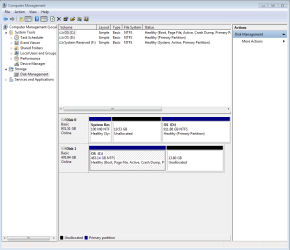
See snip for disk management.

Did you see the boot order list that I gave you that had the following boot order? It is as it has been since late yesterday.

These are in the correct order.
- Hard Drive
--- ST1000 hard drive
USB storage device
Removable Drive
eSATA
CD/DVD
- Network
--- Realtek PXE B03 DOO

These were from a list and not what I am running now:
so it tries to:
- Removeable Drive (=floppy). If it fails
- Hard Drive --- ST1000. if it fails
- USB . if it fails
- CD/DVD .if it fails
- eSATA .if it fails
- Network
 

Attachments

  • Capture computer management 1_29_13.PNG
    Capture computer management 1_29_13.PNG
    22.6 KB · Views: 16
Last edited:

My Computer My Computer

At a glance

Windows 7 Ultimate (x64) Service Pack 1 (buil...Intel(R) Core(TM) i5-2450M CPU @ 2.50GHz8 GBIntel HD Graphics 3000 with up to 1.6GB dynam...
Computer Manufacturer/Model Number
Dell 17R N7110 Inspiron laptop
OS
Windows 7 Ultimate (x64) Service Pack 1 (build 7601)
CPU
Intel(R) Core(TM) i5-2450M CPU @ 2.50GHz
Motherboard
Dell Inc. 0YH79Y A00
Memory
8 GB
Graphics Card(s)
Intel HD Graphics 3000 with up to 1.6GB dynamic video memory
Sound Card
SRS Premium Sound - (1) Realtek High Definition Audio
Monitor(s) Displays
17.3" diagonal HD+ TrueLife LED display
Screen Resolution
1600x900 resolution
Hard Drives
1 TB HD #ST1000LM024 HN-M101MBB,

512 GB Samsung 840 Pro SSD
PSU
stock
Case
stock
Cooling
stock
Keyboard
stock
Mouse
stock
Internet Speed
WiFi
Other Info
Printer: HP Photosmart C3180
I'm going to wait until you get a chance to review the boot priority order before I change the boot order. You might want me to set it different.
 

My Computer My Computer

At a glance

Windows 7 Ultimate (x64) Service Pack 1 (buil...Intel(R) Core(TM) i5-2450M CPU @ 2.50GHz8 GBIntel HD Graphics 3000 with up to 1.6GB dynam...
Computer Manufacturer/Model Number
Dell 17R N7110 Inspiron laptop
OS
Windows 7 Ultimate (x64) Service Pack 1 (build 7601)
CPU
Intel(R) Core(TM) i5-2450M CPU @ 2.50GHz
Motherboard
Dell Inc. 0YH79Y A00
Memory
8 GB
Graphics Card(s)
Intel HD Graphics 3000 with up to 1.6GB dynamic video memory
Sound Card
SRS Premium Sound - (1) Realtek High Definition Audio
Monitor(s) Displays
17.3" diagonal HD+ TrueLife LED display
Screen Resolution
1600x900 resolution
Hard Drives
1 TB HD #ST1000LM024 HN-M101MBB,

512 GB Samsung 840 Pro SSD
PSU
stock
Case
stock
Cooling
stock
Keyboard
stock
Mouse
stock
Internet Speed
WiFi
Other Info
Printer: HP Photosmart C3180
In case you didn't know yet... system still boots from "system reserved"
252819d1359509660-what-software-use-ssd-clone-backup-too-many-choices-capture-computer-management-1_29_13.png
 

My Computer My Computer

At a glance

Microsoft Windows 7 Home Premium 64-bits 7601...Intel(R) Core(TM) i3 CPU M 370 @ 2.40GHz4,00 GBATI Mobility Radeon HD 5400 Series
Computer type
Laptop
Computer Manufacturer/Model Number
ACER ASPIRE 5742G
OS
Microsoft Windows 7 Home Premium 64-bits 7601 Multiprocessor Free Service Pack 1
CPU
Intel(R) Core(TM) i3 CPU M 370 @ 2.40GHz
Motherboard
Acer Aspire 5742G
Memory
4,00 GB
Graphics Card(s)
ATI Mobility Radeon HD 5400 Series
Sound Card
(1) AMD High Definition Audio Device (2) Realtek High Defi
Screen Resolution
1366 x 768 x 32 bits (4294967296 colors) @ 60 Hz
Hard Drives
WDC WD5000BEVT-22ZAT0
These were from a list and not what I am running now:
so it tries to:
- Removeable Drive (=floppy). If it fails
- Hard Drive --- ST1000. if it fails
- USB . if it fails
- CD/DVD .if it fails
- eSATA .if it fails
- Network

Once again... how do you boot from dvd? Just insert it and power on, or press F12 and select CD/DVD?
 

My Computer My Computer

At a glance

Microsoft Windows 7 Home Premium 64-bits 7601...Intel(R) Core(TM) i3 CPU M 370 @ 2.40GHz4,00 GBATI Mobility Radeon HD 5400 Series
Computer type
Laptop
Computer Manufacturer/Model Number
ACER ASPIRE 5742G
OS
Microsoft Windows 7 Home Premium 64-bits 7601 Multiprocessor Free Service Pack 1
CPU
Intel(R) Core(TM) i3 CPU M 370 @ 2.40GHz
Motherboard
Acer Aspire 5742G
Memory
4,00 GB
Graphics Card(s)
ATI Mobility Radeon HD 5400 Series
Sound Card
(1) AMD High Definition Audio Device (2) Realtek High Defi
Screen Resolution
1366 x 768 x 32 bits (4294967296 colors) @ 60 Hz
Hard Drives
WDC WD5000BEVT-22ZAT0
Make the boot order (in BIOS using F2)

- Removeable Drive (=floppy). If it fails
- USB . if it fails
- CD/DVD .if it fails
- eSATA .if it fails
- Hard Drive --- ST1000. if it fails
- Network

And save it!
I want it to try removable drive, usb,cd/dvd, esata first. All should fail (if no CD/DVD in drive) so it boots from harddrive st1000. Works?

insert a bootable DVD and boot without pressing F12. Boots from DVD?

All works as described above... if so continue. Eject the DVD

Boot normally. Mark the SSD partition ACTIVE and boot. (you can mark it active in diskmangement, just right click on partition-> "mark partition as active") What error message do you get? I think "bootmgr is missing" (that would be great ...we found the ssd). If it boots normally post screenshot of diskmangement please.

If not booting ... change boot order in bios by placing harddisk before esata in the list. Try to boot. It boots succesfully to win7? If not place harddisk even higher in the list.

post results
 

My Computer My Computer

At a glance

Microsoft Windows 7 Home Premium 64-bits 7601...Intel(R) Core(TM) i3 CPU M 370 @ 2.40GHz4,00 GBATI Mobility Radeon HD 5400 Series
Computer type
Laptop
Computer Manufacturer/Model Number
ACER ASPIRE 5742G
OS
Microsoft Windows 7 Home Premium 64-bits 7601 Multiprocessor Free Service Pack 1
CPU
Intel(R) Core(TM) i3 CPU M 370 @ 2.40GHz
Motherboard
Acer Aspire 5742G
Memory
4,00 GB
Graphics Card(s)
ATI Mobility Radeon HD 5400 Series
Sound Card
(1) AMD High Definition Audio Device (2) Realtek High Defi
Screen Resolution
1366 x 768 x 32 bits (4294967296 colors) @ 60 Hz
Hard Drives
WDC WD5000BEVT-22ZAT0
These were from a list and not what I am running now:
so it tries to:
- Removeable Drive (=floppy). If it fails
- Hard Drive --- ST1000. if it fails
- USB . if it fails
- CD/DVD .if it fails
- eSATA .if it fails
- Network

Once again... how do you boot from dvd? Just insert it and power on, or press F12 and select CD/DVD?
If I want it to boot from the CD/DVD drive first, I set the boot priority order to boot from CD/DVD first. I haven't tried setting it to boot from the USB first.

This boot order boots the SSD first:
- Hard Drive
--- ST1000 hard drive
USB storage device
Removable Drive
eSATA
CD/DVD
- Network
--- Realtek PXE B03 DOO
 

My Computer My Computer

At a glance

Windows 7 Ultimate (x64) Service Pack 1 (buil...Intel(R) Core(TM) i5-2450M CPU @ 2.50GHz8 GBIntel HD Graphics 3000 with up to 1.6GB dynam...
Computer Manufacturer/Model Number
Dell 17R N7110 Inspiron laptop
OS
Windows 7 Ultimate (x64) Service Pack 1 (build 7601)
CPU
Intel(R) Core(TM) i5-2450M CPU @ 2.50GHz
Motherboard
Dell Inc. 0YH79Y A00
Memory
8 GB
Graphics Card(s)
Intel HD Graphics 3000 with up to 1.6GB dynamic video memory
Sound Card
SRS Premium Sound - (1) Realtek High Definition Audio
Monitor(s) Displays
17.3" diagonal HD+ TrueLife LED display
Screen Resolution
1600x900 resolution
Hard Drives
1 TB HD #ST1000LM024 HN-M101MBB,

512 GB Samsung 840 Pro SSD
PSU
stock
Case
stock
Cooling
stock
Keyboard
stock
Mouse
stock
Internet Speed
WiFi
Other Info
Printer: HP Photosmart C3180
In case you didn't know yet... system still boots from "system reserved"
252819d1359509660-what-software-use-ssd-clone-backup-too-many-choices-capture-computer-management-1_29_13.png
Yes. I know.

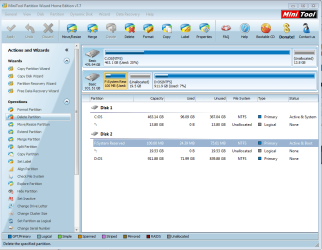
How can I move the the 100MB portion to the correct drive?


The 100 MB partition is on the HD instead of the SSD. Is this going to be a problem? How can I fix it? See snip.
 

Attachments

  • Capture 100MB partition is on the wrong drive 1_28_13.PNG
    Capture 100MB partition is on the wrong drive 1_28_13.PNG
    63 KB · Views: 3

My Computer My Computer

At a glance

Windows 7 Ultimate (x64) Service Pack 1 (buil...Intel(R) Core(TM) i5-2450M CPU @ 2.50GHz8 GBIntel HD Graphics 3000 with up to 1.6GB dynam...
Computer Manufacturer/Model Number
Dell 17R N7110 Inspiron laptop
OS
Windows 7 Ultimate (x64) Service Pack 1 (build 7601)
CPU
Intel(R) Core(TM) i5-2450M CPU @ 2.50GHz
Motherboard
Dell Inc. 0YH79Y A00
Memory
8 GB
Graphics Card(s)
Intel HD Graphics 3000 with up to 1.6GB dynamic video memory
Sound Card
SRS Premium Sound - (1) Realtek High Definition Audio
Monitor(s) Displays
17.3" diagonal HD+ TrueLife LED display
Screen Resolution
1600x900 resolution
Hard Drives
1 TB HD #ST1000LM024 HN-M101MBB,

512 GB Samsung 840 Pro SSD
PSU
stock
Case
stock
Cooling
stock
Keyboard
stock
Mouse
stock
Internet Speed
WiFi
Other Info
Printer: HP Photosmart C3180
These were from a list and not what I am running now:
so it tries to:
- Removeable Drive (=floppy). If it fails
- Hard Drive --- ST1000. if it fails
- USB . if it fails
- CD/DVD .if it fails
- eSATA .if it fails
- Network

Once again... how do you boot from dvd? Just insert it and power on, or press F12 and select CD/DVD?
If I want it to boot from the CD/DVD drive first, I set the boot priority order to boot from CD/DVD first. I haven't tried setting it to boot from the USB first.

SSD doesn't show up in BIOS. It only shows the following (not necessarily in this order):
- Removeable Drive
- Hard Drive
--- ST1000
- USB
- CD/DVD
- eSATA
- Network

What do you use when booting from dvd? Is that option DVD or USB (you attached DVD drive on usb port?)
I use CD/DVD to boot from external CD/DVD.


I just checked the boot priority order. This is how it is set up right now. This is what it shows when you expand the hard drive and network boot selections.

It boots to the SSD at this time.

- Hard Drive
--- ST1000 hard drive
USB storage device
Removable Drive
eSATA
CD/DVD
- Network
--- Realtek PXE B03 DOO
 

My Computer My Computer

At a glance

Windows 7 Ultimate (x64) Service Pack 1 (buil...Intel(R) Core(TM) i5-2450M CPU @ 2.50GHz8 GBIntel HD Graphics 3000 with up to 1.6GB dynam...
Computer Manufacturer/Model Number
Dell 17R N7110 Inspiron laptop
OS
Windows 7 Ultimate (x64) Service Pack 1 (build 7601)
CPU
Intel(R) Core(TM) i5-2450M CPU @ 2.50GHz
Motherboard
Dell Inc. 0YH79Y A00
Memory
8 GB
Graphics Card(s)
Intel HD Graphics 3000 with up to 1.6GB dynamic video memory
Sound Card
SRS Premium Sound - (1) Realtek High Definition Audio
Monitor(s) Displays
17.3" diagonal HD+ TrueLife LED display
Screen Resolution
1600x900 resolution
Hard Drives
1 TB HD #ST1000LM024 HN-M101MBB,

512 GB Samsung 840 Pro SSD
PSU
stock
Case
stock
Cooling
stock
Keyboard
stock
Mouse
stock
Internet Speed
WiFi
Other Info
Printer: HP Photosmart C3180
These were from a list and not what I am running now:
so it tries to:
- Removeable Drive (=floppy). If it fails
- Hard Drive --- ST1000. if it fails
- USB . if it fails
- CD/DVD .if it fails
- eSATA .if it fails
- Network
Have you noticed that I have been telling you that this is NOT my correct boot priority order? See posts 101, 104, 109, 110 and 115.
 

My Computer My Computer

At a glance

Windows 7 Ultimate (x64) Service Pack 1 (buil...Intel(R) Core(TM) i5-2450M CPU @ 2.50GHz8 GBIntel HD Graphics 3000 with up to 1.6GB dynam...
Computer Manufacturer/Model Number
Dell 17R N7110 Inspiron laptop
OS
Windows 7 Ultimate (x64) Service Pack 1 (build 7601)
CPU
Intel(R) Core(TM) i5-2450M CPU @ 2.50GHz
Motherboard
Dell Inc. 0YH79Y A00
Memory
8 GB
Graphics Card(s)
Intel HD Graphics 3000 with up to 1.6GB dynamic video memory
Sound Card
SRS Premium Sound - (1) Realtek High Definition Audio
Monitor(s) Displays
17.3" diagonal HD+ TrueLife LED display
Screen Resolution
1600x900 resolution
Hard Drives
1 TB HD #ST1000LM024 HN-M101MBB,

512 GB Samsung 840 Pro SSD
PSU
stock
Case
stock
Cooling
stock
Keyboard
stock
Mouse
stock
Internet Speed
WiFi
Other Info
Printer: HP Photosmart C3180
Forget about "system reserved" it just has the boot manager ( file \bootmgr) and bootmenu (file \boot\bcd)
Old C has this stuff as well. New C (SSD) hasn't yet (if you did clean install, it puts bootmenu in active partition so on system reserved).

You already marked New C (SSD) active... so it's bootable. (SSD) works fine ... your working on it, but boots from system reserved.

If you boot now from SSD...

  • It can't find file bootmgr and bcd file. So it says something like "bootmgr missing"
  • In case it has all boot stuff it boots fine.
So we have to prove it actually boots or tries to boot from ssd.
Step to do:

  • eject DVD from drive.
  • Put CD/DVD on top of boot priority
  • Put eSATA as second option.
  • Put harddisk as third option.
Save it and boot. What happens? What error message?

Most likely it gives "bootmgr missing". Put Harddisk on top again in bios boot priority and system boots fine again.

Post results
 

My Computer My Computer

At a glance

Microsoft Windows 7 Home Premium 64-bits 7601...Intel(R) Core(TM) i3 CPU M 370 @ 2.40GHz4,00 GBATI Mobility Radeon HD 5400 Series
Computer type
Laptop
Computer Manufacturer/Model Number
ACER ASPIRE 5742G
OS
Microsoft Windows 7 Home Premium 64-bits 7601 Multiprocessor Free Service Pack 1
CPU
Intel(R) Core(TM) i3 CPU M 370 @ 2.40GHz
Motherboard
Acer Aspire 5742G
Memory
4,00 GB
Graphics Card(s)
ATI Mobility Radeon HD 5400 Series
Sound Card
(1) AMD High Definition Audio Device (2) Realtek High Defi
Screen Resolution
1366 x 768 x 32 bits (4294967296 colors) @ 60 Hz
Hard Drives
WDC WD5000BEVT-22ZAT0
These were from a list and not what I am running now:
so it tries to:
- Removeable Drive (=floppy). If it fails
- Hard Drive --- ST1000. if it fails
- USB . if it fails
- CD/DVD .if it fails
- eSATA .if it fails
- Network
Have you noticed that I have been telling you that this is NOT my correct boot priority order? See posts 101, 104, 109, 110 and 115.
Yes I read everything. A few times you said it was booting from SSD. But I can't believe it! If you're right SSD is marked System (instead of system reserved) in disk management.
 

My Computer My Computer

At a glance

Microsoft Windows 7 Home Premium 64-bits 7601...Intel(R) Core(TM) i3 CPU M 370 @ 2.40GHz4,00 GBATI Mobility Radeon HD 5400 Series
Computer type
Laptop
Computer Manufacturer/Model Number
ACER ASPIRE 5742G
OS
Microsoft Windows 7 Home Premium 64-bits 7601 Multiprocessor Free Service Pack 1
CPU
Intel(R) Core(TM) i3 CPU M 370 @ 2.40GHz
Motherboard
Acer Aspire 5742G
Memory
4,00 GB
Graphics Card(s)
ATI Mobility Radeon HD 5400 Series
Sound Card
(1) AMD High Definition Audio Device (2) Realtek High Defi
Screen Resolution
1366 x 768 x 32 bits (4294967296 colors) @ 60 Hz
Hard Drives
WDC WD5000BEVT-22ZAT0
Back
Top