Solved What software to use with SSD clone and for backup too? Many Choices!!

Going to install SSD now.

Questions: Do I need to initialize the SSD; format it, align it or install its latest firmware, partition or do anything to it before use? We are going from a 1 TB HD to a 512 GB SSD. The SSD hasn't been used before.
 

My Computer My Computer

At a glance

Windows 7 Ultimate (x64) Service Pack 1 (buil...Intel(R) Core(TM) i5-2450M CPU @ 2.50GHz8 GBIntel HD Graphics 3000 with up to 1.6GB dynam...
Computer Manufacturer/Model Number
Dell 17R N7110 Inspiron laptop
OS
Windows 7 Ultimate (x64) Service Pack 1 (build 7601)
CPU
Intel(R) Core(TM) i5-2450M CPU @ 2.50GHz
Motherboard
Dell Inc. 0YH79Y A00
Memory
8 GB
Graphics Card(s)
Intel HD Graphics 3000 with up to 1.6GB dynamic video memory
Sound Card
SRS Premium Sound - (1) Realtek High Definition Audio
Monitor(s) Displays
17.3" diagonal HD+ TrueLife LED display
Screen Resolution
1600x900 resolution
Hard Drives
1 TB HD #ST1000LM024 HN-M101MBB,

512 GB Samsung 840 Pro SSD
PSU
stock
Case
stock
Cooling
stock
Keyboard
stock
Mouse
stock
Internet Speed
WiFi
Other Info
Printer: HP Photosmart C3180
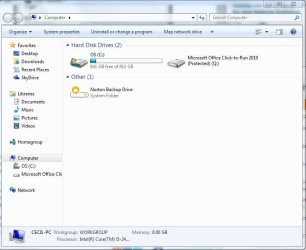
I have the SSD installed. Windows loaded its drivers. But, it doesn't show up when I click on computer. Stumped for now.
 

My Computer My Computer

At a glance

Windows 7 Ultimate (x64) Service Pack 1 (buil...Intel(R) Core(TM) i5-2450M CPU @ 2.50GHz8 GBIntel HD Graphics 3000 with up to 1.6GB dynam...
Computer Manufacturer/Model Number
Dell 17R N7110 Inspiron laptop
OS
Windows 7 Ultimate (x64) Service Pack 1 (build 7601)
CPU
Intel(R) Core(TM) i5-2450M CPU @ 2.50GHz
Motherboard
Dell Inc. 0YH79Y A00
Memory
8 GB
Graphics Card(s)
Intel HD Graphics 3000 with up to 1.6GB dynamic video memory
Sound Card
SRS Premium Sound - (1) Realtek High Definition Audio
Monitor(s) Displays
17.3" diagonal HD+ TrueLife LED display
Screen Resolution
1600x900 resolution
Hard Drives
1 TB HD #ST1000LM024 HN-M101MBB,

512 GB Samsung 840 Pro SSD
PSU
stock
Case
stock
Cooling
stock
Keyboard
stock
Mouse
stock
Internet Speed
WiFi
Other Info
Printer: HP Photosmart C3180
Stumped for now.

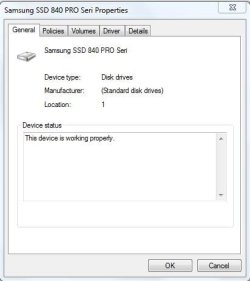
Device Manager says that the SSD is working properly but it isn't shown when I click on Computer to view drives.

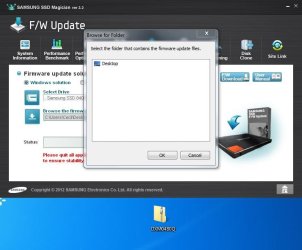
There is a firmware update for the SSD, downloaded it, but Samsung's SSD Magician ver 3.2 software doesn't see it no matter where the download file is placed. I can put the download file on the desktop, anywhere in the C drive, and it either can't see it or it won't open up the folder where it is. Strange!

Macrium Reflect sees SSD, Getting ready to clone C drive to it, if I can.
 

Attachments

  • Capture SSD working properly 1_27_13.JPG
    Capture SSD working properly 1_27_13.JPG
    24.2 KB · Views: 1
  • Capture SSD not shown 1_27_13.JPG
    Capture SSD not shown 1_27_13.JPG
    48.9 KB · Views: 2
  • Capture SSD firmware not shown 1_27_13.JPG
    Capture SSD firmware not shown 1_27_13.JPG
    49.2 KB · Views: 1
  • Capture Macrium Reflect sees SSD 1_27_13.JPG
    Capture Macrium Reflect sees SSD 1_27_13.JPG
    73.7 KB · Views: 4

My Computer My Computer

At a glance

Windows 7 Ultimate (x64) Service Pack 1 (buil...Intel(R) Core(TM) i5-2450M CPU @ 2.50GHz8 GBIntel HD Graphics 3000 with up to 1.6GB dynam...
Computer Manufacturer/Model Number
Dell 17R N7110 Inspiron laptop
OS
Windows 7 Ultimate (x64) Service Pack 1 (build 7601)
CPU
Intel(R) Core(TM) i5-2450M CPU @ 2.50GHz
Motherboard
Dell Inc. 0YH79Y A00
Memory
8 GB
Graphics Card(s)
Intel HD Graphics 3000 with up to 1.6GB dynamic video memory
Sound Card
SRS Premium Sound - (1) Realtek High Definition Audio
Monitor(s) Displays
17.3" diagonal HD+ TrueLife LED display
Screen Resolution
1600x900 resolution
Hard Drives
1 TB HD #ST1000LM024 HN-M101MBB,

512 GB Samsung 840 Pro SSD
PSU
stock
Case
stock
Cooling
stock
Keyboard
stock
Mouse
stock
Internet Speed
WiFi
Other Info
Printer: HP Photosmart C3180
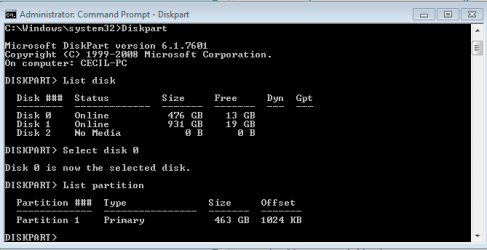
Did you create partition(s) on SSD? Did you do the clone using macrium reflect free? Macrim displays SSD with no partitions and disk signature 00000000.

Just do the clone! there is no partition yet on SSD... so no volume.... so nothing in computer output from windows explorer.
 

My Computer My Computer

At a glance

Microsoft Windows 7 Home Premium 64-bits 7601...Intel(R) Core(TM) i3 CPU M 370 @ 2.40GHz4,00 GBATI Mobility Radeon HD 5400 Series
Computer type
Laptop
Computer Manufacturer/Model Number
ACER ASPIRE 5742G
OS
Microsoft Windows 7 Home Premium 64-bits 7601 Multiprocessor Free Service Pack 1
CPU
Intel(R) Core(TM) i3 CPU M 370 @ 2.40GHz
Motherboard
Acer Aspire 5742G
Memory
4,00 GB
Graphics Card(s)
ATI Mobility Radeon HD 5400 Series
Sound Card
(1) AMD High Definition Audio Device (2) Realtek High Defi
Screen Resolution
1366 x 768 x 32 bits (4294967296 colors) @ 60 Hz
Hard Drives
WDC WD5000BEVT-22ZAT0
Of course attach ssd to system. Install macrium reflect free from Macrium Reflect FREE Edition - Information and download (scroll down). close all other running applications. Run macrium reflect. Press "clone this disk". select the source and destination disk. Select partitions you want to clone (you only have 1 the OS partition). You can adjust the size of destination partition. Make it as large as possible ... so using whole SSD (I think it's default). Make partition primary and active (think it is same as source by default). ALIGN DESTINATION PARTITION win7/vista!

Partition Alignment


Start the clone process. Of course do nothing else on computer, because clone is the state as it is now. You can display documents and browse internet if you want.

When clone has completed succesfully you can see SSD in windows explorer. SSD has drive letter F for example. I use it in next explanation. We gonna check if all is fine.
Cloned

In http://www.sevenforums.com/tutorials/783-elevated-command-prompt.html
Code:
diskpart
sel  vol  F
detail part
exit
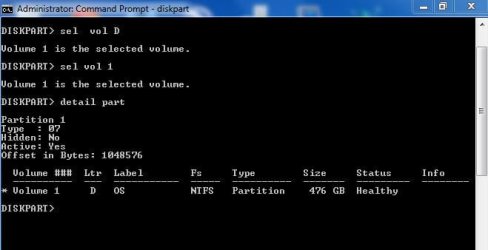
is it active?
Active, see snip.

Code:
diskpart
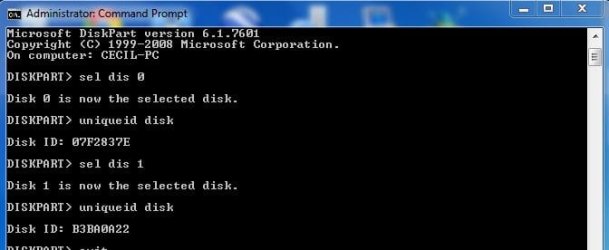
sel dis 0
uniqueid disk
sel dis 1
uniqueid disk
Disk ID's are different?....that's what you want.
ID's Different, see snip

Code:
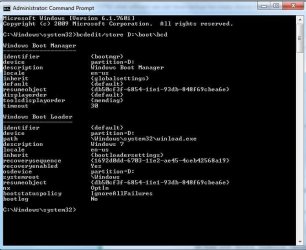
bcdedit/store F:\boot\bcd
All lines with device, osdevice, ramdisksdidevice, ramdisksdidevice are refering to F: or BOOT? So C: is nowhere in output? All should refere to F... that's nice. If you boot from SSD it all will be called C.
Refers to D, new SSD, see snip
 

Attachments

  • Capture Disk 1 Active 1_28_13.JPG
    Capture Disk 1 Active 1_28_13.JPG
    26.3 KB · Views: 0
  • Capture disks ID different 1_28_13.JPG
    Capture disks ID different 1_28_13.JPG
    26.7 KB · Views: 1
  • Capture refer to  D 1_28_13.JPG
    Capture refer to D 1_28_13.JPG
    53.2 KB · Views: 0

My Computer My Computer

At a glance

Windows 7 Ultimate (x64) Service Pack 1 (buil...Intel(R) Core(TM) i5-2450M CPU @ 2.50GHz8 GBIntel HD Graphics 3000 with up to 1.6GB dynam...
Computer Manufacturer/Model Number
Dell 17R N7110 Inspiron laptop
OS
Windows 7 Ultimate (x64) Service Pack 1 (build 7601)
CPU
Intel(R) Core(TM) i5-2450M CPU @ 2.50GHz
Motherboard
Dell Inc. 0YH79Y A00
Memory
8 GB
Graphics Card(s)
Intel HD Graphics 3000 with up to 1.6GB dynamic video memory
Sound Card
SRS Premium Sound - (1) Realtek High Definition Audio
Monitor(s) Displays
17.3" diagonal HD+ TrueLife LED display
Screen Resolution
1600x900 resolution
Hard Drives
1 TB HD #ST1000LM024 HN-M101MBB,

512 GB Samsung 840 Pro SSD
PSU
stock
Case
stock
Cooling
stock
Keyboard
stock
Mouse
stock
Internet Speed
WiFi
Other Info
Printer: HP Photosmart C3180
Start disk defragment->schedule->select disks. SSD is not listed there.... then win7 knows it's an SSD instead of normal HDD. Select any disk you want to defragment. Never defragment SSD.
OK

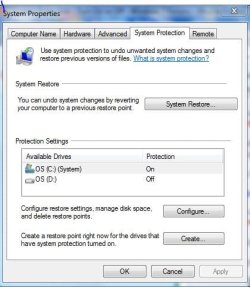
Config system restore settings http://www.sevenforums.com/tutorials/330-system-protection-turn-off.html
Any ghost disks there? If so disable system protection on that ghost disk. Be sure to enable system protection on C as shown in step 10.
HD on and SSD off, see snip

Should both be on? Confused here.

In elevated command prompt:
Code:
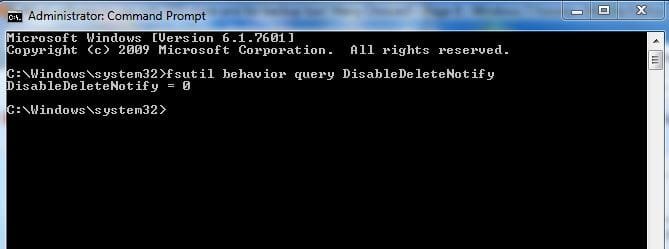
fsutil behavior query DisableDeleteNotify
Is it 0? If not
Code:
fsutil behavior set DisableDeleteNotify 0
This puts TRIM on on SSD.

Post results
Is 0, see snip
 

Attachments

  • Capture it is 0 1_28_13.JPG
    Capture it is 0 1_28_13.JPG
    23 KB · Views: 1
  • Capture System Protection 1_28_13.JPG
    Capture System Protection 1_28_13.JPG
    40 KB · Views: 1

My Computer My Computer

At a glance

Windows 7 Ultimate (x64) Service Pack 1 (buil...Intel(R) Core(TM) i5-2450M CPU @ 2.50GHz8 GBIntel HD Graphics 3000 with up to 1.6GB dynam...
Computer Manufacturer/Model Number
Dell 17R N7110 Inspiron laptop
OS
Windows 7 Ultimate (x64) Service Pack 1 (build 7601)
CPU
Intel(R) Core(TM) i5-2450M CPU @ 2.50GHz
Motherboard
Dell Inc. 0YH79Y A00
Memory
8 GB
Graphics Card(s)
Intel HD Graphics 3000 with up to 1.6GB dynamic video memory
Sound Card
SRS Premium Sound - (1) Realtek High Definition Audio
Monitor(s) Displays
17.3" diagonal HD+ TrueLife LED display
Screen Resolution
1600x900 resolution
Hard Drives
1 TB HD #ST1000LM024 HN-M101MBB,

512 GB Samsung 840 Pro SSD
PSU
stock
Case
stock
Cooling
stock
Keyboard
stock
Mouse
stock
Internet Speed
WiFi
Other Info
Printer: HP Photosmart C3180
All is as expected? Shutdown and change "boot order" in bios, so it boots from SSD. Look in disk management if SSD is called C now.
Having trouble changing boot order. SSD doesn't show up in this section, but it is shown in other parts of BIOS. Can not change boot order for this reason.

Right now, HD is C and SSD is D. This should be changed.​

Will be trying to figure this on out. Any ideas?


My Computer My Computer

At a glance

Windows 7 Ultimate (x64) Service Pack 1 (buil...Intel(R) Core(TM) i5-2450M CPU @ 2.50GHz8 GBIntel HD Graphics 3000 with up to 1.6GB dynam...
Computer Manufacturer/Model Number
Dell 17R N7110 Inspiron laptop
OS
Windows 7 Ultimate (x64) Service Pack 1 (build 7601)
CPU
Intel(R) Core(TM) i5-2450M CPU @ 2.50GHz
Motherboard
Dell Inc. 0YH79Y A00
Memory
8 GB
Graphics Card(s)
Intel HD Graphics 3000 with up to 1.6GB dynamic video memory
Sound Card
SRS Premium Sound - (1) Realtek High Definition Audio
Monitor(s) Displays
17.3" diagonal HD+ TrueLife LED display
Screen Resolution
1600x900 resolution
Hard Drives
1 TB HD #ST1000LM024 HN-M101MBB,

512 GB Samsung 840 Pro SSD
PSU
stock
Case
stock
Cooling
stock
Keyboard
stock
Mouse
stock
Internet Speed
WiFi
Other Info
Printer: HP Photosmart C3180
PARTITIONS
C: HD, active, boot
D: SSD, active
 

Attachments

  • Capture Partitions 1_28_13.JPG
    Capture Partitions 1_28_13.JPG
    95.2 KB · Views: 1

My Computer My Computer

At a glance

Windows 7 Ultimate (x64) Service Pack 1 (buil...Intel(R) Core(TM) i5-2450M CPU @ 2.50GHz8 GBIntel HD Graphics 3000 with up to 1.6GB dynam...
Computer Manufacturer/Model Number
Dell 17R N7110 Inspiron laptop
OS
Windows 7 Ultimate (x64) Service Pack 1 (build 7601)
CPU
Intel(R) Core(TM) i5-2450M CPU @ 2.50GHz
Motherboard
Dell Inc. 0YH79Y A00
Memory
8 GB
Graphics Card(s)
Intel HD Graphics 3000 with up to 1.6GB dynamic video memory
Sound Card
SRS Premium Sound - (1) Realtek High Definition Audio
Monitor(s) Displays
17.3" diagonal HD+ TrueLife LED display
Screen Resolution
1600x900 resolution
Hard Drives
1 TB HD #ST1000LM024 HN-M101MBB,

512 GB Samsung 840 Pro SSD
PSU
stock
Case
stock
Cooling
stock
Keyboard
stock
Mouse
stock
Internet Speed
WiFi
Other Info
Printer: HP Photosmart C3180
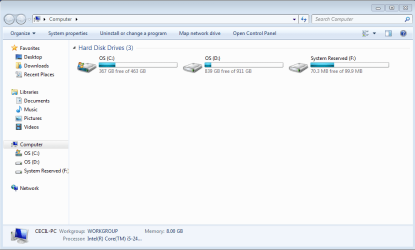
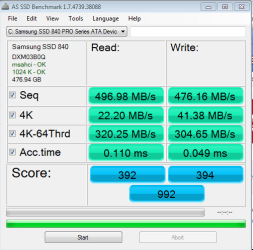
I got it. I marked the HD as inactive. Then the computer couldn't find the OS. So, I inserted the Win 7 disk and did a clean install. See snip of "Computer" and "Benchmark."
 

Attachments

  • Capture Computer B 1_28_13.PNG
    Capture Computer B 1_28_13.PNG
    19.4 KB · Views: 1
  • Capture AS Benchmark 1_28_13.PNG
    Capture AS Benchmark 1_28_13.PNG
    13.9 KB · Views: 0

My Computer My Computer

At a glance

Windows 7 Ultimate (x64) Service Pack 1 (buil...Intel(R) Core(TM) i5-2450M CPU @ 2.50GHz8 GBIntel HD Graphics 3000 with up to 1.6GB dynam...
Computer Manufacturer/Model Number
Dell 17R N7110 Inspiron laptop
OS
Windows 7 Ultimate (x64) Service Pack 1 (build 7601)
CPU
Intel(R) Core(TM) i5-2450M CPU @ 2.50GHz
Motherboard
Dell Inc. 0YH79Y A00
Memory
8 GB
Graphics Card(s)
Intel HD Graphics 3000 with up to 1.6GB dynamic video memory
Sound Card
SRS Premium Sound - (1) Realtek High Definition Audio
Monitor(s) Displays
17.3" diagonal HD+ TrueLife LED display
Screen Resolution
1600x900 resolution
Hard Drives
1 TB HD #ST1000LM024 HN-M101MBB,

512 GB Samsung 840 Pro SSD
PSU
stock
Case
stock
Cooling
stock
Keyboard
stock
Mouse
stock
Internet Speed
WiFi
Other Info
Printer: HP Photosmart C3180
I checked to make sure that the alignment is OK. It is, see snip.
 

Attachments

  • Capture Alignment  1_28_13.PNG
    Capture Alignment 1_28_13.PNG
    6.2 KB · Views: 3

My Computer My Computer

At a glance

Windows 7 Ultimate (x64) Service Pack 1 (buil...Intel(R) Core(TM) i5-2450M CPU @ 2.50GHz8 GBIntel HD Graphics 3000 with up to 1.6GB dynam...
Computer Manufacturer/Model Number
Dell 17R N7110 Inspiron laptop
OS
Windows 7 Ultimate (x64) Service Pack 1 (build 7601)
CPU
Intel(R) Core(TM) i5-2450M CPU @ 2.50GHz
Motherboard
Dell Inc. 0YH79Y A00
Memory
8 GB
Graphics Card(s)
Intel HD Graphics 3000 with up to 1.6GB dynamic video memory
Sound Card
SRS Premium Sound - (1) Realtek High Definition Audio
Monitor(s) Displays
17.3" diagonal HD+ TrueLife LED display
Screen Resolution
1600x900 resolution
Hard Drives
1 TB HD #ST1000LM024 HN-M101MBB,

512 GB Samsung 840 Pro SSD
PSU
stock
Case
stock
Cooling
stock
Keyboard
stock
Mouse
stock
Internet Speed
WiFi
Other Info
Printer: HP Photosmart C3180
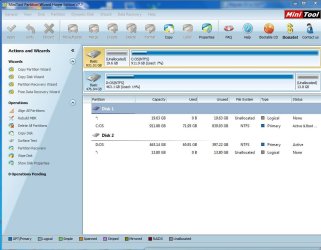
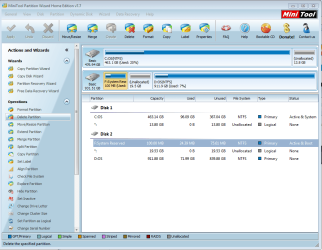
The 100 MB partition is on the HD instead of the SSD. Is this going to be a problem? How can I fix it? See snip.
 

Attachments

  • Capture 100MB partition is on the wrong drive 1_28_13.PNG
    Capture 100MB partition is on the wrong drive 1_28_13.PNG
    63 KB · Views: 5

My Computer My Computer

At a glance

Windows 7 Ultimate (x64) Service Pack 1 (buil...Intel(R) Core(TM) i5-2450M CPU @ 2.50GHz8 GBIntel HD Graphics 3000 with up to 1.6GB dynam...
Computer Manufacturer/Model Number
Dell 17R N7110 Inspiron laptop
OS
Windows 7 Ultimate (x64) Service Pack 1 (build 7601)
CPU
Intel(R) Core(TM) i5-2450M CPU @ 2.50GHz
Motherboard
Dell Inc. 0YH79Y A00
Memory
8 GB
Graphics Card(s)
Intel HD Graphics 3000 with up to 1.6GB dynamic video memory
Sound Card
SRS Premium Sound - (1) Realtek High Definition Audio
Monitor(s) Displays
17.3" diagonal HD+ TrueLife LED display
Screen Resolution
1600x900 resolution
Hard Drives
1 TB HD #ST1000LM024 HN-M101MBB,

512 GB Samsung 840 Pro SSD
PSU
stock
Case
stock
Cooling
stock
Keyboard
stock
Mouse
stock
Internet Speed
WiFi
Other Info
Printer: HP Photosmart C3180
Config system restore settings System Protection - Turn On or Off
Any ghost disks there? If so disable system protection on that ghost disk. Be sure to enable system protection on C as shown in step 10.

Just turn it on for C.
===================
You did a clean install afterwards.... pffff. Why? You still can't set SSD as boot device in bios?

So you replaced SSD with standard win7 install. All programs and data are gone?
Partition on other disk still has a fine working win7 with all stuff?
 

My Computer My Computer

At a glance

Microsoft Windows 7 Home Premium 64-bits 7601...Intel(R) Core(TM) i3 CPU M 370 @ 2.40GHz4,00 GBATI Mobility Radeon HD 5400 Series
Computer type
Laptop
Computer Manufacturer/Model Number
ACER ASPIRE 5742G
OS
Microsoft Windows 7 Home Premium 64-bits 7601 Multiprocessor Free Service Pack 1
CPU
Intel(R) Core(TM) i3 CPU M 370 @ 2.40GHz
Motherboard
Acer Aspire 5742G
Memory
4,00 GB
Graphics Card(s)
ATI Mobility Radeon HD 5400 Series
Sound Card
(1) AMD High Definition Audio Device (2) Realtek High Defi
Screen Resolution
1366 x 768 x 32 bits (4294967296 colors) @ 60 Hz
Hard Drives
WDC WD5000BEVT-22ZAT0
The 100 MB partition is on the HD instead of the SSD. Is this going to be a problem? How can I fix it? See snip.
Why do you have 13.8GB unallocated space at end of SSD? I told you to make partition as large as possible during clone! Did you format SSD partition when performing a clean install?

Anyway.... old C (now called D) was working fine before cloning? So you still want the clone?
you attached SSD drive on the place where DVD was and DVD using another connection. What options do you have in bios where you can modify "boot priority"?
 

My Computer My Computer

At a glance

Microsoft Windows 7 Home Premium 64-bits 7601...Intel(R) Core(TM) i3 CPU M 370 @ 2.40GHz4,00 GBATI Mobility Radeon HD 5400 Series
Computer type
Laptop
Computer Manufacturer/Model Number
ACER ASPIRE 5742G
OS
Microsoft Windows 7 Home Premium 64-bits 7601 Multiprocessor Free Service Pack 1
CPU
Intel(R) Core(TM) i3 CPU M 370 @ 2.40GHz
Motherboard
Acer Aspire 5742G
Memory
4,00 GB
Graphics Card(s)
ATI Mobility Radeon HD 5400 Series
Sound Card
(1) AMD High Definition Audio Device (2) Realtek High Defi
Screen Resolution
1366 x 768 x 32 bits (4294967296 colors) @ 60 Hz
Hard Drives
WDC WD5000BEVT-22ZAT0
You use a eSATA-USB kit to attach dvd drive. Are you booting from "USB CD/DVD" or something like that in "boot priority"? Is normal "DVD" drive still listed in boot priority? If so select that as first boot device. Maybe it (tries) boots from SSD then. It can't because it doesn't have an active partition and no bootmanager yet.... but I want to know if it tries to. If possible disable all other entries (temporary) in boot device priority (or called boot device order)
 

My Computer My Computer

At a glance

Microsoft Windows 7 Home Premium 64-bits 7601...Intel(R) Core(TM) i3 CPU M 370 @ 2.40GHz4,00 GBATI Mobility Radeon HD 5400 Series
Computer type
Laptop
Computer Manufacturer/Model Number
ACER ASPIRE 5742G
OS
Microsoft Windows 7 Home Premium 64-bits 7601 Multiprocessor Free Service Pack 1
CPU
Intel(R) Core(TM) i3 CPU M 370 @ 2.40GHz
Motherboard
Acer Aspire 5742G
Memory
4,00 GB
Graphics Card(s)
ATI Mobility Radeon HD 5400 Series
Sound Card
(1) AMD High Definition Audio Device (2) Realtek High Defi
Screen Resolution
1366 x 768 x 32 bits (4294967296 colors) @ 60 Hz
Hard Drives
WDC WD5000BEVT-22ZAT0
What happened was ... The computer only booted up using the HD and not the SSD after cloning. I even cloned it again trying the Paragon Migrate OS to SSD software. No change.

There was no option showing in BIOS to change the boot from the HD to the SSD, so I marked the HD as inactive because both drives were active. When I did this, the computer couldn't find the OS for it to start up. The computer was basically dead then. All I had was the blue screen. The only option that I knew of to get it going again was to do a clean install with Win 7 disk.

That got me going again. After I marked the partition as inactive, the computer was basically dead. I am still at a nursing home recovering from surgery. I have no access to another computer here. I had no way to get back on the internet that I knew of to get to this site to ask what to do. I was dead in the water, so to speak. :)

I even looked for ghost drives and didn't see any that I could tell.

I have an appointment. When I get back, I'll work on the last sets of things to do.

Thank you so much for your help.
 

My Computer My Computer

At a glance

Windows 7 Ultimate (x64) Service Pack 1 (buil...Intel(R) Core(TM) i5-2450M CPU @ 2.50GHz8 GBIntel HD Graphics 3000 with up to 1.6GB dynam...
Computer Manufacturer/Model Number
Dell 17R N7110 Inspiron laptop
OS
Windows 7 Ultimate (x64) Service Pack 1 (build 7601)
CPU
Intel(R) Core(TM) i5-2450M CPU @ 2.50GHz
Motherboard
Dell Inc. 0YH79Y A00
Memory
8 GB
Graphics Card(s)
Intel HD Graphics 3000 with up to 1.6GB dynamic video memory
Sound Card
SRS Premium Sound - (1) Realtek High Definition Audio
Monitor(s) Displays
17.3" diagonal HD+ TrueLife LED display
Screen Resolution
1600x900 resolution
Hard Drives
1 TB HD #ST1000LM024 HN-M101MBB,

512 GB Samsung 840 Pro SSD
PSU
stock
Case
stock
Cooling
stock
Keyboard
stock
Mouse
stock
Internet Speed
WiFi
Other Info
Printer: HP Photosmart C3180
There was no option showing in BIOS to change the boot from the HD to the SSD, so I marked the HD as inactive because both drives were active. When I did this, the computer couldn't find the OS for it to start up. The computer was basically dead then. All I had was the blue screen. The only option that I knew of to get it going again was to do a clean install with Win 7 disk.

What was on the blue screen?

If you boot from win7 install disk press shift-f10 to enter command prompt as described here http://www.sevenforums.com/tutorials/682-command-prompt-startup.html

From there you can do
Code:
diskpart
list vol
exit

You see drive letters (can be different as in win7!) . Look at their sizes. Now you know what drive letter is "system reserved", old OS and SSD. Select any volume you want and make it active or inactive. Only one volume can be active on each physical disk.

Code:
diskpart
sel vol  C
active (or inactive)

Mark old C active. Now reboot. It reboots in old C, correct? Check disk management to prove harddisk partition is called C. Delete system reserved if all went fine so far. Delete partition on SSD as well. Do all clone steps again afterwards. Be sure to make partition on SSD as large as possible (you didn't on first try). Be sure SSD is mark active. Mark old C inactive using diskpart as described above.

So actually do all things again. Now boot system. What error message? If error message ... just mark old C active again and reboot.

What options do you have in "boot device order" ... please explain clearly all options you can select there
 

My Computer My Computer

At a glance

Microsoft Windows 7 Home Premium 64-bits 7601...Intel(R) Core(TM) i3 CPU M 370 @ 2.40GHz4,00 GBATI Mobility Radeon HD 5400 Series
Computer type
Laptop
Computer Manufacturer/Model Number
ACER ASPIRE 5742G
OS
Microsoft Windows 7 Home Premium 64-bits 7601 Multiprocessor Free Service Pack 1
CPU
Intel(R) Core(TM) i3 CPU M 370 @ 2.40GHz
Motherboard
Acer Aspire 5742G
Memory
4,00 GB
Graphics Card(s)
ATI Mobility Radeon HD 5400 Series
Sound Card
(1) AMD High Definition Audio Device (2) Realtek High Defi
Screen Resolution
1366 x 768 x 32 bits (4294967296 colors) @ 60 Hz
Hard Drives
WDC WD5000BEVT-22ZAT0
You can also do this

At the Dell logo screeen, tap the F12 key repeatedly until the Please Select Boot Device: menu appears.
What can be selected in that menu. Answer that first prior to cloning.
 

My Computer My Computer

At a glance

Microsoft Windows 7 Home Premium 64-bits 7601...Intel(R) Core(TM) i3 CPU M 370 @ 2.40GHz4,00 GBATI Mobility Radeon HD 5400 Series
Computer type
Laptop
Computer Manufacturer/Model Number
ACER ASPIRE 5742G
OS
Microsoft Windows 7 Home Premium 64-bits 7601 Multiprocessor Free Service Pack 1
CPU
Intel(R) Core(TM) i3 CPU M 370 @ 2.40GHz
Motherboard
Acer Aspire 5742G
Memory
4,00 GB
Graphics Card(s)
ATI Mobility Radeon HD 5400 Series
Sound Card
(1) AMD High Definition Audio Device (2) Realtek High Defi
Screen Resolution
1366 x 768 x 32 bits (4294967296 colors) @ 60 Hz
Hard Drives
WDC WD5000BEVT-22ZAT0
Config system restore settings System Protection - Turn On or Off
Any ghost disks there? If so disable system protection on that ghost disk. Be sure to enable system protection on C as shown in step 10.

Just turn it on for C.
This is how system protection is set up:
C drive (SSD) On 39%
D drive (HD) Off 20%
===================
You did a clean install afterwards.... pffff. Why? You still can't set SSD as boot device in bios?
Yes. Computer couldn't find operating system after I marked the HD as inactive which used to be the boot drive. Just blue screen. Nothing else. Computer sent a message that it couldn't find the OS in the blue screen.

SSD doesn't show up in BIOS. It only shows the following (not necessarily in this order):
- Removeable Drive
- Hard Drive
--- ST1000
- USB
- CD/DVD
- eSATA
- Network

So you replaced SSD with standard win7 install. All programs and data are gone?
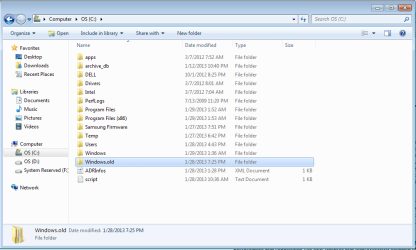
Yes, but the clone was saved in the "Windows.old" folder. So, it isn't gone.

Partition on other disk still has a fine working win7 with all stuff?
Everything is still on the origional hard drive. It hasn't been deleted.
 

Attachments

  • Capture Windows.old 1_29-13.PNG
    Capture Windows.old 1_29-13.PNG
    25.5 KB · Views: 0
Last edited:

My Computer My Computer

At a glance

Windows 7 Ultimate (x64) Service Pack 1 (buil...Intel(R) Core(TM) i5-2450M CPU @ 2.50GHz8 GBIntel HD Graphics 3000 with up to 1.6GB dynam...
Computer Manufacturer/Model Number
Dell 17R N7110 Inspiron laptop
OS
Windows 7 Ultimate (x64) Service Pack 1 (build 7601)
CPU
Intel(R) Core(TM) i5-2450M CPU @ 2.50GHz
Motherboard
Dell Inc. 0YH79Y A00
Memory
8 GB
Graphics Card(s)
Intel HD Graphics 3000 with up to 1.6GB dynamic video memory
Sound Card
SRS Premium Sound - (1) Realtek High Definition Audio
Monitor(s) Displays
17.3" diagonal HD+ TrueLife LED display
Screen Resolution
1600x900 resolution
Hard Drives
1 TB HD #ST1000LM024 HN-M101MBB,

512 GB Samsung 840 Pro SSD
PSU
stock
Case
stock
Cooling
stock
Keyboard
stock
Mouse
stock
Internet Speed
WiFi
Other Info
Printer: HP Photosmart C3180
The 100 MB partition is on the HD instead of the SSD. Is this going to be a problem? How can I fix it? See snip.
Why do you have 13.8GB unallocated space at end of SSD? I told you to make partition as large as possible during clone!
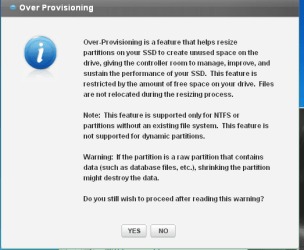
Samsung's Magician software made the 13.8GB of space for garbage collection (over provisioning). See snip below.

Did you format SSD partition when performing a clean install?
I sure didn't. Did Win 7 format it?
Anyway.... old C (now called D) was working fine before cloning?
Yes

So you still want the clone?
Good question.

you attached SSD drive on the place where DVD was and DVD using another connection. What options do you have in bios where you can modify "boot priority"?
SSD is inside the computer when old DVD was. Now DVD is external. These are nicely made kits by NewModeUS.com .

Shows the following (not necessarily in this order):
- Removeable Drive
- Hard Drive
--- ST1000
- USB
- CD/DVD
- eSATA
- Network
 

Attachments

  • Capture Over Provisioning 1_29_13.PNG
    Capture Over Provisioning 1_29_13.PNG
    12.6 KB · Views: 0

My Computer My Computer

At a glance

Windows 7 Ultimate (x64) Service Pack 1 (buil...Intel(R) Core(TM) i5-2450M CPU @ 2.50GHz8 GBIntel HD Graphics 3000 with up to 1.6GB dynam...
Computer Manufacturer/Model Number
Dell 17R N7110 Inspiron laptop
OS
Windows 7 Ultimate (x64) Service Pack 1 (build 7601)
CPU
Intel(R) Core(TM) i5-2450M CPU @ 2.50GHz
Motherboard
Dell Inc. 0YH79Y A00
Memory
8 GB
Graphics Card(s)
Intel HD Graphics 3000 with up to 1.6GB dynamic video memory
Sound Card
SRS Premium Sound - (1) Realtek High Definition Audio
Monitor(s) Displays
17.3" diagonal HD+ TrueLife LED display
Screen Resolution
1600x900 resolution
Hard Drives
1 TB HD #ST1000LM024 HN-M101MBB,

512 GB Samsung 840 Pro SSD
PSU
stock
Case
stock
Cooling
stock
Keyboard
stock
Mouse
stock
Internet Speed
WiFi
Other Info
Printer: HP Photosmart C3180
SSD doesn't show up in BIOS. It only shows the following (not necessarily in this order):
- Removeable Drive
- Hard Drive
--- ST1000
- USB
- CD/DVD
- eSATA
- Network

What do you use when booting from dvd? Is that option DVD or USB (you attached DVD drive on usb port?)
 

My Computer My Computer

At a glance

Microsoft Windows 7 Home Premium 64-bits 7601...Intel(R) Core(TM) i3 CPU M 370 @ 2.40GHz4,00 GBATI Mobility Radeon HD 5400 Series
Computer type
Laptop
Computer Manufacturer/Model Number
ACER ASPIRE 5742G
OS
Microsoft Windows 7 Home Premium 64-bits 7601 Multiprocessor Free Service Pack 1
CPU
Intel(R) Core(TM) i3 CPU M 370 @ 2.40GHz
Motherboard
Acer Aspire 5742G
Memory
4,00 GB
Graphics Card(s)
ATI Mobility Radeon HD 5400 Series
Sound Card
(1) AMD High Definition Audio Device (2) Realtek High Defi
Screen Resolution
1366 x 768 x 32 bits (4294967296 colors) @ 60 Hz
Hard Drives
WDC WD5000BEVT-22ZAT0
Back
Top