Solved Really slow toshiba laptop

larmer

New member
Local time
6:45 PM
Messages
3
Hello everyone,

I own a Toshiba Satellite C660D-10D laptop (2010 model) for 2 years (bought it brand new) with the specifications :

OS : Windows 7 Home Premium 64bit
CPU : AMD V140
RAM : 2,00 GB Single-Channel DDR3 @ 513MHz
Motherboard : TOSHIBA PWWAE (Socket M2/S1G1)
Graphics Card : ATI Mobility Radeon HD 4200 Series @2.3GHz
Sound Card : Realtek High Definition Audio

Few weeks ago I restored it to its factory settings via the Recovery partition (it was running really slow before that, couldn't even run chrome properly). At fisrt laptop was running extremely good, just as the first time I bought it, but after 2 or 3 days it started to slow down again. I ran defragment again, Iobit's Advanced System Care 6 (which is very useful program), Ccleaner etc., BUT still it is responding really slow, especially when it comes to browsers (I primarily use Chrome) and games (I am now playing games to 05-15 fps). Forgot to mention that I am often monitoring laptop's CPU (and RAM) usage through Windows' Task Manager. CPU's amount of power is extremely high (86-100%) when system is idle (only the basic programs and/or processes running), which is strange to me (or am I wrong?). Really strange too is the fact that basic opened processes are over 70 (checked multiple times few minutes after startup). Is slow performance a problem caused of the processes and/or other programs, or I have to buy and install new CPU and/or increase RAM capacity??
 

My Computer My Computer

At a glance

Windows 7 Home Premium 64bit
OS
Windows 7 Home Premium 64bit
I think it's a combination of the small ram (2GB) and programs you have starting at boot time.

How does it run if you boot to Safe Mode with Networking?
 

My Computer My Computer

At a glance

Windows 10 Pro X64Intel Quad Core i7-4770 @ 3.4Ghz16.0GB PC3-12800 DDR3 SDRAM 1600 MHzIntel Integrated HD Graphics
Computer type
PC/Desktop
Computer Manufacturer/Model Number
Lenovo IdeaCenter 450
OS
Windows 10 Pro X64
CPU
Intel Quad Core i7-4770 @ 3.4Ghz
Memory
16.0GB PC3-12800 DDR3 SDRAM 1600 MHz
Graphics Card(s)
Intel Integrated HD Graphics
Sound Card
Realtek HD Audio
Monitor(s) Displays
HP 22" LCD
Screen Resolution
1680 x 1050
Hard Drives
250GB Samsung EVO SATA-3 SSD
2TB Seagate ST2000DM001 SATA-2
1.5TB Seagate ST3150041AS SATA
Keyboard
Dell USB
Mouse
Lenovo USB
Internet Speed
Cable via Road Runner 3MB Upload, 30MB Download
Antivirus
Windows Defender, MBAM Pro, MBAE
Browser
Seamonkey
Other Info
UEFI/GPT
PLDS DVD-RW DH16AERSH
Had a few Toshys larmer of my own and fixes and like Z said you need at least another 2GB RAM and run some other apps too - by the way I don't ever use those reg come fix it all apps mate they cause more problems than they fix in my mind.

Try some really basic scans like

http://www.superantispyware.com/

http://www.malwarebytes.org/products/malwarebytes_free/

http://www.bleepingcomputer.com/download/adwcleaner/ < only from bleeping computer though

As you know there is always a ton of bloat with Toshiba and mine are all fitted with SSD's and more RAM plus an OEM - so no bloat if you don't want to do that just delete stuff that you are not going to use.

My bible is this http://www.sevenforums.com/tutorials/11728-optimize-windows-7-a.html?filter[2]=Performance Maintenance use it and see what I mean.

One other thing is run this and see what the temps are in the CPU motherboard etc

http://www.piriform.com/speccy/download < only from piriform and if you can some screen shots would be good - snip is the easiest way.
 

My Computer My Computer

At a glance

Desk1 7 Home Prem / Desk2 10 Pro / Main lap A...Desk1 i5 3750K / Laptop i7 GTX 860M / Desk2 i...Desk1 8GB (1866) / Desk2 16GB (1333) / Laptop...Desk 1& 2NVidia GTX 650 & Laptops on board Intel
Computer type
PC/Desktop
Computer Manufacturer/Model Number
Own build (new) Desk1 / Asus ROG Win 7 / Desk2 1st build
OS
Desk1 7 Home Prem / Desk2 10 Pro / Main lap Asus ROG 10 Pro 2 laptop Toshiba 7 Pro Asus P2520 7 & 10
CPU
Desk1 i5 3750K / Laptop i7 GTX 860M / Desk2 i5 2500
Motherboard
Desk1 Asus P877-V / Desk2 Gigabyte H67 UD3H / Laptop ?
Memory
Desk1 8GB (1866) / Desk2 16GB (1333) / Laptop 8Gb DDR3
Graphics Card(s)
Desk 1& 2NVidia GTX 650 & Laptops on board Intel
Sound Card
Desk 1 & 2 -XONAR DG Realtek High Def audio Laptop
Monitor(s) Displays
Desk 1 Benq HD 2450 / Desk2 Philips 24" / Laptop 17.5"
Screen Resolution
1920x1080 D1 & D2 & Laptop 1
Hard Drives
Desk1 Samsung 120GB 830 SSD
Asus ROG 256GB 850 Pro SSD
Desk2 Samsung 840 256 SSD
Toshiba 120GB EVO
PSU
Desk 1 Corsair HX 1050/ Laptop ? / Desk 2 Corsair HX 650
Case
Desk 1 Cooler HAF XM ? Toshiba laptop / Desk2 Coolermaster
Cooling
Fans on all Desk1 -2 Desk2 - all Coolermasters 5 Laptop ?
Keyboard
Desk 1 MS Sidewinder X6 Desk 2 MS Sidewinder X 4
Mouse
Desk 1&2 - Gigabyte MS 900 gamer - laptop - Logitec wireless
Internet Speed
ADSL2+
Other Info
One other Desktop (tester) and spare Toshba laptop both with SSD's
Running Kaspersky 2016 ISS on all machines config'd identically
Logitec audio stereo systems on each machine (x3)
Canon MG5250MFC
Router/modem TP-Link running WPA2SK
For a test disable all your startup programs (in msconfig) and see whether that improves it. And yes, get more RAM. Your CPU is a slowpoke, so give it at least some memory.
 

My Computer My Computer

At a glance

Vista, Windows7, Mint Mate, Zorin, Windows 8from 1.6GHz Duo to i7
Computer Manufacturer/Model Number
HP, Dell, Gateway, Toshiba - 4 laptops and 2 desktops
OS
Vista, Windows7, Mint Mate, Zorin, Windows 8
CPU
from 1.6GHz Duo to i7
Monitor(s) Displays
2x HP w2207
Hard Drives
5x HDD, 7x SSD, 12x Externals
Keyboard
with trackball - no mices
Mouse
Trackball mice
Internet Speed
DSL 6000
For a test disable all your startup programs (in msconfig) and see whether that improves it. And yes, get more RAM. Your CPU is a slowpoke, so give it at least some memory.
Yep Wolfgang thats why I suggested the optimise as there is a ton of stuff like that to sort out and like you say the AMD is perhaps the bottleneck eh? But I would suggest that the OP keeps the OS and security in start up programs though I always do. The bloat I find id easy to remove in regedit as opposed to the Control Panel method but that is a personal choice.
 

My Computer My Computer

At a glance

Desk1 7 Home Prem / Desk2 10 Pro / Main lap A...Desk1 i5 3750K / Laptop i7 GTX 860M / Desk2 i...Desk1 8GB (1866) / Desk2 16GB (1333) / Laptop...Desk 1& 2NVidia GTX 650 & Laptops on board Intel
Computer type
PC/Desktop
Computer Manufacturer/Model Number
Own build (new) Desk1 / Asus ROG Win 7 / Desk2 1st build
OS
Desk1 7 Home Prem / Desk2 10 Pro / Main lap Asus ROG 10 Pro 2 laptop Toshiba 7 Pro Asus P2520 7 & 10
CPU
Desk1 i5 3750K / Laptop i7 GTX 860M / Desk2 i5 2500
Motherboard
Desk1 Asus P877-V / Desk2 Gigabyte H67 UD3H / Laptop ?
Memory
Desk1 8GB (1866) / Desk2 16GB (1333) / Laptop 8Gb DDR3
Graphics Card(s)
Desk 1& 2NVidia GTX 650 & Laptops on board Intel
Sound Card
Desk 1 & 2 -XONAR DG Realtek High Def audio Laptop
Monitor(s) Displays
Desk 1 Benq HD 2450 / Desk2 Philips 24" / Laptop 17.5"
Screen Resolution
1920x1080 D1 & D2 & Laptop 1
Hard Drives
Desk1 Samsung 120GB 830 SSD
Asus ROG 256GB 850 Pro SSD
Desk2 Samsung 840 256 SSD
Toshiba 120GB EVO
PSU
Desk 1 Corsair HX 1050/ Laptop ? / Desk 2 Corsair HX 650
Case
Desk 1 Cooler HAF XM ? Toshiba laptop / Desk2 Coolermaster
Cooling
Fans on all Desk1 -2 Desk2 - all Coolermasters 5 Laptop ?
Keyboard
Desk 1 MS Sidewinder X6 Desk 2 MS Sidewinder X 4
Mouse
Desk 1&2 - Gigabyte MS 900 gamer - laptop - Logitec wireless
Internet Speed
ADSL2+
Other Info
One other Desktop (tester) and spare Toshba laptop both with SSD's
Running Kaspersky 2016 ISS on all machines config'd identically
Logitec audio stereo systems on each machine (x3)
Canon MG5250MFC
Router/modem TP-Link running WPA2SK
As I said, it's for a test. The AV program ultimately has to stay in the startups. But many AV programs do not even show up in the startups. But all the rest can stay disabled. They only hog RAM without a reason.
 

My Computer My Computer

At a glance

Vista, Windows7, Mint Mate, Zorin, Windows 8from 1.6GHz Duo to i7
Computer Manufacturer/Model Number
HP, Dell, Gateway, Toshiba - 4 laptops and 2 desktops
OS
Vista, Windows7, Mint Mate, Zorin, Windows 8
CPU
from 1.6GHz Duo to i7
Monitor(s) Displays
2x HP w2207
Hard Drives
5x HDD, 7x SSD, 12x Externals
Keyboard
with trackball - no mices
Mouse
Trackball mice
Internet Speed
DSL 6000
As I said, it's for a test. The AV program ultimately has to stay in the startups. But many AV programs do not even show up in the startups. But all the rest can stay disabled. They only hog RAM without a reason.
Ok I am with you on that just me being super careful :) I suppose larmer could also do something in services as well and the number of cores :)
 

My Computer My Computer

At a glance

Desk1 7 Home Prem / Desk2 10 Pro / Main lap A...Desk1 i5 3750K / Laptop i7 GTX 860M / Desk2 i...Desk1 8GB (1866) / Desk2 16GB (1333) / Laptop...Desk 1& 2NVidia GTX 650 & Laptops on board Intel
Computer type
PC/Desktop
Computer Manufacturer/Model Number
Own build (new) Desk1 / Asus ROG Win 7 / Desk2 1st build
OS
Desk1 7 Home Prem / Desk2 10 Pro / Main lap Asus ROG 10 Pro 2 laptop Toshiba 7 Pro Asus P2520 7 & 10
CPU
Desk1 i5 3750K / Laptop i7 GTX 860M / Desk2 i5 2500
Motherboard
Desk1 Asus P877-V / Desk2 Gigabyte H67 UD3H / Laptop ?
Memory
Desk1 8GB (1866) / Desk2 16GB (1333) / Laptop 8Gb DDR3
Graphics Card(s)
Desk 1& 2NVidia GTX 650 & Laptops on board Intel
Sound Card
Desk 1 & 2 -XONAR DG Realtek High Def audio Laptop
Monitor(s) Displays
Desk 1 Benq HD 2450 / Desk2 Philips 24" / Laptop 17.5"
Screen Resolution
1920x1080 D1 & D2 & Laptop 1
Hard Drives
Desk1 Samsung 120GB 830 SSD
Asus ROG 256GB 850 Pro SSD
Desk2 Samsung 840 256 SSD
Toshiba 120GB EVO
PSU
Desk 1 Corsair HX 1050/ Laptop ? / Desk 2 Corsair HX 650
Case
Desk 1 Cooler HAF XM ? Toshiba laptop / Desk2 Coolermaster
Cooling
Fans on all Desk1 -2 Desk2 - all Coolermasters 5 Laptop ?
Keyboard
Desk 1 MS Sidewinder X6 Desk 2 MS Sidewinder X 4
Mouse
Desk 1&2 - Gigabyte MS 900 gamer - laptop - Logitec wireless
Internet Speed
ADSL2+
Other Info
One other Desktop (tester) and spare Toshba laptop both with SSD's
Running Kaspersky 2016 ISS on all machines config'd identically
Logitec audio stereo systems on each machine (x3)
Canon MG5250MFC
Router/modem TP-Link running WPA2SK
Forget Services and the number of cores. He would only get himself into trouble with that.
 

My Computer My Computer

At a glance

Vista, Windows7, Mint Mate, Zorin, Windows 8from 1.6GHz Duo to i7
Computer Manufacturer/Model Number
HP, Dell, Gateway, Toshiba - 4 laptops and 2 desktops
OS
Vista, Windows7, Mint Mate, Zorin, Windows 8
CPU
from 1.6GHz Duo to i7
Monitor(s) Displays
2x HP w2207
Hard Drives
5x HDD, 7x SSD, 12x Externals
Keyboard
with trackball - no mices
Mouse
Trackball mice
Internet Speed
DSL 6000
I don't share your opinion on Advanced System Care at all. In fact my recommendation is to remove it completely. Theres no telling what kind of things were deleted with ANY "optimizer". Before I would do any of the fine steps offered to you so far I would also run sfc /scannow to see if it can fix any of the things I'm sure ASC screwed up.
 

My Computer My Computer

At a glance

Windows 10x64 Build 1709Intel i7 7700HQ Kaby Lake16 GB DDR4 @2400Nvidia Geforce GTX 1060
Computer type
Laptop
Computer Manufacturer/Model Number
MSI GE72VR Apache Pro-416
OS
Windows 10x64 Build 1709
CPU
Intel i7 7700HQ Kaby Lake
Motherboard
Micro-Star Intl. MS-179B (U3C1)
Memory
16 GB DDR4 @2400
Graphics Card(s)
Nvidia Geforce GTX 1060
Screen Resolution
1920x1080 120Hz
Hard Drives
256 GB Nvme M.2 SSD

1TB HDD@7200
Cooling
Cooler Blast 4
Keyboard
Steel Series
Antivirus
Bit Defender Free
Browser
Edge
I don't share your opinion on Advanced System Care at all. In fact my recommendation is to remove it completely. Theres no telling what kind of things were deleted with ANY "optimizer". Before I would do any of the fine steps offered to you so far I would also run sfc /scannow to see if it can fix any of the things I'm sure ASC screwed up.
You are absolutely right. Those programs are more harm than help.
 

My Computer My Computer

At a glance

Vista, Windows7, Mint Mate, Zorin, Windows 8from 1.6GHz Duo to i7
Computer Manufacturer/Model Number
HP, Dell, Gateway, Toshiba - 4 laptops and 2 desktops
OS
Vista, Windows7, Mint Mate, Zorin, Windows 8
CPU
from 1.6GHz Duo to i7
Monitor(s) Displays
2x HP w2207
Hard Drives
5x HDD, 7x SSD, 12x Externals
Keyboard
with trackball - no mices
Mouse
Trackball mice
Internet Speed
DSL 6000
Yes well I said that first up in post #3 re the fix it all apps;)
 

My Computer My Computer

At a glance

Desk1 7 Home Prem / Desk2 10 Pro / Main lap A...Desk1 i5 3750K / Laptop i7 GTX 860M / Desk2 i...Desk1 8GB (1866) / Desk2 16GB (1333) / Laptop...Desk 1& 2NVidia GTX 650 & Laptops on board Intel
Computer type
PC/Desktop
Computer Manufacturer/Model Number
Own build (new) Desk1 / Asus ROG Win 7 / Desk2 1st build
OS
Desk1 7 Home Prem / Desk2 10 Pro / Main lap Asus ROG 10 Pro 2 laptop Toshiba 7 Pro Asus P2520 7 & 10
CPU
Desk1 i5 3750K / Laptop i7 GTX 860M / Desk2 i5 2500
Motherboard
Desk1 Asus P877-V / Desk2 Gigabyte H67 UD3H / Laptop ?
Memory
Desk1 8GB (1866) / Desk2 16GB (1333) / Laptop 8Gb DDR3
Graphics Card(s)
Desk 1& 2NVidia GTX 650 & Laptops on board Intel
Sound Card
Desk 1 & 2 -XONAR DG Realtek High Def audio Laptop
Monitor(s) Displays
Desk 1 Benq HD 2450 / Desk2 Philips 24" / Laptop 17.5"
Screen Resolution
1920x1080 D1 & D2 & Laptop 1
Hard Drives
Desk1 Samsung 120GB 830 SSD
Asus ROG 256GB 850 Pro SSD
Desk2 Samsung 840 256 SSD
Toshiba 120GB EVO
PSU
Desk 1 Corsair HX 1050/ Laptop ? / Desk 2 Corsair HX 650
Case
Desk 1 Cooler HAF XM ? Toshiba laptop / Desk2 Coolermaster
Cooling
Fans on all Desk1 -2 Desk2 - all Coolermasters 5 Laptop ?
Keyboard
Desk 1 MS Sidewinder X6 Desk 2 MS Sidewinder X 4
Mouse
Desk 1&2 - Gigabyte MS 900 gamer - laptop - Logitec wireless
Internet Speed
ADSL2+
Other Info
One other Desktop (tester) and spare Toshba laptop both with SSD's
Running Kaspersky 2016 ISS on all machines config'd identically
Logitec audio stereo systems on each machine (x3)
Canon MG5250MFC
Router/modem TP-Link running WPA2SK
Ztrucker at safe mode w/ networking was extremelly fast and very well responding. :thumbsup:
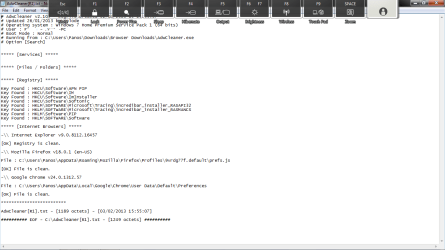
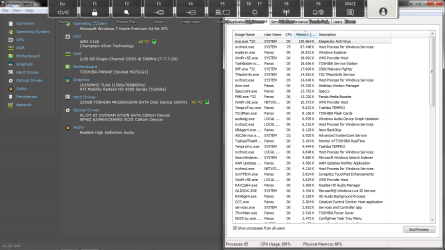
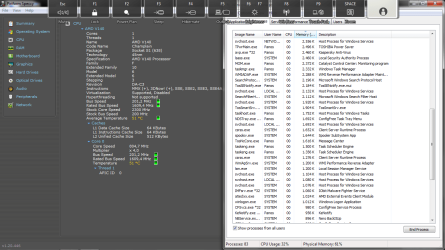
ICit2lol downloaded and ran adwcleaner (see screenshot for the report adwcleaner.png) and malwarebytes (was running for 2.30 hrs) but found no problem. As for your "bible" i found it very useful but i had already done many of the things that says. ;) see the screenshots from speccy for CPU's temp. (I have also scrennshoted processes tab on task manager and the screenshots are 5-10 mins after start-up and no programs and/or prosseces were opened or closed except speccy, paint & task manager) summary wtm1.png cpu wtm2.png ram wtm3.png ;)
whs i stopped useless startup programs but saw almost no difference. :/
indianacarnie i tried running sfc /scannow but it popped a black window for a few miliseconds... didn't manage to see what it was displaying... :/
 

My Computer My Computer

At a glance

Windows 7 Home Premium 64bit
OS
Windows 7 Home Premium 64bit
Here is a general method of using msconfig to disable startup processes and services to see if any of them are causing your slow running computer:

How does it behave if you boot to Safe Mode with Networking? If better then something is most likely starting at boot that is causing the problem.

Advanced startup options - XP
Advanced startup options - Vista
Advanced startup options - Windows 7

Use msconfig to determine what is causing the problem

These are good tutorials on using msconfig in XP, Vista or Windows 7:
How to use msconfig in Windows XP
How to use msconfig in Windows Vista
How to use msconfig in Windows 7

Click on Start then Run, type msconfig and press Enter.
Click on the Startup tab, record what is currently starting then click the Disable All button.
Reboot and see if it runs better.
If yes then use msconfig to enable several items at a time till you find the culprit.

If no, start msconfig and click on the Services tab.
Check the Hide All Microsoft Services box, record what is currently starting then click the Disable All button.
Again, do a regular boot, see if it runs normal.
If yes then use msconfig to enable services till you find the culprit.

Once you've found the culprit, uninstall it or find out how to eliminate it from your system. Simply disabling it in msconfig is a temporary fix at best.
Enable everything else you disabled.
 

My Computer My Computer

At a glance

Windows 10 Pro X64Intel Quad Core i7-4770 @ 3.4Ghz16.0GB PC3-12800 DDR3 SDRAM 1600 MHzIntel Integrated HD Graphics
Computer type
PC/Desktop
Computer Manufacturer/Model Number
Lenovo IdeaCenter 450
OS
Windows 10 Pro X64
CPU
Intel Quad Core i7-4770 @ 3.4Ghz
Memory
16.0GB PC3-12800 DDR3 SDRAM 1600 MHz
Graphics Card(s)
Intel Integrated HD Graphics
Sound Card
Realtek HD Audio
Monitor(s) Displays
HP 22" LCD
Screen Resolution
1680 x 1050
Hard Drives
250GB Samsung EVO SATA-3 SSD
2TB Seagate ST2000DM001 SATA-2
1.5TB Seagate ST3150041AS SATA
Keyboard
Dell USB
Mouse
Lenovo USB
Internet Speed
Cable via Road Runner 3MB Upload, 30MB Download
Antivirus
Windows Defender, MBAM Pro, MBAE
Browser
Seamonkey
Other Info
UEFI/GPT
PLDS DVD-RW DH16AERSH
Ztrucker at safe mode w/ networking was extremelly fast and very well responding. :thumbsup:
ICit2lol downloaded and ran adwcleaner (see screenshot for the report View attachment 253559) and malwarebytes (was running for 2.30 hrs) but found no problem. As for your "bible" i found it very useful but i had already done many of the things that says. ;) see the screenshots from speccy for CPU's temp. (I have also scrennshoted processes tab on task manager and the screenshots are 5-10 mins after start-up and no programs and/or prosseces were opened or closed except speccy, paint & task manager) View attachment 253560 View attachment 253561 View attachment 253562 ;)
whs i stopped useless startup programs but saw almost no difference. :/
indianacarnie i tried running sfc /scannow but it popped a black window for a few miliseconds... didn't manage to see what it was displaying... :/

Yep mate you definitely need more RAM if that is what it is using just running the OS security and Speccy it is certainly chewing it up I would have expected something in the vicinity of 40% usage even that is more than I would like. If you do add more it is s a good idea to add the RAM in pairs of sticks as they are more likely to be evenly matched coming form the same production batches.

Now your machine can support max 8GB which I by the way have in my L550 Satellite and using it willy nilly I use about 25% of RAM. Corsair do some very nice memory I find and at reasonable prices for the speed stuff you need. Having said that 4GB would give you a very noticeable chnage in speed.

Temps are fine so no probs there mate:)

The sfc try that in safe mode if you did it in plain boot up.
 

My Computer My Computer

At a glance

Desk1 7 Home Prem / Desk2 10 Pro / Main lap A...Desk1 i5 3750K / Laptop i7 GTX 860M / Desk2 i...Desk1 8GB (1866) / Desk2 16GB (1333) / Laptop...Desk 1& 2NVidia GTX 650 & Laptops on board Intel
Computer type
PC/Desktop
Computer Manufacturer/Model Number
Own build (new) Desk1 / Asus ROG Win 7 / Desk2 1st build
OS
Desk1 7 Home Prem / Desk2 10 Pro / Main lap Asus ROG 10 Pro 2 laptop Toshiba 7 Pro Asus P2520 7 & 10
CPU
Desk1 i5 3750K / Laptop i7 GTX 860M / Desk2 i5 2500
Motherboard
Desk1 Asus P877-V / Desk2 Gigabyte H67 UD3H / Laptop ?
Memory
Desk1 8GB (1866) / Desk2 16GB (1333) / Laptop 8Gb DDR3
Graphics Card(s)
Desk 1& 2NVidia GTX 650 & Laptops on board Intel
Sound Card
Desk 1 & 2 -XONAR DG Realtek High Def audio Laptop
Monitor(s) Displays
Desk 1 Benq HD 2450 / Desk2 Philips 24" / Laptop 17.5"
Screen Resolution
1920x1080 D1 & D2 & Laptop 1
Hard Drives
Desk1 Samsung 120GB 830 SSD
Asus ROG 256GB 850 Pro SSD
Desk2 Samsung 840 256 SSD
Toshiba 120GB EVO
PSU
Desk 1 Corsair HX 1050/ Laptop ? / Desk 2 Corsair HX 650
Case
Desk 1 Cooler HAF XM ? Toshiba laptop / Desk2 Coolermaster
Cooling
Fans on all Desk1 -2 Desk2 - all Coolermasters 5 Laptop ?
Keyboard
Desk 1 MS Sidewinder X6 Desk 2 MS Sidewinder X 4
Mouse
Desk 1&2 - Gigabyte MS 900 gamer - laptop - Logitec wireless
Internet Speed
ADSL2+
Other Info
One other Desktop (tester) and spare Toshba laptop both with SSD's
Running Kaspersky 2016 ISS on all machines config'd identically
Logitec audio stereo systems on each machine (x3)
Canon MG5250MFC
Router/modem TP-Link running WPA2SK
Most tech enthusiasts will not run the corrupt factory preinstall larded with bloatware and useless duplicate utilties which throttle win7 native performance. Instead get a perfect Clean Reinstall - Factory OEM Windows 7.

At the minimum I'd Clean Up Factory Bloatware.

Never run an optimizing or registry cleaning program besides CCleaner as they can ruin Win7.
+1Greg I have maintained this all along and the optimise I gave was Shawn's tut if you think I was being a tad careless - not some whizz bang you gotta do this app from some shonky software outlet free or otherwise.

As a matter of fact I have done both my Toshiba laptops with an SSD and an OEM for both but I have used the USB stick method as well on the tester machine (desktop).

As a by the by I am testing out the Comodo utility cleaner at the moment on my test machine it does just about the same as the CC but at light speed and so far has gone very well. The next to test is the Comodo programs manager - a bit like Revo only I think a little lighter.

Sorry larmer for the distraction I didn't want anyone think I was being careless;)
 

My Computer My Computer

At a glance

Desk1 7 Home Prem / Desk2 10 Pro / Main lap A...Desk1 i5 3750K / Laptop i7 GTX 860M / Desk2 i...Desk1 8GB (1866) / Desk2 16GB (1333) / Laptop...Desk 1& 2NVidia GTX 650 & Laptops on board Intel
Computer type
PC/Desktop
Computer Manufacturer/Model Number
Own build (new) Desk1 / Asus ROG Win 7 / Desk2 1st build
OS
Desk1 7 Home Prem / Desk2 10 Pro / Main lap Asus ROG 10 Pro 2 laptop Toshiba 7 Pro Asus P2520 7 & 10
CPU
Desk1 i5 3750K / Laptop i7 GTX 860M / Desk2 i5 2500
Motherboard
Desk1 Asus P877-V / Desk2 Gigabyte H67 UD3H / Laptop ?
Memory
Desk1 8GB (1866) / Desk2 16GB (1333) / Laptop 8Gb DDR3
Graphics Card(s)
Desk 1& 2NVidia GTX 650 & Laptops on board Intel
Sound Card
Desk 1 & 2 -XONAR DG Realtek High Def audio Laptop
Monitor(s) Displays
Desk 1 Benq HD 2450 / Desk2 Philips 24" / Laptop 17.5"
Screen Resolution
1920x1080 D1 & D2 & Laptop 1
Hard Drives
Desk1 Samsung 120GB 830 SSD
Asus ROG 256GB 850 Pro SSD
Desk2 Samsung 840 256 SSD
Toshiba 120GB EVO
PSU
Desk 1 Corsair HX 1050/ Laptop ? / Desk 2 Corsair HX 650
Case
Desk 1 Cooler HAF XM ? Toshiba laptop / Desk2 Coolermaster
Cooling
Fans on all Desk1 -2 Desk2 - all Coolermasters 5 Laptop ?
Keyboard
Desk 1 MS Sidewinder X6 Desk 2 MS Sidewinder X 4
Mouse
Desk 1&2 - Gigabyte MS 900 gamer - laptop - Logitec wireless
Internet Speed
ADSL2+
Other Info
One other Desktop (tester) and spare Toshba laptop both with SSD's
Running Kaspersky 2016 ISS on all machines config'd identically
Logitec audio stereo systems on each machine (x3)
Canon MG5250MFC
Router/modem TP-Link running WPA2SK
Thank you all guys for your support and advice!!!:D I asked a technician at a pc store and he told me that is a combination of the low RAM, the processor (only one core) and the HDD speed (it is running @5400 rpm). I shall save some money up to buy some new hardware...:p
Now another thing that came up :
When I restored to the factory settings, only the first partition of the disk was "deleted". So, I had to "delete" the second part too (I wanted an overall "format"). I right-clicked the second partition, selected "format" and formatted the disc. But i didn't know that in this partition of the disc was the hidden recovery partition, so I deleted it with everything else... :o Now I need to reformat my pc but I have no recovery partition to do it...:( I searched over the net and found out an .iso file that contains Win7 and it's probably legal (Microsoft approves, so I guess it is :p). Now, the thing that really bothers me is that if I re-install Win7 from the disc, will I have to re-install the drivers again or the .iso contains everything or at least the basic drivers??:confused:
 

My Computer My Computer

At a glance

Windows 7 Home Premium 64bit
OS
Windows 7 Home Premium 64bit
Basic drivers are included in a win7 download. Some of your other things MAY need to be reinstalled driverwise. And if for whatever reason you want to reinstall the load of crapware Toshiba so nicely "gives" you (yes, I had one) you can get it as the "added value package" from Toshibas download/support site.
 

My Computer My Computer

At a glance

Windows 10x64 Build 1709Intel i7 7700HQ Kaby Lake16 GB DDR4 @2400Nvidia Geforce GTX 1060
Computer type
Laptop
Computer Manufacturer/Model Number
MSI GE72VR Apache Pro-416
OS
Windows 10x64 Build 1709
CPU
Intel i7 7700HQ Kaby Lake
Motherboard
Micro-Star Intl. MS-179B (U3C1)
Memory
16 GB DDR4 @2400
Graphics Card(s)
Nvidia Geforce GTX 1060
Screen Resolution
1920x1080 120Hz
Hard Drives
256 GB Nvme M.2 SSD

1TB HDD@7200
Cooling
Cooler Blast 4
Keyboard
Steel Series
Antivirus
Bit Defender Free
Browser
Edge
Did you read Clean Reinstall - Factory OEM Windows 7? It is quite specfiic about how drivers are handled best in Win7, and the tools and methods needed to get and keep a perfect install.

Win7 will run fast on almost any modern hardware with a perfect install. I run it on 1gb RAM with an old Celeron faster than on a Core I7 initially hobbled by a factory preinstall that made it run worse than my 10 year old beach laptop.

So a baseline perfect reinstall normally makes all the difference, or else it will become readily apparent if you have bad or lacking hardware.
 
Boy Oh boy, you should really make images before you make experiments like that. Unless you have exotic devices, the drivers will be installed automatically.
 

My Computer My Computer

At a glance

Vista, Windows7, Mint Mate, Zorin, Windows 8from 1.6GHz Duo to i7
Computer Manufacturer/Model Number
HP, Dell, Gateway, Toshiba - 4 laptops and 2 desktops
OS
Vista, Windows7, Mint Mate, Zorin, Windows 8
CPU
from 1.6GHz Duo to i7
Monitor(s) Displays
2x HP w2207
Hard Drives
5x HDD, 7x SSD, 12x Externals
Keyboard
with trackball - no mices
Mouse
Trackball mice
Internet Speed
DSL 6000
Back
Top