
Connect HDD from DVD player to PC externally

RealGem

New member
Member
VIP
Local time
11:42 PM
Messages
269
Location
UK
Hi,

My DVD/HDD recorder has packed up today (the motor that ejects and plays the disc), and it would cost more to repair it than to buy a new one.

But I have important TV programs about my work; autism, on the hard disc, that I never got to transfer to DVDs.

And I know there's nothing wrong with the hard drive.

I had to "operate" to remove a disc, and noticed the hard disc looked exactly like a normal internal PC hard drive. It's a Western Digital 160gb one, and I seem to remember you can buy external casings for these, and use them as external hard drives.

Is that true?

And if so, what is the correct terminology please, so I can find out what to buy to get it to connect to my PC.

I'd rather not fit it internally, although I have fitted an additional 1tb one, so it can be done.

Anyone know the best way to attach it externally please?

thanks
 

My Computer My Computer

Computer type
PC/Desktop
Computer Manufacturer/Model Number
iBuild™ custom PC
OS
Windows 7 Home Premium 64 bit
CPU
Intel® Core™ i5 650 Dual Core 2x 3.2Ghz 4MB Cache
Motherboard
ASUS P7H55-M 6x Rear USB 2.0 2x Front
Memory
Samsung 4GB (2x2GB) DDR3 1333MHz
Graphics Card(s)
nvidia GT430 1GB Graphics Card
Sound Card
Built-in audio
Monitor(s) Displays
Videoseven CMC 17" AD
Screen Resolution
1280 x 1024
Hard Drives
250GB 7200RPM SATA II
Hitachi 1TB Serial ATA II 32MB cache
PSU
Corsair 500Watt PSU
Case
Gigabyte GZ-X2 Black ATX MIDI Tower Case
Cooling
Standard CPU Cooling Fan
Keyboard
Packard Bell 9205
Mouse
Microsoft IntelliMouse Optical
Internet Speed
Supposed to be 100mbps (Average: 54mbps!)
Other Info
Also Windows 7 64 Bit on my Acer i3 Laptop
You have to be careful with making a HDD from a device like that as external. Sometimes the device has a controller that provides its own file system to that HDD. That means you may not be able to use it properly on Windows. I once had a NAS drive fail on me and I tried everything to get it working on Windows until I found out that NAS device had it's own very specific file system that only worked for that device. I popped it into Linux and used a program that could browse that type of file system and restore the files.

If the device you have doesn't have a specific file system like that (which it probably doesn't, I don't know I've never worked on DVD/HDD recorders before). You should be able to just plug it into your computer and use it like a normal hard drive.

You can purchase Hard Drive Enclosures from anywhere like Newegg. Some devices are USB and others use eSATA (my personal favorite).

Before you purchase that enclosure attempt to explore it using Windows. If all else fails you can restore those files using any Linux OS like PuppyLinux.
 

My Computer My Computer

Computer Manufacturer/Model Number
Me
OS
Windows 7 Pro x64
CPU
Intel Core i7 920
Motherboard
ASUS P6T Deluxe V2
Memory
Corsair XMS3 12GB (3x2GB) DDR3 1333
Graphics Card(s)
EVGA GTX 470 1280MB GDDR5 DX11
Monitor(s) Displays
ASUS VW246H | ACER AL2216W
Screen Resolution
3600x1080
Hard Drives
1x Corsair Vertex 3 SSD (120GB)
1x Corsair Vertex 2 SSD (60GB)
2x Western Digital Black (500GB/1TB)
1x External WD Green eSATA (1TB)
PSU
Corsair 850HX
Case
Velocity Micro FullTower
Keyboard
Logitech G110
Mouse
Logitech G500
Internet Speed
http://www.speedtest.net/result/1226664359.png
Antivirus
MSE
Browser
Chrome
Other Info
Logitech Z-5500 5.1 Surround Sound
Logitech C260 Webcam
Creative Fatal1ty Headset
maybe do a little research into what file type the dvd recorder saves the programs , then see what it will take to play them, also check the connector pins to the hd and see if they are the same on a enclosure/dock.
perhaps photograph it and post here.
you could get a dock for as little as £10 from amazon if it would connect

maybe there is a forum for the manufacturer of the dvd for info on the file structure. , what brand and model is it.
 

My Computer My Computer

Computer Manufacturer/Model Number
Hewlett packard/p6512uk
OS
Microsoft Windows 7 Home Premium 64-bit 7600
CPU
IIx4 amd athelon 635 processor
Motherboard
FOXCONN 2AA9
Memory
2x2gb
Graphics Card(s)
ati radeon HD 5450
Sound Card
(1) Realtek High Definition Audio (2) AMD High Definition
Monitor(s) Displays
samsung lcd tv 32"
Screen Resolution
1360x 768
Hard Drives
(1) WDC WD10 01FAES-60Z2A0 SATA Disk Device (2) Maxtor OneTouch USB Device (3) ST310003 33AS USB Device (4) WD My Book 1111 USB Device
PSU
?
Cooling
air!
Keyboard
wireless hp
Mouse
wireless Hp,optical
Internet Speed
1.10mb/s
Antivirus
MSE
Browser
Firefox
Thanks guys,

I will dig out the DVD manual to see if it has the file types listed. And I'll try to photograph the drive's connectors too.

thanks
 

My Computer My Computer

Computer type
PC/Desktop
Computer Manufacturer/Model Number
iBuild™ custom PC
OS
Windows 7 Home Premium 64 bit
CPU
Intel® Core™ i5 650 Dual Core 2x 3.2Ghz 4MB Cache
Motherboard
ASUS P7H55-M 6x Rear USB 2.0 2x Front
Memory
Samsung 4GB (2x2GB) DDR3 1333MHz
Graphics Card(s)
nvidia GT430 1GB Graphics Card
Sound Card
Built-in audio
Monitor(s) Displays
Videoseven CMC 17" AD
Screen Resolution
1280 x 1024
Hard Drives
250GB 7200RPM SATA II
Hitachi 1TB Serial ATA II 32MB cache
PSU
Corsair 500Watt PSU
Case
Gigabyte GZ-X2 Black ATX MIDI Tower Case
Cooling
Standard CPU Cooling Fan
Keyboard
Packard Bell 9205
Mouse
Microsoft IntelliMouse Optical
Internet Speed
Supposed to be 100mbps (Average: 54mbps!)
Other Info
Also Windows 7 64 Bit on my Acer i3 Laptop
OK sorry for the delay. I had trouble with my camera's software.

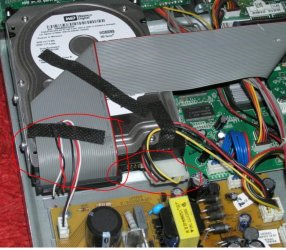
Here is a pic of the hard drive in situ:

307yjyg.jpg


Regarding file types recorded onto the hard drive, the manual does not mention anything about it. There is a section called "specifications" but only for the DVD and Freeview, not the hard drive.

So I don't know what the file types are sorry.

thanks
 

My Computer My Computer

Computer type
PC/Desktop
Computer Manufacturer/Model Number
iBuild™ custom PC
OS
Windows 7 Home Premium 64 bit
CPU
Intel® Core™ i5 650 Dual Core 2x 3.2Ghz 4MB Cache
Motherboard
ASUS P7H55-M 6x Rear USB 2.0 2x Front
Memory
Samsung 4GB (2x2GB) DDR3 1333MHz
Graphics Card(s)
nvidia GT430 1GB Graphics Card
Sound Card
Built-in audio
Monitor(s) Displays
Videoseven CMC 17" AD
Screen Resolution
1280 x 1024
Hard Drives
250GB 7200RPM SATA II
Hitachi 1TB Serial ATA II 32MB cache
PSU
Corsair 500Watt PSU
Case
Gigabyte GZ-X2 Black ATX MIDI Tower Case
Cooling
Standard CPU Cooling Fan
Keyboard
Packard Bell 9205
Mouse
Microsoft IntelliMouse Optical
Internet Speed
Supposed to be 100mbps (Average: 54mbps!)
Other Info
Also Windows 7 64 Bit on my Acer i3 Laptop
after a google the western digital 800bb is an 80 gb drive, i would hazard a guess the pins would be ok
i say guess as we cant see them cos its plugged in :p

if you unplug the large grey cable strip then we will get a better look at the pins.
if it is a standard connection then you could pop it in a dock .
if the file type is unrecogniseable or unplayable then maybe they could be converted, failing that you could format it and have 80 gb storage
 

My Computer My Computer

Computer Manufacturer/Model Number
Hewlett packard/p6512uk
OS
Microsoft Windows 7 Home Premium 64-bit 7600
CPU
IIx4 amd athelon 635 processor
Motherboard
FOXCONN 2AA9
Memory
2x2gb
Graphics Card(s)
ati radeon HD 5450
Sound Card
(1) Realtek High Definition Audio (2) AMD High Definition
Monitor(s) Displays
samsung lcd tv 32"
Screen Resolution
1360x 768
Hard Drives
(1) WDC WD10 01FAES-60Z2A0 SATA Disk Device (2) Maxtor OneTouch USB Device (3) ST310003 33AS USB Device (4) WD My Book 1111 USB Device
PSU
?
Cooling
air!
Keyboard
wireless hp
Mouse
wireless Hp,optical
Internet Speed
1.10mb/s
Antivirus
MSE
Browser
Firefox
OK sorry for the delay. I had trouble with my camera's software.

Here is a pic of the hard drive in situ:

(snip)


Regarding file types recorded onto the hard drive, the manual does not mention anything about it. There is a section called "specifications" but only for the DVD and Freeview, not the hard drive.

So I don't know what the file types are sorry.

thanks

The WD800BB is an 80GB EIDE drive. (IDE is also known as PATA.) Old.

It's still possible to buy external enclosures for IDE drives, and external IDE drive docks.

Newegg.com - Computer Hardware, Computer Cases, ide hd dock

I have no idea whether the file system used by the DVD recorder would be readable by anything else, but I doubt that it's proprietary.
 

My Computer My Computer

Computer Manufacturer/Model Number
homegrown
OS
Windows 7 Pro X64 SP1
CPU
Intel Core I7-3930k
Motherboard
Asus P9X79 Pro
Memory
16 GB Gskill DDR3-2133
Graphics Card(s)
eVGA GTX680
Sound Card
Creative X-Fi Titanium
Monitor(s) Displays
As PA246Q
Screen Resolution
1920 X 1200
Hard Drives
Corsair Force GT, 120 GB
WDC 1.5TB Caviar Black
PSU
PCP&C Silencer 750 Crossfire
Case
Silverstone FT02
Cooling
Noctua NH-D14
Keyboard
cheap Logitech USB
Mouse
Microsoft Intellimouse Explorer (old optical) USB
Internet Speed
6Mb cable
Other Info
Pioneer BDR-205
Samsung SH-203B
Monsoon 5.1 speakers
Hi there
that looks fairly straight forward - simply get an external powered IDE enclosure which will have the correct power connectors.

Then you can simply connect to a USB port and it will be fine.

Where I've ringed the picture in red shows that the drive is an IDE one -- IDE connectors are ribbon strips and the 4 pin connectors are the power connectors so an IDE==>USB external powered enclosure should do fine.

Once you've got that working show us what the files are and then we can help with software to get these to DVD.

There is another way of course -- leave the machine as is and then in REAL TIME use the VIDEO + AUDIO out of the recorder into a computer and use some sort of Video capturing software on a LAPTOP if your laptop has any sort of A/V input. Problem might be that most modern laptops have plenty of ways of getting VIDEO OUT but few seem to have any method of going the other way of getting VIDEO IN. However some of these USB TV cards might have an A/V in --then you are in business as they'll have the software as well. Hauppage used to do this sort of stuff.

Something like this :

http://www.hauppauge.co.uk/site/products/data_usblive2.html

However remember it's REAL time so a lot of video will need to run overnight etc.

Once you've got the video in to a computer we can tell you what to do next.

cheers
jimbo
 

Attachments

  • ide.jpg
    ide.jpg
    141.8 KB · Views: 3

My Computer My Computer

Computer type
PC/Desktop
Computer Manufacturer/Model Number
Custom built, several laptops HP/ASUS
OS
Linux CENTOS 7 / various Windows OS'es and servers
CPU
Intel i7 Intel i5
Memory
8GB, 16GB
Graphics Card(s)
On Motherboard
Sound Card
Realtek HD audio
Monitor(s) Displays
Apple Cinema display, Samsung LCD
Screen Resolution
1920 X 1080
Hard Drives
4 X 1TB SATA
Mouse
Toshiba wireless laser
Internet Speed
> 20MB up
Thanks a lot guys

Now I know it's an external IDE drive dock, I think I know what to buy.

I am in the UK so I can't use the Newegg.com link. Also I notice the term "drive dock" is used less in the UK than the US, although they do sell them on Amazon.co.uk.

But I found kits of wires with no dock that seem to be a lot cheaper.
So would these also be suitable?

Bipra USB 2.0 to SATA/IDE Adapter Kit with Power: Amazon.co.uk: Electronics

ide usb power adaptor | eBay

I already have a VCR-DVD USB adaptor like the one jimbo45 suggests, from when I transferred VHS to DVD. But the software couldn't install successfully to my Windows 7 PC, so without the software it probably won't work. Shame, as then I wouldn't need to buy anything else. Looking at the reviews for these things, the software seems not to be very reliable.

thanks
 

My Computer My Computer

Computer type
PC/Desktop
Computer Manufacturer/Model Number
iBuild™ custom PC
OS
Windows 7 Home Premium 64 bit
CPU
Intel® Core™ i5 650 Dual Core 2x 3.2Ghz 4MB Cache
Motherboard
ASUS P7H55-M 6x Rear USB 2.0 2x Front
Memory
Samsung 4GB (2x2GB) DDR3 1333MHz
Graphics Card(s)
nvidia GT430 1GB Graphics Card
Sound Card
Built-in audio
Monitor(s) Displays
Videoseven CMC 17" AD
Screen Resolution
1280 x 1024
Hard Drives
250GB 7200RPM SATA II
Hitachi 1TB Serial ATA II 32MB cache
PSU
Corsair 500Watt PSU
Case
Gigabyte GZ-X2 Black ATX MIDI Tower Case
Cooling
Standard CPU Cooling Fan
Keyboard
Packard Bell 9205
Mouse
Microsoft IntelliMouse Optical
Internet Speed
Supposed to be 100mbps (Average: 54mbps!)
Other Info
Also Windows 7 64 Bit on my Acer i3 Laptop
My experience with DVRs is they use a file system that is not compatible with Windows.
I would Google your model.
 

My Computer My Computer

Computer type
PC/Desktop
Computer Manufacturer/Model Number
Custom Built
OS
Windows 10 Pro x64, Windows 8.1 Pro x64, Windows 7 Ultimate x64 SP1,
CPU
INTEL i9-7920X LGA 2066
Motherboard
Gigabyte X299-WU8 F3
Memory
64 GB (4 X 16 GB) G-Skill V Series DDR4 3200 Quad Channel
Graphics Card(s)
EVGA GTX 1060 SC 3 GB
Sound Card
Realtek Onboard ALC1220
Monitor(s) Displays
2 x Samsung S27E310
Screen Resolution
1920x1080
Hard Drives
Samsung 2 x 970 EVO Plus 500 GB NVMe
1 x 6TB WD 6003FZBX SATA
1 x 6TB WD 60EFRX SATA
12 x 3TB WD 30EFRX SATA
PSU
Seasonic X-1050
Case
Thermaltake Armor+
Cooling
Corsair H80i V2 Liquid AOI Cooler
Keyboard
Logitech G510s
Mouse
Logitech MX Master 2S
Internet Speed
200 Mb/s
Antivirus
ESET NOD32 13.1
Browser
EDGE (Dev, Canary, Beta), Chrome
Other Info
ASUS RT-AC68U router
Malwarebytes 4.0.4
My experience with DVRs is they use a file system that is not compatible with Windows.
I would Google your model.

Thanks, but if the file types are not mentioned in the manual, where else are they likely to be published other than a pdf?

it's not under anything like:
LOGIK LDVR808 DVD HDD RECORDER files
LOGIK LDVR808 DVD HDD RECORDER file
LOGIK LDVR808 DVD HDD RECORDER file type
LOGIK LDVR808 DVD HDD RECORDER uses files


I'm only getting what files it PLAYS on a DVD.

thanks
 

My Computer My Computer

Computer type
PC/Desktop
Computer Manufacturer/Model Number
iBuild™ custom PC
OS
Windows 7 Home Premium 64 bit
CPU
Intel® Core™ i5 650 Dual Core 2x 3.2Ghz 4MB Cache
Motherboard
ASUS P7H55-M 6x Rear USB 2.0 2x Front
Memory
Samsung 4GB (2x2GB) DDR3 1333MHz
Graphics Card(s)
nvidia GT430 1GB Graphics Card
Sound Card
Built-in audio
Monitor(s) Displays
Videoseven CMC 17" AD
Screen Resolution
1280 x 1024
Hard Drives
250GB 7200RPM SATA II
Hitachi 1TB Serial ATA II 32MB cache
PSU
Corsair 500Watt PSU
Case
Gigabyte GZ-X2 Black ATX MIDI Tower Case
Cooling
Standard CPU Cooling Fan
Keyboard
Packard Bell 9205
Mouse
Microsoft IntelliMouse Optical
Internet Speed
Supposed to be 100mbps (Average: 54mbps!)
Other Info
Also Windows 7 64 Bit on my Acer i3 Laptop
Also, I just thought:

If I do connect the drive to my PC successfully, and the file types are not compatible with Windows, will it matter, if I just burn a DVD?

Won't the newly burned DVD be able to make sense of the files?

thanks
 

My Computer My Computer

Computer type
PC/Desktop
Computer Manufacturer/Model Number
iBuild™ custom PC
OS
Windows 7 Home Premium 64 bit
CPU
Intel® Core™ i5 650 Dual Core 2x 3.2Ghz 4MB Cache
Motherboard
ASUS P7H55-M 6x Rear USB 2.0 2x Front
Memory
Samsung 4GB (2x2GB) DDR3 1333MHz
Graphics Card(s)
nvidia GT430 1GB Graphics Card
Sound Card
Built-in audio
Monitor(s) Displays
Videoseven CMC 17" AD
Screen Resolution
1280 x 1024
Hard Drives
250GB 7200RPM SATA II
Hitachi 1TB Serial ATA II 32MB cache
PSU
Corsair 500Watt PSU
Case
Gigabyte GZ-X2 Black ATX MIDI Tower Case
Cooling
Standard CPU Cooling Fan
Keyboard
Packard Bell 9205
Mouse
Microsoft IntelliMouse Optical
Internet Speed
Supposed to be 100mbps (Average: 54mbps!)
Other Info
Also Windows 7 64 Bit on my Acer i3 Laptop
i would think putting the files on a disc will just create duplicate files but on a dvd. unless they can be converted which is possible to work out if we knew the file type
have you considered buying a cheap second hand one and swapping the hardrive, i see on ebay there is one going for £35 but you have to collect in person ,
however others may come up,
there is a 250gb one for sale on amazon for £59
 

My Computer My Computer

Computer Manufacturer/Model Number
Hewlett packard/p6512uk
OS
Microsoft Windows 7 Home Premium 64-bit 7600
CPU
IIx4 amd athelon 635 processor
Motherboard
FOXCONN 2AA9
Memory
2x2gb
Graphics Card(s)
ati radeon HD 5450
Sound Card
(1) Realtek High Definition Audio (2) AMD High Definition
Monitor(s) Displays
samsung lcd tv 32"
Screen Resolution
1360x 768
Hard Drives
(1) WDC WD10 01FAES-60Z2A0 SATA Disk Device (2) Maxtor OneTouch USB Device (3) ST310003 33AS USB Device (4) WD My Book 1111 USB Device
PSU
?
Cooling
air!
Keyboard
wireless hp
Mouse
wireless Hp,optical
Internet Speed
1.10mb/s
Antivirus
MSE
Browser
Firefox
i would think putting the files on a disc will just create duplicate files but on a dvd. unless they can be converted which is possible to work out if we knew the file type
have you considered buying a cheap second hand one and swapping the hardrive, i see on ebay there is one going for £35 but you have to collect in person ,
however others may come up,
there is a 250gb one for sale on amazon for £59

Thanks, that is an idea, but the amazon is not a dvd recorder so no use.

The ebay one is in Cornwall. I am in Wales. It drives me nuts when people are too lazy to box things up. How much effort is it to send a parcel when the buyer pays all costs? An item is up to 12 times more likely to sell if the seller offers delivery. Clearly most people don't know this.

But I will save a search for future reference, thanks.

Does anyone know if those USB IDE kits I linked to earlier are suitable?

thanks
 

My Computer My Computer

Computer type
PC/Desktop
Computer Manufacturer/Model Number
iBuild™ custom PC
OS
Windows 7 Home Premium 64 bit
CPU
Intel® Core™ i5 650 Dual Core 2x 3.2Ghz 4MB Cache
Motherboard
ASUS P7H55-M 6x Rear USB 2.0 2x Front
Memory
Samsung 4GB (2x2GB) DDR3 1333MHz
Graphics Card(s)
nvidia GT430 1GB Graphics Card
Sound Card
Built-in audio
Monitor(s) Displays
Videoseven CMC 17" AD
Screen Resolution
1280 x 1024
Hard Drives
250GB 7200RPM SATA II
Hitachi 1TB Serial ATA II 32MB cache
PSU
Corsair 500Watt PSU
Case
Gigabyte GZ-X2 Black ATX MIDI Tower Case
Cooling
Standard CPU Cooling Fan
Keyboard
Packard Bell 9205
Mouse
Microsoft IntelliMouse Optical
Internet Speed
Supposed to be 100mbps (Average: 54mbps!)
Other Info
Also Windows 7 64 Bit on my Acer i3 Laptop
co- incidentally i am in cornwall, and have a friend lives at the same location as the ebay one,
im sure if you purchased it i could have it collected and get it posted to you,
we can work the postage out somehow.
i dont know if a dock or enclosure would work as i have no experience with ide drives
 

My Computer My Computer

Computer Manufacturer/Model Number
Hewlett packard/p6512uk
OS
Microsoft Windows 7 Home Premium 64-bit 7600
CPU
IIx4 amd athelon 635 processor
Motherboard
FOXCONN 2AA9
Memory
2x2gb
Graphics Card(s)
ati radeon HD 5450
Sound Card
(1) Realtek High Definition Audio (2) AMD High Definition
Monitor(s) Displays
samsung lcd tv 32"
Screen Resolution
1360x 768
Hard Drives
(1) WDC WD10 01FAES-60Z2A0 SATA Disk Device (2) Maxtor OneTouch USB Device (3) ST310003 33AS USB Device (4) WD My Book 1111 USB Device
PSU
?
Cooling
air!
Keyboard
wireless hp
Mouse
wireless Hp,optical
Internet Speed
1.10mb/s
Antivirus
MSE
Browser
Firefox
Thanks for the kind offer but I will wait til another one comes up. I got this one off Ebay. They were a popular model.
 

My Computer My Computer

Computer type
PC/Desktop
Computer Manufacturer/Model Number
iBuild™ custom PC
OS
Windows 7 Home Premium 64 bit
CPU
Intel® Core™ i5 650 Dual Core 2x 3.2Ghz 4MB Cache
Motherboard
ASUS P7H55-M 6x Rear USB 2.0 2x Front
Memory
Samsung 4GB (2x2GB) DDR3 1333MHz
Graphics Card(s)
nvidia GT430 1GB Graphics Card
Sound Card
Built-in audio
Monitor(s) Displays
Videoseven CMC 17" AD
Screen Resolution
1280 x 1024
Hard Drives
250GB 7200RPM SATA II
Hitachi 1TB Serial ATA II 32MB cache
PSU
Corsair 500Watt PSU
Case
Gigabyte GZ-X2 Black ATX MIDI Tower Case
Cooling
Standard CPU Cooling Fan
Keyboard
Packard Bell 9205
Mouse
Microsoft IntelliMouse Optical
Internet Speed
Supposed to be 100mbps (Average: 54mbps!)
Other Info
Also Windows 7 64 Bit on my Acer i3 Laptop
Does anyone know if those USB IDE kits I linked to earlier are suitable?

That sort of adapter should be OK. I've never used one, but I have no reason to believe that there are any problems with that type. They obviously are intended for short-term use, but that's ideal for your purposes.

If the file structure on the drive isn't one that Windows recognizes, copying the files off it might not be simple.

On the other hand, years ago I needed to archive a bunch of data that was on 3.5" floppies (!) from an old HP microcomputer. Very much not "IBM compatible", as they used to write. Fortunately, I found a utility that would read the floppies on an ordinary high density floppy drive. Only took me half a day to go through the lot. Maybe you'll be able to find a utility that allows you to mount and read the disk from Windows.
 

My Computer My Computer

Computer Manufacturer/Model Number
homegrown
OS
Windows 7 Pro X64 SP1
CPU
Intel Core I7-3930k
Motherboard
Asus P9X79 Pro
Memory
16 GB Gskill DDR3-2133
Graphics Card(s)
eVGA GTX680
Sound Card
Creative X-Fi Titanium
Monitor(s) Displays
As PA246Q
Screen Resolution
1920 X 1200
Hard Drives
Corsair Force GT, 120 GB
WDC 1.5TB Caviar Black
PSU
PCP&C Silencer 750 Crossfire
Case
Silverstone FT02
Cooling
Noctua NH-D14
Keyboard
cheap Logitech USB
Mouse
Microsoft Intellimouse Explorer (old optical) USB
Internet Speed
6Mb cable
Other Info
Pioneer BDR-205
Samsung SH-203B
Monsoon 5.1 speakers
Does anyone know if those USB IDE kits I linked to earlier are suitable?

That sort of adapter should be OK. I've never used one, but I have no reason to believe that there are any problems with that type. They obviously are intended for short-term use, but that's ideal for your purposes.

If the file structure on the drive isn't one that Windows recognizes, copying the files off it might not be simple.

On the other hand, years ago I needed to archive a bunch of data that was on 3.5" floppies (!) from an old HP microcomputer. Very much not "IBM compatible", as they used to write. Fortunately, I found a utility that would read the floppies on an ordinary high density floppy drive. Only took me half a day to go through the lot. Maybe you'll be able to find a utility that allows you to mount and read the disk from Windows.

ok thanks a lot Bobkn
 

My Computer My Computer

Computer type
PC/Desktop
Computer Manufacturer/Model Number
iBuild™ custom PC
OS
Windows 7 Home Premium 64 bit
CPU
Intel® Core™ i5 650 Dual Core 2x 3.2Ghz 4MB Cache
Motherboard
ASUS P7H55-M 6x Rear USB 2.0 2x Front
Memory
Samsung 4GB (2x2GB) DDR3 1333MHz
Graphics Card(s)
nvidia GT430 1GB Graphics Card
Sound Card
Built-in audio
Monitor(s) Displays
Videoseven CMC 17" AD
Screen Resolution
1280 x 1024
Hard Drives
250GB 7200RPM SATA II
Hitachi 1TB Serial ATA II 32MB cache
PSU
Corsair 500Watt PSU
Case
Gigabyte GZ-X2 Black ATX MIDI Tower Case
Cooling
Standard CPU Cooling Fan
Keyboard
Packard Bell 9205
Mouse
Microsoft IntelliMouse Optical
Internet Speed
Supposed to be 100mbps (Average: 54mbps!)
Other Info
Also Windows 7 64 Bit on my Acer i3 Laptop
let us know how you get on, with any luck the filetype will be mpeg2
 

My Computer My Computer

Computer Manufacturer/Model Number
Hewlett packard/p6512uk
OS
Microsoft Windows 7 Home Premium 64-bit 7600
CPU
IIx4 amd athelon 635 processor
Motherboard
FOXCONN 2AA9
Memory
2x2gb
Graphics Card(s)
ati radeon HD 5450
Sound Card
(1) Realtek High Definition Audio (2) AMD High Definition
Monitor(s) Displays
samsung lcd tv 32"
Screen Resolution
1360x 768
Hard Drives
(1) WDC WD10 01FAES-60Z2A0 SATA Disk Device (2) Maxtor OneTouch USB Device (3) ST310003 33AS USB Device (4) WD My Book 1111 USB Device
PSU
?
Cooling
air!
Keyboard
wireless hp
Mouse
wireless Hp,optical
Internet Speed
1.10mb/s
Antivirus
MSE
Browser
Firefox
Back
Top