Need Help From The Experts

goldstar678

New member
Local time
10:57 AM
Messages
5
I have WindowsXP as my OS in my PC.Just a week back i got a cd in which documents r .doc extention.so it wasnt readable in XP so i got windows 7 OS CD which i installed and completed that work.

My XP is in C drive and becoz lack of space in that drive i installed win 7 in E drive.Now i want to remove that win 7 as my work is finished and i want my xp back.is it possible? if yes can to tell me how to do that?
 

My Computer My Computer

Computer type
PC/Desktop
OS
XP
This doesn't make sense, .doc extension is MSOffice how does the OS make a difference?
 

My Computer My Computer

Computer Manufacturer/Model Number
DIY
OS
Windows 7 home premium x64
CPU
AMD FX-4100 AM3+ 3.6GHz 12MB Black Edition
Motherboard
Asus M5A97 Pro
Memory
Crsair vengeance 12Gb DDR3 1600MHz CL9
Graphics Card(s)
Asus GTX 560 1GB
Sound Card
Realtek onboard
Monitor(s) Displays
Hanns G 1680x1050 native
Hard Drives
OCZ 128Gb Petrol ssd
2x500 Gb Samsung
PSU
OCZ StealthXstream II 500W
Internet Speed
8Mb or better
If you don't want to keep Win7 which you installed to another partition, look in Disk Mgmt to confirm that XP partition remains marked System Active. If so then you can just go ahead and delete the Win7 partition in Disk Mgmt which is how an OS is properly deleted. Partition or Volume - Delete

You can then extend C into the space if it's to the right of C: Partition or Volume - Extend

If not post back a screenshot Win7 of your Disk Management - Post a Screen Capture Image - Windows 7 Forums and we will give you the steps to do what you want.
 
Last edited:
This doesn't make sense, .doc extension is MSOffice how does the OS make a difference?

I dont have the technical knowledge much.the point is i installed win 7 and now i want to remove it and get back my XP.
 

My Computer My Computer

Computer type
PC/Desktop
OS
XP
Best do what Greg suggested and first post a screenshot of your Disk Management so that we can make sure that you do not make any damage to the system.

And next time you want to read a .doc or .docx document, no need to install a whole operating system. Get the free Word Viewer. That will do it for you.

http://www.microsoft.com/en-us/download/details.aspx?id=4

Alteratively you can convert Word documents to PDFs. There are several free on-line converters on the web that will do that for you.
 

My Computer My Computer

Computer Manufacturer/Model Number
HP, Dell, Gateway, Toshiba - 4 laptops and 2 desktops
OS
Vista, Windows7, Mint Mate, Zorin, Windows 8
CPU
from 1.6GHz Duo to i7
Monitor(s) Displays
2x HP w2207
Hard Drives
5x HDD, 7x SSD, 12x Externals
Keyboard
with trackball - no mices
Mouse
Trackball mice
Internet Speed
DSL 6000
You just have to read what Greg said, then do what he said. Post the shot of disk management.

Click the start button, right click computer, click manage, wait a few seconds, then click disk management. It will be in the left hand window. Open it up fully, then use the Prt Scr key on the keyboard. Then open up paint and at the top left click paste. Now save that file to the desktop. Then post the pic in your reply.

http://www.sevenforums.com/tutorials/9733-screenshots-files-upload-post-seven-forums.html

You just need microsoft office installed on your computer to read a .doc file.
 

My Computer My Computer

Computer type
PC/Desktop
Computer Manufacturer/Model Number
Skylake Special #666
OS
Windows 10 Pro x64
CPU
Intel Core i7 6700K
Motherboard
Asus Sabertooth Z170 Mark 1
Memory
GSkill TridentZ RGB 16GB 3600 16-16-16-36
Graphics Card(s)
EVGA GTX 980 Ti SC x2
Sound Card
Realtek High Definition
Monitor(s) Displays
AOC G2460PG
Screen Resolution
1920 x 1080 144Hz
Hard Drives
Samsung 860 Pro 256GB, Seagate Barracuda 4TB x2
PSU
EVGA 1000 P2, EVGA White Custom Braided Cables
Case
Corsair Vengeance C70 Gunmetal Black
Cooling
Corsair H100i v2, Corsair ML120 x2, Thermal Grizzly Kryonaut
Keyboard
Logitech G910 Orion Spectrum
Mouse
Logitech G700s
Internet Speed
Verizon Fios Quantum Gateway 75/75
Antivirus
Windows Defender, Malwarebytes Free 3.8.3
Browser
Chrome
Other Info
Corsair SP120 x4, LG Blu-ray Drive, Durabrand HT-395 100 Watt Dolby Digital Amp, Corsair H2100 Wireless 7.1 Headset
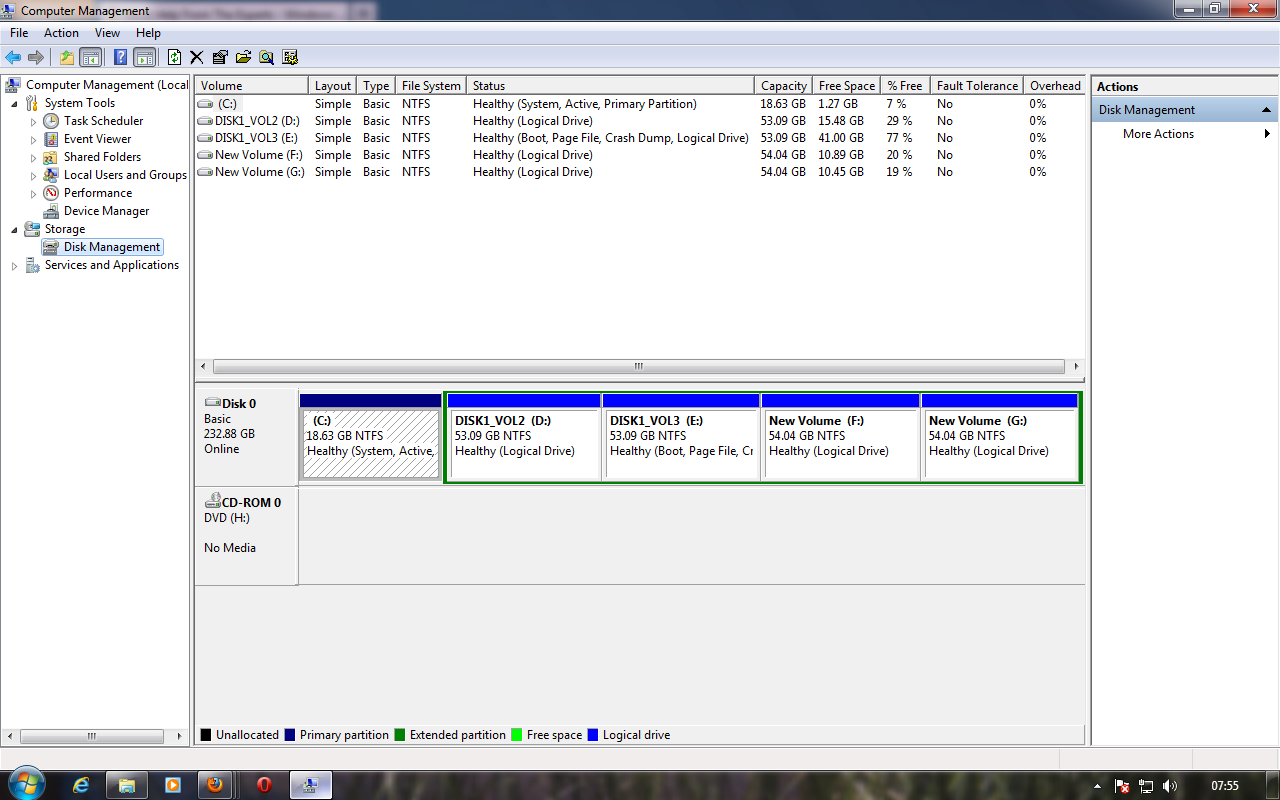
Thanks a lot for the guidance friends,i am here uploading the screenshot of the disk management

IrFdb6V.png
 

My Computer My Computer

Computer type
PC/Desktop
OS
XP
C is entirely too small, and what`s up with all the logical partitions ?
 

My Computer My Computer

Computer type
PC/Desktop
Computer Manufacturer/Model Number
Skylake Special #666
OS
Windows 10 Pro x64
CPU
Intel Core i7 6700K
Motherboard
Asus Sabertooth Z170 Mark 1
Memory
GSkill TridentZ RGB 16GB 3600 16-16-16-36
Graphics Card(s)
EVGA GTX 980 Ti SC x2
Sound Card
Realtek High Definition
Monitor(s) Displays
AOC G2460PG
Screen Resolution
1920 x 1080 144Hz
Hard Drives
Samsung 860 Pro 256GB, Seagate Barracuda 4TB x2
PSU
EVGA 1000 P2, EVGA White Custom Braided Cables
Case
Corsair Vengeance C70 Gunmetal Black
Cooling
Corsair H100i v2, Corsair ML120 x2, Thermal Grizzly Kryonaut
Keyboard
Logitech G910 Orion Spectrum
Mouse
Logitech G700s
Internet Speed
Verizon Fios Quantum Gateway 75/75
Antivirus
Windows Defender, Malwarebytes Free 3.8.3
Browser
Chrome
Other Info
Corsair SP120 x4, LG Blu-ray Drive, Durabrand HT-395 100 Watt Dolby Digital Amp, Corsair H2100 Wireless 7.1 Headset
C must be the XP partition and E he said is the Win7 partition. The other partitions are not of interest.

Question: does the system now boot into XP or into Win7 - or do you get a choice and can boot into either one.
 

My Computer My Computer

Computer Manufacturer/Model Number
HP, Dell, Gateway, Toshiba - 4 laptops and 2 desktops
OS
Vista, Windows7, Mint Mate, Zorin, Windows 8
CPU
from 1.6GHz Duo to i7
Monitor(s) Displays
2x HP w2207
Hard Drives
5x HDD, 7x SSD, 12x Externals
Keyboard
with trackball - no mices
Mouse
Trackball mice
Internet Speed
DSL 6000
Ya, you`re right then, 18 gigs is plenty for XP. :)
 

My Computer My Computer

Computer type
PC/Desktop
Computer Manufacturer/Model Number
Skylake Special #666
OS
Windows 10 Pro x64
CPU
Intel Core i7 6700K
Motherboard
Asus Sabertooth Z170 Mark 1
Memory
GSkill TridentZ RGB 16GB 3600 16-16-16-36
Graphics Card(s)
EVGA GTX 980 Ti SC x2
Sound Card
Realtek High Definition
Monitor(s) Displays
AOC G2460PG
Screen Resolution
1920 x 1080 144Hz
Hard Drives
Samsung 860 Pro 256GB, Seagate Barracuda 4TB x2
PSU
EVGA 1000 P2, EVGA White Custom Braided Cables
Case
Corsair Vengeance C70 Gunmetal Black
Cooling
Corsair H100i v2, Corsair ML120 x2, Thermal Grizzly Kryonaut
Keyboard
Logitech G910 Orion Spectrum
Mouse
Logitech G700s
Internet Speed
Verizon Fios Quantum Gateway 75/75
Antivirus
Windows Defender, Malwarebytes Free 3.8.3
Browser
Chrome
Other Info
Corsair SP120 x4, LG Blu-ray Drive, Durabrand HT-395 100 Watt Dolby Digital Amp, Corsair H2100 Wireless 7.1 Headset
C must be the XP partition and E he said is the Win7 partition. The other partitions are not of interest.

Question: does the system now boot into XP or into Win7 - or do you get a choice and can boot into either one.

The system is now booting only into win 7.thats is the problem for me.i wont mind having 2 OS in my system if i have the option to chosse one whenever i boot my system.
 

My Computer My Computer

Computer type
PC/Desktop
OS
XP
You can boot into XP and delete Win7 on E in Disk Mgmt: Partition or Volume - Delete

If you'd like more space on C then you can install Partition Wizard to XP to Extend C using the space you deleted from E. The Logical extended partition should shrink accordingly. How to extend partition easily with Partition Wizard - video help.

If there's something else you'd rather do, let us know and we'll give you the steps.

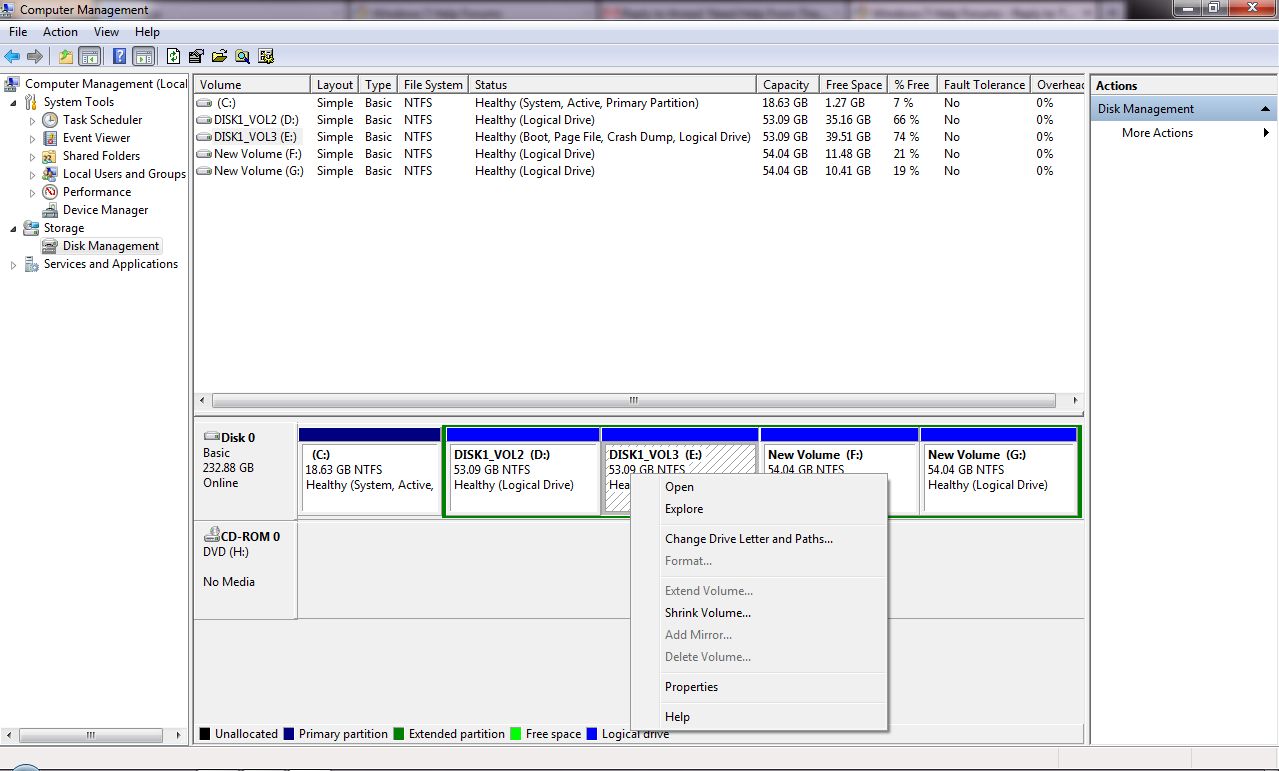
i am unable to delete the E DRIVE,let me show you what the message i am getting by a screenshot

bOdiddV.jpg


now what to do?
 

My Computer My Computer

Computer type
PC/Desktop
OS
XP
If you want to get rid of E, use the bootable CD of Partition Wizard.
 

My Computer My Computer

Computer Manufacturer/Model Number
HP, Dell, Gateway, Toshiba - 4 laptops and 2 desktops
OS
Vista, Windows7, Mint Mate, Zorin, Windows 8
CPU
from 1.6GHz Duo to i7
Monitor(s) Displays
2x HP w2207
Hard Drives
5x HDD, 7x SSD, 12x Externals
Keyboard
with trackball - no mices
Mouse
Trackball mice
Internet Speed
DSL 6000
Back
Top