Computer being remotely viewed right now (Urgent)

yk7

New member
Member
Local time
4:44 AM
Messages
93
So someone on my Steam contact list is able to view my computer screen. Don't have time to go into details but how can I stop this?
 

My Computer My Computer

OS
Windows 7 Home Premium 64bit
CPU
Intel Core i5-3570K Ivy Bridge 3.4GHz
Motherboard
GIGABYTE GA-Z77X-UD3H ATX Intel Motherboard
Memory
Corsair Vengeance 16GB (2 x 8GB) DDR3-1600
Graphics Card(s)
Gigabyte Radeon HD 7970 GHz Edition 3GB
Sound Card
Creative SB Audigy SE 7.1 PCI and Creative SB X-Fi HD USB
Monitor(s) Displays
ASUS VS Series VS247H-P Black 23.6" (x3)
Screen Resolution
1920x1080
Hard Drives
Seagate 1TB ST1000DM003 and Samsung 840 Pro 128GB SSD
PSU
Corsair Enthusiast 650W 80 PLUS Bronze
Case
Fractal Design Define R4 (Black Pearl) ATX Mid Tower
Cooling
Cooler Master Hyper 212 EVO
Keyboard
Das Keyboard Model S Professional
Mouse
Steelseries Sensei
Internet Speed
Average 3mb/s
Antivirus
Avast IS + Malwarebytes PRO
Browser
Firefox
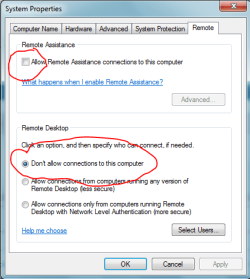
Turn OFF Remote Connection - mimic settings shown below, then reboot computer.

Capture.PNG

Also, change password on router, and reboot it.
 

My Computer My Computer

Computer type
PC/Desktop
Computer Manufacturer/Model Number
Golden Mk. I.4
OS
Windows 10 Pro x64 ; Xubuntu x64
CPU
Intel i7 860 @ 2.80 GHz O/C'ed to 4.0GHz
Motherboard
Gigabyte P55A-UD3R Rev.1. Award BIOS F13
Memory
16GB Corsair Vengance DDR3 @ 661 MHz Dual Channel (9-9-9-24)
Graphics Card(s)
EVGA NVidia GTX 560 1024MB
Sound Card
Realtek Integrated
Monitor(s) Displays
Dual Samsung SyncMaster 2494HS
Screen Resolution
1920*1080 and 1920*1080
Hard Drives
1*Samsung 840 EVO 120GB SSD;
1*OCZ Vertex 2 60GB SSD;
2*Samsung F3 SpinPoint 1TB in RAID0;
1*Samsung F1 SpinPoint 1TB;
2*Western Digital 1TB External USB 3.0
1*Western Digital 500GB External USB 3.0
1*Seagate 500GB External USB 2.0
PSU
Thermaltake ToughPower QFan 750W
Case
Thermaltake Element S VK60001W2Z
Cooling
Corsair H60 Water Cooling, 2*230mm and 2*80mm case fans
Keyboard
Logitech G110
Mouse
Logitech MX518
Turn OFF Remote Connection - mimic settings shown below, then reboot computer.

View attachment 261803

Also, change password on router, and reboot it.

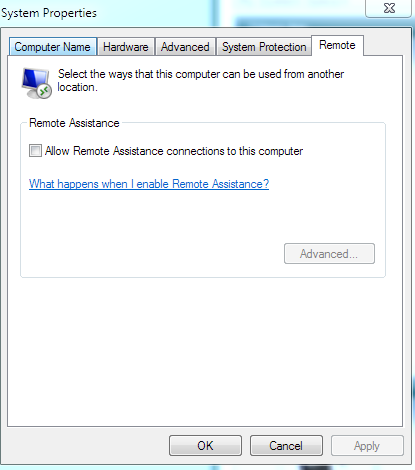
Where are those settings?

Edit: Found it but not seeing the settings below the remote assistance box.
 
Last edited:

My Computer My Computer

OS
Windows 7 Home Premium 64bit
CPU
Intel Core i5-3570K Ivy Bridge 3.4GHz
Motherboard
GIGABYTE GA-Z77X-UD3H ATX Intel Motherboard
Memory
Corsair Vengeance 16GB (2 x 8GB) DDR3-1600
Graphics Card(s)
Gigabyte Radeon HD 7970 GHz Edition 3GB
Sound Card
Creative SB Audigy SE 7.1 PCI and Creative SB X-Fi HD USB
Monitor(s) Displays
ASUS VS Series VS247H-P Black 23.6" (x3)
Screen Resolution
1920x1080
Hard Drives
Seagate 1TB ST1000DM003 and Samsung 840 Pro 128GB SSD
PSU
Corsair Enthusiast 650W 80 PLUS Bronze
Case
Fractal Design Define R4 (Black Pearl) ATX Mid Tower
Cooling
Cooler Master Hyper 212 EVO
Keyboard
Das Keyboard Model S Professional
Mouse
Steelseries Sensei
Internet Speed
Average 3mb/s
Antivirus
Avast IS + Malwarebytes PRO
Browser
Firefox
Use screen capture of panel to explain what you are seeing.
 

My Computer My Computer

Computer type
PC/Desktop
Computer Manufacturer/Model Number
Golden Mk. I.4
OS
Windows 10 Pro x64 ; Xubuntu x64
CPU
Intel i7 860 @ 2.80 GHz O/C'ed to 4.0GHz
Motherboard
Gigabyte P55A-UD3R Rev.1. Award BIOS F13
Memory
16GB Corsair Vengance DDR3 @ 661 MHz Dual Channel (9-9-9-24)
Graphics Card(s)
EVGA NVidia GTX 560 1024MB
Sound Card
Realtek Integrated
Monitor(s) Displays
Dual Samsung SyncMaster 2494HS
Screen Resolution
1920*1080 and 1920*1080
Hard Drives
1*Samsung 840 EVO 120GB SSD;
1*OCZ Vertex 2 60GB SSD;
2*Samsung F3 SpinPoint 1TB in RAID0;
1*Samsung F1 SpinPoint 1TB;
2*Western Digital 1TB External USB 3.0
1*Western Digital 500GB External USB 3.0
1*Seagate 500GB External USB 2.0
PSU
Thermaltake ToughPower QFan 750W
Case
Thermaltake Element S VK60001W2Z
Cooling
Corsair H60 Water Cooling, 2*230mm and 2*80mm case fans
Keyboard
Logitech G110
Mouse
Logitech MX518
Use screen capture of panel to explain what you are seeing.

y5tEwdO.png
 

My Computer My Computer

OS
Windows 7 Home Premium 64bit
CPU
Intel Core i5-3570K Ivy Bridge 3.4GHz
Motherboard
GIGABYTE GA-Z77X-UD3H ATX Intel Motherboard
Memory
Corsair Vengeance 16GB (2 x 8GB) DDR3-1600
Graphics Card(s)
Gigabyte Radeon HD 7970 GHz Edition 3GB
Sound Card
Creative SB Audigy SE 7.1 PCI and Creative SB X-Fi HD USB
Monitor(s) Displays
ASUS VS Series VS247H-P Black 23.6" (x3)
Screen Resolution
1920x1080
Hard Drives
Seagate 1TB ST1000DM003 and Samsung 840 Pro 128GB SSD
PSU
Corsair Enthusiast 650W 80 PLUS Bronze
Case
Fractal Design Define R4 (Black Pearl) ATX Mid Tower
Cooling
Cooler Master Hyper 212 EVO
Keyboard
Das Keyboard Model S Professional
Mouse
Steelseries Sensei
Internet Speed
Average 3mb/s
Antivirus
Avast IS + Malwarebytes PRO
Browser
Firefox
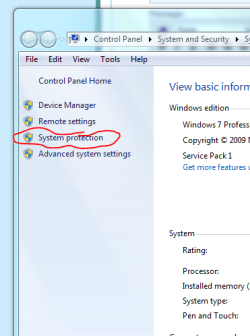
How are you opening up that panel?

Please do this:

1. Click Start :orb:
2. Right-click My Computer
3. Click Properties

Now click System protection on the panel that opens.

Capture.PNG

Does the panel still look the same as the first one you showed me? If so, please do the following:

1. Download and save this tool to your desktop:
http://go.microsoft.com/fwlink/?linkid=52012

2. Run the tool, and then click 'Copy' - ignore any errors if they appear

3. Use CTRL+V to paste the unedited results of the tool here in your next reply

4. Provide your system details using this:
http://www.sevenforums.com/tutorials/180324-system-info-see-your-system-specs.html

Can you also tell us which anti-virus software and firewall you have installed? When was the last time you performed a virus scan?
 

My Computer My Computer

Computer type
PC/Desktop
Computer Manufacturer/Model Number
Golden Mk. I.4
OS
Windows 10 Pro x64 ; Xubuntu x64
CPU
Intel i7 860 @ 2.80 GHz O/C'ed to 4.0GHz
Motherboard
Gigabyte P55A-UD3R Rev.1. Award BIOS F13
Memory
16GB Corsair Vengance DDR3 @ 661 MHz Dual Channel (9-9-9-24)
Graphics Card(s)
EVGA NVidia GTX 560 1024MB
Sound Card
Realtek Integrated
Monitor(s) Displays
Dual Samsung SyncMaster 2494HS
Screen Resolution
1920*1080 and 1920*1080
Hard Drives
1*Samsung 840 EVO 120GB SSD;
1*OCZ Vertex 2 60GB SSD;
2*Samsung F3 SpinPoint 1TB in RAID0;
1*Samsung F1 SpinPoint 1TB;
2*Western Digital 1TB External USB 3.0
1*Western Digital 500GB External USB 3.0
1*Seagate 500GB External USB 2.0
PSU
Thermaltake ToughPower QFan 750W
Case
Thermaltake Element S VK60001W2Z
Cooling
Corsair H60 Water Cooling, 2*230mm and 2*80mm case fans
Keyboard
Logitech G110
Mouse
Logitech MX518
I think the best solution is to configure your firewall so that it allows only (inbound/outbound) ports which are required by your well known applications.

For example here is a list of steam ports.

I think you don't see all the options in "System properties" "remote tab" because you're using home edition of windows.
 

My Computer My Computer

Computer Manufacturer/Model Number
Toshiba Satelite P300D 13J (Short model No: PSPDCE)
OS
Windows 7 Enterprise x64 SP1 Version 6.1 Build 7601
CPU
x64bit AMD Turion(tm) X2 Ultra Dual-Core Mobile ZM-82
Memory
4096 (2048 + 2048) MB, DDR2 RAM (800 MHz), max 8,192 MB
Graphics Card(s)
ATI Mobility Radeon™ HD 3650+HyperMemory™(512MB VRAM+2302MB)
Sound Card
Manufacturer: harman/kardon
Monitor(s) Displays
Generic PnP Monitor (MONITOR\LPLA101)
Screen Resolution
1440 x 900 (19" LCD)
Hard Drives
HDD1: TOSHIBA MK3252GSX ATA Device (IDE 320 GB 5,400 o/min) ,
HDD2: Msft Virtual Disk SCSI Disk Device (Virtual Hard Drive),
HDD3: TOSHIBA MK3263GSX USB Device (USB Mobile HDD) (TakeMS MemLine)
PSU
Batery: technology : lithium-ion
Cooling
integrated cooler + 3x external cooler
Keyboard
USB Logitech S520
Mouse
USB Logitech S520
Internet Speed
WAN: 7,2 Mbit/sec, WLAN: 54 Mbit/sec + Bluetooth®
I think the best solution is to configure your firewall so that it allows only (inbound/outbound) ports which are required by your well known applications.

For example here is a list of steam ports.

I think you don't see all the options in "System properties" "remote tab" because you're using home edition of windows.

That would probably be why. I am using home edition.
 

My Computer My Computer

OS
Windows 7 Home Premium 64bit
CPU
Intel Core i5-3570K Ivy Bridge 3.4GHz
Motherboard
GIGABYTE GA-Z77X-UD3H ATX Intel Motherboard
Memory
Corsair Vengeance 16GB (2 x 8GB) DDR3-1600
Graphics Card(s)
Gigabyte Radeon HD 7970 GHz Edition 3GB
Sound Card
Creative SB Audigy SE 7.1 PCI and Creative SB X-Fi HD USB
Monitor(s) Displays
ASUS VS Series VS247H-P Black 23.6" (x3)
Screen Resolution
1920x1080
Hard Drives
Seagate 1TB ST1000DM003 and Samsung 840 Pro 128GB SSD
PSU
Corsair Enthusiast 650W 80 PLUS Bronze
Case
Fractal Design Define R4 (Black Pearl) ATX Mid Tower
Cooling
Cooler Master Hyper 212 EVO
Keyboard
Das Keyboard Model S Professional
Mouse
Steelseries Sensei
Internet Speed
Average 3mb/s
Antivirus
Avast IS + Malwarebytes PRO
Browser
Firefox
How are you opening up that panel?

Please do this:

1. Click Start :orb:
2. Right-click My Computer
3. Click Properties

Now click System protection on the panel that opens.

View attachment 261929

Does the panel still look the same as the first one you showed me? If so, please do the following:

1. Download and save this tool to your desktop:
http://go.microsoft.com/fwlink/?linkid=52012

2. Run the tool, and then click 'Copy' - ignore any errors if they appear

3. Use CTRL+V to paste the unedited results of the tool here in your next reply

4. Provide your system details using this:
http://www.sevenforums.com/tutorials/180324-system-info-see-your-system-specs.html

Can you also tell us which anti-virus software and firewall you have installed? When was the last time you performed a virus scan?

It still didn't show and know the reason why. Using Windows 7 Home Edition. I am using Avast and haven't done a full scan in about a month. I don't have any extra third party firewalls.
 

My Computer My Computer

OS
Windows 7 Home Premium 64bit
CPU
Intel Core i5-3570K Ivy Bridge 3.4GHz
Motherboard
GIGABYTE GA-Z77X-UD3H ATX Intel Motherboard
Memory
Corsair Vengeance 16GB (2 x 8GB) DDR3-1600
Graphics Card(s)
Gigabyte Radeon HD 7970 GHz Edition 3GB
Sound Card
Creative SB Audigy SE 7.1 PCI and Creative SB X-Fi HD USB
Monitor(s) Displays
ASUS VS Series VS247H-P Black 23.6" (x3)
Screen Resolution
1920x1080
Hard Drives
Seagate 1TB ST1000DM003 and Samsung 840 Pro 128GB SSD
PSU
Corsair Enthusiast 650W 80 PLUS Bronze
Case
Fractal Design Define R4 (Black Pearl) ATX Mid Tower
Cooling
Cooler Master Hyper 212 EVO
Keyboard
Das Keyboard Model S Professional
Mouse
Steelseries Sensei
Internet Speed
Average 3mb/s
Antivirus
Avast IS + Malwarebytes PRO
Browser
Firefox
Your system specs say Home Premium - if you are using Home only, then please update it.

If you are using Home only, then everything should be fine now. Perform a full scan of your system for peace of mind, and do it regularly from now on.

Rergards,
Golden
 

My Computer My Computer

Computer type
PC/Desktop
Computer Manufacturer/Model Number
Golden Mk. I.4
OS
Windows 10 Pro x64 ; Xubuntu x64
CPU
Intel i7 860 @ 2.80 GHz O/C'ed to 4.0GHz
Motherboard
Gigabyte P55A-UD3R Rev.1. Award BIOS F13
Memory
16GB Corsair Vengance DDR3 @ 661 MHz Dual Channel (9-9-9-24)
Graphics Card(s)
EVGA NVidia GTX 560 1024MB
Sound Card
Realtek Integrated
Monitor(s) Displays
Dual Samsung SyncMaster 2494HS
Screen Resolution
1920*1080 and 1920*1080
Hard Drives
1*Samsung 840 EVO 120GB SSD;
1*OCZ Vertex 2 60GB SSD;
2*Samsung F3 SpinPoint 1TB in RAID0;
1*Samsung F1 SpinPoint 1TB;
2*Western Digital 1TB External USB 3.0
1*Western Digital 500GB External USB 3.0
1*Seagate 500GB External USB 2.0
PSU
Thermaltake ToughPower QFan 750W
Case
Thermaltake Element S VK60001W2Z
Cooling
Corsair H60 Water Cooling, 2*230mm and 2*80mm case fans
Keyboard
Logitech G110
Mouse
Logitech MX518
The thing is, it's hard to scan my computer regularly. I actually tried to do a full scan but after 16 hours, it was still on 0%. I usually just do quick scans and it takes about 10 hours.
 

My Computer My Computer

OS
Windows 7 Home Premium 64bit
CPU
Intel Core i5-3570K Ivy Bridge 3.4GHz
Motherboard
GIGABYTE GA-Z77X-UD3H ATX Intel Motherboard
Memory
Corsair Vengeance 16GB (2 x 8GB) DDR3-1600
Graphics Card(s)
Gigabyte Radeon HD 7970 GHz Edition 3GB
Sound Card
Creative SB Audigy SE 7.1 PCI and Creative SB X-Fi HD USB
Monitor(s) Displays
ASUS VS Series VS247H-P Black 23.6" (x3)
Screen Resolution
1920x1080
Hard Drives
Seagate 1TB ST1000DM003 and Samsung 840 Pro 128GB SSD
PSU
Corsair Enthusiast 650W 80 PLUS Bronze
Case
Fractal Design Define R4 (Black Pearl) ATX Mid Tower
Cooling
Cooler Master Hyper 212 EVO
Keyboard
Das Keyboard Model S Professional
Mouse
Steelseries Sensei
Internet Speed
Average 3mb/s
Antivirus
Avast IS + Malwarebytes PRO
Browser
Firefox
That is an awful long scan time.
 

My Computer My Computer

Computer type
PC/Desktop
OS
Windows 7 Home Premium 64bit
Those times for Avast are way off !

A quick scan for me is maybe 10 min. and a full scan is 45 min.
 

My Computer My Computer

Computer type
Laptop
Computer Manufacturer/Model Number
Lenovo Z710 #59400485
OS
Windows 8.1.1 64bit
CPU
i7-4700MQ
Memory
8.0GB PC3-12800 DDR3L SDRAM 1600 MHz
Graphics Card(s)
Intel® HD Graphics 4600
Sound Card
on-board
Monitor(s) Displays
17.3"
Screen Resolution
1920x1080
Hard Drives
1TB 5400 RPM;(OS,programs)


Hitachi, 1Tb external,(B'up)
PSU
4 Cell 41 Watt Hour Lithium-Ion
Case
Lenovo
Cooling
Air in, Air out.
Keyboard
Logitech - Y-UY95 - Illuminated
Mouse
M$ - Arc Touch
Internet Speed
59 Mb down / 25 Mb up
Antivirus
Defender
Browser
Firefox (newest)
Other Info
MBAM Pro, SAS Pro, Revo Pro.

Ext. HP 2311 Monitor
Those times for Avast are way off !

A quick scan for me is maybe 10 min. and a full scan is 45 min.

Maybe I just had too many background applications open. Will try doing a quick scan with less things open right now.
 

My Computer My Computer

OS
Windows 7 Home Premium 64bit
CPU
Intel Core i5-3570K Ivy Bridge 3.4GHz
Motherboard
GIGABYTE GA-Z77X-UD3H ATX Intel Motherboard
Memory
Corsair Vengeance 16GB (2 x 8GB) DDR3-1600
Graphics Card(s)
Gigabyte Radeon HD 7970 GHz Edition 3GB
Sound Card
Creative SB Audigy SE 7.1 PCI and Creative SB X-Fi HD USB
Monitor(s) Displays
ASUS VS Series VS247H-P Black 23.6" (x3)
Screen Resolution
1920x1080
Hard Drives
Seagate 1TB ST1000DM003 and Samsung 840 Pro 128GB SSD
PSU
Corsair Enthusiast 650W 80 PLUS Bronze
Case
Fractal Design Define R4 (Black Pearl) ATX Mid Tower
Cooling
Cooler Master Hyper 212 EVO
Keyboard
Das Keyboard Model S Professional
Mouse
Steelseries Sensei
Internet Speed
Average 3mb/s
Antivirus
Avast IS + Malwarebytes PRO
Browser
Firefox
Does Avast have a CPU usage setting?
 

My Computer My Computer

Computer type
PC/Desktop
OS
Windows 7 Home Premium 64bit
No, I have Avast Internet Security and do not have it.
 

My Computer My Computer

Computer type
Laptop
Computer Manufacturer/Model Number
Lenovo Z710 #59400485
OS
Windows 8.1.1 64bit
CPU
i7-4700MQ
Memory
8.0GB PC3-12800 DDR3L SDRAM 1600 MHz
Graphics Card(s)
Intel® HD Graphics 4600
Sound Card
on-board
Monitor(s) Displays
17.3"
Screen Resolution
1920x1080
Hard Drives
1TB 5400 RPM;(OS,programs)


Hitachi, 1Tb external,(B'up)
PSU
4 Cell 41 Watt Hour Lithium-Ion
Case
Lenovo
Cooling
Air in, Air out.
Keyboard
Logitech - Y-UY95 - Illuminated
Mouse
M$ - Arc Touch
Internet Speed
59 Mb down / 25 Mb up
Antivirus
Defender
Browser
Firefox (newest)
Other Info
MBAM Pro, SAS Pro, Revo Pro.

Ext. HP 2311 Monitor
I don't even remember win98 with a celly 300a taking 10 hours to slug through a scan.
 

My Computer My Computer

Computer type
PC/Desktop
OS
Windows 7 Home Premium 64bit
Just completed the quick scan in 18 minutes. Running the full scan now. I have no idea how I got those times before.
 

My Computer My Computer

OS
Windows 7 Home Premium 64bit
CPU
Intel Core i5-3570K Ivy Bridge 3.4GHz
Motherboard
GIGABYTE GA-Z77X-UD3H ATX Intel Motherboard
Memory
Corsair Vengeance 16GB (2 x 8GB) DDR3-1600
Graphics Card(s)
Gigabyte Radeon HD 7970 GHz Edition 3GB
Sound Card
Creative SB Audigy SE 7.1 PCI and Creative SB X-Fi HD USB
Monitor(s) Displays
ASUS VS Series VS247H-P Black 23.6" (x3)
Screen Resolution
1920x1080
Hard Drives
Seagate 1TB ST1000DM003 and Samsung 840 Pro 128GB SSD
PSU
Corsair Enthusiast 650W 80 PLUS Bronze
Case
Fractal Design Define R4 (Black Pearl) ATX Mid Tower
Cooling
Cooler Master Hyper 212 EVO
Keyboard
Das Keyboard Model S Professional
Mouse
Steelseries Sensei
Internet Speed
Average 3mb/s
Antivirus
Avast IS + Malwarebytes PRO
Browser
Firefox
Was the scan clean ?

If not, what did it find ?
 

My Computer My Computer

Computer type
Laptop
Computer Manufacturer/Model Number
Lenovo Z710 #59400485
OS
Windows 8.1.1 64bit
CPU
i7-4700MQ
Memory
8.0GB PC3-12800 DDR3L SDRAM 1600 MHz
Graphics Card(s)
Intel® HD Graphics 4600
Sound Card
on-board
Monitor(s) Displays
17.3"
Screen Resolution
1920x1080
Hard Drives
1TB 5400 RPM;(OS,programs)


Hitachi, 1Tb external,(B'up)
PSU
4 Cell 41 Watt Hour Lithium-Ion
Case
Lenovo
Cooling
Air in, Air out.
Keyboard
Logitech - Y-UY95 - Illuminated
Mouse
M$ - Arc Touch
Internet Speed
59 Mb down / 25 Mb up
Antivirus
Defender
Browser
Firefox (newest)
Other Info
MBAM Pro, SAS Pro, Revo Pro.

Ext. HP 2311 Monitor

My Computer My Computer

OS
Windows 7 Home Premium 64bit
CPU
Intel Core i5-3570K Ivy Bridge 3.4GHz
Motherboard
GIGABYTE GA-Z77X-UD3H ATX Intel Motherboard
Memory
Corsair Vengeance 16GB (2 x 8GB) DDR3-1600
Graphics Card(s)
Gigabyte Radeon HD 7970 GHz Edition 3GB
Sound Card
Creative SB Audigy SE 7.1 PCI and Creative SB X-Fi HD USB
Monitor(s) Displays
ASUS VS Series VS247H-P Black 23.6" (x3)
Screen Resolution
1920x1080
Hard Drives
Seagate 1TB ST1000DM003 and Samsung 840 Pro 128GB SSD
PSU
Corsair Enthusiast 650W 80 PLUS Bronze
Case
Fractal Design Define R4 (Black Pearl) ATX Mid Tower
Cooling
Cooler Master Hyper 212 EVO
Keyboard
Das Keyboard Model S Professional
Mouse
Steelseries Sensei
Internet Speed
Average 3mb/s
Antivirus
Avast IS + Malwarebytes PRO
Browser
Firefox
Back
Top