External HDD can't be open but can be partially detected

Rain08

New member
Member
VIP
Local time
1:22 AM
Messages
265
Location
Manila, Philippines
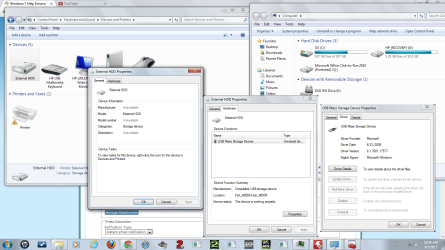
Hey guys, I have a problem with my external HD, after coming home, my HD can't be opened but detected and no auto run was appearing, the HD light is always bright, I think it's working all the time but I can't even open it. Just before home, I plugged the external HD to another computer, it was detected and can be opened. I can hear the USB plugged sound "Device Connect", but no "Device Disconnect" or "Device Failed to Connect" sound in my PC at my house. There are no clicking noise in the external HDD, it can't be detected in "Disk Management", tried to rescan and refresh the disk management and still nothing, but it can be detected in "Devices and Printers" in Control Panel so it's partially detected. I don't know about the USB cable, I have no idea on how to detect a broken USB cable. Please give me actions that WON'T delete my files inside the drive, just give me that answer if there are no more options left. Thank you for your time and knowledge for helping me.
Specs:
HP Pavilion P6640D
Windows 7 Home Basic 32-bit (6.1, Build 7601)
Pentium® Dual Core CPU E6700 @ 3.20 GHz
Foxconn 2A8C
2048 MB RAM Samsung 2rx8 PC3 10600u
Seagate Barracuda ST3320418AS 320 GB @ 7200 RPM
Western Digital 32000BEV External HDD 298.09 GB (undetected external HD)

Note: If you wonder if why there are black colors in the corners of the windows, I used paint to place them in a single picture.

Edit: Tried to unplug and re-plug the device, still nothing, restarted the PC and do the plugging thing, still nothing.
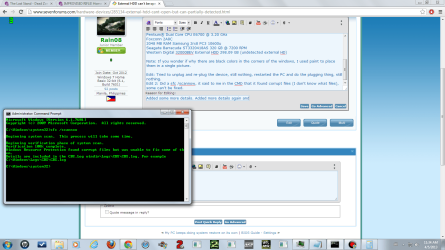
Edit 2: Did a sfc /scannow, it said to me in the CMD that it found corrupt files (I don't know what files), some can't be fixed.
Edit 3: My BIOS detected the hard drive, however in safe mode, it wasn't detected.
 

Attachments
  • HD.png
    HD.png
    122.6 KB · Views: 32
  • HD 1.png
    HD 1.png
    41.9 KB · Views: 23
  • sfc.png
    sfc.png
    84.5 KB · Views: 31
Last edited:

My Computer My Computer

At a glance

Windows 7 Professional 64-bit (6.1, Build 7601)Intel Pentium G3258 @ 3.80 GHz (OC'd)Team Elite 4 GB DDR3 1600 MHzPalit GTX 1060 6 GB Super JetStream
Computer type
PC/Desktop
Computer Manufacturer/Model Number
Built
OS
Windows 7 Professional 64-bit (6.1, Build 7601)
CPU
Intel Pentium G3258 @ 3.80 GHz (OC'd)
Motherboard
Gigabyte Z97-HD3
Memory
Team Elite 4 GB DDR3 1600 MHz
Graphics Card(s)
Palit GTX 1060 6 GB Super JetStream
Monitor(s) Displays
HP x20 LED Series Wide LCD Monitor
Screen Resolution
1600x900 pixels
Hard Drives
Western Digital Caviar Blue WD10EZRZ 1TB @ 7200 RPM,
Western Digital 3200BEV External HDD 298.09 GB, WD Elements WDBUZG0010BBK-05 External HDD 1TB
PSU
Seasonic G-550 550W 80+ Gold
Keyboard
Corsair K70 Rapidfire RGB
Mouse
Logitech G300S and G502
Internet Speed
2.00 Mbps
Antivirus
MSE, MBAM, MBAE
Browser
IE, Google Chrome, FF, Safari.
Other Info
Old PC:
HP Pavilion P6640D, Windows 7 Ultimate 32-bit (6.1, Build 7601), Intel Pentium Dual Core CPU E6700 @ 3.20 GHz, Foxconn 2A8C, Kingmax 2 GB DDR3 1066 MHz, Palit NVIDIA GeForce GT 610 2048 MB, Western Digital WD Blue WD5000AAKX 500 GB @ 7200 RPM, Seagate Barracuda ST3320418AS 320 GB @ 7200 RPM (former drive), Bestec ATX-250-12Z 250 Watts
Day 2 guys, still nothing, I just want to access the drive and copy the files, I'll try to use the external HDD later in another computer and see if it works there.
 

My Computer My Computer

At a glance

Windows 7 Professional 64-bit (6.1, Build 7601)Intel Pentium G3258 @ 3.80 GHz (OC'd)Team Elite 4 GB DDR3 1600 MHzPalit GTX 1060 6 GB Super JetStream
Computer type
PC/Desktop
Computer Manufacturer/Model Number
Built
OS
Windows 7 Professional 64-bit (6.1, Build 7601)
CPU
Intel Pentium G3258 @ 3.80 GHz (OC'd)
Motherboard
Gigabyte Z97-HD3
Memory
Team Elite 4 GB DDR3 1600 MHz
Graphics Card(s)
Palit GTX 1060 6 GB Super JetStream
Monitor(s) Displays
HP x20 LED Series Wide LCD Monitor
Screen Resolution
1600x900 pixels
Hard Drives
Western Digital Caviar Blue WD10EZRZ 1TB @ 7200 RPM,
Western Digital 3200BEV External HDD 298.09 GB, WD Elements WDBUZG0010BBK-05 External HDD 1TB
PSU
Seasonic G-550 550W 80+ Gold
Keyboard
Corsair K70 Rapidfire RGB
Mouse
Logitech G300S and G502
Internet Speed
2.00 Mbps
Antivirus
MSE, MBAM, MBAE
Browser
IE, Google Chrome, FF, Safari.
Other Info
Old PC:
HP Pavilion P6640D, Windows 7 Ultimate 32-bit (6.1, Build 7601), Intel Pentium Dual Core CPU E6700 @ 3.20 GHz, Foxconn 2A8C, Kingmax 2 GB DDR3 1066 MHz, Palit NVIDIA GeForce GT 610 2048 MB, Western Digital WD Blue WD5000AAKX 500 GB @ 7200 RPM, Seagate Barracuda ST3320418AS 320 GB @ 7200 RPM (former drive), Bestec ATX-250-12Z 250 Watts
The way you have put up your problem must have confused and scared everybody. :)

Anyway let us rework and see whether we can get to know something about.

Just before returning home, you plugged it into another PC and you were able to open it. By that I presume it was working perfectly. Right?

Now go to that PC and plug-in your drive into that. Check and let us know whether it is still working fine. If you can access all the files, then copy it to another external drive.

If you can't access the files then check whether it shows up in 1. the Device Manager ( Any error message in Properties? ) 2. Does it show up in Disk Management? If so please take a screenshot and post it. http://www.sevenforums.com/tutorials/274797-disk-management-post-screen-capture-image.html

Remember on that other PC and not on your PC. And use the Windows snipping tool to get your screencapture as per the above Golden tutorial.:)
 

My Computer My Computer

At a glance

Windows 7 Home Premium 32 bit
OS
Windows 7 Home Premium 32 bit
Perhaps you unplugged the drive while it was being read or written too. If so this may have crapped out your data. I also agree on the snips. I can't make out anything useful.
 

My Computer My Computer

At a glance

Windows 7 Ultimate X64 SP1Intel i5-2550K, Differing ~4.4-4.8GHz No buil...16GB G.Skill Sniper 1866MHz @ 2133MHz 2x8GBASUS GTX650TIB-DC2OC-2GD5, (650TI Boost)
Computer type
PC/Desktop
Computer Manufacturer/Model Number
Home Built Desktop By DataTech
OS
Windows 7 Ultimate X64 SP1
CPU
Intel i5-2550K, Differing ~4.4-4.8GHz No built in GPU
Motherboard
ASUS P8Z68-V PRO/GEN3
Memory
16GB G.Skill Sniper 1866MHz @ 2133MHz 2x8GB
Graphics Card(s)
ASUS GTX650TIB-DC2OC-2GD5, (650TI Boost)
Sound Card
Onboard Realtek 5-1
Monitor(s) Displays
Samsung P2570HD
Screen Resolution
1920x1080
Hard Drives
Samsung 840 Pro 256GB SSD for OS, 500GB Seagate Constellation (Enterprise drive) for Data
PSU
Corsair HX650W
Case
Inwin Dragon Rider
Cooling
Hyper 212 EVO w/two Noctua fans, push-pull, @1300 RPM
Keyboard
E-Z Eyes, bright yellow keys with large characters
Mouse
steelseries SENSEI Laser Pro Gaming
Internet Speed
48-51Mbs Mbs down, 11 Mbs up Xfinity Cable
Antivirus
Norton Internet Security 2013
Browser
IE 10, Opera, Pale Moon if needed
Other Info
4 case fans, LG BluRay-RE, ASUS DVD-RW, Mr. Fusion power supply, 1.21 gigawatts.
Is this external drive powered from an external adapter or is is bus powered from the USB port? If it's the latter, it may be that the computer can't supply enough power to it - hence the clicking noises. I've had this problem with some of these drives - work with some computers but not others. Try connecting it another USB port.
 

My Computer My Computer

At a glance

Windows 7 Ultimate X64
OS
Windows 7 Ultimate X64
@jumanji: It was an internet cafe computer that I used, a Windows 7 64-bit, don't know what's the real version but it's Home Premium or above since the taskbar is translucent. Tried to visit it today but it was closed, I'll try tomorrow and see if it works.
@Britton30: I just plugged it in, I wasn't using it, it was there for standby.
@johngee: It would be weird, when I plug my drive to my own PC, it works all the time, I always use the front right port for the drive and it works, but this time it's not working, tried to use the front left port, nothing, tried the vacant rear port, nothing. I'll try to use the other 3 ports and give it a shot.
 

My Computer My Computer

At a glance

Windows 7 Professional 64-bit (6.1, Build 7601)Intel Pentium G3258 @ 3.80 GHz (OC'd)Team Elite 4 GB DDR3 1600 MHzPalit GTX 1060 6 GB Super JetStream
Computer type
PC/Desktop
Computer Manufacturer/Model Number
Built
OS
Windows 7 Professional 64-bit (6.1, Build 7601)
CPU
Intel Pentium G3258 @ 3.80 GHz (OC'd)
Motherboard
Gigabyte Z97-HD3
Memory
Team Elite 4 GB DDR3 1600 MHz
Graphics Card(s)
Palit GTX 1060 6 GB Super JetStream
Monitor(s) Displays
HP x20 LED Series Wide LCD Monitor
Screen Resolution
1600x900 pixels
Hard Drives
Western Digital Caviar Blue WD10EZRZ 1TB @ 7200 RPM,
Western Digital 3200BEV External HDD 298.09 GB, WD Elements WDBUZG0010BBK-05 External HDD 1TB
PSU
Seasonic G-550 550W 80+ Gold
Keyboard
Corsair K70 Rapidfire RGB
Mouse
Logitech G300S and G502
Internet Speed
2.00 Mbps
Antivirus
MSE, MBAM, MBAE
Browser
IE, Google Chrome, FF, Safari.
Other Info
Old PC:
HP Pavilion P6640D, Windows 7 Ultimate 32-bit (6.1, Build 7601), Intel Pentium Dual Core CPU E6700 @ 3.20 GHz, Foxconn 2A8C, Kingmax 2 GB DDR3 1066 MHz, Palit NVIDIA GeForce GT 610 2048 MB, Western Digital WD Blue WD5000AAKX 500 GB @ 7200 RPM, Seagate Barracuda ST3320418AS 320 GB @ 7200 RPM (former drive), Bestec ATX-250-12Z 250 Watts
OK. I thought you had used the drive on a friend's PC. You may connect your drive to any other known-to-be good PC, check your drive and put out the screenshots.
 

My Computer My Computer

At a glance

Windows 7 Home Premium 32 bit
OS
Windows 7 Home Premium 32 bit
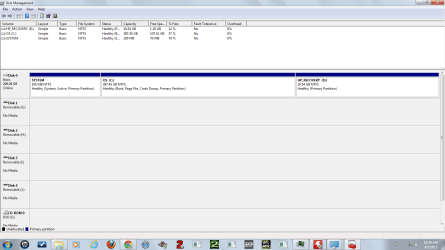
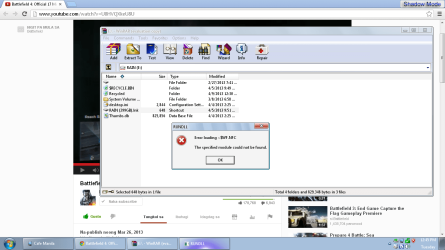
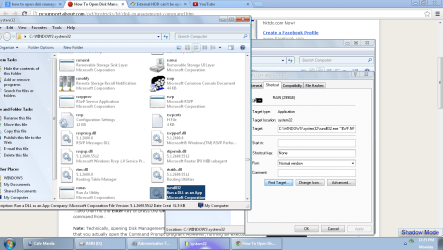
Here's the sitrep guys, this ain't the computer that I used before going home since the cafe was closed again, I asked the owner, he said that they aren't sure when are they gonna open it again. I'm currently using a different PC on a different internet cafe and it was detected but can't open the drive since before you can open it, there is a shortcut appearing naming "RAIN", and an error appearing when I click it, I had experience folders turning into shortcuts w/o reasons and I can still open them, this one is different.
The the code for the target location.
Code:
C:\WINDOWS\system32\rundll32.exe ~$WF.NFC,crys mnabnobcobc mnabnobcopcopcdpqdeqreqb
I just need to get inside the drive to copy it, maybe my own PC has a problem.
Specs of the other internet cafe's PC:
 

Attachments

  • My Computer.PNG
    My Computer.PNG
    77.1 KB · Views: 14
  • Disk Management.PNG
    Disk Management.PNG
    26.9 KB · Views: 10
  • File Location.PNG
    File Location.PNG
    88.2 KB · Views: 15
  • Error Loading.PNG
    Error Loading.PNG
    64.9 KB · Views: 13

My Computer My Computer

At a glance

Windows 7 Professional 64-bit (6.1, Build 7601)Intel Pentium G3258 @ 3.80 GHz (OC'd)Team Elite 4 GB DDR3 1600 MHzPalit GTX 1060 6 GB Super JetStream
Computer type
PC/Desktop
Computer Manufacturer/Model Number
Built
OS
Windows 7 Professional 64-bit (6.1, Build 7601)
CPU
Intel Pentium G3258 @ 3.80 GHz (OC'd)
Motherboard
Gigabyte Z97-HD3
Memory
Team Elite 4 GB DDR3 1600 MHz
Graphics Card(s)
Palit GTX 1060 6 GB Super JetStream
Monitor(s) Displays
HP x20 LED Series Wide LCD Monitor
Screen Resolution
1600x900 pixels
Hard Drives
Western Digital Caviar Blue WD10EZRZ 1TB @ 7200 RPM,
Western Digital 3200BEV External HDD 298.09 GB, WD Elements WDBUZG0010BBK-05 External HDD 1TB
PSU
Seasonic G-550 550W 80+ Gold
Keyboard
Corsair K70 Rapidfire RGB
Mouse
Logitech G300S and G502
Internet Speed
2.00 Mbps
Antivirus
MSE, MBAM, MBAE
Browser
IE, Google Chrome, FF, Safari.
Other Info
Old PC:
HP Pavilion P6640D, Windows 7 Ultimate 32-bit (6.1, Build 7601), Intel Pentium Dual Core CPU E6700 @ 3.20 GHz, Foxconn 2A8C, Kingmax 2 GB DDR3 1066 MHz, Palit NVIDIA GeForce GT 610 2048 MB, Western Digital WD Blue WD5000AAKX 500 GB @ 7200 RPM, Seagate Barracuda ST3320418AS 320 GB @ 7200 RPM (former drive), Bestec ATX-250-12Z 250 Watts
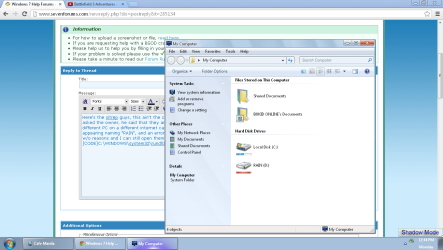
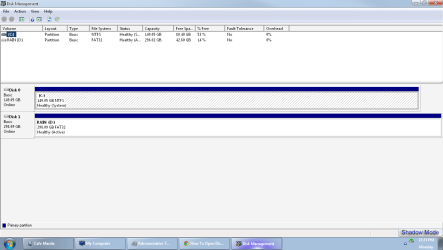
Not to worry. Your external drive which is a 300GB drive shows some 42 GB free. All your data is safe. What is now clear is your drive is OK but inflicted with the shortcut virus - which only affects USB drives. There can be many variants, but let us start and find out.

Now plug-in your problem drive into your PC. Does it show up in Disk Management? ( I would be surprised if it does not, for it did show up on the other PC)

If it shows up in Disk Management, then,

Download and install WinRAR 32bit or 64 bit as appropriate to your system. WinRAR archiver, a powerful tool to process RAR and ZIP files

Safely remove all external hard disks and pen drives.

Shut down your computer and reboot.

Plug-in only the problem drive while pressing the left Shift key so that autorun is disabled.

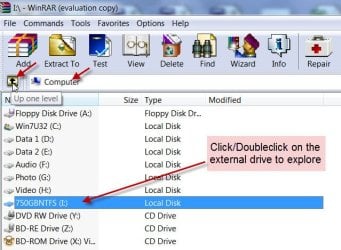
Run WinRAR, navigate to the afflicted drive, click/double click on it to explore.

08-04-2013 16-26-09.jpg


It will show all the files including the hidden files present in that particular drive.

Search for the file autorun.inf and open it with Notepad. Look for any .exe file entry in the text. This is the culprit that gets executed. Take a note of this .exe file name and close it. ( if you do not find any .exe file, please take a snapshot of the the autorun.inf in the Notepad and upload it for our examination. Use the Windows snipping tool to make the screenshots.

How to Use the Snipping Tool in Vista

http://www.sevenforums.com/general-...ed-method-uploading-posting-screen-shots.html )

Now that you know the name of the .exe file, search, locate and delete it from your PC. Also delete the autorun.inf file in your USB drive. (Right click on it and delete file in WinRAR)

Close WinRAR.

Now restart your Computer. Your system should now be free from the shortcut virus.

If at any point, you have any difficulty in following the instructions or do not know what to do further, do not hesitate to ask for clarifications.

Even if I am not there, someone else will be glad to help you.
 

My Computer My Computer

At a glance

Windows 7 Home Premium 32 bit
OS
Windows 7 Home Premium 32 bit
Still not working jumanji, only "Devices and Printers" can detect it, while for the others can't, MY computer can't detect it for some reason, while for OTHER computers can detect it, I think this is more on computer problem rather than an external HDD problem, there's no "Snipping Tool" in my PC. Those screenshots in post #8 came from an OS that is a hybrid of XP and Windows 7 !?!?, looks like a W7 but has the functionality of an XP, nevertheless, that other PC can still detect it.
 

Attachments

  • Partially detected, detected only in devices and printers.png
    Partially detected, detected only in devices and printers.png
    149.2 KB · Views: 14

My Computer My Computer

At a glance

Windows 7 Professional 64-bit (6.1, Build 7601)Intel Pentium G3258 @ 3.80 GHz (OC'd)Team Elite 4 GB DDR3 1600 MHzPalit GTX 1060 6 GB Super JetStream
Computer type
PC/Desktop
Computer Manufacturer/Model Number
Built
OS
Windows 7 Professional 64-bit (6.1, Build 7601)
CPU
Intel Pentium G3258 @ 3.80 GHz (OC'd)
Motherboard
Gigabyte Z97-HD3
Memory
Team Elite 4 GB DDR3 1600 MHz
Graphics Card(s)
Palit GTX 1060 6 GB Super JetStream
Monitor(s) Displays
HP x20 LED Series Wide LCD Monitor
Screen Resolution
1600x900 pixels
Hard Drives
Western Digital Caviar Blue WD10EZRZ 1TB @ 7200 RPM,
Western Digital 3200BEV External HDD 298.09 GB, WD Elements WDBUZG0010BBK-05 External HDD 1TB
PSU
Seasonic G-550 550W 80+ Gold
Keyboard
Corsair K70 Rapidfire RGB
Mouse
Logitech G300S and G502
Internet Speed
2.00 Mbps
Antivirus
MSE, MBAM, MBAE
Browser
IE, Google Chrome, FF, Safari.
Other Info
Old PC:
HP Pavilion P6640D, Windows 7 Ultimate 32-bit (6.1, Build 7601), Intel Pentium Dual Core CPU E6700 @ 3.20 GHz, Foxconn 2A8C, Kingmax 2 GB DDR3 1066 MHz, Palit NVIDIA GeForce GT 610 2048 MB, Western Digital WD Blue WD5000AAKX 500 GB @ 7200 RPM, Seagate Barracuda ST3320418AS 320 GB @ 7200 RPM (former drive), Bestec ATX-250-12Z 250 Watts
Does your computer detect other external drives/ pen drives plugged into it?
 

My Computer My Computer

At a glance

Windows 7 Home Premium 32 bit
OS
Windows 7 Home Premium 32 bit
Does your computer detect other external drives/ pen drives plugged into it?

Not sure, gonna try it sometime since my friend borrowed my USB, I'll try to use other devices, I'll try to use my camera to connect to the PC, I'll see if it works. Also can you help me access my drive from another computer?Because a shortcut is not letting me get inside the drive, just refer to post #8, the lower 2 pictures. So if something bad happens, I still have a backup.
Edit: Here's the pic with the Winrar used to open the drive:
Edit 2: Never mind for opening the drive, I already opened it thanks to this thread:
http://answers.microsoft.com/en-us/...hortcuts/695db4cc-645f-4bd1-85c7-41671457fe11
I just need to know how to open my drive in MY PC.
 

Attachments

  • Error.PNG
    Error.PNG
    68.2 KB · Views: 12
Last edited:

My Computer My Computer

At a glance

Windows 7 Professional 64-bit (6.1, Build 7601)Intel Pentium G3258 @ 3.80 GHz (OC'd)Team Elite 4 GB DDR3 1600 MHzPalit GTX 1060 6 GB Super JetStream
Computer type
PC/Desktop
Computer Manufacturer/Model Number
Built
OS
Windows 7 Professional 64-bit (6.1, Build 7601)
CPU
Intel Pentium G3258 @ 3.80 GHz (OC'd)
Motherboard
Gigabyte Z97-HD3
Memory
Team Elite 4 GB DDR3 1600 MHz
Graphics Card(s)
Palit GTX 1060 6 GB Super JetStream
Monitor(s) Displays
HP x20 LED Series Wide LCD Monitor
Screen Resolution
1600x900 pixels
Hard Drives
Western Digital Caviar Blue WD10EZRZ 1TB @ 7200 RPM,
Western Digital 3200BEV External HDD 298.09 GB, WD Elements WDBUZG0010BBK-05 External HDD 1TB
PSU
Seasonic G-550 550W 80+ Gold
Keyboard
Corsair K70 Rapidfire RGB
Mouse
Logitech G300S and G502
Internet Speed
2.00 Mbps
Antivirus
MSE, MBAM, MBAE
Browser
IE, Google Chrome, FF, Safari.
Other Info
Old PC:
HP Pavilion P6640D, Windows 7 Ultimate 32-bit (6.1, Build 7601), Intel Pentium Dual Core CPU E6700 @ 3.20 GHz, Foxconn 2A8C, Kingmax 2 GB DDR3 1066 MHz, Palit NVIDIA GeForce GT 610 2048 MB, Western Digital WD Blue WD5000AAKX 500 GB @ 7200 RPM, Seagate Barracuda ST3320418AS 320 GB @ 7200 RPM (former drive), Bestec ATX-250-12Z 250 Watts
I am going out now to drop my wife in her consulting chambers. Will be back in another half an hour or so and then post my strategy. So hang on.
 

My Computer My Computer

At a glance

Windows 7 Home Premium 32 bit
OS
Windows 7 Home Premium 32 bit
OK, As I said in my previous post, your external drive is inflicted with shortcut virus and you should be able to access your files once you get rid of it. I presume that you got that virus from the internet café.

I was thinking whether the shortcut virus was preventing access to your external drive on your PC. Reason why I wanted you to try another external HDD/pen drive on your PC.

Now you can try two things.

1.Take your external drive to a friend's PC ( Not to an Internet café :)) and try out its removal as outlined in my post #9 using WinRAR. Just take a snapshot or note down the contents of the autorun.inf file displayed in Notepad and then delete it. You may also delete any other file/folder that is not your data file. Also delete the Recycle Bin ( It will be recreated ) and the System Volume Information. Though SIV folder will not be deleted, I think the files inside will be deleted. All deletions to be performed in WinRAR. Now you can close WinRAR, safely remove the external drive and then plug it in. You should be able to access your files now. If those still remain hidden, then

Click on Start type cmd in the Search field and press Enter

Click on cmd.exe to open the Command Window.

Enter this command.

attrib -h -r -s /s /d g:\*.* (replace g with the actual external drive letter)

(You can copy and paste the above command but remember to put in the correct drive letter.)

Now press "Enter".

Now check for your files in your external drive.

2. Before you try this procedure with a friend's PC, I have been thinking aloud, why not try it on your own PC. No harm will be done. Make sure in both cases that you keep the left shift key pressed while you plug in the external drive. That will disable autorun, and your PC and WinRAR should be able to see the drive if that was what was preventing access to your external drive. If you can explore it in WinRAR follow the same procedure to get rid of the shortcut virus.

EDIT: I just saw your edited post.

Opening the drive with Jamesarntz's procedure what exactly did you do? Have you gotten rid of the virus and got your data back in the drive visible and accessible? And on which computer? Just curious.

Anyway, click OK on the error message to make it disappear and then delete all the files/folders that are not your data. I see only the one named File Folder in the WinRAR screenshot. Is that your data folder? Double click on it to open and confirm all your data is there. Delete all other files/folders in the WinRAR explorer.
 
Last edited:

My Computer My Computer

At a glance

Windows 7 Home Premium 32 bit
OS
Windows 7 Home Premium 32 bit
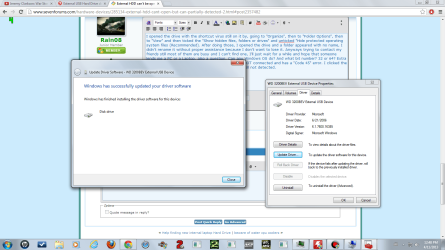
I opened the drive with the shortcut virus still on it by, going to "Organize", then to "Folder Options", then to "View" and then ticked the "Show hidden files, folders or drives" and unticked "Hide protected operating system files (Recommended). After doing those, I opened the drive and a folder appeared with no name, I didn't rename it without proper assistance because I don't want to lose it. Anyways trying to contact my friends still most of them are busy and I can't find one, I'll just wait for a while and hope that someone lends me a PC or a Laptop, also a question, Can any Windows OS do? And what bit number? 32 or 64? Extra info, just found in "Device Manager" that my drive is NOT connected and has a "Code 45" error. I clicked the "Update Drive", it says it updated to a new one but still not detected. Note that the WD 3200 BEV is greyed out.
Edit: Here's the pics:
 

Attachments

  • Not detected.png
    Not detected.png
    85.8 KB · Views: 6
  • Updated the driver.png
    Updated the driver.png
    89.5 KB · Views: 5

My Computer My Computer

At a glance

Windows 7 Professional 64-bit (6.1, Build 7601)Intel Pentium G3258 @ 3.80 GHz (OC'd)Team Elite 4 GB DDR3 1600 MHzPalit GTX 1060 6 GB Super JetStream
Computer type
PC/Desktop
Computer Manufacturer/Model Number
Built
OS
Windows 7 Professional 64-bit (6.1, Build 7601)
CPU
Intel Pentium G3258 @ 3.80 GHz (OC'd)
Motherboard
Gigabyte Z97-HD3
Memory
Team Elite 4 GB DDR3 1600 MHz
Graphics Card(s)
Palit GTX 1060 6 GB Super JetStream
Monitor(s) Displays
HP x20 LED Series Wide LCD Monitor
Screen Resolution
1600x900 pixels
Hard Drives
Western Digital Caviar Blue WD10EZRZ 1TB @ 7200 RPM,
Western Digital 3200BEV External HDD 298.09 GB, WD Elements WDBUZG0010BBK-05 External HDD 1TB
PSU
Seasonic G-550 550W 80+ Gold
Keyboard
Corsair K70 Rapidfire RGB
Mouse
Logitech G300S and G502
Internet Speed
2.00 Mbps
Antivirus
MSE, MBAM, MBAE
Browser
IE, Google Chrome, FF, Safari.
Other Info
Old PC:
HP Pavilion P6640D, Windows 7 Ultimate 32-bit (6.1, Build 7601), Intel Pentium Dual Core CPU E6700 @ 3.20 GHz, Foxconn 2A8C, Kingmax 2 GB DDR3 1066 MHz, Palit NVIDIA GeForce GT 610 2048 MB, Western Digital WD Blue WD5000AAKX 500 GB @ 7200 RPM, Seagate Barracuda ST3320418AS 320 GB @ 7200 RPM (former drive), Bestec ATX-250-12Z 250 Watts
Error code 45:
This error occurs if a device that was previously connected to the computer is no longer connected. To resolve this problem, reconnect this hardware device to the computer.

No resolution is necessary. This error code is only used to indicate the disconnected status of the device and does not require you to resolve it. The error code resolves automatically when you connect the associated device to the computer.

This is the general prescription .

Even after disconnecting and reconnecting the external USB device if you get the same message then 1.Your external device has gone bad or 2. The connecting cable is faulty or 3. the connections are loose.

Again a general diagnosis.

All this however does not apply in your case. We are pretty much sure that your external hard disk is OK, the data is still there and the virus is still there. It may be preventing Windows from accessing the drive resulting in that error message. I very clearly thought of this possibility and that is why I asked you to connect another pen drive or external drive and check whether your system is able to recognise those. That would categorically establish whether it is the true state of affairs.

I am also not happy that you have failed to follow the instructions given.

1. Even when you opened the Hard drive with WinRAR ( let it be any computer) and could see all the files/folders (your screenshot at post #12) you made no effort to delete all unwanted files keeping only your data folders/files.

2. You also followed Jamesarntz's post to unhide all the files/folders - well, it is yet another way of doing the same thing - but still did not delete the unwanted files/folders. (Well, it was a slightly variant case, but still you could have deleted the unwanted files.)

In both cases you could have opened the only unnamed folder and checked whether all your data is there before deleting all other files/folders


Anyway please do the same on your computer.


1. Check whether your computer recognises the external drive when you plug it in with Left Shift key pressed.

2. If it does then open it and check - you can use any of the above two methods.

3. Open and check the only unnamed folder is your data folder and confirm all your data is there.

4. Then delete all other files and folders and then safely remove it.

5. Shut down your computer, reboot, plug in your external drive and check whether everything is OK.

Note : Your computer may also be infected with Malware. I would suggest that that you do a quick scan running Malwarebytes in Windows safe mode and cleanse your PC first before doing any of the above procedure. You can download and watch the demo here http://www.malwarebytes.org/products/malwarebytes_free/
 
Last edited:

My Computer My Computer

At a glance

Windows 7 Home Premium 32 bit
OS
Windows 7 Home Premium 32 bit
I see you are there right now.

Your case is similar to the one here, http://www.sevenforums.com/hardware-devices/281289-external-hard-drive-error-wv-fat32.html
where the OP was able to successfully copy all data into another external drive after following the WinRAR procedure.

He got into further problems when sanitising the external drive because his computer was infected. This necessitated cleansing of his computer following a rigorous procedure outlined by cottonball.

Reason why I am advising you to cleanse your PC of all malware before proceeding further.

Now you know, why I wanted you to do that on a friend's PC - which I have presumed to be clean PC -not wanting to take any chances on your PC. :)
 
Last edited:

My Computer My Computer

At a glance

Windows 7 Home Premium 32 bit
OS
Windows 7 Home Premium 32 bit
Here's the result of the quick scan with Malwarebytes during safe mode with connection. The Mbam is still on, just minimized it. I'm fine with the folders being deleted but not sure about the registry keys, I'll wait for more info here on what to do. I'll restart my PC in to normal mode, and plug a USB device to test it later after someone tells me what to do with Mbam.
Note: vendor names with prefix "PUP" has no checks on it, should that be deleted or just stay?
Code:
Malwarebytes Anti-Malware 1.75.0.1300
www.malwarebytes.org

Database version: v2013.04.12.01

Windows 7 Service Pack 1 x86 NTFS (Safe Mode/Networking)
Internet Explorer 9.0.8112.16421
patrick :: PATRICK-HP [administrator]

4/12/2013 9:41:14 AM
MBAM-log-2013-04-12 (09-48-33).txt

Scan type: Quick scan
Scan options enabled: Memory | Startup | Registry | File System | Heuristics/Extra | Heuristics/Shuriken | PUP | PUM
Scan options disabled: P2P
Objects scanned: 250654
Time elapsed: 7 minute(s), 2 second(s)

Memory Processes Detected: 0
(No malicious items detected)

Memory Modules Detected: 0
(No malicious items detected)

Registry Keys Detected: 6
HKCR\CLSID\{CA4520F3-AE13-4FB1-A513-58E23991C86D} (Trojan.Downloader) -> No action taken.
HKCR\gencrawler_gc.GenCrawler (Trojan.Downloader) -> No action taken.
HKLM\SOFTWARE\Microsoft\Windows\CurrentVersion\Explorer\Browser Helper Objects\{CA4520F3-AE13-4FB1-A513-58E23991C86D} (Trojan.Downloader) -> No action taken.
HKCU\SOFTWARE\Microsoft\Windows\CurrentVersion\Ext\Settings\{CA4520F3-AE13-4FB1-A513-58E23991C86D} (Trojan.Downloader) -> No action taken.
HKCU\SOFTWARE\Microsoft\Windows\CurrentVersion\Ext\Stats\{CA4520F3-AE13-4FB1-A513-58E23991C86D} (Trojan.Downloader) -> No action taken.
HKLM\SOFTWARE\Microsoft\Windows\CurrentVersion\Explorer\Browser Helper Objects\{59EA5FF9-DEB5-4858-9185-F7CD3AB01C25} (PUP.wxDfast) -> No action taken.

Registry Values Detected: 3
HKLM\SOFTWARE\Microsoft\Windows\CurrentVersion\Policies\Explorer\Run|46607 (Trojan.Ransom.WL) -> Data: C:\PROGRA~2\LOCALS~1\Temp\msqiuowu.exe -> No action taken.
HKCU\SOFTWARE\Microsoft\Windows NT\CurrentVersion\Windows|Load (PUM.UserWLoad) -> Data: C:\Users\patrick\LOCALS~1\Temp\mscfwvo.bat -> No action taken.
HKCU\SOFTWARE\Microsoft\Windows NT\CurrentVersion\Windows|Load (Trojan.Ransom) -> Data: C:\Users\patrick\LOCALS~1\Temp\mscfwvo.bat -> No action taken.

Registry Data Items Detected: 1
HKCU\SOFTWARE\Microsoft\Windows NT\CurrentVersion\Windows|Load (Trojan.Ransom.WL) -> Bad: (C:\Users\patrick\LOCALS~1\Temp\mscfwvo.bat) Good: () -> No action taken.

Folders Detected: 4
C:\ProgramData\wxDfast (PUP.wxDfast) -> No action taken.
C:\ProgramData\wxDfast\data (PUP.wxDfast) -> No action taken.
C:\ProgramData\Codec-C (PUP.CodecC) -> No action taken.
C:\ProgramData\Codec-C\data (PUP.CodecC) -> No action taken.

Files Detected: 59
C:\ProgramData\Local Settings\Temp\msqiuowu.exe (Trojan.Ransom.WL) -> No action taken.
C:\Users\patrick\Local Settings\Temp\mscfwvo.bat (Trojan.Ransom.WL) -> No action taken.
C:\Users\patrick\AppData\Roaming\Media Finder\Extensions\gencrawler_gc.dll (Trojan.Downloader) -> No action taken.
C:\Users\patrick\AppData\Local\Temp\msaflqvik.pif (Trojan.Ransom.WL) -> No action taken.
C:\Users\patrick\AppData\Local\Temp\msaqawzu.scr (Trojan.Ransom.WL) -> No action taken.
C:\Users\patrick\AppData\Local\Temp\msatyv.exe (Trojan.Ransom.WL) -> No action taken.
C:\Users\patrick\AppData\Local\Temp\msavctukz.exe (Trojan.Ransom.WL) -> No action taken.
C:\Users\patrick\AppData\Local\Temp\msavouli.scr (Trojan.Ransom.WL) -> No action taken.
C:\Users\patrick\AppData\Local\Temp\msavwfhhu.exe (Trojan.Ransom.WL) -> No action taken.
C:\Users\patrick\AppData\Local\Temp\msbawrw.com (Trojan.Dropper.nsdrp) -> No action taken.
C:\Users\patrick\AppData\Local\Temp\msbopqy.com (Spyware.Zbot) -> No action taken.
C:\Users\patrick\AppData\Local\Temp\msbowti.com (Trojan.Ransom.WL) -> No action taken.
C:\Users\patrick\AppData\Local\Temp\msbvimp.com (Trojan.Ransom.WL) -> No action taken.
C:\Users\patrick\AppData\Local\Temp\mscfske.bat (Trojan.Ransom.WL) -> No action taken.
C:\Users\patrick\AppData\Local\Temp\mscfwvo.bat (Trojan.Ransom.WL) -> No action taken.
C:\Users\patrick\AppData\Local\Temp\mschzoe.bat (Trojan.Ransom.WL) -> No action taken.
C:\Users\patrick\AppData\Local\Temp\mseahy.exe (Trojan.Ransom.WL) -> No action taken.
C:\Users\patrick\AppData\Local\Temp\mseiuadq.scr (Trojan.Ransom.WL) -> No action taken.
C:\Users\patrick\AppData\Local\Temp\msevzavv.scr (Trojan.Ransom.WL) -> No action taken.
C:\Users\patrick\AppData\Local\Temp\msifqiaua.pif (Trojan.Ransom.WL) -> No action taken.
C:\Users\patrick\AppData\Local\Temp\msiiosqtx.exe (Trojan.Dropper.nsdrp) -> No action taken.
C:\Users\patrick\AppData\Local\Temp\msiozazzu.exe (Trojan.Ransom.WL) -> No action taken.
C:\Users\patrick\AppData\Local\Temp\msipilaai.exe (Spyware.Zbot) -> No action taken.
C:\Users\patrick\AppData\Local\Temp\msiqklia.com (Trojan.Ransom.WL) -> No action taken.
C:\Users\patrick\AppData\Local\Temp\msitvautr.exe (Trojan.Ransom.WL) -> No action taken.
C:\Users\patrick\AppData\Local\Temp\msiwevro.com (Trojan.Ransom.WL) -> No action taken.
C:\Users\patrick\AppData\Local\Temp\msocat.bat (Trojan.Dropper.nsdrp) -> No action taken.
C:\Users\patrick\AppData\Local\Temp\msofmro.bat (Trojan.Ransom.WL) -> No action taken.
C:\Users\patrick\AppData\Local\Temp\msojqcz.bat (Trojan.Dropper.nsdrp) -> No action taken.
C:\Users\patrick\AppData\Local\Temp\msqfeehy.bat (Trojan.Ransom.WL) -> No action taken.
C:\Users\patrick\AppData\Local\Temp\msqhmokao.pif (Trojan.Ransom.WL) -> No action taken.
C:\Users\patrick\AppData\Local\Temp\msqirxay.com (Trojan.Ransom.WL) -> No action taken.
C:\Users\patrick\AppData\Local\Temp\mstauxnuv.pif (Trojan.Ransom.WL) -> No action taken.
C:\Users\patrick\AppData\Local\Temp\mstfurivy.pif (Trojan.Ransom.WL) -> No action taken.
C:\Users\patrick\AppData\Local\Temp\msvmlz.com (Trojan.Dropper.nsdrp) -> No action taken.
C:\Users\patrick\AppData\Local\Temp\mswmvs.exe (Trojan.Ransom.WL) -> No action taken.
C:\Users\patrick\AppData\Local\Temp\mswqaoi.scr (Trojan.Ransom.WL) -> No action taken.
C:\Users\patrick\AppData\Local\Temp\mswqihx.com (Trojan.Ransom.WL) -> No action taken.
C:\Users\patrick\AppData\Local\Temp\mszegiav.scr (Trojan.Ransom.WL) -> No action taken.
C:\Users\patrick\AppData\Local\Temp\mszeiu.cmd (Trojan.Ransom.WL) -> No action taken.
C:\Users\patrick\AppData\Local\Temp\mszvuq.cmd (Trojan.Ransom.WL) -> No action taken.
C:\$RECYCLE.BIN\S-1-5-21-1684045860-3113741293-3062281249-1000\$R8DIHTP.GHOST\C&C Zero Hour +3 Trainer English v 1.4.exe (PUP.HackTool.HotKeysHook) -> No action taken.
C:\TEMP\TrustedInstaller.exe (Spyware.Zbot) -> No action taken.
C:\Users\patrick\Downloads\installer_adobe_photoshop.exe (PUP.BundleInstaller.BT) -> No action taken.
C:\Users\patrick\AppData\Local\Temp\noir.art (Malware.Trace) -> No action taken.
C:\Users\patrick\Local Settings\TempDIR\BetterInstaller.exe (PUP.BundleInstaller.Somoto) -> No action taken.
C:\ProgramData\wxDfast\background.html (PUP.wxDfast) -> No action taken.
C:\ProgramData\wxDfast\content.js (PUP.wxDfast) -> No action taken.
C:\ProgramData\wxDfast\mdpmbgnafjopenakodmonbgbnaiohklc.crx (PUP.wxDfast) -> No action taken.
C:\ProgramData\wxDfast\settings.ini (PUP.wxDfast) -> No action taken.
C:\ProgramData\wxDfast\data\content.js (PUP.wxDfast) -> No action taken.
C:\ProgramData\wxDfast\data\jsondb.js (PUP.wxDfast) -> No action taken.
C:\ProgramData\Codec-C\background.html (PUP.CodecC) -> No action taken.
C:\ProgramData\Codec-C\content.js (PUP.CodecC) -> No action taken.
C:\ProgramData\Codec-C\ekdjfcdinekpfcedakhpngcnaamhiihn.crx (PUP.CodecC) -> No action taken.
C:\ProgramData\Codec-C\settings.ini (PUP.CodecC) -> No action taken.
C:\ProgramData\Codec-C\uninstall.exe (PUP.CodecC) -> No action taken.
C:\ProgramData\Codec-C\data\content.js (PUP.CodecC) -> No action taken.
C:\ProgramData\Codec-C\data\jsondb.js (PUP.CodecC) -> No action taken.

(end)


Edit: I restarted my PC so I can test USB devices and see if it works, I exited Mbam now and I'll just rescan later in safe mode.
Edit 2: My PC detected a my camera, plugged the USB and it works.
 
Last edited:

My Computer My Computer

At a glance

Windows 7 Professional 64-bit (6.1, Build 7601)Intel Pentium G3258 @ 3.80 GHz (OC'd)Team Elite 4 GB DDR3 1600 MHzPalit GTX 1060 6 GB Super JetStream
Computer type
PC/Desktop
Computer Manufacturer/Model Number
Built
OS
Windows 7 Professional 64-bit (6.1, Build 7601)
CPU
Intel Pentium G3258 @ 3.80 GHz (OC'd)
Motherboard
Gigabyte Z97-HD3
Memory
Team Elite 4 GB DDR3 1600 MHz
Graphics Card(s)
Palit GTX 1060 6 GB Super JetStream
Monitor(s) Displays
HP x20 LED Series Wide LCD Monitor
Screen Resolution
1600x900 pixels
Hard Drives
Western Digital Caviar Blue WD10EZRZ 1TB @ 7200 RPM,
Western Digital 3200BEV External HDD 298.09 GB, WD Elements WDBUZG0010BBK-05 External HDD 1TB
PSU
Seasonic G-550 550W 80+ Gold
Keyboard
Corsair K70 Rapidfire RGB
Mouse
Logitech G300S and G502
Internet Speed
2.00 Mbps
Antivirus
MSE, MBAM, MBAE
Browser
IE, Google Chrome, FF, Safari.
Other Info
Old PC:
HP Pavilion P6640D, Windows 7 Ultimate 32-bit (6.1, Build 7601), Intel Pentium Dual Core CPU E6700 @ 3.20 GHz, Foxconn 2A8C, Kingmax 2 GB DDR3 1066 MHz, Palit NVIDIA GeForce GT 610 2048 MB, Western Digital WD Blue WD5000AAKX 500 GB @ 7200 RPM, Seagate Barracuda ST3320418AS 320 GB @ 7200 RPM (former drive), Bestec ATX-250-12Z 250 Watts
hmmm.......As expected your PC is infected with loads of malware.

Honestly, I am totally unqualified to help you get rid of malware.:)

I have now sent a PM to cottonball requesting him to help you out. ( In the last similar thread, he had graciously intimated that I redirect anyone needing help to him and that he will do his best. Very kind of him.)

So wait for cottonball Sir to kick in here with his missiles. :)
 

My Computer My Computer

At a glance

Windows 7 Home Premium 32 bit
OS
Windows 7 Home Premium 32 bit
Rain08,

We will get to Malwarebytes later.

For now, please plug in the external HDD with the problem to the USB port that you normally use.

Next, download RogueKiller:
Tlcharger RogueKiller (Site Officiel)

When you get to the website, go to where it says:
(Download link) Lien de téléchargement:
rendu2.png

Select the version for your system: 32-bit
Click the dark-blue button without x64.
Save to the Desktop.

Close all windows and browsers.

Right-click and select: Run as Administrator

At the program console, wait for the prescan to finish. (Under Status, it says: Prescan finished.)

Press: SCAN

When done, a report opens on the Desktop: RKreport.txt
Please provide the RKreport.txt (Mode: Scan) in your reply.


A couple of questions..., how large (GB) is the external HDD?
Also, what AntiVirus program do you use?
 

My Computer My Computer

At a glance

Windows 7 Home Premium
Computer type
PC/Desktop
Computer Manufacturer/Model Number
An ol' eMachines
OS
Windows 7 Home Premium
Internet Speed
Fine for me...I'm retired!
Back
Top