
I have a problem with XP booting I have 3 hard drives 2 SADA and 1 IDE, I have the group controlled with
Easy B CD 2.2. The BCD shows the following information for the XP drive:
This boot.ini was automatically generated by NeoSmart Technologies' BootGrabber.exe
; Use EasyBCD from EasyBCD - NeoSmart Technologies to manage your bootloader
[boot loader]
timeout=15
default=multi(0)disk(0)rdisk(2)partition(3)\WINDOWS
[operating systems]
multi(0)disk(0)rdisk(2)partition(3)\WINDOWS="Windows XP on I:\" /fastdetect
Easy BCD 2.2
Entry #1
Name: Microsoft Windows XP
BCD ID: {67d58bb7-3575-11e1-8931-8294ee4440e8}
Drive: I:\
Bootloader Path: \NST\ntldr
Windows Boot Manager
--------------------
identifier {9dea862c-5cdd-4e70-acc1-f32b344d4795}
device partition=E:
description Windows Boot Manager
locale en-US
inherit {7ea2e1ac-2e61-4728-aaa3-896d9d0a9f0e}
default {67d58bb3-3575-11e1-8931-8294ee4440e8}
resumeobject {cec567ac-8098-11e2-bed1-806e6f6e6963}
displayorder {67d58bb7-3575-11e1-8931-8294ee4440e8}
{67d58ba2-3575-11e1-8931-8294ee4440e8}
{67d58bb3-3575-11e1-8931-8294ee4440e8}
{67d58baa-3575-11e1-8931-8294ee4440e8}
toolsdisplayorder {b2721d73-1db4-4c62-bf78-c548a880142d}
timeout 30
displaybootmenu Yes
Real-mode Boot Sector
---------------------
identifier {67d58bb7-3575-11e1-8931-8294ee4440e8}
device partition=I:
path \NST\ntldr
description Microsoft Windows XP
locale en-US
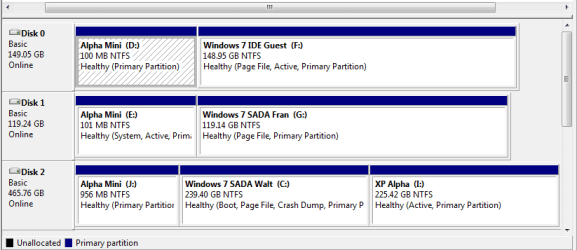
Attached is the disk manager layout. The boot info is on Disk2 C and XP is on I partition.
All the SADA and IDE drives with Windows 7 boot, while XP posts \NST\easey1dr1 status OXC000000f
I've tried various ARC paths some look better than others but no boot on XP any help would be appreciated.
Thanks,
Walt
Easy B CD 2.2. The BCD shows the following information for the XP drive:
This boot.ini was automatically generated by NeoSmart Technologies' BootGrabber.exe
; Use EasyBCD from EasyBCD - NeoSmart Technologies to manage your bootloader
[boot loader]
timeout=15
default=multi(0)disk(0)rdisk(2)partition(3)\WINDOWS
[operating systems]
multi(0)disk(0)rdisk(2)partition(3)\WINDOWS="Windows XP on I:\" /fastdetect
Easy BCD 2.2
Entry #1
Name: Microsoft Windows XP
BCD ID: {67d58bb7-3575-11e1-8931-8294ee4440e8}
Drive: I:\
Bootloader Path: \NST\ntldr
Windows Boot Manager
--------------------
identifier {9dea862c-5cdd-4e70-acc1-f32b344d4795}
device partition=E:
description Windows Boot Manager
locale en-US
inherit {7ea2e1ac-2e61-4728-aaa3-896d9d0a9f0e}
default {67d58bb3-3575-11e1-8931-8294ee4440e8}
resumeobject {cec567ac-8098-11e2-bed1-806e6f6e6963}
displayorder {67d58bb7-3575-11e1-8931-8294ee4440e8}
{67d58ba2-3575-11e1-8931-8294ee4440e8}
{67d58bb3-3575-11e1-8931-8294ee4440e8}
{67d58baa-3575-11e1-8931-8294ee4440e8}
toolsdisplayorder {b2721d73-1db4-4c62-bf78-c548a880142d}
timeout 30
displaybootmenu Yes
Real-mode Boot Sector
---------------------
identifier {67d58bb7-3575-11e1-8931-8294ee4440e8}
device partition=I:
path \NST\ntldr
description Microsoft Windows XP
locale en-US
Attached is the disk manager layout. The boot info is on Disk2 C and XP is on I partition.
All the SADA and IDE drives with Windows 7 boot, while XP posts \NST\easey1dr1 status OXC000000f
I've tried various ARC paths some look better than others but no boot on XP any help would be appreciated.
Thanks,
Walt
My Computer
At a glance
Windows 7 64 bit Home PremiumIntel I7KingstonRadion
- Computer type
- PC/Desktop
- Computer Manufacturer/Model Number
- custom built
- OS
- Windows 7 64 bit Home Premium
- CPU
- Intel I7
- Motherboard
- GA-Z77-DS3H Gigabyte
- Memory
- Kingston
- Graphics Card(s)
- Radion
- Hard Drives
- 1 SADA 2 IDE
- Antivirus
- Norton 360
- Browser
- Explore 9


