Computer takes a long time to turn on...

Rawad

New member
Power User
VIP
Local time
2:43 AM
Messages
532
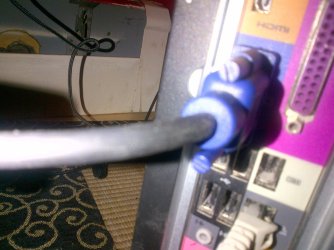
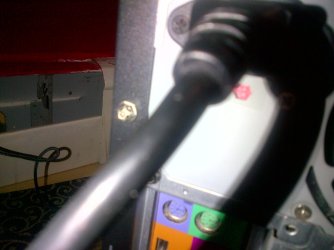
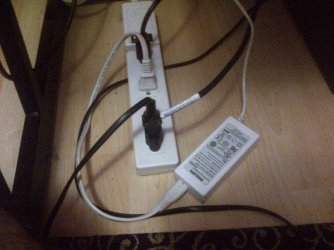
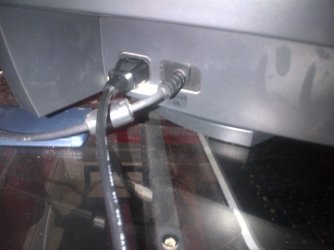
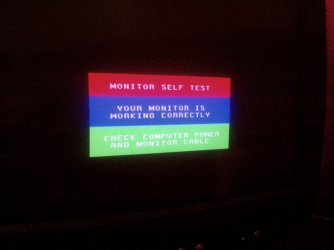
Recently I been having issues with my computer. Everyday I power my acer on . It displays a messages. It takes me about 30 minutes for me to get everything working again . here are the images I provided . It's really getting annoying . I do what screen tells me to do. After like repeating the steps over and over again . it works fine .
 

Attachments
  • IMG-20130528-01110.jpg
    IMG-20130528-01110.jpg
    298.9 KB · Views: 18
  • IMG-20130528-01113.jpg
    IMG-20130528-01113.jpg
    491.8 KB · Views: 11
  • IMG-20130528-01114.jpg
    IMG-20130528-01114.jpg
    433.4 KB · Views: 8
  • IMG-20130528-01115.jpg
    IMG-20130528-01115.jpg
    596.3 KB · Views: 8
  • IMG-20130528-01118.jpg
    IMG-20130528-01118.jpg
    251.6 KB · Views: 10

My Computer My Computer

At a glance

Windows 8.1 64 bitWindows 8.1 64-bit4096 MB RAMMicrosoft Basic Display Adapter
Computer type
Laptop
Computer Manufacturer/Model Number
Acer Aspire M5100
OS
Windows 8.1 64 bit
CPU
Windows 8.1 64-bit
Motherboard
Toshiba L745D
Memory
4096 MB RAM
Graphics Card(s)
Microsoft Basic Display Adapter
Sound Card
High Definition Audio Device
Monitor(s) Displays
1366x768
Screen Resolution
1366x768
Keyboard
Logitech Keyboard K800
Antivirus
MalwareBytes
Browser
Google Chrome
Good Job on the Hi Res photos. Does this happen after the computer posts? Do you hear any beep codes?
Take a look in your BIOS to see if you can turn off any extended tests also.
IF none of this helps, try unplugging various devices one by one and boot to possibly narrow down the issue.
PS that computer shipped with Vista or XP did the issue start after upgrading the OS?
 
Last edited:

My Computer My Computer

At a glance

Windows 7 Home Premium 64bit
Computer type
Laptop
OS
Windows 7 Home Premium 64bit
You said that you do what the screen tells you to do. Can you elaborate and tell us more about what the screen is telling you?
 

My Computer My Computer

At a glance

Windows 7 x6412 GB RAM
Computer type
Laptop
Computer Manufacturer/Model Number
Asus
OS
Windows 7 x64
Memory
12 GB RAM
Browser
IE 10 and Chrome
Do you have another monitor you can hook up to the PC and test with?

From the screenshot, I see that the monitor is not receiving a signal. That points to either the monitor or the embedded graphics on the motherboard.

If your using a CRT monitor, chances are you might have a few busted caps inside the desktop. Crack open the side case and just visually inspect the little capacitors on the motherboard, they typically have either a Y or an X on top of them. Your looking for any bubbling, rising, or leaking.

LL
 

My Computer My Computer

At a glance

Windows 7 Enterprise x64
Computer type
Laptop
OS
Windows 7 Enterprise x64
Good Job on the Hi Res photos. Does this happen after the computer posts? Do you hear any beep codes?
Take a look in your BIOS to see if you can turn off any extended tests also.
IF none of this helps, try unplugging various devices one by one and boot to possibly narrow down the issue.
PS that computer shipped with Vista or XP did the issue start after upgrading the OS?

No beeping sound at all. I have Windows 8 Pro and it's working perfectly. I am on the computer that wouldn't turn on, right now. I will go in my bios because when I power on my Acer computer this message comes up that didn't used to . I will provide an image later today. hang tight.
 

My Computer My Computer

At a glance

Windows 8.1 64 bitWindows 8.1 64-bit4096 MB RAMMicrosoft Basic Display Adapter
Computer type
Laptop
Computer Manufacturer/Model Number
Acer Aspire M5100
OS
Windows 8.1 64 bit
CPU
Windows 8.1 64-bit
Motherboard
Toshiba L745D
Memory
4096 MB RAM
Graphics Card(s)
Microsoft Basic Display Adapter
Sound Card
High Definition Audio Device
Monitor(s) Displays
1366x768
Screen Resolution
1366x768
Keyboard
Logitech Keyboard K800
Antivirus
MalwareBytes
Browser
Google Chrome
You said that you do what the screen tells you to do. Can you elaborate and tell us more about what the screen is telling you?

I believe he was referring to the screenshot green box for "check for power and cable connection yadaya"
 

My Computer My Computer

At a glance

Windows 7 Enterprise x64
Computer type
Laptop
OS
Windows 7 Enterprise x64
I ask because he said that he could get it up and running after about 30 min. That screen shouldn't just disappear after 30 min and give way to a running OS.
 

My Computer My Computer

At a glance

Windows 7 x6412 GB RAM
Computer type
Laptop
Computer Manufacturer/Model Number
Asus
OS
Windows 7 x64
Memory
12 GB RAM
Browser
IE 10 and Chrome
I ask because he said that he could get it up and running after about 30 min. That screen shouldn't just disappear after 30 min and give way to a running OS.

When I unplug everything and plug it back in , It works after awhile.
 

My Computer My Computer

At a glance

Windows 8.1 64 bitWindows 8.1 64-bit4096 MB RAMMicrosoft Basic Display Adapter
Computer type
Laptop
Computer Manufacturer/Model Number
Acer Aspire M5100
OS
Windows 8.1 64 bit
CPU
Windows 8.1 64-bit
Motherboard
Toshiba L745D
Memory
4096 MB RAM
Graphics Card(s)
Microsoft Basic Display Adapter
Sound Card
High Definition Audio Device
Monitor(s) Displays
1366x768
Screen Resolution
1366x768
Keyboard
Logitech Keyboard K800
Antivirus
MalwareBytes
Browser
Google Chrome
I see that you have an HDMI port on the computer, just for testing purposes, can you run an HDMI cable from the computer to a TV and see if you get a display to pop up? This would help isolate if it's a problem with the VGA port.
 

My Computer My Computer

At a glance

Windows 7 x6412 GB RAM
Computer type
Laptop
Computer Manufacturer/Model Number
Asus
OS
Windows 7 x64
Memory
12 GB RAM
Browser
IE 10 and Chrome
I see that you have an HDMI port on the computer, just for testing purposes, can you run an HDMI cable from the computer to a TV and see if you get a display to pop up? This would help isolate if it's a problem with the VGA port.

Unfortunately I don't have the TV near me.
 

My Computer My Computer

At a glance

Windows 8.1 64 bitWindows 8.1 64-bit4096 MB RAMMicrosoft Basic Display Adapter
Computer type
Laptop
Computer Manufacturer/Model Number
Acer Aspire M5100
OS
Windows 8.1 64 bit
CPU
Windows 8.1 64-bit
Motherboard
Toshiba L745D
Memory
4096 MB RAM
Graphics Card(s)
Microsoft Basic Display Adapter
Sound Card
High Definition Audio Device
Monitor(s) Displays
1366x768
Screen Resolution
1366x768
Keyboard
Logitech Keyboard K800
Antivirus
MalwareBytes
Browser
Google Chrome
Do you have another monitor you can hook up to the PC and test with?

From the screenshot, I see that the monitor is not receiving a signal. That points to either the monitor or the embedded graphics on the motherboard.

If your using a CRT monitor, chances are you might have a few busted caps inside the desktop. Crack open the side case and just visually inspect the little capacitors on the motherboard, they typically have either a Y or an X on top of them. Your looking for any bubbling, rising, or leaking.

LL

Do you plug/unplug your monitor a lot - perhaps to use w/a different PC?

Going along with switching monitors, I have a simple suggestion: check the monitor/video cable jack on your pc. It should be clean, and the monitor cable pins should all be there and not loose.

Also, if possible: try your monitor on a different pc... see if it works ok there.
 

My Computer My Computer

At a glance

win7 64bit Ult. using: XP Mode, in English or...8GB - included when purchased.
Computer type
Laptop
OS
win7 64bit Ult. using: XP Mode, in English or Español, SUA, Bitlocker
Memory
8GB - included when purchased.
Monitor(s) Displays
two: Laptop: 1366x768 and HP 1024x768.
Hard Drives
1: 750GB
Keyboard
Second: PS2 connection Compaq kboard, used w/adapter cable.
Mouse
USB mouse.
Antivirus
MS Security Essentials
Other Info
XP Mode Apps used: VC6 C++ and MSDN help as virtual PC apps - one for ea. monitor.
Tri-boot machine. Has Ubuntu 12.04 and Win 8.0 on as well - both used seldomly.
Do you have another monitor you can hook up to the PC and test with?

From the screenshot, I see that the monitor is not receiving a signal. That points to either the monitor or the embedded graphics on the motherboard.

If your using a CRT monitor, chances are you might have a few busted caps inside the desktop. Crack open the side case and just visually inspect the little capacitors on the motherboard, they typically have either a Y or an X on top of them. Your looking for any bubbling, rising, or leaking.

LL

Do you plug/unplug your monitor a lot - perhaps to use w/a different PC?

Going along with switching monitors, I have a simple suggestion: check the monitor/video cable jack on your pc. It should be clean, and the monitor cable pins should all be there and not loose.

Also, if possible: try your monitor on a different pc... see if it works ok there.

It took me about 1 hour to get this computer back on and running . I think it's due to the fact that my tower was all filled with dust. What I did is grab a hair dryer to get rid of the dust . There was a lot of dust coming out of my tower . I think that might have been the problem all along.
 

My Computer My Computer

At a glance

Windows 8.1 64 bitWindows 8.1 64-bit4096 MB RAMMicrosoft Basic Display Adapter
Computer type
Laptop
Computer Manufacturer/Model Number
Acer Aspire M5100
OS
Windows 8.1 64 bit
CPU
Windows 8.1 64-bit
Motherboard
Toshiba L745D
Memory
4096 MB RAM
Graphics Card(s)
Microsoft Basic Display Adapter
Sound Card
High Definition Audio Device
Monitor(s) Displays
1366x768
Screen Resolution
1366x768
Keyboard
Logitech Keyboard K800
Antivirus
MalwareBytes
Browser
Google Chrome
I don't think the hair dryer helped me fix this problem because the same thing happened to me today as well. I unplugged everything and plugged everything back in, didn't work . Then I tired the blow dryer method and it worked again. I just can't figure out the exact problem. It can be the tower itself or monitor cable . I have no idea whats causing this.
 

My Computer My Computer

At a glance

Windows 8.1 64 bitWindows 8.1 64-bit4096 MB RAMMicrosoft Basic Display Adapter
Computer type
Laptop
Computer Manufacturer/Model Number
Acer Aspire M5100
OS
Windows 8.1 64 bit
CPU
Windows 8.1 64-bit
Motherboard
Toshiba L745D
Memory
4096 MB RAM
Graphics Card(s)
Microsoft Basic Display Adapter
Sound Card
High Definition Audio Device
Monitor(s) Displays
1366x768
Screen Resolution
1366x768
Keyboard
Logitech Keyboard K800
Antivirus
MalwareBytes
Browser
Google Chrome
The dust can also migrate into the PCIe slots and open ram slots, I would get some compressed air and really go after the coolers and all open slots even take a clean dry paint brush and while spraying clean the mobo. Computers must be regularly cleaned and if there are open windows or pets what would be a minimum of every 6 month cleaning I'd suggest every 3 months. Many users let years go by and then wonder why the system is acting up or shutting down. Dust that forms a layer can and will conduct current and not good ! Get after all intake and exhaust fans and clean the blades so they perform better as well.
 

My Computer My Computer

At a glance

Windows 7 Ultimate 64i7 3770k OC'd 4.6 @ 1.17v, also FX 8120 & i5 ...32 gb G.Skill Sniper DDR3 10-12-12-31 @ 2133XFX Radeon 7870 2GB DDR5
Computer type
PC/Desktop
Computer Manufacturer/Model Number
A blend of brains, brawn and dumb luck.
OS
Windows 7 Ultimate 64
CPU
i7 3770k OC'd 4.6 @ 1.17v, also FX 8120 & i5 miniITX
Motherboard
MSI P67A-GD80 b3
Memory
32 gb G.Skill Sniper DDR3 10-12-12-31 @ 2133
Graphics Card(s)
XFX Radeon 7870 2GB DDR5
Sound Card
Sound Blaster Z Series Card
Monitor(s) Displays
(2) LG LED 23" 1920 x 1080 2ms Monitors via mini d-port
Screen Resolution
1680 X 1050 p
Hard Drives
Samsung 256 gb 830 SSD sata III
(1) 1 tb WD Black
(2) 1 tb Hitachi deskmates/sata II
(2) 1 tb WD green/sata II
(2) 3 tb Seagate Barracuda
(1) 120 gb OCZ Vertex SS
(1) Drobo 5N w/5 Seagate 3tb
PSU
EVGA modular 1000G2 80% gold rating & APC 1200 RS
Case
CoolerMaster Storm Styker
Cooling
7 case fans 140mm & 120mm, NZXT Kraken X60
Keyboard
(2) Logitech Illuminated Keyboards (1) usb (1) wireless
Mouse
Logitech G700 & T-BC21 - nano nx for the laptop
Internet Speed
Basic 120mbps down
Antivirus
Trend Micro Titanium Max Security & Malwarebytes Premium
Browser
Chrome and IE 10
Other Info
5 Noctua case fans + 3 Noctua in p/p on NZXT cooler
Integrated hot swap drive bays for 2.5" Drives
(2) Lite-on dvd/cd/Blu Ray optical 22X
Integrated fan controller and led on/off
HP Officejet Pro 8630 all-n-one
Hot-swappable 3.5" hard drive bay
Netgear Nighthawk router
Asus USB 3 & sata 6 PCIe card
Vantec IDE to sata adptr./Ultra sata adptr
Lenovo L420 i5 lappy with m sata
Drobo 5N advanced NAS
The dust can also migrate into the PCIe slots and open ram slots, I would get some compressed air and really go after the coolers and all open slots even take a clean dry paint brush and while spraying clean the mobo. Computers must be regularly cleaned and if there are open windows or pets what would be a minimum of every 6 month cleaning I'd suggest every 3 months. Many users let years go by and then wonder why the system is acting up or shutting down. Dust that forms a layer can and will conduct current and not good ! Get after all intake and exhaust fans and clean the blades so they perform better as well.


Alright, Thanks for the info, now would I need to take the computer apart, so I can start cleaning?
 

My Computer My Computer

At a glance

Windows 8.1 64 bitWindows 8.1 64-bit4096 MB RAMMicrosoft Basic Display Adapter
Computer type
Laptop
Computer Manufacturer/Model Number
Acer Aspire M5100
OS
Windows 8.1 64 bit
CPU
Windows 8.1 64-bit
Motherboard
Toshiba L745D
Memory
4096 MB RAM
Graphics Card(s)
Microsoft Basic Display Adapter
Sound Card
High Definition Audio Device
Monitor(s) Displays
1366x768
Screen Resolution
1366x768
Keyboard
Logitech Keyboard K800
Antivirus
MalwareBytes
Browser
Google Chrome
No just open both side panels and maybe the access to the front intake fan(s) all else should be easily reached from the left hand side.
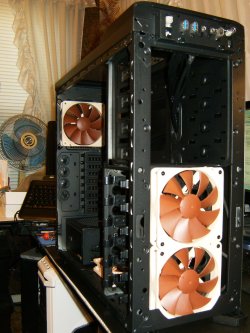
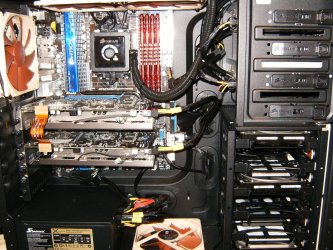
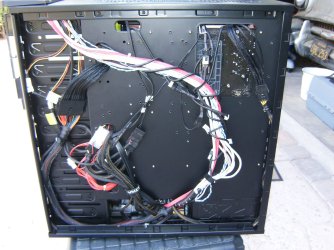
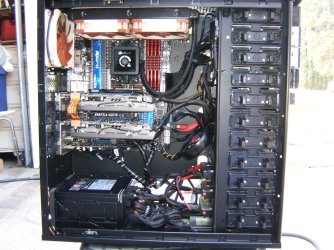
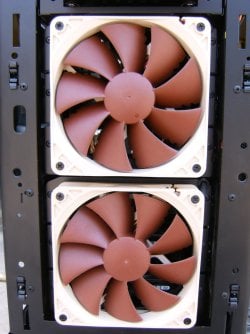
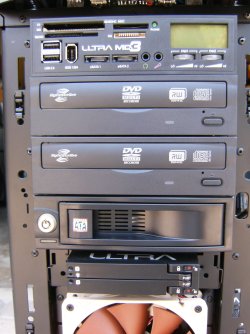
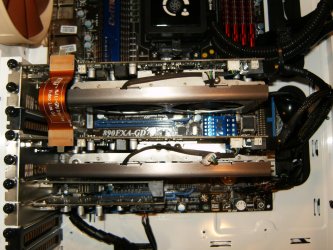
Just some shots of an old rig and how I would clean it with my Makita air compressor.
HPIM2604.jpg

HPIM2640.jpg

HPIM2256.JPG

HPIM2257.JPG

HPIM2272.JPG

HPIM2273.JPG
 

My Computer My Computer

At a glance

Windows 7 Ultimate 64i7 3770k OC'd 4.6 @ 1.17v, also FX 8120 & i5 ...32 gb G.Skill Sniper DDR3 10-12-12-31 @ 2133XFX Radeon 7870 2GB DDR5
Computer type
PC/Desktop
Computer Manufacturer/Model Number
A blend of brains, brawn and dumb luck.
OS
Windows 7 Ultimate 64
CPU
i7 3770k OC'd 4.6 @ 1.17v, also FX 8120 & i5 miniITX
Motherboard
MSI P67A-GD80 b3
Memory
32 gb G.Skill Sniper DDR3 10-12-12-31 @ 2133
Graphics Card(s)
XFX Radeon 7870 2GB DDR5
Sound Card
Sound Blaster Z Series Card
Monitor(s) Displays
(2) LG LED 23" 1920 x 1080 2ms Monitors via mini d-port
Screen Resolution
1680 X 1050 p
Hard Drives
Samsung 256 gb 830 SSD sata III
(1) 1 tb WD Black
(2) 1 tb Hitachi deskmates/sata II
(2) 1 tb WD green/sata II
(2) 3 tb Seagate Barracuda
(1) 120 gb OCZ Vertex SS
(1) Drobo 5N w/5 Seagate 3tb
PSU
EVGA modular 1000G2 80% gold rating & APC 1200 RS
Case
CoolerMaster Storm Styker
Cooling
7 case fans 140mm & 120mm, NZXT Kraken X60
Keyboard
(2) Logitech Illuminated Keyboards (1) usb (1) wireless
Mouse
Logitech G700 & T-BC21 - nano nx for the laptop
Internet Speed
Basic 120mbps down
Antivirus
Trend Micro Titanium Max Security & Malwarebytes Premium
Browser
Chrome and IE 10
Other Info
5 Noctua case fans + 3 Noctua in p/p on NZXT cooler
Integrated hot swap drive bays for 2.5" Drives
(2) Lite-on dvd/cd/Blu Ray optical 22X
Integrated fan controller and led on/off
HP Officejet Pro 8630 all-n-one
Hot-swappable 3.5" hard drive bay
Netgear Nighthawk router
Asus USB 3 & sata 6 PCIe card
Vantec IDE to sata adptr./Ultra sata adptr
Lenovo L420 i5 lappy with m sata
Drobo 5N advanced NAS
No just open both side panels and maybe the access to the front intake fan(s) all else should be easily reached from the left hand side.
Just some shots of an old rig and how I would clean it with my Makita air compressor.
View attachment 270585

View attachment 270586

View attachment 270587

View attachment 270588

View attachment 270589

View attachment 270590

Is there like a specific area I have to spray , this is my first time doing this so I am asking a lot of questions , don't mind me. I just don't want to wreck my computer. I found a video , would this be a good example?

http://www.youtube.com/watch?v=BovgvppZX4k
 

My Computer My Computer

At a glance

Windows 8.1 64 bitWindows 8.1 64-bit4096 MB RAMMicrosoft Basic Display Adapter
Computer type
Laptop
Computer Manufacturer/Model Number
Acer Aspire M5100
OS
Windows 8.1 64 bit
CPU
Windows 8.1 64-bit
Motherboard
Toshiba L745D
Memory
4096 MB RAM
Graphics Card(s)
Microsoft Basic Display Adapter
Sound Card
High Definition Audio Device
Monitor(s) Displays
1366x768
Screen Resolution
1366x768
Keyboard
Logitech Keyboard K800
Antivirus
MalwareBytes
Browser
Google Chrome
Yes please keep all fans from free spinning by holding them still when spraying air on them, Spray the mobo and all open slots, spend lots of time blasting the CPU cooler as well as the intake and exhaust fans of both the GPU and PSU. You'll see dust fly so I like to disconnect all wires and power cord and then take the computer outside in an area where you can work easily and see easily. Try not the touch the mobo or components too much for static electricity issue but the air is fine. I also like to take a soft bristle brush and loosen dust and blow it away as well. Also take moist q-tips and clean all fans on both sides and real pain but really helps to keep things cool. This is also a good chance to look at any wiring you can make cleaner for better air flow. Enjoy the process as you are doing valuable work and gaining familiarity with the inner working of the rig. Ask questions as we're here to help !
 

My Computer My Computer

At a glance

Windows 7 Ultimate 64i7 3770k OC'd 4.6 @ 1.17v, also FX 8120 & i5 ...32 gb G.Skill Sniper DDR3 10-12-12-31 @ 2133XFX Radeon 7870 2GB DDR5
Computer type
PC/Desktop
Computer Manufacturer/Model Number
A blend of brains, brawn and dumb luck.
OS
Windows 7 Ultimate 64
CPU
i7 3770k OC'd 4.6 @ 1.17v, also FX 8120 & i5 miniITX
Motherboard
MSI P67A-GD80 b3
Memory
32 gb G.Skill Sniper DDR3 10-12-12-31 @ 2133
Graphics Card(s)
XFX Radeon 7870 2GB DDR5
Sound Card
Sound Blaster Z Series Card
Monitor(s) Displays
(2) LG LED 23" 1920 x 1080 2ms Monitors via mini d-port
Screen Resolution
1680 X 1050 p
Hard Drives
Samsung 256 gb 830 SSD sata III
(1) 1 tb WD Black
(2) 1 tb Hitachi deskmates/sata II
(2) 1 tb WD green/sata II
(2) 3 tb Seagate Barracuda
(1) 120 gb OCZ Vertex SS
(1) Drobo 5N w/5 Seagate 3tb
PSU
EVGA modular 1000G2 80% gold rating & APC 1200 RS
Case
CoolerMaster Storm Styker
Cooling
7 case fans 140mm & 120mm, NZXT Kraken X60
Keyboard
(2) Logitech Illuminated Keyboards (1) usb (1) wireless
Mouse
Logitech G700 & T-BC21 - nano nx for the laptop
Internet Speed
Basic 120mbps down
Antivirus
Trend Micro Titanium Max Security & Malwarebytes Premium
Browser
Chrome and IE 10
Other Info
5 Noctua case fans + 3 Noctua in p/p on NZXT cooler
Integrated hot swap drive bays for 2.5" Drives
(2) Lite-on dvd/cd/Blu Ray optical 22X
Integrated fan controller and led on/off
HP Officejet Pro 8630 all-n-one
Hot-swappable 3.5" hard drive bay
Netgear Nighthawk router
Asus USB 3 & sata 6 PCIe card
Vantec IDE to sata adptr./Ultra sata adptr
Lenovo L420 i5 lappy with m sata
Drobo 5N advanced NAS
Yes please keep all fans from free spinning by holding them still when spraying air on them, Spray the mobo and all open slots, spend lots of time blasting the CPU cooler as well as the intake and exhaust fans of both the GPU and PSU. You'll see dust fly so I like to disconnect all wires and power cord and then take the computer outside in an area where you can work easily and see easily. Try not the touch the mobo or components too much for static electricity issue but the air is fine. I also like to take a soft bristle brush and loosen dust and blow it away as well. Also take moist q-tips and clean all fans on both sides and real pain but really helps to keep things cool. This is also a good chance to look at any wiring you can make cleaner for better air flow. Enjoy the process as you are doing valuable work and gaining familiarity with the inner working of the rig. Ask questions as we're here to help !


Would a hair dryer on cool work as well?

Can you please provide images for these? , because it will make it easier for me and it's good to learn.
-GPU
-PSU
-CPU
 

My Computer My Computer

At a glance

Windows 8.1 64 bitWindows 8.1 64-bit4096 MB RAMMicrosoft Basic Display Adapter
Computer type
Laptop
Computer Manufacturer/Model Number
Acer Aspire M5100
OS
Windows 8.1 64 bit
CPU
Windows 8.1 64-bit
Motherboard
Toshiba L745D
Memory
4096 MB RAM
Graphics Card(s)
Microsoft Basic Display Adapter
Sound Card
High Definition Audio Device
Monitor(s) Displays
1366x768
Screen Resolution
1366x768
Keyboard
Logitech Keyboard K800
Antivirus
MalwareBytes
Browser
Google Chrome
Never used a hair dryer myself and I'm not sure about if they generate static electricity? I'm sure it would be safe enough on high speed with zero heat. You can even use a vacuum and then sweep dust loose and it will pick it up but for fins and rads always best to blow.

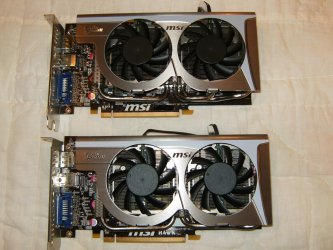
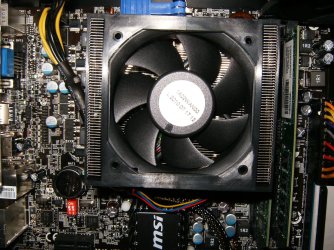
Graphics Card -GPU
HPIM2412.jpg

HPIM2419.jpg

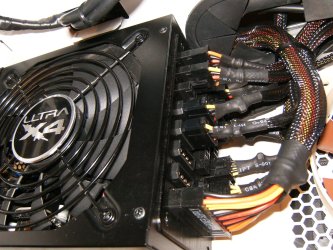
Power Supply - PSU
HPIM2626.jpg

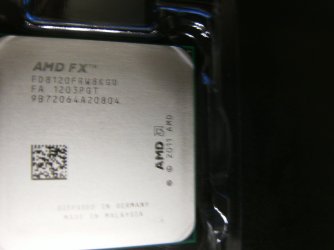
Central Processor - CPU
HPIM2200.JPG
HPIM1276.JPG
HPIM0911.JPG
 

My Computer My Computer

At a glance

Windows 7 Ultimate 64i7 3770k OC'd 4.6 @ 1.17v, also FX 8120 & i5 ...32 gb G.Skill Sniper DDR3 10-12-12-31 @ 2133XFX Radeon 7870 2GB DDR5
Computer type
PC/Desktop
Computer Manufacturer/Model Number
A blend of brains, brawn and dumb luck.
OS
Windows 7 Ultimate 64
CPU
i7 3770k OC'd 4.6 @ 1.17v, also FX 8120 & i5 miniITX
Motherboard
MSI P67A-GD80 b3
Memory
32 gb G.Skill Sniper DDR3 10-12-12-31 @ 2133
Graphics Card(s)
XFX Radeon 7870 2GB DDR5
Sound Card
Sound Blaster Z Series Card
Monitor(s) Displays
(2) LG LED 23" 1920 x 1080 2ms Monitors via mini d-port
Screen Resolution
1680 X 1050 p
Hard Drives
Samsung 256 gb 830 SSD sata III
(1) 1 tb WD Black
(2) 1 tb Hitachi deskmates/sata II
(2) 1 tb WD green/sata II
(2) 3 tb Seagate Barracuda
(1) 120 gb OCZ Vertex SS
(1) Drobo 5N w/5 Seagate 3tb
PSU
EVGA modular 1000G2 80% gold rating & APC 1200 RS
Case
CoolerMaster Storm Styker
Cooling
7 case fans 140mm & 120mm, NZXT Kraken X60
Keyboard
(2) Logitech Illuminated Keyboards (1) usb (1) wireless
Mouse
Logitech G700 & T-BC21 - nano nx for the laptop
Internet Speed
Basic 120mbps down
Antivirus
Trend Micro Titanium Max Security & Malwarebytes Premium
Browser
Chrome and IE 10
Other Info
5 Noctua case fans + 3 Noctua in p/p on NZXT cooler
Integrated hot swap drive bays for 2.5" Drives
(2) Lite-on dvd/cd/Blu Ray optical 22X
Integrated fan controller and led on/off
HP Officejet Pro 8630 all-n-one
Hot-swappable 3.5" hard drive bay
Netgear Nighthawk router
Asus USB 3 & sata 6 PCIe card
Vantec IDE to sata adptr./Ultra sata adptr
Lenovo L420 i5 lappy with m sata
Drobo 5N advanced NAS
Back
Top