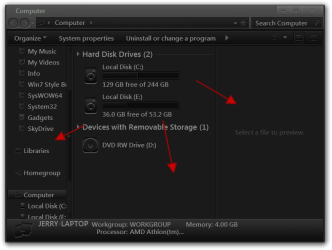
Sure as long as it's your work not someone else, just post the .msstyles in a zip folder here and I will do it for you. There are three areas that can be changed in the Explorer window you want all three? In what color would you like if possible give it to me in RGB or a color sample.
Jerry
My Computer
At a glance
Win 7 Pro x64 / Win 10 ProIntel(R) Core(TM) i7-3630QM CPU @ 2.40GHz12 GB(1) Intel(R) HD Graphics 4000 (2) NVIDIA GeFo...
Computer type
Laptop
Computer Manufacturer/Model Number
Sager NP9170
OS
Win 7 Pro x64 / Win 10 Pro
CPU
Intel(R) Core(TM) i7-3630QM CPU @ 2.40GHz
Motherboard
CLEVO P170EM
Memory
12 GB
Graphics Card(s)
(1) Intel(R) HD Graphics 4000 (2) NVIDIA GeForce GTX 675M
Sound Card
(1) Realtek High Definition Audio (2) Intel(R) Display Aud
Monitor(s) Displays
17.3
Screen Resolution
1920x1080
Hard Drives
(1) Samsung 860 EVO 500GB(OS) (1) Samsung 860 EVO 500GB(Data)
Keyboard
Backlite
Antivirus
MSE, Malwarebytes Pro
Browser
Firefox
Other Info
DESKTOP: Custom-built.
OS: Win 10 Pro x64.
CASE: Rosewill R5.
CPU: Intel I5 4670K CPU @ 3.40GHz.
CPU COOLER: Cool Master Hyper 212 EVO.
MOTHERBOARD: Asus Z87-A.
MEMORY: Kingston HyperX 2x4 GB.
GPU: Nvidia Geforce 650 TI.
PSU: Corsair TX750.
DRIVES: (1) Samsung 840 120 GB SSD (2) Western Digital blue 500 GB 7200 RPM.
Yeeeees!!!!
Thank you! I will post it here as soon as I finished my .msstyle (coz you mentioned that editing the .msstyle with WSB will change the image nos., so I better take care everything I need to change before I hand it over to you).
And yes, I want all those three areas changed because my eyes just can't endure too much whiteness. I will also post a color sample so you can change it to the exact color I want.
My Computer
At a glance
Windows 7 Professional x64 | Windows ME | Win...Intel Mobile Core 2 Duo SU7300 @ 1.30GHz3 GB HDDR3 411MHzMobile Intel 4 Series Express Chipset Family
Computer Manufacturer/Model Number
ASUS UL80A
OS
Windows 7 Professional x64 | Windows ME | Windows 8 Dev Preview
Every one seems to have migrated to Windows 8 so I think the chances of finding help to create a visual style for Windows 7 is getting slim.
So to summarize what has been happening for 13 months:
-I wasn't able to finish the theme that I was building. I revisited it and I decided that it's ugly so I'm starting from scratch.
-I still don't own Windows Style Builder. Is there any chance to get it for free? Like in a giveaway promo to something? Or as a way to promote the new version of WSB? Here's hoping that Aves become uber generous.
-I collected enough info regarding the known image nos. used in msstyle file. But there are some gaps. And that STREAM location is still daunting. How do I edit that?
-I still don't know anything about hex editing. I can't find anything that would simplify how to use it.
My Computer
At a glance
Windows 7 Professional x64 | Windows ME | Win...Intel Mobile Core 2 Duo SU7300 @ 1.30GHz3 GB HDDR3 411MHzMobile Intel 4 Series Express Chipset Family
Computer Manufacturer/Model Number
ASUS UL80A
OS
Windows 7 Professional x64 | Windows ME | Windows 8 Dev Preview
No there will be no free version or a giveaway promo or anything else, Ave is barely making anything off it as it is.
As far as editing the Steam image the easiest way will always be with Windows Style Builder but it can be done with other image editors it's just very tough to do.
Jerry
My Computer
At a glance
Win 7 Pro x64 / Win 10 ProIntel(R) Core(TM) i7-3630QM CPU @ 2.40GHz12 GB(1) Intel(R) HD Graphics 4000 (2) NVIDIA GeFo...
Computer type
Laptop
Computer Manufacturer/Model Number
Sager NP9170
OS
Win 7 Pro x64 / Win 10 Pro
CPU
Intel(R) Core(TM) i7-3630QM CPU @ 2.40GHz
Motherboard
CLEVO P170EM
Memory
12 GB
Graphics Card(s)
(1) Intel(R) HD Graphics 4000 (2) NVIDIA GeForce GTX 675M
Sound Card
(1) Realtek High Definition Audio (2) Intel(R) Display Aud
Monitor(s) Displays
17.3
Screen Resolution
1920x1080
Hard Drives
(1) Samsung 860 EVO 500GB(OS) (1) Samsung 860 EVO 500GB(Data)
Keyboard
Backlite
Antivirus
MSE, Malwarebytes Pro
Browser
Firefox
Other Info
DESKTOP: Custom-built.
OS: Win 10 Pro x64.
CASE: Rosewill R5.
CPU: Intel I5 4670K CPU @ 3.40GHz.
CPU COOLER: Cool Master Hyper 212 EVO.
MOTHERBOARD: Asus Z87-A.
MEMORY: Kingston HyperX 2x4 GB.
GPU: Nvidia Geforce 650 TI.
PSU: Corsair TX750.
DRIVES: (1) Samsung 840 120 GB SSD (2) Western Digital blue 500 GB 7200 RPM.
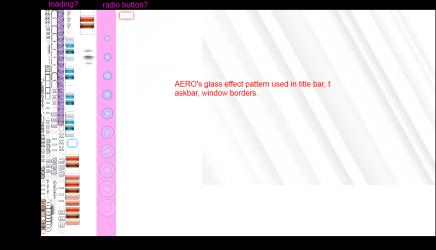
1) That image in STREAM, where is it used? I know that that big square is the pattern for Aero's glassy effect. But those many squares, close buttons, minimize buttons, where are they used? Could you help label each grouping here:
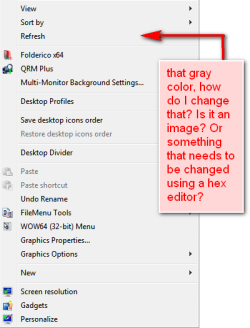
2) where is the image for context menu background?
My Computer
At a glance
Windows 7 Professional x64 | Windows ME | Win...Intel Mobile Core 2 Duo SU7300 @ 1.30GHz3 GB HDDR3 411MHzMobile Intel 4 Series Express Chipset Family
Computer Manufacturer/Model Number
ASUS UL80A
OS
Windows 7 Professional x64 | Windows ME | Windows 8 Dev Preview
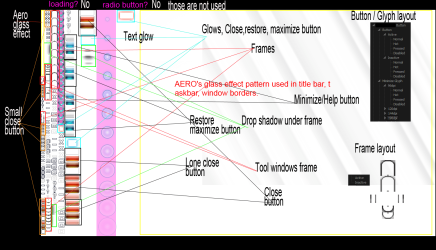
Here you go I think I got most of it labeled. I also have a screenshot of the Steam image overlaid on a gray background there was a couple areas that don't show up on a white background so you can see them.
Close, maximize, restore, minimize, help Glyph
from smallest to largest are 96dpi, 120dpi, 144dpi, 196dpu
The radio buttons are # 517, 518, 519 depending on the DPI setting
The check boxes are #508, 509, 510 also depending on the DPI size
Jerry
My Computer
At a glance
Win 7 Pro x64 / Win 10 ProIntel(R) Core(TM) i7-3630QM CPU @ 2.40GHz12 GB(1) Intel(R) HD Graphics 4000 (2) NVIDIA GeFo...
Computer type
Laptop
Computer Manufacturer/Model Number
Sager NP9170
OS
Win 7 Pro x64 / Win 10 Pro
CPU
Intel(R) Core(TM) i7-3630QM CPU @ 2.40GHz
Motherboard
CLEVO P170EM
Memory
12 GB
Graphics Card(s)
(1) Intel(R) HD Graphics 4000 (2) NVIDIA GeForce GTX 675M
Sound Card
(1) Realtek High Definition Audio (2) Intel(R) Display Aud
Monitor(s) Displays
17.3
Screen Resolution
1920x1080
Hard Drives
(1) Samsung 860 EVO 500GB(OS) (1) Samsung 860 EVO 500GB(Data)
Keyboard
Backlite
Antivirus
MSE, Malwarebytes Pro
Browser
Firefox
Other Info
DESKTOP: Custom-built.
OS: Win 10 Pro x64.
CASE: Rosewill R5.
CPU: Intel I5 4670K CPU @ 3.40GHz.
CPU COOLER: Cool Master Hyper 212 EVO.
MOTHERBOARD: Asus Z87-A.
MEMORY: Kingston HyperX 2x4 GB.
GPU: Nvidia Geforce 650 TI.
PSU: Corsair TX750.
DRIVES: (1) Samsung 840 120 GB SSD (2) Western Digital blue 500 GB 7200 RPM.





 Is there any chance to get it for free? Like in a giveaway promo to something? Or as a way to promote the new version of WSB? Here's hoping that Aves become uber generous.