Solved Reset stolen bios on laptop

ionbasa

New member
Guru
VIP
Local time
9:30 PM
Messages
744
Hi everyone I had a quick question!

Last month I bought a new toshiba laptop which i was using at university. I accidentally left it on campus last week :o in my laptop bag and someone picked it up and took it to a pawnshop.

The police were able to find it and verify that it was my laptop because I had the box, receipt and serial number.

Now that I have it back though I found out that the thief put a HDD password and Bios password on it!

How can I go about fixing this?

I haven't emailed toshiba yet regarding this issue, but they should be able to reset it given that I forward all of the information including the police report?

Thanks for your thought and opinions.
 

My Computer My Computer

At a glance

Windows 7 Ultimate SP1 x64AMD A6-3420M APU4.0 Gb DDR3 838 MHzAMD Radeon HD 6520G
Computer type
PC/Desktop
Computer Manufacturer/Model Number
HP Pavilion g7-1350dx
OS
Windows 7 Ultimate SP1 x64
CPU
AMD A6-3420M APU
Memory
4.0 Gb DDR3 838 MHz
Graphics Card(s)
AMD Radeon HD 6520G
Sound Card
IDT HD Audio
Screen Resolution
1600x 900
Hard Drives
500GB Hitachi HTS547550A9E384
Hi ionbasa, I am pretty sure if you can clear the CMOS that will get rid of all the passwords as this clears any changes made to the bios and re-sets it to default.
I am not sure however quite how you do this on a laptop. On a PC you can simply remove a small battery. I am guessing laptops are the same but access to said battery might prove to be difficult.

You could maybe do a search for resetting CMOS on your particular laptop, maybe there is an easy way to do this like removing the main battery and holding certain buttons down.
I really don't know but there will be a way.

I hope this helps a little.

Paul.
 

My Computer My Computer

At a glance

Windows 7 Professional 64 bit
OS
Windows 7 Professional 64 bit
Unlike on a desktop, laptop BIOS passwords are not stored in the CMOS. HD passwords are stored in the drive itself in an area not accessible to standard software. These passwords are designed as a deterrent against theft. If they were easily removed they would serve no purpose.

Your only real option is to contact Toshiba.
 

My Computer My Computer

At a glance

Windows 7 Pro 64 bitXeon W35208 GBNvidia Geforce 210
Computer type
PC/Desktop
Computer Manufacturer/Model Number
HP
OS
Windows 7 Pro 64 bit
CPU
Xeon W3520
Memory
8 GB
Graphics Card(s)
Nvidia Geforce 210
My first thought would be replace the hard drive and re install windows on a new one

If not you are better off contacting Toshiba they may offer you a brand new Laptop at there expense

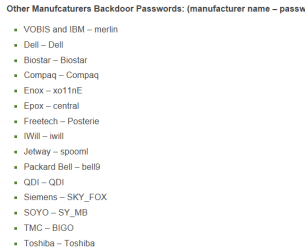
there are many ways to fix this issue problem is you want to keep your warranty in tact so with that being said

here is a way to rid yourself if you follow this hope it works for you How to Get Rid of a Master HDD Password & Unlock BIOS | eHow

and another http://www.technibble.com/how-to-bypass-or-remove-a-bios-password/
 

Attachments

  • passwords.PNG
    passwords.PNG
    7.5 KB · Views: 1,119

My Computer My Computer

At a glance

Windows 10 Home Premium 64bit sp1Intel I7-6700K @ 4.6 Ghz 1.344 volts everyday OC32GB G-Skill TridentZ 3200mhz 16-18-18-38 DDR4Sli Gigabyte Windforce GTX 980 G1
Computer type
PC/Desktop
Computer Manufacturer/Model Number
CoreI7-6700K MrFingerIII Special Builds
OS
Windows 10 Home Premium 64bit sp1
CPU
Intel I7-6700K @ 4.6 Ghz 1.344 volts everyday OC
Motherboard
Asrock Fatality K6 Z170 Socket 1151
Memory
32GB G-Skill TridentZ 3200mhz 16-18-18-38 DDR4
Graphics Card(s)
Sli Gigabyte Windforce GTX 980 G1
Sound Card
AC97 Creative Rage Tactic 3D Headphones Bluetooth
Monitor(s) Displays
27" Asus ROG Swift PG278Q G-Sync 48" Vizio Smart HD TV
Screen Resolution
2560x1440p 27"- 48" Currently Gaming at 2560x1440p Res 2K
Hard Drives
250GB Samsung Evo840SSD Seagate baracuda 500 GB WD Mybook 500Gb 1TB Seagate Barracuda
PSU
HX1050w Corsair Silver 80plus certified crosfire/sli
Case
Enthod Pro Full Tower
Cooling
Corsair H110i GT 280 mm High Performance WaterBlock
Keyboard
Logitech wireless keyboard
Mouse
Logitech wireless mouse
Internet Speed
Cox Cable 100+ mb
Antivirus
WebRoot Spysweeper with Antivirus
Browser
IE-10, Chrome, Opera
Other Info
My Other Rig is a AMD FX8320E @4.6Ghz 16GB Ballistic Sport Ram
Mobo Asrock Fatality 990FX 120GB OCZ SSD 1TB Seagate Barracuda Corsair H75 Cooling PSU Corsair CX750
GPU GTX Gigabyte 970G1
Unlike on a desktop, laptop BIOS passwords are not stored in the CMOS. HD passwords are stored in the drive itself in an area not accessible to standard software. These passwords are designed as a deterrent against theft. If they were easily removed they would serve no purpose.

Your only real option is to contact Toshiba.


Thanks, I assumed this would be the case. I just contacted them and hopefully I should get a reply by tomorrow. It is kinda a bummer that I won't have it for a week or two because of my required school work.

Edit: removing the CMOS battery probably won't work. THe laptop is equipped with a UEFI and hardware TPM.
 

My Computer My Computer

At a glance

Windows 7 Ultimate SP1 x64AMD A6-3420M APU4.0 Gb DDR3 838 MHzAMD Radeon HD 6520G
Computer type
PC/Desktop
Computer Manufacturer/Model Number
HP Pavilion g7-1350dx
OS
Windows 7 Ultimate SP1 x64
CPU
AMD A6-3420M APU
Memory
4.0 Gb DDR3 838 MHz
Graphics Card(s)
AMD Radeon HD 6520G
Sound Card
IDT HD Audio
Screen Resolution
1600x 900
Hard Drives
500GB Hitachi HTS547550A9E384
Unlike on a desktop, laptop BIOS passwords are not stored in the CMOS. HD passwords are stored in the drive itself in an area not accessible to standard software. These passwords are designed as a deterrent against theft. If they were easily removed they would serve no purpose.

Your only real option is to contact Toshiba.


Thanks, I assumed this would be the case. I just contacted them and hopefully I should get a reply by tomorrow. It is kinda a bummer that I won't have it for a week or two because of my required school work.
Don't speak to soon I gave you options take a look before you give them a go :geek:
 

My Computer My Computer

At a glance

Windows 10 Home Premium 64bit sp1Intel I7-6700K @ 4.6 Ghz 1.344 volts everyday OC32GB G-Skill TridentZ 3200mhz 16-18-18-38 DDR4Sli Gigabyte Windforce GTX 980 G1
Computer type
PC/Desktop
Computer Manufacturer/Model Number
CoreI7-6700K MrFingerIII Special Builds
OS
Windows 10 Home Premium 64bit sp1
CPU
Intel I7-6700K @ 4.6 Ghz 1.344 volts everyday OC
Motherboard
Asrock Fatality K6 Z170 Socket 1151
Memory
32GB G-Skill TridentZ 3200mhz 16-18-18-38 DDR4
Graphics Card(s)
Sli Gigabyte Windforce GTX 980 G1
Sound Card
AC97 Creative Rage Tactic 3D Headphones Bluetooth
Monitor(s) Displays
27" Asus ROG Swift PG278Q G-Sync 48" Vizio Smart HD TV
Screen Resolution
2560x1440p 27"- 48" Currently Gaming at 2560x1440p Res 2K
Hard Drives
250GB Samsung Evo840SSD Seagate baracuda 500 GB WD Mybook 500Gb 1TB Seagate Barracuda
PSU
HX1050w Corsair Silver 80plus certified crosfire/sli
Case
Enthod Pro Full Tower
Cooling
Corsair H110i GT 280 mm High Performance WaterBlock
Keyboard
Logitech wireless keyboard
Mouse
Logitech wireless mouse
Internet Speed
Cox Cable 100+ mb
Antivirus
WebRoot Spysweeper with Antivirus
Browser
IE-10, Chrome, Opera
Other Info
My Other Rig is a AMD FX8320E @4.6Ghz 16GB Ballistic Sport Ram
Mobo Asrock Fatality 990FX 120GB OCZ SSD 1TB Seagate Barracuda Corsair H75 Cooling PSU Corsair CX750
GPU GTX Gigabyte 970G1
Unlike on a desktop, laptop BIOS passwords are not stored in the CMOS. HD passwords are stored in the drive itself in an area not accessible to standard software. These passwords are designed as a deterrent against theft. If they were easily removed they would serve no purpose.

Your only real option is to contact Toshiba.


Thanks, I assumed this would be the case. I just contacted them and hopefully I should get a reply by tomorrow. It is kinda a bummer that I won't have it for a week or two because of my required school work.
Don't speak to soon I gave you options take a look before you give them a go :geek:

The problem is I can't get to the UEFI without booting into windows first, the system has Windows 8 installed. The only way to access the UEFI is through the advanced recovery option.

I will try and see if I can see a CMOS battery under the lid or anywhere near that general location. Otherwise I may risk losing the warranty if I open it up.

For the HDD password I could just try pulling out the HDD and formatting on another computer then re-installing Windows. From there I think I may get access to the UEFI if I can reinstall Windows 8.
 

My Computer My Computer

At a glance

Windows 7 Ultimate SP1 x64AMD A6-3420M APU4.0 Gb DDR3 838 MHzAMD Radeon HD 6520G
Computer type
PC/Desktop
Computer Manufacturer/Model Number
HP Pavilion g7-1350dx
OS
Windows 7 Ultimate SP1 x64
CPU
AMD A6-3420M APU
Memory
4.0 Gb DDR3 838 MHz
Graphics Card(s)
AMD Radeon HD 6520G
Sound Card
IDT HD Audio
Screen Resolution
1600x 900
Hard Drives
500GB Hitachi HTS547550A9E384
Thanks, I assumed this would be the case. I just contacted them and hopefully I should get a reply by tomorrow. It is kinda a bummer that I won't have it for a week or two because of my required school work.
Don't speak to soon I gave you options take a look before you give them a go :geek:

The problem is I can't get to the UEFI without booting into windows first, the system has Windows 8 installed. The only way to access the UEFI is through the advanced recovery option.

I will try and see if I can see a CMOS battery under the lid or anywhere near that general location. Otherwise I may risk losing the warranty if I open it up.

For the HDD password I could just try pulling out the HDD and formatting on another computer then re-installing Windows. From there I think I may get access to the UEFI if I can reinstall Windows 8.


Did you try holding the keys down like it asked in the tut ?
 

My Computer My Computer

At a glance

Windows 10 Home Premium 64bit sp1Intel I7-6700K @ 4.6 Ghz 1.344 volts everyday OC32GB G-Skill TridentZ 3200mhz 16-18-18-38 DDR4Sli Gigabyte Windforce GTX 980 G1
Computer type
PC/Desktop
Computer Manufacturer/Model Number
CoreI7-6700K MrFingerIII Special Builds
OS
Windows 10 Home Premium 64bit sp1
CPU
Intel I7-6700K @ 4.6 Ghz 1.344 volts everyday OC
Motherboard
Asrock Fatality K6 Z170 Socket 1151
Memory
32GB G-Skill TridentZ 3200mhz 16-18-18-38 DDR4
Graphics Card(s)
Sli Gigabyte Windforce GTX 980 G1
Sound Card
AC97 Creative Rage Tactic 3D Headphones Bluetooth
Monitor(s) Displays
27" Asus ROG Swift PG278Q G-Sync 48" Vizio Smart HD TV
Screen Resolution
2560x1440p 27"- 48" Currently Gaming at 2560x1440p Res 2K
Hard Drives
250GB Samsung Evo840SSD Seagate baracuda 500 GB WD Mybook 500Gb 1TB Seagate Barracuda
PSU
HX1050w Corsair Silver 80plus certified crosfire/sli
Case
Enthod Pro Full Tower
Cooling
Corsair H110i GT 280 mm High Performance WaterBlock
Keyboard
Logitech wireless keyboard
Mouse
Logitech wireless mouse
Internet Speed
Cox Cable 100+ mb
Antivirus
WebRoot Spysweeper with Antivirus
Browser
IE-10, Chrome, Opera
Other Info
My Other Rig is a AMD FX8320E @4.6Ghz 16GB Ballistic Sport Ram
Mobo Asrock Fatality 990FX 120GB OCZ SSD 1TB Seagate Barracuda Corsair H75 Cooling PSU Corsair CX750
GPU GTX Gigabyte 970G1
Did you try holding the keys down like it asked in the tut ?

Yes, Although I confirmed through the Toshiba website that you can not access the UEFI like you can on a normal bios based system.

I don't mind reinstalling windows as all of my documents were backed up. So ill see if I can pull the HDD and reformat on another computer possibly through parted magic.
 

My Computer My Computer

At a glance

Windows 7 Ultimate SP1 x64AMD A6-3420M APU4.0 Gb DDR3 838 MHzAMD Radeon HD 6520G
Computer type
PC/Desktop
Computer Manufacturer/Model Number
HP Pavilion g7-1350dx
OS
Windows 7 Ultimate SP1 x64
CPU
AMD A6-3420M APU
Memory
4.0 Gb DDR3 838 MHz
Graphics Card(s)
AMD Radeon HD 6520G
Sound Card
IDT HD Audio
Screen Resolution
1600x 900
Hard Drives
500GB Hitachi HTS547550A9E384
Did you try holding the keys down like it asked in the tut ?

Yes, Although I confirmed through the Toshiba website that you can not access the UEFI like you can on a normal bios based system.

I don't mind reinstalling windows as all of my documents were backed up. So ill see if I can pull the HDD and reformat on another computer possibly through parted magic.
Well that would be better in the long run anyway GOD knows what he or she set up on it once you got passed all the other crap

It would be wise to get a program that allows you to locate your laptop though GPS type service this would catch them as soon as they log on and then at the same time you can press charges and make them responsible for all damages
 

My Computer My Computer

At a glance

Windows 10 Home Premium 64bit sp1Intel I7-6700K @ 4.6 Ghz 1.344 volts everyday OC32GB G-Skill TridentZ 3200mhz 16-18-18-38 DDR4Sli Gigabyte Windforce GTX 980 G1
Computer type
PC/Desktop
Computer Manufacturer/Model Number
CoreI7-6700K MrFingerIII Special Builds
OS
Windows 10 Home Premium 64bit sp1
CPU
Intel I7-6700K @ 4.6 Ghz 1.344 volts everyday OC
Motherboard
Asrock Fatality K6 Z170 Socket 1151
Memory
32GB G-Skill TridentZ 3200mhz 16-18-18-38 DDR4
Graphics Card(s)
Sli Gigabyte Windforce GTX 980 G1
Sound Card
AC97 Creative Rage Tactic 3D Headphones Bluetooth
Monitor(s) Displays
27" Asus ROG Swift PG278Q G-Sync 48" Vizio Smart HD TV
Screen Resolution
2560x1440p 27"- 48" Currently Gaming at 2560x1440p Res 2K
Hard Drives
250GB Samsung Evo840SSD Seagate baracuda 500 GB WD Mybook 500Gb 1TB Seagate Barracuda
PSU
HX1050w Corsair Silver 80plus certified crosfire/sli
Case
Enthod Pro Full Tower
Cooling
Corsair H110i GT 280 mm High Performance WaterBlock
Keyboard
Logitech wireless keyboard
Mouse
Logitech wireless mouse
Internet Speed
Cox Cable 100+ mb
Antivirus
WebRoot Spysweeper with Antivirus
Browser
IE-10, Chrome, Opera
Other Info
My Other Rig is a AMD FX8320E @4.6Ghz 16GB Ballistic Sport Ram
Mobo Asrock Fatality 990FX 120GB OCZ SSD 1TB Seagate Barracuda Corsair H75 Cooling PSU Corsair CX750
GPU GTX Gigabyte 970G1
Back
Top