I've been fiddling around with my ethernet for a while and I'm at wit's end...
Starting about a week ago, my ethernet wouldn't be connecting when the computer is booted up. A quick reset or diagnose and it would work again. Now it simply refuses to connect, switching between the "no default gateway" problem to the "connects to router but no internet" problem.
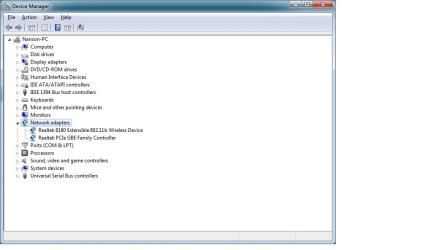
My NIC has had a problem before and it's running on non-default configurations, with all the offloads disabled and Speed & Duplex set to 10Mbps Full Duplex. If Speed & Duplex is set to anything above 10Mbps the NIC would be unable to connect, stating "Network cable unplugged", but continues to try and identify the network every few seconds.
Expanding on the "no default gateway" problem: I've reset the NIC multiple times, sometimes it would set its IP address to one that I've never seen:
169.254.60.153
The usual IP address I have should be:
192.168.1.x
Where x is usually a number between 1 to 10.
Whenever the IP address is set to that, my ethernet would connect to "Unidentified Network" rather than the one I'm supposed to connect to.
I've tried to manually set the IP address, but it doesn't work.
I've tried command prompts like
I've also tried to roll back the NIC's driver and power cycle the router and modem multiple times.
Can you guys help me pinpoint my problem? Here's the ipconfig /all if you guys need it:
Starting about a week ago, my ethernet wouldn't be connecting when the computer is booted up. A quick reset or diagnose and it would work again. Now it simply refuses to connect, switching between the "no default gateway" problem to the "connects to router but no internet" problem.
My NIC has had a problem before and it's running on non-default configurations, with all the offloads disabled and Speed & Duplex set to 10Mbps Full Duplex. If Speed & Duplex is set to anything above 10Mbps the NIC would be unable to connect, stating "Network cable unplugged", but continues to try and identify the network every few seconds.
Expanding on the "no default gateway" problem: I've reset the NIC multiple times, sometimes it would set its IP address to one that I've never seen:
169.254.60.153
The usual IP address I have should be:
192.168.1.x
Where x is usually a number between 1 to 10.
Whenever the IP address is set to that, my ethernet would connect to "Unidentified Network" rather than the one I'm supposed to connect to.
I've tried to manually set the IP address, but it doesn't work.
I've tried command prompts like
Code:
ipconfig /flushdns
netsh winsock reset catalog
netsh int ipv4 reset reset.logCan you guys help me pinpoint my problem? Here's the ipconfig /all if you guys need it:
Code:
Windows IP Configuration

   Host Name . . . . . . . . . . . . : Nanson-PC
   Primary Dns Suffix  . . . . . . . :
   Node Type . . . . . . . . . . . . : Hybrid
   IP Routing Enabled. . . . . . . . : No
   WINS Proxy Enabled. . . . . . . . : No

Ethernet adapter Local Area Connection:

   Connection-specific DNS Suffix  . :
   Description . . . . . . . . . . . : Realtek PCIe GBE Family Controller
   Physical Address. . . . . . . . . : 50-E5-49-53-49-F3
   DHCP Enabled. . . . . . . . . . . : Yes
   Autoconfiguration Enabled . . . . : Yes
   Link-local IPv6 Address . . . . . : fe80::2c6d:fdf9:c32b:3c99%12(Preferred)
   Autoconfiguration IPv4 Address. . : 169.254.60.153(Preferred)
   Subnet Mask . . . . . . . . . . . : 255.255.0.0
   Default Gateway . . . . . . . . . :
   DHCPv6 IAID . . . . . . . . . . . : 424731977
   DHCPv6 Client DUID. . . . . . . . : 00-01-00-01-16-18-1A-73-50-E5-49-53-49-F3
   DNS Servers . . . . . . . . . . . : 8.8.8.8
                                       8.8.4.4
   NetBIOS over Tcpip. . . . . . . . : Enabled

Wireless LAN adapter Wireless Network Connection:

   Connection-specific DNS Suffix  . :
   Description . . . . . . . . . . . : Realtek 8180 Extensible 802.11b Wireless Device
   Physical Address. . . . . . . . . : 00-05-5D-99-9C-A4
   DHCP Enabled. . . . . . . . . . . : Yes
   Autoconfiguration Enabled . . . . : Yes
   Link-local IPv6 Address . . . . . : fe80::5046:a420:9a47:83d1%11(Preferred)
   IPv4 Address. . . . . . . . . . . : 192.168.1.3(Preferred)
   Subnet Mask . . . . . . . . . . . : 255.255.255.0
   Lease Obtained. . . . . . . . . . : October-15-13 3:46:25 PM
   Lease Expires . . . . . . . . . . : October-16-13 3:46:24 PM
   Default Gateway . . . . . . . . . : 192.168.1.1
   DHCP Server . . . . . . . . . . . : 192.168.1.1
   DHCPv6 IAID . . . . . . . . . . . : 385877341
   DHCPv6 Client DUID. . . . . . . . : 00-01-00-01-16-18-1A-73-50-E5-49-53-49-F3
   DNS Servers . . . . . . . . . . . : 192.168.1.1
   NetBIOS over Tcpip. . . . . . . . : Enabled

Tunnel adapter isatap.{56899AC3-665E-4B80-9355-BC581B9DD353}:

   Media State . . . . . . . . . . . : Media disconnected
   Connection-specific DNS Suffix  . :
   Description . . . . . . . . . . . : Microsoft ISATAP Adapter
   Physical Address. . . . . . . . . : 00-00-00-00-00-00-00-E0
   DHCP Enabled. . . . . . . . . . . : No
   Autoconfiguration Enabled . . . . : Yes

Tunnel adapter Teredo Tunneling Pseudo-Interface:

   Connection-specific DNS Suffix  . :
   Description . . . . . . . . . . . : Teredo Tunneling Pseudo-Interface
   Physical Address. . . . . . . . . : 00-00-00-00-00-00-00-E0
   DHCP Enabled. . . . . . . . . . . : No
   Autoconfiguration Enabled . . . . : Yes
   IPv6 Address. . . . . . . . . . . : 2001:0:9d38:6abd:103e:1b0b:9c0a:8586(Preferred)
   Link-local IPv6 Address . . . . . : fe80::103e:1b0b:9c0a:8586%14(Preferred)
   Default Gateway . . . . . . . . . : ::
   NetBIOS over Tcpip. . . . . . . . : Disabled

Tunnel adapter isatap.{01C50DCE-B872-41F3-B99E-B42D391A4D0C}:

   Media State . . . . . . . . . . . : Media disconnected
   Connection-specific DNS Suffix  . :
   Description . . . . . . . . . . . : Microsoft ISATAP Adapter #2
   Physical Address. . . . . . . . . : 00-00-00-00-00-00-00-E0
   DHCP Enabled. . . . . . . . . . . : No
   Autoconfiguration Enabled . . . . : Yes
My Computer
At a glance
Windows 7 Home Premium 64-bitAMD Phenom II x4 9658GB G.SKILL F3-12800CL9D-8GBXLAMD Radeon HD 6770
- Computer type
- PC/Desktop
- Computer Manufacturer/Model Number
- Custom
- OS
- Windows 7 Home Premium 64-bit
- CPU
- AMD Phenom II x4 965
- Motherboard
- Gigabyte GA-970A-UD3
- Memory
- 8GB G.SKILL F3-12800CL9D-8GBXL
- Graphics Card(s)
- AMD Radeon HD 6770
- Hard Drives
- Western Digital WD7502AAEX 750GB Hard Drive
- Antivirus
- AVG
- Browser
- Mozilla Firefox Aurora