Multiple problems with Ethernet connection

un2978

New member
Local time
8:32 AM
Messages
11
I've been fiddling around with my ethernet for a while and I'm at wit's end...

Starting about a week ago, my ethernet wouldn't be connecting when the computer is booted up. A quick reset or diagnose and it would work again. Now it simply refuses to connect, switching between the "no default gateway" problem to the "connects to router but no internet" problem.

My NIC has had a problem before and it's running on non-default configurations, with all the offloads disabled and Speed & Duplex set to 10Mbps Full Duplex. If Speed & Duplex is set to anything above 10Mbps the NIC would be unable to connect, stating "Network cable unplugged", but continues to try and identify the network every few seconds.

Expanding on the "no default gateway" problem: I've reset the NIC multiple times, sometimes it would set its IP address to one that I've never seen:
169.254.60.153
The usual IP address I have should be:
192.168.1.x
Where x is usually a number between 1 to 10.
Whenever the IP address is set to that, my ethernet would connect to "Unidentified Network" rather than the one I'm supposed to connect to.
I've tried to manually set the IP address, but it doesn't work.

I've tried command prompts like
Code:
ipconfig /flushdns
netsh winsock reset catalog
netsh int ipv4 reset reset.log
I've also tried to roll back the NIC's driver and power cycle the router and modem multiple times.

Can you guys help me pinpoint my problem? Here's the ipconfig /all if you guys need it:
Code:
Windows IP Configuration

   Host Name . . . . . . . . . . . . : Nanson-PC
   Primary Dns Suffix  . . . . . . . : 
   Node Type . . . . . . . . . . . . : Hybrid
   IP Routing Enabled. . . . . . . . : No
   WINS Proxy Enabled. . . . . . . . : No

Ethernet adapter Local Area Connection:

   Connection-specific DNS Suffix  . : 
   Description . . . . . . . . . . . : Realtek PCIe GBE Family Controller
   Physical Address. . . . . . . . . : 50-E5-49-53-49-F3
   DHCP Enabled. . . . . . . . . . . : Yes
   Autoconfiguration Enabled . . . . : Yes
   Link-local IPv6 Address . . . . . : fe80::2c6d:fdf9:c32b:3c99%12(Preferred) 
   Autoconfiguration IPv4 Address. . : 169.254.60.153(Preferred) 
   Subnet Mask . . . . . . . . . . . : 255.255.0.0
   Default Gateway . . . . . . . . . : 
   DHCPv6 IAID . . . . . . . . . . . : 424731977
   DHCPv6 Client DUID. . . . . . . . : 00-01-00-01-16-18-1A-73-50-E5-49-53-49-F3
   DNS Servers . . . . . . . . . . . : 8.8.8.8
                                       8.8.4.4
   NetBIOS over Tcpip. . . . . . . . : Enabled

Wireless LAN adapter Wireless Network Connection:

   Connection-specific DNS Suffix  . : 
   Description . . . . . . . . . . . : Realtek 8180 Extensible 802.11b Wireless Device
   Physical Address. . . . . . . . . : 00-05-5D-99-9C-A4
   DHCP Enabled. . . . . . . . . . . : Yes
   Autoconfiguration Enabled . . . . : Yes
   Link-local IPv6 Address . . . . . : fe80::5046:a420:9a47:83d1%11(Preferred) 
   IPv4 Address. . . . . . . . . . . : 192.168.1.3(Preferred) 
   Subnet Mask . . . . . . . . . . . : 255.255.255.0
   Lease Obtained. . . . . . . . . . : October-15-13 3:46:25 PM
   Lease Expires . . . . . . . . . . : October-16-13 3:46:24 PM
   Default Gateway . . . . . . . . . : 192.168.1.1
   DHCP Server . . . . . . . . . . . : 192.168.1.1
   DHCPv6 IAID . . . . . . . . . . . : 385877341
   DHCPv6 Client DUID. . . . . . . . : 00-01-00-01-16-18-1A-73-50-E5-49-53-49-F3
   DNS Servers . . . . . . . . . . . : 192.168.1.1
   NetBIOS over Tcpip. . . . . . . . : Enabled

Tunnel adapter isatap.{56899AC3-665E-4B80-9355-BC581B9DD353}:

   Media State . . . . . . . . . . . : Media disconnected
   Connection-specific DNS Suffix  . : 
   Description . . . . . . . . . . . : Microsoft ISATAP Adapter
   Physical Address. . . . . . . . . : 00-00-00-00-00-00-00-E0
   DHCP Enabled. . . . . . . . . . . : No
   Autoconfiguration Enabled . . . . : Yes

Tunnel adapter Teredo Tunneling Pseudo-Interface:

   Connection-specific DNS Suffix  . : 
   Description . . . . . . . . . . . : Teredo Tunneling Pseudo-Interface
   Physical Address. . . . . . . . . : 00-00-00-00-00-00-00-E0
   DHCP Enabled. . . . . . . . . . . : No
   Autoconfiguration Enabled . . . . : Yes
   IPv6 Address. . . . . . . . . . . : 2001:0:9d38:6abd:103e:1b0b:9c0a:8586(Preferred) 
   Link-local IPv6 Address . . . . . : fe80::103e:1b0b:9c0a:8586%14(Preferred) 
   Default Gateway . . . . . . . . . : ::
   NetBIOS over Tcpip. . . . . . . . : Disabled

Tunnel adapter isatap.{01C50DCE-B872-41F3-B99E-B42D391A4D0C}:

   Media State . . . . . . . . . . . : Media disconnected
   Connection-specific DNS Suffix  . : 
   Description . . . . . . . . . . . : Microsoft ISATAP Adapter #2
   Physical Address. . . . . . . . . : 00-00-00-00-00-00-00-E0
   DHCP Enabled. . . . . . . . . . . : No
   Autoconfiguration Enabled . . . . : Yes
 

My Computer My Computer

At a glance

Windows 7 Home Premium 64-bitAMD Phenom II x4 9658GB G.SKILL F3-12800CL9D-8GBXLAMD Radeon HD 6770
Computer type
PC/Desktop
Computer Manufacturer/Model Number
Custom
OS
Windows 7 Home Premium 64-bit
CPU
AMD Phenom II x4 965
Motherboard
Gigabyte GA-970A-UD3
Memory
8GB G.SKILL F3-12800CL9D-8GBXL
Graphics Card(s)
AMD Radeon HD 6770
Hard Drives
Western Digital WD7502AAEX 750GB Hard Drive
Antivirus
AVG
Browser
Mozilla Firefox Aurora

My Computer My Computer

At a glance

Microsoft Windows 7 Home Premium 64-bits 7601...Intel(R) Core(TM) i3 CPU M 370 @ 2.40GHz4,00 GBATI Mobility Radeon HD 5400 Series
Computer type
Laptop
Computer Manufacturer/Model Number
ACER ASPIRE 5742G
OS
Microsoft Windows 7 Home Premium 64-bits 7601 Multiprocessor Free Service Pack 1
CPU
Intel(R) Core(TM) i3 CPU M 370 @ 2.40GHz
Motherboard
Acer Aspire 5742G
Memory
4,00 GB
Graphics Card(s)
ATI Mobility Radeon HD 5400 Series
Sound Card
(1) AMD High Definition Audio Device (2) Realtek High Defi
Screen Resolution
1366 x 768 x 32 bits (4294967296 colors) @ 60 Hz
Hard Drives
WDC WD5000BEVT-22ZAT0
Yes, wireless works fine.
 

My Computer My Computer

At a glance

Windows 7 Home Premium 64-bitAMD Phenom II x4 9658GB G.SKILL F3-12800CL9D-8GBXLAMD Radeon HD 6770
Computer type
PC/Desktop
Computer Manufacturer/Model Number
Custom
OS
Windows 7 Home Premium 64-bit
CPU
AMD Phenom II x4 965
Motherboard
Gigabyte GA-970A-UD3
Memory
8GB G.SKILL F3-12800CL9D-8GBXL
Graphics Card(s)
AMD Radeon HD 6770
Hard Drives
Western Digital WD7502AAEX 750GB Hard Drive
Antivirus
AVG
Browser
Mozilla Firefox Aurora
Why did you set dns servers manually on ehernet network card?
DNS Servers . . . . . . . . . . . : 8.8.8.8
8.8.4.4

Did you try replacing networkcable? Did you try using another router port?
 

My Computer My Computer

At a glance

Microsoft Windows 7 Home Premium 64-bits 7601...Intel(R) Core(TM) i3 CPU M 370 @ 2.40GHz4,00 GBATI Mobility Radeon HD 5400 Series
Computer type
Laptop
Computer Manufacturer/Model Number
ACER ASPIRE 5742G
OS
Microsoft Windows 7 Home Premium 64-bits 7601 Multiprocessor Free Service Pack 1
CPU
Intel(R) Core(TM) i3 CPU M 370 @ 2.40GHz
Motherboard
Acer Aspire 5742G
Memory
4,00 GB
Graphics Card(s)
ATI Mobility Radeon HD 5400 Series
Sound Card
(1) AMD High Definition Audio Device (2) Realtek High Defi
Screen Resolution
1366 x 768 x 32 bits (4294967296 colors) @ 60 Hz
Hard Drives
WDC WD5000BEVT-22ZAT0
The DNS servers were manually set because of an earlier problem, when I had the computer just built. If I remember correctly, those servers have something to do with Google, and I just kept it because it worked. :/

Can't find another network cable in my home; I want to try everything I can do before I have to cough out some for replacement parts, plus I don't have total control over the setup in my home.

Will try a different port, though I don't remember which port was mine...

Edit: Tried to switch the router port once, and reset the NIC so that it gets a gateway (It's almost like rolling dice). Connects, but no internet. I'm going to try the third port.
 
Last edited:

My Computer My Computer

At a glance

Windows 7 Home Premium 64-bitAMD Phenom II x4 9658GB G.SKILL F3-12800CL9D-8GBXLAMD Radeon HD 6770
Computer type
PC/Desktop
Computer Manufacturer/Model Number
Custom
OS
Windows 7 Home Premium 64-bit
CPU
AMD Phenom II x4 965
Motherboard
Gigabyte GA-970A-UD3
Memory
8GB G.SKILL F3-12800CL9D-8GBXL
Graphics Card(s)
AMD Radeon HD 6770
Hard Drives
Western Digital WD7502AAEX 750GB Hard Drive
Antivirus
AVG
Browser
Mozilla Firefox Aurora
what you can try:
  1. Detach network cable form the faulty machine
  2. attach it to another machine
  3. test it
 

My Computer My Computer

At a glance

Microsoft Windows 7 Home Premium 64-bits 7601...Intel(R) Core(TM) i3 CPU M 370 @ 2.40GHz4,00 GBATI Mobility Radeon HD 5400 Series
Computer type
Laptop
Computer Manufacturer/Model Number
ACER ASPIRE 5742G
OS
Microsoft Windows 7 Home Premium 64-bits 7601 Multiprocessor Free Service Pack 1
CPU
Intel(R) Core(TM) i3 CPU M 370 @ 2.40GHz
Motherboard
Acer Aspire 5742G
Memory
4,00 GB
Graphics Card(s)
ATI Mobility Radeon HD 5400 Series
Sound Card
(1) AMD High Definition Audio Device (2) Realtek High Defi
Screen Resolution
1366 x 768 x 32 bits (4294967296 colors) @ 60 Hz
Hard Drives
WDC WD5000BEVT-22ZAT0
Connected the cable from the wall socket to a laptop. The connection seems to be fine. Ran a speed test and a ping test to make sure.

Does that mean my NIC is faulty?
 

My Computer My Computer

At a glance

Windows 7 Home Premium 64-bitAMD Phenom II x4 9658GB G.SKILL F3-12800CL9D-8GBXLAMD Radeon HD 6770
Computer type
PC/Desktop
Computer Manufacturer/Model Number
Custom
OS
Windows 7 Home Premium 64-bit
CPU
AMD Phenom II x4 965
Motherboard
Gigabyte GA-970A-UD3
Memory
8GB G.SKILL F3-12800CL9D-8GBXL
Graphics Card(s)
AMD Radeon HD 6770
Hard Drives
Western Digital WD7502AAEX 750GB Hard Drive
Antivirus
AVG
Browser
Mozilla Firefox Aurora
Connected the cable from the wall socket to a laptop. The connection seems to be fine. Ran a speed test and a ping test to make sure.

Does that mean my NIC is faulty?
It means:
  • the laptop is connecting wirelessly(?) Are you sure you didn't connect wireless?!!!
  • Faulty NIC
  • Faulty driver
  • Faulty network settings
 

My Computer My Computer

At a glance

Microsoft Windows 7 Home Premium 64-bits 7601...Intel(R) Core(TM) i3 CPU M 370 @ 2.40GHz4,00 GBATI Mobility Radeon HD 5400 Series
Computer type
Laptop
Computer Manufacturer/Model Number
ACER ASPIRE 5742G
OS
Microsoft Windows 7 Home Premium 64-bits 7601 Multiprocessor Free Service Pack 1
CPU
Intel(R) Core(TM) i3 CPU M 370 @ 2.40GHz
Motherboard
Acer Aspire 5742G
Memory
4,00 GB
Graphics Card(s)
ATI Mobility Radeon HD 5400 Series
Sound Card
(1) AMD High Definition Audio Device (2) Realtek High Defi
Screen Resolution
1366 x 768 x 32 bits (4294967296 colors) @ 60 Hz
Hard Drives
WDC WD5000BEVT-22ZAT0
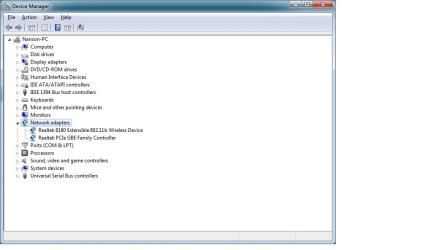
Post screenshot of device management please with branch "network adapters" expanded
 

My Computer My Computer

At a glance

Microsoft Windows 7 Home Premium 64-bits 7601...Intel(R) Core(TM) i3 CPU M 370 @ 2.40GHz4,00 GBATI Mobility Radeon HD 5400 Series
Computer type
Laptop
Computer Manufacturer/Model Number
ACER ASPIRE 5742G
OS
Microsoft Windows 7 Home Premium 64-bits 7601 Multiprocessor Free Service Pack 1
CPU
Intel(R) Core(TM) i3 CPU M 370 @ 2.40GHz
Motherboard
Acer Aspire 5742G
Memory
4,00 GB
Graphics Card(s)
ATI Mobility Radeon HD 5400 Series
Sound Card
(1) AMD High Definition Audio Device (2) Realtek High Defi
Screen Resolution
1366 x 768 x 32 bits (4294967296 colors) @ 60 Hz
Hard Drives
WDC WD5000BEVT-22ZAT0
I made sure to disable the wireless adapter on the laptop before I connected. The taskbar icon indicated that connection was made through ethernet.

As for the device manager screenshot - is that what you want? (attachment)
 

Attachments

  • devicemanager.jpg
    devicemanager.jpg
    39.5 KB · Views: 0

My Computer My Computer

At a glance

Windows 7 Home Premium 64-bitAMD Phenom II x4 9658GB G.SKILL F3-12800CL9D-8GBXLAMD Radeon HD 6770
Computer type
PC/Desktop
Computer Manufacturer/Model Number
Custom
OS
Windows 7 Home Premium 64-bit
CPU
AMD Phenom II x4 965
Motherboard
Gigabyte GA-970A-UD3
Memory
8GB G.SKILL F3-12800CL9D-8GBXL
Graphics Card(s)
AMD Radeon HD 6770
Hard Drives
Western Digital WD7502AAEX 750GB Hard Drive
Antivirus
AVG
Browser
Mozilla Firefox Aurora

My Computer My Computer

At a glance

Microsoft Windows 7 Home Premium 64-bits 7601...Intel(R) Core(TM) i3 CPU M 370 @ 2.40GHz4,00 GBATI Mobility Radeon HD 5400 Series
Computer type
Laptop
Computer Manufacturer/Model Number
ACER ASPIRE 5742G
OS
Microsoft Windows 7 Home Premium 64-bits 7601 Multiprocessor Free Service Pack 1
CPU
Intel(R) Core(TM) i3 CPU M 370 @ 2.40GHz
Motherboard
Acer Aspire 5742G
Memory
4,00 GB
Graphics Card(s)
ATI Mobility Radeon HD 5400 Series
Sound Card
(1) AMD High Definition Audio Device (2) Realtek High Defi
Screen Resolution
1366 x 768 x 32 bits (4294967296 colors) @ 60 Hz
Hard Drives
WDC WD5000BEVT-22ZAT0
I made sure to disable the wireless adapter on the laptop before I connected. The taskbar icon indicated that connection was made through ethernet.

As for the device manager screenshot - is that what you want? (attachment)
Screenshot looks fine. Ubuntu has drivers for most realtek NIC's out-of-the-box
 

My Computer My Computer

At a glance

Microsoft Windows 7 Home Premium 64-bits 7601...Intel(R) Core(TM) i3 CPU M 370 @ 2.40GHz4,00 GBATI Mobility Radeon HD 5400 Series
Computer type
Laptop
Computer Manufacturer/Model Number
ACER ASPIRE 5742G
OS
Microsoft Windows 7 Home Premium 64-bits 7601 Multiprocessor Free Service Pack 1
CPU
Intel(R) Core(TM) i3 CPU M 370 @ 2.40GHz
Motherboard
Acer Aspire 5742G
Memory
4,00 GB
Graphics Card(s)
ATI Mobility Radeon HD 5400 Series
Sound Card
(1) AMD High Definition Audio Device (2) Realtek High Defi
Screen Resolution
1366 x 768 x 32 bits (4294967296 colors) @ 60 Hz
Hard Drives
WDC WD5000BEVT-22ZAT0
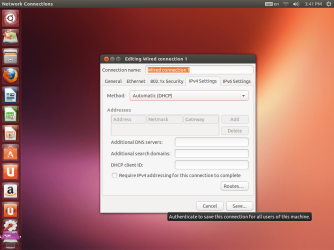
I'm on Ubuntu Live right now. Is there a way to configure NIC settings? It was trying to connect, but fails and says that network cable is unplugged, then tries again in a few seconds. I turned off auto-connect and used the wireless instead. It's similar to what I have when I try anything above 10Mbps Full Duplex in Windows.

On a side note, trying to get onto Seven Forums with Firefox on Ubuntu is at least 3 times slower. Youtube and reddit are fine though.
 

My Computer My Computer

At a glance

Windows 7 Home Premium 64-bitAMD Phenom II x4 9658GB G.SKILL F3-12800CL9D-8GBXLAMD Radeon HD 6770
Computer type
PC/Desktop
Computer Manufacturer/Model Number
Custom
OS
Windows 7 Home Premium 64-bit
CPU
AMD Phenom II x4 965
Motherboard
Gigabyte GA-970A-UD3
Memory
8GB G.SKILL F3-12800CL9D-8GBXL
Graphics Card(s)
AMD Radeon HD 6770
Hard Drives
Western Digital WD7502AAEX 750GB Hard Drive
Antivirus
AVG
Browser
Mozilla Firefox Aurora

My Computer My Computer

At a glance

Microsoft Windows 7 Home Premium 64-bits 7601...Intel(R) Core(TM) i3 CPU M 370 @ 2.40GHz4,00 GBATI Mobility Radeon HD 5400 Series
Computer type
Laptop
Computer Manufacturer/Model Number
ACER ASPIRE 5742G
OS
Microsoft Windows 7 Home Premium 64-bits 7601 Multiprocessor Free Service Pack 1
CPU
Intel(R) Core(TM) i3 CPU M 370 @ 2.40GHz
Motherboard
Acer Aspire 5742G
Memory
4,00 GB
Graphics Card(s)
ATI Mobility Radeon HD 5400 Series
Sound Card
(1) AMD High Definition Audio Device (2) Realtek High Defi
Screen Resolution
1366 x 768 x 32 bits (4294967296 colors) @ 60 Hz
Hard Drives
WDC WD5000BEVT-22ZAT0
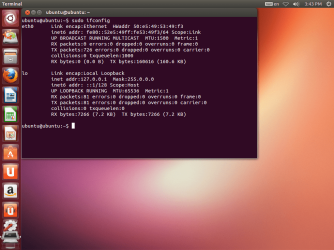
The problem is that I can't connect through Ethernet on Ubuntu. It keeps on telling me that it's disconnected, but it continues to attempt connecting. The only way I bypassed this problem in Windows was to set Speed & Duplex to 10Mbps Full Duplex, which apparently I can't do in Ubuntu Live.
Either way, I had the eth0's IPv4 settings screenshotted, and did the ifconfig anyway without a successful connection. I did both of these before I activated Wi-fi in Ubuntu.
 

Attachments

  • Screenshot from 2013-10-16 15:41:53.png
    Screenshot from 2013-10-16 15:41:53.png
    190.1 KB · Views: 1
  • Screenshot from 2013-10-16 15:43:46.png
    Screenshot from 2013-10-16 15:43:46.png
    158.6 KB · Views: 0

My Computer My Computer

At a glance

Windows 7 Home Premium 64-bitAMD Phenom II x4 9658GB G.SKILL F3-12800CL9D-8GBXLAMD Radeon HD 6770
Computer type
PC/Desktop
Computer Manufacturer/Model Number
Custom
OS
Windows 7 Home Premium 64-bit
CPU
AMD Phenom II x4 965
Motherboard
Gigabyte GA-970A-UD3
Memory
8GB G.SKILL F3-12800CL9D-8GBXL
Graphics Card(s)
AMD Radeon HD 6770
Hard Drives
Western Digital WD7502AAEX 750GB Hard Drive
Antivirus
AVG
Browser
Mozilla Firefox Aurora
What you proved so far:
  • win7 and ubuntu (on same machine) see ethernet NIC. Both fail to connect properly. So NOT a win7 driver problem.
  • Same network cable attached (still attached to same router port) to other computer works perfectly. Pleas confirm please.
Conclusion not a router problem, not a software problem. Problem is most likely the NIC. Replace NIC. Or if it's a laptop and difficult to replace..... disable it and buy an USB NIC and plug it in. Costs about $10
 

My Computer My Computer

At a glance

Microsoft Windows 7 Home Premium 64-bits 7601...Intel(R) Core(TM) i3 CPU M 370 @ 2.40GHz4,00 GBATI Mobility Radeon HD 5400 Series
Computer type
Laptop
Computer Manufacturer/Model Number
ACER ASPIRE 5742G
OS
Microsoft Windows 7 Home Premium 64-bits 7601 Multiprocessor Free Service Pack 1
CPU
Intel(R) Core(TM) i3 CPU M 370 @ 2.40GHz
Motherboard
Acer Aspire 5742G
Memory
4,00 GB
Graphics Card(s)
ATI Mobility Radeon HD 5400 Series
Sound Card
(1) AMD High Definition Audio Device (2) Realtek High Defi
Screen Resolution
1366 x 768 x 32 bits (4294967296 colors) @ 60 Hz
Hard Drives
WDC WD5000BEVT-22ZAT0
I previously connected to another computer (a laptop) to test the Ethernet cable as you told me (I disabled the wireless beforehand). It worked fine, and I could browse websites with little trouble. If needed, I'll do it again and post screenshots, along with a ping test from command prompt.

Looking for an NIC in my local computer store now...
 

My Computer My Computer

At a glance

Windows 7 Home Premium 64-bitAMD Phenom II x4 9658GB G.SKILL F3-12800CL9D-8GBXLAMD Radeon HD 6770
Computer type
PC/Desktop
Computer Manufacturer/Model Number
Custom
OS
Windows 7 Home Premium 64-bit
CPU
AMD Phenom II x4 965
Motherboard
Gigabyte GA-970A-UD3
Memory
8GB G.SKILL F3-12800CL9D-8GBXL
Graphics Card(s)
AMD Radeon HD 6770
Hard Drives
Western Digital WD7502AAEX 750GB Hard Drive
Antivirus
AVG
Browser
Mozilla Firefox Aurora
I previously connected to another computer (a laptop) to test the Ethernet cable as you told me (I disabled the wireless beforehand). It worked fine, and I could browse websites with little trouble. If needed, I'll do it again and post screenshots, along with a ping test from command prompt.

Looking for an NIC in my local computer store now...
I can't help you with that... post results after replacing NIC.

Best thing to do is uninstall NIC driver just before replacing NIC
 

My Computer My Computer

At a glance

Microsoft Windows 7 Home Premium 64-bits 7601...Intel(R) Core(TM) i3 CPU M 370 @ 2.40GHz4,00 GBATI Mobility Radeon HD 5400 Series
Computer type
Laptop
Computer Manufacturer/Model Number
ACER ASPIRE 5742G
OS
Microsoft Windows 7 Home Premium 64-bits 7601 Multiprocessor Free Service Pack 1
CPU
Intel(R) Core(TM) i3 CPU M 370 @ 2.40GHz
Motherboard
Acer Aspire 5742G
Memory
4,00 GB
Graphics Card(s)
ATI Mobility Radeon HD 5400 Series
Sound Card
(1) AMD High Definition Audio Device (2) Realtek High Defi
Screen Resolution
1366 x 768 x 32 bits (4294967296 colors) @ 60 Hz
Hard Drives
WDC WD5000BEVT-22ZAT0
Hi, I'm back!

Bought a NIC for $15 CAD, works like a charm. Here's ipconfig from Window Command Prompt:
Code:
Windows IP Configuration

   Host Name . . . . . . . . . . . . : Nanson-PC
   Primary Dns Suffix  . . . . . . . : 
   Node Type . . . . . . . . . . . . : Hybrid
   IP Routing Enabled. . . . . . . . : No
   WINS Proxy Enabled. . . . . . . . : No

Ethernet adapter Local Area Connection:

   Connection-specific DNS Suffix  . : 
   Description . . . . . . . . . . . : Realtek PCIe GBE Family Controller #2
   Physical Address. . . . . . . . . : A0-F3-C1-10-81-BF
   DHCP Enabled. . . . . . . . . . . : Yes
   Autoconfiguration Enabled . . . . : Yes
   Link-local IPv6 Address . . . . . : fe80::94:542f:e87c:5ee1%24(Preferred) 
   IPv4 Address. . . . . . . . . . . : 192.168.1.2(Preferred) 
   Subnet Mask . . . . . . . . . . . : 255.255.255.0
   Lease Obtained. . . . . . . . . . : October-18-13 6:35:25 PM
   Lease Expires . . . . . . . . . . : October-19-13 6:35:25 PM
   Default Gateway . . . . . . . . . : 192.168.1.1
   DHCP Server . . . . . . . . . . . : 192.168.1.1
   DHCPv6 IAID . . . . . . . . . . . : 413201345
   DHCPv6 Client DUID. . . . . . . . : 00-01-00-01-16-18-1A-73-50-E5-49-53-49-F3
   DNS Servers . . . . . . . . . . . : 192.168.1.1
   NetBIOS over Tcpip. . . . . . . . : Enabled

Tunnel adapter isatap.{C11B5C77-650A-46CE-8B60-67F54E9AA688}:

   Media State . . . . . . . . . . . : Media disconnected
   Connection-specific DNS Suffix  . : 
   Description . . . . . . . . . . . : Microsoft ISATAP Adapter
   Physical Address. . . . . . . . . : 00-00-00-00-00-00-00-E0
   DHCP Enabled. . . . . . . . . . . : No
   Autoconfiguration Enabled . . . . : Yes

Tunnel adapter Teredo Tunneling Pseudo-Interface:

   Connection-specific DNS Suffix  . : 
   Description . . . . . . . . . . . : Teredo Tunneling Pseudo-Interface
   Physical Address. . . . . . . . . : 00-00-00-00-00-00-00-E0
   DHCP Enabled. . . . . . . . . . . : No
   Autoconfiguration Enabled . . . . : Yes
   IPv6 Address. . . . . . . . . . . : 2001:0:9d38:90d7:1404:2f51:3f57:fefd(Preferred) 
   Link-local IPv6 Address . . . . . : fe80::1404:2f51:3f57:fefd%13(Preferred) 
   Default Gateway . . . . . . . . . : ::
   NetBIOS over Tcpip. . . . . . . . : Disabled
I'll do it again in Ubuntu if needed.
 

My Computer My Computer

At a glance

Windows 7 Home Premium 64-bitAMD Phenom II x4 9658GB G.SKILL F3-12800CL9D-8GBXLAMD Radeon HD 6770
Computer type
PC/Desktop
Computer Manufacturer/Model Number
Custom
OS
Windows 7 Home Premium 64-bit
CPU
AMD Phenom II x4 965
Motherboard
Gigabyte GA-970A-UD3
Memory
8GB G.SKILL F3-12800CL9D-8GBXL
Graphics Card(s)
AMD Radeon HD 6770
Hard Drives
Western Digital WD7502AAEX 750GB Hard Drive
Antivirus
AVG
Browser
Mozilla Firefox Aurora
Just what I concluded.... faulty NIC. Replaced and all is working?

Description . . . . . . . . . . . : Realtek PCIe GBE Family Controller #2
=> did you install it twice? Or is other driver still installed?
Check device manager and "network center" .... all is fine?
 

My Computer My Computer

At a glance

Microsoft Windows 7 Home Premium 64-bits 7601...Intel(R) Core(TM) i3 CPU M 370 @ 2.40GHz4,00 GBATI Mobility Radeon HD 5400 Series
Computer type
Laptop
Computer Manufacturer/Model Number
ACER ASPIRE 5742G
OS
Microsoft Windows 7 Home Premium 64-bits 7601 Multiprocessor Free Service Pack 1
CPU
Intel(R) Core(TM) i3 CPU M 370 @ 2.40GHz
Motherboard
Acer Aspire 5742G
Memory
4,00 GB
Graphics Card(s)
ATI Mobility Radeon HD 5400 Series
Sound Card
(1) AMD High Definition Audio Device (2) Realtek High Defi
Screen Resolution
1366 x 768 x 32 bits (4294967296 colors) @ 60 Hz
Hard Drives
WDC WD5000BEVT-22ZAT0
Back
Top