
Signature at SevenForums - Create with or without an Image

How to Create a Signature at Seven Forums with or without an Image​


   Information
This tutorial will give you an introduction into the basics of using a signature.
I will inform you on the various usergroups and the signature that fits with each of those usergroups and show you how to apply a signature and a signature image.
   Note

To change or see your signature, please do the following;
  1. Log into your account.
  2. Click on User CP.
  3. Scroll a bit down, and click on Edit Signature in the Settings & Options menu.
    :info: More detailed directions are given in the edit your signature part of this tutorial.
    :info: Please make sure that your signature doesn't violate the Forum Rules!
   Warning

Admins have the ability to change a users signature to another usergroup. This tutorial will focus on the default usergroups.


All signatures have a limit on the amount of characters used and the size of the sigpic (signature picture). The sigpic can be posted with [SIGPIC] tags.
In this tutorial I will show you how to apply a signature, apply a signature image and I will also show you a few handy tips for the length of your signature :)

1. User Groups
Signatures are limited per usergroup, and this are the restrictions per usergroup:
  • Just Joined:
    Members who have just joined the SevenForums and have the text "New Member" displayed under their username will be unable to have a signature.
    Once they have made a few posts and have been here a few days their status will be upgraded to "Junior Member".
  • Junior Member:
    Junior Members will be able to have a signature. The maximum amount of characters they can use is 500 characters and their signature picture is limited to a size of 600x100 pixels.
  • Member:
    Once a user has achieved the Member badge (min. 35 reputation points + 10 days registered + 10 posts made) the amount of characters he/she can use in their signature will increase to 750 characters.
  • Power User:
    Once a user has achieved the Power User badge (min. 200 reputation points + 30 days registered + 75 posts made), the amount of characters he/she can use will increase to 1.000 characters and the size of their signature will increase to 600x150 pixels.
  • Seven Pro:
    Once a user has achieved the Seven Pro badge (min. 500 reputation points + 60 days registered + 100 posts made), the amount of characters he/she can use in their signature will increase to 1.250 characters and the size of their signature will increase to 650x150 pixels. This is the largest "unlockable" size a signature on the SevenForums can have (with exception of admins).
  • Seven Guru and above:
    Once a user has achieved the Seven Guru badge (min. 1.000 reputation points + 90 days registered + 100 posts made), the amount of characters he/she can use in their signature will increase to 2.000 characters. This is the largest "unlockable" amount (with exception of admins).

    More information on badges, titles and reputation points can be found in the Reputation and Badges thread.
:ar: The amount of characters you can use for your signature includes the BBCode you use.
:ar: If a signature uses more characters than the maximum of the user group you are in, you won't be able to use it.
:ar: If a signature image is bigger than the maximum size of your user group, it will be resized to this size.

2. Editing your signature (text only):
Now that we know when you fall in which usergroup and what signature fits in that group, I will show you how to edit your signature.
A. Click on the User CP to enter your personal menu.
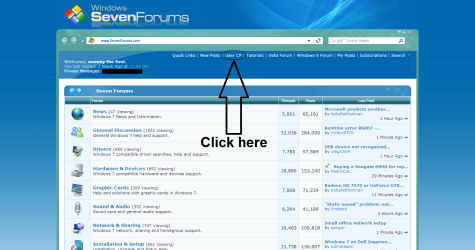
Click User CP.png

B. On the left of your screen will be a taskbar called Your Control Panel. In it, click on Edit Signature under Settings & Options.
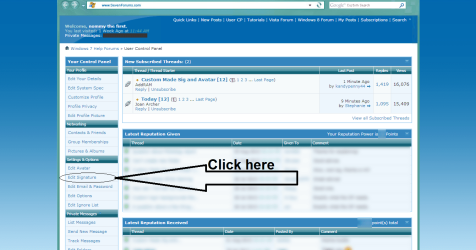
Edit Signature.png

C. Now you are in the window where you can edit your signature. See the image below for more details.
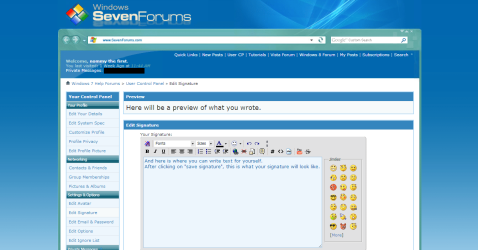
Signature preview.png

D. To see a preview of the text you wrote, click on "Preview Signature" at the bottom of the page.

E. If you are satisfied with what you wrote, click on "Save Signature" to save your signature and take it in use.

3. Editing your signature (image):
Now that you know how to edit your signature, let's look at how you can add an image in there!
A. Navigate to the Edit Signature menu by following steps one and two of the above displayed steps.
Now there are two ways to upload an image; the image upload tool of the SevenForums and using a direct link of the image. Using [IMG] [/IMG] tags will not work.

B. First seek the image that you want as a signature. And be sure that it fits the restrictions of your user group!

C. When you found a good image, upload it by clicking on the "Choose File" button in the Upload Signature Picture menu. When you have chosen a good file (be sure that the image fits in the restrictions of your usergroup!), click on "Upload"
Alternatively: When you found a good image that you want as your signature, which is uploaded to an image host, right-click the image, and select Open in new tab to get the direct link. When you have the direct link, paste it in the URL box under Option 1. Now click on "Upload".

D. When uploaded, click on "Preview Signature" to see the image you just uploaded in the Your Current Signature Picture menu.

E. Now click on the Insert signature picture link next to the picture to insert the [SIGPIC] [/SIGPIC] tags in your text field.
Hint: If you want to center your image, you can do this by clicking on Align Center. This is the second button of the three buttons with lines under the Fonts option.

F. If you are satisfied with how your signature looks, click on "Save Signature" to save your signature and take it into use.

Here is an image to show you;
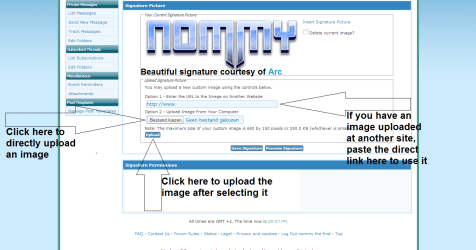
Signature Image.png
   Note
SevenForums resizes images to a .JPEG extension if they don't fit within your user groups restrictions, so if you upload an image with another file type, it will lose it's properties!
E.G. .PNG images will lose their opacity and .GIF images will no longer be animated and will also lose their opacity.

4. Useful info:

Here are a few things listed that will help you and answer some questions.

  • Ever seen a user who has a signature created by another user? You probably have. And then you will also have noticed that beneath their signature, they have the name of the user who created their signature, as a link.
    You can do this by simply copying their username from a post they made, and pasting it in the Edit Signature menu. If correctly done, the link should work.
    Alternatively you could always use the [url=http://www.sevenforums.com/members/user-name.html/]Username[/url] tags.
  • Seven Forums also counts your BBCode toward the character limit! So the shorter the links you use, the more characters you will have left!
    For instance, a simple link to the Forum Rules will look like this: [url=http://www.sevenforums.com/general-discussion/8-forum-rules-info-please-read.html]Forum Rules[/url]. That is 104 characters!
    A tip from my side, use a link shortener like goo.gl!. This way the same link will look like this: [url=http://goo.gl/PrhzL9]Forum Rules[/url]. That's only 43 characters! It saved you 61 characters!
  • Use a WYSIWYG or BBCode editor or Notepad to create your sgnature in!
    Why? Because more often than not you will have double or even tripple code using the Edit Signature box (like having [B] [/B] [B] [/B] multiple times in a row).
    Using notepad or a WYSIWYG editor will ensure you that only the BBCode you want to be there is there, so no more double tagging! It could save you several 100 characters.
  • Want a custom made signature? Visit the Custom made Sig and Avatar thread and request one!
  • Make sure that your signature does not violate the Forum Rules! If it does, your signature privileges might be removed.

That's it,
Nommy


Last edited:
Nice Tut Nommy :thumbsup:
 

My Computer My Computer

Computer type
PC/Desktop
Computer Manufacturer/Model Number
Home Built
OS
Win 7 Pro x64, Win 10 Pro x64, Linux Light x86
CPU
Core i7 3770K
Motherboard
Gigabyte GA-Z77P-D3
Memory
Crucial Ballistix Sport 8GB
Graphics Card(s)
ASUS GeForce GTX 650 Ti
Sound Card
On board
Monitor(s) Displays
ASUS 22 W/S
Screen Resolution
1920 x 1080
Hard Drives
Intel 320 Series SSD, WD Caviar Black 1TB
PSU
Corsair CX 750w
Case
Black Night
Cooling
120mm fans front/back, Coolermaster Hyper 212 Evo
Keyboard
Razer Blackwidow Expert 2013 Mechanical Keyboard
Mouse
Logitech G300 Gaming Mouse
Internet Speed
20mb Unlimited
Antivirus
ZA Antivirus + Firewall
Browser
Cyberfox
Other Info
Powered USB Hub, External Drives 3 x 1TB, Phone Dock.
Many thanks Steph!

Also Gary, it seems that you were right about the sig sizes after all:o Changed it now to show correct sizes, thanks for the heads up:D


Nommy
 

My Computer My Computer

Computer type
Laptop
Computer Manufacturer/Model Number
Dell Inspiron 5547
OS
Microsoft Windows 8.1 64-bit Professional
CPU
Intel(R) Core(TM) i7-4510U CPU @ 2.00GHz
Motherboard
Dell Inc. 08KNCD
Memory
8.00 GB (2 x 4.00 GB)
Graphics Card(s)
AMD Radeon R7 M265
Screen Resolution
1366 x 768 x 4294967296 colors
Hard Drives
(1) 1TB ST1000LM024 HN-M101MBB (2) 2TB Western Digital external hard drive (3) 500GB Packard Bell external hard drive
Mouse
Corsair Vengeance M60
Antivirus
Windows Defender & Malwarebytes
Browser
Firefox, Chromium
Other Info
+ Acer TravelMate 7730G with 32bit Ubuntu 14.04 LTS Trusty Tahr.
Vous êtes les bienvenus mon ami. I only found out about the change with Power User when Arc posted about it.
 

My Computer My Computer

Computer type
PC/Desktop
Computer Manufacturer/Model Number
Home Built Desktop By DataTech
OS
Windows 7 Ultimate X64 SP1
CPU
Intel i5-2550K, Differing ~4.4-4.8GHz No built in GPU
Motherboard
ASUS P8Z68-V PRO/GEN3
Memory
16GB G.Skill Sniper 1866MHz @ 2133MHz 2x8GB
Graphics Card(s)
ASUS GTX650TIB-DC2OC-2GD5, (650TI Boost)
Sound Card
Onboard Realtek 5-1
Monitor(s) Displays
Samsung P2570HD
Screen Resolution
1920x1080
Hard Drives
Samsung 840 Pro 256GB SSD for OS, 500GB Seagate Constellation (Enterprise drive) for Data
PSU
Corsair HX650W
Case
Inwin Dragon Rider
Cooling
Hyper 212 EVO w/two Noctua fans, push-pull, @1300 RPM
Keyboard
E-Z Eyes, bright yellow keys with large characters
Mouse
steelseries SENSEI Laser Pro Gaming
Internet Speed
48-51Mbs Mbs down, 11 Mbs up Xfinity Cable
Antivirus
Norton Internet Security 2013
Browser
IE 10, Opera, Pale Moon if needed
Other Info
4 case fans, LG BluRay-RE, ASUS DVD-RW, Mr. Fusion power supply, 1.21 gigawatts.
Bonjour Britton30, et bienvenu pour le SevenForums.

La language official pour le forum est Anglais. S'il vous plaît parler en Anglais ou bien traduire ton question avec Google Translate.


Merci pour ton coopération,
Nommy

Non, je rigole. Mais merci pour l'info quand même mon ami! :D
 

My Computer My Computer

Computer type
Laptop
Computer Manufacturer/Model Number
Dell Inspiron 5547
OS
Microsoft Windows 8.1 64-bit Professional
CPU
Intel(R) Core(TM) i7-4510U CPU @ 2.00GHz
Motherboard
Dell Inc. 08KNCD
Memory
8.00 GB (2 x 4.00 GB)
Graphics Card(s)
AMD Radeon R7 M265
Screen Resolution
1366 x 768 x 4294967296 colors
Hard Drives
(1) 1TB ST1000LM024 HN-M101MBB (2) 2TB Western Digital external hard drive (3) 500GB Packard Bell external hard drive
Mouse
Corsair Vengeance M60
Antivirus
Windows Defender & Malwarebytes
Browser
Firefox, Chromium
Other Info
+ Acer TravelMate 7730G with 32bit Ubuntu 14.04 LTS Trusty Tahr.
:roflmao:
 

My Computer My Computer

Computer type
PC/Desktop
Computer Manufacturer/Model Number
Home Built Desktop By DataTech
OS
Windows 7 Ultimate X64 SP1
CPU
Intel i5-2550K, Differing ~4.4-4.8GHz No built in GPU
Motherboard
ASUS P8Z68-V PRO/GEN3
Memory
16GB G.Skill Sniper 1866MHz @ 2133MHz 2x8GB
Graphics Card(s)
ASUS GTX650TIB-DC2OC-2GD5, (650TI Boost)
Sound Card
Onboard Realtek 5-1
Monitor(s) Displays
Samsung P2570HD
Screen Resolution
1920x1080
Hard Drives
Samsung 840 Pro 256GB SSD for OS, 500GB Seagate Constellation (Enterprise drive) for Data
PSU
Corsair HX650W
Case
Inwin Dragon Rider
Cooling
Hyper 212 EVO w/two Noctua fans, push-pull, @1300 RPM
Keyboard
E-Z Eyes, bright yellow keys with large characters
Mouse
steelseries SENSEI Laser Pro Gaming
Internet Speed
48-51Mbs Mbs down, 11 Mbs up Xfinity Cable
Antivirus
Norton Internet Security 2013
Browser
IE 10, Opera, Pale Moon if needed
Other Info
4 case fans, LG BluRay-RE, ASUS DVD-RW, Mr. Fusion power supply, 1.21 gigawatts.
I followed all the rules but do not see a "Add photo" check box, just a "Delete current image" check box. I noticed by accident that my account allows only one line for the signature, and, in the permissions fields below, that HTML is not allowed. Am I just too new to be allowed a signature block photo?

My photo is a magnificent macrophoto of an PGA-771 socket across the center, with rolling hills of gold on either side of some surface mount terrain, and I believe that it will be an asset to the Forum when it is permitted within the rules. I took it myself a couple of days ago.
 

My Computer My Computer

Computer type
PC/Desktop
Computer Manufacturer/Model Number
Home-build
OS
Windows 7 Ultimate 64-bit (I'm trying out W 10 Pro)
CPU
AMD FX8350
Motherboard
ASUS Sabertooth 990FX R2.0, chipset 990FX/SB950
Memory
16 GB (four G.Skill F3-1866C9Q-32GZH)
Graphics Card(s)
Gigabyte GEForce 660
Sound Card
On-Board RealTek ALC892
Monitor(s) Displays
NEC MultiSync 90GX2 on KVM switch
Screen Resolution
1280 X 1024
Hard Drives
Western Digital WD2002FAEX-2TB 7200 RPM SATA 3 (two, boot and data)
PSU
Rosewill CAPSTONE-1000-M, 1000W, single 12 Volt rail
Case
Rosewill Thor
Cooling
AMD fan that came with FX8350, PS and case fans
Keyboard
Cherry RS 6000 M on ATEN CS1734B KVM switch
Mouse
Kensington Expert Mouse Pro (Trackball) via USB on KVM switc
Internet Speed
25 MB/s up/down
Antivirus
Norton 360 Premier
Browser
Firefox
Other Info
Home Build as of December 3, replaced motherboard on January 29, 2014. Have Corsair H80I liquid cooler but didn't use it.
I followed all the rules but do not see a "Add photo" check box, just a "Delete current image" check box. I noticed by accident that my account allows only one line for the signature, and, in the permissions fields below, that HTML is not allowed. Am I just too new to be allowed a signature block photo?

My photo is a magnificent macrophoto of an PGA-771 socket across the center, with rolling hills of gold on either side of some surface mount terrain, and I believe that it will be an asset to the Forum when it is permitted within the rules. I took it myself a couple of days ago.

Hello Motorfingers and welcome to the Forums :party:,

I would say that you are indeed too new a member to be allowed to have an image in your signature. Once you have made a few posts and been here for a few days/weeks then your account will be "updated" to a Junior Member. Once that has happened you will be able to have a picture with the size of 600x100 pixels in your signature, and the options to enable a signature image will also become available for you then:)

If you really need a signature image and/or have a valid reason to need one, you could contact one of our admins called Brink and z3r010 with the request. But be warned that they will most likely tell you the same as I did above:)


Good luck here at the Forums,
Nommy
 

My Computer My Computer

Computer type
Laptop
Computer Manufacturer/Model Number
Dell Inspiron 5547
OS
Microsoft Windows 8.1 64-bit Professional
CPU
Intel(R) Core(TM) i7-4510U CPU @ 2.00GHz
Motherboard
Dell Inc. 08KNCD
Memory
8.00 GB (2 x 4.00 GB)
Graphics Card(s)
AMD Radeon R7 M265
Screen Resolution
1366 x 768 x 4294967296 colors
Hard Drives
(1) 1TB ST1000LM024 HN-M101MBB (2) 2TB Western Digital external hard drive (3) 500GB Packard Bell external hard drive
Mouse
Corsair Vengeance M60
Antivirus
Windows Defender & Malwarebytes
Browser
Firefox, Chromium
Other Info
+ Acer TravelMate 7730G with 32bit Ubuntu 14.04 LTS Trusty Tahr.
Thanks, I'll just leave that nice photo until I see "Junior Member" somewhere then go enable it.
 

My Computer My Computer

Computer type
PC/Desktop
Computer Manufacturer/Model Number
Home-build
OS
Windows 7 Ultimate 64-bit (I'm trying out W 10 Pro)
CPU
AMD FX8350
Motherboard
ASUS Sabertooth 990FX R2.0, chipset 990FX/SB950
Memory
16 GB (four G.Skill F3-1866C9Q-32GZH)
Graphics Card(s)
Gigabyte GEForce 660
Sound Card
On-Board RealTek ALC892
Monitor(s) Displays
NEC MultiSync 90GX2 on KVM switch
Screen Resolution
1280 X 1024
Hard Drives
Western Digital WD2002FAEX-2TB 7200 RPM SATA 3 (two, boot and data)
PSU
Rosewill CAPSTONE-1000-M, 1000W, single 12 Volt rail
Case
Rosewill Thor
Cooling
AMD fan that came with FX8350, PS and case fans
Keyboard
Cherry RS 6000 M on ATEN CS1734B KVM switch
Mouse
Kensington Expert Mouse Pro (Trackball) via USB on KVM switc
Internet Speed
25 MB/s up/down
Antivirus
Norton 360 Premier
Browser
Firefox
Other Info
Home Build as of December 3, replaced motherboard on January 29, 2014. Have Corsair H80I liquid cooler but didn't use it.
Whooooa. Thank you, I do appreciate what must be a unique courtesy.

This is one of the PGA-771 sockets of my main computer, with the gold contacts surrounding the central area with surface-mount components. Or, waving fields of grain in the sunshine on either side of an area with agricultural buildings.
 

My Computer My Computer

Computer type
PC/Desktop
Computer Manufacturer/Model Number
Home-build
OS
Windows 7 Ultimate 64-bit (I'm trying out W 10 Pro)
CPU
AMD FX8350
Motherboard
ASUS Sabertooth 990FX R2.0, chipset 990FX/SB950
Memory
16 GB (four G.Skill F3-1866C9Q-32GZH)
Graphics Card(s)
Gigabyte GEForce 660
Sound Card
On-Board RealTek ALC892
Monitor(s) Displays
NEC MultiSync 90GX2 on KVM switch
Screen Resolution
1280 X 1024
Hard Drives
Western Digital WD2002FAEX-2TB 7200 RPM SATA 3 (two, boot and data)
PSU
Rosewill CAPSTONE-1000-M, 1000W, single 12 Volt rail
Case
Rosewill Thor
Cooling
AMD fan that came with FX8350, PS and case fans
Keyboard
Cherry RS 6000 M on ATEN CS1734B KVM switch
Mouse
Kensington Expert Mouse Pro (Trackball) via USB on KVM switc
Internet Speed
25 MB/s up/down
Antivirus
Norton 360 Premier
Browser
Firefox
Other Info
Home Build as of December 3, replaced motherboard on January 29, 2014. Have Corsair H80I liquid cooler but didn't use it.
I see you have already made Junior Member status.
 

My Computer My Computer

Computer type
Laptop
Computer Manufacturer/Model Number
Gateway 17.3" LCD Intel Dual-Core, 8GB RAM 1TB HDD Windows 8 Laptop
OS
Windows 8 - 64-bit
CPU
2.2GHz Intel Pentium dual-core B960 processor with 2MB L3 ca
Memory
8GB DDR3
Graphics Card(s)
Intel HD Graphics with 128MB of dedicated system memory
Monitor(s) Displays
17.3" Ultrabright HD widescreen LED-backlit LCD
Screen Resolution
1280 X 1024
Hard Drives
1TB hard drive-1000 GB HDD
DVD-Super Multi DL drive
PSU
Intel B960 processor
Case
XXXXX
Cooling
XXXXX
Keyboard
Multi Gesture Touchpad
Mouse
USB - portable mouse... I added this
Antivirus
Avast
Browser
I E 10
Other Info
I see nothing about Motherboard info.
I'm not sure about Sound Card
Ports :(3) USB 2.0, (1) HDMI, (1) VGA, (1) Headphone out, (1) Microphone in, (1) Ethernet LAN

•Fast Wi-Fi wireless and wired Gigabit Ethernet networking
•HDMI output
•Kensington lock slot
I have no idea what all this actually means
Yeah, I need to start browsing threads and seeing where I can help out. That's a bit daunting after seeing what others here can do. I'm just a user. But I've been doing my own support since Window 2000, and I have no plans to go to Windows 8 right now.
 

My Computer My Computer

Computer type
PC/Desktop
Computer Manufacturer/Model Number
Home-build
OS
Windows 7 Ultimate 64-bit (I'm trying out W 10 Pro)
CPU
AMD FX8350
Motherboard
ASUS Sabertooth 990FX R2.0, chipset 990FX/SB950
Memory
16 GB (four G.Skill F3-1866C9Q-32GZH)
Graphics Card(s)
Gigabyte GEForce 660
Sound Card
On-Board RealTek ALC892
Monitor(s) Displays
NEC MultiSync 90GX2 on KVM switch
Screen Resolution
1280 X 1024
Hard Drives
Western Digital WD2002FAEX-2TB 7200 RPM SATA 3 (two, boot and data)
PSU
Rosewill CAPSTONE-1000-M, 1000W, single 12 Volt rail
Case
Rosewill Thor
Cooling
AMD fan that came with FX8350, PS and case fans
Keyboard
Cherry RS 6000 M on ATEN CS1734B KVM switch
Mouse
Kensington Expert Mouse Pro (Trackball) via USB on KVM switc
Internet Speed
25 MB/s up/down
Antivirus
Norton 360 Premier
Browser
Firefox
Other Info
Home Build as of December 3, replaced motherboard on January 29, 2014. Have Corsair H80I liquid cooler but didn't use it.
Jim most of us were "just users" when we came here to ask a question. I'm sure you know something about something no one else does. :D
 

My Computer My Computer

Computer type
PC/Desktop
Computer Manufacturer/Model Number
Home Built Desktop By DataTech
OS
Windows 7 Ultimate X64 SP1
CPU
Intel i5-2550K, Differing ~4.4-4.8GHz No built in GPU
Motherboard
ASUS P8Z68-V PRO/GEN3
Memory
16GB G.Skill Sniper 1866MHz @ 2133MHz 2x8GB
Graphics Card(s)
ASUS GTX650TIB-DC2OC-2GD5, (650TI Boost)
Sound Card
Onboard Realtek 5-1
Monitor(s) Displays
Samsung P2570HD
Screen Resolution
1920x1080
Hard Drives
Samsung 840 Pro 256GB SSD for OS, 500GB Seagate Constellation (Enterprise drive) for Data
PSU
Corsair HX650W
Case
Inwin Dragon Rider
Cooling
Hyper 212 EVO w/two Noctua fans, push-pull, @1300 RPM
Keyboard
E-Z Eyes, bright yellow keys with large characters
Mouse
steelseries SENSEI Laser Pro Gaming
Internet Speed
48-51Mbs Mbs down, 11 Mbs up Xfinity Cable
Antivirus
Norton Internet Security 2013
Browser
IE 10, Opera, Pale Moon if needed
Other Info
4 case fans, LG BluRay-RE, ASUS DVD-RW, Mr. Fusion power supply, 1.21 gigawatts.
We will see. I've started browsing new questions.

I have found that reading and researching questions provides a paced education in another area, troubleshooting Cadillacs. I'm Texas Jim over on Caddyinfo. When I started out, I was looking for answers to questions and got them, and started trying to help out to give back some of what I received from the people there. I'll do the same here.
 

My Computer My Computer

Computer type
PC/Desktop
Computer Manufacturer/Model Number
Home-build
OS
Windows 7 Ultimate 64-bit (I'm trying out W 10 Pro)
CPU
AMD FX8350
Motherboard
ASUS Sabertooth 990FX R2.0, chipset 990FX/SB950
Memory
16 GB (four G.Skill F3-1866C9Q-32GZH)
Graphics Card(s)
Gigabyte GEForce 660
Sound Card
On-Board RealTek ALC892
Monitor(s) Displays
NEC MultiSync 90GX2 on KVM switch
Screen Resolution
1280 X 1024
Hard Drives
Western Digital WD2002FAEX-2TB 7200 RPM SATA 3 (two, boot and data)
PSU
Rosewill CAPSTONE-1000-M, 1000W, single 12 Volt rail
Case
Rosewill Thor
Cooling
AMD fan that came with FX8350, PS and case fans
Keyboard
Cherry RS 6000 M on ATEN CS1734B KVM switch
Mouse
Kensington Expert Mouse Pro (Trackball) via USB on KVM switc
Internet Speed
25 MB/s up/down
Antivirus
Norton 360 Premier
Browser
Firefox
Other Info
Home Build as of December 3, replaced motherboard on January 29, 2014. Have Corsair H80I liquid cooler but didn't use it.
Nice tutorial Stefan :thumbsup:
Eagerly waiting for the photoShop tutorial/ s ;)
Cheers.
Love your new sig and avatar by the way :D
 

My Computer My Computer

Computer type
PC/Desktop
Computer Manufacturer/Model Number
Custom assembled by me :}
OS
Win-7-Pro64bit 7-H-Prem-64bit
CPU
i7-5930K 2nd i9-9940x both water blocked VRM's too
Motherboard
ASUS SABERTOOTH X99 2nd ASUS x299 Apex
Memory
Trident-z 3200C14 2nd Trident-z 3600C16
Graphics Card(s)
EVGA 1080ti ftw3 2nd Titan Xp both water blocked
Sound Card
Built-in Realtek
Monitor(s) Displays
1-AOC G2460PG 24"G-Sync 144Hz/ 2nd 1-ASUS VG248QE 24" 144Hz
Screen Resolution
1920 x 1080 144Hz
Hard Drives
2-Samsung M.2 Evo & Evo Plus
2-Samsung 850 EVO 500GB SSD's/ 3-2.5 W.D. Black 1tb-&3-1tb/3-3.5 WD Black 1tb hdd's
PSU
EVGA SuperNOVA 1000-P2 2nd 1200-P2
Case
2-Corsair Obsidian Series 450D Black ATX Mid Tower
Cooling
Custom water loops
Keyboard
Logitech G710+/ 2nd Logitech G910
Mouse
2-RedDragon M901 Perdition 16400 dpi Gaming mouse = wired
Internet Speed
Comcast Ping 19ms 89.31mbps download speed 6.12mbps upload
Antivirus
Malwarebytes Pro/ Superantispyware Pro
Browser
FireFox & Pale moon
Other Info
2nd ASUS X299 Apex/Intel i9-9940x with Custom water loop/7H-Prem-x64/Corsair 450D case/Ram Trident-z 3600C16 4x8gb / Samsung970Evo plus 500gb SSD/Dual ssd EZ swap evo/PSU EVGA SuperNova 1200w-P2 80+Platinum/GPU Titan Xp /8-ML-140 on push-pull on 2-280GTX rads
Excellent Info. nommy. Thanks. :)
 

My Computer My Computer

Computer type
PC/Desktop
Computer Manufacturer/Model Number
Self Built,Custom
OS
Windows 7 Home Premium x64 SP1
CPU
Intel Pentium G3420 @ 3.20GHz, Haswell, 1150 Socket
Motherboard
MSI B85M-P33
Memory
PNY 2x4 8GB
Graphics Card(s)
MSI 1GB R7770 Ghz Edition
Sound Card
HDTV Surround Sound
Monitor(s) Displays
Hitachi HDTV 60" and ACER 15"
Screen Resolution
1920 x 1080/1366 x 768
Hard Drives
Seagate Barracuda 1TB ,7200.14, 64mb Cache
PSU
Master Cooler Extreme Power Plus 500w
Case
iMicro CA-IM1627D ATX Mid Tower Case (Black)
Keyboard
onn
Mouse
Sharkk-SK2242 Wired Optical
Internet Speed
Highspeed Cable 1Gb/s
Antivirus
Microsoft Security Essentials
Browser
Chrome 64 Bit and Opera(Gotta Love Their Speed Dial).
Other Info
My Win10 Account:
http://www.tenforums.com/members/windowst3n.html
--------------------------------------------------------------
Private Firewall
Bought parts from Amazon.com
Yeah, I need to start browsing threads and seeing where I can help out. That's a bit daunting after seeing what others here can do. I'm just a user. But I've been doing my own support since Window 2000, and I have no plans to go to Windows 8 right now.

Hello motorfingers.
Yea same here,except since Win98 here. This is how I learned computer repair. By making plenty mistakes :picnic: and learning from them over time hehe.
Hence, lots of reading/video tutorials etc., and graduated eventually to building my own PC's. And I agree about not updating to win8 or etc. anytime soon either.
I have about $600 in this new build, I've been running for about 6 mths. now.
Microsoft can do without more dough from me for awhile haha. :)
Nice meeting you.
 

My Computer My Computer

Computer type
PC/Desktop
Computer Manufacturer/Model Number
Self Built,Custom
OS
Windows 7 Home Premium x64 SP1
CPU
Intel Pentium G3420 @ 3.20GHz, Haswell, 1150 Socket
Motherboard
MSI B85M-P33
Memory
PNY 2x4 8GB
Graphics Card(s)
MSI 1GB R7770 Ghz Edition
Sound Card
HDTV Surround Sound
Monitor(s) Displays
Hitachi HDTV 60" and ACER 15"
Screen Resolution
1920 x 1080/1366 x 768
Hard Drives
Seagate Barracuda 1TB ,7200.14, 64mb Cache
PSU
Master Cooler Extreme Power Plus 500w
Case
iMicro CA-IM1627D ATX Mid Tower Case (Black)
Keyboard
onn
Mouse
Sharkk-SK2242 Wired Optical
Internet Speed
Highspeed Cable 1Gb/s
Antivirus
Microsoft Security Essentials
Browser
Chrome 64 Bit and Opera(Gotta Love Their Speed Dial).
Other Info
My Win10 Account:
http://www.tenforums.com/members/windowst3n.html
--------------------------------------------------------------
Private Firewall
Bought parts from Amazon.com
WinS3v3n64Bit - actually I started building my own TRS-80's from the beginning, buying a tape Model III and adding floppies, etc. I didn't want to mention the 8/16 bit Windows, because I used OS/2 until I started using Windows 2000 because I needed the linear address space for my main uses for the computer - running my own programs for scientific work.

My current build was a bit more than that because I wanted a lot of oats for my project at the time I built it last year, but my last power workstation went for seven or eight years before the buck converter on the motherboard got too noisy for it to boot. My signature photo is the LGA 771 socket on that motherboard. This one had its sound chip go in three weeks, and the motherboard was replaced on warranty. Smooth as silk ever since.

After changing the HD twice and finally the motherboard, Microsoft did want to hear my voice before they validated my Windows 7 Ultimate that last time :shock: because, by then, absolutely zero hardware correlated with ID's of what it was installed on.Windows 7 is happily managing two internal HD's, an external RAID for backup for each of them, and a third RAID that was a little flaky and got replaced, but still hangs on. I have a Linux machine and a laptop on a KVM switch.

My copy of Windows 7 Ultimate is from NewEgg, an OEM copy that comes with no free Microsoft support, as did Vista before it, XP before that, etc.
 

My Computer My Computer

Computer type
PC/Desktop
Computer Manufacturer/Model Number
Home-build
OS
Windows 7 Ultimate 64-bit (I'm trying out W 10 Pro)
CPU
AMD FX8350
Motherboard
ASUS Sabertooth 990FX R2.0, chipset 990FX/SB950
Memory
16 GB (four G.Skill F3-1866C9Q-32GZH)
Graphics Card(s)
Gigabyte GEForce 660
Sound Card
On-Board RealTek ALC892
Monitor(s) Displays
NEC MultiSync 90GX2 on KVM switch
Screen Resolution
1280 X 1024
Hard Drives
Western Digital WD2002FAEX-2TB 7200 RPM SATA 3 (two, boot and data)
PSU
Rosewill CAPSTONE-1000-M, 1000W, single 12 Volt rail
Case
Rosewill Thor
Cooling
AMD fan that came with FX8350, PS and case fans
Keyboard
Cherry RS 6000 M on ATEN CS1734B KVM switch
Mouse
Kensington Expert Mouse Pro (Trackball) via USB on KVM switc
Internet Speed
25 MB/s up/down
Antivirus
Norton 360 Premier
Browser
Firefox
Other Info
Home Build as of December 3, replaced motherboard on January 29, 2014. Have Corsair H80I liquid cooler but didn't use it.
WinS3v3n64Bit - actually I started building my own TRS-80's from the beginning, buying a tape Model III and adding floppies, etc. I didn't want to mention the 8/16 bit Windows, because I used OS/2 until I started using Windows 2000 because I needed the linear address space for my main uses for the computer - running my own programs for scientific work.

My current build was a bit more than that because I wanted a lot of oats for my project at the time I built it last year, but my last power workstation went for seven or eight years before the buck converter on the motherboard got too noisy for it to boot. My signature photo is the LGA 771 socket on that motherboard. This one had its sound chip go in three weeks, and the motherboard was replaced on warranty. Smooth as silk ever since.

After changing the HD twice and finally the motherboard, Microsoft did want to hear my voice before they validated my Windows 7 Ultimate that last time :shock: because, by then, absolutely zero hardware correlated with ID's of what it was installed on.Windows 7 is happily managing two internal HD's, an external RAID for backup for each of them, and a third RAID that was a little flaky and got replaced, but still hangs on. I have a Linux machine and a laptop on a KVM switch.

My copy of Windows 7 Ultimate is from NewEgg, an OEM copy that comes with no free Microsoft support, as did Vista before it, XP before that, etc.

Oh very nice setup you have going now. Yea I go back to the LGA 775 socket. I started out with a dual core 775 and quickly got rid of that slow thing lol, and got a quad core CPU, 775 socket.

These newest 1150 sockets they have out now are blazing fast. I'm using the Pentium G3420 1150 socket one.

Yes NewEgg is a great place to shop as well. Well I'm off till later on,nice meeting you. :)
 

My Computer My Computer

Computer type
PC/Desktop
Computer Manufacturer/Model Number
Self Built,Custom
OS
Windows 7 Home Premium x64 SP1
CPU
Intel Pentium G3420 @ 3.20GHz, Haswell, 1150 Socket
Motherboard
MSI B85M-P33
Memory
PNY 2x4 8GB
Graphics Card(s)
MSI 1GB R7770 Ghz Edition
Sound Card
HDTV Surround Sound
Monitor(s) Displays
Hitachi HDTV 60" and ACER 15"
Screen Resolution
1920 x 1080/1366 x 768
Hard Drives
Seagate Barracuda 1TB ,7200.14, 64mb Cache
PSU
Master Cooler Extreme Power Plus 500w
Case
iMicro CA-IM1627D ATX Mid Tower Case (Black)
Keyboard
onn
Mouse
Sharkk-SK2242 Wired Optical
Internet Speed
Highspeed Cable 1Gb/s
Antivirus
Microsoft Security Essentials
Browser
Chrome 64 Bit and Opera(Gotta Love Their Speed Dial).
Other Info
My Win10 Account:
http://www.tenforums.com/members/windowst3n.html
--------------------------------------------------------------
Private Firewall
Bought parts from Amazon.com
Back
Top