- Local time
- 9:51 PM
- Messages
- 47
Hi Folks
I've got some questions for you clever people regarding the disk partitions on my HP Pavilion G6 laptop. The machine has been running more or less smoothly for probably over a year now - but my question originates from a result given to me by my anti-virus software.
I'm going to separate this post into the key headings for ease of access. My main query is under 'about the partitions', so feel free to skip to here if you just want a quick glance. However the rest will make things clearer for you most likely.
Background:
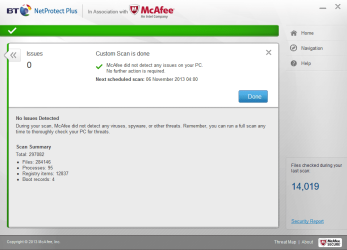
I am running BtNetprotect + antivirus software, and have had no quarrels with it as such. Upon completing a full system scan, the program returns a list of results that looks something like this;
This is likely not exactly how it looks, but you get the idea. Now, it's the 'boot records' field which seems to cause a lot of confusion for people.
My understanding is that all hard drives have a set of commands required to start or boot, and this is what must be meant; the software is recording the number of boot entries on the system.
Now... I'm fairly sure that this always used to read 2. Perhaps 5 months ago this was. But for some time now it's started consistently showing 3.
3 boot records?
I did some research, but struggled to find out exactly how many I should have. (Bear in mind it's just my laptop during these scans, without any additional hardware attached save for the mouse and my charger)
After a while I decided to leave it as unresolved, as nothing suspicious was happening.
Extrapolating
Today however I fell to wondering about the third boot record again. After some research I started wondering if each partition on a hard drive has its own 'boot record' (feel free to tell me yes or no here...still not sure if this is correct?).
So i opened up the disk management window to check my partitions, and here lies my main query.
About the partitions
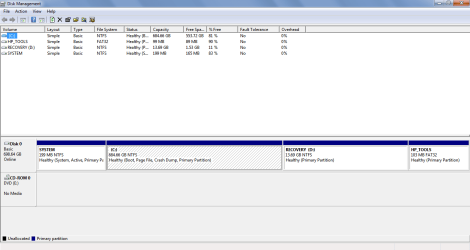
Here is a screenshot from the disk management window;

The first thing I noticed is that there are 3 partitions in NTFS format. So my first question is;
1) Do i have 3 'boot records' because 3 of my partitions are NTFS format?
I then thought about the fact that (i'm almost certain) my anti-virus software used to only read 2 boot records. If my theory linking NTFS and 'boot records' is correct - which one would have changed? I checked the partitions on my parents new Sony Vaio for comparison.
I was pretty baffled by the results. The brand new laptop runs on windows 8 - and there were about 5 different partitions. What's more, only the C : drive was named. The other 4 were only defined by the other fields. The results were very similar to those obtained at this link:
If you don't want to follow the link, another user of windows 8 was wondering what all the partitions were for;
Anywho, this isn't my main concern - as i'm simply assuming it's windows 8 doing things differently. What did intrigue me is that (as I recall it) the recovery partitions weren't listed as NTFS on my parents new laptop. In fact only the C : drive was I think.
So this leads me to my second question;
2) Is the recovery partition supposed to be NTFS format? Is it possible it used to not be, but at some point it changed and gave me 3 NTFS partitions and subsequently 3 boot record results.
That's all I can think of for now. I'll update you as things develop.
Thanks in advance for your help, :sarc:
MID
I've got some questions for you clever people regarding the disk partitions on my HP Pavilion G6 laptop. The machine has been running more or less smoothly for probably over a year now - but my question originates from a result given to me by my anti-virus software.
I'm going to separate this post into the key headings for ease of access. My main query is under 'about the partitions', so feel free to skip to here if you just want a quick glance. However the rest will make things clearer for you most likely.
Background:
I am running BtNetprotect + antivirus software, and have had no quarrels with it as such. Upon completing a full system scan, the program returns a list of results that looks something like this;
Items scanned [number]
Issues found 0
Issues fixes 0
Potentially unwanted programs found 0
Potentially unwanted programs fixed 0
Boot records 3
This is likely not exactly how it looks, but you get the idea. Now, it's the 'boot records' field which seems to cause a lot of confusion for people.
My understanding is that all hard drives have a set of commands required to start or boot, and this is what must be meant; the software is recording the number of boot entries on the system.
Now... I'm fairly sure that this always used to read 2. Perhaps 5 months ago this was. But for some time now it's started consistently showing 3.
3 boot records?
I did some research, but struggled to find out exactly how many I should have. (Bear in mind it's just my laptop during these scans, without any additional hardware attached save for the mouse and my charger)
After a while I decided to leave it as unresolved, as nothing suspicious was happening.
Extrapolating
Today however I fell to wondering about the third boot record again. After some research I started wondering if each partition on a hard drive has its own 'boot record' (feel free to tell me yes or no here...still not sure if this is correct?).
So i opened up the disk management window to check my partitions, and here lies my main query.
About the partitions
Here is a screenshot from the disk management window;
The first thing I noticed is that there are 3 partitions in NTFS format. So my first question is;
1) Do i have 3 'boot records' because 3 of my partitions are NTFS format?
I then thought about the fact that (i'm almost certain) my anti-virus software used to only read 2 boot records. If my theory linking NTFS and 'boot records' is correct - which one would have changed? I checked the partitions on my parents new Sony Vaio for comparison.
I was pretty baffled by the results. The brand new laptop runs on windows 8 - and there were about 5 different partitions. What's more, only the C : drive was named. The other 4 were only defined by the other fields. The results were very similar to those obtained at this link:
HTML:
http://www.pcadvisor.co.uk/forums/1/tech-helproom/4190621/what-are-all-these-partitions-on-my-new-laptops-hdd/If you don't want to follow the link, another user of windows 8 was wondering what all the partitions were for;
I've just had a look at the 1TB HDD in Disk Management for the first time, and the disk is already littered with partitions! Can anyone please tell me what they're all for?
1000 MB Healthy (Recovery partition) 100% free.
260 MB Healthy (EFI System partition) 100% free
1000 MB Healthy (OEM partition) 100% free
Windows 8 OS (C884.18 GB Healthy (Boot, Page file, Crash dump, Primary partition) 96% free
Lenovo (D
20 GB Healthy (Recovery partition)
Read more: What are all these partitions on my new laptop's HDD? - Tech Helproom | 29-11-12 - PC Advisor Forums
Anywho, this isn't my main concern - as i'm simply assuming it's windows 8 doing things differently. What did intrigue me is that (as I recall it) the recovery partitions weren't listed as NTFS on my parents new laptop. In fact only the C : drive was I think.
So this leads me to my second question;
2) Is the recovery partition supposed to be NTFS format? Is it possible it used to not be, but at some point it changed and gave me 3 NTFS partitions and subsequently 3 boot record results.
That's all I can think of for now. I'll update you as things develop.
Thanks in advance for your help, :sarc:
MID
My Computer
- OS
- windows 7 home premium