high CPU temperatures;upto 100 degrees celsius

removed all the monitors. trying the one in the link provided by you.
 

My Computer My Computer

At a glance

Windows 7 home basic 64bitAMD4 gbAMD radeon HD 7640G, AMD radeon HD 7670M
Computer type
Laptop
Computer Manufacturer/Model Number
HP
OS
Windows 7 home basic 64bit
CPU
AMD
Motherboard
HP
Memory
4 gb
Graphics Card(s)
AMD radeon HD 7640G, AMD radeon HD 7670M
Hard Drives
hitachi 750gb 7200rpm
Antivirus
ESET smart security 7
Browser
google chrome
If you are running more than one monitor, they can get confused and even crash the CPU.

How did simultaneous monitors get in the picture? That's as inane as running concurrent AV shield software. I don't suggest either. I think for the OP's piece of mind he's better off to swap drives. If nothing runs cooler then at least he knows for sure.
 

My Computer My Computer

At a glance

Windows 7 32 bitAMD 5200+ dual core2 GBNVidia GeForce 6150SE 128 MB
Computer Manufacturer/Model Number
HP Media Center
OS
Windows 7 32 bit
CPU
AMD 5200+ dual core
Memory
2 GB
Graphics Card(s)
NVidia GeForce 6150SE 128 MB
Monitor(s) Displays
CRT
Screen Resolution
1280x1024
Hard Drives
500 GB Sata internal :

SIIG USB 3.0 docking stations w/WD Caviar Black 6 Gb/s drives
Keyboard
PS/2
Mouse
PS/2 Wheel Mouse
Other Info
SIIG USB 3.0 PCIexpress card.
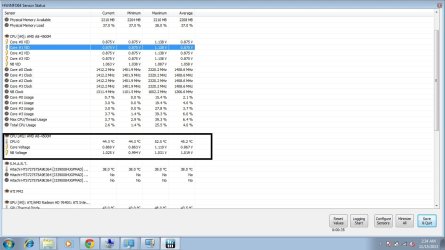
as per ypur directions i downloaded that application. i have attached screenshot.
shows normal readings for the CPU! though it doesnt show the individual core temp.
but can i infer something about the core temp from this result?
 

Attachments

  • Untitled1.jpg
    Untitled1.jpg
    111.2 KB · Views: 8

My Computer My Computer

At a glance

Windows 7 home basic 64bitAMD4 gbAMD radeon HD 7640G, AMD radeon HD 7670M
Computer type
Laptop
Computer Manufacturer/Model Number
HP
OS
Windows 7 home basic 64bit
CPU
AMD
Motherboard
HP
Memory
4 gb
Graphics Card(s)
AMD radeon HD 7640G, AMD radeon HD 7670M
Hard Drives
hitachi 750gb 7200rpm
Antivirus
ESET smart security 7
Browser
google chrome
If you are running more than one monitor, they can get confused and even crash the CPU.

How did simultaneous monitors get in the picture? That's as inane as running concurrent AV shield software. I don't suggest either. I think for the OP's piece of mind he's better off to swap drives. If nothing runs cooler then at least he knows for sure.

not running multiple monitors.
trying one at a time. :)
 

My Computer My Computer

At a glance

Windows 7 home basic 64bitAMD4 gbAMD radeon HD 7640G, AMD radeon HD 7670M
Computer type
Laptop
Computer Manufacturer/Model Number
HP
OS
Windows 7 home basic 64bit
CPU
AMD
Motherboard
HP
Memory
4 gb
Graphics Card(s)
AMD radeon HD 7640G, AMD radeon HD 7670M
Hard Drives
hitachi 750gb 7200rpm
Antivirus
ESET smart security 7
Browser
google chrome
check task manager to see CPU usage and RMA usage. also install cpuz to check cpu frequencies to make sure ur cpu is scaling. change power plan settings to balanced and make sure minium power usage is 0%. if still getting hot, its most likely the thermal paste or cooler was not put on rite.
 

My Computer My Computer

At a glance

Windows 10 ProIntel i7-3770K 4.4GHz8GB G.SKILL Ripjaws 1866 MHzEVGA GTX 980 Classified
Computer type
PC/Desktop
Computer Manufacturer/Model Number
Weekend Warrior Rig
OS
Windows 10 Pro
CPU
Intel i7-3770K 4.4GHz
Motherboard
ASUS P8Z77-V Pro
Memory
8GB G.SKILL Ripjaws 1866 MHz
Graphics Card(s)
EVGA GTX 980 Classified
Monitor(s) Displays
Asus VH238H 23" 2ms
Screen Resolution
1920x1080
Hard Drives
Intel 330 120GB SSD /
WD Blue 1TB /
WD Black 500GB
PSU
Corsair CX750M
Case
NZXT H440
Cooling
Corsair H80i- CPU / Corsair H90- GPU
Keyboard
Logitech K360 LE
Mouse
Logitech G500
Antivirus
Avast
Browser
Chrome
Other Info
1200W 2.1 Surround Sound Audio
check task manager to see CPU usage and RMA usage. also install cpuz to check cpu frequencies to make sure ur cpu is scaling. change power plan settings to balanced and make sure minium power usage is 0%. if still getting hot, its most likely the thermal paste or cooler was not put on rite.

CPU usage and RMA usage are very low.
CPU frequencies are also fine.
went to the HP service center, got the thermal pasting done again plus the fan is working properly.
 

My Computer My Computer

At a glance

Windows 7 home basic 64bitAMD4 gbAMD radeon HD 7640G, AMD radeon HD 7670M
Computer type
Laptop
Computer Manufacturer/Model Number
HP
OS
Windows 7 home basic 64bit
CPU
AMD
Motherboard
HP
Memory
4 gb
Graphics Card(s)
AMD radeon HD 7640G, AMD radeon HD 7670M
Hard Drives
hitachi 750gb 7200rpm
Antivirus
ESET smart security 7
Browser
google chrome
If you are running more than one monitor, they can get confused and even crash the CPU.

How did simultaneous monitors get in the picture? That's as inane as running concurrent AV shield software. I don't suggest either. I think for the OP's piece of mind he's better off to swap drives. If nothing runs cooler then at least he knows for sure.

not running multiple monitors.
trying one at a time. :)

I should say so. heh heh :)
 

My Computer My Computer

At a glance

Windows 7 32 bitAMD 5200+ dual core2 GBNVidia GeForce 6150SE 128 MB
Computer Manufacturer/Model Number
HP Media Center
OS
Windows 7 32 bit
CPU
AMD 5200+ dual core
Memory
2 GB
Graphics Card(s)
NVidia GeForce 6150SE 128 MB
Monitor(s) Displays
CRT
Screen Resolution
1280x1024
Hard Drives
500 GB Sata internal :

SIIG USB 3.0 docking stations w/WD Caviar Black 6 Gb/s drives
Keyboard
PS/2
Mouse
PS/2 Wheel Mouse
Other Info
SIIG USB 3.0 PCIexpress card.
as per ypur directions i downloaded that application. i have attached screenshot.
shows normal readings for the CPU! though it doesnt show the individual core temp.
but can i infer something about the core temp from this result?

MILES check this!
 

My Computer My Computer

At a glance

Windows 7 home basic 64bitAMD4 gbAMD radeon HD 7640G, AMD radeon HD 7670M
Computer type
Laptop
Computer Manufacturer/Model Number
HP
OS
Windows 7 home basic 64bit
CPU
AMD
Motherboard
HP
Memory
4 gb
Graphics Card(s)
AMD radeon HD 7640G, AMD radeon HD 7670M
Hard Drives
hitachi 750gb 7200rpm
Antivirus
ESET smart security 7
Browser
google chrome
AMD only gives a design temperature for the CPU (all cores). That could be why the temperature is shown as an aggregate. The CPU may only have one sensor placed in the middle of all cores. In any case, those temps look closer to reality. :) What's your ambient (room) temperature?
 

My Computer My Computer

At a glance

Windows 7 Pro-x64i7-2600 3.4GHz - 3.8GHz Turbo8Gb - 2x4GB, Muskin 991770 PC3-1333Integrated Intel HD 2000
Computer type
PC/Desktop
Computer Manufacturer/Model Number
Built 2/11/2011
OS
Windows 7 Pro-x64
CPU
i7-2600 3.4GHz - 3.8GHz Turbo
Motherboard
Intel DH67BL-B3
Memory
8Gb - 2x4GB, Muskin 991770 PC3-1333
Graphics Card(s)
Integrated Intel HD 2000
Sound Card
Integrated Intel 10.1 HD, RealTek ALC892
Monitor(s) Displays
Asus LCD VH222H, Haier HL24XSL2a
Screen Resolution
1920x1080, 1920x1080
Hard Drives
Crucial SSD C300-128Gb,
Western Digital WD5002AALX - 500Gb,
Western Digital WD7501AALS - 750Gb
PSU
Seasonic 650W 80+ Gold Modular
Case
Rosewill Defender
Cooling
Stock CPU, Four 120mm case fans, PCH fan added
Keyboard
Logitech EX100 Y-RBH94 Wireless
Mouse
Logitech EX100 M-RCE95 Wireless
Internet Speed
3.0/1.5 Mbs
Antivirus
Microsoft Security Essentials
Browser
Microsoft Internet Explorer 11
Other Info
Antec Veris Premier-Multimedia IR Station,
Cyber Accoustics-3602 Speakers,
AFT XM-5U Card Reader,
Hauppauge TV-HVR-2250,
Sony LX300 USB Turntable
See carwiz if according to you those temp values seem valid to you and can be relied upon taking AMD architecture into consideration, then for me those values are just fine..room temp around 25-30.
But cpu temp ~45 degrees Celsius is just fine for me..cz this is lesser than at which it usually works :-P
So according to you if these values are legit! Should i bother this matter any further?
 

My Computer My Computer

At a glance

Windows 7 home basic 64bitAMD4 gbAMD radeon HD 7640G, AMD radeon HD 7670M
Computer type
Laptop
Computer Manufacturer/Model Number
HP
OS
Windows 7 home basic 64bit
CPU
AMD
Motherboard
HP
Memory
4 gb
Graphics Card(s)
AMD radeon HD 7640G, AMD radeon HD 7670M
Hard Drives
hitachi 750gb 7200rpm
Antivirus
ESET smart security 7
Browser
google chrome
Miles - All the monitors make use of some type of Platform Environment Control Interface (PECI channel for Intel). This channel is a single wire serial comm interface with limited bandwidth. It's also the channel used to report and control fan speeds. It's self timing and syncing based on individual requests to the controller by the CPU. It's not meant to handle any type of multitasking or shared communications. Poorly written and/or multiple software monitors will cause a crash because they are expecting data at a specific address and it may not be there or invalid. I've seen it happen in crash dumps. Just like multiple AVs. Argue with someone else because I've seen it happen. WADR.
 

My Computer My Computer

At a glance

Windows 7 Pro-x64i7-2600 3.4GHz - 3.8GHz Turbo8Gb - 2x4GB, Muskin 991770 PC3-1333Integrated Intel HD 2000
Computer type
PC/Desktop
Computer Manufacturer/Model Number
Built 2/11/2011
OS
Windows 7 Pro-x64
CPU
i7-2600 3.4GHz - 3.8GHz Turbo
Motherboard
Intel DH67BL-B3
Memory
8Gb - 2x4GB, Muskin 991770 PC3-1333
Graphics Card(s)
Integrated Intel HD 2000
Sound Card
Integrated Intel 10.1 HD, RealTek ALC892
Monitor(s) Displays
Asus LCD VH222H, Haier HL24XSL2a
Screen Resolution
1920x1080, 1920x1080
Hard Drives
Crucial SSD C300-128Gb,
Western Digital WD5002AALX - 500Gb,
Western Digital WD7501AALS - 750Gb
PSU
Seasonic 650W 80+ Gold Modular
Case
Rosewill Defender
Cooling
Stock CPU, Four 120mm case fans, PCH fan added
Keyboard
Logitech EX100 Y-RBH94 Wireless
Mouse
Logitech EX100 M-RCE95 Wireless
Internet Speed
3.0/1.5 Mbs
Antivirus
Microsoft Security Essentials
Browser
Microsoft Internet Explorer 11
Other Info
Antec Veris Premier-Multimedia IR Station,
Cyber Accoustics-3602 Speakers,
AFT XM-5U Card Reader,
Hauppauge TV-HVR-2250,
Sony LX300 USB Turntable
I think you're good to go. :)
 

My Computer My Computer

At a glance

Windows 7 Pro-x64i7-2600 3.4GHz - 3.8GHz Turbo8Gb - 2x4GB, Muskin 991770 PC3-1333Integrated Intel HD 2000
Computer type
PC/Desktop
Computer Manufacturer/Model Number
Built 2/11/2011
OS
Windows 7 Pro-x64
CPU
i7-2600 3.4GHz - 3.8GHz Turbo
Motherboard
Intel DH67BL-B3
Memory
8Gb - 2x4GB, Muskin 991770 PC3-1333
Graphics Card(s)
Integrated Intel HD 2000
Sound Card
Integrated Intel 10.1 HD, RealTek ALC892
Monitor(s) Displays
Asus LCD VH222H, Haier HL24XSL2a
Screen Resolution
1920x1080, 1920x1080
Hard Drives
Crucial SSD C300-128Gb,
Western Digital WD5002AALX - 500Gb,
Western Digital WD7501AALS - 750Gb
PSU
Seasonic 650W 80+ Gold Modular
Case
Rosewill Defender
Cooling
Stock CPU, Four 120mm case fans, PCH fan added
Keyboard
Logitech EX100 Y-RBH94 Wireless
Mouse
Logitech EX100 M-RCE95 Wireless
Internet Speed
3.0/1.5 Mbs
Antivirus
Microsoft Security Essentials
Browser
Microsoft Internet Explorer 11
Other Info
Antec Veris Premier-Multimedia IR Station,
Cyber Accoustics-3602 Speakers,
AFT XM-5U Card Reader,
Hauppauge TV-HVR-2250,
Sony LX300 USB Turntable
Thanks alot! Really helpful people! :-)
Pray for me i dont get any severe issue regarding this :-P
Will rep u people! Gracias :-D
 

My Computer My Computer

At a glance

Windows 7 home basic 64bitAMD4 gbAMD radeon HD 7640G, AMD radeon HD 7670M
Computer type
Laptop
Computer Manufacturer/Model Number
HP
OS
Windows 7 home basic 64bit
CPU
AMD
Motherboard
HP
Memory
4 gb
Graphics Card(s)
AMD radeon HD 7640G, AMD radeon HD 7670M
Hard Drives
hitachi 750gb 7200rpm
Antivirus
ESET smart security 7
Browser
google chrome
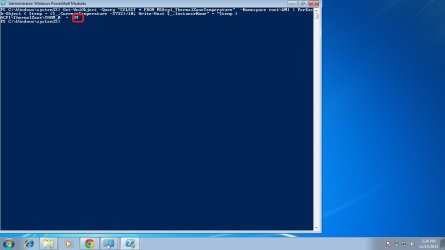
this is for everybody , who doesnt wanna use the third party tools to monitor the CPU temperature!
this service is natively present in windows(win 7) in my case.
just like any other shell programming, this one is called windows power shell. you can type in various scripts to get various thins done.
I found the small script on how to find your CPU temperature, using powershell scripting.
Im attaching the screenshots as well as the script!


Code:
Get-WmiObject -Query "SELECT * FROM MSAcpi_ThermalZoneTemperature"  -Namespace root\WMI | ForEach-Object { $temp = ($_.CurrentTemperature -2732)/10; Write-Host $_.InstanceName" = "$temp }

AS YOU CAN SEE INSIDE THE RED BOX WITHIN THE SCREENSHOT, its mentioning the CPU temperature recorded by the ACPI sensors!
 

Attachments

  • 1.jpg
    1.jpg
    40.6 KB · Views: 6
Last edited:

My Computer My Computer

At a glance

Windows 7 home basic 64bitAMD4 gbAMD radeon HD 7640G, AMD radeon HD 7670M
Computer type
Laptop
Computer Manufacturer/Model Number
HP
OS
Windows 7 home basic 64bit
CPU
AMD
Motherboard
HP
Memory
4 gb
Graphics Card(s)
AMD radeon HD 7640G, AMD radeon HD 7670M
Hard Drives
hitachi 750gb 7200rpm
Antivirus
ESET smart security 7
Browser
google chrome
Miles - All the monitors make use of some type of Platform Environment Control Interface (PECI channel for Intel). This channel is a single wire serial comm interface with limited bandwidth. It's also the channel used to report and control fan speeds. It's self timing and syncing based on individual requests to the controller by the CPU. It's not meant to handle any type of multitasking or shared communications. Poorly written and/or multiple software monitors will cause a crash because they are expecting data at a specific address and it may not be there or invalid. I've seen it happen in crash dumps. Just like multiple AVs. Argue with someone else because I've seen it happen. WADR.

As a rule of thumb I assume any program that directly accesses the hardware has the potential to cause problems. Running more than one program that accesses the same hardware at a low level is asking for problems. Which wire it's on in every case may be useful information if you are working at that level. But I really don't think it matters to a user wanting to know the CPU temp. All he needs to know is don't use more than one of the same type low level monitor at the same time.. Again I don't understand the compulsion to lecture me on the subject. I think most of us know the hazards already.
 

My Computer My Computer

At a glance

Windows 7 32 bitAMD 5200+ dual core2 GBNVidia GeForce 6150SE 128 MB
Computer Manufacturer/Model Number
HP Media Center
OS
Windows 7 32 bit
CPU
AMD 5200+ dual core
Memory
2 GB
Graphics Card(s)
NVidia GeForce 6150SE 128 MB
Monitor(s) Displays
CRT
Screen Resolution
1280x1024
Hard Drives
500 GB Sata internal :

SIIG USB 3.0 docking stations w/WD Caviar Black 6 Gb/s drives
Keyboard
PS/2
Mouse
PS/2 Wheel Mouse
Other Info
SIIG USB 3.0 PCIexpress card.
Thanks alot! Really helpful people! :-)
Pray for me i dont get any severe issue regarding this :-P
Will rep u people! Gracias :-D

Ah but if stuff runs too smoothly you won't come back!!! :cool:
 

My Computer My Computer

At a glance

Windows 7 32 bitAMD 5200+ dual core2 GBNVidia GeForce 6150SE 128 MB
Computer Manufacturer/Model Number
HP Media Center
OS
Windows 7 32 bit
CPU
AMD 5200+ dual core
Memory
2 GB
Graphics Card(s)
NVidia GeForce 6150SE 128 MB
Monitor(s) Displays
CRT
Screen Resolution
1280x1024
Hard Drives
500 GB Sata internal :

SIIG USB 3.0 docking stations w/WD Caviar Black 6 Gb/s drives
Keyboard
PS/2
Mouse
PS/2 Wheel Mouse
Other Info
SIIG USB 3.0 PCIexpress card.
Im having same laptop with same problem.

Helo aryan,

Im having the EXACT SAME laptop with EXACT SAME problem as yours. kindly give me the solution asap.

thnx
 

My Computer My Computer

At a glance

Windiws 7 Ultimate x64AMD A8-4500M6gbAMD Radeon HD 7640G + 7670M
Computer type
Laptop
Computer Manufacturer/Model Number
HP
OS
Windiws 7 Ultimate x64
CPU
AMD A8-4500M
Motherboard
HP 184A
Memory
6gb
Graphics Card(s)
AMD Radeon HD 7640G + 7670M
Hard Drives
1tb
Browser
Chrome
Back
Top