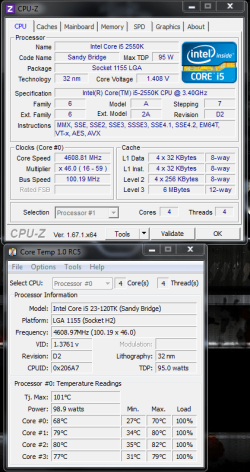
Post Your Overclock! [2]

Gary is correct. It is the enhanced halt state that allows the board to reduce power to the CPU when not in heavy usage.
 

My Computers

System One System Two

  • Computer type
    PC/Desktop
    Computer Manufacturer/Model Number
    ALWAYS UNDER CONSTRUCTION
    OS
    Windows 11 Pro
    CPU
    Ryzen 9 5900X
    Motherboard
    Asus X570 Crosshair Viii Hero
    Memory
    32GB G Skill DDR4-3600
    Graphics Card(s)
    EVGA RTX 3080 FTW 3 Ultra
    Sound Card
    On Board/Sennheiser PC37X Headset
    Monitor(s) Displays
    3 X Asus 27"
    Screen Resolution
    2560x1440
    Hard Drives
    2 X 1 TB NVME drives
    PSU
    EVGA 850
    Case
    Phanteks Eclipse P400A
    Cooling
    EVGA 280 AIO
    Keyboard
    Logitech G510s/ Logitech G13
    Mouse
    Logitech G502
    Internet Speed
    24/1
    Antivirus
    ESET/MBAM Pro/SAS Pro
    Browser
    Chrome/ Firefox/ Edge
  • Computer type
    Laptop
    System Manufacturer/Model Number
    Dell 16 Plus
    OS
    Windows 11 Pro
    CPU
    Intel Ultra 9 288V
    Memory
    32 GB LPDDR5X 8533
    Monitor(s) Displays
    16" Mini-LED HDR600 Touch 90 Hz
    Screen Resolution
    2560X1600
    Hard Drives
    1 TB NVME
Gary and Steve are right. With turbo OCing having CIE allows it to clock down when not under a load.

Edit
 

My Computer

Computer type
PC/Desktop
Computer Manufacturer/Model Number
Dude Build
OS
Windows 10 Pro X64
CPU
Intel(R) Core(TM) i5-3570K CPU OC@ 4.5GHZ Turbo
Motherboard
MSI Z77A-G45 Gaming
Memory
8.00 GB DDR3 1600Mhz
Graphics Card(s)
MSI Gaming X GTX 1070
Sound Card
Realtek High Definition
Monitor(s) Displays
Dell S23O9W, HP L1710
Screen Resolution
DELL-1920 x 1080 HP-1280 x1024
Hard Drives
Crucial m4 256 SSD, WD 7200RPM 500GB WD 1TB
PSU
Seasonic X650 GOLD
Case
Zalman Z12
Cooling
Antec Kuhler 920
Keyboard
Logitech
Mouse
MSI DS100 Interceptor
Internet Speed
50 down and 5 up
Antivirus
MSE
Browser
Chrome, IE 11
Other Info
Logitech X-620 Speakers
Oh ok, I didn't realize that this was a turbo OC, meaning as you idle the CPU load drops and you save power, but when doing intensive tasking it powers up*turbo* and c1e controls this. It's different approach from the way I overclocked because I disabled turbo so I got confused. Thank you for clarifying this for me. Learn something new each day :)
 

My Computer

Computer type
PC/Desktop
Computer Manufacturer/Model Number
Custom Build
OS
Windows 7 Ultimate x64
CPU
FX 8350 @ 4.8ghz, turbo clocked to 5.4ghz
Motherboard
Asus Sabertooth FX990 Gen 3.0 R2.0
Memory
Mushkin Enhanced Blackline 16GB 1760mhz 10-10-9-24 T1
Graphics Card(s)
Gigabyte-660 Windforce OC- GPU Clock 1212MHz /3504MHz ram
Sound Card
Creative Sound Blaster Recon3D PCIe Sound Card
Monitor(s) Displays
Samsung SyncMaster S27B350H (HDMI)
Screen Resolution
1920x1080 60HZ
Hard Drives
1 x SSD Crucial M4 256GB (Primary OS)
3 x HDD WD 1TB
4 x HDD 2TB
1 x HDD 160GB (Secondary Backup OS)
Raid SATA III 6GB/s 4-port PCI-e Controller Card, Marvel 88SE9215 chipset
PSU
Chieftec-650-14CS (Modular) 80 Plus Gold-650 Watt
Case
Akasa Venom Toxic Gaming Big tower ( Custom Black ) Ver 2.0
Cooling
Water 2.0 PRO / GEIL Cyclone VRM / 6x120mm 2x220mm 2x140mm
Keyboard
Logitech G19
Mouse
Wireless Notebook Presenter Mouse 8000
Internet Speed
Fiber GBS
Antivirus
Don't Announce it to the world :)
Browser
Gotta have at least 1!
Oh yeah, an OC is what the CPU ramps up to, it doesn't run it all the time and should drop to 1600 under light loads or idling.
 

My Computer

Computer type
PC/Desktop
Computer Manufacturer/Model Number
Home Built Desktop By DataTech
OS
Windows 7 Ultimate X64 SP1
CPU
Intel i5-2550K, Differing ~4.4-4.8GHz No built in GPU
Motherboard
ASUS P8Z68-V PRO/GEN3
Memory
16GB G.Skill Sniper 1866MHz @ 2133MHz 2x8GB
Graphics Card(s)
ASUS GTX650TIB-DC2OC-2GD5, (650TI Boost)
Sound Card
Onboard Realtek 5-1
Monitor(s) Displays
Samsung P2570HD
Screen Resolution
1920x1080
Hard Drives
Samsung 840 Pro 256GB SSD for OS, 500GB Seagate Constellation (Enterprise drive) for Data
PSU
Corsair HX650W
Case
Inwin Dragon Rider
Cooling
Hyper 212 EVO w/two Noctua fans, push-pull, @1300 RPM
Keyboard
E-Z Eyes, bright yellow keys with large characters
Mouse
steelseries SENSEI Laser Pro Gaming
Internet Speed
48-51Mbs Mbs down, 11 Mbs up Xfinity Cable
Antivirus
Norton Internet Security 2013
Browser
IE 10, Opera, Pale Moon if needed
Other Info
4 case fans, LG BluRay-RE, ASUS DVD-RW, Mr. Fusion power supply, 1.21 gigawatts.
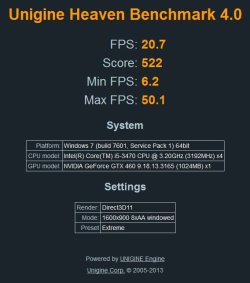
Hey guys, I think my score is a little low..
Is it ok? I have the GPU OCed to 798Mhz clock instead of 700Mhz.
 

Attachments

  • mj.jpg
    mj.jpg
    32.8 KB · Views: 80

My Computer

Computer type
PC/Desktop
OS
Win 7 64 bit
CPU
I5 3470
Motherboard
GA-H77M-D3H
Memory
Corsair 8GB DDR3 1600MHZ
Graphics Card(s)
Sparkle GTX460 1GB
Screen Resolution
1920X1080
Hard Drives
WD 320GB
Samsung 1TB F3
PSU
FSP 700W
Cooling
Scythe Grand Kama Cross
Internet Speed
30Mbps
Antivirus
Microsoft Security Essentials
Browser
FF,GC
GTX460 showing it's age ;)

Major that should be about right
 

My Computer

Computer type
PC/Desktop
Computer Manufacturer/Model Number
CoreI7-6700K MrFingerIII Special Builds
OS
Windows 10 Home Premium 64bit sp1
CPU
Intel I7-6700K @ 4.6 Ghz 1.344 volts everyday OC
Motherboard
Asrock Fatality K6 Z170 Socket 1151
Memory
32GB G-Skill TridentZ 3200mhz 16-18-18-38 DDR4
Graphics Card(s)
Sli Gigabyte Windforce GTX 980 G1
Sound Card
AC97 Creative Rage Tactic 3D Headphones Bluetooth
Monitor(s) Displays
27" Asus ROG Swift PG278Q G-Sync 48" Vizio Smart HD TV
Screen Resolution
2560x1440p 27"- 48" Currently Gaming at 2560x1440p Res 2K
Hard Drives
250GB Samsung Evo840SSD Seagate baracuda 500 GB WD Mybook 500Gb 1TB Seagate Barracuda
PSU
HX1050w Corsair Silver 80plus certified crosfire/sli
Case
Enthod Pro Full Tower
Cooling
Corsair H110i GT 280 mm High Performance WaterBlock
Keyboard
Logitech wireless keyboard
Mouse
Logitech wireless mouse
Internet Speed
Cox Cable 100+ mb
Antivirus
WebRoot Spysweeper with Antivirus
Browser
IE-10, Chrome, Opera
Other Info
My Other Rig is a AMD FX8320E @4.6Ghz 16GB Ballistic Sport Ram
Mobo Asrock Fatality 990FX 120GB OCZ SSD 1TB Seagate Barracuda Corsair H75 Cooling PSU Corsair CX750
GPU GTX Gigabyte 970G1
GTX460 showing it's age ;)

Major that should be about right
Urgh, posted it in the wrong place lol..
Wanted to post it on that becnhmark thread..

Anyway.. are you sure? It seems really low.. Even though it's a gtx460..
 

My Computer

Computer type
PC/Desktop
OS
Win 7 64 bit
CPU
I5 3470
Motherboard
GA-H77M-D3H
Memory
Corsair 8GB DDR3 1600MHZ
Graphics Card(s)
Sparkle GTX460 1GB
Screen Resolution
1920X1080
Hard Drives
WD 320GB
Samsung 1TB F3
PSU
FSP 700W
Cooling
Scythe Grand Kama Cross
Internet Speed
30Mbps
Antivirus
Microsoft Security Essentials
Browser
FF,GC
Shouldn't C1E be disabled, I see it's enabled?:o
I think C1E is what allows the Speedstep and Turboi to work.

Speedstep works with C1E disabled. That is how my system is configured. Turbo may depend on it - turbo requires that non-boosted cores be able to go to some lower power state, don't know if it has to be C1E though.
 

My Computer

Computer type
PC/Desktop
Computer Manufacturer/Model Number
Home built (GeneO industries)/Model 4
OS
Windows 10 Pro. EFI boot partition, full EFI boot
CPU
i7 4770k 4.4GHz (44-44-43-43 turbo) @ 1.248V
Motherboard
ASUS Maximus VI Hero
Memory
16GB (8GBx2) @2200 MHz G.skill Sniper 10-11-10-30-1, 1.6V
Graphics Card(s)
MSI GTX 970 Gaming 4G
Sound Card
Onboard SupremeFX Audio
Monitor(s) Displays
NEC Spectraview 2490WUXi-SV
Screen Resolution
1920 x 1200
Hard Drives
Samsung 850 Pro 256GB (OS), Samsung 2x 128GB 840 Pro SSD in RAID0, 3x WD Blue 6Gb/s 1TB RAID0, WD 2TB Black external USB 3.0, 2TB WD20EARS Green external USB 3.0, 2x 500GB Seagate and 1 750 GB external USB, 1x 350GB external USB3
PSU
Seasonic X-850 (2012 KM3 model)
Case
Fractal Design Define R4
Cooling
NH-D14, NF-F12, NF-A15; NF-P14, NF-P12,NF-A14, S12A PWM
Keyboard
Cooler Master Storm Quickfire Rapid - Brown
Mouse
Logitech G602
Internet Speed
126.4 Mb/s down, 24.3 Mb/s up
Other Info
USB 3.0 x8 , SATA III x8, eSATA, USB 2.0 x6. Samsung DVD R/W drive.

WEI: CPU 7.8, Memory 7.9, Graphics 7.9, Disk 7.9
Speedstep works with C1E disabled. That is how my system is configured. Turbo may depend on it - turbo requires that non-boosted cores be able to go to some lower power state, don't know if it has to be C1E though.
Apparently Turbo works too. Seem I read C1E had to be enabled for overclocking, maybe to a higher level than 4600 though. Anyway I disabled C1E and I still get Turbo boost. We have the same board, my i5 is the same but has no embedded GPU.

C1E Dis.PNG
 

My Computer

Computer type
PC/Desktop
Computer Manufacturer/Model Number
Home Built Desktop By DataTech
OS
Windows 7 Ultimate X64 SP1
CPU
Intel i5-2550K, Differing ~4.4-4.8GHz No built in GPU
Motherboard
ASUS P8Z68-V PRO/GEN3
Memory
16GB G.Skill Sniper 1866MHz @ 2133MHz 2x8GB
Graphics Card(s)
ASUS GTX650TIB-DC2OC-2GD5, (650TI Boost)
Sound Card
Onboard Realtek 5-1
Monitor(s) Displays
Samsung P2570HD
Screen Resolution
1920x1080
Hard Drives
Samsung 840 Pro 256GB SSD for OS, 500GB Seagate Constellation (Enterprise drive) for Data
PSU
Corsair HX650W
Case
Inwin Dragon Rider
Cooling
Hyper 212 EVO w/two Noctua fans, push-pull, @1300 RPM
Keyboard
E-Z Eyes, bright yellow keys with large characters
Mouse
steelseries SENSEI Laser Pro Gaming
Internet Speed
48-51Mbs Mbs down, 11 Mbs up Xfinity Cable
Antivirus
Norton Internet Security 2013
Browser
IE 10, Opera, Pale Moon if needed
Other Info
4 case fans, LG BluRay-RE, ASUS DVD-RW, Mr. Fusion power supply, 1.21 gigawatts.
C1E is a power saving feature for the CPU, it drop the frequency and the voltage when your PC is idle. I seem to remember advice to disable while finding your clock, but re-enabling after you have it set? A Guy
 

My Computer

Computer type
PC/Desktop
OS
Windows 10 Home x64
CPU
INTEL Core i5-750 Quad-Core 3.37GHz
Motherboard
ASUS P7P55D
Memory
HyperX Fury Black Series 8GB (2 x 4GB) 1866Mhz
Graphics Card(s)
EVGA GeForce GTX 750 Superclocked 1GB 128-Bit GDDR5
Monitor(s) Displays
LG 32MA68HY 32" IPS
Screen Resolution
1920 x 1080
Hard Drives
Samsung 840 Evo 120GB, SEAGATE 500GB Barracuda® 7200.12, SATA 3 Gb/s, 7200 RPM, 16MB cache
PSU
ANTEC TruePower New TP-550, 80 PLUS, 550W
Case
ANTEC Three Hundred Illusion
Cooling
COOLER MASTER Hyper 212 Plus, 4 x 120mm 1 x 140mm Noctua's
Internet Speed
85 + Mbps
Antivirus
Avast
Browser
Vivaldi
C1E is a power saving feature for the CPU, it drop the frequency and the voltage when your PC is idle. I seem to remember advice to disable while finding your clock, but re-enabling after you have it set? A Guy

I dont know.gif
I'm gonna leave it disabled for awhile and see how it goes.
 

My Computer

Computer type
PC/Desktop
Computer Manufacturer/Model Number
Home Built Desktop By DataTech
OS
Windows 7 Ultimate X64 SP1
CPU
Intel i5-2550K, Differing ~4.4-4.8GHz No built in GPU
Motherboard
ASUS P8Z68-V PRO/GEN3
Memory
16GB G.Skill Sniper 1866MHz @ 2133MHz 2x8GB
Graphics Card(s)
ASUS GTX650TIB-DC2OC-2GD5, (650TI Boost)
Sound Card
Onboard Realtek 5-1
Monitor(s) Displays
Samsung P2570HD
Screen Resolution
1920x1080
Hard Drives
Samsung 840 Pro 256GB SSD for OS, 500GB Seagate Constellation (Enterprise drive) for Data
PSU
Corsair HX650W
Case
Inwin Dragon Rider
Cooling
Hyper 212 EVO w/two Noctua fans, push-pull, @1300 RPM
Keyboard
E-Z Eyes, bright yellow keys with large characters
Mouse
steelseries SENSEI Laser Pro Gaming
Internet Speed
48-51Mbs Mbs down, 11 Mbs up Xfinity Cable
Antivirus
Norton Internet Security 2013
Browser
IE 10, Opera, Pale Moon if needed
Other Info
4 case fans, LG BluRay-RE, ASUS DVD-RW, Mr. Fusion power supply, 1.21 gigawatts.
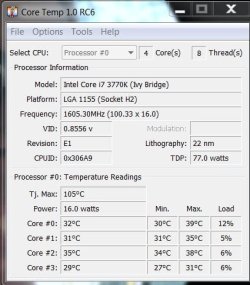
Gary, have you tried Core Temp RC6? It may read your CPU better than RC5. It did mine.
 

My Computers

System One System Two

  • Computer type
    PC/Desktop
    Computer Manufacturer/Model Number
    ALWAYS UNDER CONSTRUCTION
    OS
    Windows 11 Pro
    CPU
    Ryzen 9 5900X
    Motherboard
    Asus X570 Crosshair Viii Hero
    Memory
    32GB G Skill DDR4-3600
    Graphics Card(s)
    EVGA RTX 3080 FTW 3 Ultra
    Sound Card
    On Board/Sennheiser PC37X Headset
    Monitor(s) Displays
    3 X Asus 27"
    Screen Resolution
    2560x1440
    Hard Drives
    2 X 1 TB NVME drives
    PSU
    EVGA 850
    Case
    Phanteks Eclipse P400A
    Cooling
    EVGA 280 AIO
    Keyboard
    Logitech G510s/ Logitech G13
    Mouse
    Logitech G502
    Internet Speed
    24/1
    Antivirus
    ESET/MBAM Pro/SAS Pro
    Browser
    Chrome/ Firefox/ Edge
  • Computer type
    Laptop
    System Manufacturer/Model Number
    Dell 16 Plus
    OS
    Windows 11 Pro
    CPU
    Intel Ultra 9 288V
    Memory
    32 GB LPDDR5X 8533
    Monitor(s) Displays
    16" Mini-LED HDR600 Touch 90 Hz
    Screen Resolution
    2560X1600
    Hard Drives
    1 TB NVME
Gary, have you tried Core Temp RC6? It may read your CPU better than RC5. It did mine.
Well I just tried it Steve and it's BS to download, one has to install an installer program first then try to opt out of a load of bundled crap. I finally got it but it won't run and it still reads the CPU wrong.
I sent a nastygram to Arthur Liberman, the developer.

EDIT: On the ALCPU forums the developer, Arthur, stated on Dec 10th that RC7 would be released "this week or next", still not out though.

coretemp RC6.PNG
 

My Computer

Computer type
PC/Desktop
Computer Manufacturer/Model Number
Home Built Desktop By DataTech
OS
Windows 7 Ultimate X64 SP1
CPU
Intel i5-2550K, Differing ~4.4-4.8GHz No built in GPU
Motherboard
ASUS P8Z68-V PRO/GEN3
Memory
16GB G.Skill Sniper 1866MHz @ 2133MHz 2x8GB
Graphics Card(s)
ASUS GTX650TIB-DC2OC-2GD5, (650TI Boost)
Sound Card
Onboard Realtek 5-1
Monitor(s) Displays
Samsung P2570HD
Screen Resolution
1920x1080
Hard Drives
Samsung 840 Pro 256GB SSD for OS, 500GB Seagate Constellation (Enterprise drive) for Data
PSU
Corsair HX650W
Case
Inwin Dragon Rider
Cooling
Hyper 212 EVO w/two Noctua fans, push-pull, @1300 RPM
Keyboard
E-Z Eyes, bright yellow keys with large characters
Mouse
steelseries SENSEI Laser Pro Gaming
Internet Speed
48-51Mbs Mbs down, 11 Mbs up Xfinity Cable
Antivirus
Norton Internet Security 2013
Browser
IE 10, Opera, Pale Moon if needed
Other Info
4 case fans, LG BluRay-RE, ASUS DVD-RW, Mr. Fusion power supply, 1.21 gigawatts.
I don't know then RC5 reads mine like yours, but RC6 works fine and reads it right.


x6.JPG
 

My Computers

System One System Two

  • Computer type
    PC/Desktop
    Computer Manufacturer/Model Number
    ALWAYS UNDER CONSTRUCTION
    OS
    Windows 11 Pro
    CPU
    Ryzen 9 5900X
    Motherboard
    Asus X570 Crosshair Viii Hero
    Memory
    32GB G Skill DDR4-3600
    Graphics Card(s)
    EVGA RTX 3080 FTW 3 Ultra
    Sound Card
    On Board/Sennheiser PC37X Headset
    Monitor(s) Displays
    3 X Asus 27"
    Screen Resolution
    2560x1440
    Hard Drives
    2 X 1 TB NVME drives
    PSU
    EVGA 850
    Case
    Phanteks Eclipse P400A
    Cooling
    EVGA 280 AIO
    Keyboard
    Logitech G510s/ Logitech G13
    Mouse
    Logitech G502
    Internet Speed
    24/1
    Antivirus
    ESET/MBAM Pro/SAS Pro
    Browser
    Chrome/ Firefox/ Edge
  • Computer type
    Laptop
    System Manufacturer/Model Number
    Dell 16 Plus
    OS
    Windows 11 Pro
    CPU
    Intel Ultra 9 288V
    Memory
    32 GB LPDDR5X 8533
    Monitor(s) Displays
    16" Mini-LED HDR600 Touch 90 Hz
    Screen Resolution
    2560X1600
    Hard Drives
    1 TB NVME

My Computer

Computer type
PC/Desktop
Computer Manufacturer/Model Number
Home Built Desktop By DataTech
OS
Windows 7 Ultimate X64 SP1
CPU
Intel i5-2550K, Differing ~4.4-4.8GHz No built in GPU
Motherboard
ASUS P8Z68-V PRO/GEN3
Memory
16GB G.Skill Sniper 1866MHz @ 2133MHz 2x8GB
Graphics Card(s)
ASUS GTX650TIB-DC2OC-2GD5, (650TI Boost)
Sound Card
Onboard Realtek 5-1
Monitor(s) Displays
Samsung P2570HD
Screen Resolution
1920x1080
Hard Drives
Samsung 840 Pro 256GB SSD for OS, 500GB Seagate Constellation (Enterprise drive) for Data
PSU
Corsair HX650W
Case
Inwin Dragon Rider
Cooling
Hyper 212 EVO w/two Noctua fans, push-pull, @1300 RPM
Keyboard
E-Z Eyes, bright yellow keys with large characters
Mouse
steelseries SENSEI Laser Pro Gaming
Internet Speed
48-51Mbs Mbs down, 11 Mbs up Xfinity Cable
Antivirus
Norton Internet Security 2013
Browser
IE 10, Opera, Pale Moon if needed
Other Info
4 case fans, LG BluRay-RE, ASUS DVD-RW, Mr. Fusion power supply, 1.21 gigawatts.
I attempted to install Core Temp but cancelled. Questions...

- What it this InstallIQ?

- And does it really install Yahoo Toolbar even in "custom" install?
 

My Computer

Computer type
PC/Desktop
Computer Manufacturer/Model Number
Custom built by me.
OS
Windows 10 Pro
CPU
Intel Core i7-4770K (3.5Ghz)
Motherboard
Gigabyte G1 Sniper 5 (F10 Bios)
Memory
32 gig Corsair Dominator Platinum (4x8Gig)
Graphics Card(s)
Sapphire Tri-X R9 Fury
Sound Card
Soundblaster ZXR
Monitor(s) Displays
NEC PA242W 24" LCD Monitor
Screen Resolution
1920 x 1200
Hard Drives
Primary - Samsung 850 Pro (512gig), Samsung 840 Pro (256gig), 2TB WD Caviar Black.
PSU
EVGA Supernova 1000 G2
Case
Cooler Master HAF X
Cooling
Corsair H100i with Corsair Air Series SP120 Quiet Fans
Keyboard
Logitech Wireless Wave
Mouse
Logitech Performance MX
Internet Speed
High Speed Cable
Antivirus
Norton Security
Browser
IE11
Other Info
Memory Timings - 1866MHz @ 9-9-9-27-1T @ 1.5 volts
It is a way for developers or the file host to monetize their wares by trying to bundle crapware with the legit file. It is an unneeded POS.
I unchecked Yahoo Toolbar and it did not install.
 

My Computer

Computer type
PC/Desktop
Computer Manufacturer/Model Number
Home Built Desktop By DataTech
OS
Windows 7 Ultimate X64 SP1
CPU
Intel i5-2550K, Differing ~4.4-4.8GHz No built in GPU
Motherboard
ASUS P8Z68-V PRO/GEN3
Memory
16GB G.Skill Sniper 1866MHz @ 2133MHz 2x8GB
Graphics Card(s)
ASUS GTX650TIB-DC2OC-2GD5, (650TI Boost)
Sound Card
Onboard Realtek 5-1
Monitor(s) Displays
Samsung P2570HD
Screen Resolution
1920x1080
Hard Drives
Samsung 840 Pro 256GB SSD for OS, 500GB Seagate Constellation (Enterprise drive) for Data
PSU
Corsair HX650W
Case
Inwin Dragon Rider
Cooling
Hyper 212 EVO w/two Noctua fans, push-pull, @1300 RPM
Keyboard
E-Z Eyes, bright yellow keys with large characters
Mouse
steelseries SENSEI Laser Pro Gaming
Internet Speed
48-51Mbs Mbs down, 11 Mbs up Xfinity Cable
Antivirus
Norton Internet Security 2013
Browser
IE 10, Opera, Pale Moon if needed
Other Info
4 case fans, LG BluRay-RE, ASUS DVD-RW, Mr. Fusion power supply, 1.21 gigawatts.
C1E is a power saving feature for the CPU, it drop the frequency and the voltage when your PC is idle. I seem to remember advice to disable while finding your clock, but re-enabling after you have it set? A Guy

There is some debate in what C1E does and how it affects overall system performance. In one sense it is a power saving method, on the other hand, because it's a power saving method, it can influence overall system performance. How much of a performance hit is debatable.

I personally leave it enabled as I don't want or need my CPU running at 100 percent all the time. On the other hand, if you're benching all the time, perhaps disabling it will get you those extra points.

It comes down to what you want, but in the end having a system run 100 percent all the time may not be good for the system or your wallet.

Here's some info

- What is C1E? - TechSpot Forums

- C1E Feature and SSD performance @ 4k tests - Crucial Community

Here's an article on it and SSD drives though the article is nearly 5 years old, and I'm of the opinion this no longer applies, but that's just gut feelings - Outlook, Conclusion And Remaining Questions & Answers - Does Power-Saving Technology Kill SSD Performance? (conclusion page)

My two cents.
 

My Computer

Computer type
PC/Desktop
Computer Manufacturer/Model Number
Custom built by me.
OS
Windows 10 Pro
CPU
Intel Core i7-4770K (3.5Ghz)
Motherboard
Gigabyte G1 Sniper 5 (F10 Bios)
Memory
32 gig Corsair Dominator Platinum (4x8Gig)
Graphics Card(s)
Sapphire Tri-X R9 Fury
Sound Card
Soundblaster ZXR
Monitor(s) Displays
NEC PA242W 24" LCD Monitor
Screen Resolution
1920 x 1200
Hard Drives
Primary - Samsung 850 Pro (512gig), Samsung 840 Pro (256gig), 2TB WD Caviar Black.
PSU
EVGA Supernova 1000 G2
Case
Cooler Master HAF X
Cooling
Corsair H100i with Corsair Air Series SP120 Quiet Fans
Keyboard
Logitech Wireless Wave
Mouse
Logitech Performance MX
Internet Speed
High Speed Cable
Antivirus
Norton Security
Browser
IE11
Other Info
Memory Timings - 1866MHz @ 9-9-9-27-1T @ 1.5 volts
It is a way for developers or the file host to monetize their wares by trying to bundle crapware with the legit file. It is an unneeded POS.
I unchecked Yahoo Toolbar and it did not install.

Thanks. I just didn't want to install and find, even though I un-checked the box it ignored and installed Yahoo Toolbar anyway.

Peace :cool:
 

My Computer

Computer type
PC/Desktop
Computer Manufacturer/Model Number
Custom built by me.
OS
Windows 10 Pro
CPU
Intel Core i7-4770K (3.5Ghz)
Motherboard
Gigabyte G1 Sniper 5 (F10 Bios)
Memory
32 gig Corsair Dominator Platinum (4x8Gig)
Graphics Card(s)
Sapphire Tri-X R9 Fury
Sound Card
Soundblaster ZXR
Monitor(s) Displays
NEC PA242W 24" LCD Monitor
Screen Resolution
1920 x 1200
Hard Drives
Primary - Samsung 850 Pro (512gig), Samsung 840 Pro (256gig), 2TB WD Caviar Black.
PSU
EVGA Supernova 1000 G2
Case
Cooler Master HAF X
Cooling
Corsair H100i with Corsair Air Series SP120 Quiet Fans
Keyboard
Logitech Wireless Wave
Mouse
Logitech Performance MX
Internet Speed
High Speed Cable
Antivirus
Norton Security
Browser
IE11
Other Info
Memory Timings - 1866MHz @ 9-9-9-27-1T @ 1.5 volts
on my AMD rig, disableing C1E did give me a little better frame rates. but the thing i noticed most was that stuttering stopped in games. there was a lot of micro stutter i was getiing and part of the cause was C1E. i also ran a benchmark, (cinebench) with C1E on and off and with it off i get a better score.
 

My Computer

Computer type
PC/Desktop
Computer Manufacturer/Model Number
Weekend Warrior Rig
OS
Windows 10 Pro
CPU
Intel i7-3770K 4.4GHz
Motherboard
ASUS P8Z77-V Pro
Memory
8GB G.SKILL Ripjaws 1866 MHz
Graphics Card(s)
EVGA GTX 980 Classified
Monitor(s) Displays
Asus VH238H 23" 2ms
Screen Resolution
1920x1080
Hard Drives
Intel 330 120GB SSD /
WD Blue 1TB /
WD Black 500GB
PSU
Corsair CX750M
Case
NZXT H440
Cooling
Corsair H80i- CPU / Corsair H90- GPU
Keyboard
Logitech K360 LE
Mouse
Logitech G500
Antivirus
Avast
Browser
Chrome
Other Info
1200W 2.1 Surround Sound Audio
Back
Top