New MB and CPU; same HDD and OS. Couple of Qs

riffwraith

New member
Member
VIP
Local time
3:02 AM
Messages
240
Hi all. I have a couple of Qs about my setup here, and was hoping for some advice.

I use W7 SP-1 64-bit Ult. I moved on from my ASUS P6T and i7 960 to an ASUS 9x79-LE and i7 4820k. I have the absolute latest BIOS, swapped the RAM with crucial so I have the latest revision, am still using the same NVIDIA vid card (now the latest driver), and still use the same case and PSU. I am also using the same HDD with the old W7 install. I have been told that I shouldn't do this; but everything seems to be working ok. I installed the drivers from the ASUS CD. I had to reactivate Windows - put the key in and that went off without a hitch. And I updated the vid card driver as well. I have seen no issues so far, tho I have not yet plugged in my dongles and my soundcard. That's next.

So, the first Q is this: is it really not a good idea to run the old OS install? I realize that if I wanted to be safe, I would reinstall, but I am trying to avoid doing that because of all the stuff I have to install - all the programs, and authorizations... it's a PITA, and almost a full day's work. Like I said, everything is fine so far. But I still wanted to ask for some thoughts on this?

Secondly, when I go to my Device Mgr, there are a bunch of listings in yellow, telling me the device is not installed, and/or the driver is missing. The listing is under Other Devices, and it is "Base System Device". The thing is, there are 34 (thirty four) of them. I have never seen anything like that before. Then I have three listings for "Performance Counters" and one for "System Interrupt Controller". I ran the CD included with the board already, but admittedly, the board came with an old rev of BIOS, which I have since updated. Could that be the issue? Is this a MB thing, or something else? I can call ASUS, but I am probably better off here. ;)

Thanks in advance.
 

My Computer My Computer

At a glance

W7 64 UltIntel Core i9-7940xGSkill 128GBAMD Radeon RX 560
Computer type
PC/Desktop
Computer Manufacturer/Model Number
Custom
OS
W7 64 Ult
CPU
Intel Core i9-7940x
Motherboard
ASUS x299 TUF
Memory
GSkill 128GB
Graphics Card(s)
AMD Radeon RX 560
Sound Card
RME
Screen Resolution
1920x1080
Hard Drives
5
PSU
BeQuiet!
Case
BeQuiet!
Keyboard
HyperX
Mouse
Logitech
Browser
IE - what else is there?
What you see in Device mgr are usually driver problems. You made a pretty dramatic change of your gear. I would recommend to update those drivers. You are probably running on some generic drivers now which may not give you optimal performance.

If the system runs, you need not do all 34 in one day. But over time it may be beneficial.
 

My Computer My Computer

At a glance

Vista, Windows7, Mint Mate, Zorin, Windows 8from 1.6GHz Duo to i7
Computer Manufacturer/Model Number
HP, Dell, Gateway, Toshiba - 4 laptops and 2 desktops
OS
Vista, Windows7, Mint Mate, Zorin, Windows 8
CPU
from 1.6GHz Duo to i7
Monitor(s) Displays
2x HP w2207
Hard Drives
5x HDD, 7x SSD, 12x Externals
Keyboard
with trackball - no mices
Mouse
Trackball mice
Internet Speed
DSL 6000

My Computer My Computer

At a glance

W7 64 UltIntel Core i9-7940xGSkill 128GBAMD Radeon RX 560
Computer type
PC/Desktop
Computer Manufacturer/Model Number
Custom
OS
W7 64 Ult
CPU
Intel Core i9-7940x
Motherboard
ASUS x299 TUF
Memory
GSkill 128GB
Graphics Card(s)
AMD Radeon RX 560
Sound Card
RME
Screen Resolution
1920x1080
Hard Drives
5
PSU
BeQuiet!
Case
BeQuiet!
Keyboard
HyperX
Mouse
Logitech
Browser
IE - what else is there?
Right, I would get the drivers from Asus.
 

My Computer My Computer

At a glance

Vista, Windows7, Mint Mate, Zorin, Windows 8from 1.6GHz Duo to i7
Computer Manufacturer/Model Number
HP, Dell, Gateway, Toshiba - 4 laptops and 2 desktops
OS
Vista, Windows7, Mint Mate, Zorin, Windows 8
CPU
from 1.6GHz Duo to i7
Monitor(s) Displays
2x HP w2207
Hard Drives
5x HDD, 7x SSD, 12x Externals
Keyboard
with trackball - no mices
Mouse
Trackball mice
Internet Speed
DSL 6000
Thanks. I don't think that this is a MB thing, tho:

I went to the Intel site to get the latest x79 chipset. Apparently, the one on the CD is an older version (not surprising). I d/l-ed and installed the newer version, and that took care of the "Performance Counters", the "System Interrupt Controller", and 33 of the "Base System Device". Still stuck with that one that's left.

Any ideas on how to tackle that?
 

My Computer My Computer

At a glance

W7 64 UltIntel Core i9-7940xGSkill 128GBAMD Radeon RX 560
Computer type
PC/Desktop
Computer Manufacturer/Model Number
Custom
OS
W7 64 Ult
CPU
Intel Core i9-7940x
Motherboard
ASUS x299 TUF
Memory
GSkill 128GB
Graphics Card(s)
AMD Radeon RX 560
Sound Card
RME
Screen Resolution
1920x1080
Hard Drives
5
PSU
BeQuiet!
Case
BeQuiet!
Keyboard
HyperX
Mouse
Logitech
Browser
IE - what else is there?
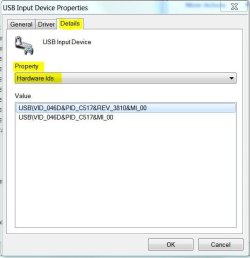
From Device Manager, right click on the device and select Properties. Click on the Details tab then under Property, select Hardware Ids. Snip that window and post it. It will look something like the picture below. Or you can just copy and paste all the values shown in the window into your message.
 

Attachments

  • Hardware IDs.JPG
    Hardware IDs.JPG
    30.5 KB · Views: 64

My Computer My Computer

At a glance

Windows 7 Pro-x64i7-2600 3.4GHz - 3.8GHz Turbo8Gb - 2x4GB, Muskin 991770 PC3-1333Integrated Intel HD 2000
Computer type
PC/Desktop
Computer Manufacturer/Model Number
Built 2/11/2011
OS
Windows 7 Pro-x64
CPU
i7-2600 3.4GHz - 3.8GHz Turbo
Motherboard
Intel DH67BL-B3
Memory
8Gb - 2x4GB, Muskin 991770 PC3-1333
Graphics Card(s)
Integrated Intel HD 2000
Sound Card
Integrated Intel 10.1 HD, RealTek ALC892
Monitor(s) Displays
Asus LCD VH222H, Haier HL24XSL2a
Screen Resolution
1920x1080, 1920x1080
Hard Drives
Crucial SSD C300-128Gb,
Western Digital WD5002AALX - 500Gb,
Western Digital WD7501AALS - 750Gb
PSU
Seasonic 650W 80+ Gold Modular
Case
Rosewill Defender
Cooling
Stock CPU, Four 120mm case fans, PCH fan added
Keyboard
Logitech EX100 Y-RBH94 Wireless
Mouse
Logitech EX100 M-RCE95 Wireless
Internet Speed
3.0/1.5 Mbs
Antivirus
Microsoft Security Essentials
Browser
Microsoft Internet Explorer 11
Other Info
Antec Veris Premier-Multimedia IR Station,
Cyber Accoustics-3602 Speakers,
AFT XM-5U Card Reader,
Hauppauge TV-HVR-2250,
Sony LX300 USB Turntable
Hi - thanks for chiming in.

Here is the text.

PCI\VEN_8086&DEV_0EB6&SUBSYS_84EF1043&REV_04
PCI\VEN_8086&DEV_0EB6&SUBSYS_84EF1043
PCI\VEN_8086&DEV_0EB6&CC_088000
PCI\VEN_8086&DEV_0EB6&CC_0880

If it helps, the location is listed as: PCI bus 255, device 16, function 6

Thanks!
 

My Computer My Computer

At a glance

W7 64 UltIntel Core i9-7940xGSkill 128GBAMD Radeon RX 560
Computer type
PC/Desktop
Computer Manufacturer/Model Number
Custom
OS
W7 64 Ult
CPU
Intel Core i9-7940x
Motherboard
ASUS x299 TUF
Memory
GSkill 128GB
Graphics Card(s)
AMD Radeon RX 560
Sound Card
RME
Screen Resolution
1920x1080
Hard Drives
5
PSU
BeQuiet!
Case
BeQuiet!
Keyboard
HyperX
Mouse
Logitech
Browser
IE - what else is there?
Try:

As long as you have installed the:
Intel® Chipset Device Software...from the Intel website
Intel(R) Management Engine Interface V9.0.0.1287 for Windows Vista/7/8 32bit & 64bit.(WHQL)...from the Asus Website

In device Manager manually use the "Browse my Computer" option to let Win find and install the files.


original thread here worked for them.
 

My Computer My Computer

At a glance

8 Pro x64i7 3770K 4.6GHz16GB G.Skill Trident X 2666mhzx2 EVGA 780 Ti Superclocked SLI
Computer type
PC/Desktop
Computer Manufacturer/Model Number
Systems by SmartEyeball
OS
8 Pro x64
CPU
i7 3770K 4.6GHz
Motherboard
ASUS P8Z77 WS
Memory
16GB G.Skill Trident X 2666mhz
Graphics Card(s)
x2 EVGA 780 Ti Superclocked SLI
Sound Card
SB X-FI Surround 5.1 PRO USB / ATH-AD900 Headphones
Monitor(s) Displays
x3 Dell U2410 / 58" Samsung
Screen Resolution
5760*1200/ 1920*1200
Hard Drives
2x Intel 520 240GB (RAID 0) * 2x WD Caviar Blacks 2TB (RAID 0) * 2TB WD Caviar Black * Sony Optirac DVD
PSU
Silverstone Strider Evolution 1200W
Case
Thermaltake Level 10 GT Snow Edition
Cooling
Noctua NH-D14
Keyboard
Topre Realforce // Ducky Shine MX Black // Filco Ninja TKL
Mouse
Thermaltake Theron (Highly Recommended) + Razer Imperator
Antivirus
MSE
Browser
IE, FF, WaterFox
Other Info
GT Extreme V2 Sim Racing Cockpit + 40" LCD and K/B Mouse stand ▼
Fanatec CSR Elite Wheel + Clubsport V1 Pedals + CSR shifter/7G-H ▼Saitek X52 Pro ▼ TrackIR 5 Pro
Buttkicker v2 Seat Rumbler with Dedicated 5.1 and Sub Woofer attached to frame ▼
=
Bloody Big Grin
The hardware Vendor is Intel but I couldn't find the Device code so I'm not much help. :confused:
 

My Computer My Computer

At a glance

Windows 7 Pro-x64i7-2600 3.4GHz - 3.8GHz Turbo8Gb - 2x4GB, Muskin 991770 PC3-1333Integrated Intel HD 2000
Computer type
PC/Desktop
Computer Manufacturer/Model Number
Built 2/11/2011
OS
Windows 7 Pro-x64
CPU
i7-2600 3.4GHz - 3.8GHz Turbo
Motherboard
Intel DH67BL-B3
Memory
8Gb - 2x4GB, Muskin 991770 PC3-1333
Graphics Card(s)
Integrated Intel HD 2000
Sound Card
Integrated Intel 10.1 HD, RealTek ALC892
Monitor(s) Displays
Asus LCD VH222H, Haier HL24XSL2a
Screen Resolution
1920x1080, 1920x1080
Hard Drives
Crucial SSD C300-128Gb,
Western Digital WD5002AALX - 500Gb,
Western Digital WD7501AALS - 750Gb
PSU
Seasonic 650W 80+ Gold Modular
Case
Rosewill Defender
Cooling
Stock CPU, Four 120mm case fans, PCH fan added
Keyboard
Logitech EX100 Y-RBH94 Wireless
Mouse
Logitech EX100 M-RCE95 Wireless
Internet Speed
3.0/1.5 Mbs
Antivirus
Microsoft Security Essentials
Browser
Microsoft Internet Explorer 11
Other Info
Antec Veris Premier-Multimedia IR Station,
Cyber Accoustics-3602 Speakers,
AFT XM-5U Card Reader,
Hauppauge TV-HVR-2250,
Sony LX300 USB Turntable
My guess is that those exclamation mark devices are on your old ASUS board and related chipset.

By simply moving the old installed Windows hard drive to your new machine environment, and installing the new chipset driver package from Intel (or ASUS, wherever you got it), you have ADDED support for the new mobo and CPU and chipset to your old installed Windows. But all of the hardware that was on the old mobo and is no longer on the new mobo is most likely what you're now seeing flags raised about.

My guess is that NONE of this will appear if/when you do a fresh new install.

If your machine is still apparently working properly or acceptably, I wouldn't worry about these numerous devices that Windows is "unhappy" about. I'm sure they'll disappear with a from-scratch cold install.

You can confirm this yourself, even without spending the day or two we know it will take to reinstall all of your application software from scratch when you do get around to a Windows install-from-scratch for your new hardware. Just take a system image backup of your current C-drive (and "system reserved" partition) with Macrium Reflect or whatever imaging software you use, presumably to some external USB drive or second internal hard drive. You're actually going to restore this back as soon as your experiment is over, as you appear not ready to go forward with a new from-scratch install yet, so you must put the image on some secondary media in order not to lose it when you reformat the hard drive for the temporary "experimental" from-scratch Windows install you're about to do.

Anyway, once you've got the image for recovery off on some secondary drive media, now go ahead and format the internal hard drive with a from-scratch Windows install. Run through the initial steps, to get the initial desktop. Run the Intel chipset installer, and any other ASUS-provided drivers for the mobo, soundcard, etc. You might also install the nVidia video driver. Basic new machine install from-scratch.

Now that you're essentially all built from scratch with the new hardware but without spending any additional time installing all of your 3rd-party application software and Windows customizations, you should again be able to look at Device Manager and see if all of the "exclamation marks" have disappeared as one would hope.

If everything looks good, you can now decide if you'll just bite the bullet and finish the from-scratch application installs to finish the job right by taking the necessary time to complete.

Or, if you're satisfied that this WILL eliminate your mystery "exclamation mark" devices if/when you ever eventually get the time to do the new Windows and applications from-scratch install job completely, you can just RESTORE the "system image" you took at the beginning of this experiment. And you're then right back where you started, with no more than maybe an hour or two spent experimenting.

If it were me, I'd never be satisfied with a new mobo/CPU upgrade unless I redid the from-scratch install of Windows and all vendor application software. Gives you an opportunity to "clean out the detritus" that no doubt has accumulated in your current (i.e. previous) system and start clean, all over again. Sure, it takes a few days depending on your collection of 3rd-party apps and Windows customizations, but we all know it's the right thing to do and it's worth it. Not every month or every six months (as it used to be with WinXP), but certainly every few years with Windows 7 and at the very least when you do a new hardware upgrade... that's often enough to justify a new long-lived super-stable Win7 reinstall from scratch.
 

My Computer My Computer

At a glance

Windows 7 Pro x64 (1), Win7 Pro X64 (2)i5-3350p 3.1Ghz/6MB-cache (1); E8400 3.0Ghz/6...8GB PC3-12800 DDR3 (1); 4GB PC3-10600 DDR3 (2)ATI HD7750 (1), (see TV cards); ATI R7 250 (2)
Computer type
PC/Desktop
Computer Manufacturer/Model Number
Home-built, two systems (1) and (2)
OS
Windows 7 Pro x64 (1), Win7 Pro X64 (2)
CPU
i5-3350p 3.1Ghz/6MB-cache (1); E8400 3.0Ghz/6MB-cache (2)
Motherboard
ASUS P8Z77-V Pro (1); ASUS P5Q3 (2)
Memory
8GB PC3-12800 DDR3 (1); 4GB PC3-10600 DDR3 (2)
Graphics Card(s)
ATI HD7750 (1), (see TV cards); ATI R7 250 (2)
Sound Card
Realtek ALC892 HD Audio (1); Realtek ALC1200 HD Audio (2)
Monitor(s) Displays
Eizo HD2441W LCD, Eizo S2433W (1); Eizo 24" S2433W (2)
Screen Resolution
1920x1200, 1920x1200 (1); 1920x1200 (2)
Hard Drives
(1) 1TB SATA-II (7200RPM), 2x2TB SATA-III (7200RPM), 250GB SATA-III (10000RPM) for OS; 2x2TB external USB 3.0

(2) 320GB SATA-II (7200RPM), 750GB SATA-II (7200RPM), 150GB SATA-II (10000RPM) for OS; 2TB external USB 3.0
PSU
Nesteq ECS-6001 600W (1); Nesteq ECS-5001 500W (2)
Case
Acousti-Case 360 (1) and (2)
Cooling
Noctua NH-U12P SE2 for CPU, 2x120mm case fans (1) and (2)
Keyboard
IBM PS/2 (1) and (2)
Mouse
Logitech MX Revolution wireless (1); Microsoft wired (2)
Internet Speed
100mbps down / 10mbps up
Antivirus
Microsoft Security Essentials; Malwarebyte Anti-Malware Pro
Browser
Firefox
Other Info
Ceton InfiniTV 4-tuner cablecard-enabled TV card as well as Hauppauge HVR-2250 OTA/ATSC 2-tuner TV card in (1), running under Win7 WMC
I just did the same thing you did but I deleted a lot of the old drives and shut down the old system. I then changed the mother board put in the old drive and restarted. When I restarted windows installed all the generic drivers, it took a little time then I restarted and installed the new mother board drivers, reactivated windows. Every thing has been working fine for a week. I think you can delete the old drivers and restart if windows needs them it will install a driver or ask you to install it. You should be OK to go. good luck
 

My Computer My Computer

At a glance

Windows 7 Home Premium 32bit.
Computer type
PC/Desktop
OS
Windows 7 Home Premium 32bit.
Thanks for all the responses. :)

Try:

As long as you have installed the:
Intel® Chipset Device Software...from the Intel website
Intel(R) Management Engine Interface V9.0.0.1287 for Windows Vista/7/8 32bit & 64bit.(WHQL)...from the Asus Website

In device Manager manually use the "Browse my Computer" option to let Win find and install the files.


original thread here worked for them.

Cool - thanks for that.

So, as I alluded to earlier, I downloaded the latest X79 chipset drivers from the intel website. That got rid of the "Performance Counters", the "System Interrupt Controller" and 33 of the "Base System Device". But I still have one remaining "Base System Device".

I did what the user in that thread suggested - d/l-ed the Intel(R) Management Engine Interface from ASUS, but got a "can not copy files. Install aborted" error. :shock: I was able to install the (older) one from the CD, but that has not gotten rid of the one remaining "Base System Device". I called ASUS - that did not help. I am going to post in that TH thread, and see where I get.

Cheers.
 

My Computer My Computer

At a glance

W7 64 UltIntel Core i9-7940xGSkill 128GBAMD Radeon RX 560
Computer type
PC/Desktop
Computer Manufacturer/Model Number
Custom
OS
W7 64 Ult
CPU
Intel Core i9-7940x
Motherboard
ASUS x299 TUF
Memory
GSkill 128GB
Graphics Card(s)
AMD Radeon RX 560
Sound Card
RME
Screen Resolution
1920x1080
Hard Drives
5
PSU
BeQuiet!
Case
BeQuiet!
Keyboard
HyperX
Mouse
Logitech
Browser
IE - what else is there?
Have you enabled Automatically deliver drivers via Windows Update (Step 3) and then run all rounds of Important and Optional Updates, with reboots, then check for Updates again until there are no more?

Until then I would not import or change any drivers.

There are also important patches for the OS and your hardware performance that will be delivered.

If performance does not improve after all this, import the latest Asus Chipset from the Support Downloads website for your mobo or PC.

Then import any other missing drivers in Device Manager. We can help you find these.
http://www.sevenforums.com/tutorials/52129-disk-clean-clean-all-diskpart-command.html
 

I have that set to "Let me choose what to do" - not automatic.

and then run all rounds of Important and Optional Updates, with reboots, then check for Updates again until there are no more?

Yes. At this point, the only updates found and not installed are language packs.

If performance does not improve after all this, import the latest Asus Chipset from the Support Downloads website for your mobo or PC.

Then import any other missing drivers in Device Manager. We can help you find these.

I don't have any performance issues. Actually, everything is running so well, I am almost tempted to just leave it. But I would really rather not.

And as far a the chipset goes, I have already applied the latest vers from the Intel site.

Cheers.
 

My Computer My Computer

At a glance

W7 64 UltIntel Core i9-7940xGSkill 128GBAMD Radeon RX 560
Computer type
PC/Desktop
Computer Manufacturer/Model Number
Custom
OS
W7 64 Ult
CPU
Intel Core i9-7940x
Motherboard
ASUS x299 TUF
Memory
GSkill 128GB
Graphics Card(s)
AMD Radeon RX 560
Sound Card
RME
Screen Resolution
1920x1080
Hard Drives
5
PSU
BeQuiet!
Case
BeQuiet!
Keyboard
HyperX
Mouse
Logitech
Browser
IE - what else is there?
You can trace the mystery device using Hardware Identification

Does Intel Mgmt Interface appear to do anything? Which drivers did it install, if any?

Ah - cool.

Ok, so the Vendor Search popped up as Acer (my two monitors are both Acer S241HL's) and the Device Search yielded no results.

I d/l-ed the latest driver from the Acer site, and now have a folder with S241HL.inf and S241HL.ICM No .exe or other means of installing the driver. Thinking I may need to put those somewhere, I searched my Win dir. for "S241HL" figuring I might have an older version of either of the aforementioned files - I found a few.

I have an inf and icm in C:\Windows\SoftwareDistribution\Download\Install, and both again in C:\Windows\System32\DriverStore\FileRepository\s241hl.inf_amd64_neutral_1d4828331b0026a3
and a third icm in C:\Windows\System32\spool\drivers\color

Should I replace those with the new files I just d/l-ed?

If I go to the Dev Mgr and update driver, choosing to browse manually, I point to C:\Windows, and get "Windows could not find driver sw...". If I point to the folder where those new files have been extracted to, I get the same message.

Thanks!
 

My Computer My Computer

At a glance

W7 64 UltIntel Core i9-7940xGSkill 128GBAMD Radeon RX 560
Computer type
PC/Desktop
Computer Manufacturer/Model Number
Custom
OS
W7 64 Ult
CPU
Intel Core i9-7940x
Motherboard
ASUS x299 TUF
Memory
GSkill 128GB
Graphics Card(s)
AMD Radeon RX 560
Sound Card
RME
Screen Resolution
1920x1080
Hard Drives
5
PSU
BeQuiet!
Case
BeQuiet!
Keyboard
HyperX
Mouse
Logitech
Browser
IE - what else is there?
Sometimes you have to browse from the Device Driver Update tab into the driver folder in the extracted download to get it to pick up driver.

If you'll tell us the exact driver and provide a link we can help you better.

If this is one you traced then provide the identifiers, too.
 
Last edited:

My Computer My Computer

At a glance

W7 64 UltIntel Core i9-7940xGSkill 128GBAMD Radeon RX 560
Computer type
PC/Desktop
Computer Manufacturer/Model Number
Custom
OS
W7 64 Ult
CPU
Intel Core i9-7940x
Motherboard
ASUS x299 TUF
Memory
GSkill 128GB
Graphics Card(s)
AMD Radeon RX 560
Sound Card
RME
Screen Resolution
1920x1080
Hard Drives
5
PSU
BeQuiet!
Case
BeQuiet!
Keyboard
HyperX
Mouse
Logitech
Browser
IE - what else is there?
I've never seen a monitor driver become a problem or not be found. Most all are in the installer or quickly updated via Windows Updates. Could it be another Acer driver? Is it listed as Unknown Device?

Confirm you've enabled Automatically deliver drivers via Windows Update (Step 3) and run all rounds of Important and Optional Windows UPdates to completion. Check again now for Updates.
 
I've never seen a monitor driver become a problem or not be found. Most all are in the installer or quickly updated via Windows Updates. Could it be another Acer driver? Is it listed as Unknown Device?

Could be another Acer driver I guess - but what? I have two monitors, but they are the same m&m.

Confirm you've enabled Automatically deliver drivers via Windows Update (Step 3) and run all rounds of Important and Optional Windows UPdates to completion. Check again now for Updates.

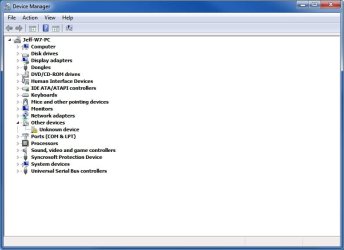
Yep - did that. The only thing there are those previously mentioned lang. packs. Below is what my D.M. looks like. Thanks!


dm.jpg
 

My Computer My Computer

At a glance

W7 64 UltIntel Core i9-7940xGSkill 128GBAMD Radeon RX 560
Computer type
PC/Desktop
Computer Manufacturer/Model Number
Custom
OS
W7 64 Ult
CPU
Intel Core i9-7940x
Motherboard
ASUS x299 TUF
Memory
GSkill 128GB
Graphics Card(s)
AMD Radeon RX 560
Sound Card
RME
Screen Resolution
1920x1080
Hard Drives
5
PSU
BeQuiet!
Case
BeQuiet!
Keyboard
HyperX
Mouse
Logitech
Browser
IE - what else is there?
Back
Top