Solved Need advice on cooling graphics cards in SLI.

Omegaman007

New member
Local time
9:32 AM
Messages
31
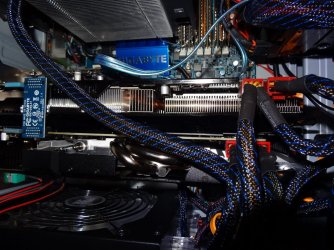
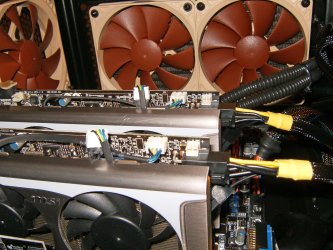
I just purchased another GTX670 2GB (2 fan ASUS) to go with the one that's been in my system (3 fan Gigabyte Windforce). Both cards do rather well thermally in the Valley benchmark with the Gigabyte reaching 59C and the ASUS 63C when they're in the box alone. Things become uncomfortably warm when I hook them up in SLI as they are extremely close together and there is little room for the Gigabyte (top card) fans to blow its air out. When in SLI the Gigabyte hits 77C and the ASUS 67C. The first time I ran it in this configuration the PC crashed during the benchmark. Afterward I increased the speed on the two front intake fans and it was able to complete the test multiple times.

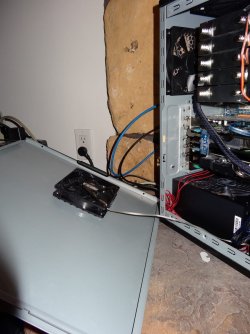
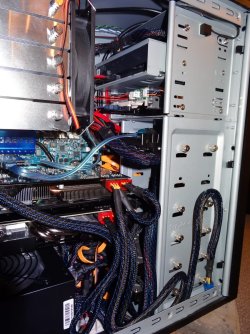
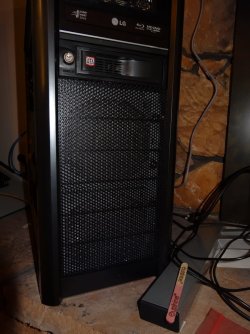
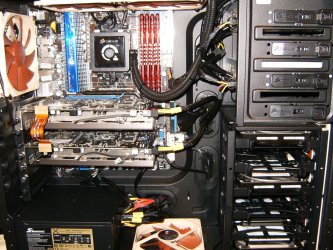
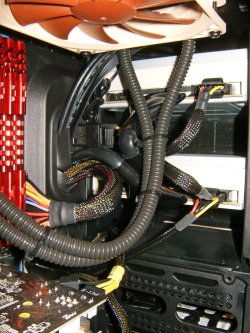
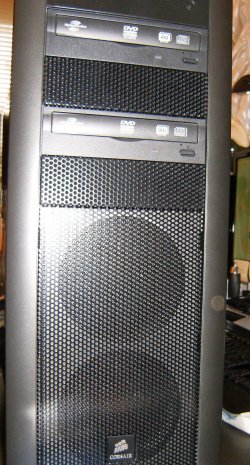
I attached some photos of the rig and would like some suggestions on what I can do to cool the top card. I don't think putting the ASUS on top would work because it's the warmer of the two cards to begin with, has a metal fan shroud (which could short the back of the Gigabyte), and the longer Gigabyte needs the space up there.

Fan setup is as follows:
2 fans in the front sucking air in over the HDs. They are on a manual fan controller.
1 side fan blowing air in between the power supply and the graphics cards, also on a manual fan controller (should it be blowing out?)
1 fan blowing air through the CPU heatsink (CPU_FAN control)
1 case fan blowing air out of the case on the other side of the CPU heatsink
1 case fan blowing air up and out of the tower (2 position speed switch)
1 bottom mounted power supply blowing air out of the back of the tower
 

Attachments
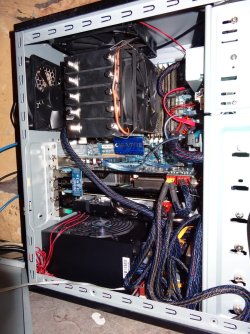
  • DSC02679.JPG
    DSC02679.JPG
    215.3 KB · Views: 4
  • DSC02680.JPG
    DSC02680.JPG
    135.5 KB · Views: 1
  • DSC02681.JPG
    DSC02681.JPG
    216.2 KB · Views: 2
  • DSC02682.JPG
    DSC02682.JPG
    204.1 KB · Views: 2
  • DSC02686.JPG
    DSC02686.JPG
    147.7 KB · Views: 1

My Computer My Computer

At a glance

Windows 7 x64, Windows XP x64, Ubuntu
OS
Windows 7 x64, Windows XP x64, Ubuntu
Dust can be a prime example of overheating mate, give it a good hover out, i know one cards brand new but if the other has alot of dust on it then it could be blowing it around the case, apart from that, liquid cooling but i have seen similar setups run cooler when under stress, im not so sure, il leave it to the guru's on the site:) Anyway good luck
 

My Computer My Computer

At a glance

Windows 7 Home Premium 64BitAMD A6-3420M 1.5GHZ OC - 2.0GHZ4GB DDR3 1600MHZAMD RADEON 6520G+AMD RADEON HD7470M 1GB DDR3
Computer type
Laptop
Computer Manufacturer/Model Number
Packard Bell
OS
Windows 7 Home Premium 64Bit
CPU
AMD A6-3420M 1.5GHZ OC - 2.0GHZ
Memory
4GB DDR3 1600MHZ
Graphics Card(s)
AMD RADEON 6520G+AMD RADEON HD7470M 1GB DDR3
Screen Resolution
1366x768
Hard Drives
500GB SATA
Internet Speed
18Mb Unlimited
Antivirus
AVAST!
Browser
MOZILLA FIREFOX
Things become uncomfortably warm when I hook them up in SLI as they are extremely close together and there is little room for the Gigabyte (top card) fans to blow its air out. When in SLI the Gigabyte hits 77C and the ASUS 67C. The first time I ran it in this configuration the PC crashed during the benchmark. Afterward I increased the speed on the two front intake fans and it was able to complete the test multiple times.

Tbh, heat shouldn't have been a factor. I had a tri 670 sli setup and the top and middle card were quite happy running in the mid/high 90's. 77c shouldn't be an issue. (aside from not hitting the full boost clock speed)


1 side fan blowing air in between the power supply and the graphics cards, also on a manual fan controller (should it be blowing out?)
You can certainly try reversing the fan - but typically the side is always 'cool air in'.


Short of upgrading your case fans to ones that push more air, unfortunately there isn't a whole lot you can do. Partly because of the gigabyte dumping heat into your case, but mostly it's just how SLI is when two cards are sandwiched together.

Mine were windforce models as well and I actually placed a 120mm on top the primary card right over the backside of the gpu core - but it may have net me a whole 1-2c difference if that.

You could try to tidy up the cables and shove them more into the drive bay area to create less of a wind flow blockage from the two front fans.

Maybe add another 120mm fan behind the cards and remove that last top bracket to make a small "exhaust".

Create a custom fan profile with afterburner/Precision X to increase the cards fan speeds if you haven't already done so.

With SLI and sandwiched cards - noise and heat are always going to be a factor.
 

My Computer My Computer

At a glance

8 Pro x64i7 3770K 4.6GHz16GB G.Skill Trident X 2666mhzx2 EVGA 780 Ti Superclocked SLI
Computer type
PC/Desktop
Computer Manufacturer/Model Number
Systems by SmartEyeball
OS
8 Pro x64
CPU
i7 3770K 4.6GHz
Motherboard
ASUS P8Z77 WS
Memory
16GB G.Skill Trident X 2666mhz
Graphics Card(s)
x2 EVGA 780 Ti Superclocked SLI
Sound Card
SB X-FI Surround 5.1 PRO USB / ATH-AD900 Headphones
Monitor(s) Displays
x3 Dell U2410 / 58" Samsung
Screen Resolution
5760*1200/ 1920*1200
Hard Drives
2x Intel 520 240GB (RAID 0) * 2x WD Caviar Blacks 2TB (RAID 0) * 2TB WD Caviar Black * Sony Optirac DVD
PSU
Silverstone Strider Evolution 1200W
Case
Thermaltake Level 10 GT Snow Edition
Cooling
Noctua NH-D14
Keyboard
Topre Realforce // Ducky Shine MX Black // Filco Ninja TKL
Mouse
Thermaltake Theron (Highly Recommended) + Razer Imperator
Antivirus
MSE
Browser
IE, FF, WaterFox
Other Info
GT Extreme V2 Sim Racing Cockpit + 40" LCD and K/B Mouse stand ▼
Fanatec CSR Elite Wheel + Clubsport V1 Pedals + CSR shifter/7G-H ▼Saitek X52 Pro ▼ TrackIR 5 Pro
Buttkicker v2 Seat Rumbler with Dedicated 5.1 and Sub Woofer attached to frame ▼
=
Bloody Big Grin
Thanks for the suggestions guys. I'll give the insides a blast of air and a vacuum. I noticed quite a bit of dust on the side fan blades so I think I need to put a filter in front of it... any suggestions for something I can sandwich in there? I was thinking of maybe getting some spacers to get the fan closer to the graphics cards too. I wondered if one of these EVERCOOL SB-F2 Case Fan - Newegg.com might help but I'm tight for room in the case as is. I don't know why MB manufacturers don't leave more space between there graphic card slots.

I've read that some people wedge something like an eraser between the two cards, but since I occasionally move my computer, I'd rather use a a sturdier method, but one that will still easily let me remove the cards if I need. Have to come up with something.

Yeah, I was thinking <80C should be OK also but the way the PC crashed was very unusual. The screen went blank and everything locked up... even the power button would not work. I had to flip the switch on the power supply. It's only happened once so I guess I'm not going to freak out over it.

Thanks again for the suggestions and if you think of anything else please let me know. Peace!
 

My Computer My Computer

At a glance

Windows 7 x64, Windows XP x64, Ubuntu
OS
Windows 7 x64, Windows XP x64, Ubuntu
I noticed quite a bit of dust on the side fan blades so I think I need to put a filter in front of it... any suggestions for something I can sandwich in there?

People use a lot things from fine mesh to panty hose. I've used the panty hose method before and it does work - however it does block some air flow. It's a trade off.


I was thinking of maybe getting some spacers to get the fan closer to the graphics cards too.

You'd need to make sure the fan 'overpowers' the air coming out of the gigabyte. Place it towards the rear to get as much cool air over the memory and VRMs (Voltage regulators. These can get quite hot too)

In fact when I mentioned heat shouldn't be an issue, I forgot about that aspect. So while the core temps are fine, other areas of the card (basically near the power plug area) are susceptible to excess heat.


I wondered if one of these EVERCOOL SB-F2 Case Fan - Newegg.com might help but I'm tight for room in the case as is. I don't know why MB manufacturers don't leave more space between there graphic card slots.

Never actually used one. Some have claimed it makes a difference, others disagree. Plus there's the noise to consider.

Slot spacing was a big factor in me choosing my board. But I agree, the layout for the majority of boards is pretty damn tight.


I've read that some people wedge something like an eraser between the two cards, but since I occasionally move my computer, I'd rather use a a sturdier method, but one that will still easily let me remove the cards if I need. Have to come up with something
.

The wedge method does work with varying degrees of success. It's not a magic bullet though unfortunately, but every degree helps.

Depending on what you wedge in there, it can be pretty secure. An eraser shouldn't shift with movement if wedged tight enough.


Are you running the cards at stock speeds, or overclocked?

And your CPU cooler - can the orientation be changed so the CPU fan is 'on the bottom' so it's basically blowing up and out through the top exhaust?
 

My Computer My Computer

At a glance

8 Pro x64i7 3770K 4.6GHz16GB G.Skill Trident X 2666mhzx2 EVGA 780 Ti Superclocked SLI
Computer type
PC/Desktop
Computer Manufacturer/Model Number
Systems by SmartEyeball
OS
8 Pro x64
CPU
i7 3770K 4.6GHz
Motherboard
ASUS P8Z77 WS
Memory
16GB G.Skill Trident X 2666mhz
Graphics Card(s)
x2 EVGA 780 Ti Superclocked SLI
Sound Card
SB X-FI Surround 5.1 PRO USB / ATH-AD900 Headphones
Monitor(s) Displays
x3 Dell U2410 / 58" Samsung
Screen Resolution
5760*1200/ 1920*1200
Hard Drives
2x Intel 520 240GB (RAID 0) * 2x WD Caviar Blacks 2TB (RAID 0) * 2TB WD Caviar Black * Sony Optirac DVD
PSU
Silverstone Strider Evolution 1200W
Case
Thermaltake Level 10 GT Snow Edition
Cooling
Noctua NH-D14
Keyboard
Topre Realforce // Ducky Shine MX Black // Filco Ninja TKL
Mouse
Thermaltake Theron (Highly Recommended) + Razer Imperator
Antivirus
MSE
Browser
IE, FF, WaterFox
Other Info
GT Extreme V2 Sim Racing Cockpit + 40" LCD and K/B Mouse stand ▼
Fanatec CSR Elite Wheel + Clubsport V1 Pedals + CSR shifter/7G-H ▼Saitek X52 Pro ▼ TrackIR 5 Pro
Buttkicker v2 Seat Rumbler with Dedicated 5.1 and Sub Woofer attached to frame ▼
=
Bloody Big Grin
You can water cool those things if you want.

NZXT makes a pretty nifty bracket Kraken? G10 - NZXT

You can use several closed loop water coolers like the NZXT Kraken X40 or the Corsair H90.

I have 2 x GTX770 and the temps on air are good, 25 idle and 70 at maxload. I did order the NZXT brackets but they are BO, waiting and waiting.
 

My Computer My Computer

At a glance

Windows Seven Ultimate x64Intel i7 4770K @ 4.5 @1.36vG-Skill TirentX 16Gb @ 2400mhz(SLI) 2 x Asus ENGTX 770 Direct CUII OC
Computer type
PC/Desktop
Computer Manufacturer/Model Number
Custom
OS
Windows Seven Ultimate x64
CPU
Intel i7 4770K @ 4.5 @1.36v
Motherboard
Asus Maximus VI Formula
Memory
G-Skill TirentX 16Gb @ 2400mhz
Graphics Card(s)
(SLI) 2 x Asus ENGTX 770 Direct CUII OC
Sound Card
Onboard
Monitor(s) Displays
Dell Wfp27 & Asus 27'
Screen Resolution
1920x1080
Hard Drives
1 x SSD Corsair Force GT 240Gb
1 x 2 TB WD Black
1 x 3 TB WD
4 x 2 TB RED NAS (RAID5)
PSU
Corsair AX1200i
Case
NZXT Phantom 820 (Mate Black)
Cooling
Corsair H100i push/pull
Keyboard
Logitech G510
Mouse
Logitech G500S
Internet Speed
Videotron Extreme 20MB
Other Info
BOSE 2.1-
Astro Gaming A50 Wireless Headset-
Asus Dark Night Router-
Nostromo N52TE-
NAS QNAP TS-469 Pro 4 x 2TB WD RED NAS (RAID5)-
I noticed quite a bit of dust on the side fan blades so I think I need to put a filter in front of it... any suggestions for something I can sandwich in there?

People use a lot things from fine mesh to panty hose. I've used the panty hose method before and it does work - however it does block some air flow. It's a trade off.


I was thinking of maybe getting some spacers to get the fan closer to the graphics cards too.
You'd need to make sure the fan 'overpowers' the air coming out of the gigabyte. Place it towards the rear to get as much cool air over the memory and VRMs (Voltage regulators. These can get quite hot too)

In fact when I mentioned heat shouldn't be an issue, I forgot about that aspect. So while the core temps are fine, other areas of the card (basically near the power plug area) are susceptible to excess heat.


I wondered if one of these EVERCOOL SB-F2 Case Fan - Newegg.com might help but I'm tight for room in the case as is. I don't know why MB manufacturers don't leave more space between there graphic card slots.
Never actually used one. Some have claimed it makes a difference, others disagree. Plus there's the noise to consider.

Slot spacing was a big factor in me choosing my board. But I agree, the layout for the majority of boards is pretty damn tight.


I've read that some people wedge something like an eraser between the two cards, but since I occasionally move my computer, I'd rather use a a sturdier method, but one that will still easily let me remove the cards if I need. Have to come up with something
.

The wedge method does work with varying degrees of success. It's not a magic bullet though unfortunately, but every degree helps.

Depending on what you wedge in there, it can be pretty secure. An eraser shouldn't shift with movement if wedged tight enough.


Are you running the cards at stock speeds, or overclocked?

And your CPU cooler - can the orientation be changed so the CPU fan is 'on the bottom' so it's basically blowing up and out through the top exhaust?

Those are some good suggestions, I especially like the idea of moving the CPU cooling fan by 90 degrees. I'll definitely check on that. I also have another CPU cooler that I could try. Right now I'm not happy with the CPU cooling solution; the cooler is huge so you'd figure it should be good enough, and I've tried using different thermal compounds but it still runs hotter than I would like. I run the i920 at 3.8GHz, if I try to run it at 4GHz it hits over 80C and the PC gets unstable. This is under 100% load on all cores (using Pi stress test). Runs perfect at 3.8GHz with CPU temp at 78C (same load). These were all from tests before I put the second gfx card in.

Although both the gfx cards overclocked by about 100MHz alone (I didn't try going higher), I have not attempted to overclock them in SLI because of the temps. The top card with throttle once it hits 75C anyway and I'm assuming they run synchronously when in SLI mode so trying to OC the bottom card probably won't give any improvements (that's only my assumption, I have no tried doing it).

What do you mean by rear of the gfx card? Over by the PCI power connectors or by the HDMI output side?

Man, I'll probably get funny looks if I go to the store asking for pantyhose... maybe I'll try dryer sheets first. :mad:

As for the liquid cooling it looks like a nice solution but I don't have much room in the case and I'd rather not spend that kind of coin on this rather old system.
 

My Computer My Computer

At a glance

Windows 7 x64, Windows XP x64, Ubuntu
OS
Windows 7 x64, Windows XP x64, Ubuntu
Thanks for the suggestions guys. I'll give the insides a blast of air and a vacuum.
Blast of air only. Save the vacuum for the floor and the furniture. It's a bad idea to put a vacuum wand into a PC as they generate a lot of static electricity. They make special vacuums just for that type of thing, but they are small and cost a bit of money. If you aren't using one of those, then keep the Hoover away from the PC. ;)
 

My Computer My Computer

At a glance

Win 7 Pro x64/Win 10 Pro x64 dual bootAMD FX 8350 Vishera @ 420016 GB Mushkin Blackline DDR3-2400 @ 1866 (9-1...XFX Radeon R9 280 Double D Black Edition
Computer type
PC/Desktop
Computer Manufacturer/Model Number
Mellon Labs (custom build)
OS
Win 7 Pro x64/Win 10 Pro x64 dual boot
CPU
AMD FX 8350 Vishera @ 4200
Motherboard
ASUS M5A97 R2.0
Memory
16 GB Mushkin Blackline DDR3-2400 @ 1866 (9-10-10-10-31)
Graphics Card(s)
XFX Radeon R9 280 Double D Black Edition
Sound Card
Realtek HD Audio on MB. Sounds great.
Monitor(s) Displays
Acer 24", Acer 22"
Screen Resolution
3840 x 1080
Hard Drives
1 x Mushkin Chronos 120 GB SSD (Win 10)
1 x Samsung 850 EVO 250 GB SSD (Win 7)
1 x WD 1TB SATA Blue
1 x WD 1TB SATA Green
PSU
Corsair TX-750
Case
CoolerMaster HAF 912+
Cooling
Coolermaster Seidon 240M Liquid AIO. 6 case fans
Keyboard
Logitech G710+
Mouse
Logitech G500s
Internet Speed
Much better since I got fiber, but still way overpriced.
Antivirus
MSE, Malware Bytes for scanning
Browser
Firefox
Other Info
Corsair VOID USB headphones.

A Mellon Labs X-1 - LCD Smartie driven system status display.

Brought to you by the letter E
if I try to run it at 4GHz it hits over 80C and the PC gets unstable.

That could be due to insufficient vcore, RAM, etc When I stressed my i7 920, I'd let the core temp get up to ~95c during prime stress testing.

Although both the gfx cards overclocked by about 100MHz alone (I didn't try going higher), I have not attempted to overclock them in SLI because of the temps. ---(that's only my assumption, I have no tried doing it).
Overclocking the cards can add around 5c-10c to the temps (depending on OC)

In SLI the top card will run ~10c-20c higher because of the restricted airflow anyway.

You can OC the cards independently if you disable Sync in Afterburner/Precision X - The cards are happy to run at different speeds.


What do you mean by rear of the gfx card? Over by the PCI power connectors or by the HDMI output side?

Yep, the PCI plug end. Between the HDD cage and the bum of the cards, flowing over the cards to the rear of the case.

Man, I'll probably get funny looks if I go to the store asking for pantyhose... maybe I'll try dryer sheets first. :mad:


Lol, been there had the looks. Tbh I got an even funnier look when I said it was for the PC ;)


As for the liquid cooling it looks like a nice solution but I don't have much room in the case and I'd rather not spend that kind of coin on this rather old system.
Yeah, you'd have to have external radiator which doesn't help portability.


The only other thing I could really suggest would be a larger case/more air and if your board allowed - the cards in slot 1 and 3 using a 3-way or extended bridge (like mine is setup). I sacrificed x16/x16 for x16/x8 To allow a slot in between my cards.

Or if you are handy with tools - mod the case. Cut some more holes for more/larger fans. (I'm not handy with tools so I just use a full size tower)

The one plus about spending coin on a case is that you can always reuse the new case in a future build.
 

My Computer My Computer

At a glance

8 Pro x64i7 3770K 4.6GHz16GB G.Skill Trident X 2666mhzx2 EVGA 780 Ti Superclocked SLI
Computer type
PC/Desktop
Computer Manufacturer/Model Number
Systems by SmartEyeball
OS
8 Pro x64
CPU
i7 3770K 4.6GHz
Motherboard
ASUS P8Z77 WS
Memory
16GB G.Skill Trident X 2666mhz
Graphics Card(s)
x2 EVGA 780 Ti Superclocked SLI
Sound Card
SB X-FI Surround 5.1 PRO USB / ATH-AD900 Headphones
Monitor(s) Displays
x3 Dell U2410 / 58" Samsung
Screen Resolution
5760*1200/ 1920*1200
Hard Drives
2x Intel 520 240GB (RAID 0) * 2x WD Caviar Blacks 2TB (RAID 0) * 2TB WD Caviar Black * Sony Optirac DVD
PSU
Silverstone Strider Evolution 1200W
Case
Thermaltake Level 10 GT Snow Edition
Cooling
Noctua NH-D14
Keyboard
Topre Realforce // Ducky Shine MX Black // Filco Ninja TKL
Mouse
Thermaltake Theron (Highly Recommended) + Razer Imperator
Antivirus
MSE
Browser
IE, FF, WaterFox
Other Info
GT Extreme V2 Sim Racing Cockpit + 40" LCD and K/B Mouse stand ▼
Fanatec CSR Elite Wheel + Clubsport V1 Pedals + CSR shifter/7G-H ▼Saitek X52 Pro ▼ TrackIR 5 Pro
Buttkicker v2 Seat Rumbler with Dedicated 5.1 and Sub Woofer attached to frame ▼
=
Bloody Big Grin
The only other thing I could really suggest would be a larger case/more air and if your board allowed - the cards in slot 1 and 3 using a 3-way or extended bridge (like mine is setup). I sacrificed x16/x16 for x16/x8 To allow a slot in between my cards.

Do you know if you lost any performance moving to x16/x8? I'm not sure if that's on option with my MB but I may look into it. Will check on the CPU fan relocation tomorrow also.
 

My Computer My Computer

At a glance

Windows 7 x64, Windows XP x64, Ubuntu
OS
Windows 7 x64, Windows XP x64, Ubuntu
I start off simple.
Cable management. Those cables are blocking most of the air coming from the front fans.
If possible you could also remove the front cages if you are not using them.
Without moving things around I don't see anyway of getting air in and out of that case.

It would be helpful if you would post you system specs as per this
Tutorial by Brink.
http://www.sevenforums.com/tutorials/180324-system-info-see-your-system-specs.html

Look at my specs at the lower left of this post and you will get a idea of all the information that would be nice to have.
Make sure you let us know what power supply is being used.

Could you post a site showing what case you are using?

Their is more to using SLI that just installing another card.
 

My Computer My Computer

At a glance

Windows 10 Pro. 64/ version 1709 Windows 7 Pr...Intel i7-6800K @ 4.3Corsair Platinum 16 gig @2400EVGA GTX 1070 OC
Computer type
PC/Desktop
Computer Manufacturer/Model Number
Home made Desktop
OS
Windows 10 Pro. 64/ version 1709 Windows 7 Pro/64
CPU
Intel i7-6800K @ 4.3
Motherboard
ASUS X-99 Deluxe II
Memory
Corsair Platinum 16 gig @2400
Graphics Card(s)
EVGA GTX 1070 OC
Monitor(s) Displays
Asus 27" LED LCD/VE278Q
Screen Resolution
1920-1080 or 1280-720 HDMI
Hard Drives
INTEL SSD 730-240 Gb Sata 3.0/
PSU
EVGA Platium 1200W
Case
Phanteks Luxe Tempered Glass 8 fans/ one radiator
Cooling
XSPC/ Water Cooled CPU
Keyboard
Das 4 Professional
Mouse
Logitech M705/MX Anywhere 2-S
Internet Speed
100 mbits
Antivirus
Microsoft Security Essentials/ Malwarebytes Premium 3.0/ SAS
Browser
I.E. 11 default/Firefox/ ISP Time Warner Cable/Spectrum
Other Info
LG BluRay Burner/
Sound system-KLipsch-THX/
Icy Dock ssd Hot Swap bays.
Very seldom do mismatched video cards work well.
They should be exactly the same.
 

My Computer My Computer

At a glance

Windows 10 Pro. 64/ version 1709 Windows 7 Pr...Intel i7-6800K @ 4.3Corsair Platinum 16 gig @2400EVGA GTX 1070 OC
Computer type
PC/Desktop
Computer Manufacturer/Model Number
Home made Desktop
OS
Windows 10 Pro. 64/ version 1709 Windows 7 Pro/64
CPU
Intel i7-6800K @ 4.3
Motherboard
ASUS X-99 Deluxe II
Memory
Corsair Platinum 16 gig @2400
Graphics Card(s)
EVGA GTX 1070 OC
Monitor(s) Displays
Asus 27" LED LCD/VE278Q
Screen Resolution
1920-1080 or 1280-720 HDMI
Hard Drives
INTEL SSD 730-240 Gb Sata 3.0/
PSU
EVGA Platium 1200W
Case
Phanteks Luxe Tempered Glass 8 fans/ one radiator
Cooling
XSPC/ Water Cooled CPU
Keyboard
Das 4 Professional
Mouse
Logitech M705/MX Anywhere 2-S
Internet Speed
100 mbits
Antivirus
Microsoft Security Essentials/ Malwarebytes Premium 3.0/ SAS
Browser
I.E. 11 default/Firefox/ ISP Time Warner Cable/Spectrum
Other Info
LG BluRay Burner/
Sound system-KLipsch-THX/
Icy Dock ssd Hot Swap bays.
For sure I would look into a new case with cable management area behind mobo. Here's a Corsair 400R that's cheap enough but lets things breath.
HPIM2603v2.jpgHPIM2604v2.jpg
HPIM2640v2.jpgHPIM2642v2.jpg
HPIM2643v2.jpgHPIM2652v2.jpg
HPIM2651v2.jpg
 

My Computer My Computer

At a glance

Windows 7 Ultimate 64i7 3770k OC'd 4.6 @ 1.17v, also FX 8120 & i5 ...32 gb G.Skill Sniper DDR3 10-12-12-31 @ 2133XFX Radeon 7870 2GB DDR5
Computer type
PC/Desktop
Computer Manufacturer/Model Number
A blend of brains, brawn and dumb luck.
OS
Windows 7 Ultimate 64
CPU
i7 3770k OC'd 4.6 @ 1.17v, also FX 8120 & i5 miniITX
Motherboard
MSI P67A-GD80 b3
Memory
32 gb G.Skill Sniper DDR3 10-12-12-31 @ 2133
Graphics Card(s)
XFX Radeon 7870 2GB DDR5
Sound Card
Sound Blaster Z Series Card
Monitor(s) Displays
(2) LG LED 23" 1920 x 1080 2ms Monitors via mini d-port
Screen Resolution
1680 X 1050 p
Hard Drives
Samsung 256 gb 830 SSD sata III
(1) 1 tb WD Black
(2) 1 tb Hitachi deskmates/sata II
(2) 1 tb WD green/sata II
(2) 3 tb Seagate Barracuda
(1) 120 gb OCZ Vertex SS
(1) Drobo 5N w/5 Seagate 3tb
PSU
EVGA modular 1000G2 80% gold rating & APC 1200 RS
Case
CoolerMaster Storm Styker
Cooling
7 case fans 140mm & 120mm, NZXT Kraken X60
Keyboard
(2) Logitech Illuminated Keyboards (1) usb (1) wireless
Mouse
Logitech G700 & T-BC21 - nano nx for the laptop
Internet Speed
Basic 120mbps down
Antivirus
Trend Micro Titanium Max Security & Malwarebytes Premium
Browser
Chrome and IE 10
Other Info
5 Noctua case fans + 3 Noctua in p/p on NZXT cooler
Integrated hot swap drive bays for 2.5" Drives
(2) Lite-on dvd/cd/Blu Ray optical 22X
Integrated fan controller and led on/off
HP Officejet Pro 8630 all-n-one
Hot-swappable 3.5" hard drive bay
Netgear Nighthawk router
Asus USB 3 & sata 6 PCIe card
Vantec IDE to sata adptr./Ultra sata adptr
Lenovo L420 i5 lappy with m sata
Drobo 5N advanced NAS
My suggestion would also be a bigger case since yours is pretty over-crowded.

Decked out like Layback's case for your extreme heat situation.

I myself have stayed away from overclocking and multiple video cards, but if I did it, definitely would have to spend quite a bit extra to protect it since the amount of heat is so much higher than a simple system, and heat is the enemy of electronics.
 

My Computer My Computer

At a glance

Windows 7 Ultimate Retail Box (64-bit install...AMD FX-8350 CPU v1.15 (or 1.0F) BIOS was requ...8G CAS-7 G-Skill DDR3 @1333 (2 fours) [mobo n...Radeon HD 7950 [3 gigs of GDDR5] MSI Twin Fro...
Computer type
PC/Desktop
Computer Manufacturer/Model Number
Self Built Custom
OS
Windows 7 Ultimate Retail Box (64-bit installed) + Service Pack 1
CPU
AMD FX-8350 CPU v1.15 (or 1.0F) BIOS was required!
Motherboard
MSI 890FXA-GD70
Memory
8G CAS-7 G-Skill DDR3 @1333 (2 fours) [mobo nonOC max rec'd]
Graphics Card(s)
Radeon HD 7950 [3 gigs of GDDR5] MSI Twin Frozr model
Sound Card
Realtek High Definition Audio (onboard mobo, ALC-889 chip)
Monitor(s) Displays
2 WS LED Monitors: One LG One Viewsonic
Screen Resolution
1920 by 1080
Hard Drives
SSD for OS: Samsung 840 Pro
SSD for VM and utilities: Adata SX900
7200 RPM SATA HDs for the rest: Hitachi and Seagate
PSU
Corsair TX850 - 850W max, in service since August 2010.
Case
Thermaltake Armor A90
Cooling
Thermaltake Spin Q CPU Cooler, in service since August 2010
Keyboard
Logitech G11
Mouse
Logitech M310 Wireless
Internet Speed
100 Megabit broadband supposedly upgraded from 50 (Cable)
Antivirus
Bitdefender Internet Security 2014 suite
Browser
Pale Moon 64-bit main, also IceDragon, Opera, and Maxthon.
Other Info
CompTIA A+ certified (220-800 series) in July 2013.
Thank you linnemeyerhere for the pictures.
As the pictures show better than words you must have a well organized case in order to get proper air flow. Getting proper air flow will also help your cpu air cooler do its job.
It might take a new case in order to run two video cards cool.
We can help with the selection if need be. Their are many good cases in various price ranges. As you can see the Corsair 400R is a good workable case for not to much money.
The proper power supply is a must x-2 running SLI. We can also help with that if need be.

Omegaman007 I and others are not saying don't run SLI. Many do and like it but their are things that have to be taken into consideration when doing so. Or you will go from happy single video card computing to very painful dual video card computing.

Letting us know what system you have will help us help you.
------------
Nice build linnemeyerhere. Thanks again for the pictures.
 

My Computer My Computer

At a glance

Windows 10 Pro. 64/ version 1709 Windows 7 Pr...Intel i7-6800K @ 4.3Corsair Platinum 16 gig @2400EVGA GTX 1070 OC
Computer type
PC/Desktop
Computer Manufacturer/Model Number
Home made Desktop
OS
Windows 10 Pro. 64/ version 1709 Windows 7 Pro/64
CPU
Intel i7-6800K @ 4.3
Motherboard
ASUS X-99 Deluxe II
Memory
Corsair Platinum 16 gig @2400
Graphics Card(s)
EVGA GTX 1070 OC
Monitor(s) Displays
Asus 27" LED LCD/VE278Q
Screen Resolution
1920-1080 or 1280-720 HDMI
Hard Drives
INTEL SSD 730-240 Gb Sata 3.0/
PSU
EVGA Platium 1200W
Case
Phanteks Luxe Tempered Glass 8 fans/ one radiator
Cooling
XSPC/ Water Cooled CPU
Keyboard
Das 4 Professional
Mouse
Logitech M705/MX Anywhere 2-S
Internet Speed
100 mbits
Antivirus
Microsoft Security Essentials/ Malwarebytes Premium 3.0/ SAS
Browser
I.E. 11 default/Firefox/ ISP Time Warner Cable/Spectrum
Other Info
LG BluRay Burner/
Sound system-KLipsch-THX/
Icy Dock ssd Hot Swap bays.
No worries Jack you know I love taking pictures, funny though what used to load here on SF with ease now is timing out so I'm having to reduce them by 50%.
 

My Computer My Computer

At a glance

Windows 7 Ultimate 64i7 3770k OC'd 4.6 @ 1.17v, also FX 8120 & i5 ...32 gb G.Skill Sniper DDR3 10-12-12-31 @ 2133XFX Radeon 7870 2GB DDR5
Computer type
PC/Desktop
Computer Manufacturer/Model Number
A blend of brains, brawn and dumb luck.
OS
Windows 7 Ultimate 64
CPU
i7 3770k OC'd 4.6 @ 1.17v, also FX 8120 & i5 miniITX
Motherboard
MSI P67A-GD80 b3
Memory
32 gb G.Skill Sniper DDR3 10-12-12-31 @ 2133
Graphics Card(s)
XFX Radeon 7870 2GB DDR5
Sound Card
Sound Blaster Z Series Card
Monitor(s) Displays
(2) LG LED 23" 1920 x 1080 2ms Monitors via mini d-port
Screen Resolution
1680 X 1050 p
Hard Drives
Samsung 256 gb 830 SSD sata III
(1) 1 tb WD Black
(2) 1 tb Hitachi deskmates/sata II
(2) 1 tb WD green/sata II
(2) 3 tb Seagate Barracuda
(1) 120 gb OCZ Vertex SS
(1) Drobo 5N w/5 Seagate 3tb
PSU
EVGA modular 1000G2 80% gold rating & APC 1200 RS
Case
CoolerMaster Storm Styker
Cooling
7 case fans 140mm & 120mm, NZXT Kraken X60
Keyboard
(2) Logitech Illuminated Keyboards (1) usb (1) wireless
Mouse
Logitech G700 & T-BC21 - nano nx for the laptop
Internet Speed
Basic 120mbps down
Antivirus
Trend Micro Titanium Max Security & Malwarebytes Premium
Browser
Chrome and IE 10
Other Info
5 Noctua case fans + 3 Noctua in p/p on NZXT cooler
Integrated hot swap drive bays for 2.5" Drives
(2) Lite-on dvd/cd/Blu Ray optical 22X
Integrated fan controller and led on/off
HP Officejet Pro 8630 all-n-one
Hot-swappable 3.5" hard drive bay
Netgear Nighthawk router
Asus USB 3 & sata 6 PCIe card
Vantec IDE to sata adptr./Ultra sata adptr
Lenovo L420 i5 lappy with m sata
Drobo 5N advanced NAS
I don't know what you mean by timing out.
 

My Computer My Computer

At a glance

Windows 10 Pro. 64/ version 1709 Windows 7 Pr...Intel i7-6800K @ 4.3Corsair Platinum 16 gig @2400EVGA GTX 1070 OC
Computer type
PC/Desktop
Computer Manufacturer/Model Number
Home made Desktop
OS
Windows 10 Pro. 64/ version 1709 Windows 7 Pro/64
CPU
Intel i7-6800K @ 4.3
Motherboard
ASUS X-99 Deluxe II
Memory
Corsair Platinum 16 gig @2400
Graphics Card(s)
EVGA GTX 1070 OC
Monitor(s) Displays
Asus 27" LED LCD/VE278Q
Screen Resolution
1920-1080 or 1280-720 HDMI
Hard Drives
INTEL SSD 730-240 Gb Sata 3.0/
PSU
EVGA Platium 1200W
Case
Phanteks Luxe Tempered Glass 8 fans/ one radiator
Cooling
XSPC/ Water Cooled CPU
Keyboard
Das 4 Professional
Mouse
Logitech M705/MX Anywhere 2-S
Internet Speed
100 mbits
Antivirus
Microsoft Security Essentials/ Malwarebytes Premium 3.0/ SAS
Browser
I.E. 11 default/Firefox/ ISP Time Warner Cable/Spectrum
Other Info
LG BluRay Burner/
Sound system-KLipsch-THX/
Icy Dock ssd Hot Swap bays.
linnemeyerhere, that is one beautiful case. Well done.
 

My Computer My Computer

At a glance

Win 7 Pro x64/Win 10 Pro x64 dual bootAMD FX 8350 Vishera @ 420016 GB Mushkin Blackline DDR3-2400 @ 1866 (9-1...XFX Radeon R9 280 Double D Black Edition
Computer type
PC/Desktop
Computer Manufacturer/Model Number
Mellon Labs (custom build)
OS
Win 7 Pro x64/Win 10 Pro x64 dual boot
CPU
AMD FX 8350 Vishera @ 4200
Motherboard
ASUS M5A97 R2.0
Memory
16 GB Mushkin Blackline DDR3-2400 @ 1866 (9-10-10-10-31)
Graphics Card(s)
XFX Radeon R9 280 Double D Black Edition
Sound Card
Realtek HD Audio on MB. Sounds great.
Monitor(s) Displays
Acer 24", Acer 22"
Screen Resolution
3840 x 1080
Hard Drives
1 x Mushkin Chronos 120 GB SSD (Win 10)
1 x Samsung 850 EVO 250 GB SSD (Win 7)
1 x WD 1TB SATA Blue
1 x WD 1TB SATA Green
PSU
Corsair TX-750
Case
CoolerMaster HAF 912+
Cooling
Coolermaster Seidon 240M Liquid AIO. 6 case fans
Keyboard
Logitech G710+
Mouse
Logitech G500s
Internet Speed
Much better since I got fiber, but still way overpriced.
Antivirus
MSE, Malware Bytes for scanning
Browser
Firefox
Other Info
Corsair VOID USB headphones.

A Mellon Labs X-1 - LCD Smartie driven system status display.

Brought to you by the letter E
The picture file size requirements must have changed as I'm having to reduce them to not time out when downloading to SF's server.
 

My Computer My Computer

At a glance

Windows 7 Ultimate 64i7 3770k OC'd 4.6 @ 1.17v, also FX 8120 & i5 ...32 gb G.Skill Sniper DDR3 10-12-12-31 @ 2133XFX Radeon 7870 2GB DDR5
Computer type
PC/Desktop
Computer Manufacturer/Model Number
A blend of brains, brawn and dumb luck.
OS
Windows 7 Ultimate 64
CPU
i7 3770k OC'd 4.6 @ 1.17v, also FX 8120 & i5 miniITX
Motherboard
MSI P67A-GD80 b3
Memory
32 gb G.Skill Sniper DDR3 10-12-12-31 @ 2133
Graphics Card(s)
XFX Radeon 7870 2GB DDR5
Sound Card
Sound Blaster Z Series Card
Monitor(s) Displays
(2) LG LED 23" 1920 x 1080 2ms Monitors via mini d-port
Screen Resolution
1680 X 1050 p
Hard Drives
Samsung 256 gb 830 SSD sata III
(1) 1 tb WD Black
(2) 1 tb Hitachi deskmates/sata II
(2) 1 tb WD green/sata II
(2) 3 tb Seagate Barracuda
(1) 120 gb OCZ Vertex SS
(1) Drobo 5N w/5 Seagate 3tb
PSU
EVGA modular 1000G2 80% gold rating & APC 1200 RS
Case
CoolerMaster Storm Styker
Cooling
7 case fans 140mm & 120mm, NZXT Kraken X60
Keyboard
(2) Logitech Illuminated Keyboards (1) usb (1) wireless
Mouse
Logitech G700 & T-BC21 - nano nx for the laptop
Internet Speed
Basic 120mbps down
Antivirus
Trend Micro Titanium Max Security & Malwarebytes Premium
Browser
Chrome and IE 10
Other Info
5 Noctua case fans + 3 Noctua in p/p on NZXT cooler
Integrated hot swap drive bays for 2.5" Drives
(2) Lite-on dvd/cd/Blu Ray optical 22X
Integrated fan controller and led on/off
HP Officejet Pro 8630 all-n-one
Hot-swappable 3.5" hard drive bay
Netgear Nighthawk router
Asus USB 3 & sata 6 PCIe card
Vantec IDE to sata adptr./Ultra sata adptr
Lenovo L420 i5 lappy with m sata
Drobo 5N advanced NAS
The picture file size requirements must have changed as I'm having to reduce them to not time out when downloading to SF's server.
Are you using Firefox? I had to switch from using Firefox to IE when on this forum because FF kept timing out on me, and would only load half menus, etc. No problems with IE so far, though I much prefer FF.
 

My Computer My Computer

At a glance

Win 7 Pro x64/Win 10 Pro x64 dual bootAMD FX 8350 Vishera @ 420016 GB Mushkin Blackline DDR3-2400 @ 1866 (9-1...XFX Radeon R9 280 Double D Black Edition
Computer type
PC/Desktop
Computer Manufacturer/Model Number
Mellon Labs (custom build)
OS
Win 7 Pro x64/Win 10 Pro x64 dual boot
CPU
AMD FX 8350 Vishera @ 4200
Motherboard
ASUS M5A97 R2.0
Memory
16 GB Mushkin Blackline DDR3-2400 @ 1866 (9-10-10-10-31)
Graphics Card(s)
XFX Radeon R9 280 Double D Black Edition
Sound Card
Realtek HD Audio on MB. Sounds great.
Monitor(s) Displays
Acer 24", Acer 22"
Screen Resolution
3840 x 1080
Hard Drives
1 x Mushkin Chronos 120 GB SSD (Win 10)
1 x Samsung 850 EVO 250 GB SSD (Win 7)
1 x WD 1TB SATA Blue
1 x WD 1TB SATA Green
PSU
Corsair TX-750
Case
CoolerMaster HAF 912+
Cooling
Coolermaster Seidon 240M Liquid AIO. 6 case fans
Keyboard
Logitech G710+
Mouse
Logitech G500s
Internet Speed
Much better since I got fiber, but still way overpriced.
Antivirus
MSE, Malware Bytes for scanning
Browser
Firefox
Other Info
Corsair VOID USB headphones.

A Mellon Labs X-1 - LCD Smartie driven system status display.

Brought to you by the letter E
Back
Top