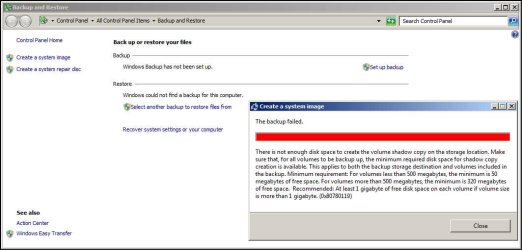
Not enough disk space to create the volume shadow copy ...

Tranas Spietis

New member
Local time
6:56 AM
Messages
26
This is an old problem on Win7 - a search of this forum showed no solutions - even though the same issue has been posted for years.

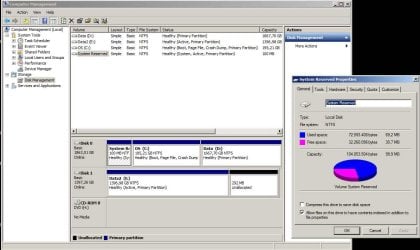
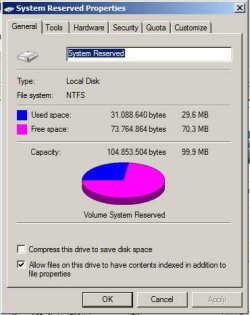
This machine has made system images for about 3 months without issues - last one was yesterday. Used space on the system reserved partition was always about 32 Mb. Suddenly this used space went to about 70 Mb which results in the error. I have no clue how this occurred.

Restoring an older system image apparently only restores the original files, does NOT deal with the excess cruff on the partition. [restoring ANY earlier image still results in 70 Mb as used on the system reserved partition].

How does one clear the useless trash that is located on the system partition so that system images can be made again?

I need a Windows7 based solution - NOT an aftermarket imaging program. [acronis, clonezilla etc.]

TIA
 

Attachments

  • Insufficient free space in system partition-backup fails.jpg
    Insufficient free space in system partition-backup fails.jpg
    49 KB · Views: 9
  • Insufficient free space in system partition.jpg
    Insufficient free space in system partition.jpg
    78.4 KB · Views: 9

My Computer My Computer

At a glance

Win7 Pro x6417-477132 GbOnboard
Computer type
PC/Desktop
Computer Manufacturer/Model Number
Custom build Intel
OS
Win7 Pro x64
CPU
17-4771
Motherboard
DH87MC
Memory
32 Gb
Graphics Card(s)
Onboard
Hard Drives
Seagate ST2000DM001

My Computer My Computer

At a glance

Windows 10 Pro. 64/ version 1709 Windows 7 Pr...Intel i7-6800K @ 4.3Corsair Platinum 16 gig @2400EVGA GTX 1070 OC
Computer type
PC/Desktop
Computer Manufacturer/Model Number
Home made Desktop
OS
Windows 10 Pro. 64/ version 1709 Windows 7 Pro/64
CPU
Intel i7-6800K @ 4.3
Motherboard
ASUS X-99 Deluxe II
Memory
Corsair Platinum 16 gig @2400
Graphics Card(s)
EVGA GTX 1070 OC
Monitor(s) Displays
Asus 27" LED LCD/VE278Q
Screen Resolution
1920-1080 or 1280-720 HDMI
Hard Drives
INTEL SSD 730-240 Gb Sata 3.0/
PSU
EVGA Platium 1200W
Case
Phanteks Luxe Tempered Glass 8 fans/ one radiator
Cooling
XSPC/ Water Cooled CPU
Keyboard
Das 4 Professional
Mouse
Logitech M705/MX Anywhere 2-S
Internet Speed
100 mbits
Antivirus
Microsoft Security Essentials/ Malwarebytes Premium 3.0/ SAS
Browser
I.E. 11 default/Firefox/ ISP Time Warner Cable/Spectrum
Other Info
LG BluRay Burner/
Sound system-KLipsch-THX/
Icy Dock ssd Hot Swap bays.
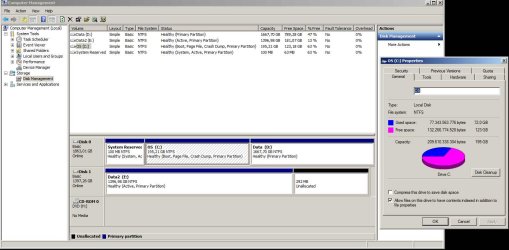
Screen shot attached
 

Attachments

  • Sufficient free space on partition C.jpg
    Sufficient free space on partition C.jpg
    89.1 KB · Views: 28

My Computer My Computer

At a glance

Win7 Pro x6417-477132 GbOnboard
Computer type
PC/Desktop
Computer Manufacturer/Model Number
Custom build Intel
OS
Win7 Pro x64
CPU
17-4771
Motherboard
DH87MC
Memory
32 Gb
Graphics Card(s)
Onboard
Hard Drives
Seagate ST2000DM001
I really don't know how your System Reserve Partition got so big.
Take a good read through these tutorials and see if they help. Be careful; if done wrong you might not be able to boot.

Why is drive (E) marked Active? With the set up you have now only System Reserve needs to be active.
A small test you could do.
Unplug the (E) drive and see if you can still boot.
If it doesn't boot plug the (E) drive back. See if it boots.

By Jonathan King

http://www.sevenforums.com/tutorials/71363-system-reserved-partition-delete.html


By Bare Foot Kid

http://www.sevenforums.com/tutorials/119151-system-reserved-create-using-disk-management.html


My Computer My Computer

At a glance

Windows 10 Pro. 64/ version 1709 Windows 7 Pr...Intel i7-6800K @ 4.3Corsair Platinum 16 gig @2400EVGA GTX 1070 OC
Computer type
PC/Desktop
Computer Manufacturer/Model Number
Home made Desktop
OS
Windows 10 Pro. 64/ version 1709 Windows 7 Pro/64
CPU
Intel i7-6800K @ 4.3
Motherboard
ASUS X-99 Deluxe II
Memory
Corsair Platinum 16 gig @2400
Graphics Card(s)
EVGA GTX 1070 OC
Monitor(s) Displays
Asus 27" LED LCD/VE278Q
Screen Resolution
1920-1080 or 1280-720 HDMI
Hard Drives
INTEL SSD 730-240 Gb Sata 3.0/
PSU
EVGA Platium 1200W
Case
Phanteks Luxe Tempered Glass 8 fans/ one radiator
Cooling
XSPC/ Water Cooled CPU
Keyboard
Das 4 Professional
Mouse
Logitech M705/MX Anywhere 2-S
Internet Speed
100 mbits
Antivirus
Microsoft Security Essentials/ Malwarebytes Premium 3.0/ SAS
Browser
I.E. 11 default/Firefox/ ISP Time Warner Cable/Spectrum
Other Info
LG BluRay Burner/
Sound system-KLipsch-THX/
Icy Dock ssd Hot Swap bays.
I really don't know how your System Reserve Partition got so big.

Looks like the standard 100MB system reserved.

Tranas Spietis said:
Used space on the system reserved partition was always about 32 Mb. Suddenly this used space went to about 70 Mb which results in the error. I have no clue how this occurred.

Try giving the system reserved a letter and check to see whats in there.
 

My Computer My Computer

At a glance

Win 10 Pro x64Intel I5-2500K @3.3GHz16GB G.Skill Ripjaws X (4x4GB)EVGA GeForce 750 Ti SC 2GB
Computer type
PC/Desktop
Computer Manufacturer/Model Number
Self Built
OS
Win 10 Pro x64
CPU
Intel I5-2500K @3.3GHz
Motherboard
Asrock P67 Extreme4
Memory
16GB G.Skill Ripjaws X (4x4GB)
Graphics Card(s)
EVGA GeForce 750 Ti SC 2GB
Sound Card
ASUS Xonar DG 5.1 Channels 24-bit 96KHz PCI Interface Sound
Monitor(s) Displays
auria eq2367
Screen Resolution
1920 x 1080
Hard Drives
250GB Samsung 850 EVO SSD
1TB WD Blue
1TB Hitachi
PSU
SeaSonic X 650W 80 Plus Gold
Case
Corsair Obsidian 750D
Cooling
Corsair H60, Three 140mm case fans
Keyboard
Logitech Wireless Keyboard K520
Mouse
Logitech Wireless Mouse M310
Internet Speed
Wave Broadband ~ 100 dn 5 up
Antivirus
Windows Defender, Malwarebytes Premium
Browser
Edge, IE11, Chrome
Other Info
Laptop specs: HP g7-1365dx /
CPU: AMD A6-3420M APU with Radeon(tm) HD Graphics /
RAM: Crucial 8Gb (2x4Gb) /
SSD: Crucial M4-CT128M4SSD2 ATA Device/ FW 000F /
GFX: AMD Radeon HD 6520G /
OS: Windows 10 Pro x64
I really don't understand this from post #1

Suddenly this used space went to about 70 Mb which results in the error. I have no clue how this occurred.

Thanks for coming to help derekimo. More eyes are better.
 

My Computer My Computer

At a glance

Windows 10 Pro. 64/ version 1709 Windows 7 Pr...Intel i7-6800K @ 4.3Corsair Platinum 16 gig @2400EVGA GTX 1070 OC
Computer type
PC/Desktop
Computer Manufacturer/Model Number
Home made Desktop
OS
Windows 10 Pro. 64/ version 1709 Windows 7 Pro/64
CPU
Intel i7-6800K @ 4.3
Motherboard
ASUS X-99 Deluxe II
Memory
Corsair Platinum 16 gig @2400
Graphics Card(s)
EVGA GTX 1070 OC
Monitor(s) Displays
Asus 27" LED LCD/VE278Q
Screen Resolution
1920-1080 or 1280-720 HDMI
Hard Drives
INTEL SSD 730-240 Gb Sata 3.0/
PSU
EVGA Platium 1200W
Case
Phanteks Luxe Tempered Glass 8 fans/ one radiator
Cooling
XSPC/ Water Cooled CPU
Keyboard
Das 4 Professional
Mouse
Logitech M705/MX Anywhere 2-S
Internet Speed
100 mbits
Antivirus
Microsoft Security Essentials/ Malwarebytes Premium 3.0/ SAS
Browser
I.E. 11 default/Firefox/ ISP Time Warner Cable/Spectrum
Other Info
LG BluRay Burner/
Sound system-KLipsch-THX/
Icy Dock ssd Hot Swap bays.

My Computer My Computer

At a glance

Windows 7x64 Home Premium SP1Intel i7 2600kG.Skill Ripjaws (DDR3-1600) 2x4GBNvidia GeForce GTS 450; Intel HD Graphics 300...
Computer type
PC/Desktop
Computer Manufacturer/Model Number
Own build
OS
Windows 7x64 Home Premium SP1
CPU
Intel i7 2600k
Motherboard
ASUS P8Z68 Deluxe
Memory
G.Skill Ripjaws (DDR3-1600) 2x4GB
Graphics Card(s)
Nvidia GeForce GTS 450; Intel HD Graphics 3000(GT2+)
Monitor(s) Displays
Dell Ultrasharp IPS panel U2311H, Samsung SyncMaster P2350
Screen Resolution
1920x1080
Hard Drives
Samsung 850 Pro SSD 256GB, Samsung SSD 840 120GB, Seagates 1TB Barracuda ST31000528AS x2
PSU
Seasonic M12II 520W
Case
Lian Li Lancool PC-K60
Cooling
Case: 1x120mm, 3x140mm CPU: Hyper 212+
Keyboard
Logitech MK520 (wireless)
Mouse
Logitech MK520
Internet Speed
6-7 Mbps
Antivirus
Norton Security Premium, Malwarebytes on 2 (MSE on 3rd PC)
Browser
FireFox
Other Info
Audio: Logitech Z523 2.1
  • Like
Reactions: whs
Those backup errors are common when system reserved doesn't have a certain amount of space.

You're welcome. :)

I see mjf here, he has a tutorial on the subject I believe.
 

My Computer My Computer

At a glance

Win 10 Pro x64Intel I5-2500K @3.3GHz16GB G.Skill Ripjaws X (4x4GB)EVGA GeForce 750 Ti SC 2GB
Computer type
PC/Desktop
Computer Manufacturer/Model Number
Self Built
OS
Win 10 Pro x64
CPU
Intel I5-2500K @3.3GHz
Motherboard
Asrock P67 Extreme4
Memory
16GB G.Skill Ripjaws X (4x4GB)
Graphics Card(s)
EVGA GeForce 750 Ti SC 2GB
Sound Card
ASUS Xonar DG 5.1 Channels 24-bit 96KHz PCI Interface Sound
Monitor(s) Displays
auria eq2367
Screen Resolution
1920 x 1080
Hard Drives
250GB Samsung 850 EVO SSD
1TB WD Blue
1TB Hitachi
PSU
SeaSonic X 650W 80 Plus Gold
Case
Corsair Obsidian 750D
Cooling
Corsair H60, Three 140mm case fans
Keyboard
Logitech Wireless Keyboard K520
Mouse
Logitech Wireless Mouse M310
Internet Speed
Wave Broadband ~ 100 dn 5 up
Antivirus
Windows Defender, Malwarebytes Premium
Browser
Edge, IE11, Chrome
Other Info
Laptop specs: HP g7-1365dx /
CPU: AMD A6-3420M APU with Radeon(tm) HD Graphics /
RAM: Crucial 8Gb (2x4Gb) /
SSD: Crucial M4-CT128M4SSD2 ATA Device/ FW 000F /
GFX: AMD Radeon HD 6520G /
OS: Windows 10 Pro x64
Try giving the system reserved a letter and check to see whats in there.

Did that. Even with hidden files and protected OS files showing, the actual used space and the displayed used space do not match. There are no "USN Journals" or other such as has been claimed in other threads. What remains invisible, I have no clue, but the mismatch is rather extreme.

I am not interested in deleting and restoring the reserved partition - I want to resolve the issue. I could make enough space for the shadow copy simply by resizing the reserved partition. Experience has shown, however, that it promptly "fills up" again and you end up with the same issue - albeit with a larger reserved partition. That does not resolve the issue.

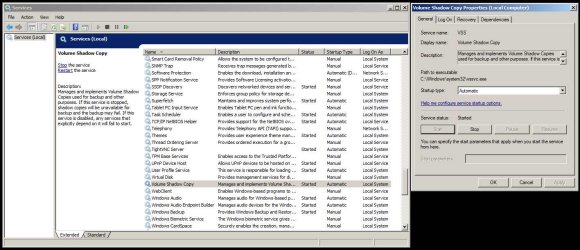
Although the questions still remain unanswered - "what fills up the reserved partition? how do I clean up the cruff" - the possible solution is the Volume Shadow Copy Service. I have yet to find a satisfactory answer as to why the following works.

Simply turning on the service [which was "stopped"] reduced the size of the "used" portion of the partition to about 39MB. This allows you to make a System Image. Once the system image completes, the used portion of the reserved partition is once again back at about 32MB. The service can be set to "Automatic" via Administrative Tools/Services/ and started. Once it makes a System Image, it stops again. Presumably, starting backup also starts the service.

My guess is that either Acronis or Clonezilla [or both] put the VSS service out of sync or trash the dependencies when you attempt to use their imaging systems - both of which programs I tried. No proof - just a presumption .

Point is, the system now works as before - but I have no satisfactory answer as to why - and do not consider the issue "solved".

YMMV

VolumeShadowCopy.jpg
Reserved partition after image creation.jpg
 

My Computer My Computer

At a glance

Win7 Pro x6417-477132 GbOnboard
Computer type
PC/Desktop
Computer Manufacturer/Model Number
Custom build Intel
OS
Win7 Pro x64
CPU
17-4771
Motherboard
DH87MC
Memory
32 Gb
Graphics Card(s)
Onboard
Hard Drives
Seagate ST2000DM001
Just to be clear - the VSS service was *not* disabled, it was simply stopped, and set to Manual.

I turned it on. That cleared most [40 MB+] of the used portion of the reserved partition. Once the image completed, I then set the service to Startup Type: Automatic.
 

My Computer My Computer

At a glance

Win7 Pro x6417-477132 GbOnboard
Computer type
PC/Desktop
Computer Manufacturer/Model Number
Custom build Intel
OS
Win7 Pro x64
CPU
17-4771
Motherboard
DH87MC
Memory
32 Gb
Graphics Card(s)
Onboard
Hard Drives
Seagate ST2000DM001
System reserved was always 100mb for me, and always 80mb or so used. So to me this is normal behavior. Beyond that, I am unsure of the why.

Stinks doesn't it? When you don't know why something happens...
 

My Computer My Computer

At a glance

Windows 10 ProAMD Ryzen 5 2400G Processor with Radeon RX Ve...G.SKILL Ripjaws V Series 16GB (2 x 8GB) 288-P...2047MB NVIDIA GeForce GTX 1060 6GB (EVGA)
Computer type
PC/Desktop
Computer Manufacturer/Model Number
Custom Built
OS
Windows 10 Pro
CPU
AMD Ryzen 5 2400G Processor with Radeon RX Vega 11 Graphics
Motherboard
ASRock X470 Master SLI/AC AM4 AMD Promontory X470 SATA 6Gb/s
Memory
G.SKILL Ripjaws V Series 16GB (2 x 8GB) 288-Pin DDR4 SDRAM D
Graphics Card(s)
2047MB NVIDIA GeForce GTX 1060 6GB (EVGA)
Sound Card
Motherboard Built in
Monitor(s) Displays
Acer R240HY bidx 23.8-Inch IPS HDMI DVI VGA (1920 x 1080) Wi
Screen Resolution
1920 x 1080
Hard Drives
1TB Sandisk SSD PLUS (Main drive)
500 GB Seagate 7200 RPM (Games)
500 GB Western Digital 7200 RPM (Virtual Machines)
PSU
CORSAIR TX Series TX650M 650W 80+ Gold Modular Power Supply
Case
CORSAIR CARBIDE SPEC-02 Mid-Tower Gaming Case, Red LED Fan
Cooling
220mm, two 120mm, and four 60mm fans
Keyboard
Wired Dell keyboard
Mouse
Wireless Logitech mouse
Internet Speed
250mb down, 30mb up
Antivirus
Panda Cloud Antivirus
Browser
Chrome-ish x64
Other Info
Your awesome for reading this.
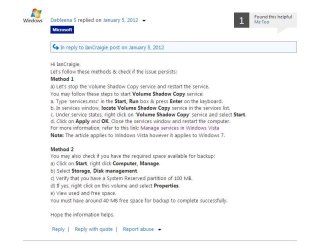
System reserved needs 40-50MB of free space for shadow storage for Windows inbuilt imaging. USN Journal files are reported as the typical cause of the "clogging up" of system reserved. It is my understanding that the OS will eventually clear the crud but this isn't much help if you want to make an image NOW.
It would have been interesting to see what happened if you had run the
>fsutil usn deletejournal /N/D F:
command as per the tutorial.

The Volume Shadow Copy startup Type is normally "Manual" as recommended by MS and works for me.

I am surprised when you say extending system reserved to say 200MB also causes problems.

You say:
"My guess is that either Acronis or Clonezilla [or both] put the VSS service out of sync or trash the dependencies when you attempt to use their imaging systems - both of which programs I tried. No proof - just a presumption." ---Maybe, get rid of them and see what happens.

I also use (free) Macrium Reflect which is highly regarded. Many people give up on the inbuilt imaging and opt for this.
 

My Computer My Computer

At a glance

Windows 7x64 Home Premium SP1Intel i7 2600kG.Skill Ripjaws (DDR3-1600) 2x4GBNvidia GeForce GTS 450; Intel HD Graphics 300...
Computer type
PC/Desktop
Computer Manufacturer/Model Number
Own build
OS
Windows 7x64 Home Premium SP1
CPU
Intel i7 2600k
Motherboard
ASUS P8Z68 Deluxe
Memory
G.Skill Ripjaws (DDR3-1600) 2x4GB
Graphics Card(s)
Nvidia GeForce GTS 450; Intel HD Graphics 3000(GT2+)
Monitor(s) Displays
Dell Ultrasharp IPS panel U2311H, Samsung SyncMaster P2350
Screen Resolution
1920x1080
Hard Drives
Samsung 850 Pro SSD 256GB, Samsung SSD 840 120GB, Seagates 1TB Barracuda ST31000528AS x2
PSU
Seasonic M12II 520W
Case
Lian Li Lancool PC-K60
Cooling
Case: 1x120mm, 3x140mm CPU: Hyper 212+
Keyboard
Logitech MK520 (wireless)
Mouse
Logitech MK520
Internet Speed
6-7 Mbps
Antivirus
Norton Security Premium, Malwarebytes on 2 (MSE on 3rd PC)
Browser
FireFox
Other Info
Audio: Logitech Z523 2.1

My Computer My Computer

At a glance

Vista, Windows7, Mint Mate, Zorin, Windows 8from 1.6GHz Duo to i7
Computer Manufacturer/Model Number
HP, Dell, Gateway, Toshiba - 4 laptops and 2 desktops
OS
Vista, Windows7, Mint Mate, Zorin, Windows 8
CPU
from 1.6GHz Duo to i7
Monitor(s) Displays
2x HP w2207
Hard Drives
5x HDD, 7x SSD, 12x Externals
Keyboard
with trackball - no mices
Mouse
Trackball mice
Internet Speed
DSL 6000

My Computer My Computer

At a glance

Windows 7x64 Home Premium SP1Intel i7 2600kG.Skill Ripjaws (DDR3-1600) 2x4GBNvidia GeForce GTS 450; Intel HD Graphics 300...
Computer type
PC/Desktop
Computer Manufacturer/Model Number
Own build
OS
Windows 7x64 Home Premium SP1
CPU
Intel i7 2600k
Motherboard
ASUS P8Z68 Deluxe
Memory
G.Skill Ripjaws (DDR3-1600) 2x4GB
Graphics Card(s)
Nvidia GeForce GTS 450; Intel HD Graphics 3000(GT2+)
Monitor(s) Displays
Dell Ultrasharp IPS panel U2311H, Samsung SyncMaster P2350
Screen Resolution
1920x1080
Hard Drives
Samsung 850 Pro SSD 256GB, Samsung SSD 840 120GB, Seagates 1TB Barracuda ST31000528AS x2
PSU
Seasonic M12II 520W
Case
Lian Li Lancool PC-K60
Cooling
Case: 1x120mm, 3x140mm CPU: Hyper 212+
Keyboard
Logitech MK520 (wireless)
Mouse
Logitech MK520
Internet Speed
6-7 Mbps
Antivirus
Norton Security Premium, Malwarebytes on 2 (MSE on 3rd PC)
Browser
FireFox
Other Info
Audio: Logitech Z523 2.1

My Computer My Computer

At a glance

Vista, Windows7, Mint Mate, Zorin, Windows 8from 1.6GHz Duo to i7
Computer Manufacturer/Model Number
HP, Dell, Gateway, Toshiba - 4 laptops and 2 desktops
OS
Vista, Windows7, Mint Mate, Zorin, Windows 8
CPU
from 1.6GHz Duo to i7
Monitor(s) Displays
2x HP w2207
Hard Drives
5x HDD, 7x SSD, 12x Externals
Keyboard
with trackball - no mices
Mouse
Trackball mice
Internet Speed
DSL 6000
My understanding was that the Beta version of Windows 7 had a 200MB system reserved but people complained about the exorbitant use of space (!) and they reduced it to 100MB in the final release. With 200MB and VSS set appropriately, I haven't heard of other people having problems.
The last system I built I did away with System Reserved.
 

My Computer My Computer

At a glance

Windows 7x64 Home Premium SP1Intel i7 2600kG.Skill Ripjaws (DDR3-1600) 2x4GBNvidia GeForce GTS 450; Intel HD Graphics 300...
Computer type
PC/Desktop
Computer Manufacturer/Model Number
Own build
OS
Windows 7x64 Home Premium SP1
CPU
Intel i7 2600k
Motherboard
ASUS P8Z68 Deluxe
Memory
G.Skill Ripjaws (DDR3-1600) 2x4GB
Graphics Card(s)
Nvidia GeForce GTS 450; Intel HD Graphics 3000(GT2+)
Monitor(s) Displays
Dell Ultrasharp IPS panel U2311H, Samsung SyncMaster P2350
Screen Resolution
1920x1080
Hard Drives
Samsung 850 Pro SSD 256GB, Samsung SSD 840 120GB, Seagates 1TB Barracuda ST31000528AS x2
PSU
Seasonic M12II 520W
Case
Lian Li Lancool PC-K60
Cooling
Case: 1x120mm, 3x140mm CPU: Hyper 212+
Keyboard
Logitech MK520 (wireless)
Mouse
Logitech MK520
Internet Speed
6-7 Mbps
Antivirus
Norton Security Premium, Malwarebytes on 2 (MSE on 3rd PC)
Browser
FireFox
Other Info
Audio: Logitech Z523 2.1
Yeah I remember the 200MB deal. The best way is to install into a predefined primary, active partition - aligned in case of a SSD. Then you do not get the 100MB partition which is nothing than a PITA.
 

My Computer My Computer

At a glance

Vista, Windows7, Mint Mate, Zorin, Windows 8from 1.6GHz Duo to i7
Computer Manufacturer/Model Number
HP, Dell, Gateway, Toshiba - 4 laptops and 2 desktops
OS
Vista, Windows7, Mint Mate, Zorin, Windows 8
CPU
from 1.6GHz Duo to i7
Monitor(s) Displays
2x HP w2207
Hard Drives
5x HDD, 7x SSD, 12x Externals
Keyboard
with trackball - no mices
Mouse
Trackball mice
Internet Speed
DSL 6000
System reserved needs 40-50MB of free space for shadow storage for Windows in built imaging.

there are also free space requirements for shadow storage on the partition where the image will be stored. That is observable as the image is being created.

USN Journal files are reported as the typical cause of the "clogging up" of system reserved. It is my understanding that the OS will eventually clear the crud but this isn't much help if you want to make an image NOW.
It would have been interesting to see what happened if you had run the
>fsutil usn deletejournal /N/D F:
command as per the tutorial.

I did. It made no difference.

I had no USN Journal files on the Reserved partition, so it did not work for me.

I would not agree that USN Journal files are reported as the *typical* cause of the "clogging up" of system reserved. The poster of that particular issue gave a long, detailed and seemingly credible description of his issue and how he dealt with it. Others posting in response did not find that to be a solution to their issue, although some did.

I have not found any other posts claiming to have *found* such USN journals on the reserved partition. That description and solution, however, is widely quoted...

The Volume Shadow Copy startup Type is normally "Manual" as recommended by MS and works for me.

Have a link to that MS recommendation? It is certainly that way on a clean install. I have no dispute with that, however have not seen such a recommendation. Once the service starts, it apparently has a timeout, as it will stop by itself. My understanding is that the "Automatic" setting simply starts the service when you logon. I presume that times out too.

Shadow Copy - Wikipedia, the free encyclopedia

I am surprised when you say extending system reserved to say 200MB also causes problems.

I posted no such thing. I stated that increasing the size of the reserved partition *allowed* you to make an image. reread the post. This issue is *NOT* the size of the partition, but the amount of remaining free space therein.
If Win7 needed a 200MB reserved partition, one presumes it would create one during install. It does not. Possibly there is there a KB article suggesting such an increase in size?

You say:
"My guess is that either Acronis or Clonezilla [or both] put the VSS service out of sync or trash the dependencies when you attempt to use their imaging systems - both of which programs I tried. No proof - just a presumption." ---Maybe, get rid of them and see what happens.

Do not have to. Neither program is on the machine, nor are they part of the system images. Both were run from rescue media, both of which fail to work properly [whole different issues...]
I was simply making an observation as the possible reason that starting VSS cleared that much space on the partition, allowing me to make a system image.

Once again, I want to note that when an MS system image [obviously created when there was sufficient free space on the reserved partition] is restored, it does *NOT* result in sufficient free space on the restored reserved partition. In other words, it does not restore the reserved partition as having about 68 MB of free space and 32 MB used space. If 68 MB was *used* prior to restoring the reserved partition - it remains that way. I would certainly like some info on why that occurs.

I also use (free) Macrium Reflect which is highly regarded. Many people give up on the inbuilt imaging and opt for this.

To restate my original post -
I need a Windows7 based solution - NOT an aftermarket imaging program. [acronis, clonezilla etc.]

I have not given up on MS Backup. I thought that my statement in the original post was pretty clear - and applies to *any* aftermarket imaging/recovery program.
If those programs work for you - use them as you see fit or hawk them in another thread.

I am looking for a *Windows* based solution to a *Win7* issue.


TIA

 
Last edited:

My Computer My Computer

At a glance

Win7 Pro x6417-477132 GbOnboard
Computer type
PC/Desktop
Computer Manufacturer/Model Number
Custom build Intel
OS
Win7 Pro x64
CPU
17-4771
Motherboard
DH87MC
Memory
32 Gb
Graphics Card(s)
Onboard
Hard Drives
Seagate ST2000DM001
I am looking for a *Windows* based solution to a *Windows 7* issue.
Lots of luck. My prediction is that you won't make it. But you can always try. Sometimes it is better to use a practical solution.
 

My Computer My Computer

At a glance

Vista, Windows7, Mint Mate, Zorin, Windows 8from 1.6GHz Duo to i7
Computer Manufacturer/Model Number
HP, Dell, Gateway, Toshiba - 4 laptops and 2 desktops
OS
Vista, Windows7, Mint Mate, Zorin, Windows 8
CPU
from 1.6GHz Duo to i7
Monitor(s) Displays
2x HP w2207
Hard Drives
5x HDD, 7x SSD, 12x Externals
Keyboard
with trackball - no mices
Mouse
Trackball mice
Internet Speed
DSL 6000
Lots of luck. My prediction is that you won't make it. But you can always try. Sometimes it is better to use a practical solution.

Maybe you need to rename this forum??
 

Attachments

  • maybe.jpg
    maybe.jpg
    45.1 KB · Views: 5

My Computer My Computer

At a glance

Win7 Pro x6417-477132 GbOnboard
Computer type
PC/Desktop
Computer Manufacturer/Model Number
Custom build Intel
OS
Win7 Pro x64
CPU
17-4771
Motherboard
DH87MC
Memory
32 Gb
Graphics Card(s)
Onboard
Hard Drives
Seagate ST2000DM001
Back
Top