Windows 7 turned into Windows 8, how did it do it?

bizee

New member
Local time
12:39 PM
Messages
35
I have Windows 7 on my computer. I took some Windows updates the other day, and I always look at them first, and I did not see anything saying "Windows 8", and they all looked like normal updates, so I let them happen. I don't have a time frame but it seems like the next time I started my computer I saw the boot screen coming up looking like Windows 8 (blue square instead of colored squares). At first I thought this was weird, as my computer then booted into Windows 7. Then I noticed my desktop icons (google chromes) had lost their color and were now plain white. I managed to search online to find out how to make them colored again, however next boot they were plain white again. Then I tried rebooting and attempted hitting F8 to go into Advanced Boot Options and nothing happened. After hours of searching to try and solve this, and finding nothing, I eventually ended up in "msconfig" and noticed my operating system (and there was only one choice) was Windows 8. So I searched how to get into Advanced Boot Options in Windows 8 and found that F8 does not work for this operating system, which verifies that I have Windows 8. I then tried to force the system into Advanced Boot Options by holding the power button in to shut down my computer and upon starting it back up, it came back into Advanced Boot Options, at which time I tried "Last known Good Configuration", and needless to say that did not work. I tried doing that again, shut off using power button, starting and this time I only got Safe Mode, Safe Mode with Networking, and Safe Mode with Command Prompt. Tried a few more times and kept getting same. This apparently from I understand is what happens with Windows 8. BUT my computer boots up in Windows 7.
Question 1: How the hell did my computer go to Windows 8
Question 2: Can I reverse this? (I tried doing system restore to 3 days before this happened and it did not work)
Question 3: Is my only option to reinstall Windows 7? (I am pretty sure it is)

Anyways, I am in dismay as to how this happened.
 

My Computer My Computer

Computer type
PC/Desktop
OS
Microsoft Windows 7 Ultimate 64-bit 7601 Multiprocessor Free Service Pack 1
CPU
AMD Athlon(tm) 64 X2 Dual Core Processor 4200+
Motherboard
Gigabyte Technology Co., Ltd. GA-MA770-UD3
Memory
6.00 GB
Graphics Card(s)
NVIDIA GeForce 9500 GT
Sound Card
(1) NVIDIA Virtual Audio Device (Wave Extensible) (WDM) (2
Screen Resolution
1280 x 1024 x 32 bits (4294967296 colors) @ 60 Hz
Hard Drives
WDC WD2500JS-98MHB0 ATA Device
Go to your computer properties page, it will tell you what version of windows you`re running.
 

My Computer My Computer

Computer type
PC/Desktop
Computer Manufacturer/Model Number
Skylake Special #666
OS
Windows 10 Pro x64
CPU
Intel Core i7 6700K
Motherboard
Asus Sabertooth Z170 Mark 1
Memory
GSkill TridentZ RGB 16GB 3600 16-16-16-36
Graphics Card(s)
EVGA GTX 980 Ti SC x2
Sound Card
Realtek High Definition
Monitor(s) Displays
AOC G2460PG
Screen Resolution
1920 x 1080 144Hz
Hard Drives
Samsung 860 Pro 256GB, Seagate Barracuda 4TB x2
PSU
EVGA 1000 P2, EVGA White Custom Braided Cables
Case
Corsair Vengeance C70 Gunmetal Black
Cooling
Corsair H100i v2, Corsair ML120 x2, Thermal Grizzly Kryonaut
Keyboard
Logitech G910 Orion Spectrum
Mouse
Logitech G700s
Internet Speed
Verizon Fios Quantum Gateway 75/75
Antivirus
Windows Defender, Malwarebytes Free 3.8.3
Browser
Chrome
Other Info
Corsair SP120 x4, LG Blu-ray Drive, Durabrand HT-395 100 Watt Dolby Digital Amp, Corsair H2100 Wireless 7.1 Headset
That says Windows 7 Ultimate.
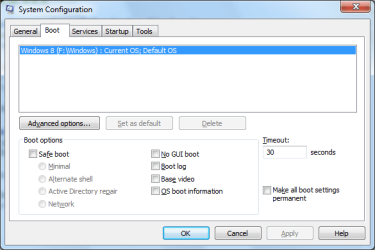
msconfig says Windows 8.
Boot up does not behave like Windows 7, it behaves like Windows 8.
Hope you read entire description of what is happening.
 

My Computer My Computer

Computer type
PC/Desktop
OS
Microsoft Windows 7 Ultimate 64-bit 7601 Multiprocessor Free Service Pack 1
CPU
AMD Athlon(tm) 64 X2 Dual Core Processor 4200+
Motherboard
Gigabyte Technology Co., Ltd. GA-MA770-UD3
Memory
6.00 GB
Graphics Card(s)
NVIDIA GeForce 9500 GT
Sound Card
(1) NVIDIA Virtual Audio Device (Wave Extensible) (WDM) (2
Screen Resolution
1280 x 1024 x 32 bits (4294967296 colors) @ 60 Hz
Hard Drives
WDC WD2500JS-98MHB0 ATA Device
My Computer My Computer

Computer type
PC/Desktop
Computer Manufacturer/Model Number
Home made Desktop
OS
Windows 10 Pro. 64/ version 1709 Windows 7 Pro/64
CPU
Intel i7-6800K @ 4.3
Motherboard
ASUS X-99 Deluxe II
Memory
Corsair Platinum 16 gig @2400
Graphics Card(s)
EVGA GTX 1070 OC
Monitor(s) Displays
Asus 27" LED LCD/VE278Q
Screen Resolution
1920-1080 or 1280-720 HDMI
Hard Drives
INTEL SSD 730-240 Gb Sata 3.0/
PSU
EVGA Platium 1200W
Case
Phanteks Luxe Tempered Glass 8 fans/ one radiator
Cooling
XSPC/ Water Cooled CPU
Keyboard
Das 4 Professional
Mouse
Logitech M705/MX Anywhere 2-S
Internet Speed
100 mbits
Antivirus
Microsoft Security Essentials/ Malwarebytes Premium 3.0/ SAS
Browser
I.E. 11 default/Firefox/ ISP Time Warner Cable/Spectrum
Other Info
LG BluRay Burner/
Sound system-KLipsch-THX/
Icy Dock ssd Hot Swap bays.
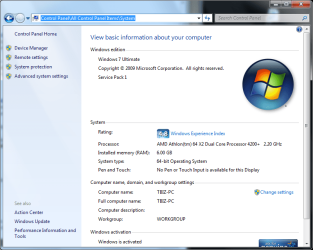
Just as I described in my war and peace, this will show exactly what I said, Control Panel/System shows Windows 7, and msconfig shows Windows 8. I didn't make this up.
 

Attachments

  • System.png
    System.png
    48.5 KB · Views: 3
  • msconfig.png
    msconfig.png
    13.6 KB · Views: 176

My Computer My Computer

Computer type
PC/Desktop
OS
Microsoft Windows 7 Ultimate 64-bit 7601 Multiprocessor Free Service Pack 1
CPU
AMD Athlon(tm) 64 X2 Dual Core Processor 4200+
Motherboard
Gigabyte Technology Co., Ltd. GA-MA770-UD3
Memory
6.00 GB
Graphics Card(s)
NVIDIA GeForce 9500 GT
Sound Card
(1) NVIDIA Virtual Audio Device (Wave Extensible) (WDM) (2
Screen Resolution
1280 x 1024 x 32 bits (4294967296 colors) @ 60 Hz
Hard Drives
WDC WD2500JS-98MHB0 ATA Device
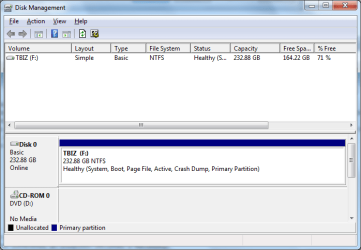
Could you post a screen shot of your Disc Management please. Click on the Start Button & in the search slot type in Disc Management, then select it from the list above where you typed. Take a screen snip including all the info shown in that window & post it back.
As your System Configuration shows Windows 8, it is shown on Drive or partition F. Normally the main OS is on Drive C, which is where Windows 7 should be if this is your main OS.
Do you have Windows 8 actually installed on your computer.
 

My Computer My Computer

Computer type
PC/Desktop
Computer Manufacturer/Model Number
Self built using existing case
OS
Windows 7 Home Premium 64 bit sp1
CPU
Intel i5 3570 3.4Ghz Ivy Bridge SKT 1155 quad core
Motherboard
Gigabyte Z77-HD3 SKT 1155 2xSata 3, 4x USB 3.0
Memory
G-Skill Rip Jaws 16Gb (8x2) DDR3 -1600 PC3 12800 CL 10 red
Graphics Card(s)
Gigabyte NVIDIA GT610 1Gb DDR3 810/1200 PCI-E 2.0 Silent
Sound Card
NVIDIA High Definition & Realtech High Definition Audio
Monitor(s) Displays
2 x Philips 226V4L 16:9 aspect ratio
Screen Resolution
1920 x 1080 HD
Hard Drives
Samsung 840 Pro 256gb SSD, SATA 3.
Hitachi Touro Portable 1tb, USB 3.0 HDD used for image b/ups.
PSU
Corsair VS450
Case
Codeng
Cooling
PSU fan & CPU fan
Keyboard
Logitech
Mouse
Logitech Wireless trackball M570
Internet Speed
Wireless 3G. 3mg down & 550kb up.
Antivirus
Bitdefender Internet Security 2020
Browser
Opera (Current Version) & Firefox
Other Info
MS Office 2013 Pro. Davis weather station software. MGE Nova 600 avr UPS.
I was just about to ask him the same thing, why is it showing Windows 8 on F ???
 

My Computer My Computer

Computer type
PC/Desktop
Computer Manufacturer/Model Number
Skylake Special #666
OS
Windows 10 Pro x64
CPU
Intel Core i7 6700K
Motherboard
Asus Sabertooth Z170 Mark 1
Memory
GSkill TridentZ RGB 16GB 3600 16-16-16-36
Graphics Card(s)
EVGA GTX 980 Ti SC x2
Sound Card
Realtek High Definition
Monitor(s) Displays
AOC G2460PG
Screen Resolution
1920 x 1080 144Hz
Hard Drives
Samsung 860 Pro 256GB, Seagate Barracuda 4TB x2
PSU
EVGA 1000 P2, EVGA White Custom Braided Cables
Case
Corsair Vengeance C70 Gunmetal Black
Cooling
Corsair H100i v2, Corsair ML120 x2, Thermal Grizzly Kryonaut
Keyboard
Logitech G910 Orion Spectrum
Mouse
Logitech G700s
Internet Speed
Verizon Fios Quantum Gateway 75/75
Antivirus
Windows Defender, Malwarebytes Free 3.8.3
Browser
Chrome
Other Info
Corsair SP120 x4, LG Blu-ray Drive, Durabrand HT-395 100 Watt Dolby Digital Amp, Corsair H2100 Wireless 7.1 Headset

My Computer My Computer

Computer type
PC/Desktop
Computer Manufacturer/Model Number
Home made Desktop
OS
Windows 10 Pro. 64/ version 1709 Windows 7 Pro/64
CPU
Intel i7-6800K @ 4.3
Motherboard
ASUS X-99 Deluxe II
Memory
Corsair Platinum 16 gig @2400
Graphics Card(s)
EVGA GTX 1070 OC
Monitor(s) Displays
Asus 27" LED LCD/VE278Q
Screen Resolution
1920-1080 or 1280-720 HDMI
Hard Drives
INTEL SSD 730-240 Gb Sata 3.0/
PSU
EVGA Platium 1200W
Case
Phanteks Luxe Tempered Glass 8 fans/ one radiator
Cooling
XSPC/ Water Cooled CPU
Keyboard
Das 4 Professional
Mouse
Logitech M705/MX Anywhere 2-S
Internet Speed
100 mbits
Antivirus
Microsoft Security Essentials/ Malwarebytes Premium 3.0/ SAS
Browser
I.E. 11 default/Firefox/ ISP Time Warner Cable/Spectrum
Other Info
LG BluRay Burner/
Sound system-KLipsch-THX/
Icy Dock ssd Hot Swap bays.
Sounds like a dual boot scenario. Disk Management will clear that up.
 

My Computer My Computer

Computer type
PC/Desktop
Computer Manufacturer/Model Number
Golden Mk. I.4
OS
Windows 10 Pro x64 ; Xubuntu x64
CPU
Intel i7 860 @ 2.80 GHz O/C'ed to 4.0GHz
Motherboard
Gigabyte P55A-UD3R Rev.1. Award BIOS F13
Memory
16GB Corsair Vengance DDR3 @ 661 MHz Dual Channel (9-9-9-24)
Graphics Card(s)
EVGA NVidia GTX 560 1024MB
Sound Card
Realtek Integrated
Monitor(s) Displays
Dual Samsung SyncMaster 2494HS
Screen Resolution
1920*1080 and 1920*1080
Hard Drives
1*Samsung 840 EVO 120GB SSD;
1*OCZ Vertex 2 60GB SSD;
2*Samsung F3 SpinPoint 1TB in RAID0;
1*Samsung F1 SpinPoint 1TB;
2*Western Digital 1TB External USB 3.0
1*Western Digital 500GB External USB 3.0
1*Seagate 500GB External USB 2.0
PSU
Thermaltake ToughPower QFan 750W
Case
Thermaltake Element S VK60001W2Z
Cooling
Corsair H60 Water Cooling, 2*230mm and 2*80mm case fans
Keyboard
Logitech G110
Mouse
Logitech MX518
Well we know he`s running Windows 7 Ultimate as per his screenshot.
 

My Computer My Computer

Computer type
PC/Desktop
Computer Manufacturer/Model Number
Skylake Special #666
OS
Windows 10 Pro x64
CPU
Intel Core i7 6700K
Motherboard
Asus Sabertooth Z170 Mark 1
Memory
GSkill TridentZ RGB 16GB 3600 16-16-16-36
Graphics Card(s)
EVGA GTX 980 Ti SC x2
Sound Card
Realtek High Definition
Monitor(s) Displays
AOC G2460PG
Screen Resolution
1920 x 1080 144Hz
Hard Drives
Samsung 860 Pro 256GB, Seagate Barracuda 4TB x2
PSU
EVGA 1000 P2, EVGA White Custom Braided Cables
Case
Corsair Vengeance C70 Gunmetal Black
Cooling
Corsair H100i v2, Corsair ML120 x2, Thermal Grizzly Kryonaut
Keyboard
Logitech G910 Orion Spectrum
Mouse
Logitech G700s
Internet Speed
Verizon Fios Quantum Gateway 75/75
Antivirus
Windows Defender, Malwarebytes Free 3.8.3
Browser
Chrome
Other Info
Corsair SP120 x4, LG Blu-ray Drive, Durabrand HT-395 100 Watt Dolby Digital Amp, Corsair H2100 Wireless 7.1 Headset
My main drive is F: as I had 2 other hard drives wired into my system but took them out when this problem arose. I had 1 drive as C: and it contained movie downloads, and I had another drive X: which contained everything from pictures to personal letters etc. I kept my operating system on what I named F: separate instead of partioning a drive to do the same.
 

Attachments

  • Disk Management.png
    Disk Management.png
    17.9 KB · Views: 112

My Computer My Computer

Computer type
PC/Desktop
OS
Microsoft Windows 7 Ultimate 64-bit 7601 Multiprocessor Free Service Pack 1
CPU
AMD Athlon(tm) 64 X2 Dual Core Processor 4200+
Motherboard
Gigabyte Technology Co., Ltd. GA-MA770-UD3
Memory
6.00 GB
Graphics Card(s)
NVIDIA GeForce 9500 GT
Sound Card
(1) NVIDIA Virtual Audio Device (Wave Extensible) (WDM) (2
Screen Resolution
1280 x 1024 x 32 bits (4294967296 colors) @ 60 Hz
Hard Drives
WDC WD2500JS-98MHB0 ATA Device
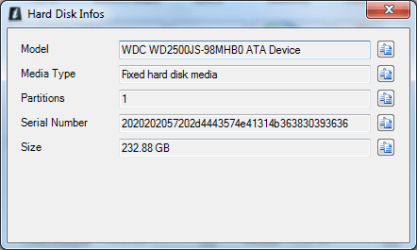
I personally have never installed Windows 8 on my computer, only the Windows 7 you see in my screenshot. I hope this is what you wanted. If not let me know what else.
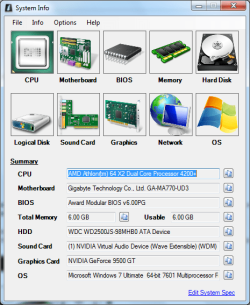
Here is System Info:
 

Attachments

  • System Info.png
    System Info.png
    36.9 KB · Views: 113

My Computer My Computer

Computer type
PC/Desktop
OS
Microsoft Windows 7 Ultimate 64-bit 7601 Multiprocessor Free Service Pack 1
CPU
AMD Athlon(tm) 64 X2 Dual Core Processor 4200+
Motherboard
Gigabyte Technology Co., Ltd. GA-MA770-UD3
Memory
6.00 GB
Graphics Card(s)
NVIDIA GeForce 9500 GT
Sound Card
(1) NVIDIA Virtual Audio Device (Wave Extensible) (WDM) (2
Screen Resolution
1280 x 1024 x 32 bits (4294967296 colors) @ 60 Hz
Hard Drives
WDC WD2500JS-98MHB0 ATA Device
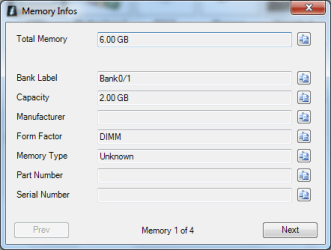
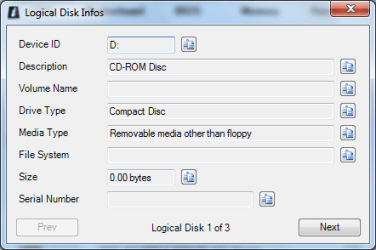
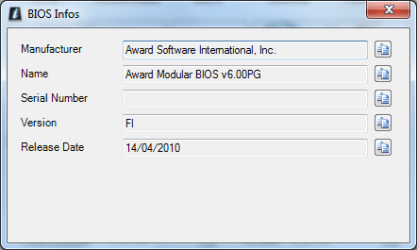
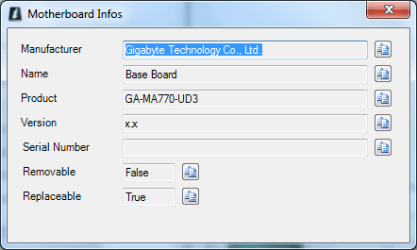
Sorry for my method, but I am trying and appreciate your help.
 

Attachments

  • Logical Disk Info.png
    Logical Disk Info.png
    10.9 KB · Views: 111
  • Hard Disk Info.png
    Hard Disk Info.png
    9.6 KB · Views: 111
  • Memory Info.png
    Memory Info.png
    10.4 KB · Views: 111
  • Bios Info.png
    Bios Info.png
    9.1 KB · Views: 112
  • Motherboard Info.png
    Motherboard Info.png
    9.1 KB · Views: 112

My Computer My Computer

Computer type
PC/Desktop
OS
Microsoft Windows 7 Ultimate 64-bit 7601 Multiprocessor Free Service Pack 1
CPU
AMD Athlon(tm) 64 X2 Dual Core Processor 4200+
Motherboard
Gigabyte Technology Co., Ltd. GA-MA770-UD3
Memory
6.00 GB
Graphics Card(s)
NVIDIA GeForce 9500 GT
Sound Card
(1) NVIDIA Virtual Audio Device (Wave Extensible) (WDM) (2
Screen Resolution
1280 x 1024 x 32 bits (4294967296 colors) @ 60 Hz
Hard Drives
WDC WD2500JS-98MHB0 ATA Device
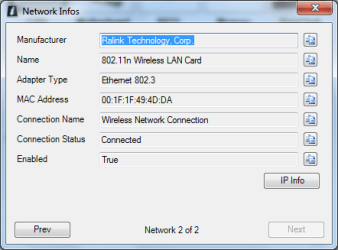
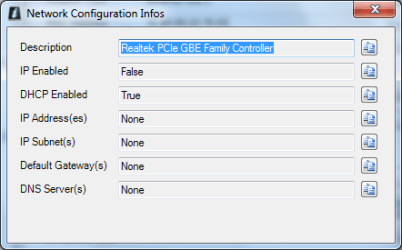
Nettwork 2 of 2 (couldn't edit so I pasted detail instead) Ralink Technology, Corp., 802.11n Wireless LAN Card, Ethernet 802.3, Wireless Network Connection,

So this attachment is Network 1 of 2
 

Attachments

  • Network Info 1 of 2.png
    Network Info 1 of 2.png
    10 KB · Views: 113

My Computer My Computer

Computer type
PC/Desktop
OS
Microsoft Windows 7 Ultimate 64-bit 7601 Multiprocessor Free Service Pack 1
CPU
AMD Athlon(tm) 64 X2 Dual Core Processor 4200+
Motherboard
Gigabyte Technology Co., Ltd. GA-MA770-UD3
Memory
6.00 GB
Graphics Card(s)
NVIDIA GeForce 9500 GT
Sound Card
(1) NVIDIA Virtual Audio Device (Wave Extensible) (WDM) (2
Screen Resolution
1280 x 1024 x 32 bits (4294967296 colors) @ 60 Hz
Hard Drives
WDC WD2500JS-98MHB0 ATA Device
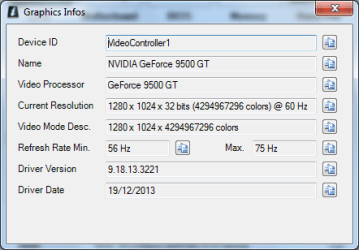
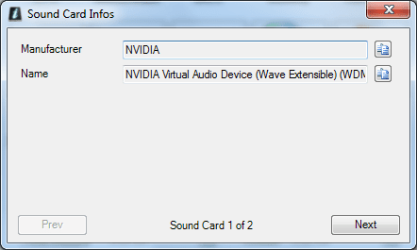
Here is the rest
 

Attachments

  • Sound Card Info.png
    Sound Card Info.png
    8.9 KB · Views: 110
  • Graphics Info.png
    Graphics Info.png
    11.6 KB · Views: 110
  • Operating System Info.png
    Operating System Info.png
    12.1 KB · Views: 111

My Computer My Computer

Computer type
PC/Desktop
OS
Microsoft Windows 7 Ultimate 64-bit 7601 Multiprocessor Free Service Pack 1
CPU
AMD Athlon(tm) 64 X2 Dual Core Processor 4200+
Motherboard
Gigabyte Technology Co., Ltd. GA-MA770-UD3
Memory
6.00 GB
Graphics Card(s)
NVIDIA GeForce 9500 GT
Sound Card
(1) NVIDIA Virtual Audio Device (Wave Extensible) (WDM) (2
Screen Resolution
1280 x 1024 x 32 bits (4294967296 colors) @ 60 Hz
Hard Drives
WDC WD2500JS-98MHB0 ATA Device
I have Windows 7 on my computer. I took some Windows updates the other day, and I always look at them first, and I did not see anything saying "Windows 8", and they all looked like normal updates, so I let them happen. I don't have a time frame but it seems like the next time I started my computer I saw the boot screen coming up looking like Windows 8 (blue square instead of colored squares). At first I thought this was weird, as my computer then booted into Windows 7. Then I noticed my desktop icons (google chromes) had lost their color and were now plain white. I managed to search online to find out how to make them colored again, however next boot they were plain white again. Then I tried rebooting and attempted hitting F8 to go into Advanced Boot Options and nothing happened. After hours of searching to try and solve this, and finding nothing, I eventually ended up in "msconfig" and noticed my operating system (and there was only one choice) was Windows 8. So I searched how to get into Advanced Boot Options in Windows 8 and found that F8 does not work for this operating system, which verifies that I have Windows 8. I then tried to force the system into Advanced Boot Options by holding the power button in to shut down my computer and upon starting it back up, it came back into Advanced Boot Options, at which time I tried "Last known Good Configuration", and needless to say that did not work. I tried doing that again, shut off using power button, starting and this time I only got Safe Mode, Safe Mode with Networking, and Safe Mode with Command Prompt. Tried a few more times and kept getting same. This apparently from I understand is what happens with Windows 8. BUT my computer boots up in Windows 7.
Question 1: How the hell did my computer go to Windows 8
Question 2: Can I reverse this? (I tried doing system restore to 3 days before this happened and it did not work)
Question 3: Is my only option to reinstall Windows 7? (I am pretty sure it is)

Anyways, I am in dismay as to how this happened.

Hello Bizee,

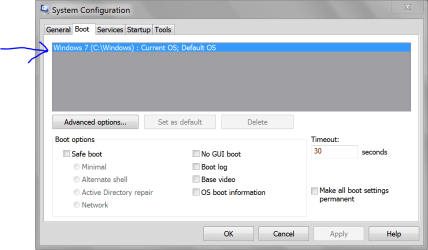
Please post a screenshot showing the Boot tab in msconfig to see what it says. :)
 

My Computer My Computer

Computer type
PC/Desktop
Computer Manufacturer/Model Number
Self built custom
OS
64-bit Windows 11 Pro for Workstations
CPU
Intel i7-8700K OC'd to 5 GHz
Motherboard
ASUS ROG Maximus XI Formula Z390
Memory
64 GB (4x16GB) G.SKILL TridentZ RGB DDR4 3600 MHz
Graphics Card(s)
ASUS ROG-STRIX-GTX1080TI-O11G-GAMING
Sound Card
Integrated
Monitor(s) Displays
2 x Samsung Odyssey G7 27"
Screen Resolution
2560x1440
Hard Drives
1TB Samsung 990 PRO M.2,
4TB Samsung 990 PRO PRO M.2,
TerraMaster F8 SSD Plus NAS
PSU
Seasonic Prime Titanium 850W
Case
Thermaltake Core P3
Cooling
Corsair Hydro H115i
Keyboard
Logitech wireless K800
Mouse
Logitech MX Master 4
Internet Speed
2 Gb/s Download and 100 Mb/s Upload
Antivirus
Malwarebyte Anti-Malware Premium
Browser
Google Chrome
Other Info
Logitech Z625 speaker system,
Logitech BRIO 4K Pro webcam,
HP Color LaserJet Pro MFP M477fdn,
APC SMART-UPS RT 1000 XL - SURT1000XLI,
Galaxy S23 Plus phone
Many years ago at college some guy claimed his XP machine had reverted to W2000, but he had just accidently clicked classic theme.
 

My Computer My Computer

Computer type
PC/Desktop
Computer Manufacturer/Model Number
self build
OS
Windows 7 pro x64 SP1
CPU
Intel i7-2600k o/c to 4.6GHz
Motherboard
MSI Z68-GD80
Memory
8GB Mushkin 1866MHz
Graphics Card(s)
Nvidia GTX 750 Ti 2GB
Sound Card
integrated
Monitor(s) Displays
Liyama ProLite 27"
Screen Resolution
1920*1080 px
Hard Drives
Seagate 2TB
PSU
Coolermaster GX 750W
Case
Antec 300 case + 5 fans
Cooling
Dark Rock Pro
Internet Speed
62Mbit down 18Mbit up
Antivirus
MSE
Browser
Firefox
Other Info
Blackgold BGT3650 Quad HD TV card. Also have various 3770 + 4770K render boxes.

My Computer My Computer

Computer type
PC/Desktop
Computer Manufacturer/Model Number
Home made Desktop
OS
Windows 10 Pro. 64/ version 1709 Windows 7 Pro/64
CPU
Intel i7-6800K @ 4.3
Motherboard
ASUS X-99 Deluxe II
Memory
Corsair Platinum 16 gig @2400
Graphics Card(s)
EVGA GTX 1070 OC
Monitor(s) Displays
Asus 27" LED LCD/VE278Q
Screen Resolution
1920-1080 or 1280-720 HDMI
Hard Drives
INTEL SSD 730-240 Gb Sata 3.0/
PSU
EVGA Platium 1200W
Case
Phanteks Luxe Tempered Glass 8 fans/ one radiator
Cooling
XSPC/ Water Cooled CPU
Keyboard
Das 4 Professional
Mouse
Logitech M705/MX Anywhere 2-S
Internet Speed
100 mbits
Antivirus
Microsoft Security Essentials/ Malwarebytes Premium 3.0/ SAS
Browser
I.E. 11 default/Firefox/ ISP Time Warner Cable/Spectrum
Other Info
LG BluRay Burner/
Sound system-KLipsch-THX/
Icy Dock ssd Hot Swap bays.
Like Layback Bear says, see msconfig boot tab in Post #5.

And "no", I do not know Bradley.
 

My Computer My Computer

Computer type
PC/Desktop
OS
Microsoft Windows 7 Ultimate 64-bit 7601 Multiprocessor Free Service Pack 1
CPU
AMD Athlon(tm) 64 X2 Dual Core Processor 4200+
Motherboard
Gigabyte Technology Co., Ltd. GA-MA770-UD3
Memory
6.00 GB
Graphics Card(s)
NVIDIA GeForce 9500 GT
Sound Card
(1) NVIDIA Virtual Audio Device (Wave Extensible) (WDM) (2
Screen Resolution
1280 x 1024 x 32 bits (4294967296 colors) @ 60 Hz
Hard Drives
WDC WD2500JS-98MHB0 ATA Device
My Computer My Computer

Computer type
PC/Desktop
Computer Manufacturer/Model Number
Self built custom
OS
64-bit Windows 11 Pro for Workstations
CPU
Intel i7-8700K OC'd to 5 GHz
Motherboard
ASUS ROG Maximus XI Formula Z390
Memory
64 GB (4x16GB) G.SKILL TridentZ RGB DDR4 3600 MHz
Graphics Card(s)
ASUS ROG-STRIX-GTX1080TI-O11G-GAMING
Sound Card
Integrated
Monitor(s) Displays
2 x Samsung Odyssey G7 27"
Screen Resolution
2560x1440
Hard Drives
1TB Samsung 990 PRO M.2,
4TB Samsung 990 PRO PRO M.2,
TerraMaster F8 SSD Plus NAS
PSU
Seasonic Prime Titanium 850W
Case
Thermaltake Core P3
Cooling
Corsair Hydro H115i
Keyboard
Logitech wireless K800
Mouse
Logitech MX Master 4
Internet Speed
2 Gb/s Download and 100 Mb/s Upload
Antivirus
Malwarebyte Anti-Malware Premium
Browser
Google Chrome
Other Info
Logitech Z625 speaker system,
Logitech BRIO 4K Pro webcam,
HP Color LaserJet Pro MFP M477fdn,
APC SMART-UPS RT 1000 XL - SURT1000XLI,
Galaxy S23 Plus phone
Back
Top