GRUB isn't happy. And all because of Windows 7 partition.

ElStellino

New member
Local time
9:13 PM
Messages
22
Location
San Isidro, Tenerife
OK, from the beginning. I had W7, I installed W8 Consumer Preview, and as many at first I didn't like it; so I created another partition and installed Linux as well, just to compare. I learned about W8, I didn't find it that bad and I ended up deciding to keep it, to the point that actually I was planning to upgrade W7 to it, deleting the W8 Consumer Preview partition and increasing the space for W8 and Linux, which I want to keep as well.

So, I changed the Windows 7 partition from primary to logical in W8 using easeUS partition Manager, in the attempt to make another logical partition bigger to put stuff in from the W7 one, as just the primary could. Thinking now it may have been because of their position on the disk, but now this matters very little...

As a result, when I restarted GRUB (which I hate, and I wish I wouldn't have to do with it) wasn't happy.
DSCF9102.JPG


It's not that I am lazy, I have actually been google'ing the whole day, but the information I found is just overwhelming (and being in Linux world, overcomplicated). Also, as I promptly discovered, playing with the partitions is dangerous. So I am looking for help!

Through a Linux Mint Maya Cinnamon live (which is the same Linux distro I am using) USB stick I managed to find this tool online (https://help.ubuntu.com/community/Boot-Repair) and I was about to use it. It created also this boot info file Ubuntu Pastebin.
And then I created this sudo fdisk -l file for reference, if it is useful:
Ubuntu Pastebin
here in a more understandable version:
Ubuntu Pastebin

But in the end I though that the easiest way to put my machine back up and running was to just reconvert back the W7 partition to primary. Because in the end I didn't play neither with the MBR, nor with the GRUB, and mainly because it's just safer. Easy to say, another story when I have to put this in action...

Would someone explain me how to get back the system up and running, please?

Would a USB Windows 7 recovery stick be useful? Amongst the other things, the DVD player doesn't work because of a SATA controller failure (just one port working, the one of the HD), so I am forced to use a USB...
Using a W7 home Premium to create it and attempting to use it for a Ultimate. Or if there is a way to create a USB stcik from my W7 Ultimate DVD, that would be great.
I may use the same procedure explained here (which is the one I used to create the USB), to copy all the content of the W7 DVD in the bootable USB key. Hoping it isn't more than 4GB because that's the maximum capacity I have now....
Would this be a possibility?

Any help would be really appreciated!
Thanks in advance!

EDIT: I don't want to wipe partitions, as in each of them there is stuff..
Windows 7 has data,
Windows 8 has some emails in outlook I'd like to retrieve,
Linux was a royal PITA to make it work properly and I wouldn't want to lose it.
 
Last edited:

My Computer My Computer

At a glance

Windows 7 Ultimate 64 bit/Linux Mint 17-64-Ci...core i3Corsair 2 Gb x 2on board
Computer Manufacturer/Model Number
self built form scratch
OS
Windows 7 Ultimate 64 bit/Linux Mint 17-64-Cinnamon
CPU
core i3
Motherboard
ASRock H55DE3
Memory
Corsair 2 Gb x 2
Graphics Card(s)
on board
Sound Card
on board
Monitor(s) Displays
1, 1920 x 1080
Hard Drives
Samsung Spinpoint 7200 rpm 1Tb
PSU
500W
Case
Cooler Master
Cooling
Arctic Cooling
Keyboard
Logitech
Mouse
Logitech, wired and with the ball!
Internet Speed
http://www.speedtest.net/my-result/3877691654
Browser
Nightly
The problem is that Windows has the MBR, and grub thought it did, so the necessary info is not in the boot record of the actual Linux partition - grub was originally installed in the MBR, not the Linux partition. You're going to have to chmod into your Linux install to fix this if you want to save your Linux system, there's no way around it. I suspect you've already found instructions to do this, and it is a bit fiddly...

The alternative is to make a Win7 USB stick, let it fix the boot setup. Your Linux partition will still be there while you do enough research to feel confident in going in with chmod to recover it.
 

My Computer My Computer

At a glance

Windows 7 Home Premium 64bitIntel Pentium Dual Core E2180 @2GHz4 GBNVIDIA GeForce 8500 GT
Computer Manufacturer/Model Number
Compaq Presario SR5518F (desktop)
OS
Windows 7 Home Premium 64bit
CPU
Intel Pentium Dual Core E2180 @2GHz
Motherboard
MSI "Boston"
Memory
4 GB
Graphics Card(s)
NVIDIA GeForce 8500 GT
Sound Card
Integrated - Realtek High Definition Audio
Monitor(s) Displays
Acer
Hard Drives
Hitachi HDP725025GLA380 ATA Device
Optiarc DVD RW AD-7201S5 ATA Device
Internet Speed
5 Mbps
Thanks sgage, I am now formatting in NTFS the USB stick and will copy the W7 DVD on it during the night, I think there is an utility in it to restore Windows without losing programs and data.
Once in Windows 7 I know how I can retrieve my emails from Windows 8, and as far as I remember I can save my home to get all the settings back in Mint, so I guess I can go with a fresh reinstall with that. And if not, lesson learned.

Off to bed now!
 

My Computer My Computer

At a glance

Windows 7 Ultimate 64 bit/Linux Mint 17-64-Ci...core i3Corsair 2 Gb x 2on board
Computer Manufacturer/Model Number
self built form scratch
OS
Windows 7 Ultimate 64 bit/Linux Mint 17-64-Cinnamon
CPU
core i3
Motherboard
ASRock H55DE3
Memory
Corsair 2 Gb x 2
Graphics Card(s)
on board
Sound Card
on board
Monitor(s) Displays
1, 1920 x 1080
Hard Drives
Samsung Spinpoint 7200 rpm 1Tb
PSU
500W
Case
Cooler Master
Cooling
Arctic Cooling
Keyboard
Logitech
Mouse
Logitech, wired and with the ball!
Internet Speed
http://www.speedtest.net/my-result/3877691654
Browser
Nightly
When you changed Win7 partition to Logical it likely made it unbootable since a Logical partition cannot be marked Active or host the System files which boot Win7.

So you can reconvert the partition to Primary and assure it's marked Active using free Partition Wizard
bootable CD: How to Set Partition as Primary or Logical
How to Set Active/Inactive partition -Partition Wizard Video Help.

You may also need to run Startup Repair - Run 3 Separate Times

However this will override GRUB so it may also be necessary to add it back using the method here: Dual boot Ubuntu-Win7.

You can also rescue your files using Copy & Paste - in Windows Recovery Console or Paragon Rescue Kit Free Edition 11.0 Free CD then boot the Win8 installer to Clean Install - Windows 8 adding Linux afteward as shown above.
 
Thanks guys, I have to say what I am going to write is odd.
Linux Mint via the USB stick this morning started having problems in mounting the partitions, so I though, 'well, let's restart it, it's a live USB stick anyway'; I failed to press on time the F key to select where to make the system start from, and grub appeared as nothing had happened. Writing now from Windows 7, in fact.
Windows 7 is still as logical partition, and it works. I remember it was like that, I changed it as primary I don't remember why, and then 2 days ago all the mess happened.
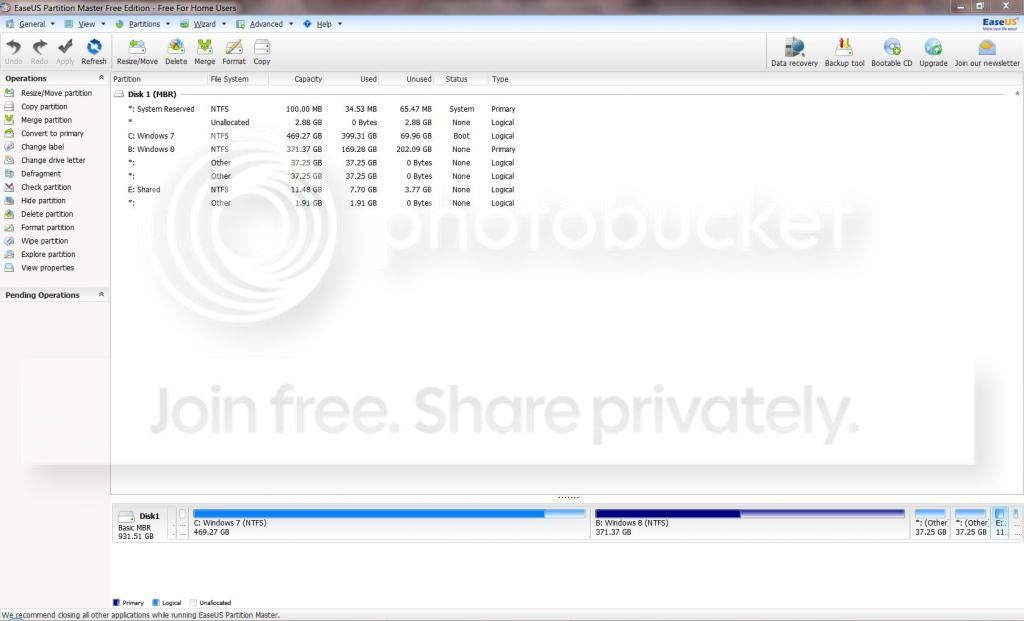
Here the screenshot of easeUS Partition Master:
system_zps6a4b38ac.jpg
 

My Computer My Computer

At a glance

Windows 7 Ultimate 64 bit/Linux Mint 17-64-Ci...core i3Corsair 2 Gb x 2on board
Computer Manufacturer/Model Number
self built form scratch
OS
Windows 7 Ultimate 64 bit/Linux Mint 17-64-Cinnamon
CPU
core i3
Motherboard
ASRock H55DE3
Memory
Corsair 2 Gb x 2
Graphics Card(s)
on board
Sound Card
on board
Monitor(s) Displays
1, 1920 x 1080
Hard Drives
Samsung Spinpoint 7200 rpm 1Tb
PSU
500W
Case
Cooler Master
Cooling
Arctic Cooling
Keyboard
Logitech
Mouse
Logitech, wired and with the ball!
Internet Speed
http://www.speedtest.net/my-result/3877691654
Browser
Nightly
Glad to hear it. Grub is very capable. :)
 

My Computers My Computers

  • At a glance

    7 X64i5 84002x8gb 3200mhz
    Computer type
    PC/Desktop
    OS
    7 X64
    CPU
    i5 8400
    Motherboard
    gigabyte b365m ds3h
    Memory
    2x8gb 3200mhz
    Hard Drives
    various
    PSU
    pure power 11 400w cm
    Case
    Coolermaster
    Cooling
    cryorig m9i
  • At a glance

    7x64g54008gb ddr4 2400
    Computer type
    PC/Desktop
    OS
    7x64
    CPU
    g5400
    Motherboard
    ga b365m ds3h
    Memory
    8gb ddr4 2400
    PSU
    xfx pro 450w
Is it? I bloody hate it! :D
 

My Computer My Computer

At a glance

Windows 7 Ultimate 64 bit/Linux Mint 17-64-Ci...core i3Corsair 2 Gb x 2on board
Computer Manufacturer/Model Number
self built form scratch
OS
Windows 7 Ultimate 64 bit/Linux Mint 17-64-Cinnamon
CPU
core i3
Motherboard
ASRock H55DE3
Memory
Corsair 2 Gb x 2
Graphics Card(s)
on board
Sound Card
on board
Monitor(s) Displays
1, 1920 x 1080
Hard Drives
Samsung Spinpoint 7200 rpm 1Tb
PSU
500W
Case
Cooler Master
Cooling
Arctic Cooling
Keyboard
Logitech
Mouse
Logitech, wired and with the ball!
Internet Speed
http://www.speedtest.net/my-result/3877691654
Browser
Nightly
System Reserved is still Primary and booting the OS(s) as signified by the System flag on it. So you should be good to go to do the Upgrade of Win7 to 8.1 if you really wanna give up Win7 for that. Only the System boot partition must be Primary in order to boot all OS's.

System Reserved should also be Partition Marked Active so I would do that next.

If the Upgrade overrides GRUB then I would add the Linux back using Barman's method in Dual boot Ubuntu-Win7. Read over the tutorial also for Dual Boot - Windows 7 and Linux - Windows 7 Forums
 
System Reserved is still Primary and booting the OS(s) as signified by the System flag on it. So you should be good to go to do the Upgrade of Win7 to 8.1 if you really wanna give up Win7 for that. Only the System boot partition must be Primary in order to boot all OS's.

System Reserved should also be Partition Marked Active so I would do that next.

If the Upgrade overrides GRUB then I would add the Linux back using Barman's method in Dual boot Ubuntu-Win7. Read over the tutorial also for Dual Boot - Windows 7 and Linux - Windows 7 Forums

Okay, so does this mean that only the first voice should be Primary? Not W8?

Another vaguely related question: there are those unallocated 2.88Gb that I suspect are making mess in Linux, as Gparted doesn't recognise the disk because of overlapping partitions.
Looking better at here I saw that sda5 (windows 7) and sda3 (f W95 Ext'd (LBA) ??) are overlapping.
can that sda3 be the unallocated 2.88Gb? I'd say no, as they are unallocated and if they were allocated to W7 they wouldn't be unallocated in the first place...
Why Linux shows 9 partitions while Windows just 7?

The Golden post is... gold! Thanks for the link!

Thanks!
 

My Computer My Computer

At a glance

Windows 7 Ultimate 64 bit/Linux Mint 17-64-Ci...core i3Corsair 2 Gb x 2on board
Computer Manufacturer/Model Number
self built form scratch
OS
Windows 7 Ultimate 64 bit/Linux Mint 17-64-Cinnamon
CPU
core i3
Motherboard
ASRock H55DE3
Memory
Corsair 2 Gb x 2
Graphics Card(s)
on board
Sound Card
on board
Monitor(s) Displays
1, 1920 x 1080
Hard Drives
Samsung Spinpoint 7200 rpm 1Tb
PSU
500W
Case
Cooler Master
Cooling
Arctic Cooling
Keyboard
Logitech
Mouse
Logitech, wired and with the ball!
Internet Speed
http://www.speedtest.net/my-result/3877691654
Browser
Nightly
Thanks, for now I leave it as it is, then, as I am saving up for a NAS Tera drive.
Once I get it I will back up everything there, now I don't have any support were to put 300+ Giga of data;
as I want a NAS drive there is no point in wasting 30 or 40€ already allocated to the NAS for a standard HD that then I won't do anything with it...
 

My Computer My Computer

At a glance

Windows 7 Ultimate 64 bit/Linux Mint 17-64-Ci...core i3Corsair 2 Gb x 2on board
Computer Manufacturer/Model Number
self built form scratch
OS
Windows 7 Ultimate 64 bit/Linux Mint 17-64-Cinnamon
CPU
core i3
Motherboard
ASRock H55DE3
Memory
Corsair 2 Gb x 2
Graphics Card(s)
on board
Sound Card
on board
Monitor(s) Displays
1, 1920 x 1080
Hard Drives
Samsung Spinpoint 7200 rpm 1Tb
PSU
500W
Case
Cooler Master
Cooling
Arctic Cooling
Keyboard
Logitech
Mouse
Logitech, wired and with the ball!
Internet Speed
http://www.speedtest.net/my-result/3877691654
Browser
Nightly
Back
Top