Win 7 64 bit : Randomly unable to access websites

Yes, please set the startup type to disabled for the DNS Client service. You can leave it disabled for a few days while we work thru this issue.

It post 14, you mention, "I cant ping my router either when this problem occurs. But its not a problem with the router because im now living in a college dorm and everyone else has normal internet when this occurs..." Are there other computers using your router?
 

My Computer My Computer

At a glance

W7 Pro SP1 64biti78GBIntel HD Graphics
Computer type
Laptop
Computer Manufacturer/Model Number
Employer provided Dell Latitude
OS
W7 Pro SP1 64bit
CPU
i7
Memory
8GB
Graphics Card(s)
Intel HD Graphics
Hard Drives
crappy SSD
Antivirus
Employer mandated Symantec Endpoint Protection
Browser
Pale Moon 64bit, IE11 64bit & Chrome 64bit
OK ive set it to disabled for now.

Its not a normal router that i can access or see anywhere, its a huge college dorm with lots of internet access outlets everywhere and building wide wi-fi. Im not sure how many routers are involved here for the building...
 

My Computer My Computer

At a glance

win 7 64 biti7-2720QM4gbHD 5600 series
Computer type
Laptop
Computer Manufacturer/Model Number
Lenovo ideapad y460p
OS
win 7 64 bit
CPU
i7-2720QM
Motherboard
unknown
Memory
4gb
Graphics Card(s)
HD 5600 series
Sound Card
onboard sound
Screen Resolution
1366x768
Hard Drives
Western digital
Internet Speed
10 mbps down/0.8 up
Antivirus
Microsoft security essentials
Browser
Firefox/IE
I understand. Thanks for the info.

Some of the things that you have mentioned make it sound like you are loosing the ability to resolve domain names to IP addresses. But, even in that state, you should still be able to ping a router using its IP address.

Can you ping the router now (while you can surf)?
edit:
perhaps I should just say Default Gateway instead of router
ping whater IP address ipconfig shows you for your Default Gateway

You might want to leave the ping running all of the time by using the -t switch at the end.


Let's see if the problem happens if you use the laptop for a few days with the DNS Client service disabled.
 

My Computer My Computer

At a glance

W7 Pro SP1 64biti78GBIntel HD Graphics
Computer type
Laptop
Computer Manufacturer/Model Number
Employer provided Dell Latitude
OS
W7 Pro SP1 64bit
CPU
i7
Memory
8GB
Graphics Card(s)
Intel HD Graphics
Hard Drives
crappy SSD
Antivirus
Employer mandated Symantec Endpoint Protection
Browser
Pale Moon 64bit, IE11 64bit & Chrome 64bit
Oh i can ping the router via the IP, thats not a problem. And i can ping it now too.
 

My Computer My Computer

At a glance

win 7 64 biti7-2720QM4gbHD 5600 series
Computer type
Laptop
Computer Manufacturer/Model Number
Lenovo ideapad y460p
OS
win 7 64 bit
CPU
i7-2720QM
Motherboard
unknown
Memory
4gb
Graphics Card(s)
HD 5600 series
Sound Card
onboard sound
Screen Resolution
1366x768
Hard Drives
Western digital
Internet Speed
10 mbps down/0.8 up
Antivirus
Microsoft security essentials
Browser
Firefox/IE
Sorry, I think that I misunderstood post #14 when you said:
I cant ping my router either when this problem occurs. But its not a problem with the router because im now living in a college dorm and everyone else has normal internet when this occurs....also the problem goes away when i restart my computer....

Oh i can ping the router via the IP, thats not a problem. And i can ping it now too.

I thought that you were pinging the router using the IP address - but when the problem occurs, you cannot ping the router. Some routers also have a domain name, so maybe you were pinging the router's name and not its IP address. Either way, I think that I understand the situation better/clearer now.

Everything points to DNS failing. So, now we wait to see if the problem happens again while the DNS Client service if disabled.


While we are waiting, could you please post your IPCONFIG/ALL info as mentioned in step 5 of this post:
http://www.sevenforums.com/network-...ts-before-posting-your-networking-thread.html
It might be easier to post it as text wrapped in code tags.
 

My Computer My Computer

At a glance

W7 Pro SP1 64biti78GBIntel HD Graphics
Computer type
Laptop
Computer Manufacturer/Model Number
Employer provided Dell Latitude
OS
W7 Pro SP1 64bit
CPU
i7
Memory
8GB
Graphics Card(s)
Intel HD Graphics
Hard Drives
crappy SSD
Antivirus
Employer mandated Symantec Endpoint Protection
Browser
Pale Moon 64bit, IE11 64bit & Chrome 64bit
Sorry i think i got a bit confused there.

Now that i think about it i couldnt ping the router either...but i will try again the next time this problem occurs.

Windows IP Configuration

Host Name . . . . . . . . . . . . : Question-PC
Primary Dns Suffix . . . . . . . :
Node Type . . . . . . . . . . . . : Hybrid
IP Routing Enabled. . . . . . . . : No
WINS Proxy Enabled. . . . . . . . : No
DNS Suffix Search List. . . . . . : pub.unsw.edu.au

Ethernet adapter Local Area Connection 2:

Connection-specific DNS Suffix . : pub.unsw.edu.au
Description . . . . . . . . . . . : Realtek PCIe GBE Family Controller #2
Physical Address. . . . . . . . . : 00-90-F5-E7-B0-6F
DHCP Enabled. . . . . . . . . . . : Yes
Autoconfiguration Enabled . . . . : Yes
Link-local IPv6 Address . . . . . : fe80::2046:a478:e323:a484%18(Preferred)
IPv4 Address. . . . . . . . . . . : 129.94.207.115(Preferred)
Subnet Mask . . . . . . . . . . . : 255.255.252.0
Lease Obtained. . . . . . . . . . : Saturday, March 01, 2014 4:30:37 PM
Lease Expires . . . . . . . . . . : Sunday, March 02, 2014 4:30:36 PM
Default Gateway . . . . . . . . . : 129.94.204.1
DHCP Server . . . . . . . . . . . : 149.171.135.141
DHCPv6 IAID . . . . . . . . . . . : 318804213
DHCPv6 Client DUID. . . . . . . . : 00-01-00-01-19-88-E2-1C-2C-D0-5A-E8-71-04

DNS Servers . . . . . . . . . . . : 208.67.222.222
208.67.222.220
Primary WINS Server . . . . . . . : 149.171.56.8
Secondary WINS Server . . . . . . : 149.171.56.6
NetBIOS over Tcpip. . . . . . . . : Enabled

Ethernet adapter Bluetooth Network Connection:

Media State . . . . . . . . . . . : Media disconnected
Connection-specific DNS Suffix . :
Description . . . . . . . . . . . : Bluetooth Device (Personal Area Network)
Physical Address. . . . . . . . . : 2C-D0-5A-E8-88-42
DHCP Enabled. . . . . . . . . . . : Yes
Autoconfiguration Enabled . . . . : Yes

Ethernet adapter Hamachi:

Connection-specific DNS Suffix . :
Description . . . . . . . . . . . : Hamachi Network Interface
Physical Address. . . . . . . . . : 7A-79-19-28-70-44
DHCP Enabled. . . . . . . . . . . : Yes
Autoconfiguration Enabled . . . . : Yes
IPv6 Address. . . . . . . . . . . : 2620:9b::1928:7044(Preferred)
Link-local IPv6 Address . . . . . : fe80::3587:d699:5237:62fb%14(Preferred)
IPv4 Address. . . . . . . . . . . : 25.40.112.68(Preferred)
Subnet Mask . . . . . . . . . . . : 255.0.0.0
Lease Obtained. . . . . . . . . . : Saturday, March 01, 2014 4:30:41 PM
Lease Expires . . . . . . . . . . : Saturday, March 01, 2014 8:18:37 PM
Default Gateway . . . . . . . . . : 2620:9b::1900:1
25.0.0.1
DHCP Server . . . . . . . . . . . : 25.0.0.1
DHCPv6 IAID . . . . . . . . . . . : 410679645
DHCPv6 Client DUID. . . . . . . . : 00-01-00-01-19-88-E2-1C-2C-D0-5A-E8-71-04

DNS Servers . . . . . . . . . . . : fec0:0:0:ffff::1%1
fec0:0:0:ffff::2%1
fec0:0:0:ffff::3%1
NetBIOS over Tcpip. . . . . . . . : Enabled

Tunnel adapter isatap.{2984EF7E-7A6E-43EF-A749-8A63EF36EBD7}:

Connection-specific DNS Suffix . :
Description . . . . . . . . . . . : Microsoft ISATAP Adapter
Physical Address. . . . . . . . . : 00-00-00-00-00-00-00-E0
DHCP Enabled. . . . . . . . . . . : No
Autoconfiguration Enabled . . . . : Yes

Link-local IPv6 Address . . . . . : fe80::200:5efe:25.40.112.68%21(Preferred)

Default Gateway . . . . . . . . . :
DNS Servers . . . . . . . . . . . : fec0:0:0:ffff::1%1
fec0:0:0:ffff::2%1
fec0:0:0:ffff::3%1
NetBIOS over Tcpip. . . . . . . . : Disabled

Tunnel adapter isatap.pub.unsw.edu.au:

Connection-specific DNS Suffix . : pub.unsw.edu.au
Description . . . . . . . . . . . : Microsoft ISATAP Adapter #2
Physical Address. . . . . . . . . : 00-00-00-00-00-00-00-E0
DHCP Enabled. . . . . . . . . . . : No
Autoconfiguration Enabled . . . . : Yes
Link-local IPv6 Address . . . . . : fe80::200:5efe:129.94.207.115%20(Preferre
d)
Default Gateway . . . . . . . . . :
DNS Servers . . . . . . . . . . . : 208.67.222.222
208.67.222.220
NetBIOS over Tcpip. . . . . . . . : Disabled

Tunnel adapter Teredo Tunneling Pseudo-Interface:

Connection-specific DNS Suffix . :
Description . . . . . . . . . . . : Teredo Tunneling Pseudo-Interface
Physical Address. . . . . . . . . : 00-00-00-00-00-00-00-E0
DHCP Enabled. . . . . . . . . . . : No
Autoconfiguration Enabled . . . . : Yes
IPv6 Address. . . . . . . . . . . : 2001:0:9d38:6ab8:3c12:85:7ea1:308c(Prefer
red)
Link-local IPv6 Address . . . . . : fe80::3c12:85:7ea1:308c%13(Preferred)
Default Gateway . . . . . . . . . :
NetBIOS over Tcpip. . . . . . . . : Disabled

Tunnel adapter isatap.{73F6222D-E185-46EB-BF52-6EEF01E0E727}:

Media State . . . . . . . . . . . : Media disconnected
Connection-specific DNS Suffix . :
Description . . . . . . . . . . . : Microsoft ISATAP Adapter #3
Physical Address. . . . . . . . . : 00-00-00-00-00-00-00-E0
DHCP Enabled. . . . . . . . . . . : No
Autoconfiguration Enabled . . . . : Yes
 

My Computer My Computer

At a glance

win 7 64 biti7-2720QM4gbHD 5600 series
Computer type
Laptop
Computer Manufacturer/Model Number
Lenovo ideapad y460p
OS
win 7 64 bit
CPU
i7-2720QM
Motherboard
unknown
Memory
4gb
Graphics Card(s)
HD 5600 series
Sound Card
onboard sound
Screen Resolution
1366x768
Hard Drives
Western digital
Internet Speed
10 mbps down/0.8 up
Antivirus
Microsoft security essentials
Browser
Firefox/IE
Ping 129.94.204.1 like this:

ping 129.94.204.1 -t

If you can stand it, leave that running for days.


Please verify your Hamachi info.

Lease Expires . . . . . . . . . . : Saturday, March 01, 2014 8:18:37 PM
Default Gateway . . . . . . . . . : 2620:9b::1900:1
25.0.0.1
DHCP Server . . . . . . . . . . . : 25.0.0.1

Is that a copy/paste error?

My Hamachi virtual network adapter does not have a default gateway - but mine is setup a bit different than most Hamachi users. I'll play with Hamachi inside a virtual machine and see what a normal setup looks like.
 

My Computer My Computer

At a glance

W7 Pro SP1 64biti78GBIntel HD Graphics
Computer type
Laptop
Computer Manufacturer/Model Number
Employer provided Dell Latitude
OS
W7 Pro SP1 64bit
CPU
i7
Memory
8GB
Graphics Card(s)
Intel HD Graphics
Hard Drives
crappy SSD
Antivirus
Employer mandated Symantec Endpoint Protection
Browser
Pale Moon 64bit, IE11 64bit & Chrome 64bit
I just double checked and the default gateway is there. I turned the hamachi adapter off though, just in case.
 

My Computer My Computer

At a glance

win 7 64 biti7-2720QM4gbHD 5600 series
Computer type
Laptop
Computer Manufacturer/Model Number
Lenovo ideapad y460p
OS
win 7 64 bit
CPU
i7-2720QM
Motherboard
unknown
Memory
4gb
Graphics Card(s)
HD 5600 series
Sound Card
onboard sound
Screen Resolution
1366x768
Hard Drives
Western digital
Internet Speed
10 mbps down/0.8 up
Antivirus
Microsoft security essentials
Browser
Firefox/IE
Thanks for checking. I saw the same type of Default Gateway when I installed Hamachi inside a Virtual Machine. So I guess that is the norm these days. Having two active network adapters with two active Default Gateways used to be a problem.

Leave the Hamachi application in whatever state it had been in the past. If you have kept it turned on in the past, then please leave it turned on now. We don't want to change two things (e.g DNS Client disabled and Hamachi off) during one test. For now, we only want to test having the DNS Client off

If DNS fails again in a few days, while the DNS Client service was disabled, then we can enable that service again and move on to the next thing to test. (e.g. removing the Default Gateways from the Hamachi adapter.)
 

My Computer My Computer

At a glance

W7 Pro SP1 64biti78GBIntel HD Graphics
Computer type
Laptop
Computer Manufacturer/Model Number
Employer provided Dell Latitude
OS
W7 Pro SP1 64bit
CPU
i7
Memory
8GB
Graphics Card(s)
Intel HD Graphics
Hard Drives
crappy SSD
Antivirus
Employer mandated Symantec Endpoint Protection
Browser
Pale Moon 64bit, IE11 64bit & Chrome 64bit
Most likely you are working around a problem created by Hamachi which is famous for causing connection problems. I've seen similar problems with Hamachi many times in the past.

Good luck on fixing this without removing Hamachi completely from the system which was a required step to fix these types of problems which have occurred many times in the past.
 

My Computer My Computer

At a glance

Windows 7 Ult, Windows 8.1 Pro,Q9650-4.275GHz, E8600 4.5GHz, E6750-3.8GHzG.Skill PC2 9600 1200Mhz 5 5 5 15 2TGTX480
Computer type
PC/Desktop
Computer Manufacturer/Model Number
Home built
OS
Windows 7 Ult, Windows 8.1 Pro,
CPU
Q9650-4.275GHz, E8600 4.5GHz, E6750-3.8GHz
Motherboard
Evga 780i FTW
Memory
G.Skill PC2 9600 1200Mhz 5 5 5 15 2T
Graphics Card(s)
GTX480
Sound Card
Asus Xonar D2
Monitor(s) Displays
HannsG
Screen Resolution
1680X1050
Hard Drives
GSkill Phoenix Pro 120GB SSD
PSU
ThermalTake Toughpower 1000Watt modular
Case
ThermalTake XaserV
Cooling
Xigmatek S1283
Keyboard
Logitech G15
Mouse
Logitech G9
Internet Speed
T1
Most likely you are working around a problem created by Hamachi which is famous for causing connection problems. I've seen similar problems with Hamachi many times in the past.

Good luck on fixing this without removing Hamachi completely from the system which was a required step to fix these types of problems which have occurred many times in the past.
Thanks, we might need some luck :-)

Computers with Hamachi installed can have problems; but my question would be: why? What is it about a computer (and/or a network) that makes it not get along with Hamachi? While I don't have firm stats - my guess is that more computers/networks function just fine with Hamachi than fail with Hamachi. I have installed Hamachi on more than a hundred computers that are sprinkled across various ISPs throughout the world. Those computers do not have network/connectivity problems.
 

My Computer My Computer

At a glance

W7 Pro SP1 64biti78GBIntel HD Graphics
Computer type
Laptop
Computer Manufacturer/Model Number
Employer provided Dell Latitude
OS
W7 Pro SP1 64bit
CPU
i7
Memory
8GB
Graphics Card(s)
Intel HD Graphics
Hard Drives
crappy SSD
Antivirus
Employer mandated Symantec Endpoint Protection
Browser
Pale Moon 64bit, IE11 64bit & Chrome 64bit
I had to turn DNS client back on and restart though since all my torrents mysteriously stopped working, and started working after the restart....
 

My Computer My Computer

At a glance

win 7 64 biti7-2720QM4gbHD 5600 series
Computer type
Laptop
Computer Manufacturer/Model Number
Lenovo ideapad y460p
OS
win 7 64 bit
CPU
i7-2720QM
Motherboard
unknown
Memory
4gb
Graphics Card(s)
HD 5600 series
Sound Card
onboard sound
Screen Resolution
1366x768
Hard Drives
Western digital
Internet Speed
10 mbps down/0.8 up
Antivirus
Microsoft security essentials
Browser
Firefox/IE
What do you use Hamachi for?
 

My Computer My Computer

At a glance

W7 Pro SP1 64biti78GBIntel HD Graphics
Computer type
Laptop
Computer Manufacturer/Model Number
Employer provided Dell Latitude
OS
W7 Pro SP1 64bit
CPU
i7
Memory
8GB
Graphics Card(s)
Intel HD Graphics
Hard Drives
crappy SSD
Antivirus
Employer mandated Symantec Endpoint Protection
Browser
Pale Moon 64bit, IE11 64bit & Chrome 64bit
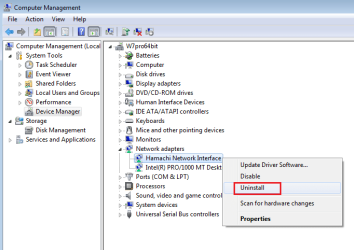
I used to use it to connect to friends, but i havent used it in like forever. I actually uninstalled the program but the hamachi adapter is still in device manager...
 

My Computer My Computer

At a glance

win 7 64 biti7-2720QM4gbHD 5600 series
Computer type
Laptop
Computer Manufacturer/Model Number
Lenovo ideapad y460p
OS
win 7 64 bit
CPU
i7-2720QM
Motherboard
unknown
Memory
4gb
Graphics Card(s)
HD 5600 series
Sound Card
onboard sound
Screen Resolution
1366x768
Hard Drives
Western digital
Internet Speed
10 mbps down/0.8 up
Antivirus
Microsoft security essentials
Browser
Firefox/IE
Right Click > Uninstall that virtual network adapter please

h.png
 

My Computer My Computer

At a glance

W7 Pro SP1 64biti78GBIntel HD Graphics
Computer type
Laptop
Computer Manufacturer/Model Number
Employer provided Dell Latitude
OS
W7 Pro SP1 64bit
CPU
i7
Memory
8GB
Graphics Card(s)
Intel HD Graphics
Hard Drives
crappy SSD
Antivirus
Employer mandated Symantec Endpoint Protection
Browser
Pale Moon 64bit, IE11 64bit & Chrome 64bit
Back
Top