How to move MBR to another drive

erik46

New member
Local time
10:05 PM
Messages
6
Hello all

I wonder if you could help me with an issue with regard to a multi-boot, xp / win 7 system.

Historically, I would run XP on my desktop workstation off a SATA drive, and later added win 7 on another SATA drive; still further down the line, i 'flipped' the win 7 onto a SSD drive.

Now, as far as I know, the MBR still resides on the older (SATA) drive. I would like to eventually ditch this drive and stay with the SSD where win 7 (x64) now resides.

However, I believe I'd need to somehow move the MBR to that drive...

Is this possible? How?

Thank you very much.
 

My Computer My Computer

At a glance

win 7 x64Core 2 Quad
Computer type
PC/Desktop
OS
win 7 x64
CPU
Core 2 Quad
Motherboard
Asus
Hard Drives
2xSSD
2xSATA
thank you.

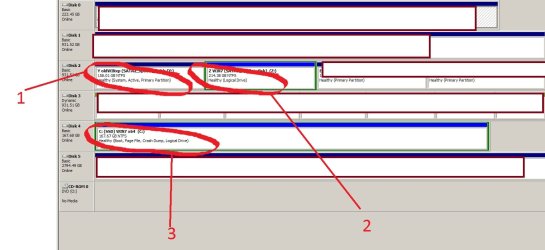
here's the drive setup (i have quite a few disks in the workstation -- 6 physical -- so i only kept the relevant [partitions] in the screen capture).

#1 shows the original [xp] system partition where I suspect the MBR is located (because it is 'active' -?). I would eventually like to delete this partition (while keeping & booting off #3)

#2 shows the partition win7 were originally installed on (before flipping them over to #3, an Intel SSD drive). Again, I would like to eventually delete this partition as it's been rendered redundant.

#3 is the OS I am currently using, and the disk/partition I'd like to hold the MBR, becoming the system (and 'active' -?) drive.

Thank you!
 

Attachments

  • 7forums_drives.jpg
    7forums_drives.jpg
    89.5 KB · Views: 6

My Computer My Computer

At a glance

win 7 x64Core 2 Quad
Computer type
PC/Desktop
OS
win 7 x64
CPU
Core 2 Quad
Motherboard
Asus
Hard Drives
2xSSD
2xSATA

My Computer My Computer

At a glance

Vista, Windows7, Mint Mate, Zorin, Windows 8from 1.6GHz Duo to i7
Computer Manufacturer/Model Number
HP, Dell, Gateway, Toshiba - 4 laptops and 2 desktops
OS
Vista, Windows7, Mint Mate, Zorin, Windows 8
CPU
from 1.6GHz Duo to i7
Monitor(s) Displays
2x HP w2207
Hard Drives
5x HDD, 7x SSD, 12x Externals
Keyboard
with trackball - no mices
Mouse
Trackball mice
Internet Speed
DSL 6000

My Computer My Computer

At a glance

win 7 x64Core 2 Quad
Computer type
PC/Desktop
OS
win 7 x64
CPU
Core 2 Quad
Motherboard
Asus
Hard Drives
2xSSD
2xSATA
when you mention 'moving the bootmgr'

If you move, a primary partition will be need to boot from.
 

My Computer My Computer

At a glance

ME/XP/Vista/Win7
OS
ME/XP/Vista/Win7
You can't move the MBR because that is a fixed area on the disk. But you can move/copy the bootmgr to C (or any other partition) http://www.sevenforums.com/tutorials/209885-bootmgr-move-c-easybcd.html

thank you!

when you mention 'moving the bootmgr' i remembered the mgr is supposedly different with xp compared to latter win versions. is this true, or can this cause any issues down the line?
theog is right. Your C partition is logical. You have to first make that primary. Sorry I overlooked that.

Your current active partition is 'Y'. It contains the bootmgrs for both XP and Windows 7. They will both be copied. But that is not a problem because in the process the C partition will be activated. You only have to change the BIOS boot sequence to boot from the SSD.

If you want to get rid of XP and the XP bootmgr entry , then you have to do this:

http://www.sevenforums.com/tutorials/210983-dual-boot-delete-os.html
 

My Computer My Computer

At a glance

Vista, Windows7, Mint Mate, Zorin, Windows 8from 1.6GHz Duo to i7
Computer Manufacturer/Model Number
HP, Dell, Gateway, Toshiba - 4 laptops and 2 desktops
OS
Vista, Windows7, Mint Mate, Zorin, Windows 8
CPU
from 1.6GHz Duo to i7
Monitor(s) Displays
2x HP w2207
Hard Drives
5x HDD, 7x SSD, 12x Externals
Keyboard
with trackball - no mices
Mouse
Trackball mice
Internet Speed
DSL 6000
Mark Win7 Partition Active, power down to unplug all other HD's, swap the XP drive's data cable to Win7 drive so it becomes DIsk0, then boot into the Win7 installation media or http://www.sevenforums.com/performance-maintenance/51100-repair-cd-system-repair-disk.html to run http://www.sevenforums.com/tutorials/105541-startup-repair-run-3-separate-times.html until Win7 starts and holds the System flag.

Now you can plug back in the other HD's, boot XP if needed using the one-time BIOS boot menu key. If it still shows a boot listing for Win7, delete it in msconfig>Boot tab.
 
Mark Win7 Partition Active, power down to unplug all other HD's, swap the XP drive's data cable to Win7 drive so it becomes DIsk0, then boot into the Win7 installation media or http://www.sevenforums.com/performance-maintenance/51100-repair-cd-system-repair-disk.html to run http://www.sevenforums.com/tutorials/105541-startup-repair-run-3-separate-times.html until Win7 starts and holds the System flag.

Now you can plug back in the other HD's, boot XP if needed using the one-time BIOS boot menu key. If it still shows a boot listing for Win7, delete it in msconfig>Boot tab.

thank you.

but as stated above, a logical partition (drive) cannot be made an active partition, right?
 

My Computer My Computer

At a glance

win 7 x64Core 2 Quad
Computer type
PC/Desktop
OS
win 7 x64
CPU
Core 2 Quad
Motherboard
Asus
Hard Drives
2xSSD
2xSATA
Back
Top