Explorer.exe taking up 15-30% CPU usage when moving mou

You have at least 2 major problems. the even id 1000 source 100 is because DEP is misconfigured in system control panel

got to cpanel>system>advanced system settings>performance settings>DEP> it should be on for all apps. If some legit app is causing this we can exempt it. Im sure you have trouble installing apps with this error.

Then your other problem. It may resolve itself when you fix dep so try that first

Ken
 
Last edited:

My Computer My Computer

At a glance

Win 8 Release candidate 8400[email protected]4 gigsNvidia 9600M
Computer Manufacturer/Model Number
HP Pavillion dv-7 1005 Tx
OS
Win 8 Release candidate 8400
CPU
[email protected]
Memory
4 gigs
Graphics Card(s)
Nvidia 9600M
Sound Card
HD built-in
Monitor(s) Displays
17" Wxga
Screen Resolution
1440x900
Cooling
none
Internet Speed
45Mb down 5Mb up
Ok will try that. Uhm, why is dep disabled at this point? I haven't done anything with dep afaik.

So in the event viewer you should never see any red signs to be sure that I don't have any probs?
 

My Computer My Computer

At a glance

Windows 7 Ultimate x6i5 2670QM2x4GB RAM Kingston HyperX Memory DDR3 1600 MH...Nvidia GeForce GTX 560M
Computer Manufacturer/Model Number
Sager NP8130
OS
Windows 7 Ultimate x6
CPU
i5 2670QM
Memory
2x4GB RAM Kingston HyperX Memory DDR3 1600 MHz Sticks
Graphics Card(s)
Nvidia GeForce GTX 560M
Sound Card
Realtek HD Audio (Built-in)
Screen Resolution
1920x1080
Hard Drives
128GB Crucial M4 SSD
500GB Seagate 7200RPM HDD
Internet Speed
12Mbps down/4Mbps up
Ok will try that. Uhm, why is dep disabled at this point? I haven't done anything with dep afaik.

So in the event viewer you should never see any red signs to be sure that I don't have any probs?


Virus' disable it. and system corruption does. Can I assume you have a current owrking anti virus, and are at least using the windows firewall

Ken
 

My Computer My Computer

At a glance

Win 8 Release candidate 8400[email protected]4 gigsNvidia 9600M
Computer Manufacturer/Model Number
HP Pavillion dv-7 1005 Tx
OS
Win 8 Release candidate 8400
CPU
[email protected]
Memory
4 gigs
Graphics Card(s)
Nvidia 9600M
Sound Card
HD built-in
Monitor(s) Displays
17" Wxga
Screen Resolution
1440x900
Cooling
none
Internet Speed
45Mb down 5Mb up
Ok will try that. Uhm, why is dep disabled at this point? I haven't done anything with dep afaik.

So in the event viewer you should never see any red signs to be sure that I don't have any probs?


Virus' disable it. and system corruption does. Can I assume you have a current owrking anti virus, and are at least using the windows firewall

Ken

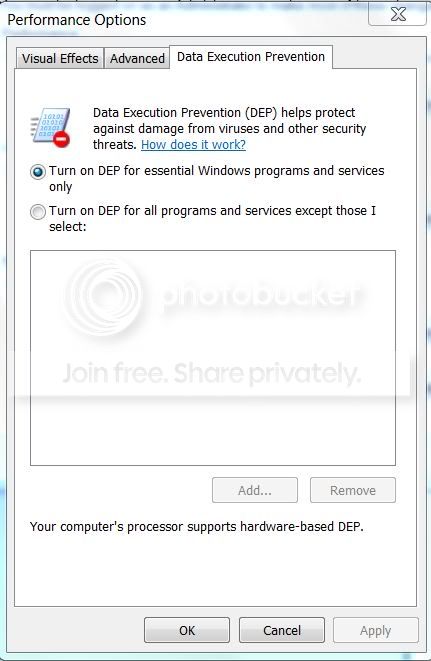
Here's the current (without me doing anything) setting of DEP:

Capture-22.jpg


That's already turned ON right?

I'm using ESET NOD32 x64 and yes Windows Firewall and Defender.

Also, I never had any problems installing programs, at least up to now.
 

My Computer My Computer

At a glance

Windows 7 Ultimate x6i5 2670QM2x4GB RAM Kingston HyperX Memory DDR3 1600 MH...Nvidia GeForce GTX 560M
Computer Manufacturer/Model Number
Sager NP8130
OS
Windows 7 Ultimate x6
CPU
i5 2670QM
Memory
2x4GB RAM Kingston HyperX Memory DDR3 1600 MHz Sticks
Graphics Card(s)
Nvidia GeForce GTX 560M
Sound Card
Realtek HD Audio (Built-in)
Screen Resolution
1920x1080
Hard Drives
128GB Crucial M4 SSD
500GB Seagate 7200RPM HDD
Internet Speed
12Mbps down/4Mbps up
Ok will try that. Uhm, why is dep disabled at this point? I haven't done anything with dep afaik.

So in the event viewer you should never see any red signs to be sure that I don't have any probs?


Virus' disable it. and system corruption does. Can I assume you have a current owrking anti virus, and are at least using the windows firewall

Ken

Here's the current (without me doing anything) setting of DEP:

Capture-22.jpg


That's already turned ON right?

I'm using ESET NOD32 x64 and yes Windows Firewall and Defender.

that is correct except for the cpu usage. One thing I notice about eset (im using it) is high cpu use when it runs randon scans. try disabling it and see what happens
 

My Computer My Computer

At a glance

Win 8 Release candidate 8400[email protected]4 gigsNvidia 9600M
Computer Manufacturer/Model Number
HP Pavillion dv-7 1005 Tx
OS
Win 8 Release candidate 8400
CPU
[email protected]
Memory
4 gigs
Graphics Card(s)
Nvidia 9600M
Sound Card
HD built-in
Monitor(s) Displays
17" Wxga
Screen Resolution
1440x900
Cooling
none
Internet Speed
45Mb down 5Mb up
K

BTW if you look in event viewer at the event ID 80 in the bottom pane it will tell you what application is causing it
 

My Computer My Computer

At a glance

Win 8 Release candidate 8400[email protected]4 gigsNvidia 9600M
Computer Manufacturer/Model Number
HP Pavillion dv-7 1005 Tx
OS
Win 8 Release candidate 8400
CPU
[email protected]
Memory
4 gigs
Graphics Card(s)
Nvidia 9600M
Sound Card
HD built-in
Monitor(s) Displays
17" Wxga
Screen Resolution
1440x900
Cooling
none
Internet Speed
45Mb down 5Mb up
Virus' disable it. and system corruption does. Can I assume you have a current owrking anti virus, and are at least using the windows firewall

Ken

Here's the current (without me doing anything) setting of DEP:

Capture-22.jpg


That's already turned ON right?

I'm using ESET NOD32 x64 and yes Windows Firewall and Defender.

that is correct except for the cpu usage. One thing I notice about eset (im using it) is high cpu use when it runs randon scans. try disabling it and see what happens

What do you mean "except for the CPU usage" ?

Is that setting in my DEP window already correct? Or should I tick the second radio button?

I tried disabling ESET but the problem still exists. And when I open task manager, I don't see ekrn.exe having high CPU usage, well that's for me.
 

My Computer My Computer

At a glance

Windows 7 Ultimate x6i5 2670QM2x4GB RAM Kingston HyperX Memory DDR3 1600 MH...Nvidia GeForce GTX 560M
Computer Manufacturer/Model Number
Sager NP8130
OS
Windows 7 Ultimate x6
CPU
i5 2670QM
Memory
2x4GB RAM Kingston HyperX Memory DDR3 1600 MHz Sticks
Graphics Card(s)
Nvidia GeForce GTX 560M
Sound Card
Realtek HD Audio (Built-in)
Screen Resolution
1920x1080
Hard Drives
128GB Crucial M4 SSD
500GB Seagate 7200RPM HDD
Internet Speed
12Mbps down/4Mbps up
Here's the current (without me doing anything) setting of DEP:

Capture-22.jpg


That's already turned ON right?

I'm using ESET NOD32 x64 and yes Windows Firewall and Defender.

that is correct except for the cpu usage. One thing I notice about eset (im using it) is high cpu use when it runs randon scans. try disabling it and see what happens

What do you mean "except for the CPU usage" ?

Is that setting in my DEP window already correct? Or should I tick the second radio button?

I tried disabling ESET but the problem still exists. And when I open task manager, I don't see ekrn.exe having high CPU usage, well that's for me.


My bad should be on for all
 

My Computer My Computer

At a glance

Win 8 Release candidate 8400[email protected]4 gigsNvidia 9600M
Computer Manufacturer/Model Number
HP Pavillion dv-7 1005 Tx
OS
Win 8 Release candidate 8400
CPU
[email protected]
Memory
4 gigs
Graphics Card(s)
Nvidia 9600M
Sound Card
HD built-in
Monitor(s) Displays
17" Wxga
Screen Resolution
1440x900
Cooling
none
Internet Speed
45Mb down 5Mb up
K

BTW if you look in event viewer at the event ID 80 in the bottom pane it will tell you what application is causing it

Event ID 80 have this info:

"Activation context generation failed for "C:\Program Files (x86)\Adobe\Acrobat 9.0\Designer 8.2\FormDesigner.exe".Error in manifest or policy file "" on line . A component version required by the application conflicts with another component version already active. Conflicting components are:. Component 1: C:\Windows\WinSxS\manifests\amd64_microsoft.windows.common-controls_6595b64144ccf1df_6.0.7600.16385_none_fa645303170382f6.manifest. Component 2: C:\Windows\WinSxS\manifests\x86_microsoft.windows.common-controls_6595b64144ccf1df_6.0.7600.16385_none_421189da2b7fabfc.manifest."
 

My Computer My Computer

At a glance

Windows 7 Ultimate x6i5 2670QM2x4GB RAM Kingston HyperX Memory DDR3 1600 MH...Nvidia GeForce GTX 560M
Computer Manufacturer/Model Number
Sager NP8130
OS
Windows 7 Ultimate x6
CPU
i5 2670QM
Memory
2x4GB RAM Kingston HyperX Memory DDR3 1600 MHz Sticks
Graphics Card(s)
Nvidia GeForce GTX 560M
Sound Card
Realtek HD Audio (Built-in)
Screen Resolution
1920x1080
Hard Drives
128GB Crucial M4 SSD
500GB Seagate 7200RPM HDD
Internet Speed
12Mbps down/4Mbps up
that is correct except for the cpu usage. One thing I notice about eset (im using it) is high cpu use when it runs randon scans. try disabling it and see what happens

What do you mean "except for the CPU usage" ?

Is that setting in my DEP window already correct? Or should I tick the second radio button?

I tried disabling ESET but the problem still exists. And when I open task manager, I don't see ekrn.exe having high CPU usage, well that's for me.


My bad should be on for all

Is the "DEP on for all" the default setting for Win7?
 

My Computer My Computer

At a glance

Windows 7 Ultimate x6i5 2670QM2x4GB RAM Kingston HyperX Memory DDR3 1600 MH...Nvidia GeForce GTX 560M
Computer Manufacturer/Model Number
Sager NP8130
OS
Windows 7 Ultimate x6
CPU
i5 2670QM
Memory
2x4GB RAM Kingston HyperX Memory DDR3 1600 MHz Sticks
Graphics Card(s)
Nvidia GeForce GTX 560M
Sound Card
Realtek HD Audio (Built-in)
Screen Resolution
1920x1080
Hard Drives
128GB Crucial M4 SSD
500GB Seagate 7200RPM HDD
Internet Speed
12Mbps down/4Mbps up
K

BTW if you look in event viewer at the event ID 80 in the bottom pane it will tell you what application is causing it

Event ID 80 have this info:

"Activation context generation failed for "C:\Program Files (x86)\Adobe\Acrobat 9.0\Designer 8.2\FormDesigner.exe".Error in manifest or policy file "" on line . A component version required by the application conflicts with another component version already active. Conflicting components are:. Component 1: C:\Windows\WinSxS\manifests\amd64_microsoft.windows.common-controls_6595b64144ccf1df_6.0.7600.16385_none_fa645303170382f6.manifest. Component 2: C:\Windows\WinSxS\manifests\x86_microsoft.windows.common-controls_6595b64144ccf1df_6.0.7600.16385_none_421189da2b7fabfc.manifest."

check a b unch of them and see if tehya ll refer to adobe. also you may be having a problem with the fact that there isn't 64 bit flash
 

My Computer My Computer

At a glance

Win 8 Release candidate 8400[email protected]4 gigsNvidia 9600M
Computer Manufacturer/Model Number
HP Pavillion dv-7 1005 Tx
OS
Win 8 Release candidate 8400
CPU
[email protected]
Memory
4 gigs
Graphics Card(s)
Nvidia 9600M
Sound Card
HD built-in
Monitor(s) Displays
17" Wxga
Screen Resolution
1440x900
Cooling
none
Internet Speed
45Mb down 5Mb up
K

BTW if you look in event viewer at the event ID 80 in the bottom pane it will tell you what application is causing it

Event ID 80 have this info:

"Activation context generation failed for "C:\Program Files (x86)\Adobe\Acrobat 9.0\Designer 8.2\FormDesigner.exe".Error in manifest or policy file "" on line . A component version required by the application conflicts with another component version already active. Conflicting components are:. Component 1: C:\Windows\WinSxS\manifests\amd64_microsoft.windows.common-controls_6595b64144ccf1df_6.0.7600.16385_none_fa645303170382f6.manifest. Component 2: C:\Windows\WinSxS\manifests\x86_microsoft.windows.common-controls_6595b64144ccf1df_6.0.7600.16385_none_421189da2b7fabfc.manifest."

check a b unch of them and see if tehya ll refer to adobe. also you may be having a problem with the fact that there isn't 64 bit flash

Yes I checked all of them and they do have the same info pertaining to Adobe.

Yeah, but if the 64-bit flash player is the problem, should I be uninstalling the 32-bit flash player to see if the problem goes away?

And is the flash player still working even though I'm just in the desktop without any programs opened?
 

My Computer My Computer

At a glance

Windows 7 Ultimate x6i5 2670QM2x4GB RAM Kingston HyperX Memory DDR3 1600 MH...Nvidia GeForce GTX 560M
Computer Manufacturer/Model Number
Sager NP8130
OS
Windows 7 Ultimate x6
CPU
i5 2670QM
Memory
2x4GB RAM Kingston HyperX Memory DDR3 1600 MHz Sticks
Graphics Card(s)
Nvidia GeForce GTX 560M
Sound Card
Realtek HD Audio (Built-in)
Screen Resolution
1920x1080
Hard Drives
128GB Crucial M4 SSD
500GB Seagate 7200RPM HDD
Internet Speed
12Mbps down/4Mbps up
manifest error - program written for 32bit while it's executed on 64bit.

Component 1: C:\Windows\WinSxS\manifests\amd64_microsoft.windows.common-controls_6595b64144ccf1df_6.0.7600.16385_none_fa645303170382f6.manifest

Component 2: C:\Windows\WinSxS\manifests\x86_microsoft.windows.common-controls_6595b64144ccf1df_6.0.7600.16385_none_421189da2b7fabfc.manifest

Is Adobe CS4 Drive in your context menu? If yes -

Open RegEdit and delete these two entries.

HKEY_CLASSES_ROOT\AllFilesystemObjects\shellex\ContextMenuHandlers\{C95FFEAE-A32E-4122-A5C4-49B5BFB69795}

HKEY_CLASSES_ROOT\Directory\Background\shellex\ContextMenuHandlers\{C95FFEAE-A32E-4122-A5C4-49B5BFB69795}
 
K

You have 2 different versions installed. If most of them say
C:\Program Files (x86)\Adobe\Acrobat 9.0\Designer 8.2\FormDesigner.exe".Error in manifest or policy file "" on line . A component version required by the application conflicts with another component version already active. Conflicting components are:. Component 1: C:\Windows

then un-install acrobat 9.0 completely from everywhere. go to adobe and re-install the newest version

K
 

My Computer My Computer

At a glance

Win 8 Release candidate 8400[email protected]4 gigsNvidia 9600M
Computer Manufacturer/Model Number
HP Pavillion dv-7 1005 Tx
OS
Win 8 Release candidate 8400
CPU
[email protected]
Memory
4 gigs
Graphics Card(s)
Nvidia 9600M
Sound Card
HD built-in
Monitor(s) Displays
17" Wxga
Screen Resolution
1440x900
Cooling
none
Internet Speed
45Mb down 5Mb up
manifest error - program written for 32bit while it's executed on 64bit.

Component 1: C:\Windows\WinSxS\manifests\amd64_microsoft.windows.common-controls_6595b64144ccf1df_6.0.7600.16385_none_fa645303170382f6.manifest

Component 2: C:\Windows\WinSxS\manifests\x86_microsoft.windows.common-controls_6595b64144ccf1df_6.0.7600.16385_none_421189da2b7fabfc.manifest

Is Adobe CS4 Drive in your context menu? If yes -

Open RegEdit and delete these two entries.

HKEY_CLASSES_ROOT\AllFilesystemObjects\shellex\ContextMenuHandlers\{C95FFEAE-A32E-4122-A5C4-49B5BFB69795}

HKEY_CLASSES_ROOT\Directory\Background\shellex\ContextMenuHandlers\{C95FFEAE-A32E-4122-A5C4-49B5BFB69795}


What do you mean context menu?
 

My Computer My Computer

At a glance

Windows 7 Ultimate x6i5 2670QM2x4GB RAM Kingston HyperX Memory DDR3 1600 MH...Nvidia GeForce GTX 560M
Computer Manufacturer/Model Number
Sager NP8130
OS
Windows 7 Ultimate x6
CPU
i5 2670QM
Memory
2x4GB RAM Kingston HyperX Memory DDR3 1600 MHz Sticks
Graphics Card(s)
Nvidia GeForce GTX 560M
Sound Card
Realtek HD Audio (Built-in)
Screen Resolution
1920x1080
Hard Drives
128GB Crucial M4 SSD
500GB Seagate 7200RPM HDD
Internet Speed
12Mbps down/4Mbps up
K

You have 2 different versions installed. If most of them say
C:\Program Files (x86)\Adobe\Acrobat 9.0\Designer 8.2\FormDesigner.exe".Error in manifest or policy file "" on line . A component version required by the application conflicts with another component version already active. Conflicting components are:. Component 1: C:\Windows

then un-install acrobat 9.0 completely from everywhere. go to adobe and re-install the newest version

K

That's weird, I installed adobe acrobat 9.0 only ONCE from the first time I installed win7. But let me try to re-install it anyway.
 

My Computer My Computer

At a glance

Windows 7 Ultimate x6i5 2670QM2x4GB RAM Kingston HyperX Memory DDR3 1600 MH...Nvidia GeForce GTX 560M
Computer Manufacturer/Model Number
Sager NP8130
OS
Windows 7 Ultimate x6
CPU
i5 2670QM
Memory
2x4GB RAM Kingston HyperX Memory DDR3 1600 MHz Sticks
Graphics Card(s)
Nvidia GeForce GTX 560M
Sound Card
Realtek HD Audio (Built-in)
Screen Resolution
1920x1080
Hard Drives
128GB Crucial M4 SSD
500GB Seagate 7200RPM HDD
Internet Speed
12Mbps down/4Mbps up
Adobe is an incestuous suite. The 64-bit install must install components from both versions for suite interaction.

Context menu = right click.

The CS4 Drive context menu entry is called in every folder.
 
Last edited:
Adobe is an incestuous suite. The 64-bit install must install components from both versions for suite interaction.

Context menu = right click.

The CS4 Drive context menu entry is called in every folder.

Oh ok. I don't have CS4 Drive in my context menu.

So with Adobe being an incestuous suite, what do you recommend I do to get rid of that Event ID 80 error?
 

My Computer My Computer

At a glance

Windows 7 Ultimate x6i5 2670QM2x4GB RAM Kingston HyperX Memory DDR3 1600 MH...Nvidia GeForce GTX 560M
Computer Manufacturer/Model Number
Sager NP8130
OS
Windows 7 Ultimate x6
CPU
i5 2670QM
Memory
2x4GB RAM Kingston HyperX Memory DDR3 1600 MHz Sticks
Graphics Card(s)
Nvidia GeForce GTX 560M
Sound Card
Realtek HD Audio (Built-in)
Screen Resolution
1920x1080
Hard Drives
128GB Crucial M4 SSD
500GB Seagate 7200RPM HDD
Internet Speed
12Mbps down/4Mbps up
Confirm that you have Adobe whatever 64-bit. Anyway, that is an Adobe problem, not a Windows problem. Contact Adobe.
.
 
I already uninstalled Adobe Acrobat, and the explorer.exe cpu usage issue is still there.

If this were a USB issue, why is it not happening in Vista?
 

My Computer My Computer

At a glance

Windows 7 Ultimate x6i5 2670QM2x4GB RAM Kingston HyperX Memory DDR3 1600 MH...Nvidia GeForce GTX 560M
Computer Manufacturer/Model Number
Sager NP8130
OS
Windows 7 Ultimate x6
CPU
i5 2670QM
Memory
2x4GB RAM Kingston HyperX Memory DDR3 1600 MHz Sticks
Graphics Card(s)
Nvidia GeForce GTX 560M
Sound Card
Realtek HD Audio (Built-in)
Screen Resolution
1920x1080
Hard Drives
128GB Crucial M4 SSD
500GB Seagate 7200RPM HDD
Internet Speed
12Mbps down/4Mbps up
Back
Top