Solved CCC - No Settings That Can Be Configured Error/Won't Open

CrazyQuickDraw

New member
Local time
3:40 PM
Messages
14
Location
Canada
Hello all. So yesterday I went to open Catalyst Control Center in order to configure some settings with my Gigabyte Radeon HD 7850. However when I opened it, I got this error:

Q7lG2xY.png


So I read up a little bit and tried many methods. I've tried uninstalling all the drivers & then deleting any left over folders in Program Files and Program Files (x86)... I've also tried deleting the registry keys after doing that as well. I've tried using Display Driver Sweeper. I've tried deleting the Public Token Key, but it wasn't there...
(I've tried these: http://www.sevenforums.com/graphic-cards/198014-ccc-catalyst-control-center-won-t-start-how.html, http://www.sevenforums.com/graphic-...control-center-ccc-will-not-open-install.html)

Just to say, I've tried all the possible methods I can think of. I reinstalled my computer about a month or two ago and when I installed the drivers, everything worked fun, including CCC. But when I decided to open it yesterday, it just wouldn't.

I don't know what else to do... and I really don't want to do another reinstall so soon. Hopefully I can get some help.

-CrazyQuickDraw
 

My Computer My Computer

At a glance

Windows 7 x64 Home PremiumAMD FX-61008GB DDR3Gigabyte Radeon HD 7850
Computer type
PC/Desktop
Computer Manufacturer/Model Number
Antec Custom Build
OS
Windows 7 x64 Home Premium
CPU
AMD FX-6100
Motherboard
Asus M5A97 R2.0
Memory
8GB DDR3
Graphics Card(s)
Gigabyte Radeon HD 7850
Sound Card
AMD HD Audio
Monitor(s) Displays
Insignia 38.5in
Screen Resolution
1920 x 1080
Hard Drives
ST3500418AS ATA 500GB
Case
Custom Antec
Keyboard
Razer
Mouse
Old Dell
Internet Speed
Feckin' Fast
Antivirus
Microsoft Security Essentials
Browser
Firefox
Hi, Welcome to Seven forums.

Do you have Microsoft .net framework 4.5 installed? CCC can't run without it. If you updated the drivers to latest, then you need to have .net installed.
 

My Computer My Computer

At a glance

Windows 11 x64i5 2500K @ 3.3 GHz16 GB DDR 3 @ 1600MhzMSI 1050TI 4GB OC version
Computer type
PC/Desktop
Computer Manufacturer/Model Number
Custom Bulid/Self made
OS
Windows 11 x64
CPU
i5 2500K @ 3.3 GHz
Motherboard
ASUS P8 Z77 V pro
Memory
16 GB DDR 3 @ 1600Mhz
Graphics Card(s)
MSI 1050TI 4GB OC version
Sound Card
On Board (Realtek HD audio)
Monitor(s) Displays
Samsung 22" LCD
Screen Resolution
1920*1080
Hard Drives
Seagate 1 TB, WD 1TB, Seagate 2 TB ( I use a lot of space)
PSU
coolermaster 750 W
Case
Coolermaster HAF912
Cooling
Coolermaster hyper 212 EVO
Keyboard
Samsung
Mouse
Dell Wireless
Internet Speed
Wireless 50 Mbps
Antivirus
AVG 2016 Internet Security
Browser
Google Chrome
Hi, Welcome to Seven forums.

Do you have Microsoft .net framework 4.5 installed? CCC can't run without it. If you updated the drivers to latest, then you need to have .net installed.

It's installed. I've checked several times.
 

My Computer My Computer

At a glance

Windows 7 x64 Home PremiumAMD FX-61008GB DDR3Gigabyte Radeon HD 7850
Computer type
PC/Desktop
Computer Manufacturer/Model Number
Antec Custom Build
OS
Windows 7 x64 Home Premium
CPU
AMD FX-6100
Motherboard
Asus M5A97 R2.0
Memory
8GB DDR3
Graphics Card(s)
Gigabyte Radeon HD 7850
Sound Card
AMD HD Audio
Monitor(s) Displays
Insignia 38.5in
Screen Resolution
1920 x 1080
Hard Drives
ST3500418AS ATA 500GB
Case
Custom Antec
Keyboard
Razer
Mouse
Old Dell
Internet Speed
Feckin' Fast
Antivirus
Microsoft Security Essentials
Browser
Firefox
I did some more searching around and figured out I could start CCC (through CMD, the app still doesn't open though) and record what happened. Here's the log file.

Code:
0000000002: 2014-03-30 10:09:43:124    Display: LOG is at your service!
 Debug      Called by: ATI.ACE.LOG.EXE.LogManager::.ctor                                                                processID:03576 threadID:(Main            ) domainName:(LOG.exe                    ) assemblyName:(LOG, Version=4.5.0.0, Culture=neutral, PublicKeyToken=90ba9c70f846762e)


0000000001: 2014-03-30 10:09:57:654    Failed to merge manifest file: C:\Program Files\ATI Technologies\ATI.ACE\Fuel\Fuel.xml with exception: Could not find file 'C:\Program Files\ATI Technologies\ATI.ACE\Fuel\Fuel.xml'.
 Error      Called by: ATI.ACE.CLI.Foundation.MergeManifest::ReadManifest                                               processID:03628 threadID:(                ) domainName:(CCC.exe                    ) assemblyName:(CLI.Foundation.XManifest, Version=4.5.5184.18818, Culture=neutral, PublicKeyToken=90ba9c70f846762e)
------------------------------------------------------------------------------------------------------------------------

0000000002: 2014-03-30 10:09:57:764    No ATIADLXX.DLL available
 Error      Called by: ATI.ACE.CLI.Component.Runtime.Runtime::.ctor                                                     processID:03628 threadID:(                ) domainName:(CCC.exe                    ) assemblyName:(CLI.Component.Runtime, Version=4.5.5184.18796, Culture=neutral, PublicKeyToken=90ba9c70f846762e)
------------------------------------------------------------------------------------------------------------------------

0000000003: 2014-03-30 10:09:57:814    Activating Source: GD source failed due to excpetion: Object reference not set to an instance of an object.
 Error      Called by: ATI.ACE.AEM.Server.ACEEventManager::ActivateSources                                              processID:03628 threadID:(                ) domainName:(CCC.exe                    ) assemblyName:(AEM.Server, Version=4.5.5184.18794, Culture=neutral, PublicKeyToken=90ba9c70f846762e)
------------------------------------------------------------------------------------------------------------------------

0000000004: 2014-03-30 10:09:57:894    RT_GC_N
 Error      Called by: ATI.ACE.CLI.Caste.Graphics.Runtime.RT_GraphicsCaste_N::.ctor                                     processID:03628 threadID:(CCCThreadNew:Runtime) domainName:(CCC.exe                    ) assemblyName:(CLI.Caste.Graphics.Runtime, Version=4.5.5184.18798, Culture=neutral, PublicKeyToken=90ba9c70f846762e)
------------------------------------------------------------------------------------------------------------------------

0000000005: 2014-03-30 10:09:57:914    RT_GraphicsCaste : No ATIADLXX.DLL or ATIDEMGX.DLL
 Error      Called by: ATI.ACE.CLI.Caste.Graphics.Runtime.RT_GraphicsCaste_N::Initialize                                processID:03628 threadID:(CCCThreadNew:Runtime) domainName:(CCC.exe                    ) assemblyName:(CLI.Caste.Graphics.Runtime, Version=4.5.5184.18798, Culture=neutral, PublicKeyToken=90ba9c70f846762e)
------------------------------------------------------------------------------------------------------------------------

0000000006: 2014-03-30 10:09:57:914    Can't find Fuel status key
 Error      Called by: ATI.ACE.CLI.Caste.Fuel.Runtime.RT_FuelCaste::GetFuelServiceStatus                                processID:03628 threadID:(CCCThreadNew:Runtime) domainName:(CCC.exe                    ) assemblyName:(CLI.Caste.Fuel.Runtime, Version=4.5.5184.18833, Culture=neutral, PublicKeyToken=90ba9c70f846762e)
------------------------------------------------------------------------------------------------------------------------

0000000007: 2014-03-30 10:09:57:984    Failed to subscrive to HKLM;software\amd\fuel
 Error      Called by: ATI.ACE.AEM.Plugin.Source.Kit.Server.REG.REG_Plugin::StartListeningForNewKey                     processID:03628 threadID:(                ) domainName:(CCC.exe                    ) assemblyName:(AEM.Plugin.Source.Kit.Server, Version=4.5.5184.18823, Culture=neutral, PublicKeyToken=90ba9c70f846762e)
------------------------------------------------------------------------------------------------------------------------

0000000008: 2014-03-30 10:09:58:014    RT_AMDOverDrive: Graphics caste is not available.
 Error      Called by: ATI.ACE.CLI.Aspect.AMDOverDrive.Platform.Runtime.RT_AMDOverDrive::Check                          processID:03628 threadID:(CCCThreadNew:Runtime) domainName:(CCC.exe                    ) assemblyName:(CLI.Aspect.AMDOverDrive.Platform.Runtime, Version=4.5.5184.18890, Culture=neutral, PublicKeyToken=90ba9c70f846762e)
------------------------------------------------------------------------------------------------------------------------

0000000009: 2014-03-30 10:09:58:084    Validation: Caste [0] is null
 Error      Called by: ATI.ACE.CLI.Component.Runtime.Runtime::Run                                                       processID:03628 threadID:(CCCThreadNew:Runtime) domainName:(CCC.exe                    ) assemblyName:(CLI.Component.Runtime, Version=4.5.5184.18796, Culture=neutral, PublicKeyToken=90ba9c70f846762e)
------------------------------------------------------------------------------------------------------------------------

0000000010: 2014-03-30 10:09:58:084    Validation: Caste [3] is null
 Error      Called by: ATI.ACE.CLI.Component.Runtime.Runtime::Run                                                       processID:03628 threadID:(CCCThreadNew:Runtime) domainName:(CCC.exe                    ) assemblyName:(CLI.Component.Runtime, Version=4.5.5184.18796, Culture=neutral, PublicKeyToken=90ba9c70f846762e)
------------------------------------------------------------------------------------------------------------------------

0000000011: 2014-03-30 10:09:58:084    Validation: Caste [4] is null
 Error      Called by: ATI.ACE.CLI.Component.Runtime.Runtime::Run                                                       processID:03628 threadID:(CCCThreadNew:Runtime) domainName:(CCC.exe                    ) assemblyName:(CLI.Component.Runtime, Version=4.5.5184.18796, Culture=neutral, PublicKeyToken=90ba9c70f846762e)
------------------------------------------------------------------------------------------------------------------------

0000000012: 2014-03-30 10:09:58:084    Exception: Retrieving the COM class factory for component with CLSID {CC7C96DF-1942-4D46-9FCD-810EF1C56C2D} failed due to the following error: 80040154 Class not registered (Exception from HRESULT: 0x80040154 (REGDB_E_CLASSNOTREG)).
 Exception  Called by: ATI.ACE.CLI.Component.Runtime.Runtime::COMSetup                                                  processID:03628 threadID:(CCCThreadNew:Runtime) domainName:(CCC.exe                    ) assemblyName:(CLI.Component.Runtime, Version=4.5.5184.18796, Culture=neutral, PublicKeyToken=90ba9c70f846762e)
************************************************************************************************************************

0000000013: 2014-03-30 10:09:58:084    COM service not enabled
 Error      Called by: ATI.ACE.CLI.Component.Runtime.Runtime::Run                                                       processID:03628 threadID:(CCCThreadNew:Runtime) domainName:(CCC.exe                    ) assemblyName:(CLI.Component.Runtime, Version=4.5.5184.18796, Culture=neutral, PublicKeyToken=90ba9c70f846762e)
------------------------------------------------------------------------------------------------------------------------

0000000014: 2014-03-30 10:09:58:094    Failed to subscrive to HKCU;software\ati\ace\settings\aem
 Error      Called by: ATI.ACE.AEM.Plugin.Source.Kit.Server.REG.REG_Plugin::StartListeningForNewKey                     processID:03628 threadID:(                ) domainName:(CCC.exe                    ) assemblyName:(AEM.Plugin.Source.Kit.Server, Version=4.5.5184.18823, Culture=neutral, PublicKeyToken=90ba9c70f846762e)
------------------------------------------------------------------------------------------------------------------------

0000000015: 2014-03-30 10:09:58:154    Couldn't get shared graphics caste!
 Error      Called by: ATI.ACE.CLI.Component.Systemtray.Systemtray::AssignAdaptersNumber                                processID:03628 threadID:(CCCThreadNew:Systemtray) domainName:(CCC.exe                    ) assemblyName:(CLI.Component.Systemtray, Version=4.5.5184.18816, Culture=neutral, PublicKeyToken=90ba9c70f846762e)
------------------------------------------------------------------------------------------------------------------------

0000000016: 2014-03-30 10:10:28:204    Failed to retrieve A4 shared caste
 Error      Called by: ATI.ACE.CLI.Caste.A4.Dashboard.DB_A4Caste::Initialize                                            processID:03628 threadID:(CCCThreadNew:Dashboard) domainName:(CCC.exe                    ) assemblyName:(CLI.Caste.A4.Dashboard, Version=4.5.5184.18898, Culture=neutral, PublicKeyToken=90ba9c70f846762e)
------------------------------------------------------------------------------------------------------------------------

0000000017: 2014-03-30 10:10:28:864    Could not load file or assembly 'file:///C:\Program Files (x86)\ATI Technologies\ATI.ACE\Branding\BrandingResourcesNet4.dll' or one of its dependencies. The system cannot find the file specified.
 Error      Called by: ATI.ACE.LOG.Foundation.Implementation.Branding::LoadBrandingResourcesFile                        processID:03628 threadID:(CCCThreadNew:Dashboard) domainName:(CCC.exe                    ) assemblyName:(LOG.Foundation.Implementation, Version=4.5.5184.18808, Culture=neutral, PublicKeyToken=90ba9c70f846762e)
------------------------------------------------------------------------------------------------------------------------

0000000018: 2014-03-30 10:10:28:934    Non-Showable tree: Advanced
 Error      Called by: ATI.ACE.CLI.Component.Dashboard.DBMainVMController::SetInitialLocation                           processID:03628 threadID:(CCCThreadNew:Dashboard) domainName:(CCC.exe                    ) assemblyName:(CLI.Component.Dashboard, Version=4.5.5184.18803, Culture=neutral, PublicKeyToken=90ba9c70f846762e)
------------------------------------------------------------------------------------------------------------------------

0000000019: 2014-03-30 10:10:28:934    Exception <Initialize>: From method (SetInitialLocation) message (Non-Showable tree: Advanced) 
 Exception  Called by: ATI.ACE.CLI.Component.Client.Shared.Private.BaseViewModelController::Initialize                  processID:03628 threadID:(CCCThreadNew:Dashboard) domainName:(CCC.exe                    ) assemblyName:(CLI.Component.Client.Shared.Private, Version=4.5.5184.18799, Culture=neutral, PublicKeyToken=90ba9c70f846762e)
************************************************************************************************************************
Seams like a lot of errors to me...
 

My Computer My Computer

At a glance

Windows 7 x64 Home PremiumAMD FX-61008GB DDR3Gigabyte Radeon HD 7850
Computer type
PC/Desktop
Computer Manufacturer/Model Number
Antec Custom Build
OS
Windows 7 x64 Home Premium
CPU
AMD FX-6100
Motherboard
Asus M5A97 R2.0
Memory
8GB DDR3
Graphics Card(s)
Gigabyte Radeon HD 7850
Sound Card
AMD HD Audio
Monitor(s) Displays
Insignia 38.5in
Screen Resolution
1920 x 1080
Hard Drives
ST3500418AS ATA 500GB
Case
Custom Antec
Keyboard
Razer
Mouse
Old Dell
Internet Speed
Feckin' Fast
Antivirus
Microsoft Security Essentials
Browser
Firefox
Errors like that cascade. The first one is often the problem and the rest of the errors are because of that one.

Make sure you can locate the fuel.xml file where it's supposed to be. That's a config file and has parameters that CCC needs to get going. Strangely, my computer doesn't have one.

What version of driver/CCC is it? If it's the latest and greatest, you may want to roll back to an older version in case the new version has bugs in it.
 

My Computer My Computer

At a glance

Win 7 Pro x64/Win 10 Pro x64 dual bootAMD FX 8350 Vishera @ 420016 GB Mushkin Blackline DDR3-2400 @ 1866 (9-1...XFX Radeon R9 280 Double D Black Edition
Computer type
PC/Desktop
Computer Manufacturer/Model Number
Mellon Labs (custom build)
OS
Win 7 Pro x64/Win 10 Pro x64 dual boot
CPU
AMD FX 8350 Vishera @ 4200
Motherboard
ASUS M5A97 R2.0
Memory
16 GB Mushkin Blackline DDR3-2400 @ 1866 (9-10-10-10-31)
Graphics Card(s)
XFX Radeon R9 280 Double D Black Edition
Sound Card
Realtek HD Audio on MB. Sounds great.
Monitor(s) Displays
Acer 24", Acer 22"
Screen Resolution
3840 x 1080
Hard Drives
1 x Mushkin Chronos 120 GB SSD (Win 10)
1 x Samsung 850 EVO 250 GB SSD (Win 7)
1 x WD 1TB SATA Blue
1 x WD 1TB SATA Green
PSU
Corsair TX-750
Case
CoolerMaster HAF 912+
Cooling
Coolermaster Seidon 240M Liquid AIO. 6 case fans
Keyboard
Logitech G710+
Mouse
Logitech G500s
Internet Speed
Much better since I got fiber, but still way overpriced.
Antivirus
MSE, Malware Bytes for scanning
Browser
Firefox
Other Info
Corsair VOID USB headphones.

A Mellon Labs X-1 - LCD Smartie driven system status display.

Brought to you by the letter E
Errors like that cascade. The first one is often the problem and the rest of the errors are because of that one.

Make sure you can locate the fuel.xml file where it's supposed to be. That's a config file and has parameters that CCC needs to get going. Strangely, my computer doesn't have one.

What version of driver/CCC is it? If it's the latest and greatest, you may want to roll back to an older version in case the new version has bugs in it.

There is no fuel.xml in "C:\Program Files\ATI Technologies\ATI.ACE\Fuel\"... thats probably the problem.

Currently, I'm running 14.3 Beta, which I had installed just prior to running the log check. But I had the exact same problems with the latest 13.12 version. I believe my graphics card itself (Gigabyte Radeon HD 7850) comes default with version 8.xxx. When I did my Windows reinstall about two months ago, I updated it to the latest drivers then and it was fine. Maybe I'll rollback the drivers like you said.
 

My Computer My Computer

At a glance

Windows 7 x64 Home PremiumAMD FX-61008GB DDR3Gigabyte Radeon HD 7850
Computer type
PC/Desktop
Computer Manufacturer/Model Number
Antec Custom Build
OS
Windows 7 x64 Home Premium
CPU
AMD FX-6100
Motherboard
Asus M5A97 R2.0
Memory
8GB DDR3
Graphics Card(s)
Gigabyte Radeon HD 7850
Sound Card
AMD HD Audio
Monitor(s) Displays
Insignia 38.5in
Screen Resolution
1920 x 1080
Hard Drives
ST3500418AS ATA 500GB
Case
Custom Antec
Keyboard
Razer
Mouse
Old Dell
Internet Speed
Feckin' Fast
Antivirus
Microsoft Security Essentials
Browser
Firefox
Yeah. The ones that come with your card are usually old ones. Hopefully rolling back will get you going.
 

My Computer My Computer

At a glance

Win 7 Pro x64/Win 10 Pro x64 dual bootAMD FX 8350 Vishera @ 420016 GB Mushkin Blackline DDR3-2400 @ 1866 (9-1...XFX Radeon R9 280 Double D Black Edition
Computer type
PC/Desktop
Computer Manufacturer/Model Number
Mellon Labs (custom build)
OS
Win 7 Pro x64/Win 10 Pro x64 dual boot
CPU
AMD FX 8350 Vishera @ 4200
Motherboard
ASUS M5A97 R2.0
Memory
16 GB Mushkin Blackline DDR3-2400 @ 1866 (9-10-10-10-31)
Graphics Card(s)
XFX Radeon R9 280 Double D Black Edition
Sound Card
Realtek HD Audio on MB. Sounds great.
Monitor(s) Displays
Acer 24", Acer 22"
Screen Resolution
3840 x 1080
Hard Drives
1 x Mushkin Chronos 120 GB SSD (Win 10)
1 x Samsung 850 EVO 250 GB SSD (Win 7)
1 x WD 1TB SATA Blue
1 x WD 1TB SATA Green
PSU
Corsair TX-750
Case
CoolerMaster HAF 912+
Cooling
Coolermaster Seidon 240M Liquid AIO. 6 case fans
Keyboard
Logitech G710+
Mouse
Logitech G500s
Internet Speed
Much better since I got fiber, but still way overpriced.
Antivirus
MSE, Malware Bytes for scanning
Browser
Firefox
Other Info
Corsair VOID USB headphones.

A Mellon Labs X-1 - LCD Smartie driven system status display.

Brought to you by the letter E
Yeah. The ones that come with your card are usually old ones. Hopefully rolling back will get you going.

How come though, when I updated to the latest ones two months back, which I believed was version 12.xxx or 13.xxx, that it worked?

And how should I go about install the default drivers? Just overwriting them, or uninstall through the Control Panel, then deleting and left over files in Program Files, Program File x86, and the Registry?
 

My Computer My Computer

At a glance

Windows 7 x64 Home PremiumAMD FX-61008GB DDR3Gigabyte Radeon HD 7850
Computer type
PC/Desktop
Computer Manufacturer/Model Number
Antec Custom Build
OS
Windows 7 x64 Home Premium
CPU
AMD FX-6100
Motherboard
Asus M5A97 R2.0
Memory
8GB DDR3
Graphics Card(s)
Gigabyte Radeon HD 7850
Sound Card
AMD HD Audio
Monitor(s) Displays
Insignia 38.5in
Screen Resolution
1920 x 1080
Hard Drives
ST3500418AS ATA 500GB
Case
Custom Antec
Keyboard
Razer
Mouse
Old Dell
Internet Speed
Feckin' Fast
Antivirus
Microsoft Security Essentials
Browser
Firefox
Use the Driver Sweeper link in my sig, uninstall the CCC and graphics drivers, reboot. Let Windows update install drivers, it will then ask for a reboot again.

Many people report problems of one kind or another using CCC, it's not really needed.
 

My Computer My Computer

At a glance

Windows 7 Ultimate X64 SP1Intel i5-2550K, Differing ~4.4-4.8GHz No buil...16GB G.Skill Sniper 1866MHz @ 2133MHz 2x8GBASUS GTX650TIB-DC2OC-2GD5, (650TI Boost)
Computer type
PC/Desktop
Computer Manufacturer/Model Number
Home Built Desktop By DataTech
OS
Windows 7 Ultimate X64 SP1
CPU
Intel i5-2550K, Differing ~4.4-4.8GHz No built in GPU
Motherboard
ASUS P8Z68-V PRO/GEN3
Memory
16GB G.Skill Sniper 1866MHz @ 2133MHz 2x8GB
Graphics Card(s)
ASUS GTX650TIB-DC2OC-2GD5, (650TI Boost)
Sound Card
Onboard Realtek 5-1
Monitor(s) Displays
Samsung P2570HD
Screen Resolution
1920x1080
Hard Drives
Samsung 840 Pro 256GB SSD for OS, 500GB Seagate Constellation (Enterprise drive) for Data
PSU
Corsair HX650W
Case
Inwin Dragon Rider
Cooling
Hyper 212 EVO w/two Noctua fans, push-pull, @1300 RPM
Keyboard
E-Z Eyes, bright yellow keys with large characters
Mouse
steelseries SENSEI Laser Pro Gaming
Internet Speed
48-51Mbs Mbs down, 11 Mbs up Xfinity Cable
Antivirus
Norton Internet Security 2013
Browser
IE 10, Opera, Pale Moon if needed
Other Info
4 case fans, LG BluRay-RE, ASUS DVD-RW, Mr. Fusion power supply, 1.21 gigawatts.
Use the Driver Sweeper link in my sig, uninstall the CCC and graphics drivers, reboot. Let Windows update install drivers, it will then ask for a reboot again.

Many people report problems of one kind or another using CCC, it's not really needed.

I never see Windows Update installing the drivers. In Device Manager it just says Standard VGA Graphics Adapter.

Plus, I would like to use CCC so I can configure game profile options.
 

My Computer My Computer

At a glance

Windows 7 x64 Home PremiumAMD FX-61008GB DDR3Gigabyte Radeon HD 7850
Computer type
PC/Desktop
Computer Manufacturer/Model Number
Antec Custom Build
OS
Windows 7 x64 Home Premium
CPU
AMD FX-6100
Motherboard
Asus M5A97 R2.0
Memory
8GB DDR3
Graphics Card(s)
Gigabyte Radeon HD 7850
Sound Card
AMD HD Audio
Monitor(s) Displays
Insignia 38.5in
Screen Resolution
1920 x 1080
Hard Drives
ST3500418AS ATA 500GB
Case
Custom Antec
Keyboard
Razer
Mouse
Old Dell
Internet Speed
Feckin' Fast
Antivirus
Microsoft Security Essentials
Browser
Firefox
Use the Driver Sweeper link in my sig, uninstall the CCC and graphics drivers, reboot. Let Windows update install drivers, it will then ask for a reboot again.

Many people report problems of one kind or another using CCC, it's not really needed.
Thanks. I meant to suggest Driver Sweeper, but I couldn't remember the name of it. :confused:

I agree about not using CCC, but I do use it for one thing. I have to manually set the scaling on my HDMI monitor or it won't overscan.

Maybe the OP has a similar issue, or is using Eyefinity and needs CCC. If not, I wouldn't use it.
 

My Computer My Computer

At a glance

Win 7 Pro x64/Win 10 Pro x64 dual bootAMD FX 8350 Vishera @ 420016 GB Mushkin Blackline DDR3-2400 @ 1866 (9-1...XFX Radeon R9 280 Double D Black Edition
Computer type
PC/Desktop
Computer Manufacturer/Model Number
Mellon Labs (custom build)
OS
Win 7 Pro x64/Win 10 Pro x64 dual boot
CPU
AMD FX 8350 Vishera @ 4200
Motherboard
ASUS M5A97 R2.0
Memory
16 GB Mushkin Blackline DDR3-2400 @ 1866 (9-10-10-10-31)
Graphics Card(s)
XFX Radeon R9 280 Double D Black Edition
Sound Card
Realtek HD Audio on MB. Sounds great.
Monitor(s) Displays
Acer 24", Acer 22"
Screen Resolution
3840 x 1080
Hard Drives
1 x Mushkin Chronos 120 GB SSD (Win 10)
1 x Samsung 850 EVO 250 GB SSD (Win 7)
1 x WD 1TB SATA Blue
1 x WD 1TB SATA Green
PSU
Corsair TX-750
Case
CoolerMaster HAF 912+
Cooling
Coolermaster Seidon 240M Liquid AIO. 6 case fans
Keyboard
Logitech G710+
Mouse
Logitech G500s
Internet Speed
Much better since I got fiber, but still way overpriced.
Antivirus
MSE, Malware Bytes for scanning
Browser
Firefox
Other Info
Corsair VOID USB headphones.

A Mellon Labs X-1 - LCD Smartie driven system status display.

Brought to you by the letter E
Use the Driver Sweeper link in my sig, uninstall the CCC and graphics drivers, reboot. Let Windows update install drivers, it will then ask for a reboot again.

Many people report problems of one kind or another using CCC, it's not really needed.
Thanks. I meant to suggest Driver Sweeper, but I couldn't remember the name of it. :confused:

I agree about not using CCC, but I do use it for one thing. I have to manually set the scaling on my HDMI monitor or it won't overscan.

Maybe the OP has a similar issue, or is using Eyefinity and needs CCC. If not, I wouldn't use it.

Forgot to mention that too, I get thick black borders around my screen if I don't manually set the scaling option, just like you said.

As of now, I'm installing the specific drivers made exactly for my graphics card from the Gigabyte website. The ones I had one the disk seamed kinda funky.... hopefully this goes better.

EDIT:

Back to where I was before, these two seam to be the problem:

0000000003: 2014-03-30 12:55:55:769 Display: LOG is at your service!
Debug Called by: ATI.ACE.LOG.EXE.LogManager::.ctor processID:02084 threadID:(Main ) domainName:(LOG.exe ) assemblyName:(LOG, Version=3.5.4601.19969, Culture=neutral, PublicKeyToken=90ba9c70f846762e)


0000000001: 2014-03-30 12:56:16:173 Failed to merge manifest file: C:\Program Files\ATI Technologies\ATI.ACE\Fuel\Fuel.xml with exception: Could not find file 'C:\Program Files\ATI Technologies\ATI.ACE\Fuel\Fuel.xml'.
Error Called by: ATI.ACE.CLI.Foundation.MergeManifest::ReadManifest processID:04400 threadID:( ) domainName:(CCC.exe ) assemblyName:(CLI.Foundation.XManifest, Version=3.5.4601.19973, Culture=neutral, PublicKeyToken=90ba9c70f846762e)
------------------------------------------------------------------------------------------------------------------------

0000000002: 2014-03-30 12:56:16:181 Failed to merge manifest file: C:\Program Files (x86)\ATI Technologies\ATI.ACE\MOM-InstallProxy\mom-installproxy.xml with exception: Could not find file 'C:\Program Files (x86)\ATI Technologies\ATI.ACE\MOM-InstallProxy\mom-installproxy.xml'.
Error Called by: ATI.ACE.CLI.Foundation.MergeManifest::ReadManifest processID:04400 threadID:( ) domainName:(CCC.exe ) assemblyName:(CLI.Foundation.XManifest, Version=3.5.4601.19973, Culture=neutral, PublicKeyToken=90ba9c70f846762e)
I noticed, I don't have Feul.xml, mom-installproxy.xml, OR the PublicKeyToken of 90ba9c70f846762e at all in my C:\Windows\assembly. What is going on here? Something is constantly screwing up the install.
 

My Computer My Computer

At a glance

Windows 7 x64 Home PremiumAMD FX-61008GB DDR3Gigabyte Radeon HD 7850
Computer type
PC/Desktop
Computer Manufacturer/Model Number
Antec Custom Build
OS
Windows 7 x64 Home Premium
CPU
AMD FX-6100
Motherboard
Asus M5A97 R2.0
Memory
8GB DDR3
Graphics Card(s)
Gigabyte Radeon HD 7850
Sound Card
AMD HD Audio
Monitor(s) Displays
Insignia 38.5in
Screen Resolution
1920 x 1080
Hard Drives
ST3500418AS ATA 500GB
Case
Custom Antec
Keyboard
Razer
Mouse
Old Dell
Internet Speed
Feckin' Fast
Antivirus
Microsoft Security Essentials
Browser
Firefox
Did you try installing as Administrator?
 

My Computer My Computer

At a glance

Win 7 Pro x64/Win 10 Pro x64 dual bootAMD FX 8350 Vishera @ 420016 GB Mushkin Blackline DDR3-2400 @ 1866 (9-1...XFX Radeon R9 280 Double D Black Edition
Computer type
PC/Desktop
Computer Manufacturer/Model Number
Mellon Labs (custom build)
OS
Win 7 Pro x64/Win 10 Pro x64 dual boot
CPU
AMD FX 8350 Vishera @ 4200
Motherboard
ASUS M5A97 R2.0
Memory
16 GB Mushkin Blackline DDR3-2400 @ 1866 (9-10-10-10-31)
Graphics Card(s)
XFX Radeon R9 280 Double D Black Edition
Sound Card
Realtek HD Audio on MB. Sounds great.
Monitor(s) Displays
Acer 24", Acer 22"
Screen Resolution
3840 x 1080
Hard Drives
1 x Mushkin Chronos 120 GB SSD (Win 10)
1 x Samsung 850 EVO 250 GB SSD (Win 7)
1 x WD 1TB SATA Blue
1 x WD 1TB SATA Green
PSU
Corsair TX-750
Case
CoolerMaster HAF 912+
Cooling
Coolermaster Seidon 240M Liquid AIO. 6 case fans
Keyboard
Logitech G710+
Mouse
Logitech G500s
Internet Speed
Much better since I got fiber, but still way overpriced.
Antivirus
MSE, Malware Bytes for scanning
Browser
Firefox
Other Info
Corsair VOID USB headphones.

A Mellon Labs X-1 - LCD Smartie driven system status display.

Brought to you by the letter E
Okay, this is where I am now. I followed this tutorial, https://www.sapphireforum.com/showt...-or-run-after-updating-drivers-Install-issues, and believe I have cleared all AMD/ATI folders, etc, from my computer. There's no AMD or ATI folders in Program Files or Program Files (x86), no PublicKeyToken, nothing related to AMD, ATI, or CCC is listed in Windows Install Cleanup. And there was no Services related to them.

I ran into something though when I did a restart, this popped up instantly.
s6GUV3L.png


That file located doesn't exist, but I suspect something it trying to start here.

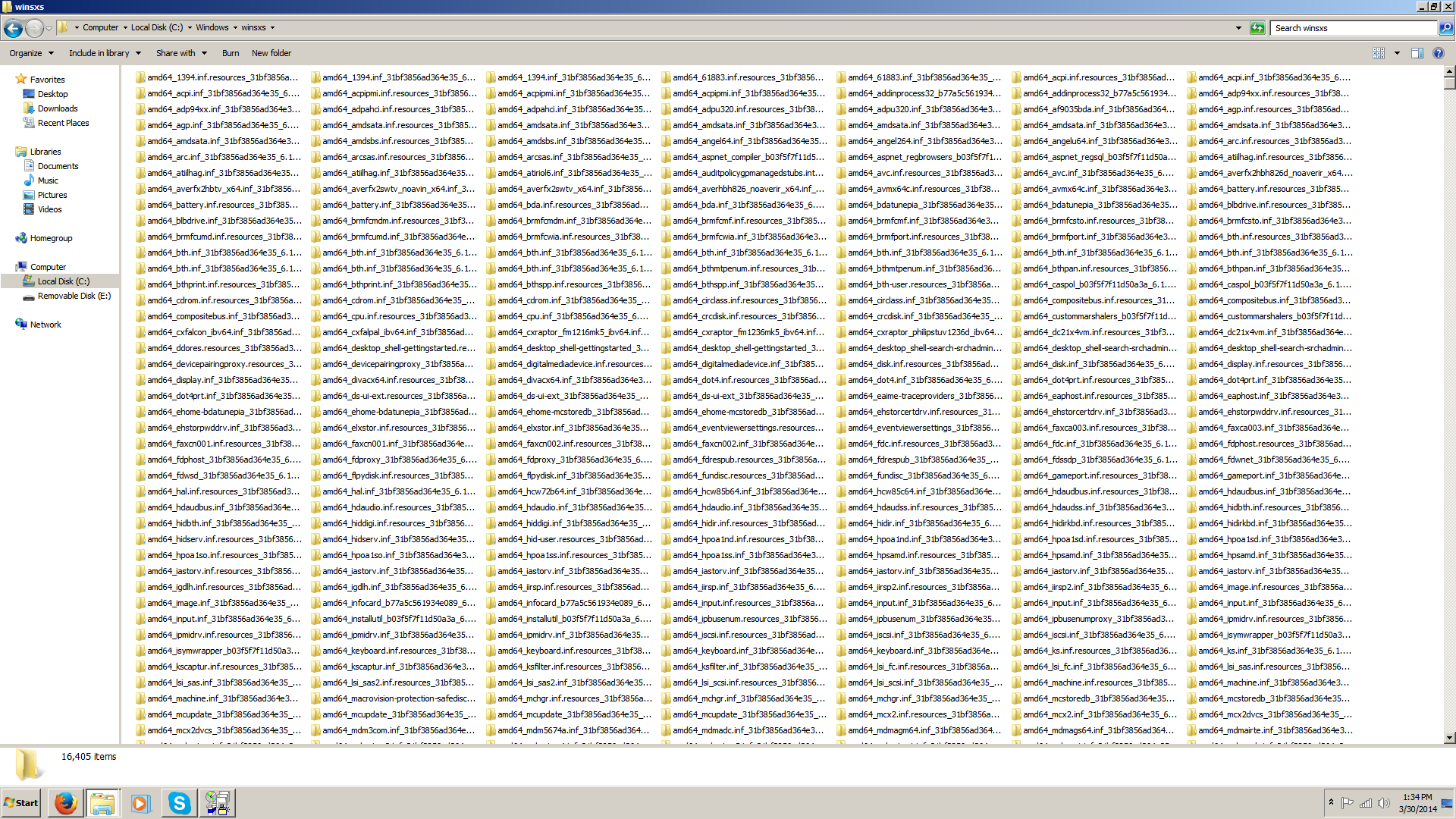
I also did a quick search for any AMD or ATI folders, and found.... A LOT of these, there's so many, not all the folders fit within the screenshot,

mNcCqk0.png


What should I do now? Oh, and not only that, but theres EVEN MORE ATI folders within AppData!
 

My Computer My Computer

At a glance

Windows 7 x64 Home PremiumAMD FX-61008GB DDR3Gigabyte Radeon HD 7850
Computer type
PC/Desktop
Computer Manufacturer/Model Number
Antec Custom Build
OS
Windows 7 x64 Home Premium
CPU
AMD FX-6100
Motherboard
Asus M5A97 R2.0
Memory
8GB DDR3
Graphics Card(s)
Gigabyte Radeon HD 7850
Sound Card
AMD HD Audio
Monitor(s) Displays
Insignia 38.5in
Screen Resolution
1920 x 1080
Hard Drives
ST3500418AS ATA 500GB
Case
Custom Antec
Keyboard
Razer
Mouse
Old Dell
Internet Speed
Feckin' Fast
Antivirus
Microsoft Security Essentials
Browser
Firefox
Remember since you have an AMD CPU there will be AMD drivers you need that aren't graphics related.
 

My Computer My Computer

At a glance

Windows 7 Ultimate X64 SP1Intel i5-2550K, Differing ~4.4-4.8GHz No buil...16GB G.Skill Sniper 1866MHz @ 2133MHz 2x8GBASUS GTX650TIB-DC2OC-2GD5, (650TI Boost)
Computer type
PC/Desktop
Computer Manufacturer/Model Number
Home Built Desktop By DataTech
OS
Windows 7 Ultimate X64 SP1
CPU
Intel i5-2550K, Differing ~4.4-4.8GHz No built in GPU
Motherboard
ASUS P8Z68-V PRO/GEN3
Memory
16GB G.Skill Sniper 1866MHz @ 2133MHz 2x8GB
Graphics Card(s)
ASUS GTX650TIB-DC2OC-2GD5, (650TI Boost)
Sound Card
Onboard Realtek 5-1
Monitor(s) Displays
Samsung P2570HD
Screen Resolution
1920x1080
Hard Drives
Samsung 840 Pro 256GB SSD for OS, 500GB Seagate Constellation (Enterprise drive) for Data
PSU
Corsair HX650W
Case
Inwin Dragon Rider
Cooling
Hyper 212 EVO w/two Noctua fans, push-pull, @1300 RPM
Keyboard
E-Z Eyes, bright yellow keys with large characters
Mouse
steelseries SENSEI Laser Pro Gaming
Internet Speed
48-51Mbs Mbs down, 11 Mbs up Xfinity Cable
Antivirus
Norton Internet Security 2013
Browser
IE 10, Opera, Pale Moon if needed
Other Info
4 case fans, LG BluRay-RE, ASUS DVD-RW, Mr. Fusion power supply, 1.21 gigawatts.
I'm throwing in the towel and doing a Clean Reinstall of Windows.

What do you recommend I do after? Try to update straight to the latest drivers, or install the Gigabyte drivers on the disc?
 

My Computer My Computer

At a glance

Windows 7 x64 Home PremiumAMD FX-61008GB DDR3Gigabyte Radeon HD 7850
Computer type
PC/Desktop
Computer Manufacturer/Model Number
Antec Custom Build
OS
Windows 7 x64 Home Premium
CPU
AMD FX-6100
Motherboard
Asus M5A97 R2.0
Memory
8GB DDR3
Graphics Card(s)
Gigabyte Radeon HD 7850
Sound Card
AMD HD Audio
Monitor(s) Displays
Insignia 38.5in
Screen Resolution
1920 x 1080
Hard Drives
ST3500418AS ATA 500GB
Case
Custom Antec
Keyboard
Razer
Mouse
Old Dell
Internet Speed
Feckin' Fast
Antivirus
Microsoft Security Essentials
Browser
Firefox
I would try the newest stable drivers from AMD, myself, or one version earlier. Not the beta ones.
 

My Computer My Computer

At a glance

Win 7 Pro x64/Win 10 Pro x64 dual bootAMD FX 8350 Vishera @ 420016 GB Mushkin Blackline DDR3-2400 @ 1866 (9-1...XFX Radeon R9 280 Double D Black Edition
Computer type
PC/Desktop
Computer Manufacturer/Model Number
Mellon Labs (custom build)
OS
Win 7 Pro x64/Win 10 Pro x64 dual boot
CPU
AMD FX 8350 Vishera @ 4200
Motherboard
ASUS M5A97 R2.0
Memory
16 GB Mushkin Blackline DDR3-2400 @ 1866 (9-10-10-10-31)
Graphics Card(s)
XFX Radeon R9 280 Double D Black Edition
Sound Card
Realtek HD Audio on MB. Sounds great.
Monitor(s) Displays
Acer 24", Acer 22"
Screen Resolution
3840 x 1080
Hard Drives
1 x Mushkin Chronos 120 GB SSD (Win 10)
1 x Samsung 850 EVO 250 GB SSD (Win 7)
1 x WD 1TB SATA Blue
1 x WD 1TB SATA Green
PSU
Corsair TX-750
Case
CoolerMaster HAF 912+
Cooling
Coolermaster Seidon 240M Liquid AIO. 6 case fans
Keyboard
Logitech G710+
Mouse
Logitech G500s
Internet Speed
Much better since I got fiber, but still way overpriced.
Antivirus
MSE, Malware Bytes for scanning
Browser
Firefox
Other Info
Corsair VOID USB headphones.

A Mellon Labs X-1 - LCD Smartie driven system status display.

Brought to you by the letter E
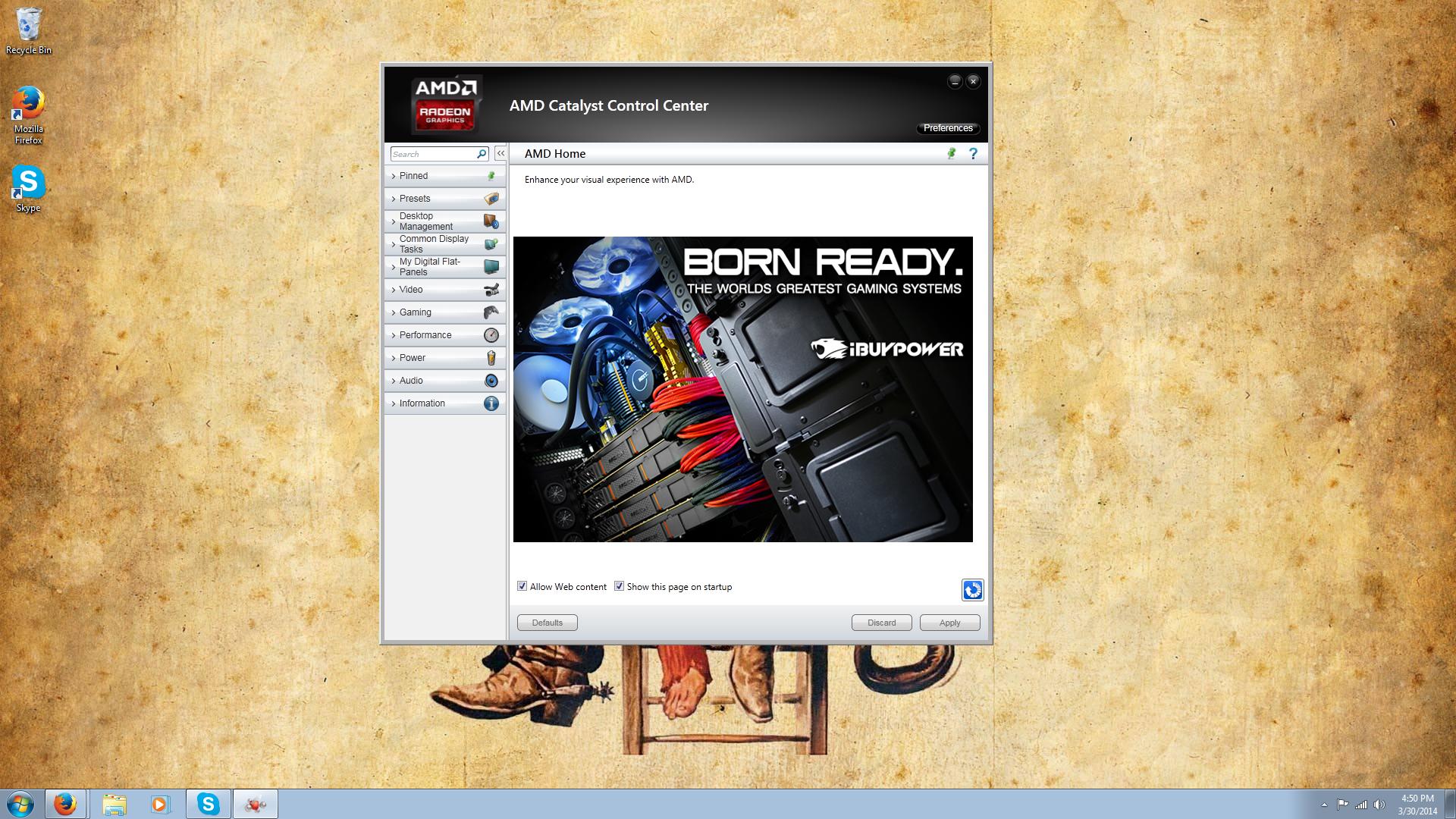
Just thought I'd share this all with you-

CCvaAeh.jpg


This is finally running the latest drivers... I suspect by the next ones it'll mess up again, hopefully not. Thanks everyone for contributing!
 

My Computer My Computer

At a glance

Windows 7 x64 Home PremiumAMD FX-61008GB DDR3Gigabyte Radeon HD 7850
Computer type
PC/Desktop
Computer Manufacturer/Model Number
Antec Custom Build
OS
Windows 7 x64 Home Premium
CPU
AMD FX-6100
Motherboard
Asus M5A97 R2.0
Memory
8GB DDR3
Graphics Card(s)
Gigabyte Radeon HD 7850
Sound Card
AMD HD Audio
Monitor(s) Displays
Insignia 38.5in
Screen Resolution
1920 x 1080
Hard Drives
ST3500418AS ATA 500GB
Case
Custom Antec
Keyboard
Razer
Mouse
Old Dell
Internet Speed
Feckin' Fast
Antivirus
Microsoft Security Essentials
Browser
Firefox
Right on. Glad you got it working.
 

My Computer My Computer

At a glance

Win 7 Pro x64/Win 10 Pro x64 dual bootAMD FX 8350 Vishera @ 420016 GB Mushkin Blackline DDR3-2400 @ 1866 (9-1...XFX Radeon R9 280 Double D Black Edition
Computer type
PC/Desktop
Computer Manufacturer/Model Number
Mellon Labs (custom build)
OS
Win 7 Pro x64/Win 10 Pro x64 dual boot
CPU
AMD FX 8350 Vishera @ 4200
Motherboard
ASUS M5A97 R2.0
Memory
16 GB Mushkin Blackline DDR3-2400 @ 1866 (9-10-10-10-31)
Graphics Card(s)
XFX Radeon R9 280 Double D Black Edition
Sound Card
Realtek HD Audio on MB. Sounds great.
Monitor(s) Displays
Acer 24", Acer 22"
Screen Resolution
3840 x 1080
Hard Drives
1 x Mushkin Chronos 120 GB SSD (Win 10)
1 x Samsung 850 EVO 250 GB SSD (Win 7)
1 x WD 1TB SATA Blue
1 x WD 1TB SATA Green
PSU
Corsair TX-750
Case
CoolerMaster HAF 912+
Cooling
Coolermaster Seidon 240M Liquid AIO. 6 case fans
Keyboard
Logitech G710+
Mouse
Logitech G500s
Internet Speed
Much better since I got fiber, but still way overpriced.
Antivirus
MSE, Malware Bytes for scanning
Browser
Firefox
Other Info
Corsair VOID USB headphones.

A Mellon Labs X-1 - LCD Smartie driven system status display.

Brought to you by the letter E
Back
Top