Solved How to add a program to the Open With Window

purplelover

New member
Member
VIP
Local time
2:55 AM
Messages
128
Location
Michigan
I have read all the posts for my proplem but it has not been covered.
I have .sig files (PrintMAster files) that will not open. I click on the files, Open With box opens and there is no PM to associte with it. Then I Choose Other Programs ansd it is not there either.
My PM program runs, nut will not open PM files on the desltop.

I have even tried strat programs, all programs and it shows up as a file. I can open and copy it but have no way to put it into the default box.

I use this program almost every day...It is currently trying to open with IE

I am at my wits end.....somebody, anybody throw me a rope..... :banghead:

Thankx, purplelover
 

My Computer My Computer

Computer type
PC/Desktop
Computer Manufacturer/Model Number
Dell
OS
Windows 7 Home Premium 64bit
CPU
Intel R Core (TM) i5
Memory
M 450 @ 2.40GH 6GB (5.80 available
Antivirus
Norton 360
Browser
Google Chrome
I have read all the posts for my proplem but it has not been covered.
I have .sig files (PrintMAster files) that will not open. I click on the files, Open With box opens and there is no PM to associte with it. Then I Choose Other Programs ansd it is not there either.
My PM program runs, nut will not open PM files on the desltop.

I have even tried strat programs, all programs and it shows up as a file. I can open and copy it but have no way to put it into the default box.

I use this program almost every day...It is currently trying to open with IE

I am at my wits end.....somebody, anybody throw me a rope..... :banghead:

Thankx, purplelover

Visit the following link;

Open With - Add Program

HTH
 

My Computer My Computer

Computer type
PC/Desktop
Computer Manufacturer/Model Number
Custom Built
OS
Windows 7 Professional x64
CPU
Intel i5 quad processor
Motherboard
DP67BG
Memory
16 GB
Graphics Card(s)
Radeon HD 5770
Sound Card
Realtek High Definition Audio
Monitor(s) Displays
Samsung SyncMaster
Screen Resolution
1920X1080
Hard Drives
WD 2TB (SATA Internal)
WD 1TB (USB External)
PSU
Corsair GS800
Case
Tower (Generic)
Cooling
3 Internal Fans
Keyboard
MS Wireless
Mouse
MS Optical Wired
Internet Speed
54 mbps
Antivirus
Emsisoft
Browser
IE-Version 9, Palemoon-Version 24.2.0

My Computer My Computer

Computer type
PC/Desktop
Computer Manufacturer/Model Number
Custom Built
OS
Windows 10 Pro
CPU
AMD Ryzen 5 2400G Processor with Radeon RX Vega 11 Graphics
Motherboard
ASRock X470 Master SLI/AC AM4 AMD Promontory X470 SATA 6Gb/s
Memory
G.SKILL Ripjaws V Series 16GB (2 x 8GB) 288-Pin DDR4 SDRAM D
Graphics Card(s)
2047MB NVIDIA GeForce GTX 1060 6GB (EVGA)
Sound Card
Motherboard Built in
Monitor(s) Displays
Acer R240HY bidx 23.8-Inch IPS HDMI DVI VGA (1920 x 1080) Wi
Screen Resolution
1920 x 1080
Hard Drives
1TB Sandisk SSD PLUS (Main drive)
500 GB Seagate 7200 RPM (Games)
500 GB Western Digital 7200 RPM (Virtual Machines)
PSU
CORSAIR TX Series TX650M 650W 80+ Gold Modular Power Supply
Case
CORSAIR CARBIDE SPEC-02 Mid-Tower Gaming Case, Red LED Fan
Cooling
220mm, two 120mm, and four 60mm fans
Keyboard
Wired Dell keyboard
Mouse
Wireless Logitech mouse
Internet Speed
250mb down, 30mb up
Antivirus
Panda Cloud Antivirus
Browser
Chrome-ish x64
Other Info
Your awesome for reading this.
Open with program

Hope I don't get you 2 confused.....

Andrew this was the same info I have checked it was from 2009 and it does not apply to my problem. I do not have the Printmaster in the Open With Window choose default OR browse. It IS in my start programs as a file. I can open it but can't figure out how to get it into the Open With window.

Sir Charles this download is limited and they want money. I spent $29 last weekend with a place claiming to fix my specific problem. I was on the phone for 45min and it did not fix it. He says he did a registry fix and diagnostic and said it had to be cleaned IMMEDIATELY! Come to find out he wanted to sell me a $200 for the cleaning charge me $39 a month to keep me running. After we hung up I changed all my passwords , did a registry clean and reinstalled PM. Still an orphaned file.

How can my PrintMaster program run and not be in the Open With, Choose Default or Browse browse windows. I am not the puter genius' you guys are . I am SURE someone can figure it out.....Thankx Andrew and Sir Charles. Any other ideas?????
:banghead: :banghead: :banghead:
 
Last edited:

My Computer My Computer

Computer type
PC/Desktop
Computer Manufacturer/Model Number
Dell
OS
Windows 7 Home Premium 64bit
CPU
Intel R Core (TM) i5
Memory
M 450 @ 2.40GH 6GB (5.80 available
Antivirus
Norton 360
Browser
Google Chrome
Post a snip of you similar window:

This is the preferred, best way to upload an image or a file to a post.

http://www.sevenforums.com/tutorials/9733-screenshots-files-upload-post-seven-forums.html#post93869

Press the ALT and PrntScrn keys at the same time, this will capture only the active window to use in Paint or your preferred graphics editor.


You may also upload a photo or image you already have on your PC,as you would a file, without using the Snipping tool.


13285-open-change-default-program-step2.jpg


Did you try this from Brink's tutorial?

Brink said:
C) Select the program that you want to open the file with. (See screenshot above)
NOTE: If the program you wanted to select is still not listed, then click on the Browse button and navigate to the program's exe file. Select it, and click on the Open button to add it to be able to select it.
 

My Computer My Computer

Computer type
PC/Desktop
Computer Manufacturer/Model Number
Home Built Desktop By DataTech
OS
Windows 7 Ultimate X64 SP1
CPU
Intel i5-2550K, Differing ~4.4-4.8GHz No built in GPU
Motherboard
ASUS P8Z68-V PRO/GEN3
Memory
16GB G.Skill Sniper 1866MHz @ 2133MHz 2x8GB
Graphics Card(s)
ASUS GTX650TIB-DC2OC-2GD5, (650TI Boost)
Sound Card
Onboard Realtek 5-1
Monitor(s) Displays
Samsung P2570HD
Screen Resolution
1920x1080
Hard Drives
Samsung 840 Pro 256GB SSD for OS, 500GB Seagate Constellation (Enterprise drive) for Data
PSU
Corsair HX650W
Case
Inwin Dragon Rider
Cooling
Hyper 212 EVO w/two Noctua fans, push-pull, @1300 RPM
Keyboard
E-Z Eyes, bright yellow keys with large characters
Mouse
steelseries SENSEI Laser Pro Gaming
Internet Speed
48-51Mbs Mbs down, 11 Mbs up Xfinity Cable
Antivirus
Norton Internet Security 2013
Browser
IE 10, Opera, Pale Moon if needed
Other Info
4 case fans, LG BluRay-RE, ASUS DVD-RW, Mr. Fusion power supply, 1.21 gigawatts.
Hope I don't get you 2 confused.....

Andrew this was the same info I have checked it was from 2009 and it does not apply to my problem. I do not have the Printmaster in the Open With Window choose default OR browse. It IS in my start programs as a file. I can open it but can't figure out how to get it into the Open With window.

Sir Charles this download is limited and they want money. I spent $29 last weekend with a place claiming to fix my specific problem. I was on the phone for 45min and it did not fix it. He says he did a registry fix and diagnostic and said it had to be cleaned IMMEDIATELY! Come to find out he wanted to sell me a $200 for the cleaning charge me $39 a month to keep me running. After we hung up I changed all my passwords , did a registry clean and reinstalled PM. Still an orphaned file.

How can my PrintMaster program run and not be in the Open With, Choose Default or Browse browse windows. I am not the puter genius' you guys are . I am SURE someone can figure it out.....Thankx Andrew and Sir Charles. Any other ideas?????
:banghead: :banghead: :banghead:

My name is Sir George, not Charles, just so no one gets confused. The download by Ramesh is free and is in a zip format for download at the following site;

Registering programs with the "Open With" dialog

The program has always been free and you may donate if you find it useful. Please post a screen shot of the request for payment.
 

My Computer My Computer

Computer type
PC/Desktop
Computer Manufacturer/Model Number
Custom Built
OS
Windows 7 Professional x64
CPU
Intel i5 quad processor
Motherboard
DP67BG
Memory
16 GB
Graphics Card(s)
Radeon HD 5770
Sound Card
Realtek High Definition Audio
Monitor(s) Displays
Samsung SyncMaster
Screen Resolution
1920X1080
Hard Drives
WD 2TB (SATA Internal)
WD 1TB (USB External)
PSU
Corsair GS800
Case
Tower (Generic)
Cooling
3 Internal Fans
Keyboard
MS Wireless
Mouse
MS Optical Wired
Internet Speed
54 mbps
Antivirus
Emsisoft
Browser
IE-Version 9, Palemoon-Version 24.2.0
I spent $29 last weekend with a place claiming to fix my specific problem. I was on the phone for 45min and it did not fix it. He says he did a registry fix and diagnostic and said it had to be cleaned IMMEDIATELY!

You might have been scammed and have way more issues then you realize.
 

My Computer My Computer

Computer type
PC/Desktop
Computer Manufacturer/Model Number
Custom Built
OS
Windows 10 Pro
CPU
AMD Ryzen 5 2400G Processor with Radeon RX Vega 11 Graphics
Motherboard
ASRock X470 Master SLI/AC AM4 AMD Promontory X470 SATA 6Gb/s
Memory
G.SKILL Ripjaws V Series 16GB (2 x 8GB) 288-Pin DDR4 SDRAM D
Graphics Card(s)
2047MB NVIDIA GeForce GTX 1060 6GB (EVGA)
Sound Card
Motherboard Built in
Monitor(s) Displays
Acer R240HY bidx 23.8-Inch IPS HDMI DVI VGA (1920 x 1080) Wi
Screen Resolution
1920 x 1080
Hard Drives
1TB Sandisk SSD PLUS (Main drive)
500 GB Seagate 7200 RPM (Games)
500 GB Western Digital 7200 RPM (Virtual Machines)
PSU
CORSAIR TX Series TX650M 650W 80+ Gold Modular Power Supply
Case
CORSAIR CARBIDE SPEC-02 Mid-Tower Gaming Case, Red LED Fan
Cooling
220mm, two 120mm, and four 60mm fans
Keyboard
Wired Dell keyboard
Mouse
Wireless Logitech mouse
Internet Speed
250mb down, 30mb up
Antivirus
Panda Cloud Antivirus
Browser
Chrome-ish x64
Other Info
Your awesome for reading this.
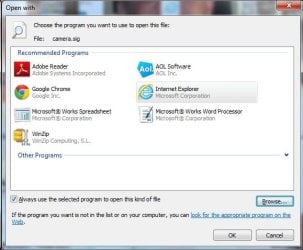
Here is a pic of the open with window.....No PrintMAster
 

Attachments

  • open with.jpg
    open with.jpg
    35.3 KB · Views: 18

My Computer My Computer

Computer type
PC/Desktop
Computer Manufacturer/Model Number
Dell
OS
Windows 7 Home Premium 64bit
CPU
Intel R Core (TM) i5
Memory
M 450 @ 2.40GH 6GB (5.80 available
Antivirus
Norton 360
Browser
Google Chrome
Did you see this?


Britton30 said:
Did you try this from Brink's tutorial?

Brink said:
C) Select the program that you want to open the file with. (See screenshot above)
NOTE: If the program you wanted to select is still not listed, then click on the Browse button and navigate to the program's exe file. Select it, and click on the Open button to add it to be able to select it.

Click the Browse button and search the C:\program files (x86) for printmaster and find the .exe file.

It could be in the C:\program files folder but I would check the above first.
 

My Computer My Computer

Computer type
PC/Desktop
Computer Manufacturer/Model Number
Self Built
OS
Win 10 Pro x64
CPU
Intel I5-2500K @3.3GHz
Motherboard
Asrock P67 Extreme4
Memory
16GB G.Skill Ripjaws X (4x4GB)
Graphics Card(s)
EVGA GeForce 750 Ti SC 2GB
Sound Card
ASUS Xonar DG 5.1 Channels 24-bit 96KHz PCI Interface Sound
Monitor(s) Displays
auria eq2367
Screen Resolution
1920 x 1080
Hard Drives
250GB Samsung 850 EVO SSD
1TB WD Blue
1TB Hitachi
PSU
SeaSonic X 650W 80 Plus Gold
Case
Corsair Obsidian 750D
Cooling
Corsair H60, Three 140mm case fans
Keyboard
Logitech Wireless Keyboard K520
Mouse
Logitech Wireless Mouse M310
Internet Speed
Wave Broadband ~ 100 dn 5 up
Antivirus
Windows Defender, Malwarebytes Premium
Browser
Edge, IE11, Chrome
Other Info
Laptop specs: HP g7-1365dx /
CPU: AMD A6-3420M APU with Radeon(tm) HD Graphics /
RAM: Crucial 8Gb (2x4Gb) /
SSD: Crucial M4-CT128M4SSD2 ATA Device/ FW 000F /
GFX: AMD Radeon HD 6520G /
OS: Windows 10 Pro x64
Open With

Sir George so sorry for the screw up.....whatever was I thinking????

Britton30
" Quote: Originally Posted by Brink
C) Select the program that you want to open the file with. (See screenshot above)
NOTE: If the program you wanted to select is still not listed, then click on the Browse button and navigate to the program's exe file. Select it, and click on the Open button to add it to be able to select it.'"


Brinks post does not address my problem. It is not anywhere he suggests.......

I am sorry but I must not be explaining myself very well...
The Printmaster Icon is NOT in the Open With window
It is Not in the Recommended OR Other Programs window
When I click the BROWSE button all that is there are files and NO Printmaster File

The ONLY place that shows a PrintMaster file is in start open programs.....
Pretty please there must be some answer....pleae don't give up on me. :( :( :(
 

My Computer My Computer

Computer type
PC/Desktop
Computer Manufacturer/Model Number
Dell
OS
Windows 7 Home Premium 64bit
CPU
Intel R Core (TM) i5
Memory
M 450 @ 2.40GH 6GB (5.80 available
Antivirus
Norton 360
Browser
Google Chrome
Can you right click on the Printmaster file in the start Open programs, and then click on Properties ?
If you can, what does it show ?

My PM program runs, nut will not open PM files on the desltop.
If the program runs you should see it in Task Manager / Processes.
What does it show for Image Path Name ?
 

My Computer My Computer

Computer type
PC/Desktop
Computer Manufacturer/Model Number
home built
OS
Multi-Boot W7_Pro_x64 W8.1_Pro_x64 W10_Pro_x64 +Linux_VMs +Chromium_VM
CPU
AMD Athlon II x4 620
Motherboard
Gigabyte GA-MA785G-UD3H
Memory
6GB GSkill DDR2 800
Graphics Card(s)
AMD 4670 GPU + AMD 4200 IGP
Sound Card
on board Realtek ALC889A
Monitor(s) Displays
RCA 40" LCD TV, Insignia 32" LCD TV, HP 15" LCD monitor
Screen Resolution
1680 x 1050
Hard Drives
OCZ Vertex 3 120GB,
Samsung F3 1TB (3),
Several others - WD, Seagate, Hitachi, ...
PSU
Corsair 500 W
Case
Rosewill mid tower
Cooling
CM 90mm rifle
Keyboard
Gyration wireless, Logitech wireless, Dell USB wired
Mouse
Gyration wireless, Logitech wireless, V7 USB wired
Internet Speed
Spectrum - 100Mbps D / 10Mbps U
Antivirus
Avast, MBAM3, EMET, WinPatrol
Browser
Pale Moon, Firefox, IE
Other Info
2 multi-boot PC's
Mainly HTPC/Office/Gen purpose (no gaming).
Trendnet USB KVM.
LG DVD burner/Blue Ray Player.
Tray system for removable SATA backup drives.

Not currently OCd, under-volted.
I use Hybrid sleep, rarely re-boot or shutdown.

Hauppauge HD-PVR, Avermedia PCIe TV Tuner, Hauppauge PCI TV Tuner.
Open with

derekimo

Lordy, Lordy are we getting closer???......I looked in the C:\program files (x86) for printmaster it is there BUT
There is NO .exe file here how us that posible?????

Is there a file i could take off the cd and past it in????? Where else could it be.....
 

My Computer My Computer

Computer type
PC/Desktop
Computer Manufacturer/Model Number
Dell
OS
Windows 7 Home Premium 64bit
CPU
Intel R Core (TM) i5
Memory
M 450 @ 2.40GH 6GB (5.80 available
Antivirus
Norton 360
Browser
Google Chrome
derekimo

Lordy, Lordy are we getting closer???......I looked in the C:\program files (x86) for printmaster it is there BUT
There is NO .exe file here how us that posible?????

Is there a file i could take off the cd and past it in????? Where else could it be.....

Can you open that folder and post a screenshot?

Or try Davids method above to see if you can find the path by opening the program and looking for the path in task manager.
 

My Computer My Computer

Computer type
PC/Desktop
Computer Manufacturer/Model Number
Self Built
OS
Win 10 Pro x64
CPU
Intel I5-2500K @3.3GHz
Motherboard
Asrock P67 Extreme4
Memory
16GB G.Skill Ripjaws X (4x4GB)
Graphics Card(s)
EVGA GeForce 750 Ti SC 2GB
Sound Card
ASUS Xonar DG 5.1 Channels 24-bit 96KHz PCI Interface Sound
Monitor(s) Displays
auria eq2367
Screen Resolution
1920 x 1080
Hard Drives
250GB Samsung 850 EVO SSD
1TB WD Blue
1TB Hitachi
PSU
SeaSonic X 650W 80 Plus Gold
Case
Corsair Obsidian 750D
Cooling
Corsair H60, Three 140mm case fans
Keyboard
Logitech Wireless Keyboard K520
Mouse
Logitech Wireless Mouse M310
Internet Speed
Wave Broadband ~ 100 dn 5 up
Antivirus
Windows Defender, Malwarebytes Premium
Browser
Edge, IE11, Chrome
Other Info
Laptop specs: HP g7-1365dx /
CPU: AMD A6-3420M APU with Radeon(tm) HD Graphics /
RAM: Crucial 8Gb (2x4Gb) /
SSD: Crucial M4-CT128M4SSD2 ATA Device/ FW 000F /
GFX: AMD Radeon HD 6520G /
OS: Windows 10 Pro x64
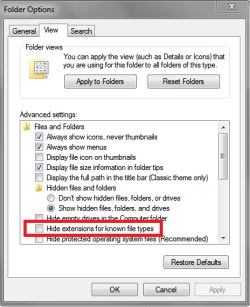
In Explorer Folder Options make sure you have Hide extensions for known file types unchecked

FOVSP01.PNG
 

My Computer My Computer

Computer type
PC/Desktop
Computer Manufacturer/Model Number
home built
OS
Multi-Boot W7_Pro_x64 W8.1_Pro_x64 W10_Pro_x64 +Linux_VMs +Chromium_VM
CPU
AMD Athlon II x4 620
Motherboard
Gigabyte GA-MA785G-UD3H
Memory
6GB GSkill DDR2 800
Graphics Card(s)
AMD 4670 GPU + AMD 4200 IGP
Sound Card
on board Realtek ALC889A
Monitor(s) Displays
RCA 40" LCD TV, Insignia 32" LCD TV, HP 15" LCD monitor
Screen Resolution
1680 x 1050
Hard Drives
OCZ Vertex 3 120GB,
Samsung F3 1TB (3),
Several others - WD, Seagate, Hitachi, ...
PSU
Corsair 500 W
Case
Rosewill mid tower
Cooling
CM 90mm rifle
Keyboard
Gyration wireless, Logitech wireless, Dell USB wired
Mouse
Gyration wireless, Logitech wireless, V7 USB wired
Internet Speed
Spectrum - 100Mbps D / 10Mbps U
Antivirus
Avast, MBAM3, EMET, WinPatrol
Browser
Pale Moon, Firefox, IE
Other Info
2 multi-boot PC's
Mainly HTPC/Office/Gen purpose (no gaming).
Trendnet USB KVM.
LG DVD burner/Blue Ray Player.
Tray system for removable SATA backup drives.

Not currently OCd, under-volted.
I use Hybrid sleep, rarely re-boot or shutdown.

Hauppauge HD-PVR, Avermedia PCIe TV Tuner, Hauppauge PCI TV Tuner.
DavidW7ncus Hide extensions is unchecked

Start, programs PM , properties :
start menu programs
SIZE: 4.42kb
SIZE ON DISK 12.0 KB
3 files, 3 folders
READ ONLY
any of this any help>>>>>>
 

My Computer My Computer

Computer type
PC/Desktop
Computer Manufacturer/Model Number
Dell
OS
Windows 7 Home Premium 64bit
CPU
Intel R Core (TM) i5
Memory
M 450 @ 2.40GH 6GB (5.80 available
Antivirus
Norton 360
Browser
Google Chrome
No, that doesn't help.

I was looking for a screenshot like you did with the open with window.

But I wanted the screenshot of the open PrintMaster folder you found in program files (x86).
 

My Computer My Computer

Computer type
PC/Desktop
Computer Manufacturer/Model Number
Self Built
OS
Win 10 Pro x64
CPU
Intel I5-2500K @3.3GHz
Motherboard
Asrock P67 Extreme4
Memory
16GB G.Skill Ripjaws X (4x4GB)
Graphics Card(s)
EVGA GeForce 750 Ti SC 2GB
Sound Card
ASUS Xonar DG 5.1 Channels 24-bit 96KHz PCI Interface Sound
Monitor(s) Displays
auria eq2367
Screen Resolution
1920 x 1080
Hard Drives
250GB Samsung 850 EVO SSD
1TB WD Blue
1TB Hitachi
PSU
SeaSonic X 650W 80 Plus Gold
Case
Corsair Obsidian 750D
Cooling
Corsair H60, Three 140mm case fans
Keyboard
Logitech Wireless Keyboard K520
Mouse
Logitech Wireless Mouse M310
Internet Speed
Wave Broadband ~ 100 dn 5 up
Antivirus
Windows Defender, Malwarebytes Premium
Browser
Edge, IE11, Chrome
Other Info
Laptop specs: HP g7-1365dx /
CPU: AMD A6-3420M APU with Radeon(tm) HD Graphics /
RAM: Crucial 8Gb (2x4Gb) /
SSD: Crucial M4-CT128M4SSD2 ATA Device/ FW 000F /
GFX: AMD Radeon HD 6520G /
OS: Windows 10 Pro x64
DavidW7ncus

just unchecked hide extensions


now what?????

also have checked Show Hidden files, folder and drives....
no diff so far. should I restart???

HIDE EXTENSIONS FIR ALL FILE TYPES ALREADY UNCHECKED
 

My Computer My Computer

Computer type
PC/Desktop
Computer Manufacturer/Model Number
Dell
OS
Windows 7 Home Premium 64bit
CPU
Intel R Core (TM) i5
Memory
M 450 @ 2.40GH 6GB (5.80 available
Antivirus
Norton 360
Browser
Google Chrome
open with

derekimo

I was looking for a screenshot like you did with the open with window.

"But I wanted the screenshot of the open PrintMaster folder you found in program files (x86)."

think its too big but will try
 

My Computer My Computer

Computer type
PC/Desktop
Computer Manufacturer/Model Number
Dell
OS
Windows 7 Home Premium 64bit
CPU
Intel R Core (TM) i5
Memory
M 450 @ 2.40GH 6GB (5.80 available
Antivirus
Norton 360
Browser
Google Chrome
You can take more than one if you need to get everything.
 

My Computer My Computer

Computer type
PC/Desktop
Computer Manufacturer/Model Number
Self Built
OS
Win 10 Pro x64
CPU
Intel I5-2500K @3.3GHz
Motherboard
Asrock P67 Extreme4
Memory
16GB G.Skill Ripjaws X (4x4GB)
Graphics Card(s)
EVGA GeForce 750 Ti SC 2GB
Sound Card
ASUS Xonar DG 5.1 Channels 24-bit 96KHz PCI Interface Sound
Monitor(s) Displays
auria eq2367
Screen Resolution
1920 x 1080
Hard Drives
250GB Samsung 850 EVO SSD
1TB WD Blue
1TB Hitachi
PSU
SeaSonic X 650W 80 Plus Gold
Case
Corsair Obsidian 750D
Cooling
Corsair H60, Three 140mm case fans
Keyboard
Logitech Wireless Keyboard K520
Mouse
Logitech Wireless Mouse M310
Internet Speed
Wave Broadband ~ 100 dn 5 up
Antivirus
Windows Defender, Malwarebytes Premium
Browser
Edge, IE11, Chrome
Other Info
Laptop specs: HP g7-1365dx /
CPU: AMD A6-3420M APU with Radeon(tm) HD Graphics /
RAM: Crucial 8Gb (2x4Gb) /
SSD: Crucial M4-CT128M4SSD2 ATA Device/ FW 000F /
GFX: AMD Radeon HD 6520G /
OS: Windows 10 Pro x64
MSRUN32.exe was only .exe in the PM browse when i opened it. clicked it because it had an .exe after it and all it did was to change the icon to a treasure chest... MY BAD.....it did put into thr open with box....

Took a screenshot of the first half of the properties in PM 18.1 and clicked open but how do I save to a .jpeg on my desktop????
 

My Computer My Computer

Computer type
PC/Desktop
Computer Manufacturer/Model Number
Dell
OS
Windows 7 Home Premium 64bit
CPU
Intel R Core (TM) i5
Memory
M 450 @ 2.40GH 6GB (5.80 available
Antivirus
Norton 360
Browser
Google Chrome
Back
Top