Solved "USB 3.0 This device can perform faster" message even though connected

castellar

New member
Local time
12:46 PM
Messages
33
"USB 3.0 This device can perform faster" message even though connected

Hi
I'm getting the "USB 3.0 This device can perform faster. This USB Mass Storage Device can transfer information faster if you connect it to a Super-Speed USB 3.0 port" message even though the external disk is connected to a USB 3.0 port with a USB 3.0 cable.
Any hints?
Thanks


My Computer My Computer

At a glance

Microsoft Windows 7 Professional 64-bit 7601 ...Intel(R) Core(TM) i7-3520M CPU @ 2.90GHz16.00 GBNVIDIA NVS 5400M
Computer type
Laptop
Computer Manufacturer/Model Number
Lenovo 23445PU
OS
Microsoft Windows 7 Professional 64-bit 7601 Multiprocessor Free Service Pack 1
CPU
Intel(R) Core(TM) i7-3520M CPU @ 2.90GHz
Motherboard
LENOVO 23445PU
Memory
16.00 GB
Graphics Card(s)
NVIDIA NVS 5400M
Sound Card
(1) NVIDIA High Definition Audio (2) Realtek High Definiti
Monitor(s) Displays
ThinkPad Display 1600x900 on NVIDIA NVS 5400M
Screen Resolution
1600 x 900 x 32 bits (4294967296 colors) @ 50 Hz
Hard Drives
(1) M4-CT512M4SSD1 (2) WDC WD7500BPKT-75PK4T0
Internet Speed
100/10
Antivirus
Kaspersky
Browser
Mozilla
Try a different port or cable. A USB port has different pins for USB 3 and USB 2, so if there is a problem on the connection for USB 3 it will try the USB 2 circuit. Could also be a driver problem.

Jim :cool:
 

My Computer My Computer

At a glance

Windows 8.1 Pro w/Media Center 64bit, Windows...Phenom II X6 1100TCrucial Balistic 8gb DDR3-1866 CL9MSI R6850 Cyclone IGD5 PE
Computer type
PC/Desktop
Computer Manufacturer/Model Number
Home Built
OS
Windows 8.1 Pro w/Media Center 64bit, Windows 7 HP 64bit
CPU
Phenom II X6 1100T
Motherboard
ASUS M5A99X EVO
Memory
Crucial Balistic 8gb DDR3-1866 CL9
Graphics Card(s)
MSI R6850 Cyclone IGD5 PE
Sound Card
On Board
Monitor(s) Displays
ASUS VE258Q 25" LED with DVI-HDMI-DisplayPort
Screen Resolution
1920 x 1080
Hard Drives
Two WD Cavier Black 2TB Sata III, WD My Book Essential 2TB USB 3.0
PSU
Seasonic X650 80 Plus GOLD Modular
Case
Corsair 400R
Cooling
Antec Kuhler H2O 620, Two 120mm and four 140mm
Keyboard
Logitech K120
Mouse
Logitech Marble Mouse USB, Logitech Precision Game Pad
Internet Speed
15MB
Antivirus
Norton IS 2013, Malwarebytes Pro Beta 2
Browser
IE-11, FF-27
Other Info
APC UPS ES 750, Netgear WNR3500L Gigabit & Wireless N Router with SamKnows Test Program, Motorola SB6120 Gigabit Cable Modem. Brother HL-2170W Laser Printer, Epson V300 Scanner
Hi there .. For some reason this can happen with Windows 7 .. Best advice i think is just ignore it ...
 

My Computer My Computer

At a glance

windows 7 home 64bitINTEL-CORE I716GB
Computer Manufacturer/Model Number
W530-3630QM1
OS
windows 7 home 64bit
CPU
INTEL-CORE I7
Memory
16GB
Hard Drives
750GB
Browser
Chrome
USB 3.0 computer ports are blue. USB 3.0 cables are either marked blue OR have initials SS on the female connector end of the 3.0 cable. Make sure your connection is right. (And, of course) it's a 3.0 device, i assume.

Connect directly to the computer. Not through a hub
 

My Computer My Computer

At a glance

Desk 1: Win 7 Pro x32; Desk 2: Windows 10 x64
Computer type
PC/Desktop
Computer Manufacturer/Model Number
Dell Optiplex 360 and Optiplex 755
OS
Desk 1: Win 7 Pro x32; Desk 2: Windows 10 x64
Hard Drives
500GB Crucial SSD in both Desktops
Other Info
Buffalo 6TB NAS, Raid 1
Some MOBOs have one USB 3.0 port that is faster than the others; I ran into that with my new notebook. It has two USB 3.0 ports. One will give me the message saying that the other would be faster (which it was when I tested them).

Other MOBOs use a USB 3.0 booster of some sort that is tied to specific devices.
 

My Computer My Computer

At a glance

Win 7 Ultimate 64 bitIntel i7-3930KKingston HyperX Genesis 32GB Kit (8x4GB Modul...MSI R7850 Twin Frozr 2GD5/OC Radeon HD 7850 2...
Computer type
PC/Desktop
Computer Manufacturer/Model Number
Custom Build
OS
Win 7 Ultimate 64 bit
CPU
Intel i7-3930K
Motherboard
ASUS P9X79 WS
Memory
Kingston HyperX Genesis 32GB Kit (8x4GB Modules) 1600MHz DDR
Graphics Card(s)
MSI R7850 Twin Frozr 2GD5/OC Radeon HD 7850 2GB 256-bit GDDR
Sound Card
Asus Xonar Essence STX
Monitor(s) Displays
3x Asus VG248QE 24", Vizio 32" TV
Screen Resolution
1920 x 1080, ?
Hard Drives
Samsung 128GB 840 Pro SSD (1),
Samsung 4TB 850 EVO SSDs (4)
Samsung 4TB 850 EVO SSDs (16) external backup drives used in 2.5" hot swap bays in the computer.
PSU
Corsair HX750w
Case
Antec Two Hundred v2 (modified)
Cooling
Cooler Master GeminII S524 120mm (fan replaced with a 140mm)
Keyboard
Logitech G510s
Mouse
Logitech M525 (two in use)
Internet Speed
=< 32Mbps down, 8Mbps up
Antivirus
AVAST!, MBAM, SAS, Spybot S&D (all but MBAM free) Glary Util
Browser
IE11
Other Info
LSI 9211-8i HBA card (8 SATA III ports), 2.5" & 3.5" Hot Swap Bays, HooToo HT-CR001 PCI-E to USB 3.0 Internal Hub + 6 Slot Card Reader, and LG Model CH12LS28 BD-ROM Optical Drive. Also, ScanSnap S1500 ADF duplexing scanner, Canon 9000F flat bed scanner, Corsair SP2500 2.1 speakers, Samsung CLP 415nw laser color printer, Cyberpower PP2200SW UPS
Thank you all for your helpful replies. The two 3.0 ports tried are definitely 3.0 and cable and external drive are 3.0 too. The speed I am getting on backups is between 3 and 400 Mb/s.
 

My Computer My Computer

At a glance

Microsoft Windows 7 Professional 64-bit 7601 ...Intel(R) Core(TM) i7-3520M CPU @ 2.90GHz16.00 GBNVIDIA NVS 5400M
Computer type
Laptop
Computer Manufacturer/Model Number
Lenovo 23445PU
OS
Microsoft Windows 7 Professional 64-bit 7601 Multiprocessor Free Service Pack 1
CPU
Intel(R) Core(TM) i7-3520M CPU @ 2.90GHz
Motherboard
LENOVO 23445PU
Memory
16.00 GB
Graphics Card(s)
NVIDIA NVS 5400M
Sound Card
(1) NVIDIA High Definition Audio (2) Realtek High Definiti
Monitor(s) Displays
ThinkPad Display 1600x900 on NVIDIA NVS 5400M
Screen Resolution
1600 x 900 x 32 bits (4294967296 colors) @ 50 Hz
Hard Drives
(1) M4-CT512M4SSD1 (2) WDC WD7500BPKT-75PK4T0
Internet Speed
100/10
Antivirus
Kaspersky
Browser
Mozilla
All a device needs to do to be able to claim it's USB 3.0 is be a bit faster than USB 2.0's upper limit.
 

My Computer My Computer

At a glance

Win 7 Ultimate 64 bitIntel i7-3930KKingston HyperX Genesis 32GB Kit (8x4GB Modul...MSI R7850 Twin Frozr 2GD5/OC Radeon HD 7850 2...
Computer type
PC/Desktop
Computer Manufacturer/Model Number
Custom Build
OS
Win 7 Ultimate 64 bit
CPU
Intel i7-3930K
Motherboard
ASUS P9X79 WS
Memory
Kingston HyperX Genesis 32GB Kit (8x4GB Modules) 1600MHz DDR
Graphics Card(s)
MSI R7850 Twin Frozr 2GD5/OC Radeon HD 7850 2GB 256-bit GDDR
Sound Card
Asus Xonar Essence STX
Monitor(s) Displays
3x Asus VG248QE 24", Vizio 32" TV
Screen Resolution
1920 x 1080, ?
Hard Drives
Samsung 128GB 840 Pro SSD (1),
Samsung 4TB 850 EVO SSDs (4)
Samsung 4TB 850 EVO SSDs (16) external backup drives used in 2.5" hot swap bays in the computer.
PSU
Corsair HX750w
Case
Antec Two Hundred v2 (modified)
Cooling
Cooler Master GeminII S524 120mm (fan replaced with a 140mm)
Keyboard
Logitech G510s
Mouse
Logitech M525 (two in use)
Internet Speed
=< 32Mbps down, 8Mbps up
Antivirus
AVAST!, MBAM, SAS, Spybot S&D (all but MBAM free) Glary Util
Browser
IE11
Other Info
LSI 9211-8i HBA card (8 SATA III ports), 2.5" & 3.5" Hot Swap Bays, HooToo HT-CR001 PCI-E to USB 3.0 Internal Hub + 6 Slot Card Reader, and LG Model CH12LS28 BD-ROM Optical Drive. Also, ScanSnap S1500 ADF duplexing scanner, Canon 9000F flat bed scanner, Corsair SP2500 2.1 speakers, Samsung CLP 415nw laser color printer, Cyberpower PP2200SW UPS
Every USB controller has a root hub. Each root hub has one or more ports.(The controller + root hub + root hub ports are all on the motherboard). Root hub ports are NOT the same as the computer ports you see on your machine and what you plug your device into.

(In general), when you plug a USB device into the computer port, Windows + firmware dynamically decide which controller/root hub/root hub port it connects to. Bad (wrong) decisions can occur for different reasons.

@castellar
You should verify what your 3.0 device is actually being to connected to on the motherboard. Download USBTreeView. Unzip and run either the 32 or 64 bit version depending on if you're running 32 or 64 bit Windows. In TreeView, root hub ports are indicated with an H ( for a hi-speed hub port) or (S super-speed hubport).

Post a snapshot of the left side of the display (the visual "tree view") to show us what it's being connected to.

@LadyFitzgerald
You may find this a curious exercise as well. Use USBTreeView to see what type of hub ports your 3.0 device connects from each of your 2 computer ports.
 

My Computer My Computer

At a glance

Desk 1: Win 7 Pro x32; Desk 2: Windows 10 x64
Computer type
PC/Desktop
Computer Manufacturer/Model Number
Dell Optiplex 360 and Optiplex 755
OS
Desk 1: Win 7 Pro x32; Desk 2: Windows 10 x64
Hard Drives
500GB Crucial SSD in both Desktops
Other Info
Buffalo 6TB NAS, Raid 1
Thank you all for your helpful replies. The two 3.0 ports tried are definitely 3.0 and cable and external drive are 3.0 too. The speed I am getting on backups is between 3 and 400 Mb/s.

If you are certain you have a USB cable then I would suspect it's the driver. Your device is rated for USB 3 SS (super speed) That why you get the message about faster speed. It's incorrect cable, port or driver.
 

My Computer My Computer

At a glance

Win8/8.1,Win7-U64, Vista U64, uncounted Linux...AMD and Intell, 9590, 8350, i5 3570kCorsair G SkillCrossfired Sapphire HD 7950 Vapor-X, ASUS R9 ...
Computer type
PC/Desktop
Computer Manufacturer/Model Number
Custom, Dell and Lenono LT's
OS
Win8/8.1,Win7-U64, Vista U64, uncounted Linux distor's
CPU
AMD and Intell, 9590, 8350, i5 3570k
Motherboard
CFVFZ, GA990FXA, Z77e-itx
Memory
Corsair G Skill
Graphics Card(s)
Crossfired Sapphire HD 7950 Vapor-X, ASUS R9 280X TOP
Sound Card
Realtek ALC889
Monitor(s) Displays
ViewSonic VX2770SMH 27" / ViewSonic VX2433 LCD 24"
Screen Resolution
1080i HD
Hard Drives
Samsung SSD 840 Pro
OCZ Agility 3's
OCZ Vector's
WD's Blue, red, green, Velociraptors
Seagate USB3 & Hybrid's
ASUS Blu-Ray
ASUS DVD
PSU
Corsair AX1200i, Seasonice 850 Gold
Case
Cooler Master HAF 922 & HAF 932, Lian Li Train case.
Cooling
Air, Glacer 240L expanded, custom EK loop with duel D5's
Keyboard
Microsoft SideWinder X4 USB Keyboard / Logitech 250 PS2
Mouse
Logitech G500 / MS wireless 5000
Internet Speed
Best of 5ms / 75+ dn / 12+ up More or less.
Antivirus
MS esentials-MalwareBytes
Browser
Firefox Chromebook
@ComputerGeek, thank you! I rebooted first and, lo and behold, no longer got the warning. I attach the screenshot which now seems to show all is correct. This seems reasonable if the USB port can be reassigned dynamically. If I transfer a large file, I'm getting speeds of about 110-120 Mb/s. Is that a normal value?
 

Attachments

  • Screenshot 2014-04-13 16.20.03.png
    Screenshot 2014-04-13 16.20.03.png
    33.3 KB · Views: 108

My Computer My Computer

At a glance

Microsoft Windows 7 Professional 64-bit 7601 ...Intel(R) Core(TM) i7-3520M CPU @ 2.90GHz16.00 GBNVIDIA NVS 5400M
Computer type
Laptop
Computer Manufacturer/Model Number
Lenovo 23445PU
OS
Microsoft Windows 7 Professional 64-bit 7601 Multiprocessor Free Service Pack 1
CPU
Intel(R) Core(TM) i7-3520M CPU @ 2.90GHz
Motherboard
LENOVO 23445PU
Memory
16.00 GB
Graphics Card(s)
NVIDIA NVS 5400M
Sound Card
(1) NVIDIA High Definition Audio (2) Realtek High Definiti
Monitor(s) Displays
ThinkPad Display 1600x900 on NVIDIA NVS 5400M
Screen Resolution
1600 x 900 x 32 bits (4294967296 colors) @ 50 Hz
Hard Drives
(1) M4-CT512M4SSD1 (2) WDC WD7500BPKT-75PK4T0
Internet Speed
100/10
Antivirus
Kaspersky
Browser
Mozilla
Your speed looks normal for USB 3, at least that is what I get on my USB 3 WD external disc. I also have a USB 2 Seagate and it gets about a 1/3 of that.

Jim
 

My Computer My Computer

At a glance

Windows 8.1 Pro w/Media Center 64bit, Windows...Phenom II X6 1100TCrucial Balistic 8gb DDR3-1866 CL9MSI R6850 Cyclone IGD5 PE
Computer type
PC/Desktop
Computer Manufacturer/Model Number
Home Built
OS
Windows 8.1 Pro w/Media Center 64bit, Windows 7 HP 64bit
CPU
Phenom II X6 1100T
Motherboard
ASUS M5A99X EVO
Memory
Crucial Balistic 8gb DDR3-1866 CL9
Graphics Card(s)
MSI R6850 Cyclone IGD5 PE
Sound Card
On Board
Monitor(s) Displays
ASUS VE258Q 25" LED with DVI-HDMI-DisplayPort
Screen Resolution
1920 x 1080
Hard Drives
Two WD Cavier Black 2TB Sata III, WD My Book Essential 2TB USB 3.0
PSU
Seasonic X650 80 Plus GOLD Modular
Case
Corsair 400R
Cooling
Antec Kuhler H2O 620, Two 120mm and four 140mm
Keyboard
Logitech K120
Mouse
Logitech Marble Mouse USB, Logitech Precision Game Pad
Internet Speed
15MB
Antivirus
Norton IS 2013, Malwarebytes Pro Beta 2
Browser
IE-11, FF-27
Other Info
APC UPS ES 750, Netgear WNR3500L Gigabit & Wireless N Router with SamKnows Test Program, Motorola SB6120 Gigabit Cable Modem. Brother HL-2170W Laser Printer, Epson V300 Scanner
@Phone Man, thanks. That's put my mind at ease.
 

My Computer My Computer

At a glance

Microsoft Windows 7 Professional 64-bit 7601 ...Intel(R) Core(TM) i7-3520M CPU @ 2.90GHz16.00 GBNVIDIA NVS 5400M
Computer type
Laptop
Computer Manufacturer/Model Number
Lenovo 23445PU
OS
Microsoft Windows 7 Professional 64-bit 7601 Multiprocessor Free Service Pack 1
CPU
Intel(R) Core(TM) i7-3520M CPU @ 2.90GHz
Motherboard
LENOVO 23445PU
Memory
16.00 GB
Graphics Card(s)
NVIDIA NVS 5400M
Sound Card
(1) NVIDIA High Definition Audio (2) Realtek High Definiti
Monitor(s) Displays
ThinkPad Display 1600x900 on NVIDIA NVS 5400M
Screen Resolution
1600 x 900 x 32 bits (4294967296 colors) @ 50 Hz
Hard Drives
(1) M4-CT512M4SSD1 (2) WDC WD7500BPKT-75PK4T0
Internet Speed
100/10
Antivirus
Kaspersky
Browser
Mozilla
I am having the exact same issues.
It started with a Vantec dock that they said was faulty so I returned it. I then bought a Syba SY-ENC35026 and it is doing the same. Using WD Black 1TB drives. I tried it with two motherboards but got the same result. USBTreeView shows it only running at high speed.
Any help would be great as I am only getting 40-45MB/second.
:)
 

My Computer My Computer

At a glance

Windows 10 Pro 64biti7 4790kKingston HyperX 32GB... (to replace huge NVidia driver fail)
Computer type
PC/Desktop
Computer Manufacturer/Model Number
Self Built
OS
Windows 10 Pro 64bit
CPU
i7 4790k
Motherboard
MSI Gaming 5
Memory
Kingston HyperX 32GB
Graphics Card(s)
... (to replace huge NVidia driver fail)
Monitor(s) Displays
30" HP ZR30W; 27" Samsung 275T
Screen Resolution
2560x1600; 1920x1200
Hard Drives
2x240GB Intel 530 SSD Raid-0;
2x1TB Crucial MX500
PSU
Antec Signature SG-850
Case
Lian Li X2000F
Cooling
BeQuiet! Dark Rock 3
Keyboard
G.Skill KM360
Mouse
Logitech G502
Other Info
Logitech Z5500 5.1
I just wanted to chime into this old post because of something I did to fix the issue I had with my USB 3.0 dock connected to a USB 3.0 hub. It was stating the "this device can perform faster ...".

After checking the cable and hub, I remembered something else that happened after transitioning to USB 3.0. If the cable isn't connected or pushed all the way in, it's possible that the 2.0 connections will connect, but the necessary 3.0 connections will not. So once I pushed in (make sure you power off the device/hub first) the cable all the way in to the hub, I was back to USB 3.0 speeds.
 

My Computer My Computer

At a glance

Win7 Ultimate 64biti2600k8gSLI 570's
Computer type
PC/Desktop
Computer Manufacturer/Model Number
Home brew
OS
Win7 Ultimate 64bit
CPU
i2600k
Motherboard
Gigabyte something
Memory
8g
Graphics Card(s)
SLI 570's
Hard Drives
Too many
open
Hi,
I know it's an old thread, but this is the exact problem I'm having and the suggestions haven't solved the issue yet.

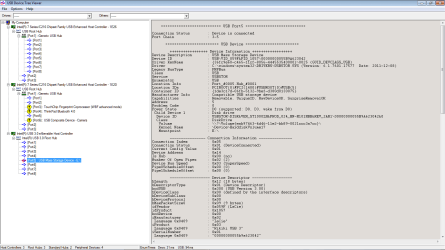
So I looked at the USB device tree viewer, and my USB3 external HDD connects to the same USB2 hub no matter where I plug it in. I have 2x blue USB3 and 1 USB2 physical ports on the outside of my laptop.

Here's a screenshot.

The 3rd controller seems like it's the USB3. The 1st 2 not. My ex HDD is highlighted. How can I force it to use USB3? I already tried uninstalling driver and reconnecting.
Thanks for any help in advance!
view
0B0N33N4o6EiufmNLR3RwMDV2SFNaQl8yamtXWnk4RldoX2tOb3N6d05WYlZlWXU5SEtwTzA

view
 

My Computer My Computer

At a glance

Windows 7 Home Premium SP1 64bitIntel Core i5-4200M8 GBNVIDIA GeForce GT 740M
Computer type
Laptop
Computer Manufacturer/Model Number
Lenovo Z510
OS
Windows 7 Home Premium SP1 64bit
CPU
Intel Core i5-4200M
Memory
8 GB
Graphics Card(s)
NVIDIA GeForce GT 740M
Antivirus
MSE
Browser
Firefox
Is your external drive USB3 compatible - if not fully supported it will default back to USB2
 

My Computers My Computers

  • At a glance

    Windows 11 Pro x64 [Latest Release and Releas...Ryzen 9 5950X, 3.8 - 5.2 MHz64GB [2 x 32GB] DDR4 3200MHz4GB NVIDIA GEFORCE GTX 1650 Ti
    Computer type
    PC/Desktop
    Computer Manufacturer/Model Number
    ChillBlast - Custom to my design
    OS
    Windows 11 Pro x64 [Latest Release and Release Preview]
    CPU
    Ryzen 9 5950X, 3.8 - 5.2 MHz
    Motherboard
    Asus Prime X570-Pro
    Memory
    64GB [2 x 32GB] DDR4 3200MHz
    Graphics Card(s)
    4GB NVIDIA GEFORCE GTX 1650 Ti
    Sound Card
    On-board SPDIF to 5.1 System + HDMI [5.1 system]
    Monitor(s) Displays
    32" UHD 32 Bit HDR Monitor + 43" UHD 4K 32Bit HDR TV
    Screen Resolution
    2 x 3840 x 2160 @60Hz
    Hard Drives
    1TB M2 SSD OS, 500GB Fast Access SSD, 2 x 8TB Data + Various Externals from 1TB to 4TB, 10TB NAS
    PSU
    NZXT C750 80 PLUS Gold 750W Modular PSU
    Case
    Workstation Case [Matt Black]
    Cooling
    NZXT Kraken X63 280mm CPU Cooler +2x Quiet Case fans
    Keyboard
    Logitech Wireless MX Keys & K400 + others
    Mouse
    Logitech Wireless MX Master 3S
    Internet Speed
    920 MB Down 50 MB Up
    Antivirus
    BitDefender Total Security Pro
    Browser
    Chrome (always run latest Non-Beta)
    Other Info
    Also run ...
    Laptop - Quad 8GB - Windows 10 Pro x64
    Nexus 7 Android tablet x2
    Samsung 10.2" tablet
    Blackview TAB 8 4G Android Tablet c/w Keyboard
    Wacom Intuos Pro Medium Pen Pad
    Wacom Intuos Pro Small Pen Pad
    Wacom Expresskeys Remote
    Loopdeck+ Graphics Controller
    Shuttle Pro v2 Control
  • At a glance

    Windows 11 Pro x64 Latest RPIntel I7 10750H 5.0GHz32GB [2x16GB] DDR4 2933 MHznVidia GTX1650Ti 4 GB GDDR6
    Computer type
    Laptop
    System Manufacturer/Model Number
    Dell XPS 17 10750H
    OS
    Windows 11 Pro x64 Latest RP
    CPU
    Intel I7 10750H 5.0GHz
    Motherboard
    Dell XPS
    Memory
    32GB [2x16GB] DDR4 2933 MHz
    Graphics Card(s)
    nVidia GTX1650Ti 4 GB GDDR6
    Sound Card
    Stock [Realtek] 4 Speaker
    Monitor(s) Displays
    17" IPS UHD+ Infinity Edge Touchscreen
    Screen Resolution
    3840 x 2400
    Hard Drives
    2TB M2 NVMe, 4TB External + various 500GB & 1TB External NVMe (also have access to spinner HDD from
    PSU
    Stock
    Case
    Stock XPS Aluminium & Carbon Fibre
    Cooling
    Stock - Active Fan Control
    Keyboard
    Backlit + Various Logitech
    Mouse
    Stock Track Pad + Logitech MX Trackball
    Internet Speed
    72 MB Down 18MB Up
    Browser
    Chrome
    Other Info
    Also run ...
    Laptop - Quad 8GB - Windows 10 Pro x64
    Nexus 7 Android tablet x2
    10.2" tablet
    Sony Z3 Android Smartphone
    Wacom Intuos Pro Medium Pen Pad
    Wacom Intuos Pro Small Pen Pad
    Wacom Expresskeys Remote
    Loopdeck+ Graphics Controller
    Shuttle Pro v2 Control Pad
    10TB NAS
Yeh, it is- says "USB 3.0 interface" on the box. The USB 3 cable came with it in the box too. HGST Touro S 1TB.
 

My Computer My Computer

At a glance

Windows 7 Home Premium SP1 64bitIntel Core i5-4200M8 GBNVIDIA GeForce GT 740M
Computer type
Laptop
Computer Manufacturer/Model Number
Lenovo Z510
OS
Windows 7 Home Premium SP1 64bit
CPU
Intel Core i5-4200M
Memory
8 GB
Graphics Card(s)
NVIDIA GeForce GT 740M
Antivirus
MSE
Browser
Firefox
I have a similar problem, not exactly the same, but similar. I'm hoping you guys have suggestions, because the other results for searching around for solutions to this problem on the net result in advice from 2012, the days where USB 3.0 was still a rather new thing. If there truly is nothing we can do about it, then I also hope my views allow other readers to put the problem in the "can't do anything about it, accept it" basket.

I can get USB 3.0 speeds out of this disk, Seagate Expansion 2 TB 2.5" sometimes. However, very often, I get the old Windows "This device can perform faster if you plug it into a SuperSpeed USB 3.0 port" warning. When that happens, UsbTreeView reports that the device is only running at H, not SS, and I'm back in the USB 2.0 era.

My solution is to plug the connector out of the drive, and plug it back in. Sometimes things go well, and I get SS connectivity and I can transfer at 50 to 60 MB/s (i'm not going to convert that to megabit per second, this is the speed Windows and FreeFileSync reports, and the speed I calculate when I do the filesize / time to copy calculation) - this I deem to be USB 3.0 speed.

I have more success angling the connector slightly when I plug it back in, almost as if I force different pins to make contact first, or possibly lowers the resistance of the connection at the time. The drive side us a USB 3.0 micro connector.

Also, often, when I reboot, the drive detects as H again. The only solution is to plug it again. The plug is wearing out as a result.

When it works fine, and rebooting causes the connection to downgrade, implicates drivers, firmware and software. I believe that is part of the issue. But powering up the drive also comes into play, maybe if the connection is assisted by manipulation when you plug the drive it goes SS, where if it is left alone, it has enough power to keep spinning, but the connection unassisted by manipulation has too high resistance to allow enough power through to spin up the device on a reboot.

My thoughts are it's a hardware problem, I propose 3 postulations:
  • The connector does not reliably connect all the pins with low enough resistance to power up and detect as SS.
  • The USB 3.0 micro jack on the drive got bent one too many times and a track on the PCB of the drive developed a dry contact.
  • The contacts degraded from too much movement on the connector.

To me, it boils down to the connection, and I feel the design of the USB 3.0 micro connector is the culprit. It's too fragile.

Lets hope USB C in future hardware improves our situation.
 

My Computer My Computer

At a glance

Windows 7 Professional x64Core i516 GBIntel
Computer type
Laptop
Computer Manufacturer/Model Number
HP
OS
Windows 7 Professional x64
CPU
Core i5
Motherboard
HP 6570b
Memory
16 GB
Graphics Card(s)
Intel
Hard Drives
Hitachi HTS727550A9E364
Antivirus
Microsoft Security Essentials
Browser
Chrome
I had a similar problem with an expresscard USB 3.0. The card supplier explained that the speed is limited by the speed of the bus that the hub is connected to. If the bus speed cannot support full USB 3.0 speeds, the hub will operate at the highest speed it supports, faster than USB 2.0, but the OS will still tell you it is not full speed. In fact I was getting speeds higher than 2.0, but not full 3.0.

There also seem to be issues with the negotiation. Probably the USB 3.0 standard has ambiguities, and may not be easy to translate into Chinese, so subtle timing issues might result in fallback.
 

My Computer My Computer

At a glance

win 7 pro x64T7700 Intel4GB
Computer type
Laptop
Computer Manufacturer/Model Number
Lenovo T61p
OS
win 7 pro x64
CPU
T7700 Intel
Memory
4GB
Just a follow up - I found a cable that reliably connects as SS. I had several other cables, and they let me down. Maybe fish around for cables to have lots of options to test with.
 

My Computer My Computer

At a glance

Windows 7 Professional x64Core i516 GBIntel
Computer type
Laptop
Computer Manufacturer/Model Number
HP
OS
Windows 7 Professional x64
CPU
Core i5
Motherboard
HP 6570b
Memory
16 GB
Graphics Card(s)
Intel
Hard Drives
Hitachi HTS727550A9E364
Antivirus
Microsoft Security Essentials
Browser
Chrome
Back
Top