This device can perform faster

farhadi

New member
Local time
7:08 AM
Messages
24
I use HP Pavilion dv6840eo notebook. After installing Windows 7 I experience problem.

When I make video chat in Skype after 3-5 minutes I receive error message:

This device can perform faster.

After receiving this error message in Device Manager I found that under "Universal Serial Bus Controllers" previous "USB Composite Device" became "Unrecognised device". After 1 or 2 restarts "Unrecognised device" becomes again "USB Composite Device".

What is recommended to do?
 

My Computer

OS
Windows 7 Ultimate x86
That is not a error message at all, it is just a message telling you that it can run faster in the right settings. You can ignore it.
 

My Computer

Computer Manufacturer/Model Number
Advent
OS
Dual-boot: Windows 7 HP 32-bit SP1 & Windows XP Pro 32-bit SP2.
CPU
AMD Phenom X4 9550 2.8Ghz
Motherboard
FOXCONN A6VMX (Socket 940)
Memory
4.0GB RAM
Graphics Card(s)
256MB On-board ATI Radeon X1200 Series
Sound Card
UnKnown
Monitor(s) Displays
19" TFT Mointor
Screen Resolution
1400 by 900
Hard Drives
500GB Western Digital WDC
Keyboard
HP Keyboard
Internet Speed
Dial-up via Mobile phone (Three)
Other Info
80GB External Hard-drive.

Also I have an old Windows XP Laptop for backup/occasional use etc.
What that message is telling you is that a USB device could run faster if it was plugged into a matching USB port. This will be displayed if a USB 3 device is plugged into a USB 2 port, or a USB 2 device is plugged into a USB 1 port. The answer is to move the device to a port that has the correct speed to match the device. If you device is USB 3 but all you have is USB 2 ports on your PC then yes you can ignore the message. It can also happen if a USB port fails to run at its full speed. In that case I wouldn't ignore it, I would try to find out why and fix it. I would try reinstalling or updating your chip-set drivers. If its just a corrupted driver that should fix it.
 

My Computer

Computer type
PC/Desktop
Computer Manufacturer/Model Number
Home Built
OS
Windows 10 Education 64 bit
CPU
AMD Phenom II X4 980 Black Edition Deneb 3.7GHz
Motherboard
Asus M4N68T-M V2 µATX Motherboard
Memory
8GB 4GBx2 Kingston PC10600 DDR3 1333 Memory
Graphics Card(s)
Zotac NVIDIA Geforce GT640 2 Gig DDR3 PCIe
Sound Card
VIA VT1708s High Definition Audio 8-channel Onboard
Monitor(s) Displays
22" LG E2242 1080p and 2 19" I-INC AG191D
Screen Resolution
1280x1024 - 1920x1080 - 1280x1024
Hard Drives
Crucial M100 256 GB SSD and 500 GB WD Blue SATA
PSU
Thermaltake TR 620
Case
Power Up Black ATX Mid-Tower Case
Cooling
Stock heatsink and fan
Keyboard
Logitech Wireless K350 Wave
Mouse
Logitech Wireless M570 Trackman Wheel
Internet Speed
80 Mbps Down 30 Mbps Up
Antivirus
Windows Defender
Browser
Internet Explorer 11
Other Info
HP DVD1040e Lightscribe - External USB2
I have installed chipset driver from hp website. The problem is drivers for Windows7 are missing. That is why I just try installing Windows Vista drivers.

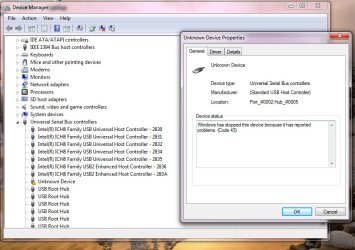
After this warning message WebCam disappeares from Device Manager. My Device Manager is like in attached picture. Camera became Unknown Device

Except installing correct chipset driver is it possible to solve this problem by the other way?

P.S. My webcam is built-in webcam not USB webcam.
 

Attachments

  • devmgmt.jpg
    devmgmt.jpg
    78.9 KB · Views: 28

My Computer

OS
Windows 7 Ultimate x86
Did you try installing in compatibility mode?
 

My Computer

Computer type
PC/Desktop
Computer Manufacturer/Model Number
Home Built
OS
Windows 10 Education 64 bit
CPU
AMD Phenom II X4 980 Black Edition Deneb 3.7GHz
Motherboard
Asus M4N68T-M V2 µATX Motherboard
Memory
8GB 4GBx2 Kingston PC10600 DDR3 1333 Memory
Graphics Card(s)
Zotac NVIDIA Geforce GT640 2 Gig DDR3 PCIe
Sound Card
VIA VT1708s High Definition Audio 8-channel Onboard
Monitor(s) Displays
22" LG E2242 1080p and 2 19" I-INC AG191D
Screen Resolution
1280x1024 - 1920x1080 - 1280x1024
Hard Drives
Crucial M100 256 GB SSD and 500 GB WD Blue SATA
PSU
Thermaltake TR 620
Case
Power Up Black ATX Mid-Tower Case
Cooling
Stock heatsink and fan
Keyboard
Logitech Wireless K350 Wave
Mouse
Logitech Wireless M570 Trackman Wheel
Internet Speed
80 Mbps Down 30 Mbps Up
Antivirus
Windows Defender
Browser
Internet Explorer 11
Other Info
HP DVD1040e Lightscribe - External USB2
When I try to install chipset driver into my system after pressing Next button several times I get information that "Chipset Driver installed successfully on your system. Please, press Finish". However I am sure it is not doing any installation. Cause after clicking Next button in less than 1 second I get the above mentioned information. After clicking Finish I get popup window which I attached to my message.
 

Attachments

  • compatability.jpg
    compatability.jpg
    27.3 KB · Views: 8

My Computer

OS
Windows 7 Ultimate x86
After your recommendation I tried to run installation .exe file in Compatability Mode also. The only difference was that I didn't receive popup window.
 

My Computer

OS
Windows 7 Ultimate x86
As you see from first picture Windows stops my webcam. How to disallow Windows to do it?
 

My Computer

OS
Windows 7 Ultimate x86
Code 43 is a driver problem. If it's just the one USB device, then its likely the driver for that device that has the problem. If its multiple USB devices then its likely the USB driver that is having issues. One thing you can try is to open device manager and go to the Universal Serial Bus Controllers section and Uninstall everything listed. Then reboot and windows will redetect them and reinstall them.
 

My Computer

Computer type
PC/Desktop
Computer Manufacturer/Model Number
Home Built
OS
Windows 10 Education 64 bit
CPU
AMD Phenom II X4 980 Black Edition Deneb 3.7GHz
Motherboard
Asus M4N68T-M V2 µATX Motherboard
Memory
8GB 4GBx2 Kingston PC10600 DDR3 1333 Memory
Graphics Card(s)
Zotac NVIDIA Geforce GT640 2 Gig DDR3 PCIe
Sound Card
VIA VT1708s High Definition Audio 8-channel Onboard
Monitor(s) Displays
22" LG E2242 1080p and 2 19" I-INC AG191D
Screen Resolution
1280x1024 - 1920x1080 - 1280x1024
Hard Drives
Crucial M100 256 GB SSD and 500 GB WD Blue SATA
PSU
Thermaltake TR 620
Case
Power Up Black ATX Mid-Tower Case
Cooling
Stock heatsink and fan
Keyboard
Logitech Wireless K350 Wave
Mouse
Logitech Wireless M570 Trackman Wheel
Internet Speed
80 Mbps Down 30 Mbps Up
Antivirus
Windows Defender
Browser
Internet Explorer 11
Other Info
HP DVD1040e Lightscribe - External USB2
I removed all USB devices from Device Manager and restarted laptop. After it it found and installed all devices normally.

There is one more thing to which I payed attention that when I move laptop for example get it from table Windows stops my webcam from Device Manager. The same thing happens when I move a bit the cover of laptop. As I understood my laptop has also hardware problems. What you think?

For example now after successfull installation of all drivers I moved a bit the cover of laptop and Windows stopped webcam again. Now it is the same in Device Manager. If I don't touch laptop, camera works within 4-5 minutes and after that windows stops it.
 

My Computer

OS
Windows 7 Ultimate x86
Sounds like a hardware fault to me. Either a broken wire in the cable that goes though the hinge or an intermittent connection in the camera. Could be a loose connector/plug somewhere too. You'd have to disassemble it to try and find the fault.
 

My Computer

Computer type
PC/Desktop
Computer Manufacturer/Model Number
Home Built
OS
Windows 10 Education 64 bit
CPU
AMD Phenom II X4 980 Black Edition Deneb 3.7GHz
Motherboard
Asus M4N68T-M V2 µATX Motherboard
Memory
8GB 4GBx2 Kingston PC10600 DDR3 1333 Memory
Graphics Card(s)
Zotac NVIDIA Geforce GT640 2 Gig DDR3 PCIe
Sound Card
VIA VT1708s High Definition Audio 8-channel Onboard
Monitor(s) Displays
22" LG E2242 1080p and 2 19" I-INC AG191D
Screen Resolution
1280x1024 - 1920x1080 - 1280x1024
Hard Drives
Crucial M100 256 GB SSD and 500 GB WD Blue SATA
PSU
Thermaltake TR 620
Case
Power Up Black ATX Mid-Tower Case
Cooling
Stock heatsink and fan
Keyboard
Logitech Wireless K350 Wave
Mouse
Logitech Wireless M570 Trackman Wheel
Internet Speed
80 Mbps Down 30 Mbps Up
Antivirus
Windows Defender
Browser
Internet Explorer 11
Other Info
HP DVD1040e Lightscribe - External USB2
Back
Top