Solved changing OS from 32 bit to 64 bit.

thats what i couldnt understand.why i needed to burn this iso disc when i already have the windows 7 ultimate discs in the black box that i bought.
 

My Computer My Computer

At a glance

Microsoft Windows 7 Ultimate 64-bit 7601 Mult...Intel(R) Core(TM)2 Duo CPU P8400 @ 2.26GHz4.00 GBNVIDIA GeForce 9600M GT
Computer type
PC/Desktop
Computer Manufacturer/Model Number
toshiba qosmio G50 -115
OS
Microsoft Windows 7 Ultimate 64-bit 7601 Multiprocessor Free Service Pack 1
CPU
Intel(R) Core(TM)2 Duo CPU P8400 @ 2.26GHz
Motherboard
TOSHIBA Portable PC
Memory
4.00 GB
Graphics Card(s)
NVIDIA GeForce 9600M GT
Sound Card
Realtek High Definition Audio
Screen Resolution
1680 x 945 x 32 bits (4294967296 colors) @ 60 Hz
Hard Drives
(1) ST9250827AS ATA Device (2) ST9250827AS ATA Device (3) SanDisk Cruzer Micro USB Device
hi there.... going back to the event viewer. there is this that keeps cropping up on the list ?
Critical 24/04/2014 13:44:56 Diagnostics-Performance 100 Boot Performance Monitoring
 

My Computer My Computer

At a glance

Microsoft Windows 7 Ultimate 64-bit 7601 Mult...Intel(R) Core(TM)2 Duo CPU P8400 @ 2.26GHz4.00 GBNVIDIA GeForce 9600M GT
Computer type
PC/Desktop
Computer Manufacturer/Model Number
toshiba qosmio G50 -115
OS
Microsoft Windows 7 Ultimate 64-bit 7601 Multiprocessor Free Service Pack 1
CPU
Intel(R) Core(TM)2 Duo CPU P8400 @ 2.26GHz
Motherboard
TOSHIBA Portable PC
Memory
4.00 GB
Graphics Card(s)
NVIDIA GeForce 9600M GT
Sound Card
Realtek High Definition Audio
Screen Resolution
1680 x 945 x 32 bits (4294967296 colors) @ 60 Hz
Hard Drives
(1) ST9250827AS ATA Device (2) ST9250827AS ATA Device (3) SanDisk Cruzer Micro USB Device
ok , there is nothing on my computer that i want . my music and photos are all stored on usb sticks and my sisters computer. so i need nothing saved. there is nothing in the back ups that i want. SO if i do i clean re install i would like all the drives clean from scratch. what do you recommend ....the "Clean" or "Clean All" with the Diskpart Command.... is this complicated ?
 

My Computer My Computer

At a glance

Microsoft Windows 7 Ultimate 64-bit 7601 Mult...Intel(R) Core(TM)2 Duo CPU P8400 @ 2.26GHz4.00 GBNVIDIA GeForce 9600M GT
Computer type
PC/Desktop
Computer Manufacturer/Model Number
toshiba qosmio G50 -115
OS
Microsoft Windows 7 Ultimate 64-bit 7601 Multiprocessor Free Service Pack 1
CPU
Intel(R) Core(TM)2 Duo CPU P8400 @ 2.26GHz
Motherboard
TOSHIBA Portable PC
Memory
4.00 GB
Graphics Card(s)
NVIDIA GeForce 9600M GT
Sound Card
Realtek High Definition Audio
Screen Resolution
1680 x 945 x 32 bits (4294967296 colors) @ 60 Hz
Hard Drives
(1) ST9250827AS ATA Device (2) ST9250827AS ATA Device (3) SanDisk Cruzer Micro USB Device
You don't need any more than the Clean command to clear the partition table and boot code. Boot the Win7 disk, press Shift + F10 at first screen or enter System Recovery Options to open a Command Prompt, then type the exact commands given in Diskpart Clean Command.

Then close the Command Box, click Install Now, at drive selection screen use the Drive Options to create and format a New partition for install, as shown in Steps 7 and 8 in Clean Install Windows 7

Be sure to use only the methods and tools in Clean Reinstall - Factory OEM Windows 7 so you know you've done a perfect baseline install. More importantly you want this to be a diagnostic install so that you can trace at what point the Shutdown hang begins if it returns.

Put your wireless driver in the backup so that if it isn't provided you can install it to get online, then enable Automatically deliver drivers via Windows Update (Step 3), open Windows Update from All Programs menu, Check for Updates, install all Important and Optional Windows Updates except Bingware. After requested reboots, go back to Windows Update to Check for Updates, install all Important and Optional updates until there are no more offered.

Next install your programs with reboots in between each so you can check for the behavior.

If at any point the Shutdown hang returns then System Restore to before it began to see if this solves it. If so then you will know that the last change made caused it.

Otherwise it might be hardware issue but we can deal with that if its present after reinstall. Hopefully not reinstalling all of the bloatware and Toshiba drivers will sort it out.

If you want to install TeamViewer and message back to me the ID and pw I will connect to set it up for you. Make a list of the programs you want.

 
at what point after i insert the windows 7 64 bit disc do i have to "boot into the installation media's System Recovery Options to open a Command Line and wipe the hard drive of all code with Diskpart Clean Command" . (i presume when it says boot, i press the power button down for a few seconds until it shuts down , and then press it again to start and then press f12 instantly) ?
 

My Computer My Computer

At a glance

Microsoft Windows 7 Ultimate 64-bit 7601 Mult...Intel(R) Core(TM)2 Duo CPU P8400 @ 2.26GHz4.00 GBNVIDIA GeForce 9600M GT
Computer type
PC/Desktop
Computer Manufacturer/Model Number
toshiba qosmio G50 -115
OS
Microsoft Windows 7 Ultimate 64-bit 7601 Multiprocessor Free Service Pack 1
CPU
Intel(R) Core(TM)2 Duo CPU P8400 @ 2.26GHz
Motherboard
TOSHIBA Portable PC
Memory
4.00 GB
Graphics Card(s)
NVIDIA GeForce 9600M GT
Sound Card
Realtek High Definition Audio
Screen Resolution
1680 x 945 x 32 bits (4294967296 colors) @ 60 Hz
Hard Drives
(1) ST9250827AS ATA Device (2) ST9250827AS ATA Device (3) SanDisk Cruzer Micro USB Device
Yes, unless you have the DVD drive set to boot first in BIOS setup as shown here: How to Boot A Computer from CD or DVD - YouTube. If it's already set first to boot then it should prompt you to Press any Key to boot disk.

If hard drive is set first to boot then you'll need to trigger the DVD drive to boot using the BIOS one-time Boot Menu key which is F12 on Toshiba. Tap the key vigorously every second after powering up the PC.
 
Whoooah!!! I am doing it now ... Figured out to boot to command prompt but I have hit a stumbling block !!! When it says to list disk it gives me 2 options . Disk 0 online 232 Gb and disk 1 online 232 Gb. Then it says select disk . I selected the disc 0 . It then said disk 0 is now the selected disk . Then I typed in "clean" and it says ; virtual disc service error: clean is not allowed on the disk containing the current boot. System, page file, crash dump, or hibernation volume ........ Whatever any of that means !!!
 

My Computer My Computer

At a glance

Microsoft Windows 7 Ultimate 64-bit 7601 Mult...Intel(R) Core(TM)2 Duo CPU P8400 @ 2.26GHz4.00 GBNVIDIA GeForce 9600M GT
Computer type
PC/Desktop
Computer Manufacturer/Model Number
toshiba qosmio G50 -115
OS
Microsoft Windows 7 Ultimate 64-bit 7601 Multiprocessor Free Service Pack 1
CPU
Intel(R) Core(TM)2 Duo CPU P8400 @ 2.26GHz
Motherboard
TOSHIBA Portable PC
Memory
4.00 GB
Graphics Card(s)
NVIDIA GeForce 9600M GT
Sound Card
Realtek High Definition Audio
Screen Resolution
1680 x 945 x 32 bits (4294967296 colors) @ 60 Hz
Hard Drives
(1) ST9250827AS ATA Device (2) ST9250827AS ATA Device (3) SanDisk Cruzer Micro USB Device
What do I do now ? Under that message it says diskpart and there is a white dash next to that flashing ?
 

My Computer My Computer

At a glance

Microsoft Windows 7 Ultimate 64-bit 7601 Mult...Intel(R) Core(TM)2 Duo CPU P8400 @ 2.26GHz4.00 GBNVIDIA GeForce 9600M GT
Computer type
PC/Desktop
Computer Manufacturer/Model Number
toshiba qosmio G50 -115
OS
Microsoft Windows 7 Ultimate 64-bit 7601 Multiprocessor Free Service Pack 1
CPU
Intel(R) Core(TM)2 Duo CPU P8400 @ 2.26GHz
Motherboard
TOSHIBA Portable PC
Memory
4.00 GB
Graphics Card(s)
NVIDIA GeForce 9600M GT
Sound Card
Realtek High Definition Audio
Screen Resolution
1680 x 945 x 32 bits (4294967296 colors) @ 60 Hz
Hard Drives
(1) ST9250827AS ATA Device (2) ST9250827AS ATA Device (3) SanDisk Cruzer Micro USB Device
Sounds to me like you may not be booting from the install disc and that instead you have booted from your hard drive.

Diskpart isn't going to let you clean a disc that you are booted from.

You can boot from the install disc by doing one of two things:

Put the install disk in the DVD drive. Reboot and hold down the key required to bring up a boot menu. Choose the DVD drive from that menu.

or

Make a change in your BIOS to boot from the DVD drive before trying to boot from the hard disc.

The first method would be easiest for you. The key required to bring up the boot menu varies, but Greg says it is F12 on a Toshiba. So--reboot with the DVD in the DVD drive and hold down the F12 key until you see a menu. Choose the DVD drive at that time.

Do you see the menu?

The PC should boot from the DVD drive and you should see a screen asking you to choose a language.

Can you get that far?

If you can get to the language screen, hit Shift F10 on the keyboard to get to a command prompt and type diskpart at that prompt and continue with your attempt to "clean" the disc.
 

My Computer My Computer

At a glance

Windows 7 Home Premium SP1, 64-bitIntel Skylake i5-6600K, not overclocked8 GB HyperX DDR4-2666 (2 x 4 GB)none; graphics are integrated on CPU
Computer type
PC/Desktop
Computer Manufacturer/Model Number
Ignatz Special; 4 speed manual gearbox; factory air conditioning; one of one
OS
Windows 7 Home Premium SP1, 64-bit
CPU
Intel Skylake i5-6600K, not overclocked
Motherboard
AsRock Z170M Extreme 4, micro ATX
Memory
8 GB HyperX DDR4-2666 (2 x 4 GB)
Graphics Card(s)
none; graphics are integrated on CPU
Sound Card
onboard: Realtek ALC1150; external: USB Behringer UF0-202
Monitor(s) Displays
Dell S2340M 23 inch IPS
Screen Resolution
1600 x 900
Hard Drives
System: Crucial MX100 series SSD, 128 GB;
Data: Samsung Spinpoint 103SJ, 1 TB;
Backup: WD Caviar Green WD30EZRX-00D8PB0, 3 TB
PSU
Rosewill SilentNight 500 watt fanless, semi-modular
Case
Antec Solo II
Cooling
Noctua NH-U12S; Noctua F12 intake, Noctua S12A exhaust
Keyboard
Microsoft 200 6JH-00001 USB
Mouse
Dell or Microsoft optical wired; USB
Antivirus
Microsoft Security Essentials and Malwarebytes Premium
Browser
Pale Moon
Other Info
All fans PWM; speeds at idle: CPU circa 500 rpm; intake circa 600 rpm; exhaust circa 600 rpm; CPU temps 27 idle and 47 C load in a warm room (27 C/81 F) when running Intel Extreme Tuning Utility stress test.
Ah , I think I have been going to the wrong one after I press f12 .... There are 5 or 6 options in a row at the bottom ... The first one are discs , the second one are discs, the third one is a single disc . The fourth I'm not sure what it is , the fifth I think is a USB pen drive and the sixth is something else ... I have been booting from the 3 rd one which is the single disc ... I think I should be choosing the first or second ones ????
 

My Computer My Computer

At a glance

Microsoft Windows 7 Ultimate 64-bit 7601 Mult...Intel(R) Core(TM)2 Duo CPU P8400 @ 2.26GHz4.00 GBNVIDIA GeForce 9600M GT
Computer type
PC/Desktop
Computer Manufacturer/Model Number
toshiba qosmio G50 -115
OS
Microsoft Windows 7 Ultimate 64-bit 7601 Multiprocessor Free Service Pack 1
CPU
Intel(R) Core(TM)2 Duo CPU P8400 @ 2.26GHz
Motherboard
TOSHIBA Portable PC
Memory
4.00 GB
Graphics Card(s)
NVIDIA GeForce 9600M GT
Sound Card
Realtek High Definition Audio
Screen Resolution
1680 x 945 x 32 bits (4294967296 colors) @ 60 Hz
Hard Drives
(1) ST9250827AS ATA Device (2) ST9250827AS ATA Device (3) SanDisk Cruzer Micro USB Device
DVD drives can have cuckoo names in that menu.

Mine is "P4 TSST corp".

I'd guess yours is one of the last names in the list, but better you tell us what your menu choices are.

Name them.
 

My Computer My Computer

At a glance

Windows 7 Home Premium SP1, 64-bitIntel Skylake i5-6600K, not overclocked8 GB HyperX DDR4-2666 (2 x 4 GB)none; graphics are integrated on CPU
Computer type
PC/Desktop
Computer Manufacturer/Model Number
Ignatz Special; 4 speed manual gearbox; factory air conditioning; one of one
OS
Windows 7 Home Premium SP1, 64-bit
CPU
Intel Skylake i5-6600K, not overclocked
Motherboard
AsRock Z170M Extreme 4, micro ATX
Memory
8 GB HyperX DDR4-2666 (2 x 4 GB)
Graphics Card(s)
none; graphics are integrated on CPU
Sound Card
onboard: Realtek ALC1150; external: USB Behringer UF0-202
Monitor(s) Displays
Dell S2340M 23 inch IPS
Screen Resolution
1600 x 900
Hard Drives
System: Crucial MX100 series SSD, 128 GB;
Data: Samsung Spinpoint 103SJ, 1 TB;
Backup: WD Caviar Green WD30EZRX-00D8PB0, 3 TB
PSU
Rosewill SilentNight 500 watt fanless, semi-modular
Case
Antec Solo II
Cooling
Noctua NH-U12S; Noctua F12 intake, Noctua S12A exhaust
Keyboard
Microsoft 200 6JH-00001 USB
Mouse
Dell or Microsoft optical wired; USB
Antivirus
Microsoft Security Essentials and Malwarebytes Premium
Browser
Pale Moon
Other Info
All fans PWM; speeds at idle: CPU circa 500 rpm; intake circa 600 rpm; exhaust circa 600 rpm; CPU temps 27 idle and 47 C load in a warm room (27 C/81 F) when running Intel Extreme Tuning Utility stress test.
they are not named. they are just pictures... 6 in a row at the bottom... the first 2 are the same. discs piled ontop of one another. the 3 rd is a single disk only. not too sure what the other 3 are but one of them looks like a pen drive ?
 

My Computer My Computer

At a glance

Microsoft Windows 7 Ultimate 64-bit 7601 Mult...Intel(R) Core(TM)2 Duo CPU P8400 @ 2.26GHz4.00 GBNVIDIA GeForce 9600M GT
Computer type
PC/Desktop
Computer Manufacturer/Model Number
toshiba qosmio G50 -115
OS
Microsoft Windows 7 Ultimate 64-bit 7601 Multiprocessor Free Service Pack 1
CPU
Intel(R) Core(TM)2 Duo CPU P8400 @ 2.26GHz
Motherboard
TOSHIBA Portable PC
Memory
4.00 GB
Graphics Card(s)
NVIDIA GeForce 9600M GT
Sound Card
Realtek High Definition Audio
Screen Resolution
1680 x 945 x 32 bits (4294967296 colors) @ 60 Hz
Hard Drives
(1) ST9250827AS ATA Device (2) ST9250827AS ATA Device (3) SanDisk Cruzer Micro USB Device
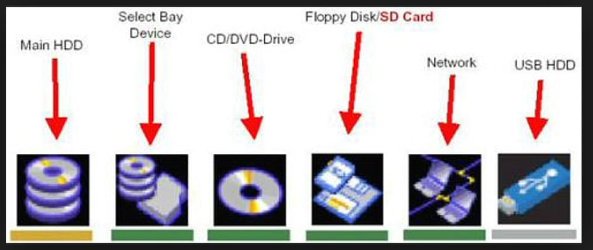
Googling for "Toshiba boot menu icons", I find the image shown below. Does that match your icons?

If that image is correct, the third one is the DVD drive.

But I have no idea what "select bay device" means.

The first choice is clearly not the DVD drive. If you chose it, you'd boot to your regular hard drive.

If those images are correct, I'd expect the 4th, 5th, and 6th icons to fail if you chose them.

You probably have to use your arrow keys to move between the choices.
 

Attachments

  • Untitled-1.jpg
    Untitled-1.jpg
    59.6 KB · Views: 0

My Computer My Computer

At a glance

Windows 7 Home Premium SP1, 64-bitIntel Skylake i5-6600K, not overclocked8 GB HyperX DDR4-2666 (2 x 4 GB)none; graphics are integrated on CPU
Computer type
PC/Desktop
Computer Manufacturer/Model Number
Ignatz Special; 4 speed manual gearbox; factory air conditioning; one of one
OS
Windows 7 Home Premium SP1, 64-bit
CPU
Intel Skylake i5-6600K, not overclocked
Motherboard
AsRock Z170M Extreme 4, micro ATX
Memory
8 GB HyperX DDR4-2666 (2 x 4 GB)
Graphics Card(s)
none; graphics are integrated on CPU
Sound Card
onboard: Realtek ALC1150; external: USB Behringer UF0-202
Monitor(s) Displays
Dell S2340M 23 inch IPS
Screen Resolution
1600 x 900
Hard Drives
System: Crucial MX100 series SSD, 128 GB;
Data: Samsung Spinpoint 103SJ, 1 TB;
Backup: WD Caviar Green WD30EZRX-00D8PB0, 3 TB
PSU
Rosewill SilentNight 500 watt fanless, semi-modular
Case
Antec Solo II
Cooling
Noctua NH-U12S; Noctua F12 intake, Noctua S12A exhaust
Keyboard
Microsoft 200 6JH-00001 USB
Mouse
Dell or Microsoft optical wired; USB
Antivirus
Microsoft Security Essentials and Malwarebytes Premium
Browser
Pale Moon
Other Info
All fans PWM; speeds at idle: CPU circa 500 rpm; intake circa 600 rpm; exhaust circa 600 rpm; CPU temps 27 idle and 47 C load in a warm room (27 C/81 F) when running Intel Extreme Tuning Utility stress test.
well, this is slightly different pics, but the 3 rd one is the same. i have been choosing the 3rd one since trying to do this reinstall but i dont know how to get to the diskpart command bit from there ?
 

My Computer My Computer

At a glance

Microsoft Windows 7 Ultimate 64-bit 7601 Mult...Intel(R) Core(TM)2 Duo CPU P8400 @ 2.26GHz4.00 GBNVIDIA GeForce 9600M GT
Computer type
PC/Desktop
Computer Manufacturer/Model Number
toshiba qosmio G50 -115
OS
Microsoft Windows 7 Ultimate 64-bit 7601 Multiprocessor Free Service Pack 1
CPU
Intel(R) Core(TM)2 Duo CPU P8400 @ 2.26GHz
Motherboard
TOSHIBA Portable PC
Memory
4.00 GB
Graphics Card(s)
NVIDIA GeForce 9600M GT
Sound Card
Realtek High Definition Audio
Screen Resolution
1680 x 945 x 32 bits (4294967296 colors) @ 60 Hz
Hard Drives
(1) ST9250827AS ATA Device (2) ST9250827AS ATA Device (3) SanDisk Cruzer Micro USB Device
well, this is slightly different pics, but the 3 rd one is the same. i have been choosing the 3rd one since trying to do this reinstall but i dont know how to get to the diskpart command bit from there ?

A few posts back you said you got to diskpart OK with shift F10, but couldn't accomplish a "clean" at that point.

Now you say you don't know how.

So, I'm confused.

Are you sure you are actually selecting the 3rd choice?? And are you hitting the enter key after choosing the 3rd icon to force a boot from the DVD drive. And then choosing Shift F10 when you come to the language screen?

Or are you doing something else? We have no way of knowing what keystrokes you are actually making.
We have to rely on what you post in this thread as we are not looking over your shoulder.
 

My Computer My Computer

At a glance

Windows 7 Home Premium SP1, 64-bitIntel Skylake i5-6600K, not overclocked8 GB HyperX DDR4-2666 (2 x 4 GB)none; graphics are integrated on CPU
Computer type
PC/Desktop
Computer Manufacturer/Model Number
Ignatz Special; 4 speed manual gearbox; factory air conditioning; one of one
OS
Windows 7 Home Premium SP1, 64-bit
CPU
Intel Skylake i5-6600K, not overclocked
Motherboard
AsRock Z170M Extreme 4, micro ATX
Memory
8 GB HyperX DDR4-2666 (2 x 4 GB)
Graphics Card(s)
none; graphics are integrated on CPU
Sound Card
onboard: Realtek ALC1150; external: USB Behringer UF0-202
Monitor(s) Displays
Dell S2340M 23 inch IPS
Screen Resolution
1600 x 900
Hard Drives
System: Crucial MX100 series SSD, 128 GB;
Data: Samsung Spinpoint 103SJ, 1 TB;
Backup: WD Caviar Green WD30EZRX-00D8PB0, 3 TB
PSU
Rosewill SilentNight 500 watt fanless, semi-modular
Case
Antec Solo II
Cooling
Noctua NH-U12S; Noctua F12 intake, Noctua S12A exhaust
Keyboard
Microsoft 200 6JH-00001 USB
Mouse
Dell or Microsoft optical wired; USB
Antivirus
Microsoft Security Essentials and Malwarebytes Premium
Browser
Pale Moon
Other Info
All fans PWM; speeds at idle: CPU circa 500 rpm; intake circa 600 rpm; exhaust circa 600 rpm; CPU temps 27 idle and 47 C load in a warm room (27 C/81 F) when running Intel Extreme Tuning Utility stress test.
In rare cases Diskpart will not allow the Clean command to proceed even from boot. You must delete the partitions first to wipe the HD.

Neil, do you have an external hard drive or another hard drive plugged in? If so unplug it first so there's no chance you Clean the wrong disk.

You will know you have booted into the disk if it proceeds as shown in the pictures in Clean Install Windows 7:

2435d1231630405-clean-install-windows-7-step1.jpg


212269d1379310636t-clean-install-windows-7-step3.jpg


Then Press Shift + F10 to open a Command Box to run Diskpart Clean Command

If Diskpart fails again on the disk you know for sure is the Win7 hard drive, then just close the Command Box, click Install Now, when you get to Steps 7 and 8 of Clean Install Windows 7 delete all partitions using the Drive Options. Then close the Window to bail out of the install, boot back into disk to run the Clean command. After it succeeds, close the Command Box again, click Install Now and continue creating and formatting your partition as shown in those steps.
 
i have no external drive. thats what needed to know. how to get the command prompt after getting the windows installation screen... thanks... will give it a go now.....
 

My Computer My Computer

At a glance

Microsoft Windows 7 Ultimate 64-bit 7601 Mult...Intel(R) Core(TM)2 Duo CPU P8400 @ 2.26GHz4.00 GBNVIDIA GeForce 9600M GT
Computer type
PC/Desktop
Computer Manufacturer/Model Number
toshiba qosmio G50 -115
OS
Microsoft Windows 7 Ultimate 64-bit 7601 Multiprocessor Free Service Pack 1
CPU
Intel(R) Core(TM)2 Duo CPU P8400 @ 2.26GHz
Motherboard
TOSHIBA Portable PC
Memory
4.00 GB
Graphics Card(s)
NVIDIA GeForce 9600M GT
Sound Card
Realtek High Definition Audio
Screen Resolution
1680 x 945 x 32 bits (4294967296 colors) @ 60 Hz
Hard Drives
(1) ST9250827AS ATA Device (2) ST9250827AS ATA Device (3) SanDisk Cruzer Micro USB Device
Ok ... I have got to command prompt and typed list disk . It gave me the two options. Disk 0 and disk 1 ... I typed disc 0 and is given me a long list of stuff .. Active-add-assign-attributes-auto mount etc.....at the end of all that , at the bottom it says disk part and the flashing line .. I typed in clean and it just gives me a long list of stuff again . I don't know what to do next ???
 

My Computer My Computer

At a glance

Microsoft Windows 7 Ultimate 64-bit 7601 Mult...Intel(R) Core(TM)2 Duo CPU P8400 @ 2.26GHz4.00 GBNVIDIA GeForce 9600M GT
Computer type
PC/Desktop
Computer Manufacturer/Model Number
toshiba qosmio G50 -115
OS
Microsoft Windows 7 Ultimate 64-bit 7601 Multiprocessor Free Service Pack 1
CPU
Intel(R) Core(TM)2 Duo CPU P8400 @ 2.26GHz
Motherboard
TOSHIBA Portable PC
Memory
4.00 GB
Graphics Card(s)
NVIDIA GeForce 9600M GT
Sound Card
Realtek High Definition Audio
Screen Resolution
1680 x 945 x 32 bits (4294967296 colors) @ 60 Hz
Hard Drives
(1) ST9250827AS ATA Device (2) ST9250827AS ATA Device (3) SanDisk Cruzer Micro USB Device
I'm concerned about why it shows two disks. Does your laptop have two hard drives, or is anything at all plugged in? When you list disk what is the Free Space shown on each?

That menu it gives means you need to do it over. It is not recognizing your commands which must be typed exactly as shown with no extra spaces or anything:

3. In the elevated command prompt, type diskpart and press Enter. (see screenshot below)
45322d1262507101-disk-clean-clean-all-diskpart-command-step1.jpg

4. In the elevated command prompt, type list disk and press Enter. (see screenshot below)
NOTE: This will give you a list of disk numbers to select from.
45323d1262507101-disk-clean-clean-all-diskpart-command-step2.jpg

5. In the elevated command prompt, type select disk # and press Enter. (see screenshot below)
NOTE: You would substitute # for the disk number listed that you want to use clean or clean all on. For example, I want to use one of them on Disk 1 (from step 1) for my USB key drive, so I would type select disk 1 and press Enter.
45324d1262507101-disk-clean-clean-all-diskpart-command-step3.jpg

6. Do either step 7 or 8 below for which command you would like to use.

7. To Use the Clean Diskpart Command
NOTE: (Recommended) See the green INFO box at the top of the tutorial for more information about this command. This command will wipe the HDD quickly.A) In the elevated command prompt, type clean and press Enter. (see screenshot below)
NOTE: This will not take long to finish. Think of it as being like a quick format.
45325d1262507101-disk-clean-clean-all-diskpart-command-step4_clean.jpg
 
Back
Top