Windows Security Center won't turn on

Status
Not open for further replies.
Please remove any CD from the problem computer before running the following fixlist.
Next, open notepad (Start > All Programs > Accessories > Notepad)
Copy the entire contents of the code box below (Do not copy the word 'code') to Notepad.
Save it to the pen drive where FRST is located, and name it: fixlist.txt
Code:
start
HKLM-x32\...\Run: [] => [X]
AppInit_DLLs-x32: c:\progra~2\sshelp~1\psupport.dll => "c:\progra~2\sshelp~1\psupport.dll" File Not Found
SSODL-x32: EldosMountNotificator - {5FF49FE8-B332-4CB9-B102-FB6951629E55} -  No File
S2 *etadpug; "C:\Program Files (x86)\Google\Desktop\Install\{15fbac65-355f-d5ce-9a5e-8694a1ac93dc}\   \...\???\{15fbac65-355f-d5ce-9a5e-8694a1ac93dc}\GoogleUpdate.exe" 
end
NOTICE: This script is written specifically for this computer!!!
Running this on another computer may cause damage to the Operating System.

Now, with the pen drive containing FRST64 and fixlist connected, restart the computer, and once again enter System Recovery Options and select the Command Prompt .
Get to FRST, as you did before, and press the Fix button, just once, and wait.

When done, the tool creates a report on the pen drive called: Fixlog.txt

Please post the Fixlog.txt in your reply.

Let us know if the computer boots to Windows.
 

My Computer My Computer

At a glance

Windows 7 Home Premium
Computer type
PC/Desktop
Computer Manufacturer/Model Number
An ol' eMachines
OS
Windows 7 Home Premium
Internet Speed
Fine for me...I'm retired!
Between Post #3 and Post #20, so many things were done that it is difficult to determine what has transpired here.

Looks like this is an HP computer. If so, what Model and Number?
 

My Computer My Computer

At a glance

Windows 7 Home Premium
Computer type
PC/Desktop
Computer Manufacturer/Model Number
An ol' eMachines
OS
Windows 7 Home Premium
Internet Speed
Fine for me...I'm retired!
Between Post #3 and Post #20, so many things were done that it is difficult to determine what has transpired here.

Looks like this is an HP computer. If so, what Model and Number?

HP Pavillion. Model: p6837c

Doing what you suggested above in the next few min. Please stand by for my reply.
 

My Computer My Computer

At a glance

windows 7 64 bitAMD Athalon II 645 Quad Core14 gig (upgraded from 6 gig)on board/integrated ati radeon HD 4200
Computer type
PC/Desktop
Computer Manufacturer/Model Number
HP Pavillion p6837c
OS
windows 7 64 bit
CPU
AMD Athalon II 645 Quad Core
Memory
14 gig (upgraded from 6 gig)
Graphics Card(s)
on board/integrated ati radeon HD 4200
Monitor(s) Displays
Samsung 245bw
Hard Drives
1.5 tb wd
Internet Speed
100mb down
Antivirus
Windows Secuity Essentials, Windows defender, Malwarebytes
Browser
IE & firefox
Ok, I had to use the repair cd to get the dos prompt, and did it. Still same issue with black screen and mouse pointer...

Fix result of Farbar Recovery Tool (FRST written by Farbar) (x64) Version: 29-04-2014
Ran by SYSTEM at 2014-04-29 22:11:46 Run:1
Running from G:\
Boot Mode: Recovery
==============================================
Content of fixlist:
*****************
start
HKLM-x32\...\Run: [] => [X]
AppInit_DLLs-x32: c:\progra~2\sshelp~1\psupport.dll => "c:\progra~2\sshelp~1\psupport.dll" File Not Found
SSODL-x32: EldosMountNotificator - {5FF49FE8-B332-4CB9-B102-FB6951629E55} - No File
S2 *etadpug; "C:\Program Files (x86)\Google\Desktop\Install\{15fbac65-355f-d5ce-9a5e-8694a1ac93dc}\ \...\???\{15fbac65-355f-d5ce-9a5e-8694a1ac93dc}\GoogleUpdate.exe"
end
*****************
HKLM\Software\WOW6432Node\Microsoft\Windows\CurrentVersion\Run\\ => Value deleted successfully.
"c:\progra~2\sshelp~1\psupport.dll" => Value Data removed successfully.
HKLM\Software\Wow6432Node\Microsoft\Windows\CurrentVersion\ShellServiceObjectDelayLoad\\EldosMountNotificator => Value deleted successfully.
HKLM\Software\Wow6432Node\Classes\CLSID\{5FF49FE8-B332-4CB9-B102-FB6951629E55} => Key not found.
*etadpug => Service deleted successfully.
==== End of Fixlog ====
 

Attachments

My Computer My Computer

At a glance

windows 7 64 bitAMD Athalon II 645 Quad Core14 gig (upgraded from 6 gig)on board/integrated ati radeon HD 4200
Computer type
PC/Desktop
Computer Manufacturer/Model Number
HP Pavillion p6837c
OS
windows 7 64 bit
CPU
AMD Athalon II 645 Quad Core
Memory
14 gig (upgraded from 6 gig)
Graphics Card(s)
on board/integrated ati radeon HD 4200
Monitor(s) Displays
Samsung 245bw
Hard Drives
1.5 tb wd
Internet Speed
100mb down
Antivirus
Windows Secuity Essentials, Windows defender, Malwarebytes
Browser
IE & firefox
Repair CD?

Please explain...what repair CD?

used another windows 7 pc to burn a repair cd instead of using the repair tool built into the bad pc

Is this what you are using?
 

My Computer My Computer

At a glance

Windows 7 Home Premium
Computer type
PC/Desktop
Computer Manufacturer/Model Number
An ol' eMachines
OS
Windows 7 Home Premium
Internet Speed
Fine for me...I'm retired!

My Computer My Computer

At a glance

windows 7 64 bitAMD Athalon II 645 Quad Core14 gig (upgraded from 6 gig)on board/integrated ati radeon HD 4200
Computer type
PC/Desktop
Computer Manufacturer/Model Number
HP Pavillion p6837c
OS
windows 7 64 bit
CPU
AMD Athalon II 645 Quad Core
Memory
14 gig (upgraded from 6 gig)
Graphics Card(s)
on board/integrated ati radeon HD 4200
Monitor(s) Displays
Samsung 245bw
Hard Drives
1.5 tb wd
Internet Speed
100mb down
Antivirus
Windows Secuity Essentials, Windows defender, Malwarebytes
Browser
IE & firefox
No processes are running.

See if you can press Control Alt Delete (at the same time) and select: task manager

Under Applications select: New task

Type in: explorer.exe

Press: Enter
 

My Computer My Computer

At a glance

Windows 7 Home Premium
Computer type
PC/Desktop
Computer Manufacturer/Model Number
An ol' eMachines
OS
Windows 7 Home Premium
Internet Speed
Fine for me...I'm retired!
Tried that every time I get to that screen, and nothing... I did try the start-up repair tool, the previously would always fail. This time since your fix, it said no errors within a few sec, but same issue with non booting....

I'm pasting a log from SFC to post it here? %windir%\logs\cbs\cbs.log this was from the other day when I stopped the computer from finishing this because it was taking 3 hours... I haven't tried to run again, but maybe there is something in here to show us something. again, this log was cut short...

Download CBS.log - uncheck download manager to open
 

My Computer My Computer

At a glance

windows 7 64 bitAMD Athalon II 645 Quad Core14 gig (upgraded from 6 gig)on board/integrated ati radeon HD 4200
Computer type
PC/Desktop
Computer Manufacturer/Model Number
HP Pavillion p6837c
OS
windows 7 64 bit
CPU
AMD Athalon II 645 Quad Core
Memory
14 gig (upgraded from 6 gig)
Graphics Card(s)
on board/integrated ati radeon HD 4200
Monitor(s) Displays
Samsung 245bw
Hard Drives
1.5 tb wd
Internet Speed
100mb down
Antivirus
Windows Secuity Essentials, Windows defender, Malwarebytes
Browser
IE & firefox
Ok, after more research....

HKEY_local machine/software/microsoft/WindowsNT/Currentversion/winlogon/shell SHOULD have a value of "explorer.exe"

BUT has "cmd.exe /k start cmd.exe"

I edit this bad value back to "explorer.exe" attempt a re-boot and the bad value for Shell is still there.

This guy had same issue back from 2010, and tried a bunch of stuff and couldn't fix it.

Solved: Windows 7 & Virus - Tech Support Guy

I don't want to give up!
 

My Computer My Computer

At a glance

windows 7 64 bitAMD Athalon II 645 Quad Core14 gig (upgraded from 6 gig)on board/integrated ati radeon HD 4200
Computer type
PC/Desktop
Computer Manufacturer/Model Number
HP Pavillion p6837c
OS
windows 7 64 bit
CPU
AMD Athalon II 645 Quad Core
Memory
14 gig (upgraded from 6 gig)
Graphics Card(s)
on board/integrated ati radeon HD 4200
Monitor(s) Displays
Samsung 245bw
Hard Drives
1.5 tb wd
Internet Speed
100mb down
Antivirus
Windows Secuity Essentials, Windows defender, Malwarebytes
Browser
IE & firefox
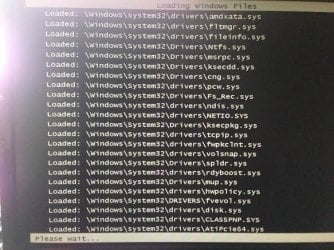
Why is my screen black when I start Windows 7?

Also, see above. it first mentions video driver, and I do notice when it tried to load safe mode, right before it gets to black screen with mouse pointer, the last file loaded was the ati driver, but maybe that is normal? Lastly, Scroll down to "fixing registry issues" on above link, and it says to check for "winlogon" key in registry and I don't have that key in my registry! This could be related? I haven't done anything else and will wait rfor eplies...
You cancelled the installation of the updates. You cancelled the checkdisk. No very smart!

How did you check the win7 registry for the winlogon key? you can't access the win7 registry.... unless you mount the registry hive remote. Very unlikely that key is broken/missing.

What are the last 3 lines on screen if booting to "safe mode"?
 

My Computer My Computer

At a glance

Microsoft Windows 7 Home Premium 64-bits 7601...Intel(R) Core(TM) i3 CPU M 370 @ 2.40GHz4,00 GBATI Mobility Radeon HD 5400 Series
Computer type
Laptop
Computer Manufacturer/Model Number
ACER ASPIRE 5742G
OS
Microsoft Windows 7 Home Premium 64-bits 7601 Multiprocessor Free Service Pack 1
CPU
Intel(R) Core(TM) i3 CPU M 370 @ 2.40GHz
Motherboard
Acer Aspire 5742G
Memory
4,00 GB
Graphics Card(s)
ATI Mobility Radeon HD 5400 Series
Sound Card
(1) AMD High Definition Audio Device (2) Realtek High Defi
Screen Resolution
1366 x 768 x 32 bits (4294967296 colors) @ 60 Hz
Hard Drives
WDC WD5000BEVT-22ZAT0
I just typed in regedit at the command prompt to get into it and view it. PLease see here, this thread has same issue with this registry issue... see here, and it was fixed, read the first few posts:

Solved: Windows 7 & Virus - Tech Support Guy

and safe mode shows, after it stops... Then 20 sec after this is will go to black screen with mouse pointer.
 

Attachments

  • unnamed.jpg
    unnamed.jpg
    50.8 KB · Views: 23

My Computer My Computer

At a glance

windows 7 64 bitAMD Athalon II 645 Quad Core14 gig (upgraded from 6 gig)on board/integrated ati radeon HD 4200
Computer type
PC/Desktop
Computer Manufacturer/Model Number
HP Pavillion p6837c
OS
windows 7 64 bit
CPU
AMD Athalon II 645 Quad Core
Memory
14 gig (upgraded from 6 gig)
Graphics Card(s)
on board/integrated ati radeon HD 4200
Monitor(s) Displays
Samsung 245bw
Hard Drives
1.5 tb wd
Internet Speed
100mb down
Antivirus
Windows Secuity Essentials, Windows defender, Malwarebytes
Browser
IE & firefox
You must examine registrry key HKEY_LOCAL_MACHINE\SOFTWARE\Microsoft\Windows NT\CurrentVersion\Winlogon from win7! Not the same key in recovery environment!!

Load the SOFTWARE hive. An example how to do is here http://www.sevenforums.com/tutorials/85657-password-reset.html load the SOFTWARE hive instead of SYSTEM hive.
 

My Computer My Computer

At a glance

Microsoft Windows 7 Home Premium 64-bits 7601...Intel(R) Core(TM) i3 CPU M 370 @ 2.40GHz4,00 GBATI Mobility Radeon HD 5400 Series
Computer type
Laptop
Computer Manufacturer/Model Number
ACER ASPIRE 5742G
OS
Microsoft Windows 7 Home Premium 64-bits 7601 Multiprocessor Free Service Pack 1
CPU
Intel(R) Core(TM) i3 CPU M 370 @ 2.40GHz
Motherboard
Acer Aspire 5742G
Memory
4,00 GB
Graphics Card(s)
ATI Mobility Radeon HD 5400 Series
Sound Card
(1) AMD High Definition Audio Device (2) Realtek High Defi
Screen Resolution
1366 x 768 x 32 bits (4294967296 colors) @ 60 Hz
Hard Drives
WDC WD5000BEVT-22ZAT0
Ok, wow, you learn something new every day. I went into that key, and it's set to explorer.exe. It's fine. I don't know what all those other people are doing in the other post. lol. There are countless people changing that cmd thing to explorer without loading that hive..

Ok, so, I navigated to the system32/config folder... The 5 files in there, system, sam, etc. are still showing current dates when all the bad stuff was happening, and there is a .bak for each of those files right in that same folder with the main ones, from 2 days ago when everything was fine. I deleted the current ones, and removed the .bak off the other 5... Now, you had me replace those files from regbak folder and the dates were from a week earlier, which fixed the blue screen issue, but still had the black screen mouse pointer issue. Even though it said 5 files replaced.
see my post #11, where you had me replace those files earlier if you forget... I had to scroll back as this is a lot of info.

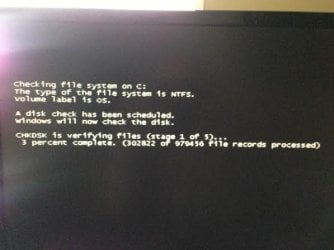
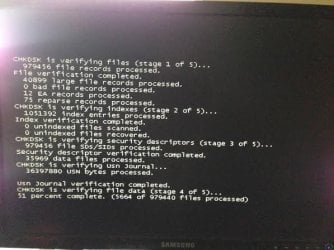
anyway, I rebooted, and for the first time I see this! This is what I stopped the other day because it was taking so long. I guess I will let it finish... Do you think this will fix me? it's literally taking forever, and after 15 min on stage 4, it's still at 51% now at 11,000 files out of 979,000
 

Attachments

  • after_reboot.jpg
    after_reboot.jpg
    18.2 KB · Views: 21
  • after_reboot_more.jpg
    after_reboot_more.jpg
    34.7 KB · Views: 21
Last edited:

My Computer My Computer

At a glance

windows 7 64 bitAMD Athalon II 645 Quad Core14 gig (upgraded from 6 gig)on board/integrated ati radeon HD 4200
Computer type
PC/Desktop
Computer Manufacturer/Model Number
HP Pavillion p6837c
OS
windows 7 64 bit
CPU
AMD Athalon II 645 Quad Core
Memory
14 gig (upgraded from 6 gig)
Graphics Card(s)
on board/integrated ati radeon HD 4200
Monitor(s) Displays
Samsung 245bw
Hard Drives
1.5 tb wd
Internet Speed
100mb down
Antivirus
Windows Secuity Essentials, Windows defender, Malwarebytes
Browser
IE & firefox
The *.bak files are backups you created yourself!!
let chkdsk finish plz
 

My Computer My Computer

At a glance

Microsoft Windows 7 Home Premium 64-bits 7601...Intel(R) Core(TM) i3 CPU M 370 @ 2.40GHz4,00 GBATI Mobility Radeon HD 5400 Series
Computer type
Laptop
Computer Manufacturer/Model Number
ACER ASPIRE 5742G
OS
Microsoft Windows 7 Home Premium 64-bits 7601 Multiprocessor Free Service Pack 1
CPU
Intel(R) Core(TM) i3 CPU M 370 @ 2.40GHz
Motherboard
Acer Aspire 5742G
Memory
4,00 GB
Graphics Card(s)
ATI Mobility Radeon HD 5400 Series
Sound Card
(1) AMD High Definition Audio Device (2) Realtek High Defi
Screen Resolution
1366 x 768 x 32 bits (4294967296 colors) @ 60 Hz
Hard Drives
WDC WD5000BEVT-22ZAT0
Those baks had to be put in there when I ran some of the tools before this issue...

I have a feeling this chkdsk is going to take DAYS. It's still on stage 4, and an hour later only at 52%. This doesn't do anything but move files around, right? Isn't the SFC what fixes windows file issues? I'm just killing time...
 

My Computer My Computer

At a glance

windows 7 64 bitAMD Athalon II 645 Quad Core14 gig (upgraded from 6 gig)on board/integrated ati radeon HD 4200
Computer type
PC/Desktop
Computer Manufacturer/Model Number
HP Pavillion p6837c
OS
windows 7 64 bit
CPU
AMD Athalon II 645 Quad Core
Memory
14 gig (upgraded from 6 gig)
Graphics Card(s)
on board/integrated ati radeon HD 4200
Monitor(s) Displays
Samsung 245bw
Hard Drives
1.5 tb wd
Internet Speed
100mb down
Antivirus
Windows Secuity Essentials, Windows defender, Malwarebytes
Browser
IE & firefox
Actually, SFC repaired C:\Windows\System32\rpcss, and afterwards, FRST did not identify the file as patched:
C:\Windows\System32\rpcss.dll => MD5 is legit

Also, FRST took care of the ZeroAccess it found.


Please follow the instruction of Kaktussoft. Right now, he is your best bet. The way things are looking, I am at a loss for new ideas. Other than a clean install, fixing this kind of situation, if at all possible, requires lots of patience.
 

My Computer My Computer

At a glance

Windows 7 Home Premium
Computer type
PC/Desktop
Computer Manufacturer/Model Number
An ol' eMachines
OS
Windows 7 Home Premium
Internet Speed
Fine for me...I'm retired!
When done with Kaktussoft's instructions, let's try to run RogueKiller, just like you did FRST64.

:info: Please plug in a USB pen drive into a working computer.
Go to the RogueKilller download:
http://www.adlice.com/softs/roguekiller/RogueKillerX64.exe

Save the program to the >> USB pen drive.
Remove USB pen drive when done.

Now, we are going to use the RogueKiller program from the Recovery Environment.

:info: Please go to the problem computer.
Plug in the USB pen drive which has RogueKiller.exe

Start the computer, and tap the F8 key until you get to the Advanced Boot Options
Use the arrow keys to select the Repair your computer menu item

From there...
Select your language settings, and click: Next
Select your User account and click: OK (If you did not set a password, leave blank.)

On the System Recovery Options you get the following options:
Startup Repair
System Restore
Windows Complete PC Restore
Windows Memory Diagnostic Tool
Scan your computer's memory for errors
Command Prompt

Select: Command Prompt

In the Command Prompt window, at the blinking cursor type notepad and press: Enter
In Notepad, under the File menu select: Open
Double-click the Computer icon on the left.
Find the pen drive letter, remember what letter it is, click on it, and press: Open
Close out of Notepad.

Click the Command Prompt window
Type x:\roguekillerX64.exe, and press: Enter
Note: Replace the drive letter x with the drive letter of your pen drive!

When RogueKiller starts, Wait until the Prescan finishes, and press the Scan button.
(PreScan finished appears under Status)

RGKRScan.png.pagespeed.ce.QGZsQEjUHM.png


The scan runs, and, the program saves the RKreport.txt, on the pen drive.

When done, click the Command Prompt window, type exit, and press: Enter

Back at the System Recovery Options, press: Shutdown
Remove the USB pen drive.

Plug the USB pen drive in the working computer, and please provide the RKreport.txt in your reply.

Please do not take action to remove anything!!!!!
 

My Computer My Computer

At a glance

Windows 7 Home Premium
Computer type
PC/Desktop
Computer Manufacturer/Model Number
An ol' eMachines
OS
Windows 7 Home Premium
Internet Speed
Fine for me...I'm retired!
Ok, it was at 51% 7 hours ago, and now only at 54%, 7 hours later it's gone up 2%. I cannot wait for this to finish. At this rate, it's going to take DAYS. THis is insane. I've done a lot of reading in 7 hours, and everyone is saying it's ok stop a chk dsk at stage 4 or 5, but never to stop at stages 1-3. 4-5 are only moving user files. I cannot wait for this to finish. At this rate, it will be 17 more hours for stage 4 to finish, and then stage 5 is a read over of stage 4. Do you agree on this?
 
Last edited:

My Computer My Computer

At a glance

windows 7 64 bitAMD Athalon II 645 Quad Core14 gig (upgraded from 6 gig)on board/integrated ati radeon HD 4200
Computer type
PC/Desktop
Computer Manufacturer/Model Number
HP Pavillion p6837c
OS
windows 7 64 bit
CPU
AMD Athalon II 645 Quad Core
Memory
14 gig (upgraded from 6 gig)
Graphics Card(s)
on board/integrated ati radeon HD 4200
Monitor(s) Displays
Samsung 245bw
Hard Drives
1.5 tb wd
Internet Speed
100mb down
Antivirus
Windows Secuity Essentials, Windows defender, Malwarebytes
Browser
IE & firefox
This is a 1.5 tb harddrive with about 15 gb free.

Per Microsoft..

During stage 4 which I'm on, Chkdsk verifies all clusters in use; during stage 5, Chkdsk verifies unused clusters.
The percent complete that Chkdsk displays during stage 4 is based on the percent of used clusters that are checked. The percent complete that Chkdsk displays during stage 5 is the percent of unused clusters that are checked. Used clusters typically take longer to check than unused clusters, so stage 4 lasts longer than stage 5 on a volume with equal amounts of used and unused clusters. For a volume with mostly unused clusters, stage 5 takes longer than stage 4.

So, since I only have 15gb free, stage 5 will go quicker than stage 4?
 

My Computer My Computer

At a glance

windows 7 64 bitAMD Athalon II 645 Quad Core14 gig (upgraded from 6 gig)on board/integrated ati radeon HD 4200
Computer type
PC/Desktop
Computer Manufacturer/Model Number
HP Pavillion p6837c
OS
windows 7 64 bit
CPU
AMD Athalon II 645 Quad Core
Memory
14 gig (upgraded from 6 gig)
Graphics Card(s)
on board/integrated ati radeon HD 4200
Monitor(s) Displays
Samsung 245bw
Hard Drives
1.5 tb wd
Internet Speed
100mb down
Antivirus
Windows Secuity Essentials, Windows defender, Malwarebytes
Browser
IE & firefox
Status
Not open for further replies.
Back
Top