my security center won't start

my security center won't start I have used the malwarebytes .... @_@ what should I do with this problem?

Hi, read the two topic they suggested some solution which has worked for others....give it a try. If those solution did not work for you then you can try system restore.

security center service will not start

security centre service will not start error code 1068 - Microsoft Answers

P.S: did you get any error? you can google that error code and see if you can find any solution.
 

My Computer My Computer

Computer Manufacturer/Model Number
Compaq CQ 40- 330 TU laptop
OS
windows 7 ultimate 32 bit
CPU
Intel core 2 duo T6400 @ 2.00 GHz
Motherboard
Compal model 3607
Memory
2048 MB DDR 2 399.0 MHz
my system restore is also unavailable too, because my security center cannot start.. I also tried to enable security center on the services.msc, but it always disable
 

My Computer My Computer

OS
Windows 7 Ultimate x32
my security center won't start I have used the malwarebytes .... @_@ what should I do with this problem?

P.S: did you get any error? you can google that error code and see if you can find any solution.

this is the only error I encounter "The security center service cannot start" ...
 

My Computer My Computer

OS
Windows 7 Ultimate x32
Hi ernprivado

I am sorry i won't be much help on this issue i personally never had this problem may be some other forum member will join the topic to help you, meanwhile make google your friend and keep serching for a solution. Best of luck
 

My Computer My Computer

Computer Manufacturer/Model Number
Compaq CQ 40- 330 TU laptop
OS
windows 7 ultimate 32 bit
CPU
Intel core 2 duo T6400 @ 2.00 GHz
Motherboard
Compal model 3607
Memory
2048 MB DDR 2 399.0 MHz
Hi,

Have you checked to see that the service is started? To do this, please follow these steps:

1. Click the Start Orb, and in the search box, type services.msc and hit enter.
2. Scroll down to to the items called:
  • Security Accounts Manager
  • Security Centre
Both should have a Started status and Automatic Startup type. See attached image.

If this is not the case, edit them to automatic statup, and then reboot the PC, and see if the issue is solved.

If the above doesn't work, then please do this:

1. Click Start Orb, and in the search box type cmd
2. Right-click on CMD in the list that appears, and select 'Run as adminstrator'
3. In the CMD window, type sfc /scannow and hit enter.

Post a screen capture image of the results here when it finishes.

Regards,
Golden

 

Attachments

  • Capture.PNG
    Capture.PNG
    65.2 KB · Views: 54

My Computer My Computer

Computer type
PC/Desktop
Computer Manufacturer/Model Number
Golden Mk. I.4
OS
Windows 10 Pro x64 ; Xubuntu x64
CPU
Intel i7 860 @ 2.80 GHz O/C'ed to 4.0GHz
Motherboard
Gigabyte P55A-UD3R Rev.1. Award BIOS F13
Memory
16GB Corsair Vengance DDR3 @ 661 MHz Dual Channel (9-9-9-24)
Graphics Card(s)
EVGA NVidia GTX 560 1024MB
Sound Card
Realtek Integrated
Monitor(s) Displays
Dual Samsung SyncMaster 2494HS
Screen Resolution
1920*1080 and 1920*1080
Hard Drives
1*Samsung 840 EVO 120GB SSD;
1*OCZ Vertex 2 60GB SSD;
2*Samsung F3 SpinPoint 1TB in RAID0;
1*Samsung F1 SpinPoint 1TB;
2*Western Digital 1TB External USB 3.0
1*Western Digital 500GB External USB 3.0
1*Seagate 500GB External USB 2.0
PSU
Thermaltake ToughPower QFan 750W
Case
Thermaltake Element S VK60001W2Z
Cooling
Corsair H60 Water Cooling, 2*230mm and 2*80mm case fans
Keyboard
Logitech G110
Mouse
Logitech MX518
Hi,


If the above doesn't work, then please do this:

1. Click Start Orb, and in the search box type cmd
2. Right-click on CMD in the list that appears, and select 'Run as adminstrator'
3. In the CMD window, type sfc /scannow and hit enter.

Post a screen capture image of the results here when it finishes.

Regards,
Golden

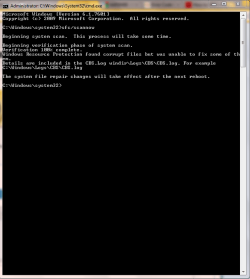
Sir, I have attached a screen capture of the result of sfc/scannow....
 

Attachments

  • in2.PNG
    in2.PNG
    16.6 KB · Views: 66

My Computer My Computer

OS
Windows 7 Ultimate x32
Hi ernprivado

I am sorry i won't be much help on this issue i personally never had this problem may be some other forum member will join the topic to help you, meanwhile make google your friend and keep serching for a solution. Best of luck

hahahah, but thanks... I think I should just reformat my laptop..
 

My Computer My Computer

OS
Windows 7 Ultimate x32
Hi,

Did you check services.msc? Were the services started?

Regards,
Golden
 

My Computer My Computer

Computer type
PC/Desktop
Computer Manufacturer/Model Number
Golden Mk. I.4
OS
Windows 10 Pro x64 ; Xubuntu x64
CPU
Intel i7 860 @ 2.80 GHz O/C'ed to 4.0GHz
Motherboard
Gigabyte P55A-UD3R Rev.1. Award BIOS F13
Memory
16GB Corsair Vengance DDR3 @ 661 MHz Dual Channel (9-9-9-24)
Graphics Card(s)
EVGA NVidia GTX 560 1024MB
Sound Card
Realtek Integrated
Monitor(s) Displays
Dual Samsung SyncMaster 2494HS
Screen Resolution
1920*1080 and 1920*1080
Hard Drives
1*Samsung 840 EVO 120GB SSD;
1*OCZ Vertex 2 60GB SSD;
2*Samsung F3 SpinPoint 1TB in RAID0;
1*Samsung F1 SpinPoint 1TB;
2*Western Digital 1TB External USB 3.0
1*Western Digital 500GB External USB 3.0
1*Seagate 500GB External USB 2.0
PSU
Thermaltake ToughPower QFan 750W
Case
Thermaltake Element S VK60001W2Z
Cooling
Corsair H60 Water Cooling, 2*230mm and 2*80mm case fans
Keyboard
Logitech G110
Mouse
Logitech MX518
Hi,

Did you check services.msc? Were the services started?

Regards,
Golden

Yes I have started it, but after a seconds it will automatically disable... I try looking for malware using different anti-malware and viruses but still not fix.. I also restarted it after putting it on automatic.
 

My Computer My Computer

OS
Windows 7 Ultimate x32
Hi,

OK. Since the sfc found some issues, go ahead and re-run that a few more times (in some cases running sfc a few times will fix the issues).

Post back here with the window again once you have run sfc /scannow another 2 times. Make sure you reboot if it says so, and then check services.msc again each time.

Regards,
Golden
 

My Computer My Computer

Computer type
PC/Desktop
Computer Manufacturer/Model Number
Golden Mk. I.4
OS
Windows 10 Pro x64 ; Xubuntu x64
CPU
Intel i7 860 @ 2.80 GHz O/C'ed to 4.0GHz
Motherboard
Gigabyte P55A-UD3R Rev.1. Award BIOS F13
Memory
16GB Corsair Vengance DDR3 @ 661 MHz Dual Channel (9-9-9-24)
Graphics Card(s)
EVGA NVidia GTX 560 1024MB
Sound Card
Realtek Integrated
Monitor(s) Displays
Dual Samsung SyncMaster 2494HS
Screen Resolution
1920*1080 and 1920*1080
Hard Drives
1*Samsung 840 EVO 120GB SSD;
1*OCZ Vertex 2 60GB SSD;
2*Samsung F3 SpinPoint 1TB in RAID0;
1*Samsung F1 SpinPoint 1TB;
2*Western Digital 1TB External USB 3.0
1*Western Digital 500GB External USB 3.0
1*Seagate 500GB External USB 2.0
PSU
Thermaltake ToughPower QFan 750W
Case
Thermaltake Element S VK60001W2Z
Cooling
Corsair H60 Water Cooling, 2*230mm and 2*80mm case fans
Keyboard
Logitech G110
Mouse
Logitech MX518
Back
Top