Windows Security Center won't turn on

Status
Not open for further replies.
Disk Check is checking your hard drive which absolutely needs to be done to completion to know if the file system needs repair or is irreparable. It should take a long time for a 1tb HD, but if it takes days then this points firmly in the direction of your HD or the file system residing on it.

The next step is to confirm the HD's status using the maker's HD Diagnostic extended CD scan, to know with certainty whether it needs replacement.

If the HD checks out then your choices are to work with the experts here to clean up an apparently seriously infected OS, or to cut your losses, back up your files to quarantine (for scanning with Malwarebytes, your AV and SAS before reimporting later) to delete all partitions during a booted Clean Reinstall - Factory OEM Windows 7.

This has the added benefit of giving you a perfect install replacing the worst possible install one can have which is the HP pre-installed Win7 larded with the worst load of bloatware in the industry, including duplicate utilities that interfere with better versions built into Win7.

In addition to the specialized steps you've already been given to clean up your known infection, once it is cleaned I'd proceed with the steps to check System files and then try to repair the boot as given in Troubleshooting Windows 7 Failure to Start.
 
Thanks to all. I'm going to wait it out, looks like it's going to be days for this to finish, but might as well have a nice long "complete" log. This 1.5 tb harddrive has tons of files, tons and only about 15 gig free of space, which is going to go slow.

I know you are all super anxious to see what happens :)
 

My Computer My Computer

At a glance

windows 7 64 bitAMD Athalon II 645 Quad Core14 gig (upgraded from 6 gig)on board/integrated ati radeon HD 4200
Computer type
PC/Desktop
Computer Manufacturer/Model Number
HP Pavillion p6837c
OS
windows 7 64 bit
CPU
AMD Athalon II 645 Quad Core
Memory
14 gig (upgraded from 6 gig)
Graphics Card(s)
on board/integrated ati radeon HD 4200
Monitor(s) Displays
Samsung 245bw
Hard Drives
1.5 tb wd
Internet Speed
100mb down
Antivirus
Windows Secuity Essentials, Windows defender, Malwarebytes
Browser
IE & firefox
Is it fixing files? Do you see progress apace?

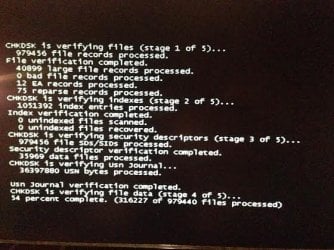
see below. It's going, but slow... Since this 1.5tb drive only has 15 gb of free spacer, stage 4 will take forever and stage 5 will be quicker.

"Stage 4 checks the parts of your disk being used by files, stage 5 checks the part unused. So if you have a mostly empty hard drive, stage 4 will be quick and stage 5 will be long. If your hard drive is mostly full, it'll be opposite.
You usually get a percentage if you are checking while Windows is fully booted. If it is checking on startup (also called autochk) then you will get no percentages. "

I do have percentage though :) I don't know how to interpret what it's done do far, just that 300,000 files takes, 7 hours, and it's got a total of 979,000, so I'm guessing stage 4 will be done in 14 hours aprox......
 

Attachments

  • chkdsk.jpg
    chkdsk.jpg
    37.5 KB · Views: 18

My Computer My Computer

At a glance

windows 7 64 bitAMD Athalon II 645 Quad Core14 gig (upgraded from 6 gig)on board/integrated ati radeon HD 4200
Computer type
PC/Desktop
Computer Manufacturer/Model Number
HP Pavillion p6837c
OS
windows 7 64 bit
CPU
AMD Athalon II 645 Quad Core
Memory
14 gig (upgraded from 6 gig)
Graphics Card(s)
on board/integrated ati radeon HD 4200
Monitor(s) Displays
Samsung 245bw
Hard Drives
1.5 tb wd
Internet Speed
100mb down
Antivirus
Windows Secuity Essentials, Windows defender, Malwarebytes
Browser
IE & firefox
It isn't finding problems yet., I'd at least complete your file data. But when that has problems it usually also shows up in the directories done earlier.

I wouldn't quit it. If it stalls that is not a good sign and would be cause to test the HD. Otherwise you can probably just check the SMART data in BIOS setup or once you get into OS by installing CrystalDiskInfo - Software unless there are any other indicators that HD is bad.

The concensus seems to be that you're seriously infected. You can work with these experts to clean it up or follow Clean Reinstall - Factory OEM Windows 7 which will assure you get and keep a perfect install as long as you stick only with the tools and methods given.
 
ok, so... I walked away from the pc and came back to a black screen with a mouse pointer on it. The scan must have finished or stopped, I don't know. All I know it was at 55% at 12 hours in. The log file for the scan, cbs, has the same date on it as the one posted earlier in this thread, so not sure what happened. All I did since this was reboot and tried start-up repair option, and it said no problems found within about 10 sec, but still goes to black screen with pointer :(

Now I'm left with what I had before, a black screen with mouse pointer... doing the rouge killer scan as cotton suggested on the last page... Will post log in a few min....
 

My Computer My Computer

At a glance

windows 7 64 bitAMD Athalon II 645 Quad Core14 gig (upgraded from 6 gig)on board/integrated ati radeon HD 4200
Computer type
PC/Desktop
Computer Manufacturer/Model Number
HP Pavillion p6837c
OS
windows 7 64 bit
CPU
AMD Athalon II 645 Quad Core
Memory
14 gig (upgraded from 6 gig)
Graphics Card(s)
on board/integrated ati radeon HD 4200
Monitor(s) Displays
Samsung 245bw
Hard Drives
1.5 tb wd
Internet Speed
100mb down
Antivirus
Windows Secuity Essentials, Windows defender, Malwarebytes
Browser
IE & firefox
When done with Kaktussoft's instructions, let's try to run RogueKiller, just like you did FRST64.

:info: Please plug in a USB pen drive into a working computer.
Go to the RogueKilller download:

Please do not take action to remove anything!!!!!

Here is log for the above...
 

Attachments

My Computer My Computer

At a glance

windows 7 64 bitAMD Athalon II 645 Quad Core14 gig (upgraded from 6 gig)on board/integrated ati radeon HD 4200
Computer type
PC/Desktop
Computer Manufacturer/Model Number
HP Pavillion p6837c
OS
windows 7 64 bit
CPU
AMD Athalon II 645 Quad Core
Memory
14 gig (upgraded from 6 gig)
Graphics Card(s)
on board/integrated ati radeon HD 4200
Monitor(s) Displays
Samsung 245bw
Hard Drives
1.5 tb wd
Internet Speed
100mb down
Antivirus
Windows Secuity Essentials, Windows defender, Malwarebytes
Browser
IE & firefox
The next step is to confirm the HD's status using the maker's HD Diagnostic extended CD scan, to know with certainty whether it needs replacement.

Doing that now for the western digital drive.

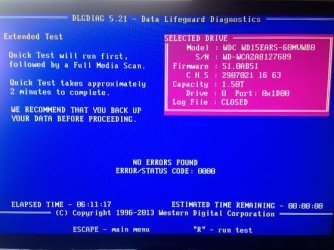
QUICK TEST - This option tests your drive quickly for any major physical problems. This completed fine, no errors.

EXTENDED TEST - This option checks your drive thoroughly and it can repair any correctable errors. This has 4 hours to go....
 

My Computer My Computer

At a glance

windows 7 64 bitAMD Athalon II 645 Quad Core14 gig (upgraded from 6 gig)on board/integrated ati radeon HD 4200
Computer type
PC/Desktop
Computer Manufacturer/Model Number
HP Pavillion p6837c
OS
windows 7 64 bit
CPU
AMD Athalon II 645 Quad Core
Memory
14 gig (upgraded from 6 gig)
Graphics Card(s)
on board/integrated ati radeon HD 4200
Monitor(s) Displays
Samsung 245bw
Hard Drives
1.5 tb wd
Internet Speed
100mb down
Antivirus
Windows Secuity Essentials, Windows defender, Malwarebytes
Browser
IE & firefox

My Computer My Computer

At a glance

Microsoft Windows 7 Home Premium 64-bits 7601...Intel(R) Core(TM) i3 CPU M 370 @ 2.40GHz4,00 GBATI Mobility Radeon HD 5400 Series
Computer type
Laptop
Computer Manufacturer/Model Number
ACER ASPIRE 5742G
OS
Microsoft Windows 7 Home Premium 64-bits 7601 Multiprocessor Free Service Pack 1
CPU
Intel(R) Core(TM) i3 CPU M 370 @ 2.40GHz
Motherboard
Acer Aspire 5742G
Memory
4,00 GB
Graphics Card(s)
ATI Mobility Radeon HD 5400 Series
Sound Card
(1) AMD High Definition Audio Device (2) Realtek High Defi
Screen Resolution
1366 x 768 x 32 bits (4294967296 colors) @ 60 Hz
Hard Drives
WDC WD5000BEVT-22ZAT0
When booting normally... do you see the logon screen?
Did you normally see the logon screen, or do you have only 1 user account?
When seeing the mouse pointer on black background: Press CTRL-ALT-DEL... what happens?
 

My Computer My Computer

At a glance

Microsoft Windows 7 Home Premium 64-bits 7601...Intel(R) Core(TM) i3 CPU M 370 @ 2.40GHz4,00 GBATI Mobility Radeon HD 5400 Series
Computer type
Laptop
Computer Manufacturer/Model Number
ACER ASPIRE 5742G
OS
Microsoft Windows 7 Home Premium 64-bits 7601 Multiprocessor Free Service Pack 1
CPU
Intel(R) Core(TM) i3 CPU M 370 @ 2.40GHz
Motherboard
Acer Aspire 5742G
Memory
4,00 GB
Graphics Card(s)
ATI Mobility Radeon HD 5400 Series
Sound Card
(1) AMD High Definition Audio Device (2) Realtek High Defi
Screen Resolution
1366 x 768 x 32 bits (4294967296 colors) @ 60 Hz
Hard Drives
WDC WD5000BEVT-22ZAT0
When you get done with Kactussoft and gregrocker, please do the following:

RogueKiller did not identify malware, so let's press on with FRST64, and run another fix.

Please open notepad (Start > All Programs > Accessories > Notepad)
Copy the entire contents of the code box below (Do not copy the word 'code') to Notepad.
Save it to the pen drive where FRST64 is located, and name it: fixlist.txt

Code:
start
S2 WindowsSVC; C:\Windows\SysWOW64\winthemes.dll [151552 2014-04-11] ()
2014-04-11 06:40 - 2014-04-11 06:40 - 00151552 _____ () C:\Windows\SysWOW64\winthemes.dll
2014-04-11 06:40 - 2014-04-11 06:40 - 00062464 _____ () C:\Windows\SysWOW64\common2.dat
2014-04-11 06:40 - 2014-04-11 06:40 - 00062464 _____ () C:\Windows\SysWOW64\common1.dat
DisableService: MsMpSvc
DisableService: NisSrv
DisableService: MpFilter
DisableService: NisDrv
DisableService: MpNWMon
HKLM\...\Run: [MSC] => c:\Program Files\Microsoft Security Client\msseces.exe [1271072 2014-03-11] (Microsoft Corporation)
end

NOTICE: This script is written specifically for this computer!!!
Running this on another computer may cause damage to the Operating System.


Now, with the pen drive( containing FRST64 and fixlist) connected, restart the computer, and once again enter System Recovery Options and select: Command Prompt

Get to FRST, as you did before, and press the Fix button, just once, and wait.


When done, the tool creates a report on the pen drive called: Fixlog.txt


Please post the Fixlog.txt in your reply.


Let us know if the computer boots to Windows.
 

My Computer My Computer

At a glance

Windows 7 Home Premium
Computer type
PC/Desktop
Computer Manufacturer/Model Number
An ol' eMachines
OS
Windows 7 Home Premium
Internet Speed
Fine for me...I'm retired!
What is the windows system didk drive letter in windows7 recovery environment? It isn't necessary C!

Code:
dir c:\users
dir d:\users

Do you see your username? Then you know the correct drive letter. Assuming it's C:
Code:
sfc /scannow /offbootdir=c:\ /offwindir=c:\windows

http://www.sevenforums.com/tutorials/139810-sfc-scannow-run-command-prompt-boot.html

Post results

My user account is on D:

I did the command and it says: "Beginning system scan. This process will take some time. About 10 seconds later it said: There is a system repair pending which requires reboot to complete. Restat windows and run SFC again.

This isn't going to try tand run chkdsk again for 17 hours is it? Now what? I found this article, but want to be sure I do the correct thing...

http://www.sevenforums.com/performa...cannow-there-system-repair-pending-requi.html

When booting normally... do you see the logon screen?
Did you normally see the logon screen, or do you have only 1 user account?
When seeing the mouse pointer on black background: Press CTRL-ALT-DEL... what happens?

No, when rebooting, you see the windows logo and flag, then a few seconds after that, it goes to black screen with pointer. You cannot hit ctrl alt delete, it does nothing, I've tried that on every reboot. Normally, when the system worked, there were two accounts, mine and a guest account....
 

Attachments

  • sfc.jpg
    sfc.jpg
    19.6 KB · Views: 1

My Computer My Computer

At a glance

windows 7 64 bitAMD Athalon II 645 Quad Core14 gig (upgraded from 6 gig)on board/integrated ati radeon HD 4200
Computer type
PC/Desktop
Computer Manufacturer/Model Number
HP Pavillion p6837c
OS
windows 7 64 bit
CPU
AMD Athalon II 645 Quad Core
Memory
14 gig (upgraded from 6 gig)
Graphics Card(s)
on board/integrated ati radeon HD 4200
Monitor(s) Displays
Samsung 245bw
Hard Drives
1.5 tb wd
Internet Speed
100mb down
Antivirus
Windows Secuity Essentials, Windows defender, Malwarebytes
Browser
IE & firefox
Also, the extended test for the WD harddrive that gregrocker had me run ...took 6 hours and finished with 0 errors.
 

Attachments

  • hd_extended_test_results.jpg
    hd_extended_test_results.jpg
    39.2 KB · Views: 12

My Computer My Computer

At a glance

windows 7 64 bitAMD Athalon II 645 Quad Core14 gig (upgraded from 6 gig)on board/integrated ati radeon HD 4200
Computer type
PC/Desktop
Computer Manufacturer/Model Number
HP Pavillion p6837c
OS
windows 7 64 bit
CPU
AMD Athalon II 645 Quad Core
Memory
14 gig (upgraded from 6 gig)
Graphics Card(s)
on board/integrated ati radeon HD 4200
Monitor(s) Displays
Samsung 245bw
Hard Drives
1.5 tb wd
Internet Speed
100mb down
Antivirus
Windows Secuity Essentials, Windows defender, Malwarebytes
Browser
IE & firefox
So you did:
sfc /scannow /offbootdir=D:\ /offwindir=D:\windows
???

Code:
DIR  C:\windows\system32\config\regback
Which date/time are those files?

When did non-boot problems begin?
 

My Computer My Computer

At a glance

Microsoft Windows 7 Home Premium 64-bits 7601...Intel(R) Core(TM) i3 CPU M 370 @ 2.40GHz4,00 GBATI Mobility Radeon HD 5400 Series
Computer type
Laptop
Computer Manufacturer/Model Number
ACER ASPIRE 5742G
OS
Microsoft Windows 7 Home Premium 64-bits 7601 Multiprocessor Free Service Pack 1
CPU
Intel(R) Core(TM) i3 CPU M 370 @ 2.40GHz
Motherboard
Acer Aspire 5742G
Memory
4,00 GB
Graphics Card(s)
ATI Mobility Radeon HD 5400 Series
Sound Card
(1) AMD High Definition Audio Device (2) Realtek High Defi
Screen Resolution
1366 x 768 x 32 bits (4294967296 colors) @ 60 Hz
Hard Drives
WDC WD5000BEVT-22ZAT0
Can you revert back to this state? #1
The system was booting then. Did you make a backup when system was fine? Did you make backup before advanced troubleshooting/cleaning?
 

My Computer My Computer

At a glance

Microsoft Windows 7 Home Premium 64-bits 7601...Intel(R) Core(TM) i3 CPU M 370 @ 2.40GHz4,00 GBATI Mobility Radeon HD 5400 Series
Computer type
Laptop
Computer Manufacturer/Model Number
ACER ASPIRE 5742G
OS
Microsoft Windows 7 Home Premium 64-bits 7601 Multiprocessor Free Service Pack 1
CPU
Intel(R) Core(TM) i3 CPU M 370 @ 2.40GHz
Motherboard
Acer Aspire 5742G
Memory
4,00 GB
Graphics Card(s)
ATI Mobility Radeon HD 5400 Series
Sound Card
(1) AMD High Definition Audio Device (2) Realtek High Defi
Screen Resolution
1366 x 768 x 32 bits (4294967296 colors) @ 60 Hz
Hard Drives
WDC WD5000BEVT-22ZAT0
So you did:
sfc /scannow /offbootdir=D:\ /offwindir=D:\windows
???

Code:
DIR  C:\windows\system32\config\regback
Which date/time are those files?

When did non-boot problems begin?

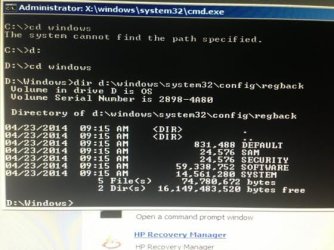
Correct on the above command. I added a screen shot to my last post ^

I had to put in DIR D:\windows\system32\config\regback instead of C: (it lists windows under D in this command area)

The dates are 4/23/14 for the 5 files in config/regback. The problems started on the 4/28 around 6pm. I think I replaced these before with regback, and that's when it tried to do that chksdk for 17 hours... If we do again, I want to make sure that scan doesn't happen again.:)

Also, FRST made a folder on my machine that has saved hives in it, before this issue started too.
 

Attachments

  • regback.jpg
    regback.jpg
    37.3 KB · Views: 12

My Computer My Computer

At a glance

windows 7 64 bitAMD Athalon II 645 Quad Core14 gig (upgraded from 6 gig)on board/integrated ati radeon HD 4200
Computer type
PC/Desktop
Computer Manufacturer/Model Number
HP Pavillion p6837c
OS
windows 7 64 bit
CPU
AMD Athalon II 645 Quad Core
Memory
14 gig (upgraded from 6 gig)
Graphics Card(s)
on board/integrated ati radeon HD 4200
Monitor(s) Displays
Samsung 245bw
Hard Drives
1.5 tb wd
Internet Speed
100mb down
Antivirus
Windows Secuity Essentials, Windows defender, Malwarebytes
Browser
IE & firefox
Can you revert back to this state? #1
The system was booting then. Did you make a backup when system was fine? Did you make backup before advanced troubleshooting/cleaning?

That's the problem, I had 3 restore points at that time, even labeled one of them, and now it shows none when I try to do a restore...

The sfc scannow wouldn't work, scroll up to see what it said. I put a screen shot.
 

My Computer My Computer

At a glance

windows 7 64 bitAMD Athalon II 645 Quad Core14 gig (upgraded from 6 gig)on board/integrated ati radeon HD 4200
Computer type
PC/Desktop
Computer Manufacturer/Model Number
HP Pavillion p6837c
OS
windows 7 64 bit
CPU
AMD Athalon II 645 Quad Core
Memory
14 gig (upgraded from 6 gig)
Graphics Card(s)
on board/integrated ati radeon HD 4200
Monitor(s) Displays
Samsung 245bw
Hard Drives
1.5 tb wd
Internet Speed
100mb down
Antivirus
Windows Secuity Essentials, Windows defender, Malwarebytes
Browser
IE & firefox
Code:
D:
cd  \windows\system32\config\regback
copy/y *.*  ..

So "space 2 dots" at end. It's for copying one level up.
then do:
Code:
sfc /scannow /offbootdir=d:\ /offwindir=d:\windows

Post results. You can cancel the chkdsk on normal boot by pressing space bar I think. It's on your screen how to do it.
 

My Computer My Computer

At a glance

Microsoft Windows 7 Home Premium 64-bits 7601...Intel(R) Core(TM) i3 CPU M 370 @ 2.40GHz4,00 GBATI Mobility Radeon HD 5400 Series
Computer type
Laptop
Computer Manufacturer/Model Number
ACER ASPIRE 5742G
OS
Microsoft Windows 7 Home Premium 64-bits 7601 Multiprocessor Free Service Pack 1
CPU
Intel(R) Core(TM) i3 CPU M 370 @ 2.40GHz
Motherboard
Acer Aspire 5742G
Memory
4,00 GB
Graphics Card(s)
ATI Mobility Radeon HD 5400 Series
Sound Card
(1) AMD High Definition Audio Device (2) Realtek High Defi
Screen Resolution
1366 x 768 x 32 bits (4294967296 colors) @ 60 Hz
Hard Drives
WDC WD5000BEVT-22ZAT0
After doing to copy *.* .. it says Overwrite... \default, yes, no or all. Yes?
 

My Computer My Computer

At a glance

windows 7 64 bitAMD Athalon II 645 Quad Core14 gig (upgraded from 6 gig)on board/integrated ati radeon HD 4200
Computer type
PC/Desktop
Computer Manufacturer/Model Number
HP Pavillion p6837c
OS
windows 7 64 bit
CPU
AMD Athalon II 645 Quad Core
Memory
14 gig (upgraded from 6 gig)
Graphics Card(s)
on board/integrated ati radeon HD 4200
Monitor(s) Displays
Samsung 245bw
Hard Drives
1.5 tb wd
Internet Speed
100mb down
Antivirus
Windows Secuity Essentials, Windows defender, Malwarebytes
Browser
IE & firefox
Code:
dism /image:D:\ /get-packages |more
What has been installed last few days? Which one are pending?
 

My Computer My Computer

At a glance

Microsoft Windows 7 Home Premium 64-bits 7601...Intel(R) Core(TM) i3 CPU M 370 @ 2.40GHz4,00 GBATI Mobility Radeon HD 5400 Series
Computer type
Laptop
Computer Manufacturer/Model Number
ACER ASPIRE 5742G
OS
Microsoft Windows 7 Home Premium 64-bits 7601 Multiprocessor Free Service Pack 1
CPU
Intel(R) Core(TM) i3 CPU M 370 @ 2.40GHz
Motherboard
Acer Aspire 5742G
Memory
4,00 GB
Graphics Card(s)
ATI Mobility Radeon HD 5400 Series
Sound Card
(1) AMD High Definition Audio Device (2) Realtek High Defi
Screen Resolution
1366 x 768 x 32 bits (4294967296 colors) @ 60 Hz
Hard Drives
WDC WD5000BEVT-22ZAT0
Status
Not open for further replies.
Back
Top